Posts with «featured» label

Add biometric security to your next Arduino project
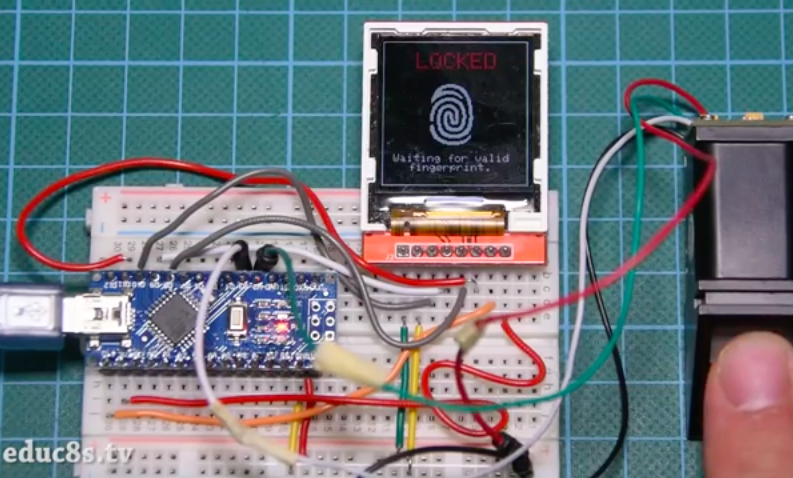
If you’ve ever wanted to add biometric security features to your Arduino project, you’re in luck. That’s because Nick Koumaris of educ8s.tv has put together a quick tutorial on how to integrate a fingerprint sensor module with an Arduino Nano and a 1.44” color TFT display.

The fingerprint sensor module is small, nicely built, and it uses some advanced DSP (Digital Signal Processing) chips inside. The sensor works like this. It is an optical sensor, which means it analyzes the photo of a finger. It then renders the image, makes some calculations, finds the features of that finger and then searches in its memory for a fingerprint with the same characteristics. It can achieve all that in less than a second! This module can store up to 1,000 fingerprints in its memory and its false acceptance rate is less than 0.001% which makes it pretty secure!

As you can see in the video below, the project requires a valid fingerprint in order to unlock. If it recognizes the user, which in this case is Koumaris or his girlfriend, the fingerprint icon on the display turns green along with a kind greeting, e.g. “Welcome, Nick!”
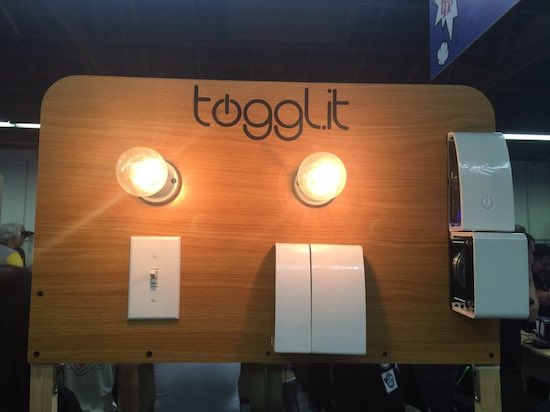
Togglit is a DIY automation kit for your home

A few years ago, Integreight set out to turn your smartphone into more than 40 different Arduino shields. Now, the creators of the 1Sheeld have launched an open-source, fully-customizable home automation kit that will enable you to control your door locks, light switches and power strips using that very same mobile device.

“Togglit” can be assembled without any programming, wires, or hassle — only a screwdriver. For its debut at Maker Faire Bay Area, the connected interface was based on an Arduino Uno and 1Sheeld; however, the startup’s founder Amr Saleh notes that it can run on virtually any hardware platform, ranging from Raspberry Pi to other Wi-Fi products.

At the moment, Togglit is compatible with typical toggle light switches, standard deadbolts, as well as American and European power outlets. Ready to make your house smarter? The DIY kit is currently available for pre-order.

Get the party started with these coke bottle lights

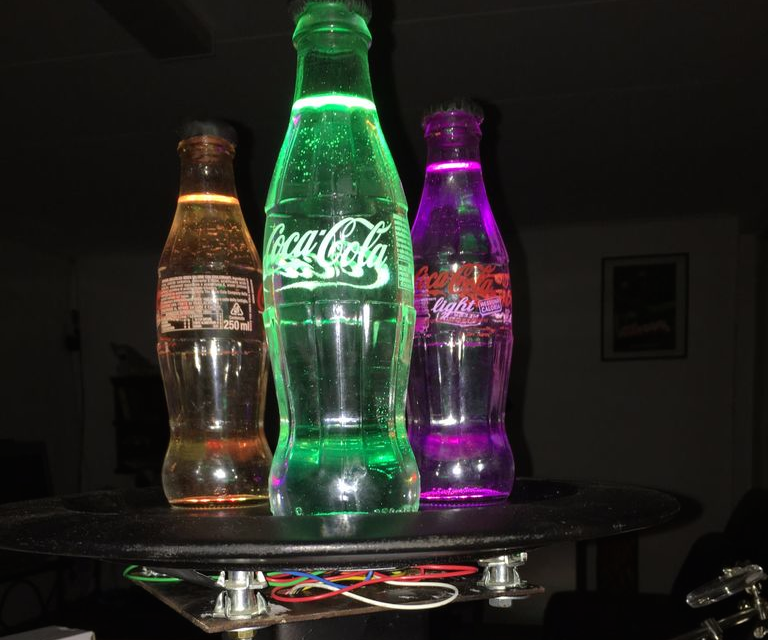
With school just about out for the summer, Brian Fitzgerald’s son was throwing a party to celebrate the end of exam week. Like any cool Maker dad would, he decided to build awesome lights made out of a few old soda bottles, the “gooey innards” of glow sticks, and some other supplies he had lying around the basement.

Fitzgerald used a wooden plate for the base and a playground post bracket for the mount, along with an Arduino Leonardo (though any Arduino would do) and three NeoPixel rings for the colorful effects.

Fill the Coke bottles with water. Alternatively, you can add a drop of milk to get a cloudy effect — it makes the liquid translucent and gives the impression of solid light, but you loose the little bubble and scratch effects that clear water highlights, which we thought was cooler. We put a black Sugru cap on the bottles to avoid a drunken accident involving water and electronics. And filled the countersunk bolt holes with Sugru to hide the bolt heads as well.

I attached the plastic Arduino casing with double-sided velcro to the base unit for easy removal. It’d look nicer if I’d put the whole unit inside the base, but as we’re planning to pull the board out and modify for music sensitivity, I opted for convenience over beauty. If anybody has any cool Arduino code that gets an Adafruit auto-gain mic and NeoPixels jamming via FFT, I’d love to see it. There are some great color organ projects out there, but I can’t seem to find this particular combo. So we may have to write it ourselves!

Plug the 9v wall wart into the Arduino and BOOM. You got yourself a classic party light that’s mesmerizing to look at, throws patterns on the ceiling that look like Hubble images of distant nebulae, a fine conversation piece, and a bunch of cast off junk transformed into a thing of beauty.

Intrigued? You can check out the entire project on Instructables, as well as see it in action below.


Maker installs an Android tablet in his car’s dashboard

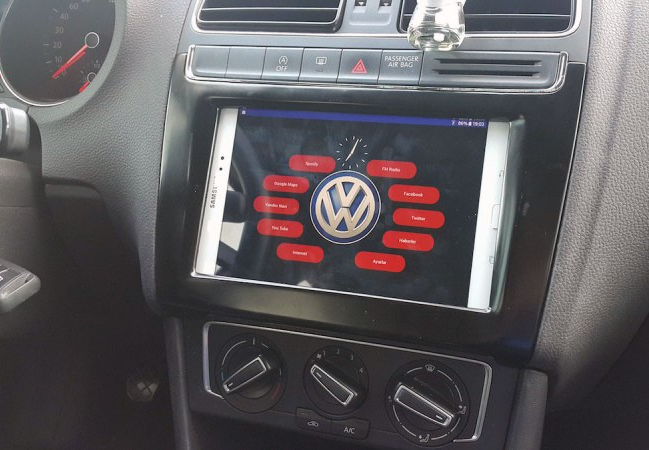
Unlike many cars today, Aykut Celik’s 2014 Volkswagen Polo didn’t have Bluetooth connectivity or an elaborate touchscreen navigation system. So, the Maker decided to take matters into his own hands and swapped out his “useless” radio for a Samsung tablet, putting Google Maps, Spotify and other apps right in his vehicle’s dashboard.

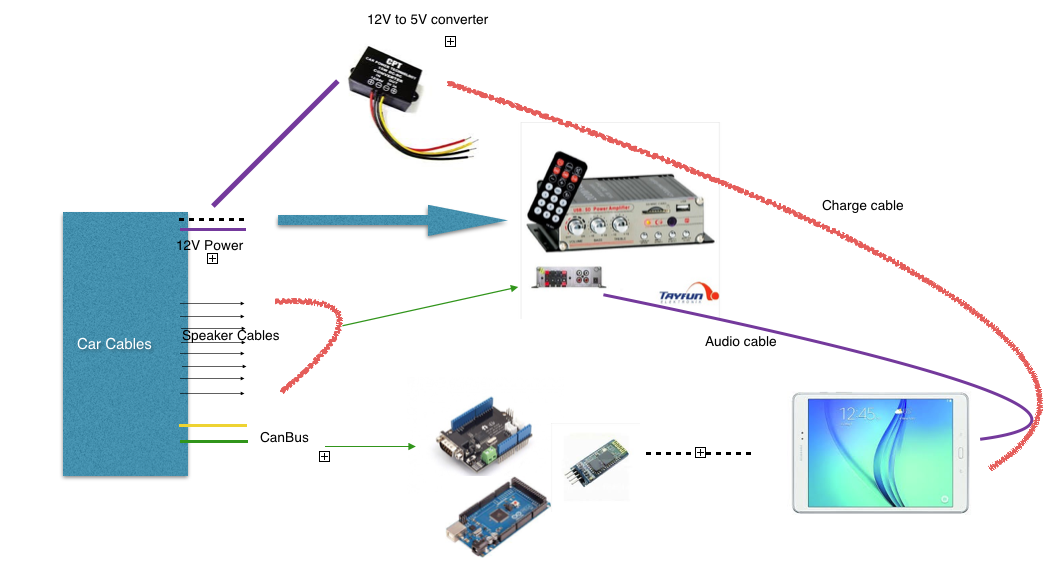
In order to accomplish this, Celik needed an amplifier (to replace the one attached to the prior radio), a CAN bus shield from Seeed (so he could use the steering wheel’s volume buttons), a Bluetooth module, and an Arduino Mega 2560 (for parsing data and sending it over to the Android device).

A CAN-BUS shield is necessary to be able to read CAN-BUS commands from the CAN bus line… I used this shield for detecting wheel button commands like volume up, mute and volume down. Behind the car radio there are two CAN bus cables. One of them is CAN bus – HIGH and the other is CAN bus – LOW. These cables must be connected to green sockets on the shield.

Using the SeeedCAN bus shield, you can sniff you car’s CAN bus data.

The info which is gathered from CAN bus is transferred to the Android tablet via Bluetooth. There is a little app which is responsible, for example, reducing volume whenever the wheel volume button is clicked. And a menu activity to open other apps.

You can watch the elaborate project below, and read more about it on Celik’s blog. The Maker has also made the software and other information available on GitHub.

Pong Project is a tabletop version of the classic game

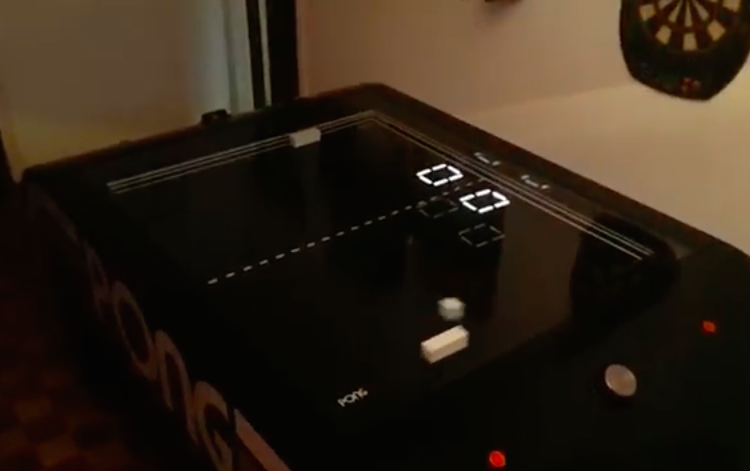
Released in 1972, Pong was one of the earliest arcade video games to hit the scene and has since claimed its place in pop culture history. Whereas the Atari classic took the sport of tennis and brought it into the virtual world, a team of Makers led by Daniel Perdomo are taking it back to into the real world with an air hockey-like tabletop version.

As you can see in the video below, the “Pong Project” uses knobs similar to familiar arcade controls to move the paddles, which just like in the original, change the ball’s trajectory as it makes its way over to the opponent. The only difference is that it’s happening on a table instead of a screen. From the looks of it, there may even be a single-player mode with the other paddle seemingly moving all by itself.

To pay homage to the game, its creators gave the Pong Project some ‘70s flair with the iconic logo and play area, as well as neon lights along the sides that illuminate whenever the ball bounces off. Score is kept on seven-segment displays, while it would appear that at least a pair of Arduino boards are helping to drive the system. The team is currently seeking a hardware incubator and other Makers who may be interested in turning this into a final product. You can follow along with the project’s progress on Facebook.

Arduino Blog 27 May 16:34

Arduino MetroPhones will help keep you and your bag safe

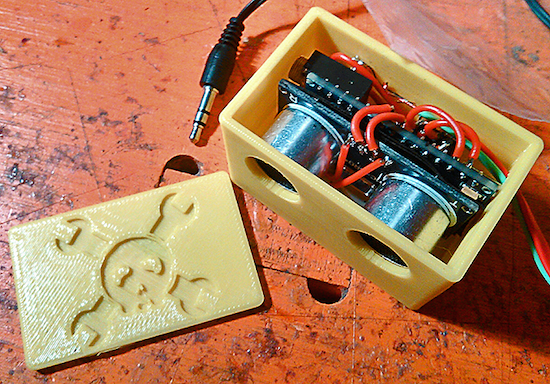
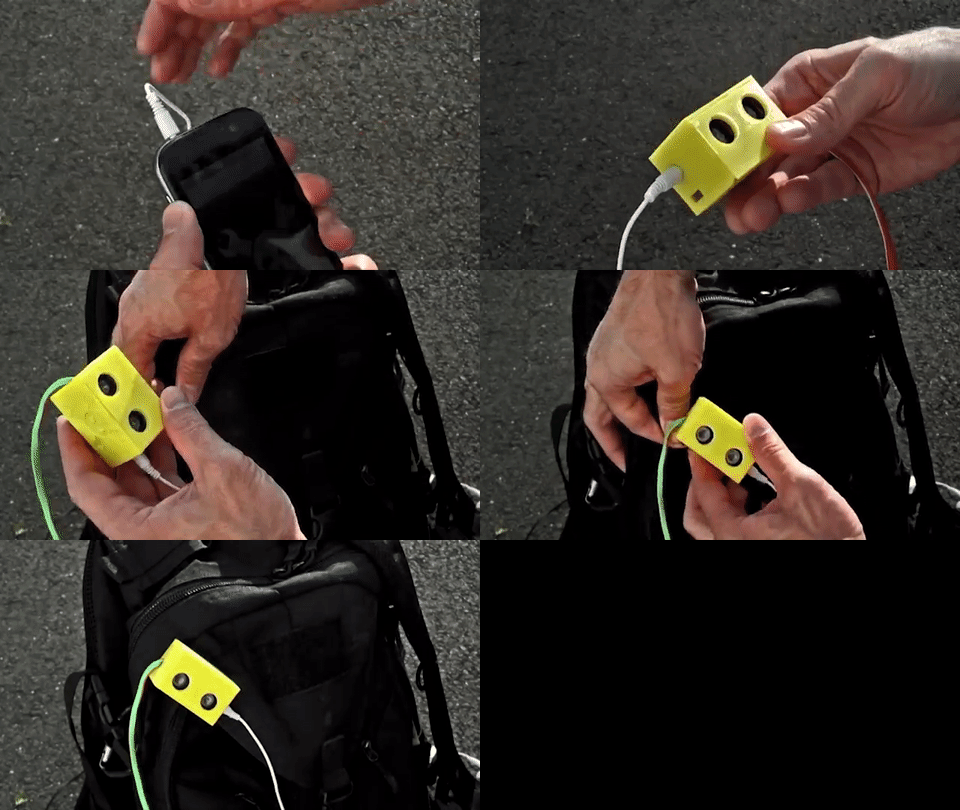
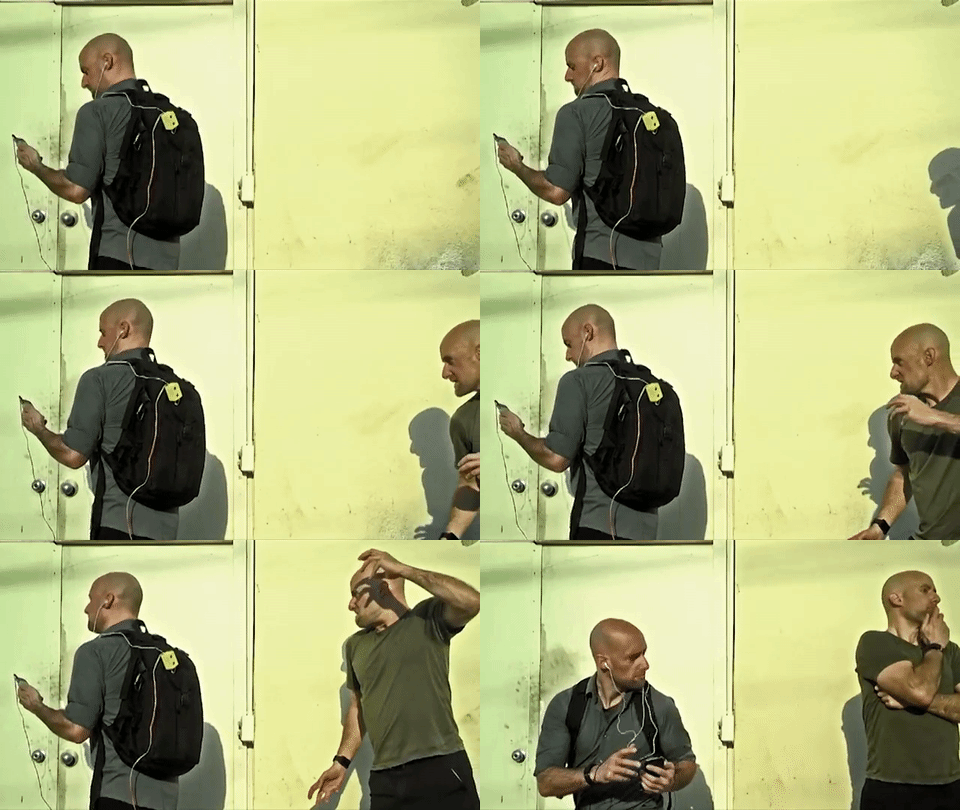
Walking the streets of a highly-populated city, or even a crowded event for that matter, comes with certain risks like pickpocketing. Mindful of this, Maker TVMiller has come up with a clever system to prevent bag thieves from unknowingly creeping up behind you. Called the “Arduino MetroPhones,” the device consists of a Nano, an ultrasonic sensor, a digital potentiometer, a coin-cell battery, and a few other components, all housed inside a 3D-printed case.

The metropolitan in its natural habitat; unaware, oblivious, purposefully deafened and subsequent prey. To increase perception thus safety, we wed an Arduino Nano and ultrasonic sensor to regulate volume to proximity to someone behind you; easily deactivated per environment and rechargeable. Beyond this proof of concept, intention for apparel or accessory (purse, back pack) embedding is ideal.

This prototype of a prototype is a mono-version. A stereo version would merely require dual channels. Thus, imagine, you plug your head phones in to your purse strap which is embedded with a MetroPhone with Bluetooth that streams to your smartphone..

And the last winner of our Instagram giveaway is…

Congratulations to Geoff Seawright for the following photo showing a cute dog getting angry with four-legged Arduino spider. He’s the last winner of our MKR1000 giveaway, which kicked off back on Arduino Day! Thanks to all the participants sharing their pics and mentioning our new official Arduino Instagram account!

Dog getting angry with 4-legged arduino spider…possibly it will replace him #arduinoD16 @Arduino.cc

A photo posted by Geoff Seawright (@geoffseawright) on


Cloud lamp/speaker combo brings thunder into your living room

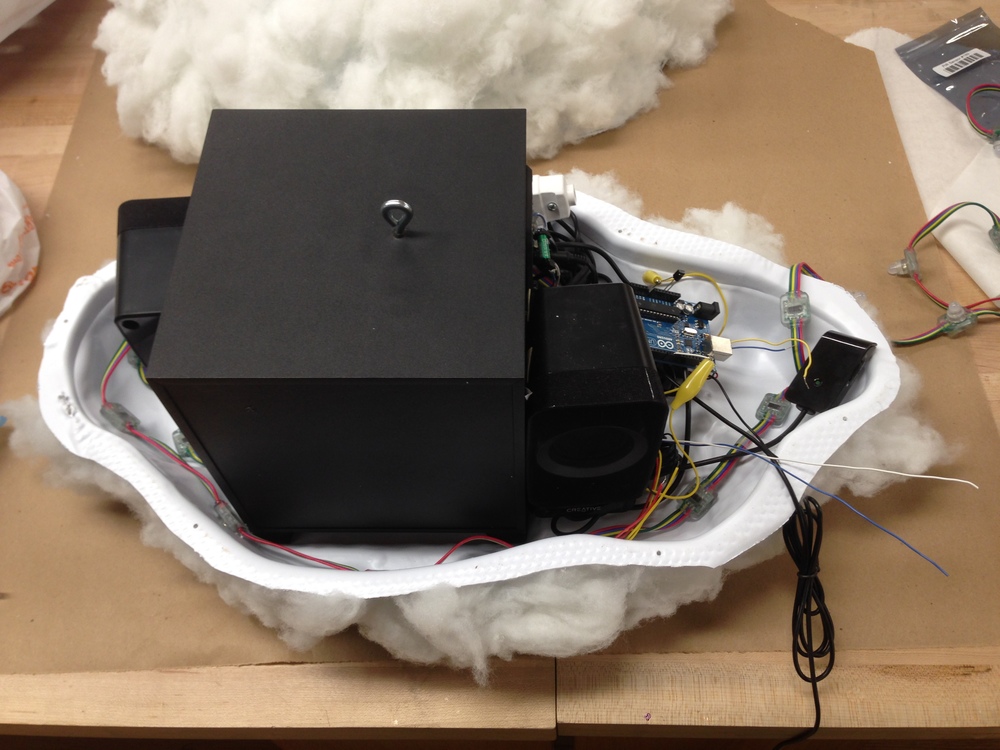
“The Cloud” is an interactive lamp and speaker designed to mimic a thunderstorm in terms of appearance and entertainment. Created by Richard Clarkson, it not only provides users with an Arduino-powered, motion-triggered lightning and thunder performance, but serves as a music-activated visualizing speaker as well.

The Cloud employs embedded motion sensors to create unique lightning and thunder shows while providing entertainment value and inspiring awe. This is a kind of magic, not based on illusions and trickery, but on sensors and code. Featuring a powerful speaker system, The Cloud allows its beholder to stream music via any Bluetooth-compatible device and can adapt to any desired lighting, color and brightness.


The hybrid installation is suspended from the ceiling, and consists of hypoallergenic polyester fiberfill with a sponge casing that holds the Arduino, lights, sensors, speakers and other components. Users can control the Cloud through a small, wireless remote.

Clarkson tells The Creators Project:

“Acting as both an immersive lighting experience and a speaker with visual feedback, this hybrid lamp/speaker introduces a new discourse for what a light fixture could be. Advances in physical computing and interaction design hardware over recent years have created a new breed of smart-objects, which are gaining more and more traction in the design world. These smart-objects have the potential to be far more interactive and immersive than ever before.”

Seem awfully familiar? If it does, that’s because development of the project dates back 2012. Whereas the original model had subtle reactive light and sound elements, the latest iteration boasts a more robust design with a larger speaker system. And what’s even cooler is that multiple units are able to communicate with each other, creating a connected network of clouds right in your living room, office or wherever else it’s hanging.

You can check out Clarkson’s page to learn more about the Cloud, or even purchase your own for a few thousand dollars. You’ll also find cheaper versions with less functionality on the site, too.

(Photos: Richard Clarkson)

Wear a connected hoodie that displays tweets and text

Let’s face it, developers and programmers love their hoodies. That’s why last fall, a few members of the FirstBuild team built a connected sweatshirt capable of displaying text and tweets with a specific hashtag.

The hoodie is equipped with a Blend Micro board and a 16 x 32 LED matrix panel with a plastic overlay that’s sewn into a cutout on the front of the shirt. The system connects with a smartphone over Bluetooth to reveal the message, though in the future its creators hope to add animated GIFs.

Power is supplied through a USB battery placed inside a wearer’s pants or the hoodie’s pocket, in which case a USB cable can simply run from the Blend Micro. Ready to turn some heads as you walk down the street? You can check out FirstBuild’s entire project step-by-step here.

Arduino Nano-based robot pats your dog and gives it treats

As fun as petting your dog can be, sometimes you’re just too busy to give it the attention it deserves — especially if he or she is needy. Luckily, there is now an automated mechanism that’ll give Fido a nice pat and reward him with a treat at the press of an arcade button. But that’s not all. Engineer James Cochrane’s “IOT Robot People/Pet Affectionator” allows your pup to reciprocate their appreciation, too.

The robot itself consists of an Arduino Nano, two H-Bridge motor drivers, two geared Pittman motors, and two geared hobby motors. The Kibbles ‘n Bits are delivered using a wooden spoon, while a button on the pup’s side enables them give their owner a nice rub of the head and a snack with a fork as well.

Arduino Blog 25 May 18:01
arduino  featured  nano  robots