Posts with «arduino» label

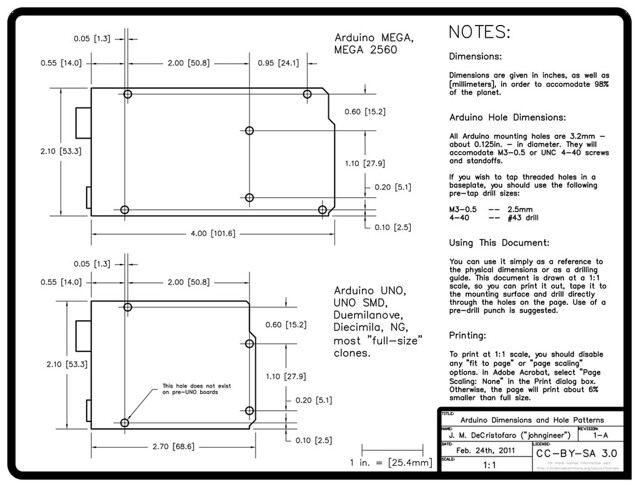
Arduino Hole Dimensions Drawing

Arduinos are great, but if you’ve ever tried to mount one on a baseplate or inside an enclosure, you know it can be a pain. While there are some great enclosures specifically designed for an Arduino, if you just have a regular box that you want to use, you have to measure and mark out the holes yourself. If all you have is a ruler and a pencil, this isn’t the easiest thing to do.

In the process of working on a robot project, I needed to draw up an Arduino hole pattern and outline in CAD as part of the design. I figured others could use a similar drawing — after some polishing up, I had this Arduino hole dimension drawing (PDF).

You can use it as a reference to the dimensions or as a drilling guide. It is drawn at a scale of 1:1, so you can print it out, lay the drawing down on your mounting surface, and use a pre-drill punch directly on the paper. I’d recommend you use the punch rather than just drilling through the paper, to avoid a “walking” drill bit. If you don’t have a proper punch, you can just use a sharpened nail (we’re not fancy here).

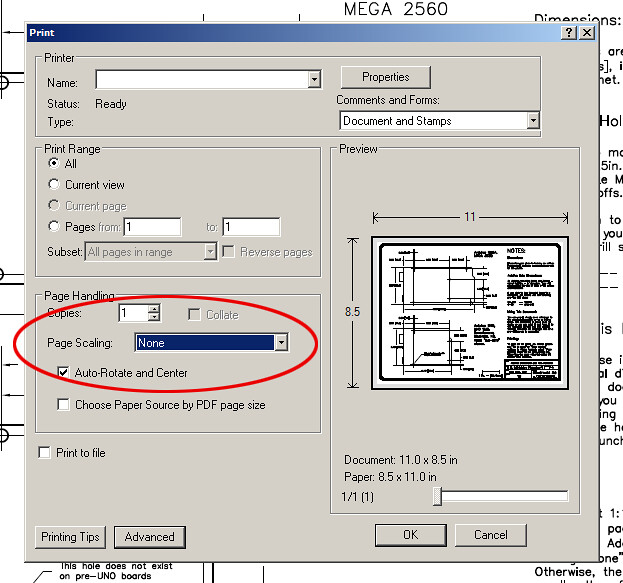
In order to get it to print 1:1, you have to turn off print scaling in Adobe Acrobat. Somewhere in the Acrobat print dialog there’s going to be a “Page Scaling” option. Set it to “None”. There’s a 1-inch scale mark next to the title block in case you want to verify that it worked.

The drawing has dimensions for both the regular Arduino and the Arduino MEGA, and the hole pattern is good for all Arduinos going back to the NG (though the diameter of the holes might be different). The new UNO boards added a fourth mounting hole, which is indicated. It should also work with most “full-size” Arduino clones, such as the EMSL Diavolino and the Seeed Studios Seeeduino, as well as the Netduino boards.

This post is cross-posted from the Adafruit Blog. Big thanks to Adafruit for hosting the PDF.

Communicate with Arduino using python

Os: linux, windows (not tested), mac osx (not tested)
Difficulty: medium
Knowledge you need: a little bit of python programming (ver 2.x) and Arduino

Let’s see how easy it is to communicate with an Arduino 2009 board and the  pySerial python’s module. What we will do is to use python to send characters serially to an Arduino 2009 which will send them back. Obviously, everything has a demonstration purposes only, since the code proposed here has no specific function but you can easily modify it to get something usable for your projects. What you describe has been tested on Ubuntu 10.04 but should work on other distributions as on various Windows and Mac OSX. If you have problems let me know!

1 Install pySerial

[Linux] Use your favorite packet manager to install python-serial or from command line type the famous command (on Ubuntu &co.):

sudo apt-get install python-serial

Type administration password and you are done!
[Windows] Download ed install pySerial (the file should be pyserial-2.5.win32.exe)

2 Download  test software

Program Arduino with this sketch Serial echo test program (403) and download the  python code Python to Arduino test program (385). Open it with a text editor and see if at line 23 in place of ’/ dev/ttyUSB0′ what you find the editor of the Arduino sketch below themenu Tools -> Serial Port -> xxxxxxx. Remeber, do not forget the single quotes!

conn = serial.Serial('/dev/ttyUSB0', timeout=1)

3 Let’s try

With Arduino programmed with the sketch above and connected to the computer launch communication.py, if it works the board will send back all the ASCII characters that you type on the keyboard. You can verify that the communication is actually taking place looking at the flashing LED TX and RX on the board. Now you can to modify these examples to suit your needs.

Ah! The python’s way…

Eraclitux 20 Feb 11:13

Communicate with Arduino using python

Os: linux, windows (not tested), mac osx (not tested)
Difficulty: medium
Knowledge you need: a little bit of python programming (ver 2.x) and Arduino

Let’s see how easy it is to communicate with an Arduino 2009 board and the  pySerial python’s module. What we will do is to use python to send characters serially to an Arduino 2009 which will send them back. Obviously, everything has a demonstration purposes only, since the code proposed here has no specific function but you can easily modify it to get something usable for your projects. What you describe has been tested on Ubuntu 10.04 but should work on other distributions as on various Windows and Mac OSX. If you have problems let me know!

1 Install pySerial

[Linux] Use your favorite packet manager to install python-serial or from command line type the famous command (on Ubuntu &co.):

sudo apt-get install python-serial

Type administration password and you are done!
[Windows] Download ed install pySerial (the file should be pyserial-2.5.win32.exe)

2 Download  test software

Program Arduino with this sketch Serial echo test program (84) and download the  python code Python to Arduino test program (98). Open it with a text editor and see if at line 23 in place of ’/ dev/ttyUSB0′ what you find the editor of the Arduino sketch below themenu Tools -> Serial Port -> xxxxxxx. Remeber, do not forget the single quotes!

conn = serial.Serial('/dev/ttyUSB0', timeout=1)

3 Let’s try

With Arduino programmed with the sketch above and connected to the computer launch communication.py, if it works the board will send back all the ASCII characters that you type on the keyboard. You can verify that the communication is actually taking place looking at the flashing LED TX and RX on the board. Now you can to modify these examples to suit your needs.

Ah! The python’s way…

Eraclitux 20 Feb 11:13

Hacking An Industrial CNC Lathe, Part I: Intro

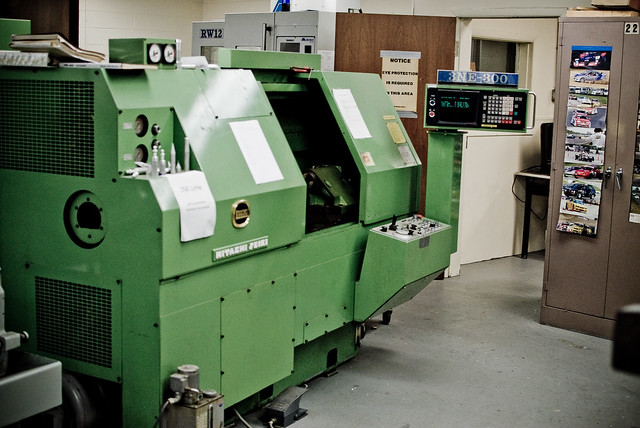
Hitachi-Seiki 3NE-300 Lathe, circa 1980

I’m currently taking some mechanical engineering classes at County College of Morris (CCM) in Randolph, NJ. Among the equipment in the machine shop is this mean, green Hitachi-Seiki CNC Lathe, a neat piece of industrial equipment from the late 70′s/early 80′s.

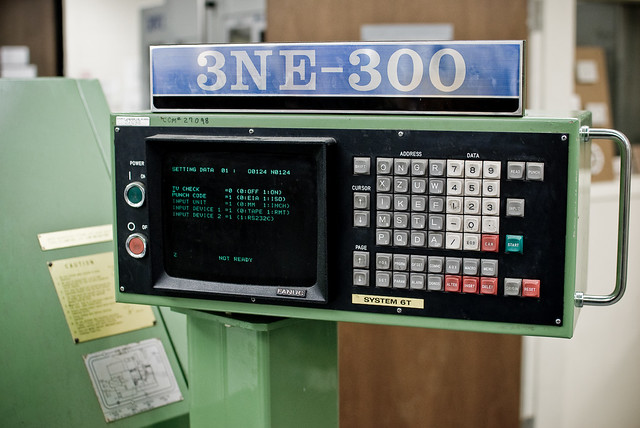
Currently, there are two ways to program the machine. You can program it manually, by entering in codes on the keypad:

3NE-300 control panel

-OR- you can get your Jacquard on and write a program on punched tape:

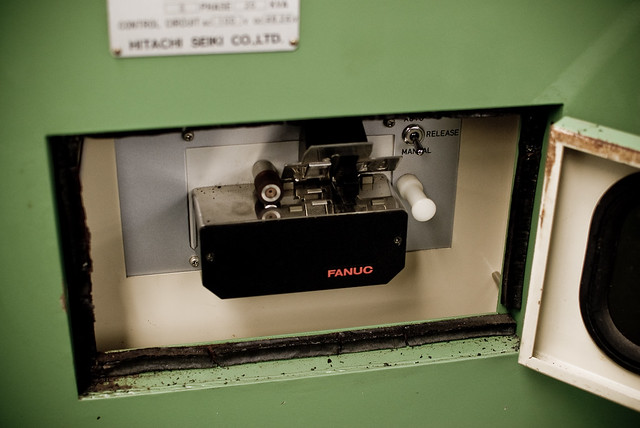
FANUC punched tape reader

Naturally, for ease of use, the punched tape reader is on the back of the machine. *sigh*

Fortunately, there is a third way to get program code into the controller. This is via an RS-232C port:

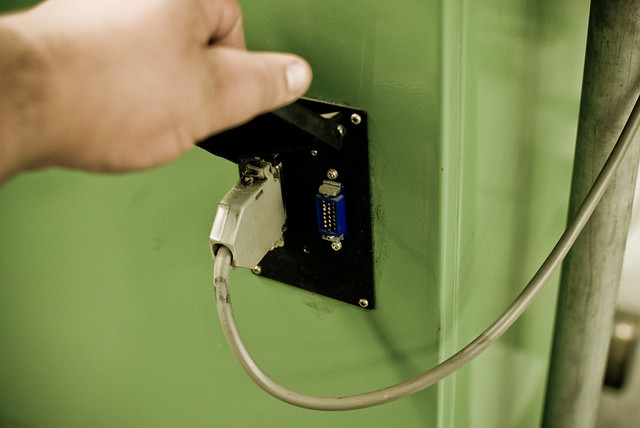
Serial port: a DB-25 RS-232-C port and an MR-20 "HONDA" connector

The obvious question is: why not just hook the serial port up to a computer? Well, due to the logistics of the shop, it’s not feasible to have a computer in the immediate vicinity of the machine. In order to hook it up to the nearest computer, the required cable would be at least 25 feet long. In practice, this translates to a 600-baud signaling rate, as there is a lot of EM interference in the shop, due to motors, fluorescent lights, etc. It’s much easier to simply have a small “black box” that can load the program from modern media like an SD card.

My plan is to build a circuit based around an Arduino, which will read an NC file (ASCII text) from an SD card and send it to the machine over the serial port. I plan to use the following hardware:

  • Arduino Mega – the brains of the operation. To be honest, I probably won’t need the extra pins of the Mega, but with the full SD library, the serial library and the extensive menu system I plan to write, I need the extra program memory.
  • LCD with Adafruit i2c/SPI backpack – for the display (file menu, load progress, etc.)
  • Adafruit Logger Shield – for reading from and writing to the SD card.
  • CuteDigi RS232 Shield – not entirely sure about this one yet. I may just get an Adafruit protoshield and wire up a DB-25 port to it.
  • Hammond 1550D enclosure – with milled openings for the SD card, LCD and buttons.

The controller for the lathe is a FANUC 6T-B. While rather primitive by today’s standards, in it’s day it was a top of the line industrial controller, and FANUC is still the standard. It’s pretty much indestructible too, which is a bonus, because it means I won’t end up scrambling the brains on a $20,000 piece of equipment.

More to come as I work on this project over winter break. I’m hoping to get the electronics soon and start work on the menu and input systems. By the time I get back to school in January, it’ll (hopefully) be ready to interface with the FANUC controller.

WiFi for Arduino with Asus WL-520gu

I love Arduino but its lack of wireless bugs me. And it sucks that WiFi Shields for the Arduino cost as much a cell phone. I want something cheap. Turns out, small, cheap WiFi routers like the Asus WL-520gu can run the DD-WRT Linux firmware and act as serial-to-network gateway for Arduinos (or most any other USB device). Here’s how to do it.

(Hey, is this a Wifi-controlled BlinkM? I think it is.)

A quick video showing a router acting as a serial-to-network gateway:

This is not that new of a concept, hacking Linux onto a router for some [...]

Todbot 16 Dec 09:48

ReflashBlinkM: Update your BlinkM’s firmware

All BlinkM-family devices can have their firmware updated. This makes them great for tiny development boards for ATtiny processors. ReflashBlinkM is an application that makes it easy to put back the original firmware or update a BlinkM to the latest firmware.

Previously you needed an AVR ISP programmer like the AVRISPmkII or the USBtinyISP. Thanks to the ArduinoISP sketch that ships with Arduino, if you have already have an Arduino, you can easily reflash your BlinkM with new firmware.

The ReflashBlinkM application is a tool for Mac OS X and Windows that uses ArduinoISP to help you reflash BlinkMs to their default [...]

Todbot 20 Nov 03:32

A Brief Essay About the Benefits of Open-Source Hardware #openhardware

Didn't have a photo to go with this article, so here's a picture of a cat with an Arduino

The Other Benefits of Open-Source Hardware

Lots of people have been talking about (and questioning) the economic value of open-source
hardware. The most frequent question/criticism is that OSH facillitates the ripping off of the
original designer. That is, they publish their work openly and then someone else takes this work,
produces a product, and sells it. None of the money from this sale goes to the original designer.
In the case of less scrupulous manufacturers, no attribution is cited and all identifying marks
are removed from the product. Under these conditions, it would be rather difficult to take legal
recourse, particularly if said manufacturer is based somewhere overseas.

The argument itself is quite valid — the above scenario could happen, and I know for a fact that
it does happen. And there’s really not a damn thing you can do about it. It happens to people
whose work is protected by copyright too, if that makes you feel any better.

The problem I have with the argument above is that it’s only valid when the hardware is being
sold (or intended to be sold) commercially. This represents one way to make money from your
work, but it’s not the only way. The work itself has value too.

In her keynote address at the Open Hardware Summit, LadyAda pointed out that one of the
prime benefits of doing open hardware is that it makes you a better engineer. I’m inclined to
agree. From this standpoint, the OSH community is sort of a ‘peer-review’ journal with a very
low barrier to entry (can you put it on the internet?) and worldwide exposure (make something
cool and the blogs will pick it up). Within a week you’ll receive LOTS of peer review. Some will
be positive, much of it will be negative. Most of the negative stuff you can ignore (see rebuttal),
but a portion of the negative will be constructive, and that’s the part you should pay attention to.
This instant feedback is usually in the form of blog comments. When people really start looking
at what you’ve done and begin making changes, adding things, or using it in projects, that’s the
real peer review. It’s also the most rewarding part.

But how can this make you money, or at least help you in your professional life? The answer
is simple: it raises your profile, gets you props, and gives you cred. There are plenty of people
who bank on their own rep and get paid. That’s basically what you’re doing when you send out a
resume or CV — it’s all about what you’ve done and how you did it.

In the terms of this discussion, you get cred for three things: good design, great docs, and
actually completing the project. Good design and great documentation are fairly obvious. The
last one sounds ridiculous, but it’s not. I have no actual data to back this up, but I’m willing to bet
that the ratio of unfinished vs finished projects in the world at any moment is about 100:1, and
I’m probably being generous.

Lots of people have great ideas every day. Some people act on them. And then there are the
proud, rare few who actually finish what they’ve started. It’s not easy, particularly if you have
other things to do. Still, if you can take a project from conception through design to building and
testing, and then document the hell out of it and put it out into the wild in a finished and working
state, you get insane cred. And not just among the relatively few people who see it on a blog
and comment: “cool project!” (p.s. god bless those people).

Let’s say two engineers (A & B) want to apply to graduate school. The only project Engineer A
has on her CV is her senior project, which doesn’t work the way it should and is only minimally
documented (which pretty much describes every senior engineering project ever).

Engineer B is very similar to A — she has the same grades and a similar ‘almost working’ senior
project. But B also put together a neat little open-source hardware project on her own time, fully
tested, with complete documentation. It’s not as complex as her senior project, but it actually
works. She puts this on her CV, along with a link to the project. She also sends an email to the
department chair telling this person about her project, and mentioning that she might be thinking
about applying to grad school at his prestigious university.

If you were the department chair, who would you more like to admit into your program? The
person who is just like every other applicant, or the person who has shown the initiative and
ability to take a project from start to finish? I’m not dumb enough to make some guarantee that
doing OSH will get you into grad school, but it definitely can’t hurt you.

It’s very similar in the professional world. You have your resume and references just like
everybody else. The thing that will make you stand out is the self-motivated and fully realized
work you’ve done on the side by yourself. The demonstrated ability to document your projects
comes into play here too. Engineers hate documentation. HATE IT. Because it sucks. But
it’s a necessary evil — you can’t (or at least you shouldn’t) sell a product to a customer without
documentation. Engineers who can write docs are a valuable asset to any company — in fact,
they are critical, and always in short supply.

The open-source hardware community gives you the opportunity to “publish” your work and show off your skills,
be recognized for them, and eventually be rewarded for them. The reward may or may not be monetary,
but there’s plenty of good karma and experience to be had, and lots of cred.

End.

If you want to discuss this post, or tell me I’m wrong and call me names, you can do that here.

SoftI2CMaster: Add I2C to any Arduino pins

Ever wanted to use any pair of pins for I2C on Arduino, not just the dedicated pins on Analog 4 & 5? Me too, so I made a quick little Arduino library called “SoftI2CMaster”, available in the “blinkm-projects” Googlecode repository.

Get it here: SoftI2CMaster.h, SoftI2CMaster.cpp.

It’s still a work in progress, but it can write data pretty successfully and do it over longer cables than normal.

For the VIMBY/Scion Hackerspace Challenge, I created an array of BlinkM MaxM-powered accent lights for the device we made. Because the I2C cable was longer than a few feet, the normal Wire library that [...]

Todbot 25 Sep 08:14

Barometric Sensor testing with Arduino

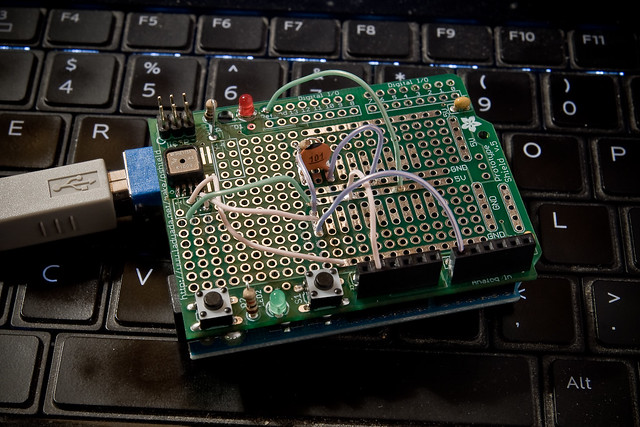
Freescale MP3H6115A baro sensor on Arduino protoshield.

bad data

good data

Click on the pictures for more info.

Adafruit Arduino Logshield with Apples

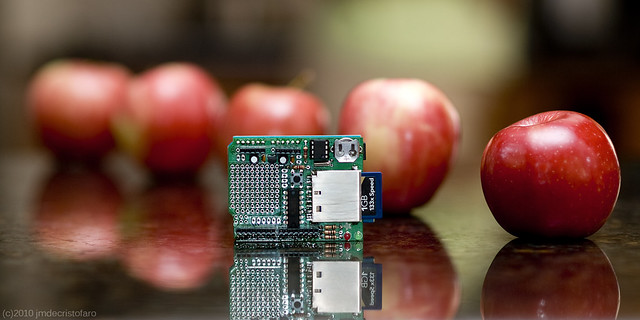
Adafruit Logshield for Arduino (with apples)

Playing around with shooting Adafruit products alongside fruit. I think it looks pretty nice, actually.

johnginneer 11 Sep 18:46
arduino  photo