Posts with «arduino» label

Raspberry Pi

Thanks to Mark Guzdial’s Computing Education blog, specifically this post, I recently found out about the Raspberry Pi, a Linux board that is retailing for $35, with 256Mb RAM, 2 USB ports, an Ethernet port, and both RCA and HDMI video output (no VGA though an adapter can be had for ).  The system on a chip they are using

is a Broadcom BCM2835. This contains an ARM1176JZFS, with floating point, running at 700Mhz, and a Videocore 4 GPU. The GPU is capable of BluRay quality playback, using H.264 at 40MBits/s. It has a fast 3D core accessed using the supplied OpenGL ES2.0 and OpenVG libraries.

…

The GPU provides Open GL ES 2.0, hardware-accelerated OpenVG, and 1080p30 H.264 high-profile decode.

The GPU is capable of 1Gpixel/s, 1.5Gtexel/s or 24 GFLOPs of general purpose compute and features a bunch of texture filtering and DMA infrastructure.

That is, graphics capabilities are roughly equivalent to Xbox 1 level of performance. Overall real world performance is something like a 300MHz Pentium 2, only with much, much swankier graphics.

This board seems to be at least 50 times as much processing and 8000 times as much memory as an Arduino for a similar price.  You need to add an SD card to boot off of (I presume with a Linux system on the card), which raises the price by another $15–35 depending on how big a flash card you get (I’m assuming that 16gB or 32gB is about the right size—a smaller drive would be much cheaper).

There appear to be 26 general-purpose I/O pins, so I can see this processor becoming quite popular for higher-end robotics.  With the ethernet connection, it may become popular for providing small LAMP (Linux-Apache-MySQL-PhP) servers, as long as everything can fit on the SD drive.  It has an audio-out port, but you’d have to use a USB microphone to get audio in.  The board can be powered over the USB line, or through a separate power port.

The default Linux is Fedora, but Debian and ArchLinux will also be supported.  The Linux can be downloaded and put on an SD, or the SD flash cards can be bought preloaded.

This looks like a potentially very useful educational toy—cheap enough to mess around with and easy to start over from scratch (just write a new copy of the Linux onto an SD card).  The only problem I can see is that Linux makes getting access to the I/O ports much harder than it needs to be, but I suspect that the developers have already written drivers and Python modules for accessing the I/O pins, so this may not be a problem.  They plan to make Python the main development language for the Raspberry Pi (Python is slow, but even with interpreter overhead the chip would still be faster than an Arduino), but any language that has a compiler for the ARMv6 should work.  I assume that Pyrex would be available for speeding up inner loops.

I may have to look into designing a motor shield for the Raspberry Pi, so that we can do robotics with Python programming!

Related articles

Tagged: Arduino, Linux, Raspberry Pi

listComPorts – Windows command-line tool for USB-to-serial

Did you know each Arduino has a unique serial number in its USB interface that you can use to distinguish one Arduino from another? If you deal with multiple Arduinos, knowing exactly which one is plugged into your computer can be a real time-saver. But actually getting at this serial number and mapping it to COM ports can be challenging.

For Windows computers, here’s “listComPorts”, implemented both in GCC C code and in VBScript, both available from my usbSearch github repository.

It gives the COM port number, the manufacturer name, the USB Vendor ID and Product ID (VID & PID) and [...]

Todbot 02 Mar 08:55

listComPorts – Windows command-line tool for USB-to-serial

Did you know each Arduino has a unique serial number in its USB interface that you can use to distinguish one Arduino from another? If you deal with multiple Arduinos, knowing exactly which one is plugged into your computer can be a real time-saver. But actually getting at this serial number and mapping it to [...]
Todbot 02 Mar 08:55

Sensor board for underwater ROV

Since I had bought the robotics club an I2C accelerometer and magnetometer, I decided to make a new PC board for them to mount the accelerometer, the magnetometer, and the pressure gauge on the same board.  I don’t have the SMD soldering skills to solder all the chips onto one board, and I already had breakout boards for the accelerometer and magnetometer from Sparkfun, so I decided just to put connectors for those breakout boards onto the back of the pressure sensor board.  (The back, because the pressure sensor on the front has to be stuck through a hole in the dry box and glued in place.

The new boards are tiny (1.05″ × 1.425″), so I decided to try BatchPCB (which has pricing by the square inch) rather than 4pcb.com (which has fixed pricing per board, up to a fairly large size).  The price from BatchPCB was $10 per order plus $2.50/square inch plus $0.90 for shipping, so ordering 3 copies of the board (though I only needed one), cost me $22.12, substantially less than a single board from 4pcb.com, which is $33 plus $17.30 shipping and handling per board (plus an extra $50 if your board has multiple boards on it).  The 4pcb price is lower if your board is bigger than about 15.76 square inches, so even my HexMotor boards (at 12.44 square inches) would be cheaper from BatchPCB.  If you get multiple boards from 4pcb.com on a single panel and cut them apart yourself, the breakeven point is about 35.76 square inches for a single design (so three HexMotor boards from a single 4pcb.com panel is cheaper than from BatchPCB). For multiple designs on a single panel, the 4pcb.com deal is better: for 3 different designs, a total of 27.04 square inches would make 4pcb.com the cheaper way to go.

If you want a copy of the board, you can order it from BatchPCB, or pick up the Eagle files from my web site and order copies from elsewhere.  I’ve put the HexMotor Eagle files on line also, but not put them on the BatchPCB site.  I should probably upload them there sometime.

Bottom line: BatchPCB is better for small numbers of tiny boards, but 4pcb.com is better for larger boards and multiple designs.

The BatchPCB orders came back quite quickly (12 days from order to delivery by mail), though I had been worried because their design-rule check, which they say takes minutes had taken about 8 hours.  The problem was that each check takes a few minutes, but they had hundreds in the queue over the weekend, and it took a full day to clear the queue.

I had less trouble soldering the pressure gauge this time (this was my second attempt at soldering surface mount devices).  You can see in the pictures above that the results are much cleaner than in my first attempt.

The robotics club has tested the pressure sensor on the new board (using their own code on the Arduino) and it seems to work ok,  have drilled the hole in the dry box for the port, and glued the sensor board in place using superglue.  It seems to be waterproof (at least down to 1 foot—we’ve not tested in deep water yet).

Related articles

Tagged: accelerometer, Arduino, BatchPCB, magnetometer, pressure sensor, Printed circuit board, ROV, SparkFun Electronics

Arduino RFID shield

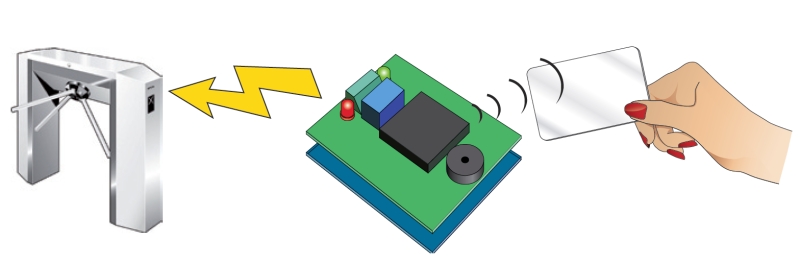
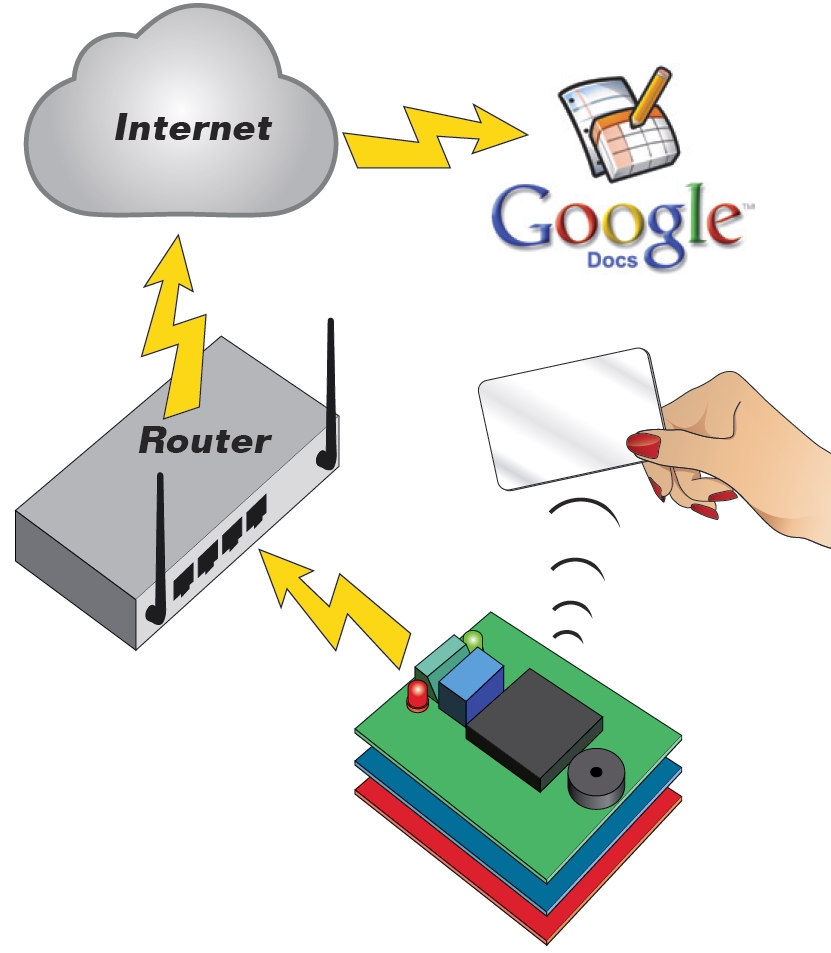
This shield could be used as a stand-alone transponder key, or with Google’s servers to create a cloud-computing application.


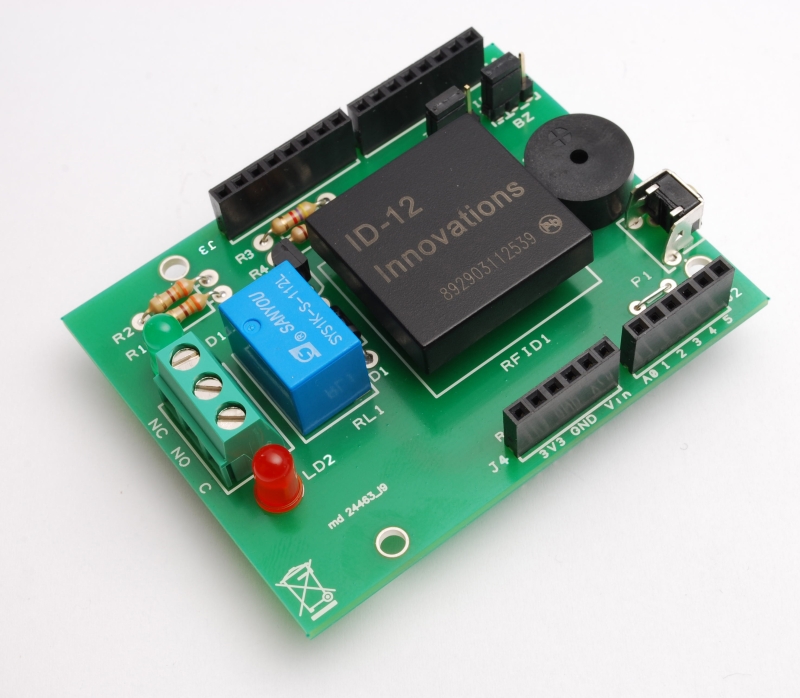
It’s time to present you an application with RFID. We want to show you how to use the popular Arduino to produce a device capable of recognizing passive transponder (TAG). But this is not the usual RFID key, because the system can activate a relay if a recognised TAG is read, but also we took the opportunity to make an application that use cloud-computing. The basic version, which is a simple key relay consists of an Arduino (Duemilanove or UNO) and the RFID shield based on a ID-12 of Innovations: placing a transponder already learned, the relay is activated.
The extended version of our project uses an Arduino, the RFID Shield and the Ethernet Shield with which we can access the Internet and stored, using the Google Docs service, the transponder data.

The RFID shield
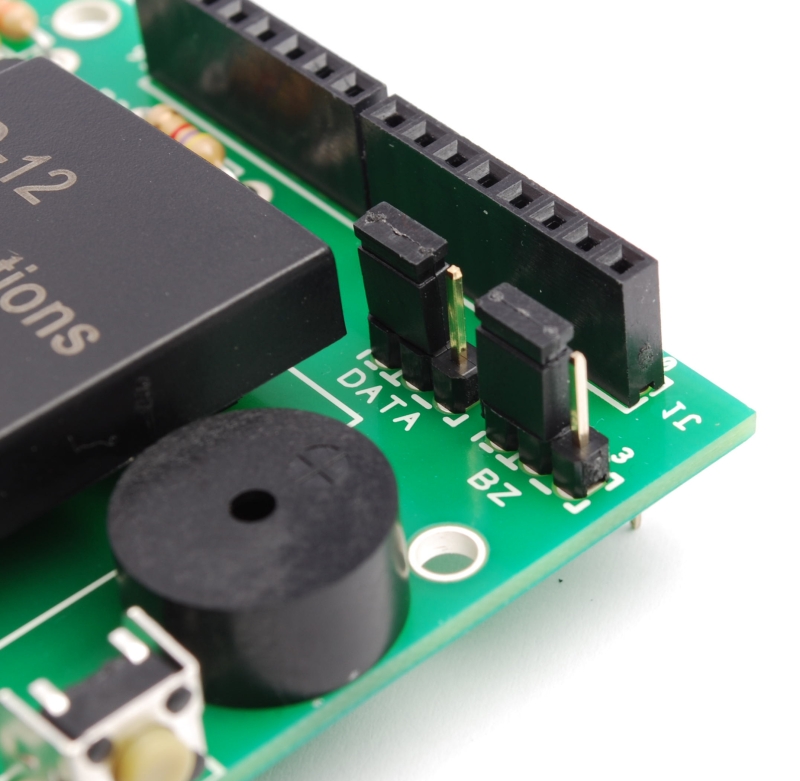
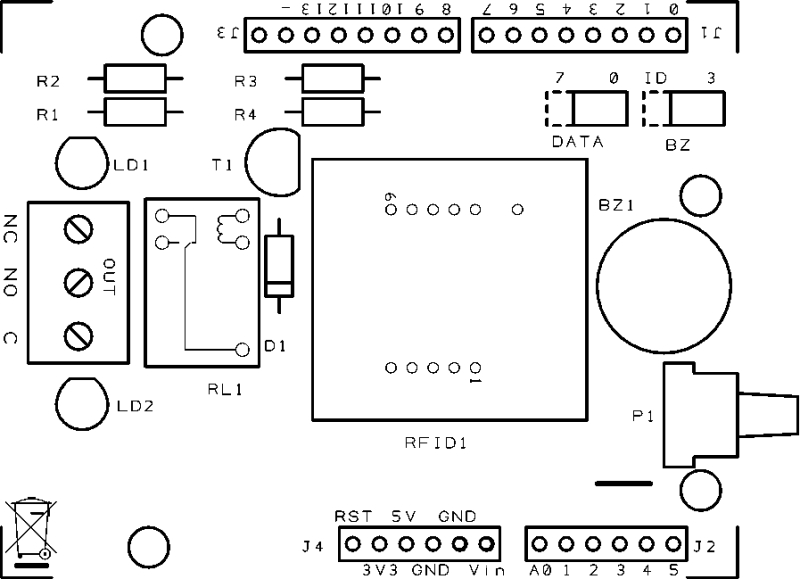
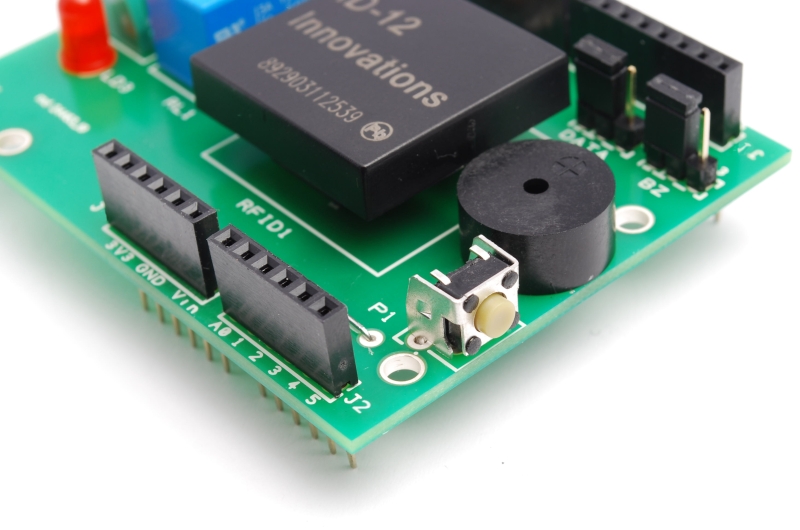
But before you see the applications in detail, we spend some words on the shield for Arduino that we need to capture data of passive TAG. It is a very simple circuit based on the form ID-12 , which contains a complete recognizer of passive transponders, in addition to a relay controlled by Arduino and a few other passive components. The buzzer, which allows you to set an audible alert, could be controlled by ID-12 or by Arduino.

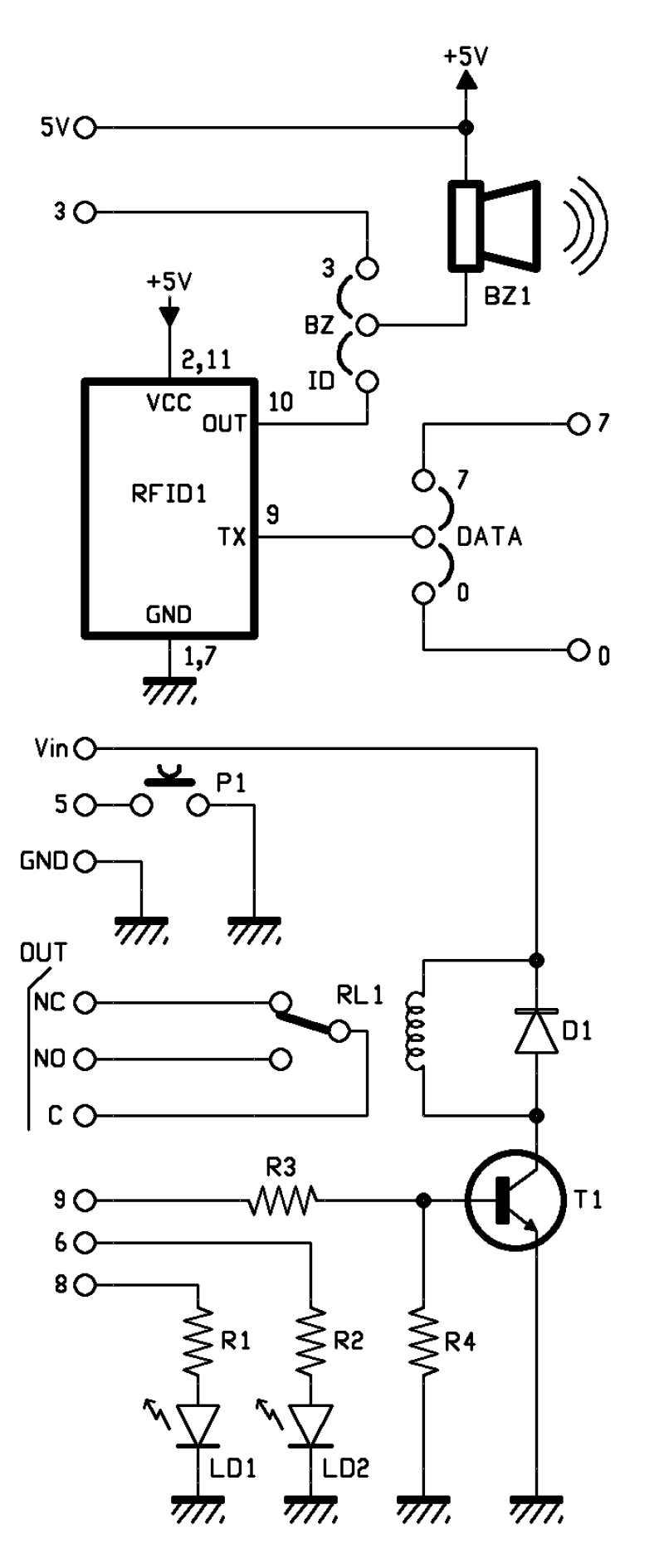
The relay is powered by Vin Arduino (and the corresponding contact of the shield) and GND. The base of the transistor that controls RL1 is driven by the pin 9 of the Arduino. The lines 6 and 8 control the lighting of the LEDs.
In our case, the pin 7 of ID-12 is connected to ground, so the chip will only recognize ASCII coded tag and return its output in ASCII characters.

The component has a TTL level serial interface, accessible from it’s pins 9 and 8, then there is an output (pin 10) that pulses rapidly (at a frequency of 3 kHz) every time the module detects the code of a tag encoded and used to drive a buzzer or a light emitting diode.
All data are read from Arduino using the library NewsoftSerial that allows to emulate a serial port; in our case, the emulation is carried on lines 7.

How it works

Once you put power to the system, when the module ID-12 reads a tag, the pin 10 pulse at 3 kHz and the Arduino read s data; then microcontroller compares the code with those who has in memory.
If the transponder is one of those already learned the micro actives the relay and the green led. This relay will be used to control an electric lock, a gate, etc..
In bistable mode, the relay changes state each time the ID-12 reads a valid tag.
Clearly, the circuit can work well if in his memory there is at least a RFID tag.

To learn the code for a tag and then write it to EEPROM, you must press and hold button P1 for 3 seconds (max. 5), once that is done you have to pass a card and wait for the confirmation sound (given by buzzer) and light (provided by the green LED).
At any time you can remove a tag code from memory: must press the P1 button for 5 seconds or longer, until the red LED lights on. At this point you release the button and pass the tag to be deleted, if the LED turns off and on again, the card has been deleted.
To erase the entire EEPROM you must restart the Arduino, and during the reboot, hold down the button P1 for about one second; when the red LED lights up. Done this, Arduino is ready to read new tags.

R1: 330 ohm
R2: 330 ohm
R3: 4,7 kohm
R4: 10 kohm

LD1: Led 3 mm green
LD2: Led 3 mm red

BZ1: Buzzer

T1: BC547

RFID1: ID-12

RL1: Relé 12V

P1: Microswitch 90°

D1: 1N4007

Varie:
- Screw 3 poli
- Jumper (2 pz.)
- Strip male 3 via (2 pz.)
- Strip M/F 6 via (2 pz.)
- Strip M/F 8 via (2 pz.)


/* RFID shield key

 created 2011
 by Andrea Fainozzi

 This example code is in the public domain.

http://www.open-electronics.org

http://www.futurashop.it

http://blog.elettronicain.it/

 */

#include <EEPROM.h>
#include <NewSoftSerial.h>

#define PULSANTE   5               //pin relativo al pulsante da premere per entrare in modalità scrittura/cancellazione

#define DATA_PIN       7           //scegliere il pin che si vuole utilizzare in base alla scelta fatta con il jumper sulla scheda (7 | 
#define RELE_PIN       9           //scegliere il pin che si vuole utilizzare in base alla scelta fatta con il jumper sulla scheda (9 | 10)
#define BUZZ_PIN       3           //scegliere il pin che si vuole utilizzare in base alla scelta fatta con il jumper sulla scheda (3 | 11)
#define GREEN_LED_PIN  8           //pin relativo al led verde
#define RED_LED_PIN    6           //pin relativo al led rosso

//scegliere cosa fare quando viene letta una scheda

#define RELE     0                 //scegliere '1' per fare in modo che alla lettura di una scheda il relè venga attivato '0' per non fare nulla
#define BUZZER   1                 //scegliere '1' per fare in modo che alla lettura di una scheda il buzzer emetta un suono '0' per non fare nulla
#define LED      1                 //scegliere '1' per fare in modo che alla lettura di una scheda corretta venga acceso il led verde e per una scheda incorretta il led rosso '0' per non fare nulla

#define DURATA_RELE 1000          //scegliere il tempo per il quale deve rimanere acceso il relè (se viene inserito '0' il relè funzionerà in modo bistabile)

boolean check;                    //variabile con la quale eseguo tutti i controlli all'interno dello sketch
int on_off=0;                     //variabile che utilizzo per controllare lo stato del led in modalità bistabile

NewSoftSerial mySerial(DATA_PIN,1);    //inizializzo il pin sul quale leggere i dati trasmessi dall'ID-12
void setup() {

  if(DURATA_RELE>60000)                                                    //controllo che il tempo impostato per la durata di attivazione del relè sia inferiore a 1 minuto
    while(1){                                                              //in caso contrario stampo su seriale un messaggio di errore in un ciclo infinito
        delay(2000);
        Serial.print("Tempo relè non valido, troppo alto");
    }

  pinMode(PULSANTE,INPUT);                                                 //imposto il pin del pulsante in modalità input per verificare quando il pulsante viene premuto
  digitalWrite(PULSANTE,HIGH);                                             //e lo setto alto, in modo tale da attivare la resistenza di pull-up

  if(RELE)                                                                 //controllo se è stato scelto di attivare o meno il relè, nel primo caso, imposto il pin assegnatogli come output
    pinMode(RELE_PIN,OUTPUT);
  if(BUZZER)                                                               //controllo se è stato scelto di attivare o meno il buzzer, nel primo caso, imposto il pin assegnatogli come output
    pinMode(BUZZ_PIN,OUTPUT);
  if(LED){                                                                 //controllo se è stato scelto di attivare o meno i led, nel primo caso, imposto i pin assegnatogli come output
    pinMode(GREEN_LED_PIN,OUTPUT);
    pinMode(RED_LED_PIN,OUTPUT);
  }
  Serial.begin(9600);                                                      //Inizializzo la porta seriale sulla frequenza di 9600 baud
  mySerial.begin(9600);                                                    //inizializzo la seriale sulla quale leggo i dati delle schede a 9600 baud

  if(digitalRead(PULSANTE)==LOW) azzera();                                 //controllo che il il pulsante sia premuto in fase di accensione del dispositivo, in caso affermativo azzero tutta la memoria EEPROM
}

void loop () {

  byte val;                                                          //variabile che utilizzo per leggere i valori dalla tessera appena passata
  byte code[6];                                                      //vettore nel quale salvo il codice letto completo
  byte checksum;                                                     //variabile sulla quale calcolo e salvo il checksum
  byte bytesread;                                                    //variabile che viene utilizzata per per contare quanti byte sono stati letti
  byte tempbyte;                                                     //variabile che mi serve per memorizzare temporaneamente mezzo byte letto

  unsigned long int tempo=0;                                         //variabile che utilizzo per salvare il tempo attuale, per contare i millisecondi passati
  boolean scrivere=false;                                            //variabile che utilizzo per controllare se la tessera appena letta è da salvare o da controllare
  boolean controllo=false;                                           //variabile che utilizzo per controllare se la tessera appena letta è da cancellare oppure no

  if(digitalRead(PULSANTE)==LOW){                                    //controllo se il pulsante è premuto
     tempo=millis();                                                 //se lo è salvo gli attuali millisecondi passati dall'avvio del dispositivo
     while((digitalRead(PULSANTE)==LOW)&&(tempo+3000>millis()));     //quindi mando in esecuzione un ciclo che non fa nulla
     if(millis()>tempo+2999){                                        //controllo dopo la fine del ciclo se esso è stato in esecuzione per 3 secondi, confrontando il tempo iniziale + 3000 con il tempo attuale
       if(LED)
         digitalWrite(GREEN_LED_PIN,HIGH);                           //se così è, accendo il led verde
         Serial.println("Modalità registrazione");                   //e stampo sulla seriale che sono entrato in modalità registrazione
       if(BUZZER){
         analogWrite(BUZZ_PIN,50);
         delay(50);                                                  //e faccio fare un suono di avviso al buzzer
         digitalWrite(BUZZ_PIN,LOW);
       }
         scrivere=true;                                              //e pongo a vero la variabile scrivere
     }
     if(digitalRead(PULSANTE)==LOW){                                 //se dopo ciò il pulsante è ancora premuto
       while((digitalRead(PULSANTE)==LOW)&&(tempo+5000>millis()));   //mando in esecuzione un altro ciclo nullo
       if(millis()>tempo+4999){                                      //se esso è stato in esecuzione per 2 secondi significa che sono entrato in modalita eliminazione
         Serial.println("Modalità eliminazione");                    //quindi lo scrivo sulla seriale
        if(LED){
         digitalWrite(RED_LED_PIN,HIGH);                             //accendo il led rosso
         digitalWrite(GREEN_LED_PIN,LOW);                            //spengo quello verde, precedentemente acceso
        }
        if(BUZZER){
         analogWrite(BUZZ_PIN,50);
         delay(50);                                                  //faccio fare un suono di avviso al buzzer
         digitalWrite(BUZZ_PIN,LOW);
        }
         while(digitalRead(PULSANTE)==LOW);                          //mando in esecuzione un ciclo finchè il pulsante non viene rilasciato
         controllo=true;                                             //e pongo a vero la variabile controllo
       }
     }
  }

//-------------------------------------------------------------------------------------inizio do-while------------------------------------------------------------------------------------------

  do{                                                                //inizio un ciclo che finirà solo quando verrà premuto nuovamente il pulsante

   val = 0;
   checksum = 0;                                                     //azzero le variabili precedentemente dichiarate
   bytesread = 0;
   tempbyte = 0;

  if(mySerial.available() > 0) {                                     //controllo se sulla mia seriale è presente qualche dato
    if((val = mySerial.read()) == 2) {                               //se così è leggo da essa il valore
      bytesread = 0;                                                 //e se è uguale a 2 (carattere di controllo) pongo a 0 la variabile bytesread
      while (bytesread < 12) {                                       //mando in esecuzione un ciclo per 12 volte, in modo da poter leggere tutti i 12 caratteri della tessera (5 byte del codice + 1 del cehcksum
      if( mySerial.available() > 0) {                                //controllo se i dati sono disponibili ad essere letti
          val = mySerial.read();                                     //quindi assegno a 'val' il valore dell'i-esimo carattere
          if((val == 0x0D)||(val == 0x0A)||(val == 0x03)||(val == 0x02)) {     //se leggo un carattere 'header' o un carattere di stop
            break;                                                             // fermo la lettura
          }

          if ((val >= '0') && (val <= '9')) {
            val -= '0';
          }                                                                    //traduco in esadecimale il carattere appena letto
          else if ((val >= 'A') && (val <= 'F')) {
            val = 10 + val - 'A';
          }

          //ogni 2 caratteri letti, aggiungo il byte così creato al vettore 'code'

          if (bytesread & 1 == 1) {                                            //se ho letto un solo carattere fin'ora
            code[bytesread >> 1] = (val | (tempbyte << 4));                        //assegno alla seconda parte del byte in posizione bytesread-esima il valore esadecimale del carattere letto

            if (bytesread >> 1 != 5) {                                             //se ho letto l'ultimo byte della scheda calcolo il checksum
              checksum ^= code[bytesread >> 1];                                    //facendo la XOR sull'ultimo byte letto
            };
          } else {
            tempbyte = val;                                                    //altrimenti assegno il valore letto alla variabile tempbyte
          };

          bytesread++;                                                        //mi preparo a leggere il prossimo byte
        }
      }

     if (bytesread == 12) {                                                   //se ho letto tutti i 6 byte
        (code[5]==checksum) ? check = true : check = false ;                  //controllo che il checksum sia corretto
        if(check){                                                            //se lo è passo a controllare se devo salvare o cancellare
            check=false;                                                      //rimetto a false la variabile check per successivi utilizzi
            if(scrivere&&!controllo){                                         //controllo se devo scrivere
                  for(int i=0;i<1021;i+=5){                                   //in caso affermativo eseguo un ciclo che controlla tutta la EEPROM
                        if((EEPROM.read(i)==code[0])&&(EEPROM.read(i+1)==code[1])&&(EEPROM.read(i+2)==code[2])&&(EEPROM.read(i+3)==code[3])&&(EEPROM.read(i+4)==code[4])){
                            check=true;                                        //se trovo il codice della tessera letta già salvato nella EEPROM metto a true la variabile 'check'
                            break;                                             //ed esco dal ciclo
                        }
                  }
                  if(check){                                                   //quindi controllo il valore della variabile check, se è vero, significa che la tessera è già stata registrata
                        Serial.print("Tessera già registrata!");               //quindi lo comunico su seriale
                        stampa_code(code);
                      if(LED)
                        digitalWrite(RED_LED_PIN,HIGH);
                        delay(50);
                      if(BUZZER)
                        analogWrite(BUZZ_PIN,50);                              //e mando un segnale di errore luminoso e/o sonoro in sempre in base al fatto che l'utente abbia specificato led e buzzer
                        delay(50);
                      if(BUZZER)
                        digitalWrite(BUZZ_PIN,LOW);
                      if(LED)
                        digitalWrite(RED_LED_PIN,LOW);
                  }

                  else{                                                        //se la tessera non è stata trovata
                      check=false;                                             //rimetto a false la variabile check per successivi utilizzi
                      for(int i=0;i<1021;i+=5){                                //quindi eseguo un ciclo che controlla tutta la EEPROM in cerca di 5 byte successivi liberi
                        if((EEPROM.read(i)==0xff)&&(EEPROM.read(i+1)==0xff)&&(EEPROM.read(i+2)==0xff)&&(EEPROM.read(i+3)==0xff)&&(EEPROM.read(i+4)==0xff)){
                          for(int j=i;j<i+5;j++)                               //una volta trovati, partendo dal primo, fino al quinto, ci salvo il valore della tessera
                              EEPROM.write(j,code[j-i]);                             //eseguendo un ciclo 5 volte
                          check=true;                                                //pongo a true la variabile check
                          break;                                               //ed esco dal ciclo
                        }
                      }
                      if(check){                                               //se la variabile check è vera, significa che ho salvato con successo, quindi
                          Serial.print("Tessera Salvata");                     //lo stampo su seriale
                          stampa_code(code);
                        if(BUZZER){
                          analogWrite(BUZZ_PIN,50);
                          delay(100);
                          digitalWrite(BUZZ_PIN,LOW);
                        }
                        if(LED){
                          for(int i=0;i<5;i++){
                           digitalWrite(GREEN_LED_PIN,HIGH);                   //e mando un segnale luminoso e/o sonoro in sempre in base al fatto che l'utente abbia specificato led e buzzer
                           delay(50);
                           digitalWrite(GREEN_LED_PIN,LOW);
                           delay(50);
                          }
                          digitalWrite(GREEN_LED_PIN,HIGH);
                        }
                      }
                      else{                                                    //se la variabile check non è vera, significa che ho controllato tutta la memoria senza trovare 5 byte sequenziali liberi
                           Serial.println("Memoria piena");                    //quindi spamo su seriale che la memoria è piena
                           for(int i=0;i<5;i++){
                           if(LED)
                             digitalWrite(RED_LED_PIN,HIGH);
                           if(BUZZER)
                             analogWrite(BUZZ_PIN,50);
                           delay(50);                                          //e mando un segnale di errore luminoso e/o sonoro in sempre in base al fatto che l'utente abbia specificato led e buzzer
                           if(LED)
                             digitalWrite(RED_LED_PIN,LOW);
                           if(BUZZER)
                             digitalWrite(BUZZ_PIN,LOW);
                           delay(50);
                          }
                    }
                }
            }
            else if(scrivere&&controllo){                                      //se non bisogna salvare, controllo se bisogna eliminare una tessera
                  int posizione=-1;                                            //quindi inizializzo a -1 la variabile posizione, che mi servirà per salvare la posizione nella EEPROM della tessera
                  for(int i=0;i<1021;i+=5){                                    //ed eseguo un ciclo che controlla tutta la EEPROM per cercare il codice corrispondente
                        if((EEPROM.read(i)==code[0])&&(EEPROM.read(i+1)==code[1])&&(EEPROM.read(i+2)==code[2])&&(EEPROM.read(i+3)==code[3])&&(EEPROM.read(i+4)==code[4])){
                            posizione=i;                                       //se viene trovato salvo la posizione del primo byte nella variabile posizione
                        break;                                                 //ed esco dal ciclo
                        }
                  }
                  if(posizione!=-1){                                           //quindi controllo che la variabile posizione sia diversa da -1 così da sapere se è stato trovato o meno il codice
                      for(int j=posizione;j<posizione+5;j++)                   //eseguo quindi un ciclo partendo dalla posizione 'posizione' nella EEPROM
                              EEPROM.write(j,0xff);                            //sovrascrivendo i 5 byte corrispondenti alla tessera, con il byte di default '0xff'
                      Serial.print("Scheda cancellata");                       //una volta fatto ciò, stampo su seriale l'avvenuta cancellazione
                      stampa_code(code);
                      if(LED){
                        digitalWrite(GREEN_LED_PIN,HIGH);
                        digitalWrite(RED_LED_PIN,HIGH);
                      }
                      if(BUZZER)
                        analogWrite(BUZZ_PIN,50);                              //e mando un segnale luminoso e/o sonoro in sempre in base al fatto che l'utente abbia specificato led e buzzer
                      delay(250);
                      if(LED)
                        digitalWrite(GREEN_LED_PIN,LOW);
                      if(BUZZER)
                        digitalWrite(BUZZ_PIN,LOW);
                  }
                  else{                                                        //se la variabile posizione vale -1 significa che non ha trovato in memoria la tessera letta
                      Serial.print("Impossibile cancellare la scheda, non è salvata");  //quindi lo comunico su seriale
                      stampa_code(code);
                      for(int x=0;x<10;x++){
                        if(LED)
                          digitalWrite(RED_LED_PIN,HIGH);
                        if(BUZZER)
                          analogWrite(BUZZ_PIN,50);
                        delay(25);                                             //e mando un segnale di errore luminoso e/o sonoro in sempre in base al fatto che l'utente abbia specificato led e buzzer
                        if(LED)
                          digitalWrite(RED_LED_PIN,LOW);
                        if(BUZZER)
                          digitalWrite(BUZZ_PIN,LOW);
                        delay(25);
                      }
                      if(LED)
                        digitalWrite(RED_LED_PIN,HIGH);
                    }

            }

            check=true;                                                        //rimetto a vero il valore della variabile check siccome il checksum è corretto
            }
            else{                                                              //se il checksum fosse incorretto
                 Serial.print("Checksum incorretto");                          //lo comunico su seriale
                 for(int i=0;i<3;i++){
                    if(LED)
                      digitalWrite(RED_LED_PIN,HIGH);
                    if(BUZZER)
                      analogWrite(BUZZ_PIN,50);
                    delay(30);                                                 //e mando un segnale di errore luminoso e/o sonoro in sempre in base al fatto che l'utente abbia specificato led e buzzer
                    if(LED)
                      digitalWrite(RED_LED_PIN,LOW);
                    if(BUZZER)
                      digitalWrite(BUZZ_PIN,LOW);
                 }
                 if(LED)
                    digitalWrite(RED_LED_PIN,HIGH);
            }

     }
    }
  }
  }
  while((digitalRead(PULSANTE)==HIGH)&&(controllo||scrivere));

//-------------------------------------------------------------------------------------------fine do-while---------------------------------------------------------------------------------------

  if(LED){
    digitalWrite(GREEN_LED_PIN,LOW);                                          //spengo gli eventuali led accesi per conoscere la modalità nella quale ero all'interno del ciclo
    digitalWrite(RED_LED_PIN,LOW);
  }

  if (bytesread == 12) {                                                      //controllo di avere letto tutti i 6 byte della tessera
     if(check){                                                               //controllo che il checksum sia corretto
           if(!scrivere){                                                     //e controllo anche che non ci sia da salvare/scrivere una tessera
                  check=false;                                                //rimetto a false la variabile check per successivi utilizzi
                  for(int i=0;i<1021;i+=5)                                    //eseguo un ciclo che controlla tutta la EEPROM alla ricerca della tessera letta
                        if(EEPROM.read(i)==code[0]&&EEPROM.read(i+1)==code[1]&&EEPROM.read(i+2)==code[2]&&EEPROM.read(i+3)==code[3]&&EEPROM.read(i+4)==code[4]){
                            check=true;                                       //se viene trovata metto a true la variabile check
                            break;                                            //ed esco dal ciclo
                        }

                     if(check){                                               //quindi controllo il valore della variabile check
                       Serial.print("Tessera valida");                        //se è vero, significa che la tessera è stata trovata e quindi è valida, e lo stampo su seriale
                       stampa_code(code);
                       if(LED)
                            digitalWrite(GREEN_LED_PIN,HIGH);
                       if(BUZZER){
                            analogWrite(BUZZ_PIN,50);
                            delay(200);
                            digitalWrite(BUZZ_PIN,LOW);                       //quindi in base alla selezione dell'utente
                       }                                                      //mando un segnale luminoso e/o sonoro
                       if(RELE){                                              //in più accendo il relè
                            if(DURATA_RELE){                                  //secondo la modalità impostata dall'utente
                               digitalWrite(RELE_PIN,HIGH);
                               tempo=millis();
                               while(tempo+DURATA_RELE>millis());
                               digitalWrite(RELE_PIN,LOW);
                            }
                            else{
                               if(on_off){
                                  digitalWrite(RELE_PIN,LOW);
                                  on_off--;
                               }
                               else{
                                  digitalWrite(RELE_PIN,HIGH);
                                  on_off++;
                               }
                            }
                       }
                    }
                      else{                                                    //se al contrario il valore è falso
                        Serial.print("Tessera non valida!");                   //significa che ho controllato tutta la memoria senza trovare la tessera, quindi lo comunico su seriale
                        stampa_code(code);
                        if(LED)
                            digitalWrite(RED_LED_PIN,HIGH);
                        if(BUZZER){
                            analogWrite(BUZZ_PIN,50);
                            delay(50);
                            digitalWrite(BUZZ_PIN,LOW);                        //e mando un segnale di errore luminoso e/o sonoro in sempre in base al fatto che l'utente abbia specificato led e buzzer
                            delay(50);
                            analogWrite(BUZZ_PIN,50);
                            delay(50);
                            digitalWrite(BUZZ_PIN,LOW);
                        }
                     }
                    }
                    if(LED){
                      delay(500);
                      digitalWrite(GREEN_LED_PIN,LOW);                         //spegno gli eventuali led rimasti accesi
                      digitalWrite(RED_LED_PIN,LOW);
                    }
     }
     else{                                                                     //se il checksum fosse incorretto
                 Serial.print("Checksum incorretto");                          //lo comunico su seriale
                 for(int i=0;i<3;i++){
                    if(LED)
                      digitalWrite(RED_LED_PIN,HIGH);
                    if(BUZZER)
                      analogWrite(BUZZ_PIN,50);
                    delay(30);                                                 //e mando un segnale di errore luminoso e/o sonoro in sempre in base al fatto che l'utente abbia specificato led e buzzer
                    if(LED)
                      digitalWrite(RED_LED_PIN,LOW);
                    if(BUZZER)
                      digitalWrite(BUZZ_PIN,LOW);
                 }
     }
    }
  bytesread=0;                                                                 //azzero la variabile bytesread per una prossima lettura
}

//--------------------------------------------------------------------------FUNZIONE PER AZZERARE LA MEMORIA EEPROM------------------------------------------------------------------------------

void azzera(){
  if(LED){
    digitalWrite(GREEN_LED_PIN,HIGH);
    digitalWrite(RED_LED_PIN,HIGH);
  }
  for(int i=0;i<1023;i++)
      EEPROM.write(i,0xff);
  Serial.println("Memoria Azzerata!");
  if(BUZZER)
    analogWrite(BUZZ_PIN,50);
  for(int i=0;i<5;i++)
    if(LED){
      digitalWrite(GREEN_LED_PIN,HIGH);
      delay(100);
      digitalWrite(GREEN_LED_PIN,LOW);
      digitalWrite(RED_LED_PIN,HIGH);
      delay(100);
      digitalWrite(RED_LED_PIN,LOW);
    }
  if(BUZZER)
    digitalWrite(BUZZ_PIN,LOW);
}

//--------------------------------------------------------------FUNZIONE PER STAMPARE IL CODICE DELLA TESSERA LETTA SU SERIALE-------------------------------------------------------------------

void stampa_code(byte * code){
        Serial.print(": <");
        for (int i=0; i<5; i++) {
          if (code[i] < 16) Serial.print("0");
          Serial.print(code[i], HEX);
          if(i!=4)
            Serial.print(" ");
        }
        Serial.println(">");
}


Send data to Google

Our system may be facing a network and on the web to secure the cooperation of the Google Docs service. It only works if we add an Ethernet Shield.
Our online application proposes to use a Google Spreadsheet document (spreadsheet on Google Docs, anyway …) in which Arduino transcribe the codes read from valid cards. The only condition for accessing the service has to be registered, or have a Google account (eg Gmail), if you have not, open it: it is free and gives you the opportunity to have a mail box and many other free services offered by Google.
In practice, our system does not directly access to the spreadsheet, but sends the data using a form (form). We write a post to explain how to connect Arduino to Google Docs. All the results of a module is imported in the corresponding sheet, from which can be viewed by authorized users, or by anyone in possession of the link, if we remove the protection.


/* RFID shield Google

 created 2011
 by Andrea Fainozzi

 This example code is in the public domain.

http://www.open-electronics.org

http://www.futurashop.it

http://blog.elettronicain.it/

 */

#include <EEPROM.h>
#include <NewSoftSerial.h>
#include <Ethernet.h>
#include <SPI.h>
#include <Client.h>

char formkey[] = "dDh11222222233333333344444444MQ"; //Chiave identificatrice del documento di google (SOSTITUIRE CON LA PROPRIA CHIAVE PRESA DIRETTAMENTE DALL'URL DI GOOGLE SPREADSHEET)
byte mac[] = { 0x90,0xA2,0xDA,0x00,0x55,0xA3};         //Mac addres della scheda ethernet dell'arduino (SOSTITUIRE CON IL MAC ADDRESS RIPORTATO SULLA SHIELD ETHERNET)
byte ip[] = { 192,168,0,99};                           //IP da assegnare alla scheda ethernet dell'arduino (SOSTITUIRE CON UNO SUPPORTATO DALLA PROPRIA RETE)
byte subnet[] = { 255,255,255,0};                      //Maschera di sottorete riferita alla propria connessione (SOSTITUIRE CON LA PROPRIA SUBNET MASK)
byte gateway[] = { 192,168,0,254};                     //Gateway del proprio modem/router (SOSTITUIRE CON IL PROPRIO GATEWAY PREDEFINITO)
byte server[] = { 209,85,229,101 };                    //IP del server di google spreadsheet

Client client(server, 80);                             //connettiamo il nostro arduino, come client al server di google spreadsheet

char buffer [33];                                      //vettore nel quale salvo temporaneamente vari caratteri che mi serviranno per leggere totalmente le tessere
char codice[13];                                       //stringa nella quale andremo a salvare il codice letto dalla tessera

#define PULSANTE   5               //pin relativo al pulsante da premere per entrare in modalità scrittura/cancellazione

#define DATA_PIN       7           //scegliere il pin che si vuole utilizzare in base alla scelta fatta con il jumper sulla scheda (7 | 
#define RELE_PIN       9           //scegliere il pin che si vuole utilizzare in base alla scelta fatta con il jumper sulla scheda (9 | 10)
#define BUZZ_PIN       3           //scegliere il pin che si vuole utilizzare in base alla scelta fatta con il jumper sulla scheda (3 | 11)
#define GREEN_LED_PIN  8           //pin relativo al led verde
#define RED_LED_PIN    6           //pin relativo al led rosso

//scegliere cosa fare quando viene letta una scheda

#define RELE     1                 //scegliere '1' per fare in modo che alla lettura di una scheda il relè venga attivato '0' per non fare nulla
#define BUZZER   1                 //scegliere '1' per fare in modo che alla lettura di una scheda il buzzer emetta un suono '0' per non fare nulla
#define LED      1                 //scegliere '1' per fare in modo che alla lettura di una scheda corretta venga acceso il led verde e per una scheda incorretta il led rosso '0' per non fare nulla
#define EEPROM_ON_OFF 1            //scegliere '1'(consigliato) per fare in modo che alla lettura di una tessera, il programma controlli che essa sia registrata per essere valida, '0' per fare in modo che una qualsiasi tessera con checksum valido sia considerata valida

#define DURATA_RELE 1000          //scegliere il tempo per il quale deve rimanere acceso il relè (se viene inserito '0' il relè funzionerà in modo bistabile)

boolean check;                    //variabile con la quale eseguo tutti i controlli all'interno dello sketch
int on_off=0;                     //variabile che utilizzo per controllare lo stato del led in modalità bistabile

NewSoftSerial mySerial(DATA_PIN,1);    //inizializzo il pin sul quale leggere i dati trasmessi dall'ID-12
void setup() {

  Serial.begin(9600);
  Ethernet.begin(mac, ip , gateway , subnet);

  if(DURATA_RELE>60000)                                                    //controllo che il tempo impostato per la durata di attivazione del relè sia inferiore a 1 minuto
    while(1){                                                              //in caso contrario stampo su seriale un messaggio di errore in un ciclo infinito
        delay(2000);
        Serial.print("Tempo relè non valido, troppo alto");
    }

  pinMode(PULSANTE,INPUT);                                                 //imposto il pin del pulsante in modalità input per verificare quando il pulsante viene premuto
  digitalWrite(PULSANTE,HIGH);                                             //e lo setto alto, in modo tale da attivare la resistenza di pull-up

  if(RELE)                                                                 //controllo se è stato scelto di attivare o meno il relè, nel primo caso, imposto il pin assegnatogli come output
    pinMode(RELE_PIN,OUTPUT);
  if(BUZZER)                                                               //controllo se è stato scelto di attivare o meno il buzzer, nel primo caso, imposto il pin assegnatogli come output
    pinMode(BUZZ_PIN,OUTPUT);
  if(LED){                                                                 //controllo se è stato scelto di attivare o meno i led, nel primo caso, imposto i pin assegnatogli come output
    pinMode(GREEN_LED_PIN,OUTPUT);
    pinMode(RED_LED_PIN,OUTPUT);
  }
  Serial.begin(9600);                                                      //Inizializzo la porta seriale sulla frequenza di 9600 baud
  mySerial.begin(9600);                                                    //inizializzo la seriale sulla quale leggo i dati delle schede a 9600 baud

  if(digitalRead(PULSANTE)==LOW) azzera();                                 //controllo che il il pulsante sia premuto in fase di accensione del dispositivo, in caso affermativo azzero tutta la memoria EEPROM
}

void loop () {

  byte val;                                                          //variabile che utilizzo per leggere i valori dalla tessera appena passata
  byte code[6];                                                      //vettore nel quale salvo il codice letto completo
  byte checksum;                                                     //variabile sulla quale calcolo e salvo il checksum
  byte bytesread;                                                    //variabile che viene utilizzata per per contare quanti byte sono stati letti
  byte tempbyte;                                                     //variabile che mi serve per memorizzare temporaneamente mezzo byte letto

  unsigned long int tempo=0;                                         //variabile che utilizzo per salvare il tempo attuale, per contare i millisecondi passati
  boolean scrivere=false;                                            //variabile che utilizzo per controllare se la tessera appena letta è da salvare o da controllare
  boolean controllo=false;                                           //variabile che utilizzo per controllare se la tessera appena letta è da cancellare oppure no
 if(EEPROM_ON_OFF){
  if(digitalRead(PULSANTE)==LOW){                                    //controllo se il pulsante è premuto
     tempo=millis();                                                 //se lo è salvo gli attuali millisecondi passati dall'avvio del dispositivo
     while((digitalRead(PULSANTE)==LOW)&&(tempo+3000>millis()));     //quindi mando in esecuzione un ciclo che non fa nulla
     if(millis()>tempo+2999){                                        //controllo dopo la fine del ciclo se esso è stato in esecuzione per 3 secondi, confrontando il tempo iniziale + 3000 con il tempo attuale
       if(LED)
         digitalWrite(GREEN_LED_PIN,HIGH);                           //se così è, accendo il led verde
         Serial.println("Modalità registrazione");                   //e stampo sulla seriale che sono entrato in modalità registrazione
       if(BUZZER){
         analogWrite(BUZZ_PIN,50);
         delay(50);                                                  //e faccio fare un suono di avviso al buzzer
         digitalWrite(BUZZ_PIN,LOW);
       }
         scrivere=true;                                              //e pongo a vero la variabile scrivere
     }
     if(digitalRead(PULSANTE)==LOW){                                 //se dopo ciò il pulsante è ancora premuto
       while((digitalRead(PULSANTE)==LOW)&&(tempo+5000>millis()));   //mando in esecuzione un altro ciclo nullo
       if(millis()>tempo+4999){                                      //se esso è stato in esecuzione per 2 secondi significa che sono entrato in modalita eliminazione
         Serial.println("Modalità eliminazione");                    //quindi lo scrivo sulla seriale
        if(LED){
         digitalWrite(RED_LED_PIN,HIGH);                             //accendo il led rosso
         digitalWrite(GREEN_LED_PIN,LOW);                            //spengo quello verde, precedentemente acceso
        }
        if(BUZZER){
         analogWrite(BUZZ_PIN,50);
         delay(50);                                                  //faccio fare un suono di avviso al buzzer
         digitalWrite(BUZZ_PIN,LOW);
        }
         while(digitalRead(PULSANTE)==LOW);                          //mando in esecuzione un ciclo finchè il pulsante non viene rilasciato
         controllo=true;                                             //e pongo a vero la variabile controllo
       }
     }
  }
 }

//-------------------------------------------------------------------------------------inizio do-while------------------------------------------------------------------------------------------

  do{                                                                //inizio un ciclo che finirà solo quando verrà premuto nuovamente il pulsante

   val = 0;
   checksum = 0;                                                     //azzero le variabili precedentemente dichiarate
   bytesread = 0;
   tempbyte = 0;

  if(mySerial.available() > 0) {                                     //controllo se sulla mia seriale è presente qualche dato
    if((val = mySerial.read()) == 2) {                               //se così è leggo da essa il valore
      bytesread = 0;                                                 //e se è uguale a 2 (carattere di controllo) pongo a 0 la variabile bytesread
      while (bytesread < 12) {                                       //mando in esecuzione un ciclo per 12 volte, in modo da poter leggere tutti i 12 caratteri della tessera (5 byte del codice + 1 del cehcksum
      if( mySerial.available() > 0) {                                //controllo se i dati sono disponibili ad essere letti
          val = mySerial.read();                                     //quindi assegno a 'val' il valore dell'i-esimo carattere
          if((val == 0x0D)||(val == 0x0A)||(val == 0x03)||(val == 0x02)) {     //se leggo un carattere 'header' o un carattere di stop
            break;                                                             // fermo la lettura
          }

          if ((val >= '0') && (val <= '9')) {
            val -= '0';
          }                                                                    //traduco in esadecimale il carattere appena letto
          else if ((val >= 'A') && (val <= 'F')) {
            val = 10 + val - 'A';
          }

          //ogni 2 caratteri letti, aggiungo il byte così creato al vettore 'code'

          if (bytesread & 1 == 1) {                                            //se ho letto un solo carattere fin'ora
            code[bytesread >> 1] = (val | (tempbyte << 4));                        //assegno alla seconda parte del byte in posizione bytesread-esima il valore esadecimale del carattere letto

            if (bytesread >> 1 != 5) {                                             //se ho letto l'ultimo byte della scheda calcolo il checksum
              checksum ^= code[bytesread >> 1];                                    //facendo la XOR sull'ultimo byte letto
            };
          } else {
            tempbyte = val;                                                    //altrimenti assegno il valore letto alla variabile tempbyte
          };

          bytesread++;                                                        //mi preparo a leggere il prossimo byte
        }
      }

     if (bytesread == 12) {                                                   //se ho letto tutti i 6 byte
        (code[5]==checksum) ? check = true : check = false ;                  //controllo che il checksum sia corretto
      if(EEPROM_ON_OFF){                                                      //se è stato scelto di untilizzare la EEPROM
        if(check){                                                            //e il checksum è corretto, passo a controllare se devo salvare o cancellare
            check=false;                                                      //rimetto a false la variabile check per successivi utilizzi
            if(scrivere&&!controllo){                                         //controllo se devo scrivere
                  for(int i=0;i<1021;i+=5){                                   //in caso affermativo eseguo un ciclo che controlla tutta la EEPROM
                        if((EEPROM.read(i)==code[0])&&(EEPROM.read(i+1)==code[1])&&(EEPROM.read(i+2)==code[2])&&(EEPROM.read(i+3)==code[3])&&(EEPROM.read(i+4)==code[4])){
                            check=true;                                        //se trovo il codice della tessera letta già salvato nella EEPROM metto a true la variabile 'check'
                            break;                                             //ed esco dal ciclo
                        }
                  }
                  if(check){                                                   //quindi controllo il valore della variabile check, se è vero, significa che la tessera è già stata registrata
                        Serial.print("Tessera già registrata!");               //quindi lo comunico su seriale
                        stampa_code(code);
                      if(LED)
                        digitalWrite(RED_LED_PIN,HIGH);
                        delay(50);
                      if(BUZZER)
                        analogWrite(BUZZ_PIN,50);                              //e mando un segnale di errore luminoso e/o sonoro in sempre in base al fatto che l'utente abbia specificato led e buzzer
                        delay(50);
                      if(BUZZER)
                        digitalWrite(BUZZ_PIN,LOW);
                      if(LED)
                        digitalWrite(RED_LED_PIN,LOW);
                  }

                  else{                                                        //se la tessera non è stata trovata
                      check=false;                                             //rimetto a false la variabile check per successivi utilizzi
                      for(int i=0;i<1021;i+=5){                                //quindi eseguo un ciclo che controlla tutta la EEPROM in cerca di 5 byte successivi liberi
                        if((EEPROM.read(i)==0xff)&&(EEPROM.read(i+1)==0xff)&&(EEPROM.read(i+2)==0xff)&&(EEPROM.read(i+3)==0xff)&&(EEPROM.read(i+4)==0xff)){
                          for(int j=i;j<i+5;j++)                               //una volta trovati, partendo dal primo, fino al quinto, ci salvo il valore della tessera
                              EEPROM.write(j,code[j-i]);                             //eseguendo un ciclo 5 volte
                          check=true;                                                //pongo a true la variabile check
                          break;                                               //ed esco dal ciclo
                        }
                      }
                      if(check){                                               //se la variabile check è vera, significa che ho salvato con successo, quindi
                          Serial.print("Tessera Salvata");                     //lo stampo su seriale
                          stampa_code(code);
                        if(BUZZER){
                          analogWrite(BUZZ_PIN,50);
                          delay(100);
                          digitalWrite(BUZZ_PIN,LOW);
                        }
                        if(LED){
                          for(int i=0;i<5;i++){
                           digitalWrite(GREEN_LED_PIN,HIGH);                   //e mando un segnale luminoso e/o sonoro in sempre in base al fatto che l'utente abbia specificato led e buzzer
                           delay(50);
                           digitalWrite(GREEN_LED_PIN,LOW);
                           delay(50);
                          }
                          digitalWrite(GREEN_LED_PIN,HIGH);
                        }
                      }
                      else{                                                    //se la variabile check non è vera, significa che ho controllato tutta la memoria senza trovare 5 byte sequenziali liberi
                           Serial.println("Memoria piena");                    //quindi spamo su seriale che la memoria è piena
                           for(int i=0;i<5;i++){
                           if(LED)
                             digitalWrite(RED_LED_PIN,HIGH);
                           if(BUZZER)
                             analogWrite(BUZZ_PIN,50);
                           delay(50);                                          //e mando un segnale di errore luminoso e/o sonoro in sempre in base al fatto che l'utente abbia specificato led e buzzer
                           if(LED)
                             digitalWrite(RED_LED_PIN,LOW);
                           if(BUZZER)
                             digitalWrite(BUZZ_PIN,LOW);
                           delay(50);
                          }
                    }
                }
            }
            else if(scrivere&&controllo){                                      //se non bisogna salvare, controllo se bisogna eliminare una tessera
                  int posizione=-1;                                            //quindi inizializzo a -1 la variabile posizione, che mi servirà per salvare la posizione nella EEPROM della tessera
                  for(int i=0;i<1021;i+=5){                                    //ed eseguo un ciclo che controlla tutta la EEPROM per cercare il codice corrispondente
                        if((EEPROM.read(i)==code[0])&&(EEPROM.read(i+1)==code[1])&&(EEPROM.read(i+2)==code[2])&&(EEPROM.read(i+3)==code[3])&&(EEPROM.read(i+4)==code[4])){
                            posizione=i;                                       //se viene trovato salvo la posizione del primo byte nella variabile posizione
                        break;                                                 //ed esco dal ciclo
                        }
                  }
                  if(posizione!=-1){                                           //quindi controllo che la variabile posizione sia diversa da -1 così da sapere se è stato trovato o meno il codice
                      for(int j=posizione;j<posizione+5;j++)                   //eseguo quindi un ciclo partendo dalla posizione 'posizione' nella EEPROM
                              EEPROM.write(j,0xff);                            //sovrascrivendo i 5 byte corrispondenti alla tessera, con il byte di default '0xff'
                      Serial.print("Scheda cancellata");                       //una volta fatto ciò, stampo su seriale l'avvenuta cancellazione
                      stampa_code(code);
                      if(LED){
                        digitalWrite(GREEN_LED_PIN,HIGH);
                        digitalWrite(RED_LED_PIN,HIGH);
                      }
                      if(BUZZER)
                        analogWrite(BUZZ_PIN,50);                              //e mando un segnale luminoso e/o sonoro in sempre in base al fatto che l'utente abbia specificato led e buzzer
                      delay(250);
                      if(LED)
                        digitalWrite(GREEN_LED_PIN,LOW);
                      if(BUZZER)
                        digitalWrite(BUZZ_PIN,LOW);
                  }
                  else{                                                        //se la variabile posizione vale -1 significa che non ha trovato in memoria la tessera letta
                      Serial.print("Impossibile cancellare la scheda, non è salvata");  //quindi lo comunico su seriale
                      stampa_code(code);
                      for(int x=0;x<10;x++){
                        if(LED)
                          digitalWrite(RED_LED_PIN,HIGH);
                        if(BUZZER)
                          analogWrite(BUZZ_PIN,50);
                        delay(25);                                             //e mando un segnale di errore luminoso e/o sonoro in sempre in base al fatto che l'utente abbia specificato led e buzzer
                        if(LED)
                          digitalWrite(RED_LED_PIN,LOW);
                        if(BUZZER)
                          digitalWrite(BUZZ_PIN,LOW);
                        delay(25);
                      }
                      if(LED)
                        digitalWrite(RED_LED_PIN,HIGH);
                    }

            }

            check=true;                                                        //rimetto a vero il valore della variabile check siccome il checksum è corretto
            }

            else{                                                              //se il checksum fosse incorretto
                 Serial.print("Checksum incorretto");                          //lo comunico su seriale
                 for(int i=0;i<3;i++){
                    if(LED)
                      digitalWrite(RED_LED_PIN,HIGH);
                    if(BUZZER)
                      analogWrite(BUZZ_PIN,50);
                    delay(30);                                                 //e mando un segnale di errore luminoso e/o sonoro in sempre in base al fatto che l'utente abbia specificato led e buzzer
                    if(LED)
                      digitalWrite(RED_LED_PIN,LOW);
                    if(BUZZER)
                      digitalWrite(BUZZ_PIN,LOW);
                 }
                 if(LED)
                    digitalWrite(RED_LED_PIN,HIGH);
            }

     }
     }
    }
  }
  }
  while((digitalRead(PULSANTE)==HIGH)&&(controllo||scrivere));

//-------------------------------------------------------------------------------------------fine do-while---------------------------------------------------------------------------------------

  if(LED){
    digitalWrite(GREEN_LED_PIN,LOW);                                          //spengo gli eventuali led accesi per conoscere la modalità nella quale ero all'interno del ciclo
    digitalWrite(RED_LED_PIN,LOW);
  }

  if (bytesread == 12) {                                                      //controllo di avere letto tutti i 6 byte della tessera
     if(check&&EEPROM_ON_OFF){                                                //controllo che il checksum sia corretto e che è stato scelto di utilizzare la EEPROM
           if(!scrivere){                                                     //e controllo anche che non ci sia da salvare/scrivere una tessera
                  check=false;                                                //rimetto a false la variabile check per successivi utilizzi
                  for(int i=0;i<1021;i+=5)                                    //eseguo un ciclo che controlla tutta la EEPROM alla ricerca della tessera letta
                        if(EEPROM.read(i)==code[0]&&EEPROM.read(i+1)==code[1]&&EEPROM.read(i+2)==code[2]&&EEPROM.read(i+3)==code[3]&&EEPROM.read(i+4)==code[4]){
                            check=true;                                       //se viene trovata metto a true la variabile check
                            break;                                            //ed esco dal ciclo
                        }

                     if(check){                                               //quindi controllo il valore della variabile check
                       Serial.print("Tessera valida");                        //se è vero, significa che la tessera è stata trovata e quindi è valida, e lo stampo su seriale
                       stampa_code(code);
                       stampa_codice(code,codice);
                       if(LED)
                            digitalWrite(GREEN_LED_PIN,HIGH);
                       if(BUZZER){
                            analogWrite(BUZZ_PIN,50);
                            delay(200);
                            digitalWrite(BUZZ_PIN,LOW);                       //quindi in base alla selezione dell'utente
                       }                                                      //mando un segnale luminoso e/o sonoro
                       if(RELE){                                              //in più accendo il relè
                            if(DURATA_RELE){                                  //secondo la modalità impostata dall'utente
                               digitalWrite(RELE_PIN,HIGH);
                               tempo=millis();
                               while(tempo+DURATA_RELE>millis());
                               digitalWrite(RELE_PIN,LOW);
                            }
                            else{
                               if(on_off){
                                  digitalWrite(RELE_PIN,LOW);
                                  on_off--;
                               }
                               else{
                                  digitalWrite(RELE_PIN,HIGH);
                                  on_off++;
                               }
                            }
                       }
                      google_send("entry.0.single",codice);
                    }
                      else{                                                    //se al contrario il valore è falso
                        Serial.print("Tessera non valida!");                   //significa che ho controllato tutta la memoria senza trovare la tessera, quindi lo comunico su seriale
                        stampa_code(code);
                        if(LED)
                            digitalWrite(RED_LED_PIN,HIGH);
                        if(BUZZER){
                            analogWrite(BUZZ_PIN,50);
                            delay(50);
                            digitalWrite(BUZZ_PIN,LOW);                        //e mando un segnale di errore luminoso e/o sonoro in sempre in base al fatto che l'utente abbia specificato led e buzzer
                            delay(50);
                            analogWrite(BUZZ_PIN,50);
                            delay(50);
                            digitalWrite(BUZZ_PIN,LOW);
                        }
                     }
                    }
                    if(LED){
                      delay(500);
                      digitalWrite(GREEN_LED_PIN,LOW);                         //spegno gli eventuali led rimasti accesi
                      digitalWrite(RED_LED_PIN,LOW);
                    }
     }   

     else if(check&&!EEPROM_ON_OFF){
                             Serial.print("Tessera valida");                        //se è vero, significa che la tessera è stata trovata e quindi è valida, e lo stampo su seriale
                       stampa_code(code);
                       stampa_codice(code,codice);
                       if(LED)
                            digitalWrite(GREEN_LED_PIN,HIGH);
                       if(BUZZER){
                            analogWrite(BUZZ_PIN,50);
                            delay(200);
                            digitalWrite(BUZZ_PIN,LOW);                       //quindi in base alla selezione dell'utente
                       }                                                      //mando un segnale luminoso e/o sonoro
                       if(RELE){                                              //in più accendo il relè
                            if(DURATA_RELE){                                  //secondo la modalità impostata dall'utente
                               digitalWrite(RELE_PIN,HIGH);
                               tempo=millis();
                               while(tempo+DURATA_RELE>millis());
                               digitalWrite(RELE_PIN,LOW);
                            }
                            else{
                               if(on_off){
                                  digitalWrite(RELE_PIN,LOW);
                                  on_off--;
                               }
                               else{
                                  digitalWrite(RELE_PIN,HIGH);
                                  on_off++;
                               }
                            }
                       }
                      google_send("entry.0.single",codice);
     }

     else if(!check){                                                                     //se il checksum fosse incorretto
                 Serial.print("Checksum incorretto");                          //lo comunico su seriale
                 for(int i=0;i<3;i++){
                    if(LED)
                      digitalWrite(RED_LED_PIN,HIGH);
                    if(BUZZER)
                      analogWrite(BUZZ_PIN,50);
                    delay(30);                                                 //e mando un segnale di errore luminoso e/o sonoro in sempre in base al fatto che l'utente abbia specificato led e buzzer
                    if(LED)
                      digitalWrite(RED_LED_PIN,LOW);
                    if(BUZZER)
                      digitalWrite(BUZZ_PIN,LOW);
                 }
     }
    }
  bytesread=0;                                                                 //azzero la variabile bytesread per una prossima lettura
}

//--------------------------------------------------------------------------FUNZIONE PER AZZERARE LA MEMORIA EEPROM------------------------------------------------------------------------------

void azzera(){
  if(LED){
    digitalWrite(GREEN_LED_PIN,HIGH);
    digitalWrite(RED_LED_PIN,HIGH);
  }
  for(int i=0;i<1023;i++)
      EEPROM.write(i,0xff);
  Serial.println("Memoria Azzerata!");
  if(BUZZER)
    analogWrite(BUZZ_PIN,50);
  for(int i=0;i<5;i++)
    if(LED){
      digitalWrite(GREEN_LED_PIN,HIGH);
      delay(100);
      digitalWrite(GREEN_LED_PIN,LOW);
      digitalWrite(RED_LED_PIN,HIGH);
      delay(100);
      digitalWrite(RED_LED_PIN,LOW);
    }
  if(BUZZER)
    digitalWrite(BUZZ_PIN,LOW);
}

//--------------------------------------------------------------FUNZIONE PER STAMPARE IL CODICE DELLA TESSERA LETTA SU SERIALE-------------------------------------------------------------------

void stampa_code(byte * code){
        Serial.print(": <");
        for (int i=0; i<5; i++) {
          if (code[i] < 16) Serial.print("0");
          Serial.print(code[i], HEX);
          if(i!=4)
            Serial.print(" ");
        }
        Serial.println(">");
}

//------------------------------------------------------------FUNZIONE PER INVIARE A GOOGLE SPREADSHEET IL VALORE DELLA TESSERA LETTA------------------------------------------------------------

void google_send(char *entry,char *val){

  char *submit = "&submit=Submit";
  if (client.connect()) {
    client.print("POST /formResponse?formkey=");
    client.print(formkey);
    client.println("&ifq HTTP/1.1");
    client.println("Host: spreadsheets.google.com");
    client.println("Content-Type: application/x-www-form-urlencoded");
    client.print("Content-Length: ");
    client.println(strlen(entry)+1+strlen(val)+strlen(submit),DEC);
    client.println();
    client.print(entry);
    client.print("=");
    client.print(val);
    client.print(submit);
    client.println();
  }
  delay(1000);
  client.stop();
}

//-----------------------------------------------------------FUNZIONE PER CONVERTIRE DA BYTE A CARATTERE IL VALORE DELLA TESSERA LETTA-----------------------------------------------------------

void stampa_codice(byte * code,char * codice){
   char tmp[3];
   codice[0]='\0';
   for(int i=0;i<5;i++){
   sprintf(tmp, "%02X", code[i]);
   strncat(codice,tmp,2);
   }
}


[Thanks to Andrea Fainozzi]

Merged in my Arduino blog

I decided that it was too much hassle maintaining 2 blogs (one of which was rarely read and which I didn’t often add stuff to).  My previous blog about the Arduino microprocessor, printed circuit board design, and robotics has now been merged into this one.

The way the merging of blogs on WordPress.com works, all the posts retained their old dates, so they do not appear as new posts here.  I’ll try to point back to the old posts as I add new stuff to the categories, but if you want to scroll through all the posts, you can do so by visiting the new categories (I think that all the posts in that blog had categories, as it was a much more organized blog than this one):

I’ll also try going through my posts on this blog, trying to find ones that belong in the new categories.  I may even try adding some categories for tags that have gotten used a lot.  This cataloging will take a while, as it is fairly low on my priority list.


Tagged: Arduino, blog

Insert Coin: Node helps your smartphone monitor pretty much everything

In Insert Coin, we look at an exciting new tech project that requires funding before it can hit production. If you'd like to pitch a project, please send us a tip with "Insert Coin" as the subject line.
Fallen out of love with sensor? Don't worry, Variable Technologies is here to help. The company's working to bring the world Node, a project aimed at helping smartphone users "explore the fun and power of sensors." The "Swiss Army knife-sized" modular device communicates with the iPhone 4S and Android devices via Bluetooth. It has a built-in accelerometer, magnetometer and gyroscope and can detect physical motion and space, temperature and elevation, to name but a few. It also has a game control module and eight LEDs that can double as a camera flash, with carbon monoxide and radiation detection on the way. The Node will be compatible with Arduino devices and will have an open API, firmware and source code. There's a month left to help Variable hit its lofty $50,000 goal. Click the source link for more info.

Continue reading Insert Coin: Node helps your smartphone monitor pretty much everything

Insert Coin: Node helps your smartphone monitor pretty much everything originally appeared on Engadget on Thu, 23 Feb 2012 16:49:00 EST. Please see our terms for use of feeds.

Permalink | Email this | Comments

Adafruit's Internet of Things Printer combines your love of information, receipts

Love staying connected and using excess paper? Adafruit's got your back with its latest project. The Internet of Things (IoT) printer goes online via an Ethernet jack, printing up data on 2.5 inch wide receipt paper. You can print things like Twitter feeds, news briefs or sports scores using its open source software. Putting the box together requires some soldering and an Arduino, but once you're done, you'll finally be able to live out your fantasies of becoming an old timey stock broker. Video of the printer with a slightly grating Twitter song soundtrack after the break.

Continue reading Adafruit's Internet of Things Printer combines your love of information, receipts

Adafruit's Internet of Things Printer combines your love of information, receipts originally appeared on Engadget on Wed, 22 Feb 2012 19:01:00 EST. Please see our terms for use of feeds.

Permalink | Email this | Comments

ARDUINO WIFI RGB LAMP [IKEA DUDERÖ MODDING]


We create an application based on Arduino, that allows you to control brightness and color of a RGB strip LED via local network or Internet through a WiFi or Ethernet shield

How it works

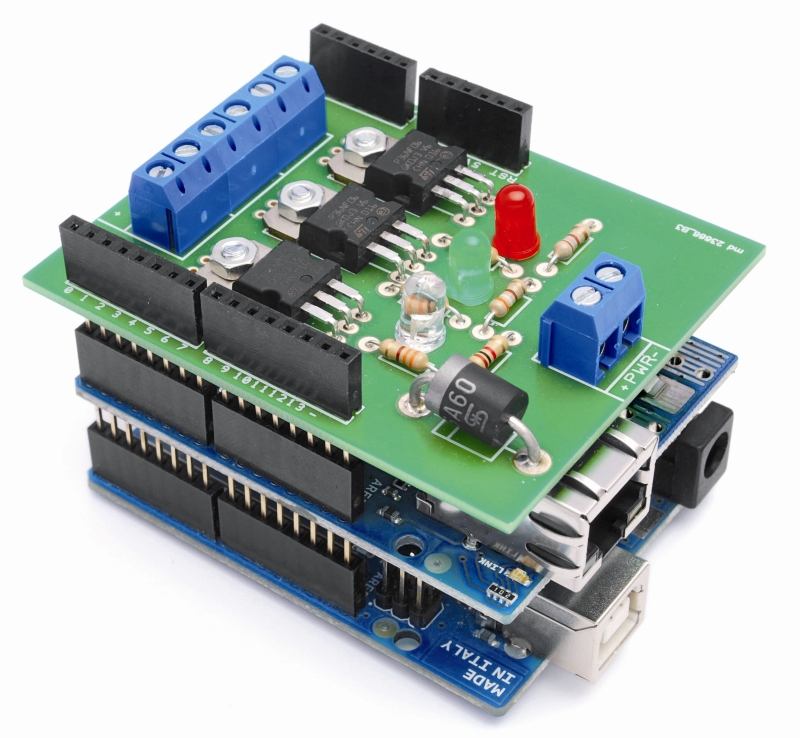
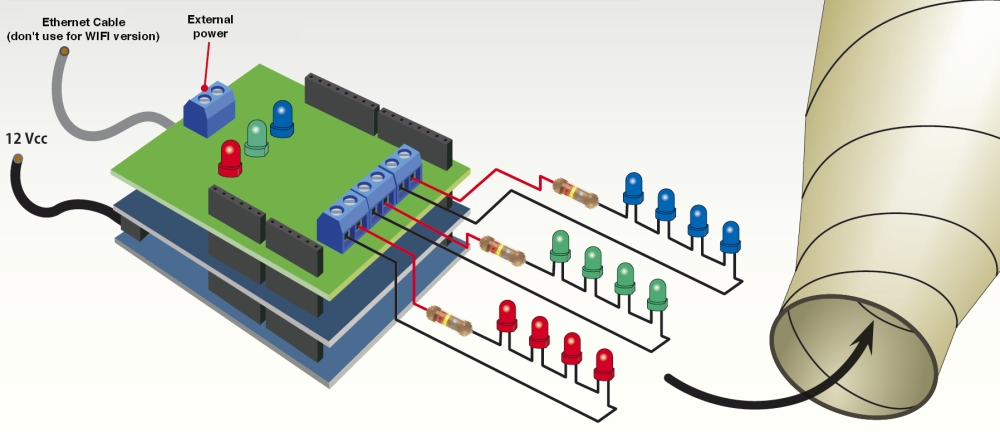
The system that we propose is based on the Arduino UNO, on which are mounted two shield: the Ethernet or WIFI Shield, which provides the connection to LAN, and the RGB shield which mounts three power drivers to control the LED strip.
In Arduino must be loaded different sketch depending of the type of connection you choose (Ethernet or WiFi). The sketch allows you to manage communication via LAN and create a web interface (which will come to those who try to access via a local network) and run the commands received.
Arduino is like a web server, an HTML page is showed through a browser, by introducing into the address bar the IP address corresponding to the ethernet/WIFI shield.
This means that the lamp can be turned on and controlled by any device on the network or remotely via the Internet. The web page shows the current setting of R, G, B of the lamp and allows you to edit them.


The shield RGB
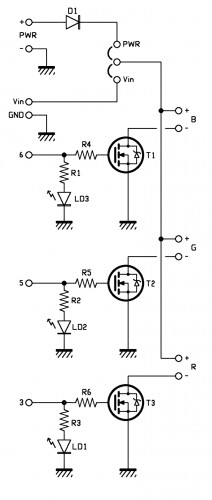
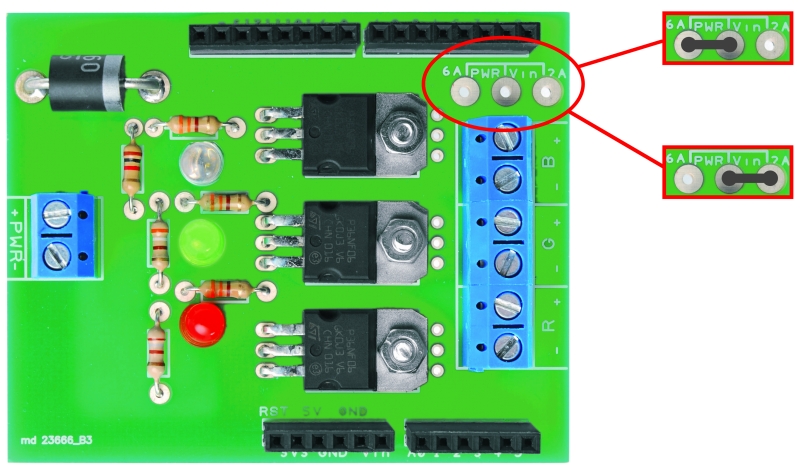
Arduino controls the LED channels by a shield very simple, containing three MOSFET enhancement-mode n-channel type P36NF06; each MOSFET is driven on the gate, through a resistor, with the logic signal that Arduino sends. To be precise, pin 3 controls T3 (red), pin 5 controls T2 (green) and pin 6 controls T1 (blue), each line has a status LED, polarized by a limiting resistor (LEDs indicate how it is behaving this channel). Note that Arduino controls the individual transistors by PWM signals, which duty cycle determines the presence and intensity of a certain color; more precisely, the width of the pulses can changes from a minimum to a maximum to decide how much light should be the group of LEDs of the respective color.

The drain of each MOSFET controls the load which must be connected with the anode to the positive line of the common power supply (+); for each channel there is a connector with a positive contact (goes on line common) and a negative (corresponding to the respective drain MOSFET).
We have provided the possibility to power the LEDs in two ways: with the power drawn by Arduino contact Vin (in which case you should close the jumper on Vin) or with a voltage supplied to the terminal PWR (PWR jumper closed on), you can opt for the first solution if you think your lamps absorbs less than 1.5 amps, but if you need more power you have give power apart from the shield, with a suitable power supply.
Note that by closing the jumper on Vin, the Arduino must be supplied at 12 V with a power supply capable of delivering all the current required.


R1: 1 kohm
R2: 390 ohm
R3: 180 ohm
R4: 330 ohm
R5: 330 ohm
R6: 330 ohm

T1: STP36NE06
T2: STP36NE06
T3: STP36NE06

LD1: Led 5 mm blue
LD2: Led 5 mm green
LD3: Led 5 mm red

D1: 6A600

- Screw a 2

R1: 1 kohm
R2: 390 ohm
R3: 180 ohm
R4: 330 ohm
R5: 330 ohm
R6: 330 ohm

T1: STP36NE06
T2: STP36NE06
T3: STP36NE06

LD1: Led 5 mm blu (510LB7C)
LD2: Led 5 mm verde
LD3: Led 5 mm rosso

D1: 6A600

Varie:
- Screw 2 via(4 pz.)
- Strip M/F 6 via (2 pz.)
- Strip M/F 8 via (2 pz.)

The sketch

/* IKEA Dudero mods WIFI Version

 created 2011
 by Boris Landoni

 This example code is in the public domain.

http://www.open-electronics.org

http://www.futurashop.it

http://blog.elettronicain.it/

 */

// Inclusione Libreria per Server Web WiFi
#include <WiServer.h>
#include <avr/pgmspace.h>
#include <EEPROM.h>

int red = 3;    // RED LED connected to PWM pin 3
int green = 5;    // GREEN LED connected to PWM pin 5
int blue = 6;    // BLUE LED connected to PWM pin 6
int r=50; int g=100; int b=150;
int rup; int gup; int bup;
int fader=0;
int inc=10;
String inString = String(50);
char buffer[160]; // make sure this is large enough for the largest string it must hold

// Definizione Parametri Rete Wireless
#define WIRELESS_MODE_INFRA	1  // Infrastrutturata (basata su Access Point)
#define WIRELESS_MODE_ADHOC	2  // Ad-hoc (senza Access Point)

unsigned char local_ip[] = {192, 168, 0, 89};      // Indirizzo IP
unsigned char gateway_ip[] = {192, 168, 0, 254};	    // Indirizzo gateway IP
unsigned char subnet_mask[] = {255, 255, 255, 0};   // Subnet Mask
const prog_char ssid[] PROGMEM = {"AP_FES"};	    // SSID access point

// Selezione tipo di cifratura rete Wireless
unsigned char security_type = 3;  // 0 -> nessuna cifratura
                                  // 1 -> cifratura WEP
                                  // 2 -> cifratura WPA
                                  // 3 -> cifratura WPA2

// Password cifratura per WPA/WPA2 (max. 64 cratteri)
const prog_char security_passphrase[] PROGMEM = {"12345678"};

// Password cifratura per WEP 128-bit keys
prog_uchar wep_keys[] PROGMEM = {0x01, 0x02, 0x03, 0x04, 0x05, 0x06, 0x07, 0x08, 0x00, 0x00, 0x00, 0x00, 0x00,
				 0x00, 0x00, 0x00, 0x00, 0x00, 0x00, 0x00, 0x00, 0x00, 0x00, 0x00, 0x00, 0x00,
				 0x00, 0x00, 0x00, 0x00, 0x00, 0x00, 0x00, 0x00, 0x00, 0x00, 0x00, 0x00, 0x00,
				 0x00, 0x00, 0x00, 0x00, 0x00, 0x00, 0x00, 0x00, 0x00, 0x00, 0x00, 0x00, 0x00};

// Selezione tipo di rete Wireless infrastrutturata
unsigned char wireless_mode = WIRELESS_MODE_INFRA;

// Variabili per lunghezza SSID e password di cifratura
unsigned char ssid_len;
unsigned char security_passphrase_len;

prog_char string_0[] PROGMEM  = "<html><head><title>Boris's Project</title></head><script language=\"javascript\"> var alphaStr = \"0123456789ABCDEF\";";
prog_char string_1[] PROGMEM  = "var alphaArr = [\"0\",\"1\",\"2\",\"3\",\"4\",\"5\",\"6\",\"7\",\"8\",\"9\",\"A\",\"B\",\"C\",\"D\",\"E\",\"F\"]; var RGB = [";
prog_char string_2[] PROGMEM  = "];function pulsRED(){document.bgColor='#FF0000';RGB = [255,0,0]}function pulsGRE(){document.bgColor='#00FF00';RGB = [0,255,0]}";
prog_char string_3[] PROGMEM  = "function pulsBLU(){document.bgColor='#0000FF';RGB = [0,0,255]}function pulsYEL(){document.bgColor='#FFFF00';RGB = [255,255,0]}";
prog_char string_4[] PROGMEM  = "function pulsPIN(){document.bgColor='#FF00FF';RGB = [255,0,255]}function pulsCEL(){document.bgColor='#00FFFF';RGB = [0,255,255]}";
prog_char string_5[] PROGMEM  = "function pulsWHI(){document.bgColor='#FFFFFF';RGB = [255,255,255]}";
prog_char string_6[] PROGMEM  = " ";
prog_char string_7[] PROGMEM  = "function HEX_from_RGB(){document.bgColor = '#' + DEC_to_HEX(RGB[0]) + DEC_to_HEX(RGB[1]) + DEC_to_HEX(RGB[2]);}";
prog_char string_8[] PROGMEM  = "function adjRED(incr){	RGB[0] += incr;	if (RGB[0] > 255) RGB[0] = 255;	if (RGB[0] < 0) RGB[0] = 0;}";
prog_char string_9[] PROGMEM  = "function adjGRN(incr)	{RGB[1] += incr;if (RGB[1] > 255) RGB[1] = 255;	if (RGB[1] < 0) RGB[1] = 0;}";
prog_char string_10[] PROGMEM  = "function adjBLU(incr)	{RGB[2] += incr;if (RGB[2] > 255) RGB[2] = 255;	if (RGB[2] < 0) RGB[2] = 0;}";
prog_char string_11[] PROGMEM = "function setRED(r) { RGB[0] = r; } function setGRN(g) { RGB[1] = g; } function setBLU(b) { RGB[2] = b; }";
prog_char string_12[] PROGMEM = "function newRGB() { HEX_from_RGB(); } </script> <script language=\"javascript\"> var i_a; ";
prog_char string_13[] PROGMEM = "function DEC_to_HEX(dec) {var n_ = Math.floor(dec / 16); var _n = dec - n_ * 16; return alphaArr[n_] + alphaArr[_n];	}";
prog_char string_14[] PROGMEM = "function HEX_to_DEC(hex){var n_ = alphaStr.indexOf(hex.substring(0,1)); var _n = alphaStr.indexOf(hex.substring(1,2)); return n_ * 16 + _n;	}";
prog_char string_15[] PROGMEM = "function updateFields(){var d = document.colForm;d.r.value = RGB[0];	d.g.value = RGB[1];	d.b.value = RGB[2];	}";
prog_char string_16[] PROGMEM = "function setRGB(){var d = document.colForm; var R = d.r.value;	var G = d.g.value;	var B = d.b.value;";
prog_char string_17[] PROGMEM = "setRED(parseInt(R));	setGRN(parseInt(G));	setBLU(parseInt(B));	newRGB(); updateFields();} </script>";
prog_char string_18[] PROGMEM = "</head><body><center><form method=GET, name=\"colForm\"><h1>The INTERNET RGB LAMP</h1> <table> <tr> <td valign=\"top\"> <input type=\"text\" name=\"r\"> ";
prog_char string_19[] PROGMEM = "<input type=\"text\" name=\"g\"> <input type=\"text\" name=\"b\"> <input type=\"button\" value=\"Calculate\" onclick=\"setRGB();\">";
prog_char string_20[] PROGMEM = " </td></tr> <tr><td><CENTER><input type=\"button\" class=\"tweak\" value=\"Red+\" onclick=\"adjRED(i_a);newRGB();updateFields();\">";
prog_char string_21[] PROGMEM = "<input type=\"button\" class=\"tweak\" value=\"Green+\" onclick=\"adjGRN(i_a);newRGB();updateFields();\"><input type=\"button\" class=\"tweak\" value=\"Blue+\"";
prog_char string_22[] PROGMEM = "onclick=\"adjBLU(i_a);newRGB();updateFields();\"> <select name=\"inc\" onchange=\"i_a = parseInt(document.colForm.inc.options";
prog_char string_23[] PROGMEM = "[document.colForm.inc.selectedIndex].value);\"> <option value=\"1\"";//selected
prog_char string_24[] PROGMEM = ">inc/speed = 1x <option value=\"5\"";
prog_char string_25[] PROGMEM = ">inc/speed = 5x <option value=\"10\"";
prog_char string_26[] PROGMEM = ">inc/speed = 10x <option value=\"25\"";
prog_char string_27[] PROGMEM = ">inc/speed = 25x <option value=\"50\"";
prog_char string_28[] PROGMEM = ">inc/speed = 50x <option value=\"100\"";
prog_char string_29[] PROGMEM = ">inc/speed = 100x <option value=\"150\"";
prog_char string_30[] PROGMEM = ">inc/speed = 150x <option value=\"200\"";
prog_char string_31[] PROGMEM = ">inc/speed = 200x <option value=\"250\"";
prog_char string_32[] PROGMEM = ">inc/speed = 250x</select><input type=";
prog_char string_33[] PROGMEM = "\"button\" class=\"tweak\" value=\"Red-\" onclick=\"adjRED(0-i_a);newRGB();updateFields();\"><input type=\"button\" class=\"tweak\" value=\"Green-\"";
prog_char string_34[] PROGMEM = "onclick=\"adjGRN(0-i_a);newRGB();updateFields();\"><input type=\"button\" class=\"tweak\" value=\"Blue-\" onclick=\"adjBLU(0-i_a);newRGB();updateFields();\">";
prog_char string_35[] PROGMEM = "</CENTER></td> <tr><td><CENTER>Fader<input type=\"radio\" name=\"fad\" value=\"1\"";
prog_char string_36[] PROGMEM = "/> On<input type=\"radio\" name=\"fad\" value=\"0\" ";
prog_char string_37[] PROGMEM = "/> Off</CENTER></td></tr> </tr></td> </tr> <input type=\"submit\" style=\" width:80;height:44px;background-color:FF0000;\" onclick=\"pulsRED();updateFields();\";>";
prog_char string_38[] PROGMEM = "<input type=\"submit\" style=\" width:80;height:44px;background-color:00FF00;\" onclick=\"pulsGRE();updateFields();\";>";
prog_char string_39[] PROGMEM = "<input type=\"submit\" style=\" width:80;height:44px;background-color:0000FF;\" onclick=\"pulsBLU();updateFields();\";>";
prog_char string_40[] PROGMEM = "<input type=\"submit\" style=\" width:80;height:44px;background-color:FFFF00;\" onclick=\"pulsYEL();updateFields();\";>";
prog_char string_41[] PROGMEM = "<input type=\"submit\" style=\" width:80;height:44px;background-color:FF00FF;\" onclick=\"pulsPIN();updateFields();\";>";
prog_char string_42[] PROGMEM = "<input type=\"submit\" style=\" width:80;height:44px;background-color:00FFFF;\" onclick=\"pulsCEL();updateFields();\";>";
prog_char string_43[] PROGMEM = "<input type=\"submit\" style=\" width:80;height:44px;background-color:FFFFFF;\" onclick=\"pulsWHI();updateFields();\";>";
prog_char string_44[] PROGMEM = "<tr><td><CENTER><input type=\"submit\" value=\"Set colors\"></CENTER></td></tr>   ";
prog_char string_45[] PROGMEM = "</table> </form> <script language=\"javascript\">newRGB(); updateFields(); ";
prog_char string_46[] PROGMEM = "i_a = parseInt(document.colForm.inc.options[document.colForm.inc.selectedIndex].value);</script>";
prog_char string_47[] PROGMEM = "<font size= 2>Powered by Open-Electronics.org - Boris Landoni</font>"; //please don't remove  ";
prog_char string_48[] PROGMEM  = "<br></center></body></html>";
prog_char string_49[] PROGMEM  = "";
prog_char string_50[] PROGMEM  = "";
prog_char string_51[] PROGMEM  = "";

PROGMEM const char *string_table[] = // change "string_table" name to suit
{
string_0,
string_1,
string_2,
string_3,
string_4,
string_5,
string_6,
string_7,
string_8,
string_9,
string_10,
string_11,
string_12,
string_13,
string_14,
string_15,
string_16,
string_17,
string_18,
string_19,
string_20,
string_21,
string_22,
string_23,
string_24,
string_25,
string_26,
string_27,
string_28,
string_29,
string_30,
string_31,
string_32,
string_33,
string_34,
string_35,
string_36,
string_37,
string_38,
string_39,
string_40,
string_41,
string_42,
string_43,
string_44,
string_45,
string_46,
string_47,
string_48,
string_49,
string_50,
string_51
};

void setup()
{
  // start the Ethernet connection and the server:
// Inizializzo WiServer (Gestione_Richieste_Web per creare/trasmettere pagine HTML)
      WiServer.init (Gestione_Richieste_Web);
      // Inizializzo porta seriale
      Serial.begin (9600);
      WiServer.enableVerboseMode (false);

      Serial.println("Serial READY");
      Serial.println("WiFi READY");
      Serial.println("Server READY");

      r = EEPROM.read(1);
      g = EEPROM.read(2);
      b = EEPROM.read(3);
      inc = EEPROM.read(4);
      fader = EEPROM.read(5);
} 

void loop()  { 

    // Avvio WiServer
  WiServer.server_task();

  delay(10);

  if (fader==1){
    funcfader();
  }

}

// Gestione diverse richieste provenienti dal WEB
// INPUT:   URL pagina web richiesta
// OUTPUT:  Flag URL riconosciuto/non riconosciutoo
boolean Gestione_Richieste_Web (char* URL) {
  Serial.print("Richiesta Web - URL->");
  Serial.println(URL); 

  // Se URL richiesto corrisponde a "/" (pagina index)
  if (strcmp (URL, "/") == 0) {
    // Secondo gli I/O creo e invio le pagine Web
    Serial.println("pagina index");
    printWebPage();

    // Ritorno URL è stato riconosciuto
    return true;
  }    // Chiusura if URL richieso corrisponde a "/" (pagina index)

  // Se URL richieso corrisponde a "?OPERATION=ACCENDI_ROSSO
  if (strncmp (URL, "/?r=*",4) == 0) {

    Serial.println("pagina operazione"); 

                char colorArr[5];
                String temp="";
                inString=URL;
                Serial.print("inString: ");
                Serial.println(inString);

                int Pos_r = inString.indexOf("r");
                int Pos_g = inString.indexOf("g");
                int Pos_b = inString.indexOf("b");
                int Pos_i = inString.indexOf("inc");
                int Pos_f = inString.indexOf("fad");
                int End = inString.indexOf("HTTP");
                Serial.print("Pos_r: ");
                Serial.println(Pos_r);
                Serial.print("Pos_g: ");
                Serial.println(Pos_g);
                Serial.print("Pos_b: ");
                Serial.println(Pos_b);
                Serial.print("Pos_i: ");
                Serial.println(Pos_i);
                Serial.print("Pos_f: ");
                Serial.println(Pos_f);
                Serial.print("End: ");
                Serial.println(End);
                if(Pos_r>=0){
                   temp=inString.substring((Pos_r+2), (Pos_g-1));
                   temp.toCharArray(colorArr, 5);
                   r=(atoi(colorArr));
                   Serial.print("red: ");
                   Serial.println(r);
                   EEPROM.write(1, r);
                }
                if(Pos_g>=0){
                   temp=inString.substring((Pos_g+2), (Pos_b-1));
                   temp.toCharArray(colorArr, 5);
                   g=(atoi(colorArr));
                   Serial.print("green: ");
                   Serial.println(g);
                   EEPROM.write(2, g);
                }         

                if(Pos_b>=0){
                   temp=inString.substring((Pos_b+2), (Pos_i-1));
                   temp.toCharArray(colorArr, 5);
                   b=(atoi(colorArr));
                   Serial.print("blue: ");
                   Serial.println(b);
                   EEPROM.write(3, b);
                }      

                if(Pos_i>=0){
                   temp=inString.substring((Pos_i+4), (Pos_f-1));
                   temp.toCharArray(colorArr, 5);
                   inc=(atoi(colorArr));
                   Serial.print("inc: ");
                   Serial.println(inc);
                   EEPROM.write(4, inc);
                } 

                if(Pos_f>=0){
                   temp=inString.substring((Pos_f+4), (End-1));
                   temp.toCharArray(colorArr, 5);
                   fader=(atoi(colorArr));
                   Serial.print("fader: ");
                   Serial.println(fader);
                   EEPROM.write(5, fader);
                }     

               if ((Pos_r>=0)&&(Pos_g>=0)&&(Pos_b>=0)) {
                 rgb(r,g,b);
               }

    // Secondo gli I/O creo e invio le pagine Web
    printWebPage();

    // Ritorno URL è stato riconosciuto
    return true;
  }    // Chiusura if URL richieso corrisponde a "?OPERATION=ACCENDI_ROSSO"

  // Ritorno URL non riconosciuto
  return false;
}

 void printWebPage2()
{
      int tmp=0;
      Serial.println("printWebPage");
      // send a standard http response header

//      WiServer.print("HTTP/1.1 200 OK");
//      WiServer.print("Content-Type: text/html");
//      WiServer.print();

      //strcpy_P(buffer, (char*)pgm_read_word(&(string_table[0]))); // Necessary casts and dereferencing, just copy.
      //WiServer.print( buffer );
      //Serial.println( buffer );
      for (int i = 0; i < 51; i++)
      {
          //strcpy_P(buffer, (char*)pgm_read_word(&(string_table[i]))); // Necessary casts and dereferencing, just copy.
          //WiServer.print( buffer );
          WiServer.print_P((char*)pgm_read_word(&(string_table[i])));
          //Serial.println( buffer );
          //delay(500);
      }

}          

void printWebPage()
{
      int tmp=0;
      Serial.println("printWebPage");
      // send a standard http response header
      //WiServer.print_P("HTTP/1.1 200 OK");
      //WiServer.print_P("Content-Type: text/html");

      //strcpy_P(buffer, (char*)pgm_read_word(&(string_table[0]))); // Necessary casts and dereferencing, just copy.
      WiServer.print_P((char*)pgm_read_word(&(string_table[0])));
      //Serial.println( buffer );
      for (int i = 1; i < 51; i++)
      {
          /*if (i==9)
          {
              strcpy_P(buffer, (char*)pgm_read_word(&(string_table[i])));  //butto tutto nell'array buffer
              for (tmp=0 ; tmp < sizeof(buffer); tmp++)
              {
                if (buffer[tmp]=='#')
                {
                  //Serial.println( "trovato ##### " ); 

                }

              }
          }
          else
          {
            strcpy_P(buffer, (char*)pgm_read_word(&(string_table[i]))); // Necessary casts and dereferencing, just copy.
          }*/
          //strcpy_P(buffer, (char*)pgm_read_word(&(string_table[i]))); // Necessary casts and dereferencing, just copy.
          WiServer.print_P((char*)pgm_read_word(&(string_table[i])));
          //Serial.println( buffer );
          if (i==1)
          {
            char tmpstr[4];
            WiServer.print( itoa(r,tmpstr,10) );
            //Serial.println( itoa(r,tmpstr,10) );
            WiServer.print( "," );
            //Serial.println("," );
            WiServer.print( itoa(g,tmpstr,10) );
            //Serial.println( itoa(g,tmpstr,10) );
            WiServer.print( "," );
            //Serial.println( "," );
            WiServer.print( itoa(b,tmpstr,10) );
            //Serial.println( itoa(b,tmpstr,10) );
          }

          if (i==23){if (inc==1){WiServer.print("selected");}}
          if (i==24){if (inc==5){WiServer.print("selected");}}
          if (i==25){if (inc==10){WiServer.print("selected");}}
          if (i==26){if (inc==25){WiServer.print("selected");}}
          if (i==27){if (inc==50){WiServer.print("selected");}}
          if (i==28){if (inc==100){WiServer.print("selected");}}
          if (i==29){if (inc==150){WiServer.print("selected");}}
          if (i==30){if (inc==200){WiServer.print("selected");}}
          if (i==31){if (inc==250){WiServer.print("selected");}}

          if (i==35)
          {
            if (fader==1){
              WiServer.print("checked");
            }
          }
          if (i==36)
          {
            if (fader==0){
              WiServer.print("checked");
            }
          }
      }
     Serial.println("FINE printWebPage"); 

}

void funcfader(){
    Serial.println("fader");
    if (rup==1){r+=1;}
    else{r-=1;}
    if (r>=255){rup=0;}
    if (r<=0){rup=1;}

    if (gup==1){g+=1;}
    else{g-=1;}
    if (g>=255){gup=0;}
    if (g<=0){gup=1;}

    if (bup==1){b+=1;}
    else{b-=1;}
    if (b>=255){bup=0;}
    if (b<=0){bup=1;}

    delay(inc*2);
    rgb(r, g, b);
}

void rgb(int r, int g, int b)
{

  Serial.print("RGB: ");
  Serial.print(r);
  Serial.print(" ");
  Serial.print(g);
  Serial.print(" ");
  Serial.print(b);
  if (r>255) r=255;
  if (g>255) g=255;
  if (b>255) b=255;
  if (r<0) r=0;
  if (g<0) g=0;
  if (b<0) b=0;

  analogWrite(red, r);
  analogWrite(green, g);
  analogWrite(blue, b);
}


/* IKEA Dudero mods Ethernet Version

 created 2011
 by Boris Landoni

 This example code is in the public domain.

http://www.open-electronics.org

http://www.futurashop.it

http://blog.elettronicain.it/

 */

#include <SPI.h>
#include <Ethernet.h>
#include <avr/pgmspace.h>
#include <EEPROM.h>

int red = 3;    // RED LED connected to PWM pin 3
int green = 5;    // GREEN LED connected to PWM pin 5
int blue = 6;    // BLUE LED connected to PWM pin 6
int r=50; int g=100; int b=150;
int rup; int gup; int bup;
int fader=0;
int inc=10;
String inString = String(50);
char buffer[160]; // make sure this is large enough for the largest string it must hold

byte mac[] = {  0x90, 0xA2, 0xDA, 0x00, 0x1D, 0x89 };
byte ip[] = { 192,168,0,88 };
byte gateway[] = { 192, 168, 0, 1 };
byte subnet[] = { 255, 255, 255, 0 };

/*

*/

prog_char string_0[] PROGMEM  = "<html><head><title>Boris's Project</title></head><script language=\"javascript\"> var alphaStr = \"0123456789ABCDEF\";";
prog_char string_1[] PROGMEM  = "var alphaArr = [\"0\",\"1\",\"2\",\"3\",\"4\",\"5\",\"6\",\"7\",\"8\",\"9\",\"A\",\"B\",\"C\",\"D\",\"E\",\"F\"]; var RGB = [";
prog_char string_2[] PROGMEM  = "];function pulsRED(){document.bgColor='#FF0000';RGB = [255,0,0]}function pulsGRE(){document.bgColor='#00FF00';RGB = [0,255,0]}";
prog_char string_3[] PROGMEM  = "function pulsBLU(){document.bgColor='#0000FF';RGB = [0,0,255]}function pulsYEL(){document.bgColor='#FFFF00';RGB = [255,255,0]}";
prog_char string_4[] PROGMEM  = "function pulsPIN(){document.bgColor='#FF00FF';RGB = [255,0,255]}function pulsCEL(){document.bgColor='#00FFFF';RGB = [0,255,255]}";
prog_char string_5[] PROGMEM  = "function pulsWHI(){document.bgColor='#FFFFFF';RGB = [255,255,255]}";
prog_char string_6[] PROGMEM  = "";
prog_char string_7[] PROGMEM  = "function HEX_from_RGB(){document.bgColor = '#' + DEC_to_HEX(RGB[0]) + DEC_to_HEX(RGB[1]) + DEC_to_HEX(RGB[2]);}";
prog_char string_8[] PROGMEM  = "function adjRED(incr){	RGB[0] += incr;	if (RGB[0] > 255) RGB[0] = 255;	if (RGB[0] < 0) RGB[0] = 0;}";
prog_char string_9[] PROGMEM  = "function adjGRN(incr)	{RGB[1] += incr;if (RGB[1] > 255) RGB[1] = 255;	if (RGB[1] < 0) RGB[1] = 0;}";
prog_char string_10[] PROGMEM  = "function adjBLU(incr)	{RGB[2] += incr;if (RGB[2] > 255) RGB[2] = 255;	if (RGB[2] < 0) RGB[2] = 0;}";
prog_char string_11[] PROGMEM = "function setRED(r) { RGB[0] = r; } function setGRN(g) { RGB[1] = g; } function setBLU(b) { RGB[2] = b; }";
prog_char string_12[] PROGMEM = "function newRGB() { HEX_from_RGB(); } </script> <script language=\"javascript\"> var i_a; ";
prog_char string_13[] PROGMEM = "function DEC_to_HEX(dec) {var n_ = Math.floor(dec / 16); var _n = dec - n_ * 16; return alphaArr[n_] + alphaArr[_n];	}";
prog_char string_14[] PROGMEM = "function HEX_to_DEC(hex){var n_ = alphaStr.indexOf(hex.substring(0,1)); var _n = alphaStr.indexOf(hex.substring(1,2)); return n_ * 16 + _n;	}";
prog_char string_15[] PROGMEM = "function updateFields(){var d = document.colForm;d.r.value = RGB[0];	d.g.value = RGB[1];	d.b.value = RGB[2];	}";
prog_char string_16[] PROGMEM = "function setRGB(){var d = document.colForm; var R = d.r.value;	var G = d.g.value;	var B = d.b.value;";
prog_char string_17[] PROGMEM = "setRED(parseInt(R));	setGRN(parseInt(G));	setBLU(parseInt(B));	newRGB(); updateFields();} </script>";
prog_char string_18[] PROGMEM = "</head><body><center><form method=GET, name=\"colForm\"><h1>The INTERNET RGB LAMP</h1> <table> <tr> <td valign=\"top\"> <input type=\"text\" name=\"r\"> ";
prog_char string_19[] PROGMEM = "<input type=\"text\" name=\"g\"> <input type=\"text\" name=\"b\"> <input type=\"button\" value=\"Calculate\" onclick=\"setRGB();\">";
prog_char string_20[] PROGMEM = " </td></tr> <tr><td><CENTER><input type=\"button\" class=\"tweak\" value=\"Red+\" onclick=\"adjRED(i_a);newRGB();updateFields();\">";
prog_char string_21[] PROGMEM = "<input type=\"button\" class=\"tweak\" value=\"Green+\" onclick=\"adjGRN(i_a);newRGB();updateFields();\"><input type=\"button\" class=\"tweak\" value=\"Blue+\"";
prog_char string_22[] PROGMEM = "onclick=\"adjBLU(i_a);newRGB();updateFields();\"> <select name=\"inc\" onchange=\"i_a = parseInt(document.colForm.inc.options";
prog_char string_23[] PROGMEM = "[document.colForm.inc.selectedIndex].value);\"> <option value=\"1\"";//selected
prog_char string_24[] PROGMEM = ">inc/speed = 1x <option value=\"5\"";
prog_char string_25[] PROGMEM = ">inc/speed = 5x <option value=\"10\"";
prog_char string_26[] PROGMEM = ">inc/speed = 10x <option value=\"25\"";
prog_char string_27[] PROGMEM = ">inc/speed = 25x <option value=\"50\"";
prog_char string_28[] PROGMEM = ">inc/speed = 50x <option value=\"100\"";
prog_char string_29[] PROGMEM = ">inc/speed = 100x <option value=\"150\"";
prog_char string_30[] PROGMEM = ">inc/speed = 150x <option value=\"200\"";
prog_char string_31[] PROGMEM = ">inc/speed = 200x <option value=\"250\"";
prog_char string_32[] PROGMEM = ">inc/speed = 250x</select><input type=";
prog_char string_33[] PROGMEM = "\"button\" class=\"tweak\" value=\"Red-\" onclick=\"adjRED(0-i_a);newRGB();updateFields();\"><input type=\"button\" class=\"tweak\" value=\"Green-\"";
prog_char string_34[] PROGMEM = "onclick=\"adjGRN(0-i_a);newRGB();updateFields();\"><input type=\"button\" class=\"tweak\" value=\"Blue-\" onclick=\"adjBLU(0-i_a);newRGB();updateFields();\">";
prog_char string_35[] PROGMEM = "</CENTER></td> <tr><td><CENTER>Fader<input type=\"radio\" name=\"fad\" value=\"1\"";
prog_char string_36[] PROGMEM = "/> On<input type=\"radio\" name=\"fad\" value=\"0\" ";
prog_char string_37[] PROGMEM = "/> Off</CENTER></td></tr> </tr></td> </tr> <input type=\"submit\" style=\" width:80;height:44px;background-color:FF0000;\" onclick=\"pulsRED();updateFields();\";>";
prog_char string_38[] PROGMEM = "<input type=\"submit\" style=\" width:80;height:44px;background-color:00FF00;\" onclick=\"pulsGRE();updateFields();\";>";
prog_char string_39[] PROGMEM = "<input type=\"submit\" style=\" width:80;height:44px;background-color:0000FF;\" onclick=\"pulsBLU();updateFields();\";>";
prog_char string_40[] PROGMEM = "<input type=\"submit\" style=\" width:80;height:44px;background-color:FFFF00;\" onclick=\"pulsYEL();updateFields();\";>";
prog_char string_41[] PROGMEM = "<input type=\"submit\" style=\" width:80;height:44px;background-color:FF00FF;\" onclick=\"pulsPIN();updateFields();\";>";
prog_char string_42[] PROGMEM = "<input type=\"submit\" style=\" width:80;height:44px;background-color:00FFFF;\" onclick=\"pulsCEL();updateFields();\";>";
prog_char string_43[] PROGMEM = "<input type=\"submit\" style=\" width:80;height:44px;background-color:FFFFFF;\" onclick=\"pulsWHI();updateFields();\";>";
prog_char string_44[] PROGMEM = "<tr><td><CENTER><input type=\"submit\" value=\"Set colors\"></CENTER></td></tr>   ";
prog_char string_45[] PROGMEM = "</table> </form> <script language=\"javascript\">newRGB(); updateFields(); ";
prog_char string_46[] PROGMEM = "i_a = parseInt(document.colForm.inc.options[document.colForm.inc.selectedIndex].value);</script>";
prog_char string_47[] PROGMEM = "<font size= 2>Powered by Open-Electronics.org - Boris Landoni</font>"; //please don't remove  ";
prog_char string_48[] PROGMEM  = "<br></center></body></html>";
prog_char string_49[] PROGMEM  = "";
prog_char string_50[] PROGMEM  = "";
prog_char string_51[] PROGMEM  = "";

PROGMEM const char *string_table[] = // change "string_table" name to suit
{
string_0,
string_1,
string_2,
string_3,
string_4,
string_5,
string_6,
string_7,
string_8,
string_9,
string_10,
string_11,
string_12,
string_13,
string_14,
string_15,
string_16,
string_17,
string_18,
string_19,
string_20,
string_21,
string_22,
string_23,
string_24,
string_25,
string_26,
string_27,
string_28,
string_29,
string_30,
string_31,
string_32,
string_33,
string_34,
string_35,
string_36,
string_37,
string_38,
string_39,
string_40,
string_41,
string_42,
string_43,
string_44,
string_45,
string_46,
string_47,
string_48,
string_49,
string_50,
string_51
};

// Initialize the Ethernet server library
// with the IP address and port you want to use
// (port 80 is default for HTTP):
Server server(80);

void setup()
{
  // start the Ethernet connection and the server:
      Serial.begin(9600);
      Ethernet.begin(mac, ip,gateway,subnet);
      server.begin();
      Serial.println("Serial READY");
      Serial.println("Ethernet READY");
      Serial.println("Server READY");
      r = EEPROM.read(1);
      g = EEPROM.read(2);
      b = EEPROM.read(3);
      inc = EEPROM.read(4);
      fader = EEPROM.read(5);
} 

void loop()  {
//  // fade in from min to max in increments of 5 points:
//  for(int fadeValue = 0 ; fadeValue <= 255; fadeValue +=5) {
//    // sets the value (range from 0 to 255):
//    //analogWrite(red, fadeValue);
//    // wait for 30 milliseconds to see the dimming effect
//    rgb(fadeValue,fadeValue,fadeValue);
//    delay(30);
//  }
//
//  // fade out from max to min in increments of 5 points:
//  for(int fadeValue = 255 ; fadeValue >= 0; fadeValue -=5) {
//    // sets the value (range from 0 to 255):
//    //analogWrite(red, fadeValue);
//    // wait for 30 milliseconds to see the dimming effect
//    rgb(fadeValue,fadeValue,fadeValue);
//    delay(30);
//  } 

  if (fader==1){
    funcfader();
  }

      Client client = server.available();

      if (client) {
        Serial.println("client");
        // an http request ends with a blank line
        boolean current_line_is_blank = true;
        while (client.connected()) {

          if (client.available()) {

            char c = client.read();
            if (inString.length() < 50) {
            inString.concat(c);

            } 

            if (c == '\n' && current_line_is_blank) {
                char colorArr[5];
                String temp="";
                Serial.print("inString: ");
                Serial.println(inString);

                int Pos_r = inString.indexOf("r");
                int Pos_g = inString.indexOf("g");
                int Pos_b = inString.indexOf("b");
                int Pos_i = inString.indexOf("inc");
                int Pos_f = inString.indexOf("fad");
                int End = inString.indexOf("HTTP");
                Serial.print("Pos_r: ");
                Serial.println(Pos_r);
                Serial.print("Pos_g: ");
                Serial.println(Pos_g);
                Serial.print("Pos_b: ");
                Serial.println(Pos_b);
                Serial.print("Pos_i: ");
                Serial.println(Pos_i);
                Serial.print("Pos_f: ");
                Serial.println(Pos_f);
                Serial.print("End: ");
                Serial.println(End);

                if(Pos_r>=0){
                   temp=inString.substring((Pos_r+2), (Pos_g-1));
                   temp.toCharArray(colorArr, 5);
                   r=(atoi(colorArr));
                   Serial.print("red: ");
                   Serial.println(r);
                   EEPROM.write(1, r);
                }
                if(Pos_g>=0){
                   temp=inString.substring((Pos_g+2), (Pos_b-1));
                   temp.toCharArray(colorArr, 5);
                   g=(atoi(colorArr));
                   Serial.print("green: ");
                   Serial.println(g);
                   EEPROM.write(2, g);
                }         

                if(Pos_b>=0){
                   temp=inString.substring((Pos_b+2), (Pos_i-1));
                   temp.toCharArray(colorArr, 5);
                   b=(atoi(colorArr));
                   Serial.print("blue: ");
                   Serial.println(b);
                   EEPROM.write(3, b);
                }      

                if(Pos_i>=0){
                   temp=inString.substring((Pos_i+4), (Pos_f-1));
                   temp.toCharArray(colorArr, 5);
                   inc=(atoi(colorArr));
                   Serial.print("inc: ");
                   Serial.println(inc);
                   EEPROM.write(4, inc);
                } 

                if(Pos_f>=0){
                   temp=inString.substring((Pos_f+4), (End-1));
                   temp.toCharArray(colorArr, 5);
                   fader=(atoi(colorArr));
                   Serial.print("fader: ");
                   Serial.println(fader);
                   EEPROM.write(5, fader);
                }     

               if ((Pos_r>=0)&&(Pos_g>=0)&&(Pos_b>=0)) {
                 rgb(r,g,b);
               }
            printWebPage( &client);
            break;
            }
            if (c == '\n') {
            // we're starting a new line
            current_line_is_blank = true;
            } else if (c != '\r') {
            // we've gotten a character on the current line
            current_line_is_blank = false;
            }
          }
        }
        // give the web browser time to receive the data
        delay(1);

        inString = "";
        client.stop();
      }

}

void printWebPage(Client *client)
{
      int tmp=0;
      Serial.println("printWebPage");
      // send a standard http response header
      client->println("HTTP/1.1 200 OK");
      client->println("Content-Type: text/html");
      client->println();

      strcpy_P(buffer, (char*)pgm_read_word(&(string_table[0]))); // Necessary casts and dereferencing, just copy.
      client->println( buffer );
      //Serial.println( buffer );
      for (int i = 1; i < 51; i++)
      {
          /*if (i==9)
          {
              strcpy_P(buffer, (char*)pgm_read_word(&(string_table[i])));  //butto tutto nell'array buffer
              for (tmp=0 ; tmp < sizeof(buffer); tmp++)
              {
                if (buffer[tmp]=='#')
                {
                  //Serial.println( "trovato ##### " ); 

                }

              }
          }
          else
          {
            strcpy_P(buffer, (char*)pgm_read_word(&(string_table[i]))); // Necessary casts and dereferencing, just copy.
          }*/
          strcpy_P(buffer, (char*)pgm_read_word(&(string_table[i]))); // Necessary casts and dereferencing, just copy.
          client->println( buffer );
          if (i==1)
          {
            client->print( r );client->print( "," );client->print( g );client->print( "," );client->print( b );
          }

          if (i==23){if (inc==1){client->print("selected");}}
          if (i==24){if (inc==5){client->print("selected");}}
          if (i==25){if (inc==10){client->print("selected");}}
          if (i==26){if (inc==25){client->print("selected");}}
          if (i==27){if (inc==50){client->print("selected");}}
          if (i==28){if (inc==100){client->print("selected");}}
          if (i==29){if (inc==150){client->print("selected");}}
          if (i==30){if (inc==200){client->print("selected");}}
          if (i==31){if (inc==250){client->print("selected");}}

          if (i==35)
          {
            if (fader==1){
              client->print("checked");
            }
          }
          if (i==36)
          {
            if (fader==0){
              client->print("checked");
            }
          }
//          switch(i){
//
//              case 1:
//                  //itoa (tempC, buffer, 10); client->print( buffer ); Serial.print( buffer ); client->print( "," ); Serial.print( "," ); itoa ((int(tempC * 100) % 100), buffer, 10); client->print( buffer ); Serial.print( buffer ); break;
//              case 2:
//                  //if(digitalRead(rele)) st4=41;
//                  //else st4=42;
//                  //strcpy_P(buffer, (char*)pgm_read_word(&(string_table[st4]))); client->println( buffer ); Serial.println( buffer ); break;
//              case 3:
//                  //strcpy_P(buffer, (char*)pgm_read_word(&(string_table[st6]))); client->println( buffer ); Serial.println( buffer ); break;
//              case 4:
//              case 5:
//              case 6:
//          }
          delay(30);
      }

}

void funcfader(){
    Serial.println("fader");
    if (rup==1){r+=1;}
    else{r-=1;}
    if (r>=255){rup=0;}
    if (r<=0){rup=1;}

    if (gup==1){g+=1;}
    else{g-=1;}
    if (g>=255){gup=0;}
    if (g<=0){gup=1;}

    if (bup==1){b+=1;}
    else{b-=1;}
    if (b>=255){bup=0;}
    if (b<=0){bup=1;}

    delay(inc*2);
    rgb(r, g, b);
}

void rgb(int r, int g, int b)
{

  Serial.print("RGB: ");
  Serial.print(r);
  Serial.print(" ");
  Serial.print(g);
  Serial.print(" ");
  Serial.print(b);
  if (r>255) r=255;
  if (g>255) g=255;
  if (b>255) b=255;
  if (r<0) r=0;
  if (g<0) g=0;
  if (b<0) b=0;

  analogWrite(red, r);
  analogWrite(green, g);
  analogWrite(blue, b);
}


The web page

We conclude seeing the commands and reports available on the web page, there are buttons to issue commands, the option radio to select mode and some boxes where you write parameters. We start from the top, where we find the seven buttons, each relating to a color: each of them set in the lamp the combination of the LEDs R, G and B to obtain the corresponding color; receiving the command Arduino sets its color. Below these buttons are three boxes, with the Calculate button to the right: from left to right, they represent the colors red, green and blue. In each box, you can write, with a number between 0 and 255, the intensity that we have employed the same light, for example, typing 255 in the middle box we illuminate at full intensity green light.
The value in each cell can be varied with the buttons below Red+ Green+ and Blue+ (which increases the light intensity, respectively, red, green and blue) or by Red- Green- and Blue- buttons that reduce the intensity. Clicking on the Calculate button, see what color will obtain, whereas with Set colors send a request for setting the color intensity corresponding to the combination of the three boxes.
The last section of the web page is that of the fader: it is the effect of color change continues, activated by clicking in the option box next to On the same name (Fader) to disable this function you must click Off. By activating the fader, we will see the light of the lamp shades change cyclically from the currently set color, you can also choose between multiple execution speed of the cycle, the drop down menu which is accessed by clicking the middle box inc/speed was above a Fader section.

To build the project

Open Electronics 20 Feb 14:15

Ford sends out OpenXC beta, vehicle-aware apps should be just around the corner

It's six months since Ford partnered with Bug Labs to build OpenXC and now the system is ready for third-party developers to get involved. Rather than following Renault and others down the Android route, OpenXC is a dedicated platform designed to bring together third-party apps and hardware. It comes with an Arduino-based interface module that hooks up to the car's own systems, allowing the software to work with sensors, audio interfaces, safety devices and whatever other add-ons an owner might want to rig up. One app, developed by India's HCL Technologies, is already complete: it sends location updates to selected contacts to warn them if a driver is running late for a meeting. (Finally, Arduino gets to do something useful.)

Ford sends out OpenXC beta, vehicle-aware apps should be just around the corner originally appeared on Engadget on Sat, 18 Feb 2012 02:41:00 EST. Please see our terms for use of feeds.

Permalink | Email this | Comments