We use an Arduino to program other ATmega without bootloader . This technique allows you to use all flash memory for code and make boards using new ATmega, cheaper than those with bootloader.
The qualities that have made the success of Arduino are undoubtedly the open-source software, many libraries, a good hardware and a virtually infinite Reference that explains each possible use of the platform.
But if we use Arduino for a specific use, we can integrate it into a specific circuit and program the micro in a way that performs a single firmware. We may so remove the bootloader and leave to the firmware the entire program memory.
The ATmega328 has 32 Kbytes of flash, that when the chip is mounted on Arduino are not all available, as a portion is reserved to the bootloader, the purpose of which is to communicate with the IDE Arduino to load programs (sketch) to be performed. The same bootloader, on each power on or reset of Arduino, verifies the presence of a sketch in flash memory and executes it. The bootloader occupies a space of 512 bytes, in the case of Arduino UNO.
Well, in a stand-alone application the bootloader no longer needed.
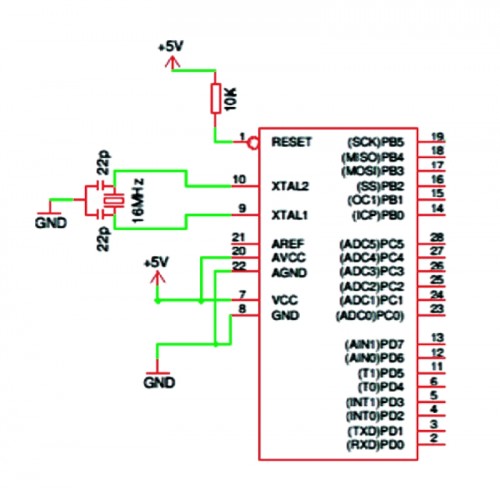
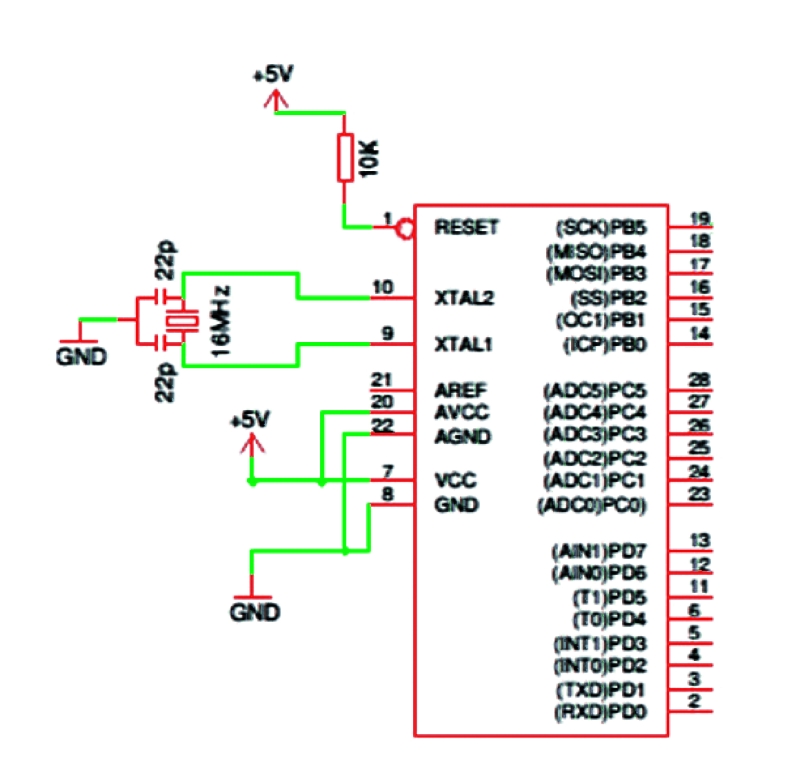
The configuration of the micro ATmega328P needs, in addition to the power (+5 VDC to pins 7 and 20, GND to pins 8 and 22), a 16-MHz crystal between pins 9 and 10, two 22 pF ceramic capacitors from between these pins and GND, a 10 k Ω resistor between pin 1 and +5 VDC for pull-up the reset line.
Programming ATMEGA in stand-alone
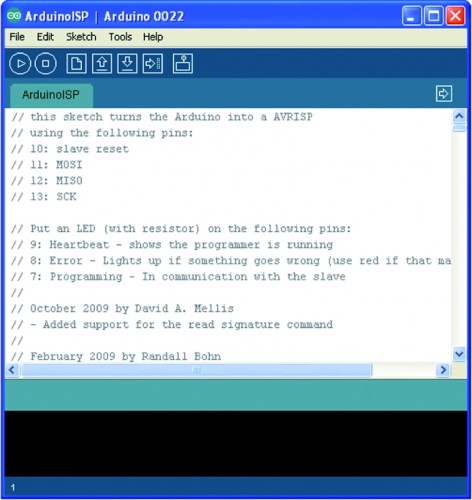
Anyone knows that it is necessary program Arduino uploading a sketch via USB, using the software called IDE and the operation is quite simple.
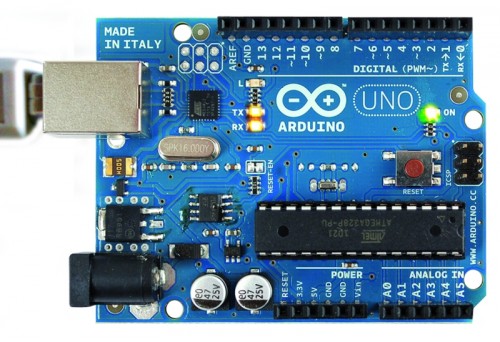
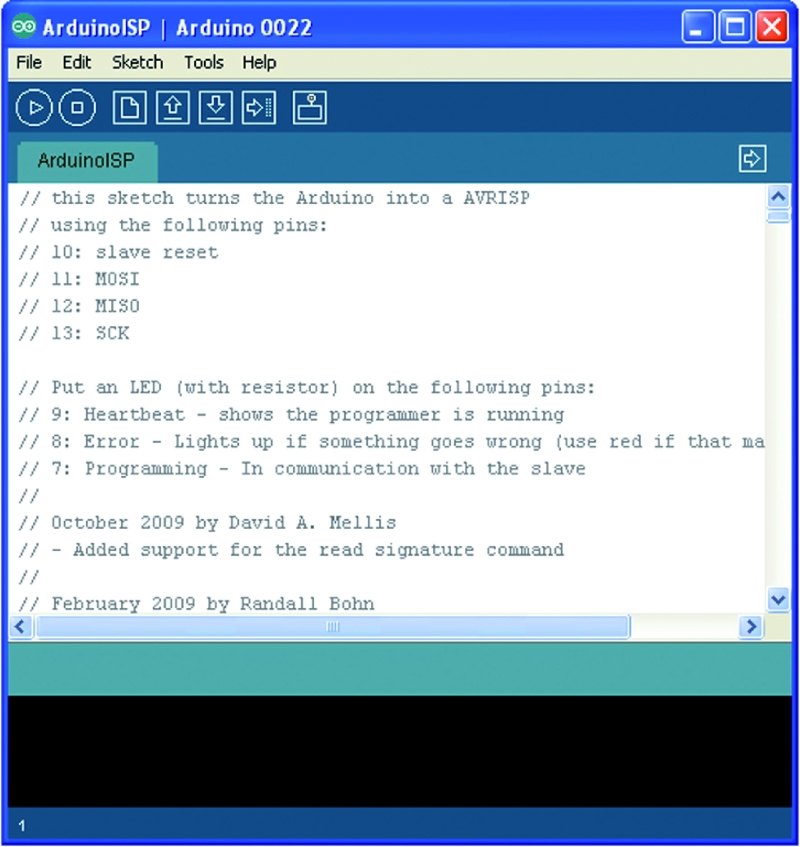
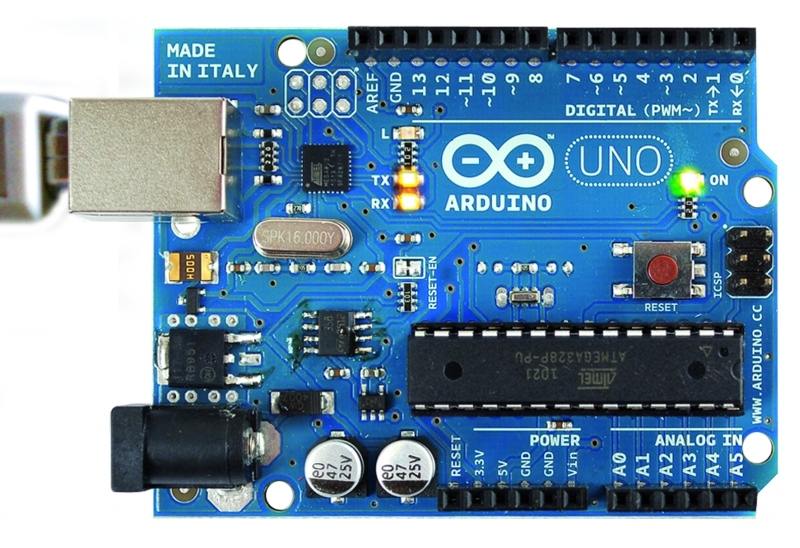
We can see a screenshot of the IDE with an Arduino sketch loaded and UNO during the receipt of the sketch (notice the yellow LED on).
The technique will test allows the use of a board Arduino as ISP Programmer.
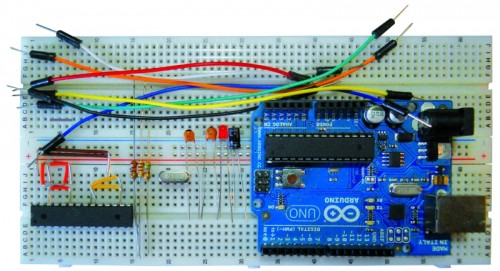
We start with the list of required materials:
• Arduino UNO / Duemilanove (will be used as a programmer);
• ATmega328P chip (chip to be programmed);
• Breadboard and jumper;
• a crystal of 16 MHz, two ceramic capacitors from 22 pF, a resistance of 10 K Ω 1/4 W, a resistance of 560 Ω 1/4 W LED 3 or 5 mm;
• seven male-male jumper wires.
A resistance of 120 Ω 1/4 of watts, and an electrolytic capacitor or tantalum from 10 uF 10 ÷ 16 volts.
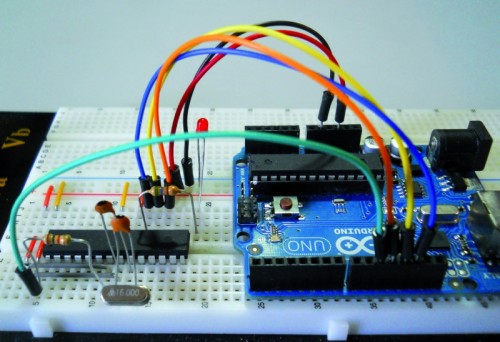
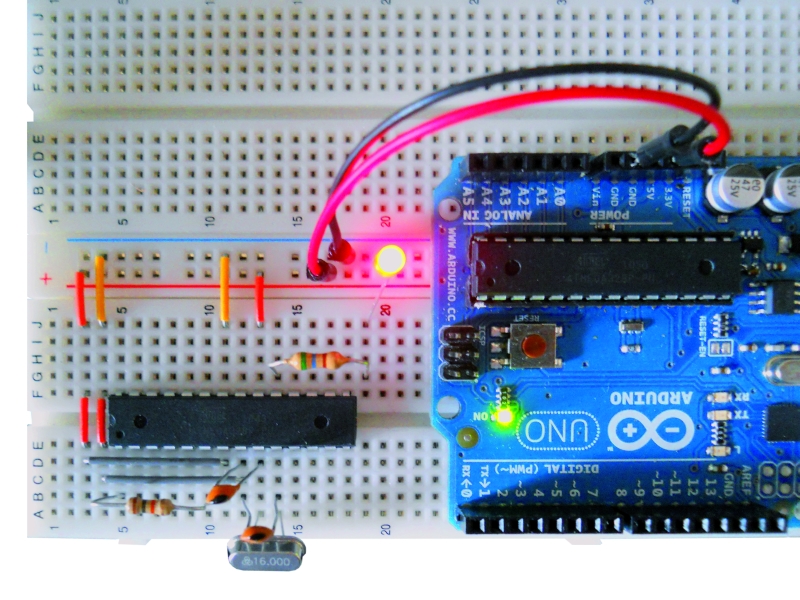
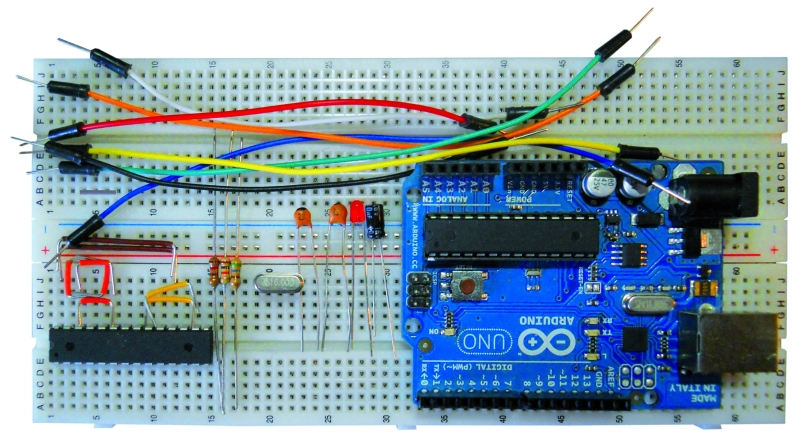
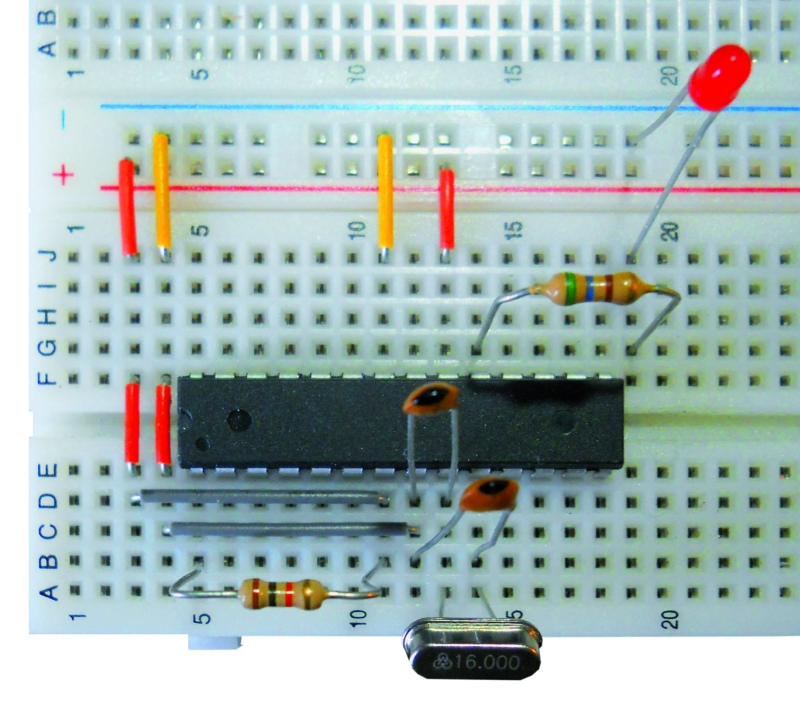
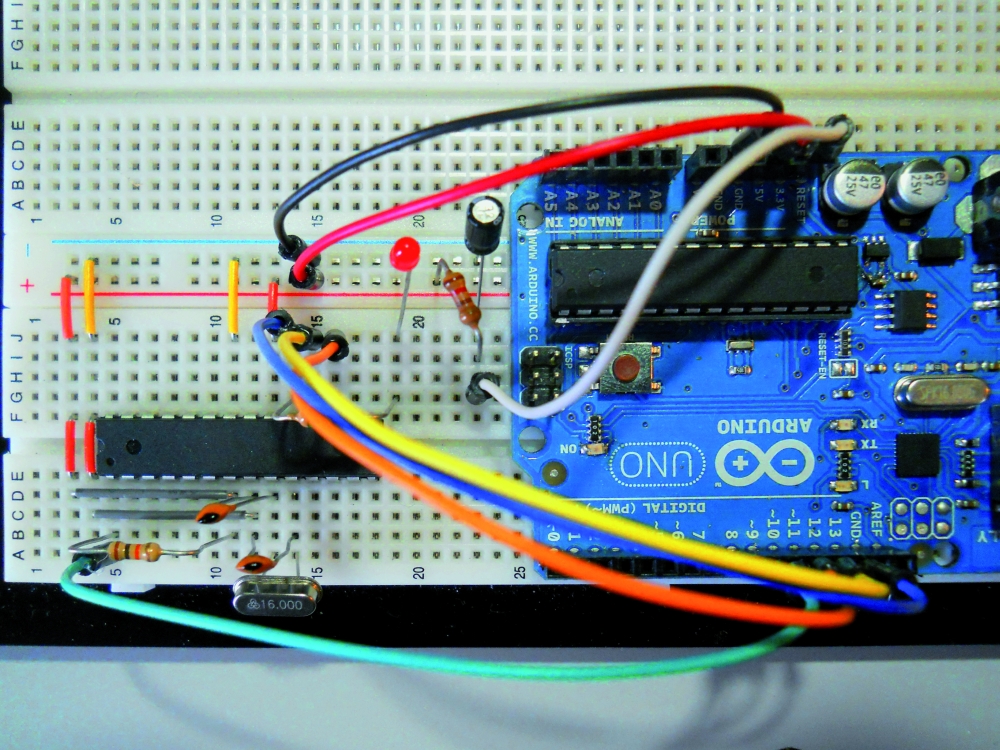
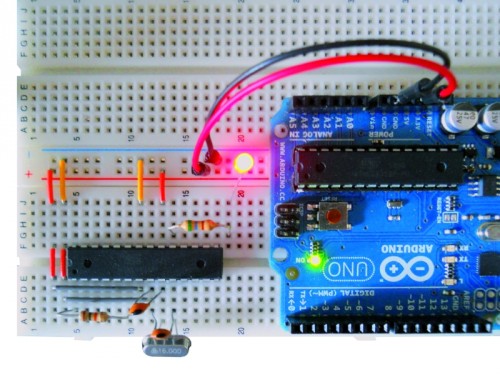
Now we prepare our target circuit and first of all insert the chip on the Breadboard, these are the connections to make:
• through the jumper to be Breadboard connect pins 7 and 20 of the chip to the positive supply line (+5 volts);
• in the same way we connect the pins 8 and 22 of the chip to the ground line supply (GND);
• connect pin 1 of the chip to the +5 V line through the resistor of 10 k Ω;
• insert the crystal to the pins 9 and 10 of the chip;
• insert the two 22 pF ceramic capacitors; both must have a leg connected to GND, while the other will serve to connect a capacitor to pin 9 and the other to pin 10 of the chip;
• insert one end of resistor 560 Ω at the pin 19 and the other end into an empty spot on the breadboard, and to this end we connect the anode LED(the longer pin) , whose other end (cathode) goes to GND;
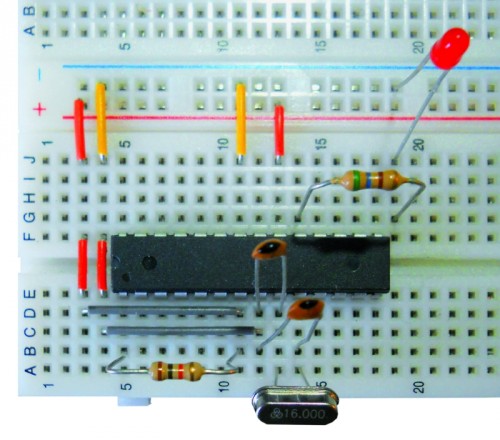
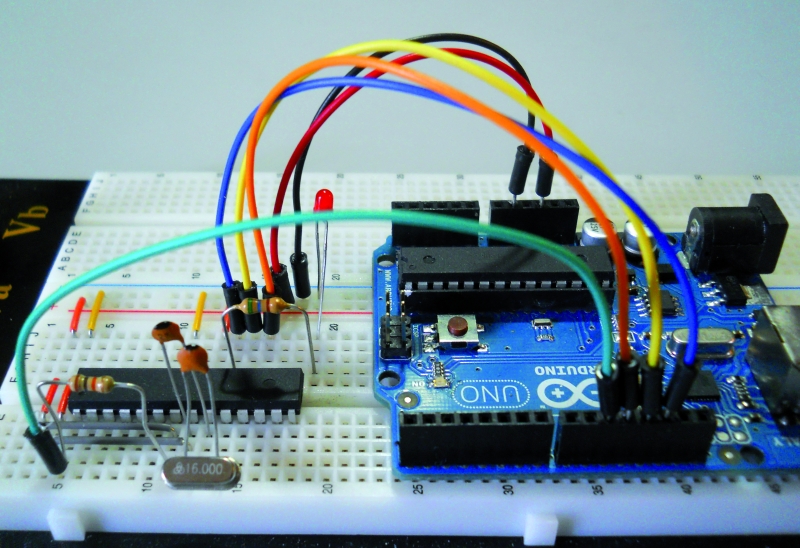
At this point we can connect to the Arduino Breadboard using jumper cables under the following matches:
• Arduino pin 10 goes to pin 1 of the chip;
• Arduino pin 11 goes to pin 17 of the chip;
• pin 12 of Arduino is connected to pin 18 of the chip;
• pin 13 to Arduino pin 19 goes on the chip;
• the +5 V pins of Arduino goes to the positive supply line of the breadboard;
• any of the three GND pin of Arduino goes to the ground line of the breadboard.
Now look the software to reveal the “trick” that sends a sketch, using the IDE, to the chip on the Breadboard, bypassing Arduino that will play the role of Programmer ISP.
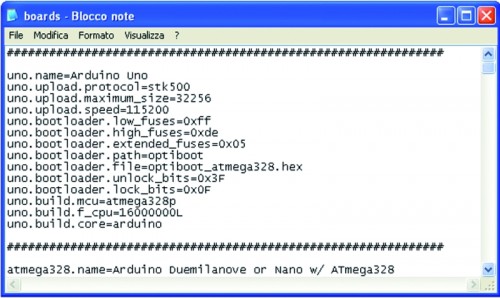
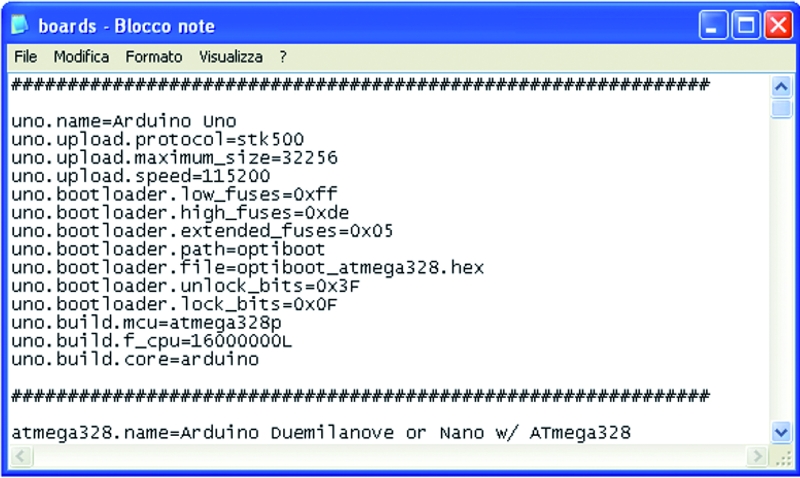
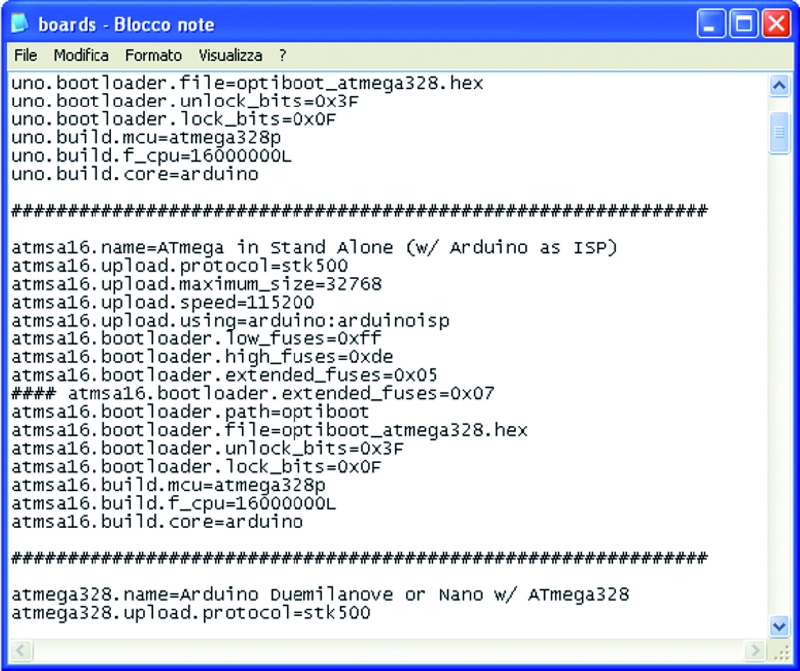
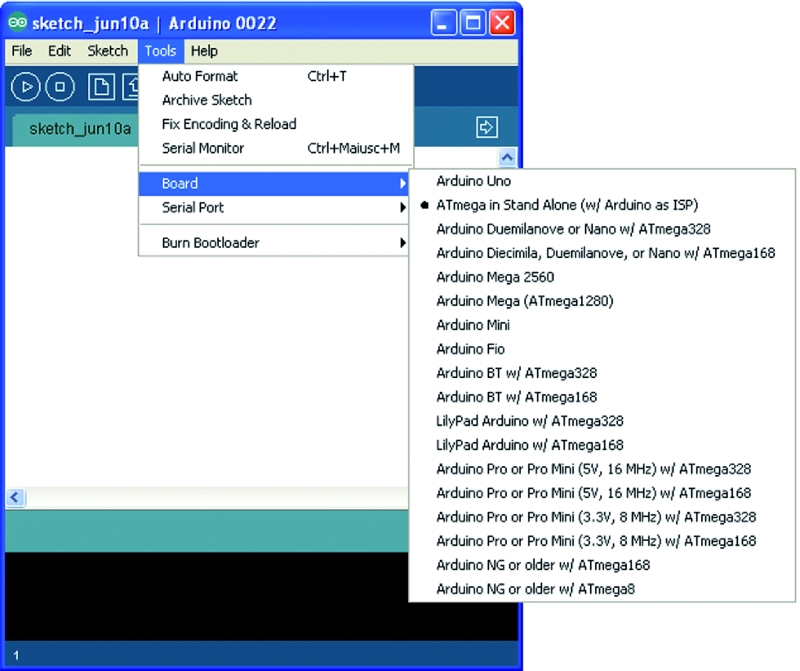
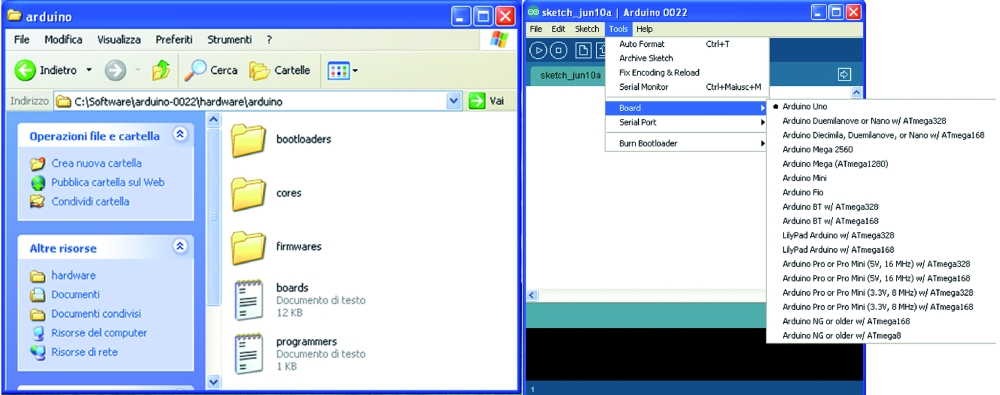
What we need to do is create a virtual board, starting from the original (corresponding to the model we are using Arduino) and making some simple but essential changes. We must first locate the file that is boards.txt containing all information relating to the various boards that the IDE shows us when we execute the command Tools->Board. Typically this file is located in the folder of the IDE software, the path X: \ mypath \ arduino-xxx \ hardware \ arduino, where X is the letter that indicates the logical drive and myPath the folder or location containing the program (xxx indicates the version of the program).
Now open the file with Notepad and see a long series of lines arranged in groups separated by a line consisting of a repetition of the symbol ”#”,each group representing a different board. The lines are identified by the initial code, the same for all, but different for the board, the name that will appear in the submenu Tools->Board is inserted in the first row in the group.
The code is represented by the word “uno” which is at the beginning of each line.
The line containing the word “name” (usually the first) is followed by “=” and then the name that the board will have in the IDE.
Other information that concern us are:
• uno.upload.maximum_size = 32256: Sets the maximum capacity of flash memory that we can use in practice from 32 Kbytes of Flash which has the total ATmega328P we must subtract the space occupied by the bootloader, for the Arduino UNO is 512 byte;
• uno.bootloader.low_fuses = 0xff; uno.bootloader.high_fuses = 0xde; uno.bootloader.extended_fuses = 0×05; these three lines are the “fuse”, are used to set the behavior of the chip and are expressed with hexadecimal values;
• uno.build.f_cpu = 16000000L: This line must correspond to the clock frequency for which the chip has been set, by means of the fused, expressed in Hz, 1 Hz 6,000,000 correspond to 16 MHz, precisely the frequency of the quartz or, more precisely, the present external oscillator to Arduino UNO; this value is used as a reference for timing controls of the software, such as delay () and millis ().
And now we create our own virtual board, writing these lines of code:
atmsa16.name=ATmega in Stand Alone (w/ Arduino as ISP)
atmsa16.upload.protocol=stk500
atmsa16.upload.maximum_size=32768
atmsa16.upload.speed=115200
atmsa16.upload.using=arduino:arduinoisp
atmsa16.bootloader.low_fuses=0xff
atmsa16.bootloader.high_fuses=0xdf
atmsa16.bootloader.extended_fuses=0x05
#### atmsa16.bootloader.extended_fuses=0x07
atmsa16.bootloader.path=optiboot
atmsa16.bootloader.file=optiboot_atmega328.hex
atmsa16.bootloader.unlock_bits=0x3F
atmsa16.bootloader.lock_bits=0x0F
atmsa16.build.mcu=atmega328p
atmsa16.build.f_cpu=16000000L
atmsa16.build.core=arduino
Following the approach of the file will separate this group of lines to those of other boards, inserting a line of ”#”.The end result should be:
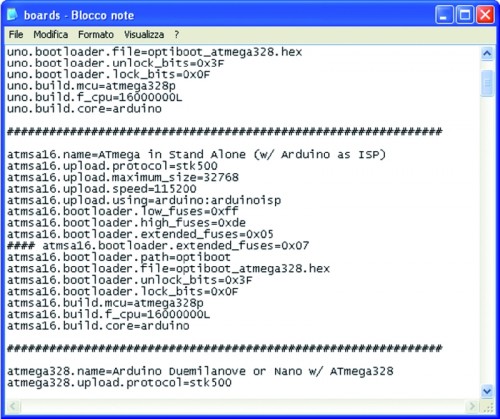
We note that are varied: the code (atmsa16 instead of uno), the maximum_size (brought to its maximum capabilities of Flash, since we do not reserve space for the bootloader), then there a new line (atmsa16.upload.using = arduino: arduinoisp) that allows us to understand the IDE that will program the chip in stand-alone and not on the Arduino. Another new line is preceded by some “# # # #” that disables it, the reason is easily explained: the extended_fuses is set to 0×05, and in some special cases, during the transfer of the sketch could be an error bound the setting of this value.As we shall see later, simply change the following two lines of code:
 <em># # # # Atmsa16.bootloader.extended_fuses = 0x05</em>
<em>atmsa16.bootloader.extended_fuses = 0x0</em>7
thus activating the value 0×07 instead of 0×05, it will work out. Of course, this change should not be made before, but only if you get the error.
Program the micro
At this point we are ready for the final step: send our sketches to the chip mounted on the breadboard and then will test the operation separating it from Arduino.
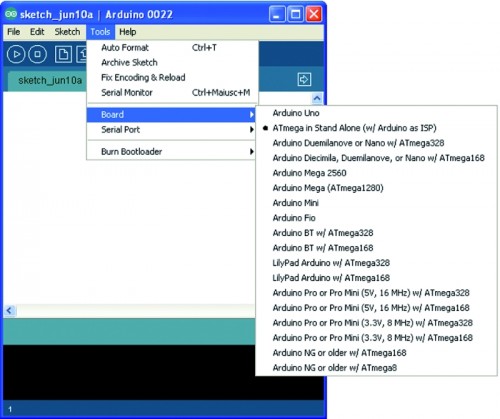
To read the new board in the file, the IDE must be restarted, so if this program was open, when editing the file boards.txt must close it and restart it. To verify that our modification is successful, it is sufficient now run the command Tools->Board and check if there is now our “stand-alone” board, otherwise we should close the IDE and check the file boards.txt, because certainly we made a mistake.
The technique used to send the sketch to the chip in stand-alone mode is very simple: First select the Arduino board that we are using as a programmer (eg Arduino Duemilanove or UNO) , just as we do for normal use of Arduino. Then select the Arduino serial port (the COM for Windows users) and recall from the IDE the sketch ArduinoISP, execute this command by clicking the Upload button on the IDE. After several seconds of the three flashing LEDs and Arduino to the breadboard of course (at the moment is physically connected to pin 13 of Arduino that, as we know, check out one of the three LEDs on the board) on the IDE will come the message “done uploading “.
Arduino is ready to play the role of Programmer ISP, select, now, our board IDE “ATmega Stand Alone (w / Arduino as ISP)“, without changing the COM.
We load the sketch “blink” and execute it again by clicking the Upload button on the IDE: LEDs and Arduino breadboard flash again, this time for a much shorter period, after which the IDE will show the message again “Done uploading”.
So our ATmega328P chip was programmed without having to physically fit on Arduino and now lives its own life. It is then ready to be mounted in the circuit which it is intended.
Of course, the chip can be reprogrammed at will with any kind of sketch.
Troubleshooting
At this point we have to solve three types of problem that may occur when we send the sketch to the chip stand-alone. The problems of’extended_fuses and of autoreset may occur on either Arduino Duemilanove or Arduino UNO, without that you can establish a certain rule.We must also emphasize that the remedies that will illustrate to 100% solve the problems, but must be applied only if the problem occurs.
We start from the situation that may occur if we use a blank chip, the Atmel set the fuse to make the chip work at 1 MHz with the internal oscillator. If we send a sketch directly, happens that the chip in stand-alone ignores the external crystal and times will be staggered: for example, the LED blink with the sketch will last about 16 seconds instead of 1 second. Simply, we set the fuse, the operation can be done easily by loading the bootloader on the chip before sending the sketch.
Before explaining this simple maneuver quickly clarify two points: the bootloader is sent once a chip virgin and will only serve to set the fuse, then it will become useless and the sketch overwrite it, if we had to first load the sketch, noticing the error, and then load the bootloader, no problem: the chip is set and we just have to resubmit the sketch. The simple steps that are going to describe will return very useful for cases where we wanted to prepare a blank chip to work directly on Arduino; is a good idea to have in the house a spare chip with bootloader of our board, so if you were unfortunately damaged the original, a simple substitution solves this problem immediately.
Here are the steps to follow:
• prepare and connect the Breadboard Arduino as discussed previously;
• We open the IDE and select the model we are using Arduino and port to which it is connected;
• upload the sketch ArduinoISP to Arduino;
• now execute the command Tools->Burn Bootloader w / Arduino as ISP;
• After about a minute we loaded into the stand-alone chip the bootloader of Arduino boards (you may have noticed that in the IDE we’ve set our Arduino board).
As mentioned, the chip can be quickly mounted to receive the Arduino sketch, or leave it on the breadboard and repeat/execute the operation of sending the sketch stand-alone, this time the Blink will work perfectly.
Of course, other errors may occur, do not worry, keep reading this section and of course everything will be resolved.
So let the problem of ’extended_fuses: the rows of our virtual board we expected a double value for this cast, because it can happen (even though it is quite rare) that some boards do not succeed in this program merged with the value 0×05. During the upload of the sketch on the chip with stand-alone mode, the IDE will display an error message (written in red on a black background) that will indicate the need to use the value 0×07, if it appears that in practice warning means that we must close the IDE, open the file boards.txt and activate the relevant line, simultaneously disabling the other (with 0×05), as explained above. At this point we can repeat the test. We clarify that if the error occurs on a given board will always occur on this board, so the variation of the files should be done only once and permanently.
And now we see the problem, more frequent, about autoreset. When the serial chip (FT232RL on Duemilanove or ATmega8U2 of UNO) receives a signal from the USB port, sends the reset pulse to ATmega328, who then prepares itself to receive Data. This operation corresponds to the one you make every time you press the button “RESET” on the Arduino.
If the data do not arrive or if the reset was made manually, the sketches in flash memory chip ATmega328 is executed. When Arduino is used as ISP Programmer can happen that, if the autoreset is sent too early, the upload operation fails. In this case the IDE returns the following error: ”avrdude:stk500_getsync (): not in sync: resp = 0×15“.
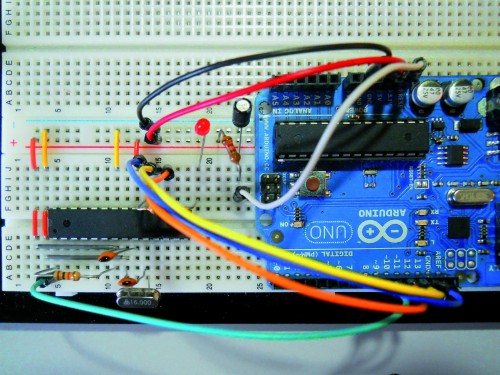
The problem is solved by blocking the Autoreset. The 120 ohm resistance must be connected between the RESET pin of Arduino and +5 V, while the 10µF capacitor is connected with the positive pole to the RESET of Arduino and negative to GND.
With a jumper cable connect on Breadboard the RESET signal of Arduino.
The methods described should be used only if absolutely necessary.
Important note: the need to connect these components only when needed, is dictated by the fact that to load a sketch on the Arduino should autoreset, otherwise the upload will fail and we will get the error avrdude: stk500_getsync (): not in sync: resp = 0×00 – avrdude: stk500_disable (): protocol error, expect = 0×14, resp = 0×51, so if you see this error, know that you just have to “liberate” the pin “RESET” Arduino from the link with the Anti- autoreset.
[Thanks to Michele Menniti]