Posts with «arduino» label

SparkFun launches ProtoSnap MiniBot for the budding roboticist

SparkFun struck a chord with many when it released the ProtoSnap series last year. The perforated perfboard housed not only a tiny Arduino compatible chip, but a small host of sensors and components that made assembling simple projects a snap (pun not only intended, but relished). Tomorrow, the company will begin selling the next member of its ProtSnap family -- the MiniBot. Just like its predecessors, the ProtoSnap MiniBot is based around an Arduino compatible microcontroller (specifically ATmega328) and features a number of components that can easily be detached when you're ready to move from prototype to a more permanent arrangement. The onboard selection components is fairly limited. The base is a relatively bare perfboard with a 9v battery holder on one side and two wheels connected to a motor on the other. Up front is two IR sensors that can be used for basic controls.

Of course, it's simple enough to expand on the basic platform with any host of sensors and components, like servos or RF receivers. Ultimately it's up to your imagination and skill level, which is why SparkFun is primarily targeting the kits at the educational market. The company's new educational outreach program is making a big push to put the ProtoSnap MiniBot in classrooms across the country, starting with high schools and trade schools, as a bridge from more simplistic robotics kits to the more advanced projects tackled at the university level. The completely open source robotics platform will be available tomorrow for $74.95. As soon as we can get our mitts on one our own we'll return with a thorough hands on... one that reveals just how much smarter the average high school kid is than us.

SparkFun launches ProtoSnap MiniBot for the budding roboticist originally appeared on Engadget on Thu, 31 May 2012 16:46:00 EST. Please see our terms for use of feeds.

Permalink | Email this | Comments

Comunikino, an Arduino based communication system

Comunikino is a box, connected to a PC which runs a script in Python.  When receiving a mail, the subject will be printed to its LCD. You can then use one of three Comunikino’s buttons to send a mail back to say “Yes”,  “No” or “Readed”  (this button can also to be used to say: “Hey! I’m thinking of you”).


The project has been developed by Eraticlux, check here the full project.


Arduino Blog 31 May 19:26

Triangle-grid LED display

[Dearmash] put together this RGB LED display using triangles for each pixel. It’s an interesting deviation from the traditional grid layout. There are two video demos after the break. The first is a plasma-style pattern generated in Processing. The second is a spinning color wheel which would be perfect if synchronized with your Photoshop color spinner.

So the physical build is done, and now [Dearmash] is looking for a purpose for the device (isn’t that always the way it happens?). He mentions that the triangular layout looks cool, but makes text display almost impossible. Does anyone have any ideas on how to make this work? Right off the bat we could see side-scrolling a font similar to the Metallica logo’s M and A. Bu there must be some way to group these pixels together into readable characters. If you always use an upward and downward pointed triangle on the same row as a pixel it makes a parallelogram which would be used to display italicization characters.


Filed under: led hacks
Hack a Day 31 May 14:01

Remote shutter module uses LCD screen for setup

Here’s a full-featured remote shutter project which [Pixel-K] just finished. It seems that he’s interested in taking time-lapse images of the cosmos. Since astrophotography happens outside at night, this presented some special design considerations. He wanted something that he could configure in the dark without zapping his night-vision too much. He also wanted it to be easily configured with a pair of gloves on.

The project enclosure is a 4x AA battery box. He removed the partitions between each cell, leaving plenty of room for the guts. Inside you’ll find a lithium battery and a micro-USB recharger board. It powers the Arduino mini pro which drives the 1.8″ LCD screen and actuates the optoisolator which is responsible for triggering the camera. On the right you can see the clear knob of the clickable rotary encoder. All of the user settings are chosen and selected using just this one knob.

He’s already tried it out on a 6-hour shoot and had no battery life problems or other issues.


Filed under: digital cameras hacks

Morse code beacon wins the LayerOne badge hacking contest

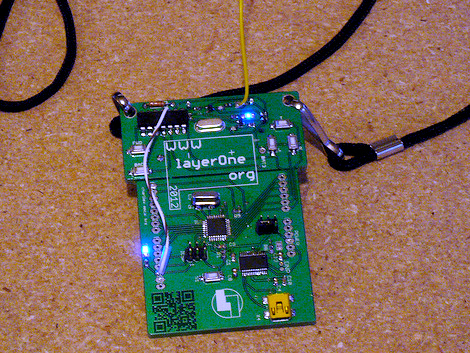
Ham skills prevail in this year’s LayerOne badge hacking contest. [Jason] was the winner with this Morse Code beacon hack.He got a head start on the competition after seeing our preview feature on the badge hardware development. It got him thinking and let him gather his tools ahead of arrival.

The hardware is segregated into two parts of the board. The lower portion is a take on the Arduino, and the upper portion is a wireless transmitter meant to control some cheap RC cars. [Jason] figured this was perfect for conversion as a CW beacon (continuous wave is what Morse Code is called if you’re a ham). The first issue he encountered was getting the badge to play nicely with the Arduino IDE. It was setup to run Slowduino firmware which uses the internal oscillator. [Jason] soldered on his own crystal and reflashed the firmware. He found that the transmitter couldn’t be directly keyed because of the shifting used in the RC car protocol. He cut the power to the transmitter, and found that it could be more accurately keyed by injecting power to one of the other pins. Check out the video after the break for a better explanation of his technique.


Filed under: cons
Hack a Day 30 May 21:01
arduino  badge  beacon  cons  cw  layerone  morse code  

Turn a Pencil Drawing Into a Capacitive Sensor

Alan Chatham of Unojoy wrote an Instructable on using pencil drawings as capacitive sensors:

Did you know? You can make pencil drawings reactive to touch for use with your projects! It’s really easy, and gives you a lot of flexibility in making interfaces for whatever microcontroller project you’re making.

Making a capacitive touch sensor from a drawing via Arduino


MAKE » Arduino 30 May 19:34

DIY burglar alarm system

Make your own DIY motion alarm using an Arduino, a motion sensor, a few wires and headers.

The code can be obtained here.

Oh also, its been featured on Hacker News, so you can read the thread for pleasure!

Via:[Lifehacker]

Arduino Blog 29 May 20:03

Programming your arduino with no physical contact?

This IR based Arduino programmer works from Arduino IDE using ATK500V2 protocol.

Construction details:

For infrared link it uses standard 38kHz modulation – as as in TV remotes. One part of the circuit utilizes FT232RQ module that talks to Arduino IDE. It has a also a circuitry that enables sending and receiving IR signals using IR LED and IR demodulator. Arduino part has also an IR transceiver pair connected to RXD and TXD pins. Arduino bootloader was a bit modified to work as half duplex so the receiver were turned off while transmitting. The only problem remaining is that target board has to be reset manually.

Any hackers in the house to repair that?

Via:[embedds]

Arduino Blog 29 May 19:45

Arduino gets 3G connectivity

Libelium, with its open source hardware division of Cooking Hacks has come out with a new 3G module for arduino.

The new 3G shield for Arduino enables connectivity to high speed WCDMA and HSPA cellular networks allowing transfers up to 7.2Mbps (20 times faster than with GPRS technology). The module also counts with an internal GPS that enables the location of any Arduino both outdoors and indoors, combining standard positioning data from satellites with mobile cell triangulation in the assisted mobile mode (A-GPS).

The new Arduino 3G module also includes a small camera for video recording in high resolution and a complete audio interface that enables Arduino to run with all the functionalities of a smartphone device.

And just to remind our readers about cooking hacks? They were the people who created the XBee shield for arduino.

Further information regarding this new 3G/GPRS module can be found here.

Via:[EMSnow, cooking-hacks, memristor]

Arduino Blog 29 May 19:27
3g  arduino  xbee  

Insert Coin: Modkit Micro asks us if we're ready for six-year-olds coding Arduino boards

In Insert Coin, we look at an exciting new tech project that requires funding before it can hit production. If you'd like to pitch a project, please send us a tip with "Insert Coin" as the subject line.

What does microcontroller programming have in common with Tetris? Quite a bit if you're doing it with Modkit Micro from a Kickstarter project out of Cambridge, MA., which allows almost anyone to visually set up their hardware using graphical blocks to write the code. The partially-hooded trio behind it promises that the software is ideal for use with protyping boards from Arduino, Evil Mad Science, Lilypad, Seeed Studio, Wiring and SparkFun, and they even claim that elementary school students have used it to "take their projects from concept to reality in just a few hours." Purists should have no fear either: you can still get into a code view to see what's going on behind the scenes. A web-based Modkit Micro is being offered online starting June 1st for $25, and there'll be a desktop variant for Windows, OSX, and Linux as early as July if they reach their funding target. Check out the video after the break and then try to get your kids to wait for college before inventing version 2.0 of this.

Continue reading Insert Coin: Modkit Micro asks us if we're ready for six-year-olds coding Arduino boards

Insert Coin: Modkit Micro asks us if we're ready for six-year-olds coding Arduino boards originally appeared on Engadget on Tue, 29 May 2012 10:01:00 EST. Please see our terms for use of feeds.

Permalink | Email this | Comments