Posts with «arduino» label

Music + Floppy = Moppy

Moppy is a musical floppy controller program. By using an Arduino UNO as a translator, you can command an array of floppy drives with a musical keyboard. The head on each floppy drive is controlled by a stepper motor which will put out sounds when driven at the right frequency.


Here is a link to the Moppy project page.

Enjoy your musical floppy drives!


Via:[Hackaday]


Arduino Blog 29 May 12:40
arduino  floppy  hacks  keyboard  music  stepper  

Handy Arduino Uno R3 Pinout Diagram

The original post from Nick Gammon is old, but I’m pretty sure can still be useful.


Check out this handy Arduino R3 pinout diagram and write up from Nick Gammon. He hits a lot of the important points here, and in addition he explains the limits of all the pins and interfaces in the rest of the post. It’s nice to have all this info collected into a single place.

Via:[Adafruit]


Arduino Blog 29 May 09:38

An alternative Language/OS for your Max-32

Did you buy a Digilent Max-32 for the 32 bit processor and the Arduino compatability (these boards are VERY Arduino compat.)

Do you know you have an entire OS including the Basic language available to you for FREE???

See the following website for details on: http://www.cpustick.com/ (StickOS).

(By the way, those with a Uno-32 boards are not left out, you can do the same thing!)

read more

Let's Make Robots 29 May 04:04
arduino  avr  digilent  max-32  os  stickos  

Hipster chandelier

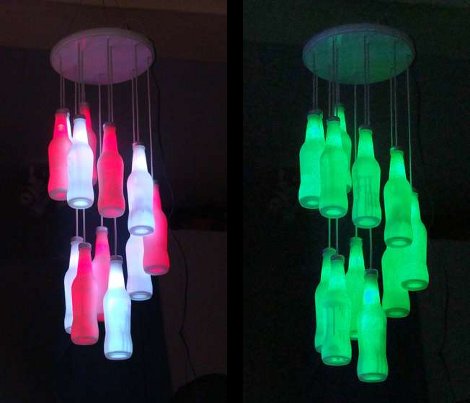
This chandelier is something we’d expect to see on sale in the local gallery store. [Starkec] made it a couple of years back and we just love the look. The materials are pretty common, and you can throw it together in an afternoon.

The diffuser are made from clear glass soda bottles. After removing the labels and giving them a good cleaning, they were each set upside down and sprayed with some glass frosting spray. A four-conductor telephone wire serves both as the support for the bottle and electrical path for the RGB LED inside of each. The original screw cap for the bottles makes it a twist to install them after the soldering is done. There are two common color buses so that alternating colors can be shown at the same time. After seeing the video we think you’ll agree that the wiring scheme makes for some great animated effects.

[Thanks Craig]


Filed under: led hacks
Hack a Day 28 May 19:01
arduino  bottle  chandelier  glass  lamp  led hacks  light  rgb  

Doodle Bot

Primary image

What does it do?

Draws nonsensical pictures

Having one of those days where your too lazy to do anything? Have a robot doodle for you while you sit back in your favorite chair. This is a very simple drawing robot that was actually started by one of our student engineers. I just made the base plate bigger so I could add a third servo to raise and lower the pen.

My base plate is laser cut acrylic but it could easily have been a small food container, CD or a piece of wood. Just use some double sided tape or hotglue to hold it all together.

Cost to build

Embedded video

Finished project

Complete

Number

Time to build

Type

URL to more information

Weight

read more

EasyLights

I was working on my Picaxe 28x2 robot from http://letsmakerobots.com/ and I wanted lights and I needed more sensors. I had four input pins left. With the 28x2 you can make the pins anything that you need. I went back to electronics to find some answers. I looked up shift registers on http://www.jameco.com/ and I bought the latest CD74HC164 serial in parallel out. This is why I made Easy Lights. For two pins you get eight lights. Yes there is a little flicker. It is a shift register. Each time the lights change you have to shift in all eight lights.

read more

Controlling a robot from javascript (g+ hangouts application)

Hi guys

I'm trying to create a google+ hangouts application to let us to control a robot (like magabot, for example), directly from there.

I already created the interface of the application, it is actually pretty simple, if you want to have a look it is hosted here: http://magabot.cc/hangouts/magabot-hangouts/.

read more

An Arduino Based Quadruped Robot

Sure, we see hexapods all the time at [HAD], but moving around with four legs can be more tricky kinematics-wise. This Instructable shows you how to make one out of balsa wood.

Although one might not think of balsa to make their robot out of [vexedpheonix] explains that this was chosen because it’s extremely light and easy to work with. Since he was trying to keep costs down, the cheapest servos available were used. These weren’t all that powerful, so the lighter the body the better! According to the included bill of materials, he was able to keep the entire robot build under $100.

According to the article, the hardest part was making four copies of the same leg. We might suggest using a CNC router, but building one would obviously add a huge layer of complication to the project!

Thanks for the tip on this one [SteveT]! Be sure to check out the video of this little robot waving one of it’s legs or trying to walk after the break!
If you’d rather see a hexapod in action, why not check out this one!


Filed under: arduino hacks, robots hacks

Line robot sensor

Hey guys, i want to build a line following robot and I was scouring ebay for some sensors


I found these but I wasn't sure if they would work, as I haven't done this before. They're pretty cheap.

Let's Make Robots 27 May 05:14
arduino  ir  line  module  picaxe  robot  sensor  

Moppy lets you play your floppy drives

Get ready to join a band. Just follow the guide over at the Moppy project page and you’ll have your very own floppy drive instrument.

The name is a mashup between Musical and Floppy. By using an Arduino UNO as a translator, you can command an array of floppy drives with a musical keyboard (think piano). The head on each floppy drive is controlled by a stepper motor which will put out some sweet sounds if driven at just the right frequency. The lower notes tend to fair a bit better than the high range. One great example of this is the Imperial March theme as heard after the break.

Once you get the base system up and running, it’s time to think of some alternate interfaces. Sure, you can obvious things like toy keyboards. But wouldn’t it be more fun to make it fruit controlled?


Filed under: musical hacks
Hack a Day 26 May 18:01