Posts with «arduino» label

Bike alert tells drivers to back off

Bicycle commuters are often in a battle with drivers for space on the road. [Hammock Boy] does all of his commuting on two human-powered wheels, and is quite interested in not getting hit by a car. He decided to ply his hobby skills to build a device that helps keep him safe. It’s not just a tail light, it’s a sensor that shines brighter the closer a car is to the back of the bike.

The sensor portion is the ultrasonic range finder seen in the center of the protoboard. Surrounding it is a set of LEDs. Each is individually addressable with the whole package controlled by an Arduino. The sketch measures the distance between the back of the bike and whatever’s behind it. If there’s nothing, one Red led is illuminated. If there is an object, the lights shine brighter, and in different patterns as the distance decreases.

Certainly the next iteration could use a standalone chip without the need for the whole Arduino. This could even work with two battery cells and no voltage regulator. We also think the use of any other color than Red LEDs is suspect but we do love the concept.


Filed under: transportation hacks

Arduino Leonardo Pinout Reference

I made this Arduino Leonardo pinout reference for anyone considering building shields for the Leonardo. Please note that shields designed for the UNO, Duemilanove, Diecimila and others will most likely NOT WORK on the Leonardo, because alot of the pin functions have been moved around. This image helps you see some of the differences.

For example, the lower 8 digital pins are no longer all a single port, and many of the pins, with the exception of the RX and TX lines, are moved around. Some of the PWM lines are in the same place, but are now connected to different ports and OC registers than they were before.

On the other hand, you now have access to twice as many ADC pins as you did before, and you don’t have to give up 2 ADCs for I2C. You also get two more low-level interrupt lines and, of course, USB native functionality, which (I personally feel) is exciting!

You can see the full-size image (about 2200×1600) in my Flickr photostream. This pinout was derived from the info found here. The Leonardo image is from the official Arduino Leonardo page.

Happy hacking!

johnginneer 03 Jun 20:13
arduino  

Attiny-Duino or whatever?

Hi geeks ;-)

I am thinking about to shrink some of my projects. That's the deal. I am planning to build a Attiny-Duino.

What would you think about it's usage? For myself I would use it in the Insect bot to reduce the weight, costs and power comsumption.

Starbot

Primary image

What does it do?

Shines toward Spectator

The Starbot is a custom robot made for one of my sons. It is a star that shines and rotates to where the spectator is.

My son found this wooden star-on-a-stick somewhere and played around with it. After a while he came to me and said it would be cool if this star would shine whenever somebody comes close to it.

Bam! Here we go. This is a perfect question for a geek dad. Of course we can! So this little kid and I elaborated a bit more and out came this robot named Starbot.

Cost to build

$40,00

Embedded video

Finished project

Number

Time to build

8 hours

Type

URL to more information

Weight

200 grams

read more

How Arduino helped him win a hackathon: Locksmasher

While browsing Hacker News, I came across this interesting account of Andrei Pop [blog, twitter] which tells about how he won a recent Facebook hackathon using an arduino hack.

It is a recent trend that hardware too has entered the hackathon scenario. Here are interesting excerpts from his honest account!

A few months ago 3 friends and I participated in the facebook hackathon at UBC. It was a 36 hour, redbull-fueled affair in which quite a few teams participated. We won. I’m not telling you this story to brag, I want to share with you what I learned. In all honesty, I was shocked we won, but I think that sticking to a couple of principles helped:

1. Don’t compete with your second best arsenal

2. Solve a real problem

3. Breadth instead of depth can pay off

Yes, you’ve heard this advice before and there are exceptions to every rule… I’m just sharing my personal experience.

Our team consisted of a designer, a biomedical engineer (who didn’t write a single line of code), a CS student (without a doubt the most “qualified” of all of us), and myself (a Political Science grad). I was the only non-engineering-educated person in the room. One essential lesson I have learned over and over in life is that it is futile to compete on a metric that you cannot possibly be the best at. Don’t compete with your second best arsenal. You need to find the edge that nobody else will think of, or where nobody else can be. If the competition can outspend you, outmanouever them. If the guy at the bar is better looking, be funnier. And if most of the guys in the room have PhDs in CS, go for hardware?

The night before the hackathon I picked up an arduino microcontroller, a few LEDs, some alligator clips, and a breadboard. I didn’t really know how things would come together, but I had spent some time hardware hacking and I was really interested in physical computing. I also figured that most of the guys in the room wouldn’t be thinking about hardware (this was a facebook hackathon, most people were looking up the Open Graph API). I hoped hardware would be our edge, and as it turns out, it was.

After a bit of brainstorming and chinese food we agreed to build Locksmasher – an arduino powered unlocking mechanism that would handle authentication through the Open Graph API. We wanted to create a way to grant one-time access to facebook friends that need to get into your house.

Half an hour into our brainstorming, one of my team members had to leave the hackathon to let a friend into his house. This event sparked the idea of locksmasher and outlines my second point – solve a real problem. A craft for a craft’s sake can often be futile. There are definitely exceptions to this, but most of the time, start with a defined problem and apply your craft, instead of the other way around. The judges loved that they could personally relate to the problem of needing to let someone into their house when they weren’t home.

Our hack was very simple – it was nothing more than a glorified switch that talked to facebook. Graeham (our biomedical engineer) hooked up an old door lock to the arduino for our demo. Yazad (the CS student) and I wrote a NodeJS server to talk to facebook. We spent most of our time dealing with authentication, a problem that could have been solved in a few hours by a better hacker who knows the facebook API well. In the meantime Vince (our designer) made everything look very beautiful. This brings me to my last point point, sometimes breadth is better than depth. I want to credit a tremendous amount of our success to Vince’s design work and Graeham’s hardware. By the end of the 36 hours, we had addressed a little bit of everything.

Most of the hackers in the room built some very elegant projects; machine learning algorithms, recommendation algorithms based on your friends likes, data parsing applications. However many of the projects were elegant for elegance sake and didn’t solve a pain point that the judges could relate to. Furthermore, they didn’t look at the whole package (arguably not necessary for a hackathon but I certainly think our sleek UI helped win over the crowd).

It easily highlights arduino’s adaptability to hooking with various technologies. It truly comes out as the bridge between hardware and software.

The project demo lies here.

Any hackathons worldwide in which our readers have used their Arduino? Please do link the demo or your blog We would love to read!

Via:[dedigncodelearn,HackerNews]

Jumper: Arduino controlled animation

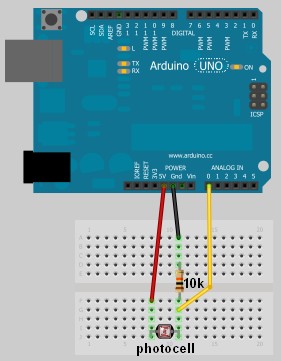
In this project, I have connected an Arduino to my computer and used a photoresistor to control an animation on the screen. Other sensors could have been used, but I chose a photoresistor because it feels like magic!!

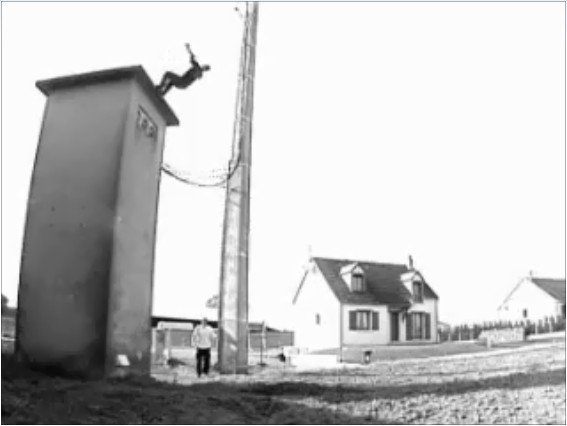
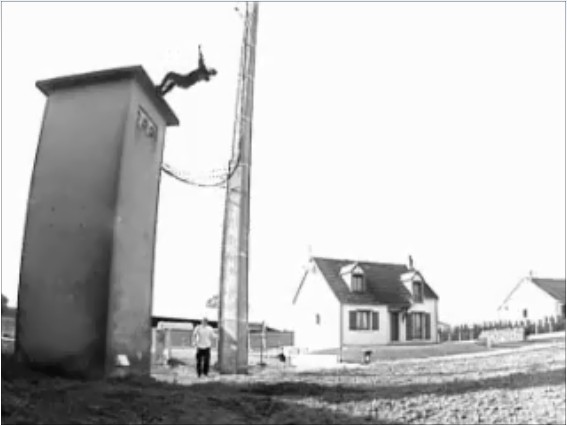
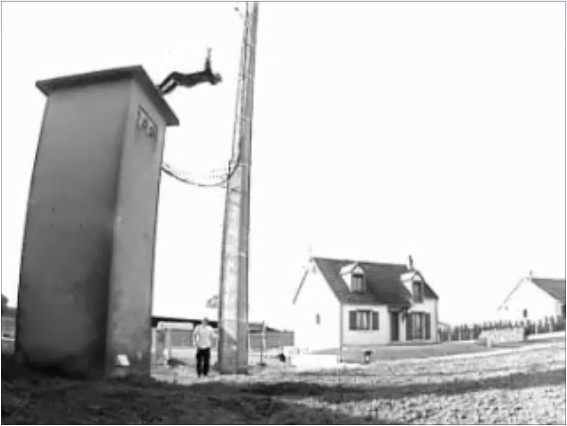
The photoresistor responds to changes in ambient light as my hand moves up and down. The Arduino sends the reading to a Processing sketch on the computer via a Serial command (through the USB cable). The processing sketch interprets the signal from the Arduino and selects the appropriate picture to display.

I took a series of screenshots from the following YouTube video: http://www.youtube.com/watch?v=h6nE8m74kDg  And after borrowing a bit of code from these sites (1,2), the project was born.
This idea is not new, nor my own. There are many people who have done this project before, but I thought to blog about how I have done it, just for fun.

The Project Movie


Components Required


  • Arduino Uno (and associated software), and USB cable
  • Photoresistor or Photocell
  • 10K resistor
  • Wires to put it all together
  • Processing IDE from http://processing.org
  • Computer/laptop


The Arduino Sketch


The Arduino Code:

You can download the Arduino IDE from this site.
 1
2
3
4
5
6
7
8
9
10
11
12
13
14
15
16
17
18
19
20
21
22
23
24
25
26
27
28
29
30
31
32
33
34
35
36
37
38
39
40
41
42
43
44
45
46
47
48
49
/* Jumper: Using an Arduino to animate:
Written by ScottC on 02/06/2012 */

int photoRPin = 0;
int minLight;
int maxLight;
int lightLevel;
int adjustedLightLevel;
int oldLightLevel;

void setup() {
Serial.begin(9600);

//Setup the starting light level limits
lightLevel=analogRead(photoRPin);
minLight=lightLevel-10;
maxLight=lightLevel;
oldLightLevel=lightLevel;
}

void loop(){
lightLevel=analogRead(photoRPin);
delay(10);

//auto-adjust the minimum and maximum limits in real time
if(minLight>lightLevel){
minLight=lightLevel;
}
if(maxLight<lightLevel){
maxLight=lightLevel;
}

//Map the light level to produce a result between 1 and 28.
adjustedLightLevel = map(lightLevel, (minLight+20), (maxLight-20), 1, 28);
adjustedLightLevel = constrain (adjustedLightLevel, 1,28);

/*Only send a new value to the Serial Port if the
adjustedLightLevel value changes.*/
if(oldLightLevel==adjustedLightLevel){
//do nothing if the old value and the new value are the same.
}else{
//Update the oldLightLevel value for the next round
oldLightLevel=adjustedLightLevel;

/*Send the adjusted Light level result
to Serial port (processing)*/
Serial.println(adjustedLightLevel);
}
}

The code above was formatted using this site.


The Processing Code:

You can download the Processing IDE from this site.

 1
2
3
4
5
6
7
8
9
10
11
12
13
14
15
16
17
18
19
20
21
22
23
24
25
26
27
28
29
30
31
32
33
34
35
36
37
38
39
40
41
42
43
44
45
46
47
48
49
50
51
52
53
54
55
56
57
58
59
60
61
62
63
64
65
66
67
68
69
70
71
72
73
74
75
76
77
/* Jumper: Using an Arduino to animate
Written by ScottC on 02/06/2012

Source code derived from :
http://processing.org/learning/topics/sequential.html
http://processing.org/discourse/beta/num_1267080062.html

Pictures captured from:
http://www.youtube.com/watch?v=h6nE8m74kDg

======================================================= */

import processing.serial.*;
Serial myPort;
String sensorReading="";

// Create the array that will hold the images
PImage[] movieImage = new PImage[29];

/* The frame variable is used to control which
image is displayed */
int frame = 1;


/* Setup the size of the window. Initialise serial communication with Arduino
and pre-load the images to be displayed later on. This is done only once.
I am using COM6 on my computer, you may need replace this value with your
active COM port being used by the Arduino.*/

void setup(){
size(700,600);

myPort = new Serial(this, "COM6", 9600);
myPort.bufferUntil('\n');

for(int i=0;i<28;i++){
movieImage[i] = loadImage("Jumper" + (i+1) + ".jpg");
}
}


// The draw function controls the animation sequence.

void draw(){

//this draws the relevant image to the window
image(movieImage[frame-1],0,0,width,height);
}

void serialEvent (Serial myPort){
sensorReading = myPort.readStringUntil('\n');
if(sensorReading != null){
sensorReading=trim(sensorReading);
if (sensorReading.length()<2){
frame = integerFromChar(sensorReading.charAt(0));
}else{
frame = integerFromChar(sensorReading.charAt(0))*10;
frame += integerFromChar(sensorReading.charAt(1));
}
}
}


/* This function used to convert the character received from the
serial port (Arduino), and converts it to a number */

int integerFromChar(char myChar) {
if (myChar < '0' || myChar > '9') {
return -1;
}else{
return myChar - '0';
}
}

The code above was formatted using this site.


The pictures 

Captured from this YouTube Video: http://www.youtube.com/watch?v=h6nE8m74kDg


ATMega AVR Pin Sticker

Okay, so I was bored and flipping through Adafruit tonight and I saw that they had stickers like these for $3/10.  Not that I want to take money out of Limor's pocket, but I thought I'd share these with my LMR kin:

read more

Let's Make Robots 02 Jun 03:30
168  328  arduino  atmega  avr  compatible  throughhole  

Scratch-build garden nursery uses Arduino monitoring

Starting your garden indoors helps to ensure large yields. This is because the plants get a head start before it’s warm enough for them to be put in the ground. But the process involves a fair amount of labor, ensuring that the lights are turned on and off at the right times each day, and that the temperature for germination and growth, as well as humidity, hit a certain target. It’s obvious that a bit of automation would be nice, and this Arduino-based garden nursery does just that. One of the things that sets this project apart is that it shows you how to go from an empty room to the bounty of plant starters seen here.

For the most part the equipment is what you’d expect, seed trays and covers, tray warming mats, and fluorescent light fixtures. the whole thing is given a small footprint thanks to an adjustable shelving unit. The Arduino is used in conjunction with a Sprout Board to add connectivity for switching the lights and warming mats. This is just a matter of driving a relay to switch mains voltage and can take any number of forms, including this home automation project we saw the other day.

[Thanks Tom]


Filed under: green hacks
Hack a Day 01 Jun 21:01

NES controllers for any Bluetooth application

[Dustin Evans] wanted to used his original NES controllers to play emulated games. The problem is he didn’t want to alter the classic hardware. His solution was to use the connectors and enclosure from a dead NES to build a Bluetooth translator that works with any NES controller.
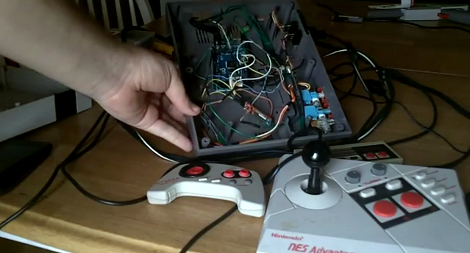
Here he’s showing the gutted half of an original NES. Although the motherboard is missing, the connectors for the controllers are still there. They’ve been rewired to an Arduino board which has a BlueSMiRF modem. The controller commands are harvested by the Arduino and sent to whatever is listening on the other end of the Bluetooth connection. He also has plans to add a couple of SNES ports to the enclosure so that those unaltered controllers may also be used.

In the video after the break [Dustin] walks us through the hardware setup. He then demonstrates pairing the device with an Android phone and playing some emulators with the pictured controllers.


Filed under: nintendo hacks, peripherals hacks

Electronic bracer wraps a lot of features around your arm

[Stephanie] just finished up her wearable project which puts a lot of information where a wristwatch would normally be found. She calls it the Integrated Sensors Electronic Bracer. We had to look up what a bracer is; the name originates with archers and it was a leather wrap used to protect the wrist. This does that, but we don’t think you’ll want the bowstring frequently hitting the electronic components hidden within.

There is a nice finished leather cover which wraps around the unit, leaving just a few holes for key components. Above you can see the parts undressed, with an Arduino compatible board in the middle. It provides a user interface with the OLED display and three input buttons. The array of sensors found on the device include a GPS module to display position data, humidity sensor, magnetometer, luminance sensor, and galvanic skin response.

The opposite side of the bracer has an opening secured by a couple of elastic cords. [Stephanie] mentions that this works, but she’s not happy with the look of it and hopes to make some leather-based improvements.

[via Adafruit]


Filed under: wearable hacks
Hack a Day 01 Jun 18:01
arduino  bracer  cuff  gps  wearable hacks  wrist