Posts with «arduino» label

Noise pollution tit for tat uses the Baha Boys as a weapon

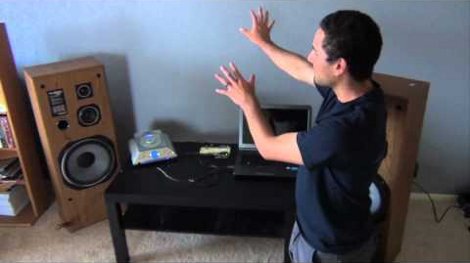
Here [Matthew Br] explains the situation he’s in with the neighbors that share this wall of his apartment. When they listen to music they like it loud and so he gets to ‘enjoy’ the experience as well. But he can’t ignore it any longer, and has decided to use a sound volume detector to blast some tunes right back at them.

He taped a microphone to the wall and wired it up to his Arduino. It monitors incoming sound and, using an adjustable threshold, it will trigger when the neighbors are too loud. We think he was wise to include some time filtering that makes sure the loud noises are sustained and not just the result of someone bumping into the wall. When the system does detect loud music for a sustained period it triggers [Matthew's] own CD player to pump out Who Let the Dogs Out? by the Baha Boys. It will play for a period of time, then shut off to listen and see if the neighbors are still rowdy.

He documents an actual run in the latter half of the clip after the break. We sure hope he’s living in a building with just two units, otherwise this will drive the rest of the neighbors batty as well!


Filed under: digital audio hacks

Codebender: An online Arduino IDE

Because everything is moving to a web app, [Vasilis Georgitzikis], a.k.a. [tzikis] developed codebender, a cloud-based Arduino IDE replete with built-in libraries, documentation, and the ability to upload your code to an Arduino from a browser.

To compile an Arduino sketch, codebender uses clang a wonderful compiler that will give you extremely descriptive warnings on terrible code. Like any good IDE, there’s built-in highlighting and documentation, and a small bit of Java allows you to upload your code and monitor the serial port right in the browser.

One of the more interesting innovations is codebender’s (upcoming) use of a TFTP bootloader. With this and an Ethernet shield, it’s easy to upload code to any Internet-connected Arduino, whether it’s on your desk or halfway across the world. We can see that being very useful for a data logger or even a UAV balloon, and can’t wait to see it in action.


Filed under: arduino hacks
Hack a Day 01 Jul 21:16

QRD1114 Resistor Values

Hi all,

I'm using a QRD1114 sensor for a line-follower. Datasheet: http://www.fairchildsemi.com/ds/QR/QRD1114.pdf

Im hooking it up with this schematic:

However, I'm unsure how the value for the 10K resistor was calculated? It's acting as a potential divider, right?

For the LED im guessing that the value of 220 was taken from doing:

R=(Input Voltage - Max Forward Voltage)/(Optimum forward current)

read more

Audio VU meter (AC microVoltmeter) with Extra wide Dynamic Range 69 dB.

O’K, after having some fun with stereo version of the VU meter I described in my previous blog-post, now it’s time to do a serious stuff. Studio grade VU meter !!! 24 steps, equally spaced every 3 dB, covering Extra wide Dynamic Range from -63  up to  +6 dB.  Single (mono) channel this time, no messing around, absolute precision at the stake. Plus, it keeps absolutely Top-Flat linear frequency response from 40 Hz up to 20 kHz(*).


I’m not going into details of RGB LEDs Display, which has no modification since “Tears of Rainbow” project, only plates installed in one line, form a single GIGANTIC bar-graph. There are some minor changes in mixing colors data tables, but they intuitively understandable.  The most important feature in this project is autoscaling. As you, probably know, Arduino has 10 bits ADC. Only it can’t process negative half-wave, and for this reason it has only 9 bits available for AC measurements.  According to DSP theory, maximum dynamic range is:

DR = 1.77 + 6.02 x B = 1.77 + 6.02 x 9 = 55.95 dB.

 As input audio waveform represents anything but perfect peak-to-peak 5V sine-wave, real dynamic range would be lower. How much? In first, there is a hardware limits.  OPA (NE5532), which is:

  • very low noise !!!
  •  high output-drive capability;
  •  high unity-gain and maximum-output-swing bandwidths;
  •  low distortion;
  •  high slew rate;
  •  input-protection diodes, and output short-circuit protection

 but, unfortunately,  isn’t rail-to-rail type. Test results show, that compression  become noticeable (~1 dB) when not scaled magnitude approaches level about 50 dB. That is in good agreement with observed on oscilloscope not distorted deviation peak-to-peak 2.5 V. Or only half of full range of 5V. And as theory says, half is one bit less, and real DR = 1.77 + 6.02 x 8 = 49.93  (~50 dB). In second, audio data is processed on “block” structure basis. It means, having average of the block 50 dB, doesn’t mean that there was no spikes in the sampling pull, that obviously would be clipped and introduce error in the measurements results.  This phenomenon is defined as Crest Factor. Different sources estimate crest factor of musical content between 10 – 20 dB.  So, taking direct approach, Arduino with OPA mentioned above as front-end could accurately cover only:              50 – 20 = 30 dB.  To get wider dynamic range, I have to scale input amplifier gain, and this is exactly what I did, building amplifier in two stages and selecting one cascade (by-passing second one) or two cascades using internal ADC multiplexer. As there is no switching IC in analog signal path involved, gain is defined with high stability, could be one time precisely measured – calibrated via coefficient stored in EEPROM (nice feature to add).

On the right side there are electrical drawings of “slightly” modified kit,  where stereo amplifier was converted into 2 stage mono version. First stage, with gain about  G1 = 1 + 10 k / 1 k = 11  is necessary to “bump-up” line-level signal, to create DC bias required for correct operation of the ADC, and also served as buffer to lower signal source impedance, as it seen by ADC input.  I set a gain of the second stage amplifier at 40 dB:  20 x Log_10 ( G2 ),     where    G2 = 1 + 100 k / 1 k = 101.

IMHO, setting gain limit for only 30 db per stage as it follows from paragraph above, is overkill, and would be justified for “real-time” radio broadcasting or audio processing for storage media, when high fidelity of audio program must be preserved. For visual display “clipping” of bursts in signal is not noticeable at all due high refresh rate of display, 78 Hz. Human just can’t see, if LED lights-up with such speed.  For steady AC amplitude measurements (micro Voltmeter mode) this is not a problem at all, and headroom as small as 3 dB would be sufficient, leaving wide 47 dB per stage.

 Software

  There are two thresholds are defined in program, where switching between one or two stage amplification is happening:

      if ( magn_new <=  44 ) sensitv = 1;

      if ( magn_new >= 47 ) sensitv = 0;

  44 and 47, with hysteresis 3 dB. First line defines switching to high sensitive mode (overall gain 1100), and second line, does exactly opposite. Look at the chart, hope it would save me a million words -);

 Couple words on using this device as precise AC micro-voltmeter. Having 1100 overall amplification as add-up to already quite sensitive Arduino ADC, driving overall sensitivity to enormously  5 / ( 1024 x 1100 ) = 4.439 uV Special care should be taken on grounding, shielding of amplifier PCB, probably, EMI suppressor ferrite chokes wouldn’t be an excess in power line and signal path.   In my project, w/o any modification to original kit’s board (except couple jumper wires to cascade two stage amplifier) of course, I was not expecting to get to such high sensitivity level. Moreover, in project arduino is driving LED display, “ADC noise reduction mode” is off, plus ADC is working on double speed – preselector set to 250 kHz!!!  And this is why constant 14 was subtracted in software from magn_new, just before it goes for BarGraph “mapping” procedure:

      magn_new  -= 14;

Basically 14 is a noise flour of my analog front-end.  Approximately 51 micro volts AC is turning on first LED bar. Look at the table, which reflect my current hardware set-up.

* Other things to keep in mind, there is a “gap” 78 Hz wide in frequency range at 10 kHz,  It introduces a small error, about  78 / 20.000 = 0.39% in white noise measurements result. For musical content, which has really low power density level at 10 kHz, magnitude of error would be much lower, probably, less than 0.05 %.

 Running FFT in code creates great opportunity to reject any interference in the audio band. For example, if there is a noticeable hum from electrical grid lines in the content, issue easily could be fixed NOT including bin[1] in final sum of magnitude calculation. Though to make it works more efficient, some adjustment in sampling period would be necessary, setting bin[1] frequency precisely at 50/60 Hz.

 One more advantage of having FFT based  filtering     (primary mission is HPF, look in stereo VU meter, how long kernel of the FIR filter has to be otherwise), is great opportunity to create “weighting” A, B, C or D curve for audio noise measurements. (:TO DO).

 Link to Download Arduino sketch:  Audio_VU_Meter_Mono_69dB


Lets Make Robots or Lets Make Radars?

A while back I notice the simularity between the Ultrasound/IR sensors we use on robots for object avoidance to the concept of basic RADAR. (This is more like UDAR or IRDAR). Direction and range information are what the controller uses to detect objects (RADARs basically use the same information.)

So instead of building robots for a while I decided to see how good I could make my own IRDAR. Wow! One can adjust trigger point, gain and a bunch of other factors and have a way-cool little system!

read more

Let's Make Robots 01 Jul 00:38
arduino  avr  non-robot  pic32  uno32  

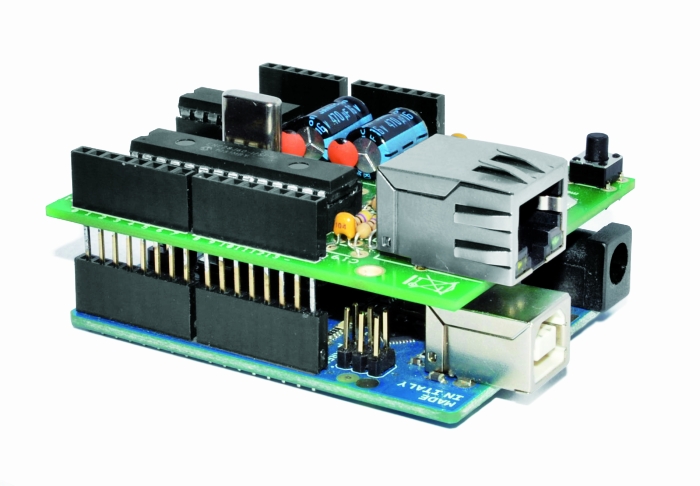
Low cost Ethernet shield with ENC28J60

Economical alternative to original Arduino ethernet shields, allows data rates up to 10 Mbps and is achieved with a traditional assembly components.

One of the most interesting shield that you can mount on the Arduino platform is certainly the ethernet shield, because enable numerous networking applications such as remote control of systems and users, web access and publication of data, and more yet, the simplicity of finding and integrating open-source libraries on Arduino IDE does the rest. The usefulness of LAN connectivity has meant that the market would respond by offering different ethernet shield, first of all the original Arduino Ethernet Shield, which was accompanied by the good shield by Seeed Studio, both of these circuits are based on the chipset WIZnet W5100, allow multiple socket connections and can work at 100 Mbps

This ethernet shield is low-cost thanks to components used: all traditional mounting (THT). This feature makes the circuit accessible to those who haven’t the equipment to assemble SMD components. The data-rate is limited to 10 Mbps.


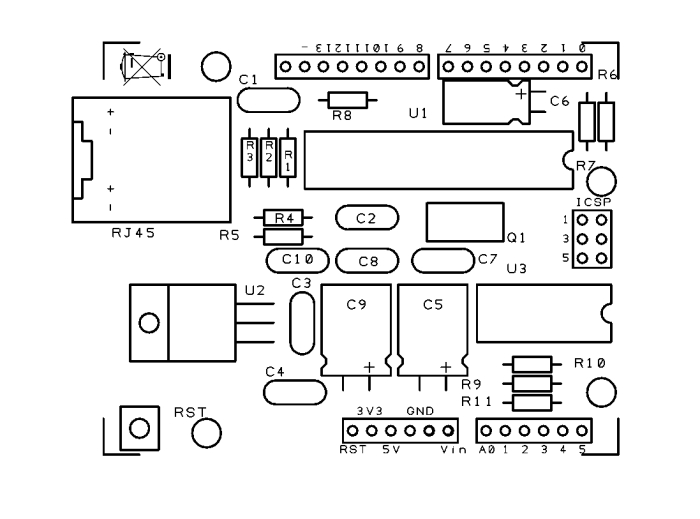
Wiring diagram

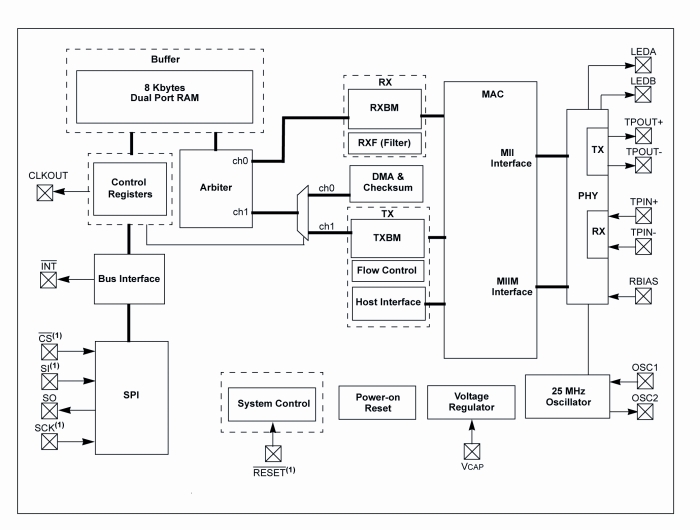
The shield is based on a Microchip ENC28J60 chip that interfaces with Arduino and data conversion according to the ethernet protocol. It integrates the MAC controller, an 8 KB Transmit / Receive Packet Dual Port Buffer and a circular FIFO managed at the hardware level, allows the programming of data retransmission in case of collision.
The MAC controller supports both Unicast, Multicast and Broadcast packets, has a programmable 64-byte pattern within a margin allowed to the user and programmable wake-up on multiple packet formats (Magic Packet, Unicast, Multicast, Broadcast, specific packet match or any packet).


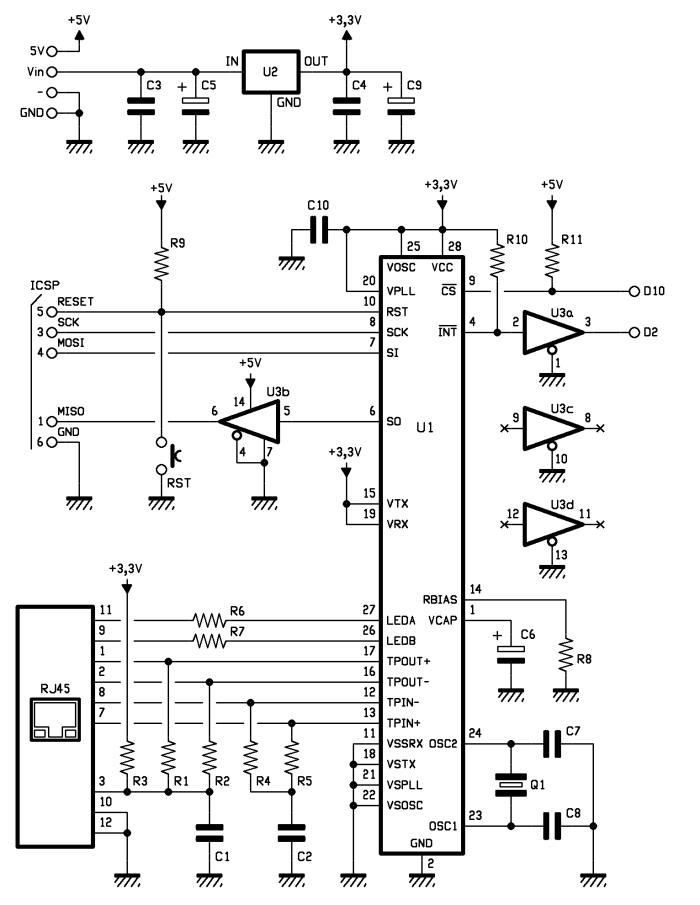
In the circuit we see that over all’ENC28J60 there are a standard RJ45 jack with integrated LEDs, filters and line transformers, and a voltage level shifter for the SPI interface to communicate with the Arduino.

MISO is the output data of the slave device and the input of Arduino, while MOSI is the opposite; SCK is the clock that marks the two-way communication on the SPI bus and RESET the reset line, which is also connected to a button that allows you to reset the Ethernet interface, if necessary, manually. The digital D10 and D2 lines of Arduino are used, respectively, for the control of CS (Chip Select, active logic zero) and the reading of INT. U3B is used to adapt the logic levels 0/3, 3 V to those of Arduino 0/5 V.

The ENC28J60 operates with a clock of 25 MHz, defined by the quartz Q1 connected between the pins 23 and 24; the capacitor connected to pin VCAP filters the output voltage (2.5 V) of the internal controller and should preferably be of the type low ESR (low series resistance parasite). The resistor connected to RBIAS is used to bias the LAN transceiver that is part of the pin TPIN + / – and TPOUT + / -.

We conclude the analysis of the circuit diagram of the shield with the power that is drawn by Arduino 5V and Vin through the strip: the first provides the 5 volts continuous stabilized points of the circuit that require them (basically the 74HC125 and the resistance of pull Line-up reset and Chip Select) and the second give power to the integrated regulator U2, which creates the 3.3 volts needed to power the microcontroller and circuits contained in the RJ45 jack.


The library for ENC28J60


The original library from which we derived can be downloaded from the site https://github.com/jcw/ethercard ; from our site you can download the library itself but with a higher number of application examples.

Here you will find a sketch example to build a Web Server, in particular, in the current web page you will see the hours: minutes: seconds elapsed from the ignition of Arduino.


// This is a demo of the RBBB running as webserver 
// with the Ether Card
// 2010-05-28 
// http://opensource.org/licenses/mit-license.php

#include

// ethernet interface mac address
static byte mymac[] = { 0x74,0x69,0x69,0x2D,0x30,0x31 };
// ethernet interface ip address
static byte myip[] = { 192,168,0,188 };
// gateway ip address
static byte gwip[] = { 192,168,0,1 };

byte Ethernet::buffer[500];
BufferFiller bfill;

void setup () {
  if (ether.begin(sizeof Ethernet::buffer, mymac) == 0)
    Serial.println( "Failed to access Ethernet controller");
  ether.staticSetup(myip);
}

static word homePage() {
  long t = millis() / 1000;
  word h = t / 3600;
  byte m = (t / 60) % 60;
  byte s = t % 60;
  bfill = ether.tcpOffset();
  bfill.emit_p(PSTR(
    "HTTP/1.0 200 OK\r\n"
    "Content-Type: text/html\r\n"
    "Pragma: no-cache\r\n"
    "\r\n"
    "<meta http-equiv='refresh' content='1'/>"
    "<title>RBBB server</title>" 
    "<h1>$D$D:$D$D:$D$D</h1>"),
      h/10, h%10, m/10, m%10, s/10, s%10);
  return bfill.position();
}

void loop () {
  word len = ether.packetReceive();
  word pos = ether.packetLoop(len);

  if (pos)  // check if valid tcp data is received
    ether.httpServerReply(homePage()); // send web page data
}


Library Ethernet shild with ENC28J60 

Store

Arduino Current Output

Hi there,

I have an LCD03 which i'm controlling via serial. See here: http://www.technobotsonline.com/lcd03-i2c--serial-display-32400.html

read more

Robot dares you to snatch the pebble from this flower

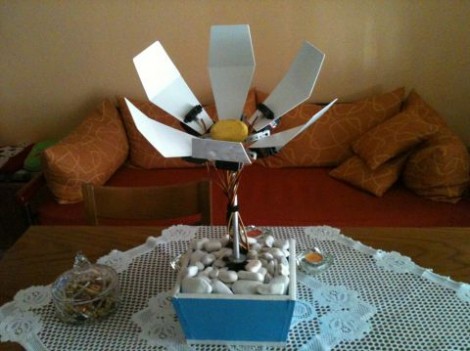
This pleasant-looking plant may try to take your hand off if you’re not careful. The robot flower (translated) includes sensors that cause the petals to move in reaction to external stimuli.

You can just make out the distance sensors as black rectangles on two of the petals. These let the flower track an object by rotating the flower stem. But if they determine the object is getting a bit too close for comfort, the servo motor on the back of each petal will cause the flower to suddenly clamp shut.

The video after the break starts off with an in-depth look at the hardware that went into the project. An Arduino clone called the GRoboduino makes this project a lot easier since it has a bunch of extras on the board aimed at things like sensors and servo motors. The mounting technique for the petal-powering-servos is quite attractive, and we enjoy the Snapple lid (probably not the actual brand but you get the picture) which has been coated with yellow felt for the center of the bloom. The final look is normal enough to fit in with home decor, but it still has enough geek in it to melt our hacker hearts.

[via Make]


Filed under: robots hacks
Hack a Day 30 Jun 00:01

Electric bike (earplugs not included)

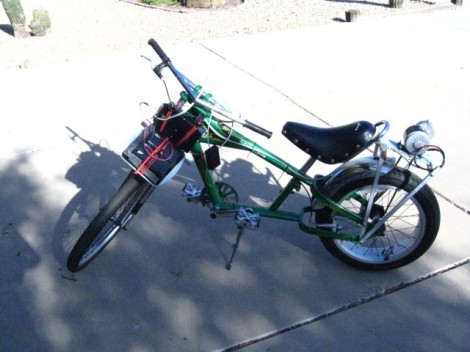
It’s obvious this bike has some extra parts. But look closely and you’ll see the chainring has no chain connecting to it. Pedaling will get you nowhere since [PJ Allen] rerouted the chain in order to drive this bicycle using an electric motor.

He’s got beefy motor which pulls 350 Watts at 24 Volts. For speed control he opted to use an Arduino, pumping out PWM signals to some MOSFETs. This results in an incredibly noisy setup, as you can hear in the bench test video after the break. But once this is installed on the bike it doesn’t quiet down at all. You can hear the thing a block away.

The original road test fried the first set of 7A MOSFETs when trying to start the motor from a standstill. It sounds like the 40A replacements he chose did the trick through. We didn’t see any information on the battery life, but if he runs out of juice on the other side of town we bet he’ll be wishing he had left the chain connected to the crankset.


Filed under: transportation hacks
Hack a Day 29 Jun 22:01

Slouch Detecting Belt

Ellen Sundh’s Bad Posture belt uses an Arduino, wave shield, and a flex sensor to detect when the user slouches. If your posture needs correcting, the belt literally yells at you. How’s that for motivation?

The belt is calibrated when the user presses a pushbutton after attaining good posture. After that, he/she is free to be lambasted by this piece of wearable tech.

[via The Creators Project]