Posts with «arduino» label

Fighting over the Frat’s TV remote

[Colin Bookman] lives in a Fraternity house and apparently the remote for the cable box has a way of walking off. He figured out a method to give everyone control of the TV channel in one form or another.

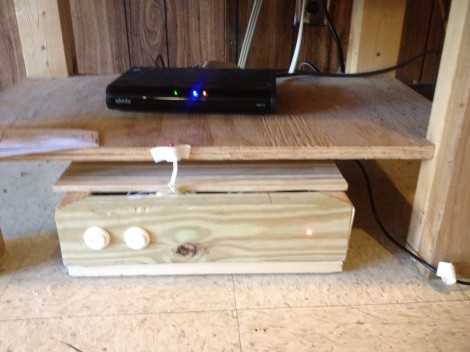
The cable box can be seen perched on that shelf, and [Colin's] addition is the wooden box sitting on the floor. Inside is an Arduino board, and the cable snaking out of the enclosure is an IR LED. This give the Arduino the ability to send remote control commands to the TV box. The two arcade buttons on the front will switch the channel up or down.

But this is hardly a remote control replacement since you have to get up to use it, so he went a few steps further. The Arduino board was paired with an Ethernet shield. It serves up a web page that has a virtual keypad. So anyone with a smart phone or laptop can log into the server and start changing the channels. We’re not sure if this provides relief from a missing remote, or promotes impromptu fist fights when brothers can’t agree on what to watch. It certainly opens up the possibility of long-distance trolling as you could be sitting in class and decide to change the channel to Lifetime every ten minutes or so.

If you don’t have an Ethernet shield handy we’ve seen a similar setup that uses Bluetooth instead the network.


Filed under: home entertainment hacks

Using the MakerShield – LCD Display

An LCD screen can bring a whole new level of interactivity to your Arduino projects. They can provide instant data without using your computer and give visual feedback about your project. Normally, you would use a separate breadboard to hook up an LCD but using a MakerShield and this tutorial from Make: Projects, you can make your own LCD shield!

LCD screens look complicated but using an Arduino it’s not too bad at all. This tutorial will teach you how to hook up an LCD display to an Arduino using a MakerShield. All the components you need for this build are included in the Ultimate Microcontroller Pack.

You can pick up an Ultimate Microcontoller Pack from the Maker Shed, Micro Center, and select RadioShack locations. Call me crazy but I love the look of all those jumper wires!

More:
Using the MakerShield – Button
Using the MakerShield – Servo Control


Turning an Arduino into a USB keyboard

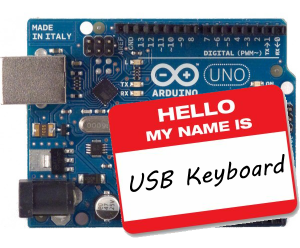
The newly released Arduino Leonardo has a few very interesting features, most notably the ability to act as a USB keyboard and mouse thanks to the new ATmega 32U4 microcontroller. This feature isn’t exclusive to the Leonoardo, as [Michael] explains in a build he sent in – the lowly Arduino Uno can also serve as a USB HID keyboard with just a firmware update.

The Arduino Uno (and Mega) communicate to your computer through a separate ATmega8U2 microcontroller. Simply by uploading new firmware with the Arduino Device Firmware Upgrade, it’s easy to have your old Arduino board gain some of the features of newer boards such as the Teensy or Leonardo.

[Michael] goes through the steps required to make this upgrade work and ends his build by showing off an Arduinofied ‘cut, copy and paste’ button project as well as a few multimedia controls. You can check those builds out in the video after the break.

If emulating a USB keyboard isn’t your thing, it’s also possible to install LUFA firmware to emulate everything from joysticks to USB audio devices. Very cool, and very useful.


Filed under: arduino hacks, peripherals hacks
Hack a Day 29 Jun 12:01

**********Stereo Audio VU meter on Arduino**********

This blog is a sequel of “Tears of Rainbow”.  Using the same hardware set-up of Gigantic RGB LED display, I decided to re-work software a little bit, in order to display the true RMS amplitude of musical content. Video clip on youtube:                       VU_Meter   640×480                                      VU_Meter_HD

Objective:

  • Stereo input, process both channel;
  • Full audio band, 40 Hz – 20 kHz;
  • Fast update rate of visual output.
  • Precision Full-Wave  measurements. 

To process stereo input, this time arduino is switching ADC multiplexer every time when it finish sampling input data array (size=128). Two channels “interleaved” with frame rate 78 Hz, so during each frame only one channel sampled / processed, and update rate per channel is equals to 78 / 2 = 39 Hz, which is more than enough for most audio applications.

 I’m using FFT Radix-4  to extract RMS magnitude of audio waveform, and this is why:

1.  Sampling rate in this application is 10 kHz. How I achieved  20 kHz stated in objective section, doing sampling only 10 ksps?  >>>Aliasing!<<<   What is considered to be nightmare when we need spectral information from FFT output, aliasing in this project is really helpful, reflecting all spectral components around  axis – 10 kHz back “to the field”. As all bins going to be sum-up there is no issue, only benefits. Due aliasing, I’m able to use low sampling rate, and reduce CPU workload down to 52%.

2.  In order to get accurate magnitude calculation of RMS,  which is defined as square root of the sum of squares divided by number of samples per specified period of time:    V(rms) = √ ( ∑ Vi ^2 ) / N) DC offset  must be subtracted from the input raw data of each sample    Vi = Vac + Vdc   (if you remember, AtMega328 ADC needs DC offset to read AC negative half-wave).  The problem here, DC offset value is never known with high accuracy due bunch of reason, like voltage stability of PSU,  thermal effects, resistors tolerance (+/- 1 or 5 %), ADC internal non-linearity etc. Cure for this, which works quite well for monitoring electrical grid power, high pass filter (HPF). Only instead of single 50/60 Hz frequency of power line,  I have a wide frequency range, starting from 20 Hz and ending at 20 kHz. When I feed specification of the HPF:

  • Sample Rate (Hz) ? [0 to 20000]                     ? 10000
  • Desired stop-band attenuation (dB) [10 to 200] ? 40
  • Stop-band edge frequency Fa [0 to 5000]         ? 0
  • Pass-band edge frequency Fp [0 to 5000]        ? 40

to  Parks-McClellan FIR filter design algorithm (one of the most popular, and probably, the best) it provides the result:

  • …filter length: 551 …beta: 3.395321

551 coefficient to be multiplied and sum up (MAC-ed) every 100 usec! No way. I’m not sure, if it could be done on 32-bits 100 MHz platform with build-in MAC hardware, but there is no way for 8-bit 16 MHz Arduino.

IIR filter wouldn’t make much difference here. It has lower quantity of multiplications, but more sensitive for truncation and rounding error, so I’d have to use longer (32-bits?) variables, which is not desirable on 8-bit microprocessor at all.

And here comes FFT Radix-4, which easily fulfill this extra-tough requirements in the most efficient and elegant way. All I have to do, is just NOT include bin[0] in final sum, and all DONE!. TOP-FLAT  linear frequency response  40 Hz – 20 kHz  ( -3 dB ), with complete suppression of DC, and low frequency rumble below 20 Hz attenuation.  Linearity is better than +-1 dB between 80 – 9960 Hz.

Last things, audio front-end. As VU meter was designed in stereo version, I’ve build another “line-in”  pre-amplifier based on this kit: Super Ear Amplifier Kit

Link to Download a sketch:  Stereo_VU_Meter.


Modified Stereo VU meter, Logarithmic scale, 8 bars per channel, spacing 6 dB.

Dynamic range: 8 x 6 = 48 dB.  Stereo_VU_Meter(Log10).
 Next blog:   Extending dynamic range to 72 dB! 

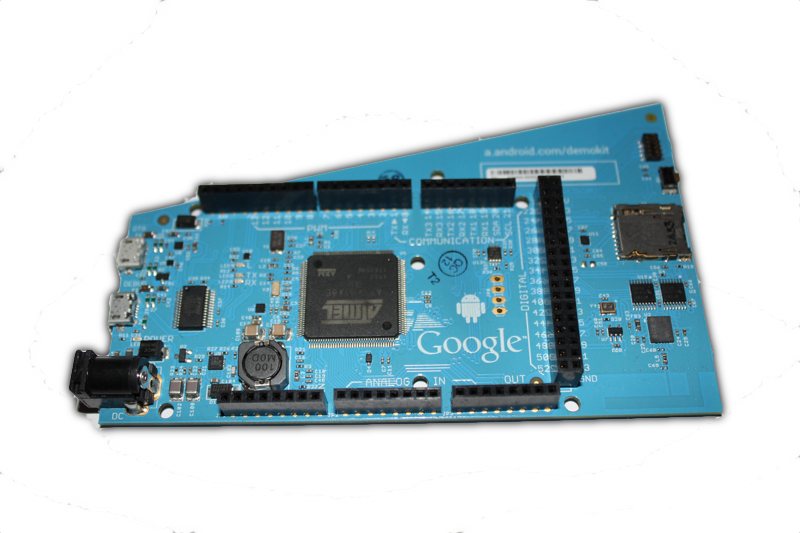
Android ADK2012 is here and is powered by Arduino technology


ADK2012 board

Google has unveiled at Google IO their new  Accessory Development Kit for Android mobile phones and tablets, the ADK2012

The ADK2012 is based on the upcoming Arduino Due platform and the new Arduino IDE that supports programming ARM targets.

Currently the IDE works only on the Google ADK board released at Google IO, while the official launch of the Arduino Due is due later in the year.


Arduino Blog 28 Jun 20:35
adk  arduino  

USB Keyboard Support with the Arduino Uno


One of the exciting new features of the Arduino Leonardo is its ability to act as a USB human interface device like a keyboard or mouse. This can make interfacing hardware projects with third-party software much easier. For example, if you want to build a physical button to go backwards in your web browsing history, you can have the Arduino send your browser’s keyboard command for back each time you hit the button. But if you have an Arduino Uno, you’re not out of luck.

Michael Mitchell recently shared his tutorial on how to use DFU Programmer to update the firmware on the Atmega8U2, which, according to the Arduino documentation, “acts as a bridge between the computer’s USB port and the main processor’s serial port” on the Uno. Michael also points out that you’ll need to make a slight hardware modification to the board if you have the DIP version of the Uno board—SMD Uno owners can keep their soldering irons holstered for this one. Michael demos his tutorial with a volume controller for his Ubuntu box and naturally he offers all the code you need to make your own.

More:
The AWESOME Button: A Made-to-Measure USB Input Device


MAKE » Arduino 28 Jun 12:30
arduino  atmega8u2  hid  keyboard  usb  

Arduino’s Massimo Banzi’s TED Talk

Massimo Banzi helped invent the Arduino, a tiny, easy-to-use open-source microcontroller that’s inspired thousands of people around the world to make the coolest things they can imagine — from toys to satellite gear. Because, as he says, “You don’t need anyone’s permission to make something great.”


MAKE » Arduino 27 Jun 19:00
arduino  

Massimo’s Talk at TEDGlobal

We are really thrilled to blog Massimo’s delightful talk of yesterday about Arduino and the open hardware movement: TED team chose it to be the first video to be traslated and released for everybody to see.

Enjoy!


Metatron - Autonomus Robot

Primary image

What does it do?

Navigates to GPS Points with Object Avoidance

Autonomous Robot - GPS, Tilt Compass, Arduino Mega, Wild Thumper Motor Controller, Wild Thumper Chassis.


Cost to build

$100,00

Embedded video

Finished project

Complete

Number

Time to build

60 hours

Type

URL to more information

Weight

Bad Posture tells you to sit up straight, replaces your mom with an Arduino

At certain point in every geek's life, their mother gives up and stops yelling at them to sit up straight. If the lack of constant reminders to maintain good posture has you slouching and hunching, there are countless technological substitutes. Even a few nice DIY ones. But we've got to give Ellen Sundh props for the simplicity of her solution. While similar projects rely on accelerometers, which can be difficult for the budding hobbyist to work with, to monitor the angle of your body, Bad Posture sticks with a simple bend sensor to keep tabs on your spinal cord. The flexible plastic is arranged vertically in a fabric belt that also houses an Arduino, a Wave Shield from Adafruit and a push button for calibration. Sit at your optimal angle, press the button and you're ready to go. Bend too much and the Wave Shield plays a warning -- "bad posture!" Check out the video after the break to see it in action.

Continue reading Bad Posture tells you to sit up straight, replaces your mom with an Arduino

Bad Posture tells you to sit up straight, replaces your mom with an Arduino originally appeared on Engadget on Tue, 26 Jun 2012 14:21:00 EST. Please see our terms for use of feeds.

Permalink | Email this | Comments