Posts with «arduino» label

Intern’s Corner: The Arduino Bumper

Inspired by Arduino design and the iPhone Bumper, I present to you the 3D-printable Arduino Bumper!

The Arduino Bumper is a 3D-printed case for Arduino boards that use the Uno form factor. It allows the Arduino to be placed onto a flat conductive surface without running the risk of shorting out your microcontroller. It also keeps the bottom of the board from scratching your table.

The bumper securely press-fits onto the Arduino boards, staying in place until you want to remove it, at which point, it can be popped right off. Recessed grooves located under where the Arduino pins sit allow the back of the board to sit flat in the bumper.

I designed this case to fit the Arduino, but I also wanted to it to reflect the Arduino design instead of just making a box. I decided to design around the look of the Arduino board, thus I needed to make an offset of its outline for the general shape. Looking up the dimensions for the Arduino, I found an excellent drawing by Wayne and Layne, found via Arduino.cc.

Using the dimensions from the drawing, I drew the outline of the Uno in Autodesk Inventor, created an outer offset by 0.008” for press-fit spacing, and another one at 0.029” to complete the 2-perimeter-thick wall. This means that when 3D printed with a 0.4mm nozzle (such as on a standard Ultimaker or MakerBot Replicator), the printer will lay down two strands of plastics that are solidly fused together, resulting in a very sturdy wall. Extruding the outlines gave me the general shapes of the bumper. I then added the grooves for the pins, and cut-aways for the USB and power jack. Lastly, I cut made cut-aways for the underside of the board for the USB mounting backets and power jack pins. I gave the corners a nice 45-degree chamfer to give it that Arduino look.

The Arduino Bumper and the Inventor source file are available for download at Thingiverse. I printed mine on our Ultimaker, at 0.1mm-thickness-resolution, in under 20 minutes. At such a small layer thickness, it feels incredibly solid, almost like it was injection molded.  Go print your own bumper today!


Telepresence Zen Garden

Harford Hackerspace’s Telepresence Zen Garden looks awesome! Such a great idea.

For this year’s RedBull Creation competition, we had to incorporate a ‘Bullduino’ into the project of our choice. What is a Bullduino? It’s essentially an Arduino Uno shaped like the RedBull logo. So, we came up with the idea of creating a Telepresence Zen Garden. Sounds simple right? Well, it was actually more difficult than it sounds.

We created a user interface in Flash which allows the user to draw lines on a canvas. That data is uploaded to a web server and stored into a MySQL database. There is a queuing system written in PHP on the web server. The queuing system keeps track of the order in which the drawings are submitted and it is responsible for keeping the buffer full on the Bullduino.

The Bullduino is connected to a rail of power mosfets to control turning on and off 8 banks of Red and Blue LEDs. It is also connected to 2 stepper motor drivers, 2 servos, and 4 limit switches. The limit switches are used to zero out the XY table and prevent damage to the machine should something go wrong.

[via MakerBot]


MAKE » Arduino 11 Jul 15:00

BlinkM gets upgraded to a USB mass-market device

[TodBot] has a new piece of hardware on the way up. His Blink(1) is currently about 50% funded on Kickstarter. It’s a USB nub that has an RGB LED inside of it. When plugged into a computer it can be used as a status indicator. At first that sounds like a let down, but his marketing is fantastic as the myriad of uses really caught our attention. If you’re on the road you can use it to report back your server statistic. Plug one into each rack-mounted servers for quick visual indication of which one has crashed. Or find your own use.

You probably remember [TodBot] as the creator of the BlinkM. Recently he was calling it the world’s smallest Arduino. Well this Blink(1) is being marketed as Arduino programmable as well. The board size is about the same, and both have an RGB LED module. The difference is that the BlinkM had an ATtiny85 and needed a serial converter to program it. This has a USB plug so we’d bet he’s swapped the tiny for an ATmega8u2 or something from the same family.

Don’t think one blinky LED is going to cut it? For folks that just need more resolution there are other hardware options out there. For instance, this project gives you a wireless 8×8 RGB led display to use as an indicator.


Filed under: led hacks
Hack a Day 11 Jul 14:01

Sending serial from python to an arduino

I'm working on a project where I send a bunch of data through an arduino to my laptop.  I'm using python serial to read in the serial data.  That part is working fine.  Then I do some processing and I want to send the results back to the arduino.  This part is not working so well.  

It seems like python  serial.write()  only likes to send strings?  Right now I'm trying to send back one integer value.  Any ideas how to do that?  

Let's Make Robots 11 Jul 13:41

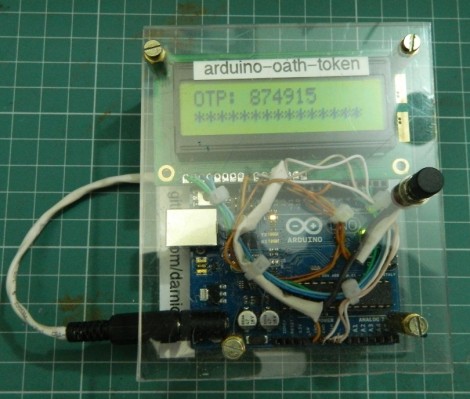
Time-based One-Time Passwords with an Arduino

Get your feet wet with Time-based One-Time Password (TOTP) security by building your own Arduino OATH system. OATH is an open standard authentication system that provides a platform to generate tokens, making your login more secure than a password alone would.

The TOTP approach is what is used with many companies that issue hardware-based dongles for logging in remotely. This security may have been compromised but it’s still better than passwords alone. Plus, if you’re building it around an Arduino we’d bet you’re just trying to learn and not actually responsible for protecting industrial or state secrets.

The hardware setup requires nothing more than the Arduino board with one button and a screen as a user interface. Since the board has a crystal oscillator it keeps fairly accurate time (as long as it remains powered). It will push out a new token every thirty seconds. The video after the break shows that the Arduino-calculated value does indeed match what the test box is displaying.


Filed under: arduino hacks, security hacks
Hack a Day 11 Jul 12:01

Incredible RGB LED Cube Tutorial


We’ve seen our fair share of LED light cubes before, but what makes this one different is its incredibly detailed, step-by-step tutorial.   The creator of this light show previously made a one color LED light cube and shared the trials, tribulations and instructions.  He has since decided to go multi-color, again while challenging himself and learning some new tricks along the way.


The project requires 512, 10mm RGB LEDs and an Arduino compatible microcomputer. The creator used wooden strips to create vertical panels of LEDs rather than horizontal layers for ease of building. The building and soldering took about one weekend and the software took about 70 hours. The author saves you time by providing most of the code for you.  Learn how to  fbuild your own RGB LED cube!

Popular LED Projects:

Hack n Mod 11 Jul 11:07

Arduino Camp 2012

Gli hackers credono di poter apprendere lezioni essenziali sui sistemi (sul mondo) smontando le cose, vedendo come funzionano, ed utilizzare questa conoscenza per creare cose nuove e più interessanti.

Steven Levy

Domenica 17 Giugno alle Officine Arduino una quarantina di persone hanno dimostrato la veridicita’ dell’affermazione di S. Levy.

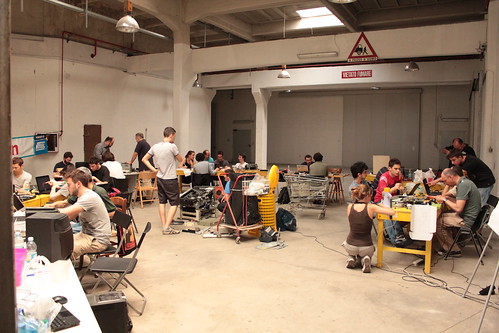
Dall’anno scorso Arduino organizza in Italia l’Arduino Camp , un evento di due giorni che vede il primo giorno dedicato a presentazioni e talk su Arduino, seguito da un secondo giorno di Hack Day su un tema. per vedere video e foto dell’evento consulta il set su Flickr.

Il tema dell’HackDay di quest’anno era costruire un’ orologio/sveglia utilizzando Arduino, un circuito integrato RTC PCF8563 (con quarzo da 32.768 kHz) ed una montagnetta di rifiuti da cui attingere.

Divisi in gruppi di 4 o cinque persone, in poche ore i partecipanti hanno realizzato il proprio progetto. Potete leggere il resoconto della giornata qui.

La giuria (composta da Aurelio Balestra, Massimo Poti’, Fabio Varesano, Uwe Federer e Federico) alle 17 :30 ha iniziato ad esaminare i risultati dei vari gruppi ed ha decretato come vincitori il gruppo Clock Cloud, che ha creato un manufatto riciclando un vecchio giradischi e sostituendo gran parte della meccanica e dell’elettronica interne con una scheda Arduino Uno, uno shield Ethernet , un buzzer, uno stepper motor e varie parti meccaniche per  realizzare un riduttore.


Il gruppo, composto da Stella, Giulio, Bissaorboea e Diego cosi’  descrive il funzionamento dell’ oggetto:

Il sistema sfrutta le API di Google per leggere la presenza di un allarme sul Google Calendar e l’ora corrente. Arduino pilota lo stepper all’ora corretta e se c’è un allarme attivo provvede a far suonare il buzzer. L’intera modifica ha preservato l’aspetto fisico e conservato il design utilizzando i caratteri e i colori del tempo.

Un lavoro ben fatto, che prevedeva addirittura dei gadget per la campagna di lancio sul mercato!

Congratulazioni ai vincitori, un grosso ringraziamento ai partecipanti ed ai volontari che hanno prestato aiuto ed a Toolbox per il supporto.

Arrivederci al prossimo Arduino Camp.


Nerf gun progress

The Nerf gun prototype is coming along nicely.  The students have tested the launcher up to 120 psi, built a prototype tilt and pan mechanism in Lego, and today hooked up a small reservoir behind the solenoid valve on the barrel to a bigger reservoir using an air hose.

They hope to be able to keep the bigger reservoir up to pressure by occasionally turning on a 12v compressor.  The compressor takes 10A and can’t be run for very long at a time (it brings the system up to 120psi  from 0psi in about 15 seconds), so they’ll have to run it off a relay.  I couldn’t find cheap relays that looked easy to use with 5v control and 12v 10A contacts, but automotive relays are cheap (I found 5 relays and 5 sockets for $5 on Amazon AGT (5 Pack) 30/40 AMP Relay Harness Spdt 12V Bosch Style (40AMP-HRNS)—even with shipping that is only $2.25 each for relay plus socket).  The relay can be controlled by half an H-bridge of the Hexmotor board.  The other half of the H-bridge controlling the solenoid should be fine, as we never need to run the compressor and fire at the same time—we can stop the compressor for a fraction of a second while firing.

They want to have the running of the compressor be automatic, which would require a pressure sensor.  The Freescale MPX5999D would work and is one of the few sensors I’ve seen with a large enough range, but I’m not sure how to mount it.  Standard tire-pressure monitoring sensors and transmitters are cool, but I don’t know if they go up to high enough pressures and I don’t know how to interface to their transmitters—that is almost certainly a more expensive solution. Honeywell has a differential sensor with ports that will go to ±150psi, which may be easier to connect up, but it costs about twice as much and is uncompensated and unamplified: I suspect it would be a lot fussier to work with than the Freescale part.  I’ve ordered a sample of the Freescale part, and read their AN936 application note on mounting (epoxy is your friend).

It turns out that the relays may be useful for other functions, like a linear actuator for the tilt mechanism. Two relays can be controlled from one H-bridge to get forward-backward-stop action on motors up to 30 amps (but no PWM!). Unfortunately, 12v linear actuators seem to run $100 and up, which is more that I want to spend on a single part.  I may ask the students to redesign—either building their own lead-screw mechanism or coming up with a different tilt mechanism.  I don’t think a simple servo motor will do—the beefiest one I have claims only 69 oz-in (0.49 Nm) of torque, which I don’t think will be enough to tilt the gun, even if they can get the hinge very close to the center of gravity.

Another problem has come up: getting more darts.  We have 5 darts that fit the barrel perfectly (1.45cm diameter).  There are plenty of darts sold like that, but they almost all now have larger heads on the end, and the heads don’t slide down the barrel.  The new Nerf clip-system darts are all mini-darts, that have a 0.5″ (1.25cm) diameter instead.  These do not fire well from the ½” PVC, which I measured as having an ID of 1.485cm (0.585″). A chart of PVC sizes I found on line says that 1/2″ ID Schedule 40 PVC is supposed to have an inside diameter of 0.622″, which is almost 5/8″, but that ID can vary by 10%, even along a single piece of pipe—only OD is held to tight specs.  Thicker-walled Schedule 80 is supposed to have 0.546″ ID, which would still be too loose for clip-system darts.

I see four possible solutions:

  • Find a source of (probably non-Nerf) foam darts that are 1.45cm (9/16″) diameter with heads that are no wider than the body. I think that they came with an NXT generation crossbow, so replacement foam darts for that may be what we need. They’re nowhere near as cheap as clip-system darts, but this is still probably the cheapest solution.
  • Buy Nerf  (or other) darts with the right size bodies but oversize heads, remove the heads, and make new ones (out of what?). This would be cheap, but tedious, and the darts would probably fly poorly, unless we made the new heads have a decent weight.
  • Use clip-system darts for compatibility with the popular Nerf guns, but find a smaller diameter tube than the ½” PVC pipe (where? and how would it be connected to the solenoid valve?) It looks like Schedule 40 3/8″ steel pipe has a inside diameter of 0.49″, which is just right, but steel pipe is rather heavy.
  • Use clip-system darts, but convert to the Nerf-standard tube-inside-the-dart launching system.  This limits the effective barrel length to the inside length of the dart (about 4.5cm) and the barrel diameter to the inside diameter of ¼”, which will limit the top speed of the darts (OK for safety, but probably not as much fun).

Filed under: Pressure gauge, Robotics Tagged: Arduino, foam darts, linear actuator, Nerf darts, Nerf gun, nerf guns, pressure sensor, relay, rocket

Cheap as chips Arduino Ethernet shield

It’s no secret that Ethernet shields for the Arduino are a little expensive. With the official Ethernet shield selling for about $50 and other options not much cheaper, there’s a lot of room for improvement for Arduinofied Ethernet. [Boris] over at Open Electronics has a solution to this problem: his Ethercard powered by a $3 Ethernet controller.

The Ethercard uses the Microchip ENC28J60, a through-hole Ethernet controller. There isn’t much else on the board apart from an RJ45 jack, caps, resistors, and a cheap buffer chip. This board was designed to be easily produced, and we’re thinking it might be possible to etch this board at home.

There are a few drawbacks to this ENC28J60 Ethernet shield – the official Arduino Ethernet shield has a 10/100 Mbps connection where the Microchip-powered shield is limited to 10 Mbps. Given the reduced cost, ease of assembly, and the fact that it’s pretty hard to saturate a 100Mbps connection with an Arduino this flaw can be easily ignored.

Pretty neat, especially considering how much you can do with an Ethernet connection on your Arduino. Files and code available in the git.


Filed under: arduino hacks, hardware
Hack a Day 10 Jul 23:02

MAKE Asks: First Arduino Projects


Make: Asks is a weekly column where we ask you, our readers, for responses to maker-related questions. We hope the column sparks interesting conversation and is a way for us to get to know more about each other.

Once I learned the basics of Arduino, my first project was a system of tracks that held ping pong balls. At the end of the tracks were solenoids that popped out the ping pong balls in sequence, making music.

This week’s question: What was your first Arduino project that went beyond the basics, and was something that could be called creative?

Post your responses in the comments section.


MAKE » Arduino 10 Jul 20:00