Posts with «arduino» label

Capacitive sensing with op amps, continued

What more can I do (or, more importantly, have the students do with the Capacitive sensing with op amps?

The circuit that I gave in that post has several parameters.  Perhaps the students should try predicting what happens when they are adjusted.
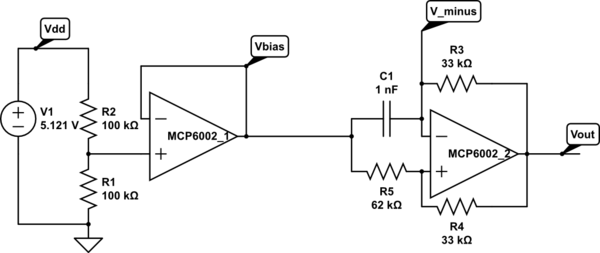
Op amp multivibrator. The first op amp is just to set up a virtual ground halfway between the power rails. The second op amp does the oscillating (at about 8.12 kHz for these components). Circuit drawn with CircuitLab, which is not capable of simulating it.

For example, what happens if Vbias is raised or lowered? What is the effect of changing each of the resistors? How can we optimize the circuit for easy, reliable detection of touches with an Arduino pulseIn() measurement?

If we pretend that the output is a rail-to-rail square wave (ignoring the slew rate limitation), analysis is pretty easy.

.

  • If the output is low, then and Vminus is higher than that, but dropping.
  • If the output is high, then and Vminus is lower than that, but rising.

If we define , we can simplify further and say that Vminus swings between two threshold voltages:   and .

The discharging curve is simply , where , so it takes to discharge to the other threshold.

The charging curve is , and so it takes . That is, .

If we want a symmetric waveform, we need to have , which in turn requires . Raising Vbias makes the low part of the output waveform shorter and the high part longer. Conversely, lowering Vbias makes the low part longer and the high part shorter.

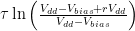
The total period is  .  If we set Vbias to Vdd/2, then we can simplify further to .

The sum R4+R5 only affects the amount of current that the Vbias supply has to provide, but it is probably a good idea to make it fairly large, and to add a bypass capacitor to Vbias, to prevent noise coupling though the bias supply.

When using pulseIn() on the Arduino to measure the capacitance C1, we want to have a large change in the pulse duration (to avoid quantization effects from reporting the duration in μsec), which means a large value for R3. That is limited by the problem of picking up 60Hz noise if the input impedance is too high.

We can also tweak r=R5/R4 a little, to make the period a larger multiple of τ, limited by the problem of noise if we get the thresholds too close to the rails.

Since pulseIn() only measures one part of the waveform (the low part or the high part), we could also tweak the bias voltage to lengthen just that part of the waveform, for example, dropping Vbias to Vdd/4 to length the low part.  We again have to be careful not to get the threshold too close to the rails.  If we are lowering Vbias, then the threshold to watch is . If we fix as low as we’re willing to make it, then should we make Vbias low or r high?  The number we are trying to maximize is the discharge time , with the constraint that . At equality, we have to maximize , which is achieved by making r as large as possible.  Of course, that would mean raising Vbias, which would run us into trouble with noise at the other threshold.  In general, it seems like the symmetric waveform with Vbias=Vdd/2 gives us the best noise margins.

Next step: how do we either slow down the oscillator or clean up the waveform enough to get a good signal to feed into the Arduino?

I tried increasing both R1 and R5, while decreasing R4, as shown below.

Modified circuit for longer period. C1 is just the stray capacitance of the touch sensor, with no deliberately added capacitance.

This circuit oscillates with a frequency of 35.66 kHz (period of about 28 µsec )when the touch sensor is not touched, which is slow enough that the signal runs from rail to rail. Touching the sensor drops the frequency to 20kHz or less (period of 50 µsec or more). Since r=5.556, the expected period is 4.988 τ, or 0.4988 µsec/pF C1.  The period is consistent with a stray capacitance of 56 pF, increasing to over 100 pF when the sensor is touched.  There is a lot of jitter in the lower-frequency signal, probably due to some coupling of 60 Hz noise into the system. A 1nF capacitor for C1 gives a frequency of 1660Hz (602 µsec, which is more than the expected 500 µsec), 47nF gives 34.65 Hz (28.86 msec, not the expected 23.44 msec).  Why am I consistently 25% off?

The change of 20 µsec or more in the period (10 µsec or more in the half period) should be easily detectable with one pulseIn() measurement on the Arduino.  The following code seems to work fairly well, with a light touch causing the LED to flash (right on the edge of detection) and a firmer touch giving a steady reading.

// Capacitive sensor switch
// Thu Jul 12 21:36:42 PDT 2012 Kevin Karplus

// To use, connect the output of the op-amp oscillator to
// pin CAP_PIN on the Arduino.
// The code turns on the LED on pin 13 when a touch is sensed.

// The Arduino measures the width of one LOW pulse on pin CAP_PIN.
// The LED is turned on if the pulse width is more than min_pulse_usec

// pin that oscillator output connected to
#define CAP_PIN (2)

// time (in milliseconds) to wait after a change in state before
// testing input again
#define DEBOUNCE_MSEC (100)

static uint8_t was_on;	// stored state of LED, for detecting transition

static uint16_t min_pulse_usec=5;
// min pulse width (in  microseconds) for detecting a touch

void setup(void)
{
    was_on=0;
    pinMode(CAP_PIN,INPUT);
    pinMode(13, OUTPUT);
    
    // assuming that the touch sensor is not touched when resetting, 
    // find the maximum typical value for untouched sensor
    for (uint8_t i=0; i<10; i++)
    {   long pulse=pulseIn(CAP_PIN,LOW);
        if (pulse>min_pulse_usec)
	{    min_pulse_usec =pulse;
	}
    }
    min_pulse_usec += 2;	// add some room for noise
}

void loop(void)
{
    uint8_t on = pulseIn(CAP_PIN,LOW) >= min_pulse_usec;
    digitalWrite(13, on);
    if (on!=was_on)
    {   delay(DEBOUNCE_MSEC);
        was_on=on;       
    }
}


Filed under: Circuits course Tagged: Arduino, bioengineering, capacitive touch sensor, circuits, course design, op amp, sensors, teaching

UPGRADE INDUSTRIES - Home of BoardX: The Open Source, Miniature Robotics Motherboard

what is the best way to communicate wirelessly from one arduino to another

I have 2 arduino megas and would like to send the potentiometer values of one arduino to control servos conected to the other arduino and I have never used any wireless things with arduino before I have a 433mhz transmitter and a reciever but havent been able to find any useful code for it and was wondering what other wireless devices i could use for sending potentiometer values wirelessly to another arduino easily . Any sugestions and example code and where to buy it would be greatly apreciated thank you

Introducing Maker – Michael Shiloh


photo by Scott Beale / Laughing Squid

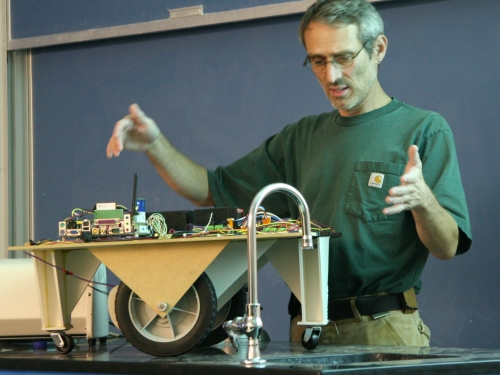
“Teach me to make” as simple as it sounds is a simple yet powerful effort on wordpress by a maker from USA. Apart from being a true maker, Michael Shiloh is an absolutely delightful and an approachable person to talk to. His sense of purpose in his work was very much apparent in my short, yet interesting conversation with him. Here are some widely and less known things about the teacher, student and entrepreneur.

Priya: What brought your interest in electronics? What is the very first project that you fondly remember completing till date?
Michael: Ever since I remember, I have been taking things apart and putting them back. The important thing is to pay attention to details while doing that. Like, where the screw fits, what part goes where, what are the names of the parts etc. even if one is not able to know the full functioning one should be able to call the parts by the name and know where they fit and what they do. Growing up at a time with limited resources, left only one option of harvesting old electronic parts. I suggest every aspiring-maker to do that!

(Gives a pause) As for the finishing part, I never finished a lot of projects, and I had a LOT of unfinished projects sitting around me in my room. But the important part was, that I caught hold of a lot of basics while making them. Not stopping, is important.

P: What drives your passion for Arduino and open source hardware?
M: 10 years back, I started a project called Teleo based on PIC which was on similar lines as an Arduino, just not with an IDE. Hence, a simple prototype for students to interact has always been my passion.

P: You talk about 3 methods of your teaching – contraption building, physical computing, and open source advocacy. What is Contraption building as defined by you?
M: Interesting question! Contraption, is an idea of a prototype in its raw un-polished form. It is the fastest way to check if what you assume in theory is in fact practical or not. I always encourage contraption as it makes understanding and explaining easier of the internal working mechanisms of an idea.

P: How is it different from Physical computing?
M: Contraption building, may or may not include electronics. It can be purely mechanical, say, just a few wheels, pulleys and a rubber band? Physical computing on the other hand needs an inclusion of electronics.

P: What do you think is the right approach to Advocate Open source hardware?
M: The right approach is to teach the concept of sharing knowledge, Eg: Pythagoras Theorem. Its a shared piece of knowledge which is applied everywhere, new theorems are proven using the age old theorem. The strength of Open source hardware is not only the product, but what people do using the product.

P: In all your teaching classes, What do you think is the biggest attraction for any individual towards Arduino?
M: (Laughs) I am yet to find a concept or topic where Arduino has not been used. Type on google, ‘The concept + Arduino’ and voila! You have an application. BE it gardening, space, music or photography, name your interest and there is a way to tinker with it using an Arduino.

P: We hear a lot about media art, as a concept these days. What is special about adding electronics to art?
M: Any Art installation with electronics is based on sensors and actuators. Arduino helps the artist to manipulate the idea in his head and give a more personal and interactive approach to a previously ‘look-but-don’t-touch’ art. Let me call it a more knowledgeable way of interacting?

P: Since you have taken so many workshops and visited so many hackerspaces, what are the few useful tips you might want to give to the maker at home?
M: The most important thing is, to have a space. Space defines purpose. The next is organizing the tools that you have. In my times, I used old shoe boxes with egg-cartons inside to separate the resistors, LEDs and potentiometers. Harvest old electronic items and know what they are used for, they might come of use later. A multimeter is a must have. So are tiny components like LEDs etc. To add intelligence a programing board would be useful, and arduino has a great community support for a maker even at the middle of the night!

Never get intimidated by others polished presentations. The more raw your circuit is, the better it is appreciated among the maker community. Do share the knowledge, including the success and including the failures.

P: What is your role as a part of Arduino?
M: Let me see… We can call it Community Liason. Ill take care of all the minor bugs, wishlist and major issues, bridging the gap between developers and the community.
P: Wow! That sounds exciting! On a separate note, what would be your Ideal birthday gift?
M: Since there is SO much to build and manage, that would be – time.

A full bios of Michael alongwith his latest work can be read here.

Capacitive sensing with op amps

I’m not very happy with the lab exercise in Capacitive sensing.  The basic design questions are good:

  • What capacitance do we add by touching something?
  • What frequency should the oscillator run at without the touch?
  • What % change in frequency can we detect reliably? How will we do that detection?

but I’m not happy with my choice of an LM555 chip for the oscillator.  It is a fine choice for many purposes, and a good chip for students and hobbyists to learn about, but the Fairchild Semiconductor LM 555 data sheet does not do a good job of explaining how the chip works nor exactly what the logic function is for triggering the flip-flop.  As a result, students will probably end up just copying the astable circuit without really understanding it.

I think I would prefer to have them use an op-amp multi-vibrator circuit.  It can’t quite be modeled with only linear op amps, as it relies on clipping of the output to get nearly a square wave.

Op amp multivibrator. The first op amp is just to set up a virtual ground halfway between the power rails. The second op amp does the oscillating (at about 8.12 kHz for these components). Circuit drawn with CircuitLab, which is not capable of simulating it.

The op-amp multivibrator is a simple design.  When the output is high, C1 is charged until V_minus is higher than the positive input of the op amp (about 34.7% of the way from Vbias to Vout=Vdd).  Then the output goes low (taking about 6µsec, limited by the slew rate of the op amp), and the capacitor discharges until it is below the positive input (about 65.3% of the way from Vbias to Vout=0 with these values for R4 and R5). So Vminus swings from (1-0.6526) Vbias = 0.1737 Vdd to Vbias+0.6526(Vdd-Vbias)=0.8263Vdd.  The time it takes to charge or discharge should be about ,  where the time constant τ=R3 C1.  For the values of R4 and R5 here, the charge time should be 1.560 τ, and the period 3.119 τ. With the given values of R3 and C1, this should be a period of 102.9 µsec, or a frequency of 9.7 kHz.   I’m measuring 8.1 kHz, not 9.7 kHz, but I think that the discrepancy is due to the slew rate limitations (which add about 12 µsec to the period) and possibly stray capacitance.  With C1=47 nF, the frequency is 203.6 Hz, when the calculation says it should be 206.7 Hz, well within the accuracy of the components.

Connecting the foil-and-plastic-wrap sensor to Vminus adds a little stray capacitance, dropping the frequency to 8.01 kHz. Touching the sensor drops the frequency to 7.5 kHz–7.7 kHz, adding about 5 µsec–8.5 µsec to the period, consistent with adding about 50pF – 83 pF to C1.  This is a little smaller than the 163 pF that I estimated using the parallel-plate model in Capacitive sensing, but consistent with my measurements using the LM555 circuits.

I can get a much stronger effect if I remove C1 from the circuit, and use only stray capacitance.  The period drops to about 6.2 µsec (roughly 160 kHz), but (because of the slew rate limitations of the op amp) is not full scale and is essentially a triangle wave.  Touching the sensor reduces the frequency to about 35 kHz – 45 kHZ, an increase of 16 µsec – 22 µsec in period, consistent with an additional capacitance of  155 pF – 220 pF, which is about what was predicted by the parallel plate model. I’m a little reluctant to put this signal into an Arduino board, though, as the no-touch signal spends most of its time in the non-digital region between high and low, and only barely crosses the thresholds that would allow the ATMega328 chip to detect the signal.

One interesting idea would be to take advantage of the change in amplitude of the oscillation to make an all-analog touch detector.  I’m afraid that would not be very robust, though, as an increase in the period of only 12 µsec is enough to make the oscillation full scale.


Filed under: Circuits course Tagged: Arduino, bioengineering, capacitive touch sensor, circuits, course design, LM555, op amp, sensors, teaching

Reading bar codes with Arduino and unaltered CueCat

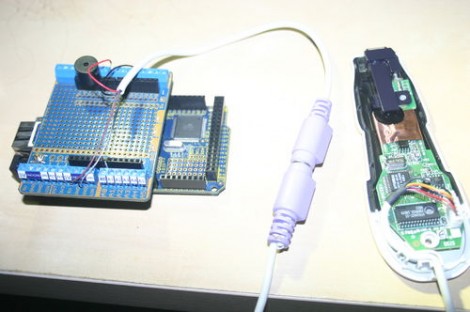
[Damcave] decided to try out some bar code reader projects. He got his hands on a CueCat years ago. The problem is that it outputs encrypted character sets instead of a clear text string. To get around this he used his Arduino to decrypt the CueCat’s data output.

Originally you could get you hands on a CueCat for free. It was meant to work like QR codes do now — you see a bar code, you scan it to get to a web address. It never really took off but you can still get your hands on one for about twelve clams. We’ve seen projects that clip a pin on the processor to disable to encryption. But [Damcave] didn’t want to mess with the hardware. Instead he connected the Arduino via the PS/2 connector and used software to translate the data. The encryption format has long been know so it was just a matter of translating the steps into an Arduino function.


Filed under: arduino hacks
Hack a Day 12 Jul 13:09

Energia brings Arduino IDE to the TI Launchpad

The Arduino IDE is an abstraction layer for the AVR chip which the board is based around. So it’s no surprise that it is now possible to use the Arduino IDE with the TI Launchpad board. This makes it dead simple for beginners to play around with the inexpensive and low-power MSP430 platform. This is all thanks to a lot of hard work on part of the Energia developers.

The project branches from Arduino so the look, feel, and function are all about the same. Most notably, the color scheme has migrated to red to match the board color of the Launchpad. You can configure the hardware the same way by selecting a COM port and target board. Almost everything is already working, but you should check the known issues page so that you don’t try to use a function that hasn’t been ported. Right now the list includes the random and random seed functions, as well as tone, notone, and micros. There is also an issue with analogWrite; it will only produce half the requested frequency and duty cycle can only be set from 0-50%. Still this is a great development if you’re most comfortable working from this IDE.


Filed under: Microcontrollers
Hack a Day 12 Jul 12:01

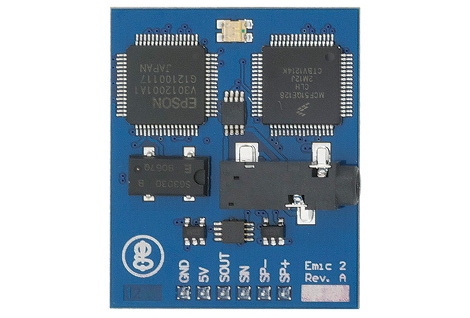
EMIC2 text to speech module

This is the EMIC2 text-to-speech module. You can see from the logo on the bottom left it’s the latest gadget coming out of [Joe Grand's] Grand Idea Studios. [Dino] tipped us off about his first experience with a prototype of the board. He’s driving it with an Arduino and the video after the break shows that the sound rendering is high quality and the words are very easy to understand. One of the things that we think is interesting is that the serial communications used to drive the board are not uni-directional. In fact, there’s a serial terminal that provides documentation on how to use the chip. Obviously this is most suited to the Arduino, which always has a PC-side terminal window available to it.

[Joe] himself shows some of the potential for the board. He gave new life to a broken toy by replacing its internals with a PIC-based circuit to drive the EMIC2. That video is also found after the break. He’s just using the demo clips, but from that you will get a good idea of the vocal modulations this device is capable of. The board rings up at $60 and is available from Parallax.

[Dino's] introduction:

[Joe's] project:

and it’s on sale now for about $60 for Parallax.


Filed under: arduino hacks

Want to learn Arduino? Use this educational Microbot!

Primary image

What does it do?

Educates people on arduino

Introducing the latest creation from B.O.T, the SWARMµBOT. An Arduino-Compatible educational micro-bot with all sensors required for applications such as Line-Following, Maze Solving, And Swarming! With a Atmega328 running an Arduino-compatible bootloader, and an integrated USB-UART bridge, programming this bot is as easy as connecting a USB cable, and hitting upload.

Cost to build

$99,95

Embedded video

Finished project

Complete

Number

Time to build

0 hours

Type

URL to more information

Weight

65 grams

read more

blink(1) the USB RGB LED Status Light

The wonderful gang at ThingM (makers of the blinkM smart LED) have announced an interesting new product is in the works, the blink(1) programmable USB RGB LED status indicator. Plug the little open source nub into most any USB port – laptop, desktop, server, some Android phones, DD-WRT router – and then you can use apps (or create your own) to make the blink(1) LED light up to indicate an event. A tweet just mentioned me? Steady green light. Email from my wife? Three blue blinks. CPU overheating? Red alert!

From the ThingM blog:

ThingM has just launched a Kickstarter for “blink(1)”. A USB RGB LED that builds on our BlinkM Smart LED. It’s a super status light that packs three dimensions of information (color, brightness and pattern) into a single tiny package that fits into any USB port on nearly every device.
It makes it incredibly easy to connect any data source in the cloud or on your computer to a full-color RGB LED so you can know what’s happening without checking any windows, going to any websites, or typing any commands.

I can’t wait to get my hands on one – the Kickstarter is nearly funded, so I’m optimistic – to play around with the development tools. I’d love, for example, to have the Blink(1) tell me when a Renderman render has completed, or if I have a meeting in five minutes.

Blink(1), the USB RGB LED by ThinkM