Posts with «arduino» label

Kegerator tallies your pints on Untappd while you sit back with a cold one

[Jeff] admits that he’s pretty well addicted to Untappd, a site he describes as a Foursquare for beer. Like his fellow beer nerds, he enjoys reporting the pints he’s had, even if they happen to be from his own stash of homebrew kegs. Untappd certainly supports this level of dedication, but it seemed silly to [Jeff] that he needed to grab his phone each time he poured himself a cold one in the comfort of his own home.

He took a look around the room and spied an Arduino doing a whole lot of nothing, so he set off to build a system that would allow him to automatically record his drinking habits without the use of his smartphone. The system is not overly complex, and measures pours using flow sensors, uploading the results to Untappd using their “check-in” API. [Jeff] was sure to include several other useful features into his build, including a lockout timer that prevents multiple check-ins when simply topping off a pint, as well as “neighbor mode” which lets you pour a round for friends without recording the pour.

Be sure to check out the build in its entirety on [Jeff’s] site, and let us know if you’re doing something equally cool with your keg setup at home.


Filed under: arduino hacks, beer hacks
Hack a Day 18 Jul 12:01

Kick Off Maker Camp with Free Shipping from the Maker Shed


For Maker Camp, our virtual summer camp for teens, most of the materials for the projects use common household items, others, such as the Compressed Air Rocket Kit in the picture, can be purchased in the Maker Shed.

To celebrate the launch of Maker Camp, the Maker Shed is offering free shipping on all orders over $50! Just use coupon code MAKERCAMP upon checkout to get the deal. It’s the perfect way to stock up on camp supplies or to take your new found skills to the next level. With everything from Arduino, to guitar kits, to tools, the Maker Shed has something for every maker.

Want to attend Maker Camp? It’s easy and free, just follow MAKE on Google+!


EKG recording working

My son and I spent some time today debugging his data logger.  I also convinced him to add some documentation, though not nearly as much as I think is needed.  This version is just a text command interface, with no GUI—the PyGUI interface he was building seemed to slow things down a lot, and is not yet ready for use.

The data logger works fine as long as the sampling interval is at least 3msec.  With 2msec sampling, I think that serial communications (over a 115200 baud USB serial connection) is getting overwhelmed.  The Arduino seems to be capable of sending out data ok at 2msec/sample, though 1msec/sample causes it to miss some timer interrupts.

If the Python program can’t empty the serial port fast enough, I think that there operating system problems. My MacBook Pro sometimes gets wedged with long runs at higher sampling rates—I’ve had to reboot it a couple of times today. If the problem is with the MacBook Pro, it may be possible to run with slightly shorter sampling intervals on faster hosts, before hitting the limits of the Arduino.

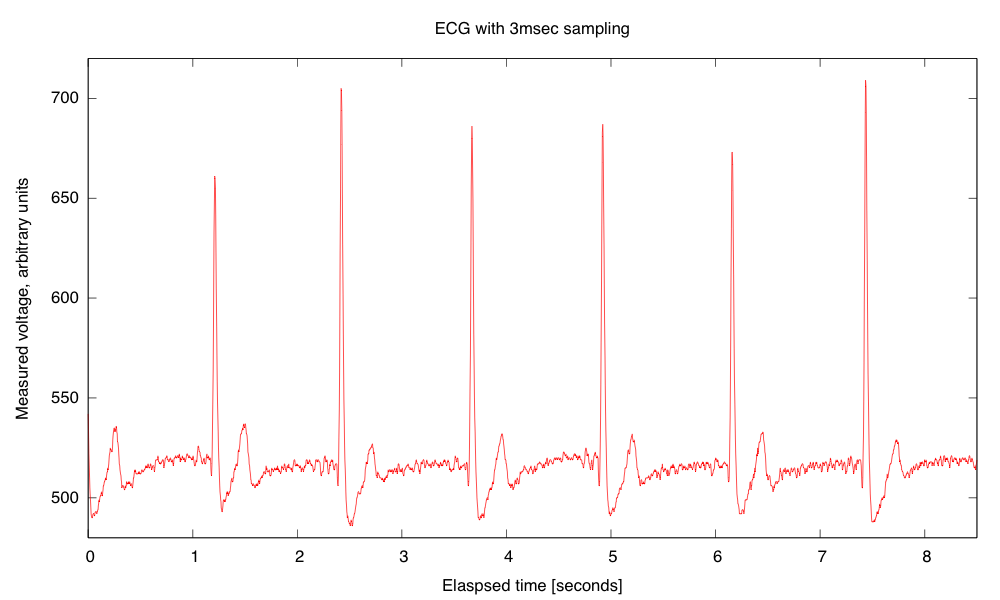
I did manage to get a nice recording for about 8.5 seconds at 3msec sampling:

Recording of EKG trace on the Arduino. The value 512 represents the midpoint of the Arduino voltage scale. The EKG circuit and Arduino used separate power supplies, so the reference voltage is about 2.506V, while AREF on the Arduino was 4.96V, so the reference voltage should be about 517.  In a separate recording of the EKG signal and Vref, I found Vref to be 515±1.  The arbitrary units are about 4.844mV at the input to Arduino.  If my gain of my EKG is set to 591 as I expect from the resistor values, the arbitrary units should correspond to 8.2µV at the electrodes, and the biggest peak is about +1.6mV and the deepest drop is about -0.24mV.

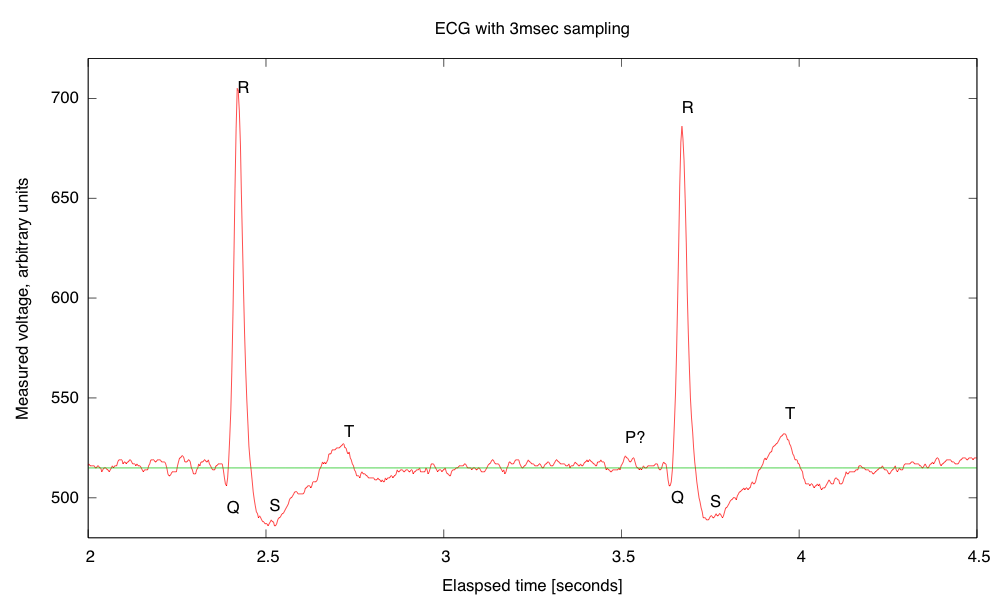
I think that the signals were clearer today, because I was using a ground electrode on my chest, rather than on my elbow, reducing the common-mode noise a little. The 3msec resolution allows zooming in to get a pretty clear view of the structure of the pulses:

Detail of a couple of pulses showing the QRS complex and the T pulse. I’m not sure whether or not a P pulse is visible—if so it is almost buried in the noise. I’ve added a line where I believe that the reference voltage is, though it was not recorded on this run. The R-R interval here is about 1251±2msec for a pulse of 0.80 Hz or 48.0 bpm, which is about my usual resting pulse.

Although it took my son and me a little debugging to get everything working today, overall I’m quite pleased with the data logger code he wrote. He still has more documentation to add (both in-code and external), and there are some more features that could be added, but it is basically usable as is.

Incidentally, I found out today from Cardiology Explained by E.A. Ashley and J. Niebauer, that

ECG terminology has two meanings for the word “lead”:

  • the cable used to connect an electrode to the ECG recorder
  • the electrical view of the heart obtained from any one combination of electrodes

So it is not surprising that I was confused by the usage—I was only familiar with the first usage, which corresponds to normal engineering terminology.


Filed under: Circuits course, Data acquisition Tagged: Arduino, bioengineering, circuits, course design, ECG, EKG, electrocardiogram, instrumentation amplifier, op amp

How to Build a Ping Pong Robot (YouTube)

Hey,

The ModuPong YouTube channel is about a modular robotics system that tracks a ping pong ball in real-time. In addition, we cover in this channel how the system predicts and responds in less than 130ms.

Please tell me if you have any ideas on how we could make our system better. Cheaper and faster would be great!

how to send sensor values wirelessly

i know how to send messages to another arduino but im not sure how to send sensor values here is code to transmit the word hello 

If you could show me an example code it would be great.

// transmitter.pde

//

// Simple example of how to use VirtualWire to transmit messages

// Implements a simplex (one-way) transmitter with an TX-C1 module

//

// See VirtualWire.h for detailed API docs

// Author: Mike McCauley (mikem@open.com.au)

// Copyright (C) 2008 Mike McCauley

read more

Arduino Forum Quick-typer Uses Arduino, Naturally


Arduino Forum moderator Nick Gammon finds himself typing in the same things over and over again while responding to questions within the community. On the list are links to primers about interrupts, serial, and debugging; plus there are also few phrases and markup tags. To make his life a little easier, he used a 16-key keypad and the Arduino Leonardo’s capability to act like a USB keyboard to make all these strings one pushbutton away.


MAKE » Arduino 14 Jul 14:00

Sales Team Goes to Camp, Part II

These are the ongoing adventures of the MAKE Sales and Marketing team, as we build our maker skill sets… pretty much from scratch. To read about how MAKE Sales Camp came to be, go here.

My masterpiece.

Up until now at MAKE Sales Camp, it’s been all fun and games.  We did a little programming, a little building, had some laughs, and everyone went home feeling good.  But today at Camp, things stopped being fun– and started getting REAL.

Camp Director Nick Raymond, knowing what today’s task would demand of us, left us in the capable hands of the only intern man enough for the job: the Sultan of Solder, Brian Melani.  Our task?  Using only a soldering iron and a steady hand, populate a servo motor shield with capacitors, resistors, and integrated circuits.

This basic soldering task seemed like child’s play at first, but after the first dozen solder joints, tensions began to escalate.  Attention to detail was essential.  Perfection: the only option.  In the end, the pressure proved too much… for some.

Professional demeanor was compromised.  Dignity was left by the wayside.  Tears were shed.

(OK, no tears, but there were definitely some colorful expressions tossed around the lab.)

It’s all in the wrist…

Once we were finally able to regain our composure, we emerged from the cloud of solder fumes we had created and all came to the same conclusion: Putting this board together was harder than we thought!  Getting all those tiny parts lined up, making sure we knew which capacitors were polarized, and most of all, having a steady yet quick hand (no bridges!!)… sheesh!  I definitely earned a new respect for our Engineering interns today.

In the end, it took an iron will (and a rosin core)– but we all managed to get our servo shields put together (reasonably) correctly.  High Fives all around!

But our future is still uncertain: Will our shields hold up when we hook them up to our Arduinos?  Do we have what it takes for the more advanced maker skills that lay ahead?

Will yours truly crack the color code for differentiating resistor values and become totally awesome??

Only time will tell… see you at next week’s MAKE Sales Camp!


Joystick operated security cam will overlook the moat

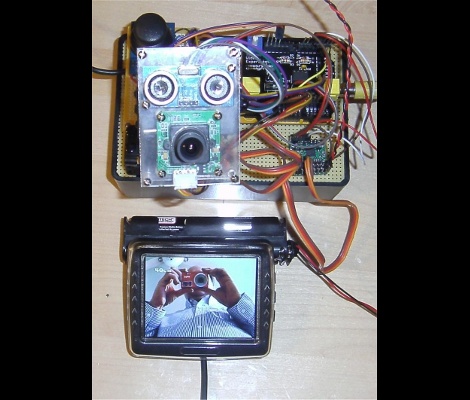
What good is a moat if nobody is guarding it? We suppose that depends on what beasties lurk beneath the surface of the water, but that’s neither here nor there. The members of LVL1 continue their quest to outdo each other in augmenting the building’s automated features. The latest offering is this security camera which is operated with an analog thumb stick.

These are the people who are building a moat (which the city things is a reflecting pool) in front of their main entrance. Now they will be able to see and sense if anyone is trying to get across the watery hazard. The hack marries an ultrasonic rangefinder and camera module with a pair of servo motors. The brackets for the motors allow a full range of motion, and the signal is translated by an Arduino and Video Experimenter shield to put out a composite video signal. That’s not going to make streaming all that easy, but we’re sure that is just one more hack away.


Filed under: Hackerspaces, video hacks

Laser light painting includes camera control

This laser light painting setup can even control the camera. But it probably will not work with your average point-and-shoot. The exposure time used is somewhere around 2 seconds long, a feature which is hard to find on anything but DSLR cameras.

The setup relies on a red laser diode to do the painting. When viewed in real time you only see a dot tracing out a cryptic pattern and occasionally switching on and off. But with a long exposure the intense light persists to achieve an image like the one seen above. Note the ghosting around the rig as it has moved while the shutter was open.

The Arduino controlled device consists of a base which pivots the diode horizontally, with a servo for aiming on the vertical axis. Since the sketch is divided up by letter, we wonder how hard it would be to adapt this for use with a point-and-shoot? Perhaps you could capture one letter at a time and layer the frames in post production?

It seems this is a lot easier to build than some of the LED plotters we’ve looked at. If you do make your own don’t forget to send a link our way.


Filed under: digital cameras hacks, laser hacks

cheap wireless shields for arduino

I was looking for wireless shields for my arduino and stumbled across      this http://www.kickstarter.com/projects/1608192864/open-source-wireless-inventors-shield-for-arduino 

its a wireless shield for arduino that has 177meters range and is easy to program check out the link above for more info

read more