Posts with «arduino» label

Home Automation for Makers goes Arduino At Heart! Support them on indiegogo

A connected home is in the dreams of many of us and we all spent at least a few moments thinking about how would it be for real. The problem is that most of the hardware devices and software platforms are not designed to work together and that’s why things become complicated.

Today we introduce you to a new Arduino At Heart project called EZcontrol.IT, crowdfunding now on Indiegogo, and designed to simplify the world  of internet of things:

EZcontrol.IT offers dedicated hardware that is affordable and easy to use, compatible and programmable with the Arduino™ IDE and language; designed to interact with a full and extensive software platform: Lelylan, that is an open, easy to use and personalize, cloud platform for Home Automation.

The project is composed by:

  •  EZboard, a low power consumption Arduino compatible board, equipped with an onboard Ethernet controller, microSD card socket, temperature sensor, and power relay. It’s designed to run for long periods of time powered by batteries and it integrates all the hardware necessary to implement most of the common applications for Home Automation.
  • Leylan platform, a very easy to use Home Automation cloud platform, universally compatible with any device capable of being connected to the web. It’s  based on the MQTT protocol (MQ Telemetry Transport), the same used by Facebook to send live updates to the mobile messaging applications, and offers a simple API that can be used to program basically any platform.

EZcontrol.IT decided to join the Arduino AtHeart program to better identify this solution as dedicated to makers, and to remark the compatibility with the Arduino platform at the highest possible level.

EZboard in bundle with Lelylan is available starting today for a short initial period of pre-order, with packages for makers and extremely affordable early-birds offers. Make your pledge!

The Story of OpenSprinkler: an Open-Source Web-Based Sprinkler Controller

Learning Arduino inspired me to invent the OpenSprinkler.

Read more on MAKE

Hackaday Links: April 27, 2014


The HackFFM hackerspace in Frankfurt finally got their CO2 laser up and running, and the folks there were looking for something to engrave. They realized the labels on IC packages are commonly laser engraved, so they made a DIP-sized Arduino. The pins are labelled just as they would be on an Arduino, and a few SMD components dead bugged onto the pins provide all the required circuitry. Video here.

A few years ago, we heard [David Mellis] built a DIY cell phone for an MIT Media Lab thingy. Apparently it’s making the blog rounds again thanks to the Raspi cell phone we featured yesterday. Here’s the Arduino cell phone again. Honestly we’d prefer the minimalist DIY Nokia inspired version.

The Raspberry Pi is now a form factor, with the HummingBoard, a Freescale i.MX6-powered clone, being released soon. There’s another form factor compatible platform out there, the Banana Pi, and you can actually buy it now. It’s an ARM A20 dual core running at 1GHz, Gig of RAM, and Gigabit Ethernet for about $60. That SATA port is really, really cool, too.

[Richard] has been working on a solar-powered sun jar this winter and now he’s done. The design uses two small solar panels to charge up two 500F (!) supercapacitors. There’s a very cool and very small supercap charging circuit in there, and unless this thing is placed in a very dark closet, it’ll probably keep running forever. Or until something breaks.

Here’s something awesome for the synth heads out there: it’s an analog modeling synthesizer currently on Indiegogo. Three DCOs, 18dB lowpass filter, 2 envelopes and an LFO, for all that classic Moog, Oberheim, and Roland goodness. It’s also pretty cheap at $120 USD. We really don’t get enough synth and musical builds here at Hackaday, so if you’re working on something, send it in.

A glass-based PCB? Sure. Here’s [Masataka Joei] put gold and silver on a piece of glass, masked off a few decorative shapes, and sandblasted the excess electrum away. [Masataka] is using it for jewelery, but the mind races once you realize you could solder stuff to it.


Filed under: Hackaday links

Mirobot—a WiFi robotics kit at Maker Faire UK

The Mirobot, the brain child of Ben Pirt, brings long buried memories of the Logo Turtle flooding back. It's a Wi-Fi robot designed kit help children learn about technology and programming.

Read more on MAKE

The making of Terrors of the breakfast table

Visual artist and filmmaker Tyler Tekatch worked with Kyle Duffield, interactive programmer to create an interactive video installation called Terrors of the breakfast table, currently on view at the Art Gallery of Hamilton in Ontario, Canada, until May 25 2014:

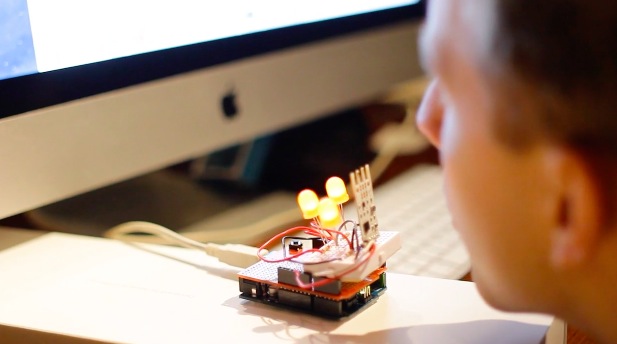
The visitor approaches a table and chair in the centre of the space, and blows into a sculptural device on the table, when the device glows orange. Subtle technologies sense the viewer’s breath, triggering thought-provoking interactive elements, such as a dream montage, the pace of a scene, the ambient sound, and the brightness of the visuals. The viewer discovers the interactions at their own pace, and some of the effects are more subtle than others.

They used a combination of cameras to shoot the project, including the Canon C100, the 5d markiii, and the Sony FS700 to achieve some of the super slow motion shots. The film was edited in FCP7, graded in DaVinci Resolve, and effects were done with Cinema 4d and 3ds Max.

For the interactive elements, they used Max 6 for all of the programming, including the Arduino library, AHarker Externals library, Ambisonics Externals from ICST, and externals from Jamoma. They experimented with a number of different approaches to the sensor, including sound analysis, but finally settled on an anemometer designed especially for breath by the company Modern Device.

The sensor was paired with an Arduino Uno,  to which they also added LEDs in order to illuminate the sensor housing sculpture, and which were also mapped to the viewer’s breathe.


Arduino Blog 26 Apr 16:01

Small-Scale Projects Use Snail-Mail Mail-Scale

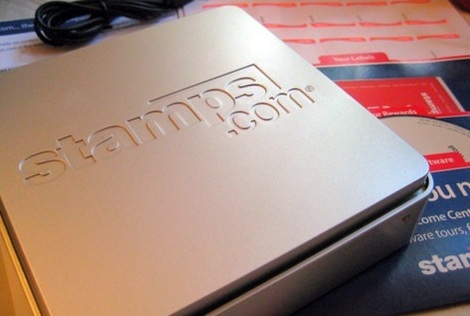
Stamps.com offers a free USB scale when you sign up for their service. The first versions of this scale did not have a display. In order to find the weight of an object the scale had to be connected to a computer running the stamps.com software. If you happen to have one of these old scales or are able to pick one up cheap, you may be interested in using it outside of the stamps.com service. There are several options on how to do that.


Stamps.com Scale Tool

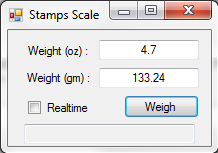
Although ‘stamps.com’ is in the title, the two are not affiliated. This is a simple program that displays the scales output in both ounces and grams. There are 2 modes, Realtime that constantly updates the displayed output and Snapshot where the ‘Weigh’ button records and displays the weight at that moment.


Stamps.com USB Scale Reader

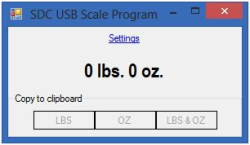
Here’s another similar Windows-based scale reader program. It claims to work with all stamps.com scale models. This has a unique feature where it hangs out in the system tray and pops up when it detects a change in weight. When an amount is displayed, the 3 lower buttons let you quickly copy the values to the clipboard.


Ultimate Scale

If you don’t own a Windows-based computer and/or you would like to weigh an apple, then Ultimate Scale is for you. This Android App automatically starts when the scale is connected and proceeds to display the weight on your phone. Tapping the main weight text zeros the scale. The amount is also spoken out loud for those too lazy to use their eyes. If you know the density of the object being weighed, this app will also calculate the volume!


Still not enough options for you? We’ve previously covered an Arduino project that displays the scale’s measurement on an LCD screen.


Filed under: hardware
Hack a Day 26 Apr 15:00

DIY Multimeter, Arduino Sold Seperately

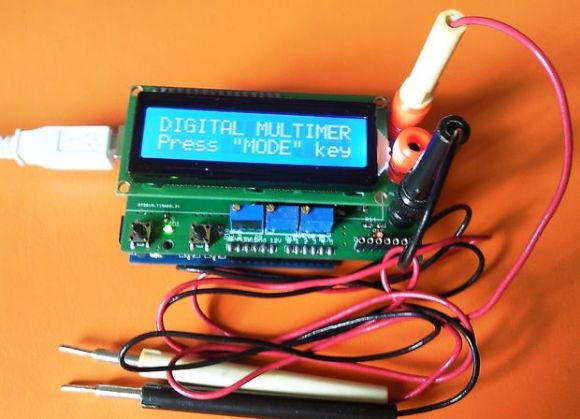
You can’t argue that Arduinos are extremely popular with the maker/hacker community. Some would say that there is certainly no shortage of projects to make using them. [Milen] thought otherwise and felt it was time to create an Arduino-based multimeter.

At the heart of this project  is a common Arduino Uno. The additional parts were kept to a minimum in order to keep down the overall cost and project complexity. The finished product can measure voltage from 0-100v, amperage up to 500mA and resistance between 0-250 kohm. If you need to check for continuity, it can do that too.

All of the parts required to make the multimeter fit on a shield that plugs directly into the Arduino. Banana plugs allow for attaching test leads. The measurement values are displayed on an LCD screen and/or (if connected) to the Arduino IDE Serial Monitor. If only using the serial monitor, the LCD screen can be omitted to save a few bucks.

If you would like to build one for yourself, the above link has detailed instructions, schematics and a bill of material. The best bang-for-the-buck multimeter available is still the Harbor Freight Special that you can usually get for free with purchase.

[Thanks Karl]


Filed under: Arduino Hacks

Arduino’s Servo Library: Angles, Microseconds, and “Optional” Command Parameters

A closer look at Arduino's servo library and the optional parameters you should be aware of.

Read more on MAKE

MAKE » Arduino 23 Apr 18:28
arduino  robotics  

Upgrading the OpenWrt-Yun image on the Yún

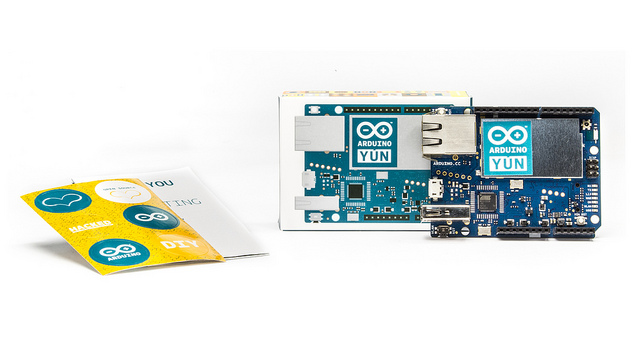
Today we released the upgraded version of the OpenWrt-Yun image on the Arduino Yún.
This version includes all the latest and greatest from stable OpenWrt, the latest (Python) Bridge (with a php contribution and fixes to the file module), we also added Mailbox support to REST api and other fixes to some open issues.

The new image contains also the fix to the well known Heartbleed bug, a big security issue that impacted on almost all websites of the world.

If you own an Arduino Yún we suggest you to follow the link and read the procedure to update the board.
You’ll need to download the zip file from the download page. Remember that updating the OpenWrt-Yun image will cause the loss of all files and configurations you previously saved on the flash memory of the Yún.
Enjoy!

Arduino Blog 23 Apr 10:00
arduino  hearbleed  openwrt  python  yún  

Paper-Thin Arduino Enables DIY Dirigible

Build your own balloon-based blimp with Printoo, a new paper-thin Arduino-compatible microcontroller.

Read more on MAKE

MAKE » Arduino 22 Apr 19:43