Posts with «arduino» label

MakerFaire Rome: the european call for makers is online! Join us

 

It’s time to start tinkering on new projects or pimp-up some old ones because MakerFaire Rome is calling!

Last year it was an overwhelming experience for all of us: more than 35.000 people from all over the world gathered for the first edition of the European edition of MakerFaire. Around 24o makers presented their projects ( 60% from Italy and 40% from the rest of the continent) and showed to a crowd of enthusiasts and newbies  the impact of open source community and DIY on our lives.

If you want to join us with your project in Rome from the 3rd to the 5th of October, take a look at the Call for Makers and fill it before the 25th of May:

The first step to participate in Maker Faire Rome as Maker is to submit an entry that tells us about yourself and your project. Entries can be submitted from individuals as well as from groups.
Please provide a description of what you make and what you would like to bring to Maker Faire, including links to photographs and/or videos of your project. We particularly encourage exhibits that are interactive and that highlight the process of making things. Continue >>

Here’s Arduino’s video from last year experience:


Arduino Blog 22 Apr 11:10

Building a Final Key


Remembering passwords is a pain, and there’s a number of devices out there to make it easier. If you’re looking to roll your own, this guide to building a Final Key will walk you through the process.

We talked about the Final Key before. It’s a one button password manager that encrypts and stores your password. It acts as a virtual serial port for configuration. When you hit the button, it becomes a keyboard and types in the correct password.

The creator has no intentions of making this a commercial project for a number of reasons. Instead, easy build instructions are provided based on the Arduino Pro Micro. The 24LC512 EEPROM can be soldered directly to the Arduino by bending out the DIP legs. A few resistors, a button, and an LED finish off the project. The last step is to fill it with hot glue to prevent tampering.

The Final Key firmware is available on Github, and the case can be ordered from Shapeways. If you’re interested in hardware password management, you can also check out the Mooltipass which is being developed on Hackaday.

[Thanks to Lars for the tip!]


Filed under: Arduino Hacks, security hacks

Practice Your Service Return With This Arduino-Powered Automatic Ping-Pong Ball Machine

Friction wheel mechanism, frame made of VEX Robotics Design System components.

Read more on MAKE

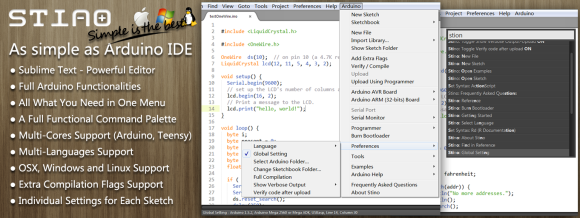
Sublime Text as an Arduino IDE

If you’ve played with an Arduino, you’ve probably been frustrated by the IDE. It works, but it’s not the best editor. It’s especially painful for bigger files and larger projects. The Stino plugin for Sublime Text aims to solve this issue by bringing the full functionality of the Arduino IDE to the Sublime Text editor.

Sublime Text is a powerful text editor with support for most programming languages. What it’s missing is support for compiling and uploading code to an Arduino. Stino bridges that gap. Sublime is a commercial product, and retails for $70 USD. However Sublime does have an indefinite trial period, so Stino can be evaluated for free. Stino itself is an open source plugin written in Python, and you can contribute to the project on Github.

After installing Sublime and Stino, you point the plugin at an Arduino install folder. It then allows you to build and flash directly from the editor. For anyone who’s been frustrated with the Arduino IDE, this looks like a slick solution.

[Thanks to Matt for the tip!]


Filed under: Arduino Hacks
Hack a Day 21 Apr 06:00

Flexible Arduino Sure to Be A Hit


Wearable, lightweight hacks have long been dominated by the Lilypad. This will probably change with the introduction of the Printoo. Using printable circuit technology, the Printoo takes a modular approach to enable hackers, makers, and engineers alike to construct flexible circuits that can be put on almost anything, including paper!

Powered by the all too familiar ATmega328, the Printoo core module is fully compatible with the Ardunio IDE. The modular design enables functionality with several other printed devices including displays, batteries, sensors and even LED strips to make many different projects possible. One of the most interesting modules is the 1.5 volt, 500 micron thick electrochromic display.

Be sure to check out their Kickstarter, which has a nice video that demonstrates the project. If funded, they will be available in October in case you want to get your hands on one. Or feel free to make your own. Just be sure to let us know if you do!


Filed under: Arduino Hacks, wearable hacks

A LIN Bus Signal Injector

[Zapta] tipped us about his latest project: a LIN bus signal injector. For our unfamiliar readers, the LIN bus is a popular automotive bus that is used to interface with buttons, lights, etc. As [Zapta] was tired of having to press the Sport Mode button of his car each time he turned the ignition on, he thought it’d build the platform shown above to automatically simulate the button press.

The project is based around an ATMega328 and is therefore Arduino IDE compatible (recognized as an Arduino Mini Pro), making firmware customization easy. In the car, it is physically setup as a proxy between the LIN master and the slave (which explains the two 3-wires groups shown in the picture). It is interesting to note that the injection feature can be toggled by using a particular car buttons press sequence. The project is fully open source and a video of the system in action is embedded after the break.


Filed under: Arduino Hacks, hardware

Sniffing Vending Machine Buses


We’ve talked about a variety of protocols and how to deal with them in the past. Today, [Dan] is working on sniffing vending machine Multidrop Bus. The Multidrop Bus (MDB) protocol is a standard used in vending machines to connect devices such as currency collectors to the host controller.

To connect to the bus, interface hardware is required. [Dan] worked out compliant hardware and connected it to an Arduino. With the device on the bus, [Dan] got to work on an Arduino sketch to parse the MDB data into a human-readable format. With that working, the bus can easily be sniffed over the Arduino’s serial console.

This is just the start of a more involved project. Since this protocol is used to communicate with a vending machine’s currency collector or card reader, being able to communicate it would allow him to implement his own payment methods. The plan is to augment the vending machine he operates at Vancouver Hack Space to accept Bitcoin. We’re looking forward to seeing that project unfold.


Filed under: Hackerspaces, Network Hacks

New Project: Bricktronics Mini Tank

Build this simple rolling Mini Tank to learn how to combine Arduino microcontrollers with Lego Mindstorms robotics.

Read more on MAKE

(Mind)Storms are Brewing in the Shed

Think of the best pairing you know, be it chocolate and peanut butter, rainy days and good books, or the purr of an engine and the open road. Then, imagine pairing one of the best toys of your childhood, Legos, and the hobbyist toy of your adulthood, the Arduino microcontroller. Combined, these […]

Read more on MAKE

How to make your own Primo prototype using digital fabrication and Arduino boards

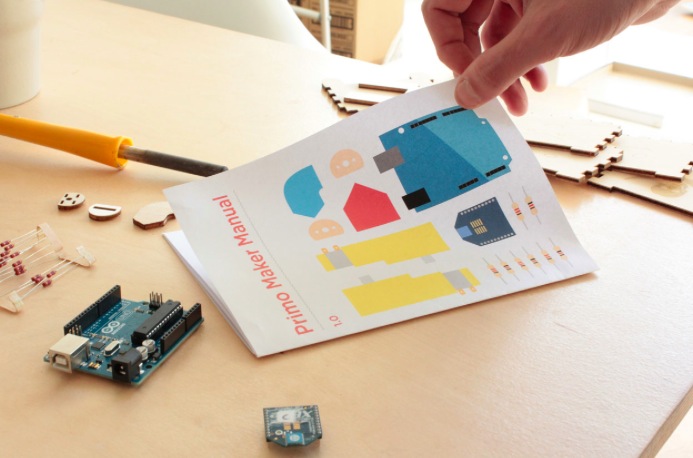
Primo‘s team sent us exciting news from their HQ about their contribution to the open source community. After the successful Kickstarter campaign to launch the wooden play-set that uses shapes, colours and spacial awareness to teach programming logic through a tactile, warm and magical learning experience, they took a step further. They released all the documentation and the instructions to produce a Primo prototype,  different from the product that they make and sell.

We just finished the first edition of the Primo play-set open documentation, that includes the design files that we used to make our first prototype and a step-by-step guide to make your own version of the Primo play set. This “maker” version of our product can be assembled using rapid prototyping techniques and common tools like Arduino boards.

We recently published a preview of this documentation just for our Kickstarter backers, who already started to build their projects and to translate the document in their language. The FabLab in São Paulo for example already translated it in Brasilian Portuguese, while other languages like Dutch, Italian and Japanese are now in progress.

The whole documentation is completely transparent: it’s written in Markdown using Jekyll and GitHub pages. In this way it is very easy for creators to modify, translate and use it as a starting point for their projects.

In parallel we are developing an industrial version of our product, using manufacture-quality materials and custom Arduino-compatible electronic boards.


And if you want to read about the experience of a dad making a DIY version in 1 month and a half of work, follow this link.

Primo is an Arduino At Heart partner. If you have a great project based on Arduino and want to join the program, read the details and then get in touch with us.

Arduino Blog 16 Apr 22:17