3D-Printed Smart Watch Wins Our Arduino Challenge, Heading to Maker Faire Rome
 Arduino-compatible brain, Bluetooth LE connectivity, 3D-printed case, and open-source design.


 Arduino-compatible brain, Bluetooth LE connectivity, 3D-printed case, and open-source design.

Once again Amanda Ghassaei sent a cool project she’s been working on lately as an extension of the work she’s been doing on the monome project. Sugarcube is an open source, grid-based, standalone MIDI instrument self-contained and relatively cheap to make. It communicates via a MIDI output with other electronic MIDI instruments and software environments like Ableton and MaxMSP.
An Arduino Uno generates all of its MIDI data and drives LEDS, buttons, a 2 axis gyroscope, a 3 axis accelerometer, two potentiometers, and the whole device is powered by a lithium-polymer battery making it pretty portable.
She published detailed documentation on Instructables to make one yourself and shared a bunch of videos to discover its main features:
Basically this project is:
A portable, Arduino-powered, grid-based MIDI controller that boots up into a variety of apps to do lots of things with sound. The controller has 16 backlit buttons, used as both inputs and outputs to give the controller some visual feedback. 2 potentiometers give analog control, depending on the app the pots are assigned to tempo, MIDI velocity, pitch, and scrolling (making the avaible grid space larger than 4×4). An x/y accelerometer and an x/y gyroscope add some playful, gestural control to the device; most of the apps implement a “shake to erase” control and several respond to tilt in various ways.
It boots up into 7 different apps, though it has the potential to boot up into 16 total. This device is primarily a MIDI controller, but I’ve also written an app that allows you to pull the button and analog data into MaxMSP and to control audio.
…
With this project, I was interested in making a device that was a little more self-contained and relatively cheap to make (lots of buttons = lots of $). In keeping more with the concept of the tenori-on, this controller does all its app processing itself, it does not rely on a computer to process button presses/analog controls into MIDI. This means you can plug it directly into a synth or any device that understands MIDI and you’re good to go, no computer required. It runs off a beefy LiPo battery that keeps it running for days on a charge, so it’s fairly portable as well. In keeping with the monome side of things, it’s totally open source and can be adapted to your particular audio setup/needs. All the Arduino code is up on github, along with a MaxMSP patch that decodes data from the controller into something usable in Max.

 Making a self-maintained, Arduino-based garden helped with instilling “grit,” the trait of not giving up when you hit obstacles.
 Two Weekend Projects from our archives are ideal for challenging makers to hack their houseplants and collect data from their garden.
 7 meters of RGB LEDs crammed onto a centurion’s helmet? It makes perfect sense once you see it in action. When you’re a creative developer with a name like Roman, you’re bound to find yourself recreating things from antiquity. Roman Cory found his inevitable foray into ancient Roman culture resulted […]

Zork, the famous Infocom text-based adventure game, is actually quite the technical achievement in software engineering. It’s an amazingly large world to explore, albeit in text form only, running on an interpreter that allows paging, loading, and saving the complete state. All this, built to run on computers with meager amounts of RAM in the late 70s. You might think it would be easy to play Zork on an Arduino, but as [rossum] found out, that’s easier said than done (alternate blog link)
While most computers that were capable of running Zork had at least 8k of RAM, if not more, the ATMega328 in the Arduino only has 2k of RAM. Those fancy home computers of yore also had built-in video, a keyboard, and most of the time, a disk drive. The Arduino has none of that.
[Rossum] faced this challenge head on, capitalizing on the onboard hardware of the Arduino. Video is generated by using SPI mode on a UART at top speed – 8 MHz. This just shifts out pixels from the video buffer on an SD card. The keyboard is handled like any other PS/2 keyboard project on the Arduino, and audio is generated by toggling a pin at 1000Hz for a keypress, and 3600Hz for SD card access.
The finished product includes a bunch of other Infocom games on the SD card, including Leather Goddesses of Phobos, and the ability to run Hitchhiker’s Guide to the Galaxy, the game regarded by many as being better than the book. Video below.


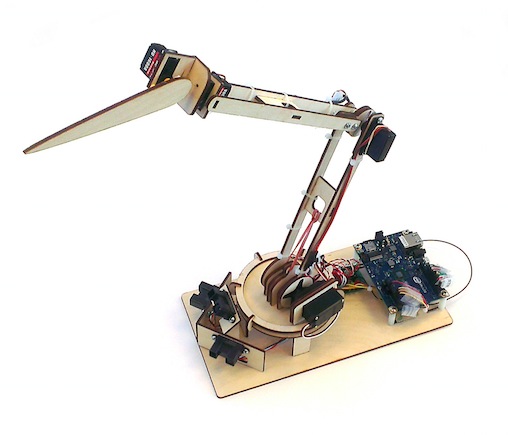
Datamonsters are creatures that respond to you. They can see you and respond to your presence and movement. In addition to responding to immediate interactions, they can also be influenced by events happening in the world outside.
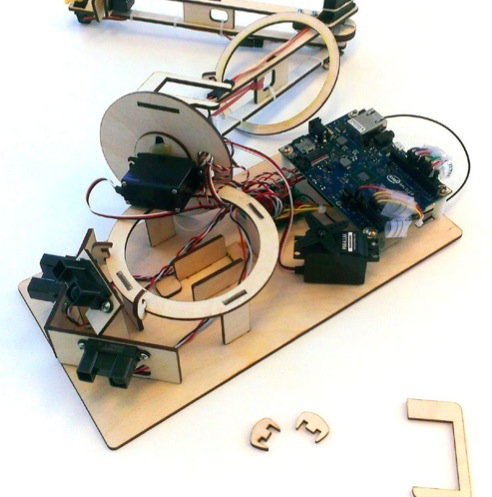
The project you see in the picture was made by Lucas Ainsworth using Intel Galileo board and needs 3 main things:
- a physical structure
The physical structure uses commonly available materials and a relatively easy-to build wooden kit pattern, so that the physical form “gets out of the way”
as much as possible. If you cut this kit and put it together, you will have a robot with 5 joints: waist rotation, waist elevation, mid-body elevation, neck rotation, and head movement.
- sensing
For this version, we’re using 3 long range active IR sensors for simplicity and low cost. This sensor pack estimates object location in 3D space. Next gen could possibly use a webcam and OpenCV to include face-detection and motion in addition to presence.
- software
This is where the fun is and where the most work remains to be done. We have code for the Arduino IDE (written for the Intel Galileo board) that you
can use to calibrate and control your monster. If you use our code unchanged, you’ll have some basic reactions to objects, and a connection over WiFi to Thingspeak. Thingspeak is an easy-to-use repository for data collected from the internet or any data sources you create.
You can make your own Datamonster following the detailed documentation at this link. The Galileo code to get started (for the Arduino IDE) is on GitHub.
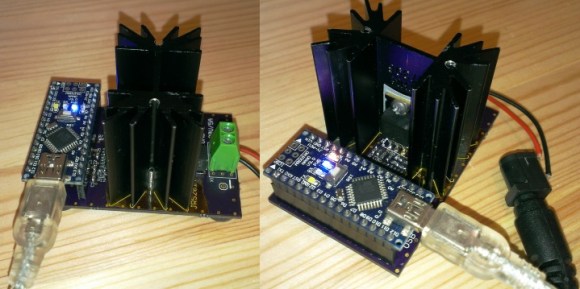
Some projects are both educational and useful. We believe that [Jasper's] Arduino based electronic load is one of those project.
[Jasper's] electronic load can not only act as a constant current load, but also as a constant power and constant resistive load as well. The versatile device has been designed for up to 30V, 5A, and 15W. It was based on a constant current source that is controlled by a DAC hooked up to the Arduino. By measuring both the resulting voltage and current of the load, the system can dynamically adapt to achieve constancy. While we have seen other Arduino based constant loads before, [Jasper's] is very simple and straight forward compartively. [Jasper] also includes both the schematic and Arduino code, making it very easy to reproduce.
There are tons of uses for a voltage controlled current source, and this project is a great way to get started with building one. It is an especially great project for putting together your knowledge of MOSFET theory and opamp theory!



In proper, high-dollar embedded development environments – and quite a few free and open source ones, as well – you get really cool features like debugging, emulation, and profiling. The Arduino IDE doesn’t feature any of these bells a whistles, so figuring out how much time is spent in one section of code is nigh impossible. [William] came up with a clever solution to this problem, and while it doesn’t tell you exactly how much time is spent on a specific line of code, it’s still a good enough tool to be a great help in optimization.
[William]‘s solution is to create a ‘bin’ for arbitrary chunks of code – one for each subroutine or deeply nested loop. When the profiler run, you end up with a histogram of how much time is spent per block of code. This is done with an interrupt that runs at about 1 kHz, with macros sprinkled around the code. Each time the interrupt ticks, the macro runs and increases a counter by one. Let the sketch run for a minute or so, and you get an idea of how much time is spent in a specific area of code.
It’s a bit of a kludge, but when you’re dealing with extremely minimal tools, any sort of help in debugging is sorely needed and greatly appreciated.


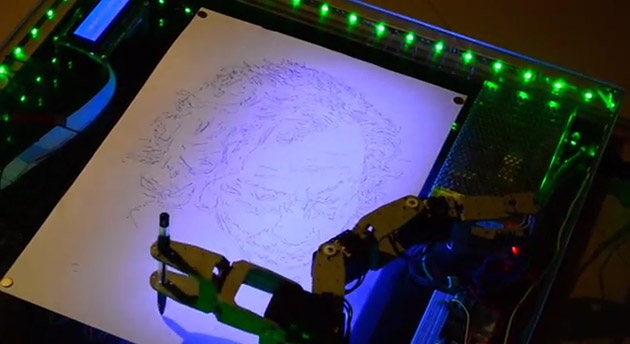
A recent Pew Research study says 51 percent of Americans believe robots will be able to create art indistinguishable from a human's. Well, they might be surprised that robots like those already exist, and one of them's this new mechanical Picasso called Roboartist. Obviously, this robotic arm can't think up its own masterpieces, so its operators feed it images to draw -- once it "sees" its subject, the system uses an image processing tool called Canny edge detector to determine where pen strokes go. Roboartist then uses rows of violet lights under the drawing surface as a guide to determine the lines on an A3 paper. If you're curious how its creators assembled the whole thing, Hackaday has its full hardware list (they used an assortment of parts, including Arduino), as well as as a diagram on how its software works. As you can see in the video below, the artistic robot works great and has even successfully sketched an eerie rendition of Heath Ledger's Joker.
Filed under: Robots
Source: Hackaday (1), (2)