Building an Overwatch Lucio Blaster
 Follow along as John Park prototypes a sound and light blaster prop.
The post Building an Overwatch Lucio Blaster appeared first on Make: DIY Projects and Ideas for Makers.


Follow along as John Park prototypes a sound and light blaster prop.
The post Building an Overwatch Lucio Blaster appeared first on Make: DIY Projects and Ideas for Makers.
We’ve noticed a lot of musical groups are named after insects. Probably has something to do with the Beatles. (If you study that for a while you’ll spot the homophonic pun, and yes we know that the Crickets inspired the name.) There’s also Iron Butterfly, Adam Ant, and quite a few more. A recent art project by a Mexican team — Micro-ritmos — might inspire some musical groups to be named after bacteria.
The group used geobacter — a kind of bacteria found in soil — a Raspberry Pi, an Arduino, and a camera to build an interesting device. As it looks at the bacteria and uses SuperCollider to create music and lighting from the patterns. You can see a video of Micro-ritmos, below.
Music is a bit subjective, of course. We thought the music sounded a little oppressive. Not sure how much of that is the code and how much is the characteristics of the bacteria itself.
We’ve seen SuperCollider in a banana piano, before (these are popular because for most people bananas have appeal). We’ve also seen other natural processes generating sound like this project for presenting the sunset to the blind.


[Stanley] wanted to make a laser projector but all he could find online were one’s using expensive galvanometer scanners. So instead he came up with his own solution that is to be admired for its simplicity and its adaptation of what he could find.
At its heart is an Arduino Uno and an Adafruit Motor Shield v2. The green laser is turned on and off by the Arduino through a transistor. But the part that makes this really a fun machine to watch at work are the two stepper motors and two mirrors that reflect the laser in the X and Y directions. The mirrors are rectangles cut from a hard disk platter, which if you’ve ever seen one, is very reflective. The servos tilt the mirrors at high speed, fast enough to make the resulting projection on the wall appear almost a solid shape, depending on the image.
He’s even written a Windows application (in C#) for remotely controlling the projector through bluetooth. From its interface you can select from around sixteen predefined shapes, including a what looks like a cat head, a heart, a person and various geometric objects and line configurations.
There is a sort of curving of the lines wherever the image consists of two lines forming an angle, as if the steppers are having trouble with momentum, but that’s probably to be expected given that they’re steppers controlling relatively large mirrors. Or maybe it’s due to twist in the connection between motor shaft and mirror? Check out the video after the break and let us know what you think.
The video’s in three parts: looking at the laser beams in action as you’d see them on a dance floor, then watching the projected images while looking at an insert of the Windows application, and then watching the steppers and mirror doing their rapid movements.
As for the expensive galvanometer scanners we mentioned above, check out this impressive laser projector that uses them. Another method is to use a spinning wheel with mirrors set to different angles, like this one that draws a marquee using a pill box as the wheel. And how about one with no mirrors at all, instead attaching the laser directly to servo motors, though that one does take longer to draw.


RC flying is one of those multi-disciplinary hobbies that really lets you expand your skill set. You don’t really need to know much to get started, but to get good you need to be part aeronautical engineer, part test pilot and part mechanic. But if you’re going to really go far you’ll also need to get good at electronics, which was part of the reason behind this Arduino servo tester.
[Peter Pokojny] decided to take the plunge into electronics to help him with the hobby, and he dove into the deep end. He built a servo tester and demonstrator based on an Arduino, and went the extra mile to give it a good UI and a bunch of functionality. The test program can cycle the servo under test through its full range of motion using any of a number of profiles — triangle, sine or square. The speed of the test cycle is selectable, and there’s even a mode to command the servo to a particular position manually. We’ll bet the build was quite a lesson for [Peter], and he ended up with a useful tool to boot.
Need to go even further back to basics than [Peter]? Then check out this primer on servos and this in-depth guide.
[via r/Arduino]


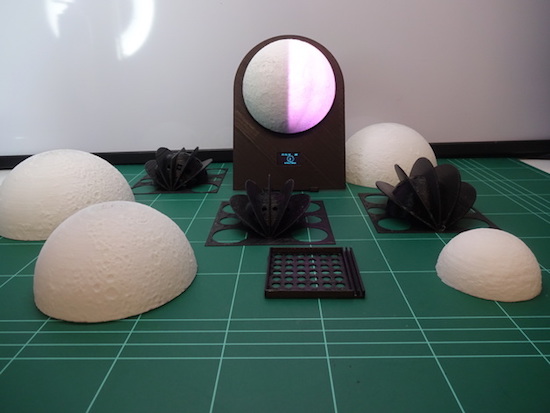
“Since there isn’t a supermoon everyday, make one for your bedside table!” This is exactly what G4lile0 set out to do using a 3D printer, an Arduino and some open-source tools.
The result was a moon phase clock consisting of a 3D-printed model and an LED strip to create the lunar phases. The lights are driven by an Arduino that precisely calculates which phase to show, as well as controls a 0.96″ OLED display revealing the date and time. Other electronics include an RTC module, a DTH11 sensor, a buzzer, and three push buttons.
The clock also features several modes, including an alarm, a wake-up light, a lamp, a thermometer, and a hygrometer. It can even help set the mood or start your next lunar rave with its relaxation and party-like special effects.
You can read all about this project on Thingiverse and find its code over on GitHub.
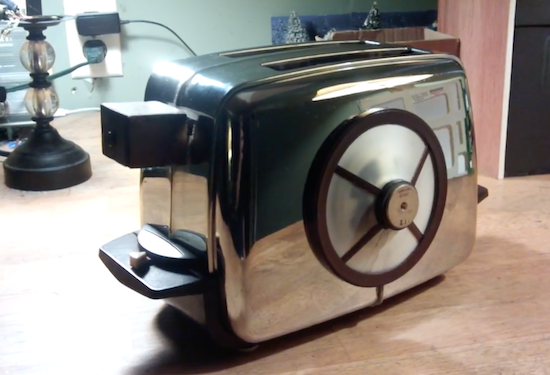
In the Red Dwarf TV series, Talkie Toaster is a monomaniacal talking toaster that tries to steer every conversation to the subject of toast. Now, YouTuber “slider2732″ has gone ahead and built a chatty appliance of his own.
To accomplish this, the Maker embedded a PIR sensor into the toaster’s lever that communicates with an Arduino Pro Mini whenever someone is nearby. The Arduino then reads sound files loaded onto an SD card and plays them through a 3W amplifier out to a speaker underneath. The replica is also complete with a circular panel on front, made out of “laptop screen material” with a sour cream tub’s lid, and equipped with a couple LEDs.
The Arduino code uses the TMRpcm library and is a simple case of responding to the PIR sensor going high or low. The samples are loaded from the SD card. The front grill area has the speaker underneath, with two white 5mm LEDs that are connected to the Pin 9 output from the Arduino. The former laptop screen material was cut out and then fitted. The main surround is from the lid of a sour cream tub, sprayed with a Krylon brown rattle can paint. The our legs are from a window blind, cut to the right sizes and similarly sprayed, then glued with Fix-All.
The samples were recorded in Audacity, normalized and saved out as 11025Hz, 8-bit WAVs due to buffer constraints of the Arduino Pro Mini.
slider2732 walks through the entire build and shows it off in the video below!
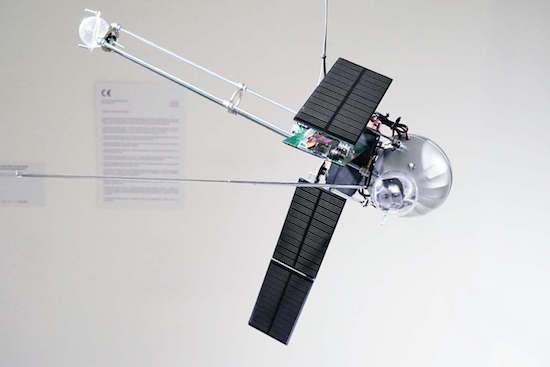
This model satellite is both strange and mesmerizing with folding solar panels and a FM transmitter.
Media artist Dmitry Morozov, aka ::vtol::, is back with his latest kinetic sound object, this one resembling a satellite. The Orbitalochka hangs from the ceiling and broadcasts sound via an FM transmitter and a built-in speaker. These noises are based on the position of the satellite in space, and it can even transmit a pre-recorded lecture by Sergev Kasich, who appears to reside in the satellite’s clear bubble.

::vtol:: bases the sound signals on the generative sound processes created with Patchblocks, a modular mini-synth kit. The signals also react to a light intensity sensor, which responds to how the satellite’s position in space changes.
This happens due to mass redistribution as the solar cell changes location. The solar cells operate as sensors and produce CV (control voltage) to change sound program parameters.
Aside from its unusual sounds, what is really interesting about this synthesizer are the solar panels, which autonomously move around via four servo motors. The Orbitalochka is equipped with an Arduino Nano as well.
You can see the apparatus in action below, and read all about it on ::vtol::’s page here.
(Photos: ::vtol::)
In the Red Dwarf TV series, Talkie Toaster wants to know if you want toast, and if not toast, then maybe a muffin or waffle, and it will pester you incessantly until you smash it with a 14lb lump hammer and throw it in a waste disposal. Now [slider2732] has actually gone and made one of the infernal machines!
He’s hidden a PIR sensor in the toaster handle to tell an Arduino Pro Mini when someone is unfortunate enough to be passing by. The Arduino then reads sound files from an SD card reader and plays them through a 3 watt amplifier out to a speaker. For that he uses the TMRpcm library available on github.
[slider2732] cleverly mounted the speaker to the side of the toaster along with some appropriately shaped bits and pieces, and some LEDs to make it appear and work much like the circular panel that lights up on the real Talkie Toaster. We dare you to watch the video after the break, unless you really are looking for toast. As a consolation, the video also walks through making it.
These links will take you to clips of Talkie Toaster in the TV series before he was smashed and after he was repaired.
And what else can you do with a toaster? Why not make a flying one. Of course what seems to be most popular here on Hackaday is making reflow ovens from toaster ovens.


What with wearable tech, haptic feedback, implantable devices, and prosthetic limbs, the boundary between man and machine is getting harder and harder to discern. If you’re going to hack in this space, you’re going to need to know a little about electromyography, or the technique of sensing the electrical signals which make muscles fire. This handy tutorial on using an Arduino to capture EMG signals might be just the thing.
In an article written mainly as a tutorial to other physiatrists, [Dr. George Marzloff] covers some ground that will seem very basic to the seasoned hacker, but there are still valuable tidbits there. His tutorial build centers around a MyoWare Muscle Sensor and an Arduino Uno. The muscle sensor has snap connectors for three foam electrodes of the type used for electrocardiography, and outputs a rectified and integrated waveform that represents the envelope of the electrical signal traveling to a muscle. [Dr. Marzloff]’s simple sketch just reads the analog output of the sensor and lights an LED if it detects a muscle contraction, but the sky’s the limit once you have the basic EMG interface. Prosthetic limbs, wearable devices, diagnostic tools, virtual reality — the possibilities are endless.
We’ve seen a few EMG interfaces before, mainly of the homebrew type like this audio recorder recruited for EMG measurements. And be sure to check out [Bil Herd]’s in-depth discussion of digging EMG signals out of the noise.


Ever since Jimi Hendrix brought guitar distortion to the forefront of rock and roll, pedals to control the distortion have been a standard piece of equipment for almost every guitarist. Now, there are individual analog pedals for each effect or even digital pedals that have banks of effects programmed in. Distortion is just one of many effects, and if you’ve built your own set of pedals for each of these, you might end up with something like [Brian]: a modular guitar pedal rack.
 Taking inspiration from modular synthesizers, [Brian] built a rack out of wood to house the pedal modules. The rack uses 16U rack rails as a standard, with 3U Eurorack brackets. It looks like there’s space for 16 custom-built effects pedals to fit into the rack, and [Brian] can switch them out at will with a foot switch. Everything is tied together with MIDI and is programmed in Helix. The end result looks very polished, and helped [Brian] eliminate his rat’s nest of cables that was lying around before he built his effects rack.
MIDI is an extremely useful protocol for musicians and, despite being around since the ’80s, doesn’t show any signs of slowing down. If you want to get into it yourself, there are all kinds of ways that you can explore the studio space, even if you play an instrument that doesn’t typically use MIDI.

