Posts with «arduino» label

This Arduino machine will judge how sick your ollies are

In skateboarding, the ollie is a fundamental trick used to leap onto, over or off obstacles, or over gaps of unfriendly terrain such as grass or stairs. But how do you know just how sick your ollie actually was? Josh Sheldon has a solution.

The Maker has built a device that judges the sickness of your ollie and visualizes your score, rewarding the best ones with the chiming of a cowbell. Sheldon describes the project as something “like one of those hammer games at carnivals, but instead of trying to hit that thing with a hammer as hard as you can, the goal is to land the sickest ollie.”

The aptly named Sick Ollie Machine consists of two parts: a stand with LEDs and the skateboard itself. Underneath the board is an Arduino Uno, a 9V battery, and an accelerometer. The stand is equipped with another Arduino, a relay, and an RGB LED strip that goes up mast, as well as a solenoid on top. When the relay closes, the solenoid hits the bell. Both units also contain a wireless transmitter, allowing them to communicate with one another.

Watch Sheldon discuss his project in more detail below!

 

Turn an old payphone into a boombox for ’90s hits

If you grew up in the ’90s and would love to play some of your favorite hit songs through something a bit more nostalgic than your smartphone, perhaps you can do what “digital alchemist” Fuzzy Wobble has done and transform an old-school payphone into a fully-functional boombox.

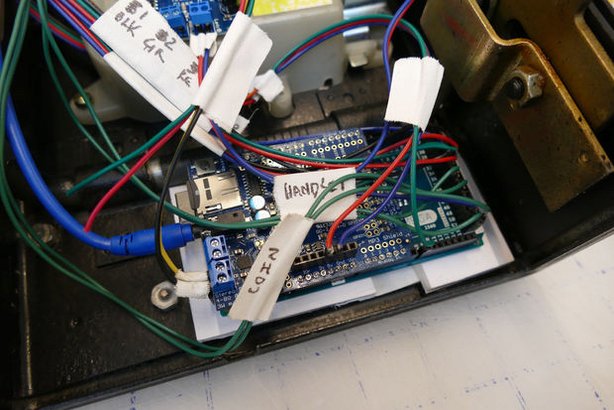
Fuzzy Wobble was able to get his hands on an inexpensive payphone and hacked it using an Arduino Mega, an Adafruit MP3 Maker Shield, a 20W amplifier, a 20W speaker, and some other components. The unique boombox is also equipped with a rangefinder that detects whenever someone walks by, triggering the phone to ring and enticing someone to answer the call.

The phone is programmed with a recorded menu along with instructions on how to select one of several pre-loaded song. Hitting the star key sends the device into broadcast mode.

What’s neat is that there’s a tiny booklet filled with images of ’90s tunes, from Coolio to Sugar Ray to Semisonic, each with a four-digit number on the back. Simply punch in the code and the payphone begins to play music.

Pretty awesome, right? You can build one yourself by following Fuzzy Wobble’s step-by-step Instructable here, and check out his demo video below.

ICYMI: CERNs robotic inspectors ride a monorail

Today on In Case You Missed It: Pairing an Arduino with a skateboard produces the Sick Ollie Machine, capable of measuring angular and X-,Y- or Z-axis accelerations to measure who is hitting their tricks the hardest. Courtesy of Josh Sheldon, the ollie machine uses an Arduino beneath the trucks of the board paired with a relay to measure the stats of each trick. Those who are producing truly sick ollies are rewarded with a chime from the attached cowbell.

Meanwhile, over at CERN a set of robot twins have been enlisted to provide live video feeds and environmental measurements for the massive underground complex. The robots, called TIM twins for Train Inspection Monorail, move along a -- you guessed it -- overhead rail that runs throughout the facility in order to monitor stats like oxygen concentration and radiation emissions.

Also, don't forget to check out what happens when a frog is run through Google's Deep Dream project (which is easily the weirdest sentence I've written yet today). As always, please share any interesting tech or science videos you find by using the #ICYMI hashtag on Twitter for @mskerryd.

ICYMI: CERNs robotic inspectors ride a monorail

Today on In Case You Missed It: Pairing an Arduino with a skateboard produces the Sick Ollie Machine, capable of measuring angular and X-,Y- or Z-axis accelerations to measure who is hitting their tricks the hardest. Courtesy of Josh Sheldon, the ollie machine uses an Arduino beneath the trucks of the board paired with a relay to measure the stats of each trick. Those who are producing truly sick ollies are rewarded with a chime from the attached cowbell.

Meanwhile, over at CERN a set of robot twins have been enlisted to provide live video feeds and environmental measurements for the massive underground complex. The robots, called TIM twins for Train Inspection Monorail, move along a -- you guessed it -- overhead rail that runs throughout the facility in order to monitor stats like oxygen concentration and radiation emissions.

Also, don't forget to check out what happens when a frog is run through Google's Deep Dream project (which is easily the weirdest sentence I've written yet today). As always, please share any interesting tech or science videos you find by using the #ICYMI hashtag on Twitter for @mskerryd.

QuadBot is a 3D-printable walking robot for everyone

If you think building a walking robot is impossible, perhaps this little guy will change your mind!

With platforms like the various flavors of Arduino, robotics has become accessible for many more people. Walking robots, however, can still be challenging. Especially when it comes to electronics and programming, one has some fairly complicated mechanisms to figure out. Perhaps none is more frustrating than four-legged walkers, as they seem very stable, but that all changes when one foot is removed from the ground.

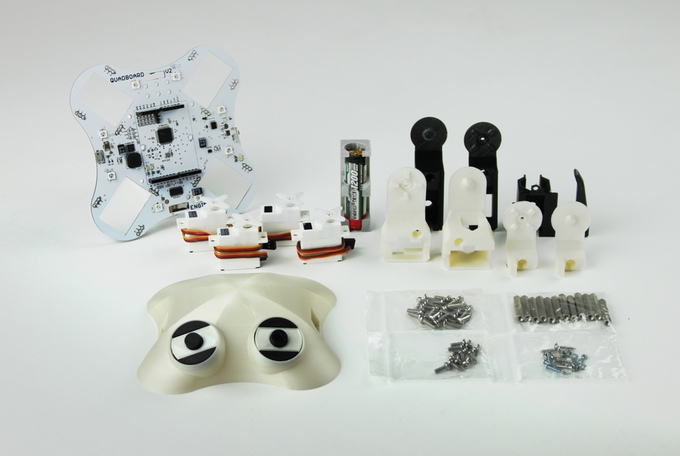
QuadBot aims to change this with an Arduino-compatible robot that, with clever cutouts for servo motors and plug-in headers on its main board, should be fairly easy to set up, yet capable of being expanded as needed.

The 3D-printable, open-source bot is designed for Makers of any skill level. It works right out of the box and can be programmed using graphical blocks, ideal for beginners. Every aspect of QuadBot can be customized and modified, though, from the 3D design down to a single line of C++ code, opening it up to more advanced users as well.

QuadBot was made for you to do real deal robotics. This means that you learn coding techniques that are scalable to bigger and better projects, rather than an oversimplified and limited alternative (such as Lego Mindstorms). A robotics platform that sets up young and experienced Makers like this has not existed until right now.

QuadBot doesn’t just walk either, it can dance, light up, and with sensors, can follow you, avoid obstacles, and even play songs. The project is the brainchild of Jack Scott-Reeve and Josh Elijah, who graduated with master’s degrees from the University of Manchester’s School of Electrical and Electronic Engineering.

Interested? Head over to Scott-Reeve, Elijah and the team’s Kickstarter page to learn more or back QuadBot for yourself!

An Arduino tachometer for your older vehicle

Unlike most cars today, deepsyx’s old Opel Astra did not have a tachometer. So what’s a Maker to do? Build your own, of course.

To accomplish this, deepsyx used an Arduino Uno along with a few LEDs. The first LED turns on at 4000 RPM, while the others light up with every 500 RPM increment. At 5800 RPM, however, all the LEDs flash as a warning. There’s even a serial output of the RPM value, so logging real-time data can be a possible enhancement down the road.

I started by cutting a 5cm x 1.5cm piece of an old credit cart, drilled 4 holes in it, painted it black and glued 4 LED diodes to it. Then I soldered 220ohm resistors to each positive LED pin and used a common ground. I connected them to an Arduino via 5 x 30cm jumpers and hid the Arduino in a hole under the wheel. I connected the Arduino data pin via voltage divider to the signal pin of the coil and used an old phone charger to power the Arduino. In order to work, I shared the phone charger and Arduino’s grounds.

Intrigued? You can read more about this project on deepsyx’sGitHub page and over on Hackaday.


Harry Potter fans create a fully-functioning smart wand

In the Harry Potter series, a Muggle is a person who lacks any sort of magical ability. Growing up reading these books, one can only imagine what it would be like to cast spells using a wand. Well, wonder no more as a group of NYC Muggles decided to build their own smart wand that can ‘magically’ control devices over Wi-Fi.

The 3D-printed wand is equipped with a voice recognition module that lets users cast spells of their own with a flick of the wrist, like ordering takeout from delivery.com, turning the lights on and off, as well as playing and silencing music.

Other components include (what appears to be) a MKR1000 board, a LiPo battery, a PowerBoost, a microphone, a switch, and a vibrating motor that indicates when a command is recognized.

Those wishing to buy one are out of luck, as the creators reveal this was merely a fan-made project to celebrate the Harry Potter prequel “Fantastic Beasts and Where to Find Them.”  You can read more about the Muggle Wand here! 

How to use a quadrature encoder

hi 

i have a Advanced Rover 5 Robot Platform with four shaft encoder (quadrature encoder)and im asking about if there is a libirary

arduino that makes me counts the number of revoultions and check if it is forword or reverse , if not is there eny reffrencies that

gives me information of how to code it what type of out and hot to change this output for my desired specific case 

***note that ***

the picture of the shaft is below and also the rover data sheet 


thanks in advance 

Let's Make Robots 28 Nov 11:17
arduino  avr  

Quick Arduino Hack Lets Tach-less Car Display Shift Points

A tachometer used to be an accessory added to the dash of only the sportiest of cars, but now they’re pretty much standard equipment on everything from sleek coupes to the family truckster. If your daily driver was born without a tach, fear not – a simple Arduino tachometer is well within your reach.

The tach-less vehicle in question is [deepsyx]’s Opel Astra, which from the video below seems to have the pep and manual transmission that would make a tach especially useful. Eschewing the traditional analog meter display or even a digital readout, [deepsyx] opted to indicate shift points with four LEDs mounted to a scrap of old credit card. The first LED lights at 4000 RPM, with subsequent LEDs coming on at each 500 RPM increase beyond that. At 5800 RPM, all the LEDs blink as a redline warning.  [Deepsyx] even provides a serial output of the smoothed RPM value, so logging of RPM data is a possible future enhancement.

The project is sensing engine speed using the coil trigger signal – a signal sent from the Engine Control Unit (ECU) which tells one of the ignition coilpacks to fire. The high voltage signal from the coilpack passes on to the spark plug, which ignites the air-fuel mixture in that cylinder. This is a good way to determine engine RPM without mechanical modifications to the car. Just make sure you modify the code for the correct number of cylinders in your vehicle.

Simple, cheap, effective – even if it is more of a shift point indicator than true tachometer, it gets the job done. But if you’re looking for a more traditional display and have a more recent vintage car, this sweeping LED tachometer might suit you more.

[via r/Arduino]


Filed under: Arduino Hacks, transportation hacks

A Different Sort of Word Clock

Our wonderfully creative community has a penchant for clocks. We have seen so many timepieces over the years that one might suppose that there would be nothing new, no instrument of horology that would not elicit a yawn as we are presented with something we’ve seen many times before.

Every once in a while though along comes a project that is different. A clock that takes the basic idea of a timepiece and manages to present something new, proving that this particular well of projects has not yet quite run dry.

Such a project is the circular word clock made by [Roald Hendriks]. Take a conventional circular wall clock and remove the hands and mechanism, then place LEDs behind the numbers. Add the words for “Quarter”, “Half”, etc. in an inner ring, and place LEDs behind them. Hook all these LEDs up to a microcontroller with a real-time clock, and away you go with a refreshingly novel timepiece.

[Roald]’s clock has the wording in Dutch, and the brain behind it is an Arduino Uno with the relevant driver ICs. He’s provided a video which we’ve put below the break, showing the clock in operation with its various demo modes.

We’ve seen so many word clocks over the years it’s best to give you a stream of them through our word clock tag. It’s good of this one to come along and refresh the genre.


Filed under: clock hacks
Hack a Day 28 Nov 06:01