Posts with «arduino» label

Scrap Bin Mods Move Science Forward

A first-time visitor to any bio or chem lab will have many wonders to behold, but few as captivating as the magnetic stirrer. A motor turns a magnet which in turn spins a Teflon-coated stir bar inside the beaker that sits on top. It’s brilliantly simple and so incredibly useful that it leaves one wondering why they’re not included as standard equipment in every kitchen range.

But as ubiquitous as magnetic stirrers are in the lab, they generally come in largish packages. [BantamBasher135] needed a much smaller stir plate to fit inside a spectrophotometer. With zero budget, he retrofitted the instrument with an e-waste, Arduino-controlled magnetic stirrer.

The footprint available for the modification was exceedingly small — a 1 cm square cuvette with a flea-sized micro stir bar. His first stab at the micro-stirrer used a tiny 5-volt laptop fan with the blades cut off and a magnet glued to the hub, but that proved problematic. Later improvements included beefing up the voltage feeding the fan and coming up with a non-standard PWM scheme to turn the motor slow enough to prevent decoupling the stir bar from the magnets.

[BantamBasher135] admits that it’s an ugly solution, but one does what one can to get the science done. While this is a bit specialized, we’ve featured plenty of DIY lab instruments here before. You can make your own peristaltic pump or even a spectrophotometer — with or without the stirrer.

[via r/Arduino]


Filed under: chemistry hacks, tool hacks

Building a “laser sky” effect generator with Arduino

Bouncing a laser off of a spinning mirror creates an amazing effect with smoke and fog, but YouTuber “Normal Universe” made it even better with an Arduino.

This video starts out by introducing the concept of “laser sky,” which seems like a fun idea. There is, however, a chance that the mirrors wouldn’t spin, potentially pointing a laser continuously at a bystander, possibly damaging his or her eyes. To prevent this, the YouTuber added a photoresistor and LED to sense the spinning mirrors, then programmed an Arduino Uno to cut off the laser if it’s stopped for whatever reason.

Normal Universe goes on to explain the electronic concept behind it as well as the Arduino code involved, so even if this effect isn’t your cup of tea, the photoresistor/voltage divider setup could still be quite useful.

You can find a detailed breakdown of the project in the video below!

3D Printed Moon Phase Clock

Someone once observed that the moon is a harsh mistress. But that doesn’t mean you can’t keep track of her, specially with this awesome moon phase clock that [G4lile0] designed and built.

It uses a 3D printed moon model combined with a series of LEDs to create the phases. These LEDs are driven by an Arduino that calculates the phase to show, as well as driving a small OLED display that shows the date and time. There is even a party mode for all of those lunar raves that you host.

[G4lile0] has done an excellent job of documenting the code that drives the lamp, so it would be easy to add features, or adapt this design to show the phases of another moon or add other features. It’s an excellent overall design, and kudos to [G4lile0] for doing it all with open source tools like FreeCAD.


Filed under: Arduino Hacks, clock hacks
Hack a Day 19 Nov 09:01

Only One Button? No Problem!

Sometimes less is more. This is especially true when dealing with microcontrollers with limited I/O pins. Even if you have lots of I/O, sometimes you are need to pack a lot into a little space. [Hugatry] was inspired by the simple interface found on a lot of flashlights: one button. Push it and it turns on. Push it again, and it switches modes. You cycle through the modes until you finally turn it back off. One button provides mutliple functions. The question is how can you use a power switch as an I/O device? After all, when you turn the power off, the microprocessor stops operating, right?

[Hugatry’s] answer is quite simple. He connects a resistor/capacitor network to an I/O pin (or multiple pins). When the processor turns on initially, the pin will read low and the capacitor will charge up. If you turn the power off, the CPU voltage will fall rapidly to zero, but the voltage on the capacitor will discharge slower. If you wait long enough and turn the power on, there’s no difference from that first power on event. But if you turn the power on quickly, the capacitor voltage will still be high enough to read as a logic one.

What that means is that the processor as part of its start up can detect that it was recently turned off and take some action. If it remembers the previous state in nonvolatile memory, you can have the code cycle through multiple states, just like a flashlight. You can see a video of the setup, below.

[Hugatry] included some simple Arduino code that illustrates the concept. However, the technique is simple enough that you can adapt it to other projects easily.

Think one button isn’t enough to do anything interesting? Think again. Then again, Amazon probably has a patent on things with one button.


Filed under: Arduino Hacks, Microcontrollers

Teslapathic! Hackers build a brain-controlled Tesla

Using an electroencephalography (EEG) headset and gyroscopic tracking, researchers have created a mind-controlled Tesla Model S.

Self-driving cars seem to be all the rage these days in technology circles, but, as part of Cal Hacks 3.0, researchers have instead figured out how to drive a car using brain waves. This hack takes the form of an EEG headset that translates brain signals into “stop” and “go” commands, with a head-mounted gyroscopic sensor used to tell the steering wheel how to turn.

A radio link using an Arduino transmits these signals to the car’s new physical controls. This takes the form of linear actuators for the brake and accelerator pedal, and a windshield wiper motor for the steering wheel.

As seen in the video below, it works, but looks slightly terrifying! You can find out more about this particular project here.

(Photos: Devpost)

A Laser Effect Projector Built with Safety in Mind

There’s just something about wielding a laser pointer on a dark, foggy night. Watching the beam cut through the mist is fun – makes you feel a little Jedi-esque. If you can’t get enough of lasers and mist, you might want to check out this DIY “laser sky” effect projector.

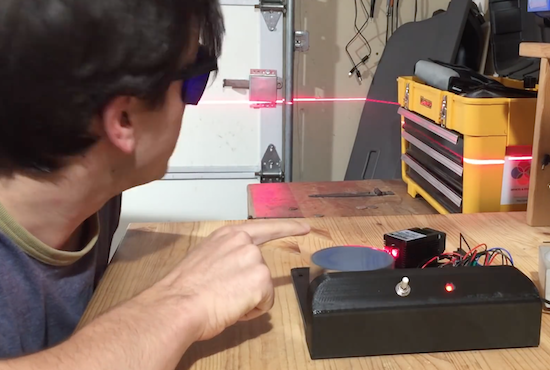
The laser sky effect will probably remind you of other sci-fi movies – think of the “egg scene” from Alien. The effect is achieved by sweeping a laser beam in a plane through swirling smoke or mist. The laser highlights a cross section of the otherwise hidden air currents and makes for some trippy displays. The working principle of [Chris Guichet]’s projector is simplicity itself – an octagonal mirror spun by an old brushless fan motor and a laser pointer. But after a quick proof of concept build, he added the extras that took this from prototype to product. The little laser pointer was replaced with a 200mW laser module, the hexagonal mirror mount and case were 3D printed, and the mirrors were painstakingly aligned so the laser sweeps out a plane. An Arduino was added to control the motor and provide safety interlocks to make sure the laser fires only when the mirror is up to speed. The effect of the deep ruby red laser cutting through smoke is mesmerizing.

If laser sky is a little too one-dimensional for you, expand into two dimensions with this vector laser projector, and if monochrome isn’t your thing try an RGB vector projector.


Filed under: Arduino Hacks, laser hacks

Teen helps friend with a brain injury communicate again

After an accident, Ethan Kadish was paralyzed. His friend, 14-year-old Jacob Smilg, came up with a simple device to help him communicate.

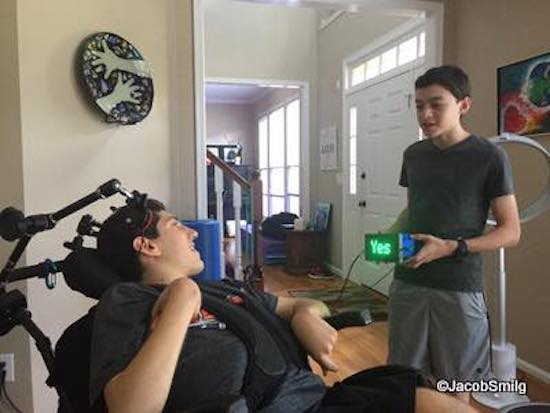
Several years ago, Kadish was struck by lightning, and lost control over his body. Communication with the world took the form of eye blinks for “yes” and “no,” which gave Smilg an idea for a revolutionary, Arduino Uno-based gadget that could help him communicate with people not familiar with this method.

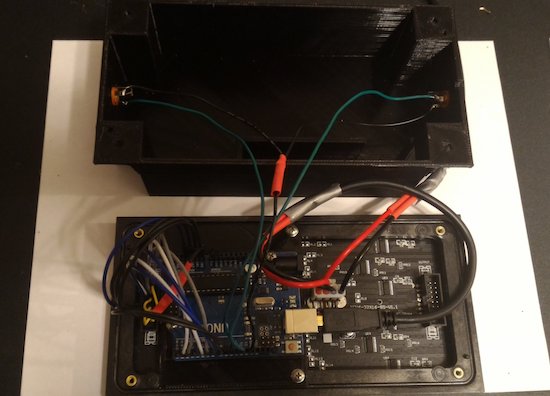
It uses two pads, which Kadish can press with his head. When pressed, the device displays “yes” or “no” on a small LED screen. This allows him to have conversations in a more natural way, which, as seen in the video below around 4:00 it appears to make him very happy!

You can read more about the project on Make:, and keep up with Kadish’s story and progress on the Team Ethan blog. More pictures and videos can be found on Smilg’s Facebook page.

Arduino Blog 17 Nov 19:38

A wakeup light for kids

In order to convince his kids to stay in bed just a little longer, Maker Ralph Crutzen has created a “wakeup light” using an Arduino Mega and an RGB LED strip.

Those of us that have toddlers know that they can wake up very early. If you’d like to get some more sleep without leaving them unsupervised to dangerously play with your electronics and power tools, then a “wakeup light” could be a good solution.

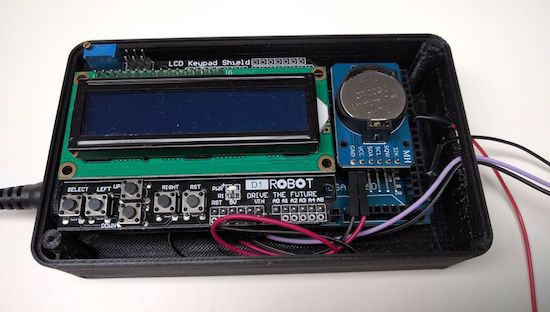
Crutzen’s system uses an Arduino Mega with a real-time clock to control a strip of LEDs, along with an LCD display to change settings. Besides a reminder to kids to “please stay in bed a few minutes longer,” perhaps a similar setup could be used as alternative alarm clock for adults as well.

You can find instructions for this build on Instructables, or check out the project’s code on GitHub. Finally, if you’d like to print an enclosure to protect humans and electronics, Crutzen used this design.

14 Year Old Builds Communication Device for Brain-Injured Friend

Try not to get anything in your eye as you hear this moving story of a teen helping an injured friend communicate with the world again.

Read more on MAKE

The post 14 Year Old Builds Communication Device for Brain-Injured Friend appeared first on Make: DIY Projects and Ideas for Makers.

This machine sends messages using common chemicals

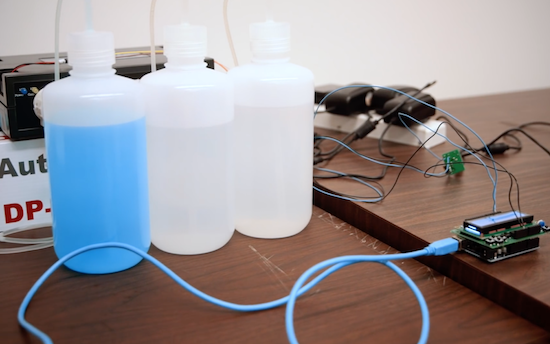
Stanford researchers led by post-doctoral fellow Nariman Farsad have built a machine that sends text messages using common chemicals.

If you’re building a project, and need to send a signal from one component to another, solutions generally involve wiring them together, or some sort of radio, perhaps Bluetooth or Wi-Fi. Farsad, however, has been working on something entirely different. His system uses commonly-available chemicals to turn a liquid, either basic or acidic, in sequence as a binary communication protocol.

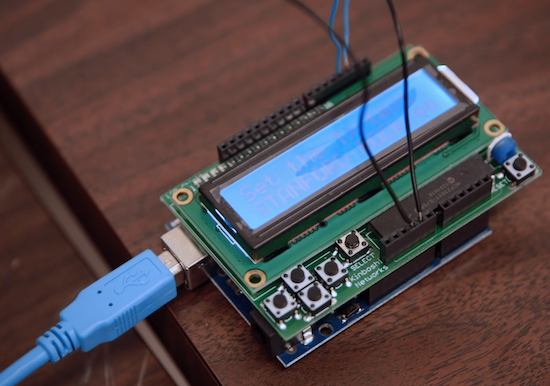
But instead of zeros and ones, it sends pulses of acid (vinegar) or base (glass cleaner). The researchers type their desired message in a small computer, which  sends a signal to a machine that pumps out the corresponding “bits” of chemicals. The liquids travel through plastic tubes to a small container that reads the solution’s pH. Changes in pH are then transmitted to a computer that deciphers the encoded message.

Once perfected, a messaging system like this could be used by devices inside of a human body or by tiny robots communicating with a chemical trail like ants. It can even leave secret messages that others wouldn’t even know to look for. Though still in its infancy, this method could open up an exciting array of possibilities!

You can read all about the fascinating system on Stanford’s page and see more below!

Arduino Blog 16 Nov 15:07