Posts with «technology & electronics» label

The best smart displays you can buy

Smart displays have evolved quite a bit since the initial debut of Amazon’s first Echo Show back in 2017. In fact, the category didn’t really come into its own until Google joined the fray with its own line of hardware about a year later. Now, both of these companies are essentially dominating the smart display landscape, with each offering their own take on a smart assistant with a screen.

It’s that screen that makes smart displays so much more useful than smart speakers. Rather than just having a voice recite the current weather report, for example, you can see a five-day forecast as well. The same goes for when you ask about your shopping list or calendar; it's simply easier to see the whole list or your day's appointments at a glance.

Plus, displays offer other benefits that speakers can't, like watching videos or checking your webcam to see who's at your front door. They're especially handy in the kitchen, where you can use them for step-by-step cooking instructions. And, thanks to touchscreens, you can often navigate through functions and settings a lot faster than using your voice.

Amazon vs. Google

The first question you should ask is whether you'd rather be in Amazon's ecosystem or Google's. If you have a lot of Google products in your home, like Nest thermostats or Nest cams, then a Google-powered model makes more sense. If you have Amazon products, like a Fire TV Stick or a Ring cam, Amazon would obviously be a better choice. Of course, it's perfectly acceptable to have products from competing companies in the same home, but just realize they might not work seamlessly with each other.

Aside from that, the two systems also offer some unique features. Google, for example, works best if you have an existing Google account and use services like Calendar and Photos. In fact, we especially love Google smart displays because they work well as digital photo frames. You can set it up to automatically pull in pictures of friends and family from your Google Photos library, and the algorithm is smart enough to use what it thinks are the best shots — so less chance of blurry photos or images of your eyes half-closed showing up, for example.

It might seem like a minor point, but seeing as the display is on standby 90 percent of the time, its secondary function as a digital photo frame is very welcome. All Google smart displays also support YouTube and YouTube TV, step-by-step cooking instructions and all of the usual benefits of Google Assistant, like weather reports. As with Assistant on the phone, it also has voice recognition, so only you can see your calendar appointments and not others.

Amazon's smart displays, on the other hand, are slightly different. Instead of YouTube, they offer some alternative video streaming options, including Amazon Prime, NBC and Hulu. They also come with two browsers (Silk and Firefox), which you can use to search the web or watch YouTube videos – a handy enough workaround given the lack of a dedicated app.

Amazon devices offer step-by-step cooking instructions as well, thanks to collaborations with sources like SideChef and AllRecipes. In fact, the cooking instructions sometimes include short video clips. But although you can use Amazon's displays as digital photo frames, the process is not quite as intuitive as Google’s, and Amazon doesn’t have anything comparable to Google’s photo-sorting algorithm.

The best smart displays

Smart displays come in all sorts of shapes and sizes, and some are better suited to certain rooms in the home than others. So while we do have some favorite all-around picks, we've also compiled a list of smart displays that would suit specific use cases as well.

The best Google smart display: Google Nest Hub
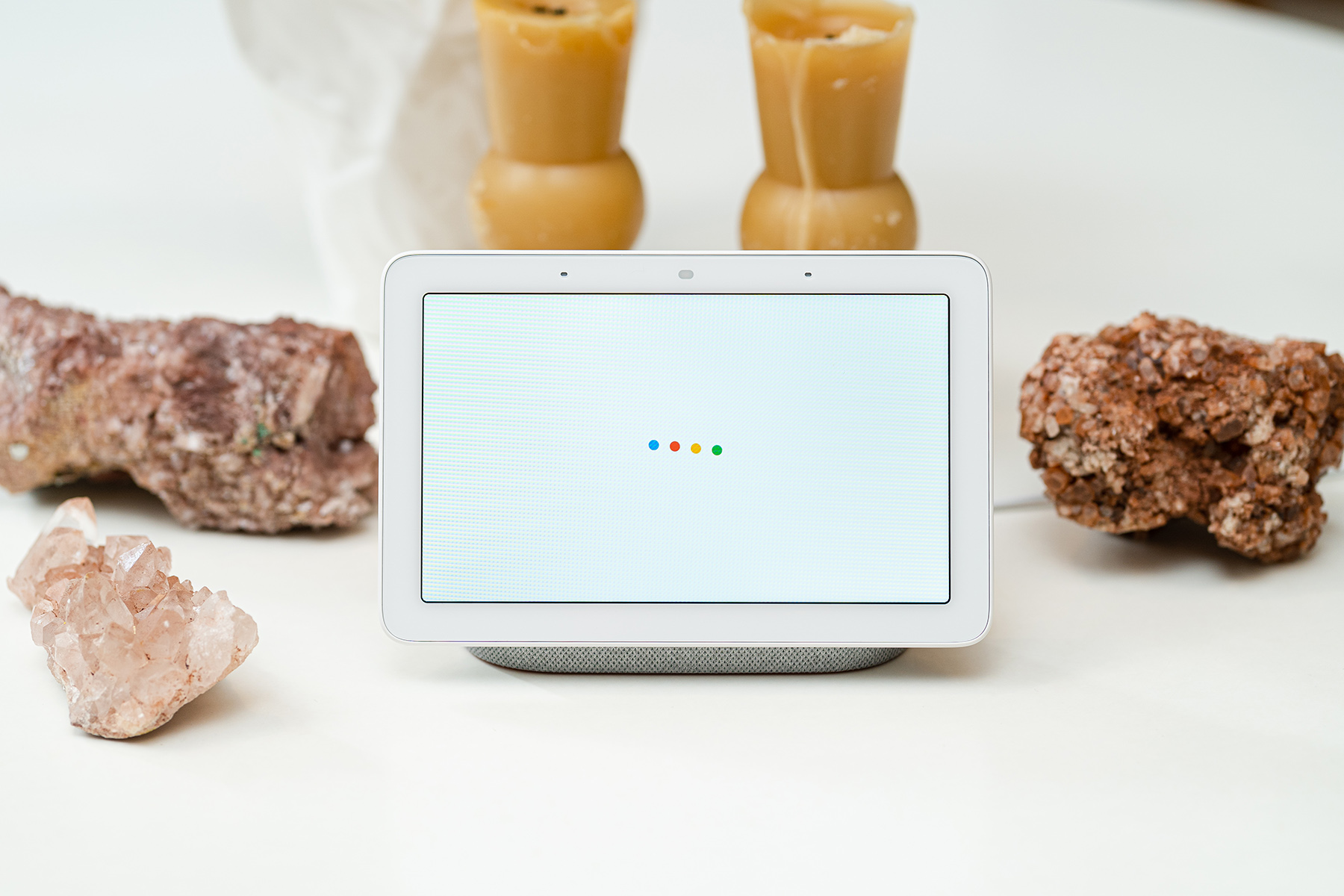
We at Engadget tend to prefer Google smart displays because most people are likely already entrenched in the Google ecosystem due to the ubiquity of Google services like Gmail, Calendar and so forth. We also tend to find Google Assistant to be a little smarter than Alexa, especially when bringing up answers from the web. As mentioned earlier, we also really like the tie-in with Google Photos and the smart photo-sorting algorithm.

Our favorite smart display overall is Google's latest Nest Hub. Its 7-inch size is a better fit in more rooms, and its unobtrusive design combined with its soft fabric exterior blends nicely into your existing home decor. It does everything we think most people would want in a smart display, like YouTube videos, step-by-step cooking instructions, smart home controls and the ability to check in on your Nest cams if you have any.

In fact, the Nest Hub is especially useful if you have a Nest video doorbell, as the camera view of who’s at the front door will show up on the screen. An ambient light sensor helps to detect the light and color temperature of the environment and adjusts the screen to match. Plus, if you choose, it can help track your sleep patterns if placed next to your bed.

Another feature of the Nest Hub is actually a lack of one: It doesn't have a camera. That gives it that additional layer of privacy that many people covet, and it's also a lot more suitable for personal spaces like the bedroom. Sure, you could also cover up a camera with a shutter, but with the Nest Hub you don't have to remember to do that.

Buy Nest Hub at Walmart - $100

Runner up: Google Nest Hub Max

If you like Google but you miss having a camera for video calls, or you just prefer a bigger screen, consider the Google Nest Hub Max. At 10 inches instead of seven, it works a lot better for watching videos from YouTube and YouTube TV. It's especially useful in the kitchen, where it functions as a kind of portable television, and you can see more of those step-by-step cooking instructions at a glance. The bigger display also means a larger photo frame, which you may prefer.

As mentioned, the Nest Hub Max adds a camera to the mix. It doesn't have a physical shutter, which is a concern, but you can shut it off with an electronic switch. You can use the camera for video calls with Google's Duo service as well as Zoom, and it can also function as a Nest Cam to help you keep an eye on your house when you're away. Another benefit of the camera is the addition of Face Match facial recognition for authentication purposes, which we found to be a little more accurate than just using Voice Match.

Last but not least, the Nest Hub Max's camera adds a unique gestures feature that lets you play and pause media simply by holding up your hand to the screen. It's not entirely necessary, but it's potentially useful if you're in a noisy environment and just want the music to stop without having to shout over everyone. Or perhaps you have messy hands while cooking and don’t want to dirty up the display.

Buy Nest Hub Max at Walmart - $170

The best Amazon smart display: Amazon Echo Show 8

Amazon

Our favorite Amazon smart display is the second-gen Echo Show 8. Its 8-inch screen is just right; it doesn’t take up as much space as the Echo Show 10, but it’s also more suitable for watching videos than the tiny Echo Show 5. Like other Amazon smart displays, it has a built-in camera, but there is a physical camera cover to help alleviate privacy concerns.

As such, the Echo Show 8 is a compelling choice if you want the option of using your smart display for video calls. Not only is the camera quality fantastic, but the Show 8 has a feature that automatically frames your face and follows your movements during video calls. It’s useful if you want to move around as you’re chatting, or if you have rambunctious children and pets running around the house and you want to involve them in the conversation. You can use the Echo Show 8 to make calls between other Echo Show displays, or through Skype or Zoom.

As with the other smart displays, the Echo Show 8 also works as a digital photo frame and can be used to keep up with the news, check the weather and control smart home devices. If you want to use your smart display to play music, we also really like the Echo Show 8’s audio quality on account of its deep bass and rich tone.

Buy Echo Show 8 at Amazon - $130

Runner up: Amazon Echo Show 5

Nicole Lee / Engadget

At only 5.5 inches wide, the Echo Show 5 is one of the smallest smart displays on the market, and as a result, will work nicely on a desk or a nightstand. In fact, one of the reasons we like the Echo Show 5 so much is that it doubles as a stellar smart alarm clock. It has an ambient light sensor that adjusts the screen's brightness automatically; a tap-to-snooze function so you can whack the top of it for a few extra minutes of shut-eye; plus a sunrise alarm that slowly brightens the screen to wake you up gently.

The Echo Show 5 does have a camera, which might make you a touch queasy if you are privacy conscious – especially if this is supposed to sit by your bedside. Still, it does have a physical camera cover, which can help ease any fears.

Buy Echo Show 5 at Amazon - $85

The best smart clocks

Perhaps a smart display doesn't appeal to you because you don't care about watching videos on it. But maybe the idea of a smarter alarm clock like the Echo Show 5 intrigues you. In that case, I’d recommend the 4-inch Lenovo Smart Clock 2, which isn't a full-fledged smart display because you can't play any videos on it, but it does use Google's smart display tech, so you can use it for controlling your smart home as well as checking out your Nest Cams.

We also like it because it lacks a camera, which makes it perfect for your nightstand. It has all of the features we want in a smart alarm clock, like an ambient light sensor, that tap-to-snooze function and a sunrise alarm. Plus, the latest version can double as a night light – you can swipe down the display to enable it – and you can get an optional wireless charging base to go with it.

If the Smart Clock 2 is too advanced for you, Lenovo does offer an even simpler version called the Smart Clock Essential. It really isn’t a smart display at all – it’s really more of a smart speaker with a clock – but it does perform many of the same functions as the Smart Clock 2.

Lenovo sells the Smart Clock Essential in two different versions: One has Google Assistant, while the other is powered by Alexa. The one with Google Assistant has a built-in night light, an extra USB port for charging devices and a mic-mute button. The one with Alexa, on the other hand, is compatible with an optional docking station that can be used with accessories such as a wireless charging pad or an ambient light dock (it comes in either a sea lion or a squid shape) that can act as a night light.

Buy Lenovo Smart Clock 2 at Walmart - $70Buy Lenovo Smart Clock Essential at Walmart - $33

Amazon's Omni Fire TVs are up to 46 percent off right now

Amazon has kicked off the lead up to this year's Prime Day by discounting a bunch of Fire TVs. A number of Toshiba, Insignia and Hisense smart TVs are on sale right now, so you could pick up a TV for as low as $90. But we recommend springing for one of the higher-end Omni Series televisions, which came out last September. All sizes are cheaper than usual, but you'll find the steepest discount on the 55-inch Omni Series 4K TV, which is 46 percent off and down to $300. While many of these TV deals are Prime exclusives, some — including the 55-inch Omni deal — are available to all Amazon shoppers.

Shop Fire TV sales at AmazonBuy 55-inch Omni Series Fire TV at Amazon - $300

All of the Omni Series sets streaming in 4K and support HDR10, HLG and Dolby Digital Plus — if you want Dolby Vision, you'll have to spring for the 65- or 75-inch TVs. You'll get access to streaming services like Netflix, Disney+, HBO Max and others, but you'll find the real perks come in if you're already a heavy Alexa user. Omni Series sets have built-in microphones to allow hands-free Alexa access, so you can basically treat the TV as you would an Echo smart speaker. You can ask it to set timers and reminders, check sports scores and more, even when the TV is off. But if that's not really your thing, you can use the built-in switch to electronically disable the microphones.

As far as connectivity goes, the 55-inch model has three HDMI ports plus one HDMI 2.1 jack with eARC, one USB port and an Ethernet connector. While you could deck the TV out with the soundbar of your choosing, you can also wirelessly pair the TV with Echo speakers to create a more immersive home theater setup. These TVs are clearly best for those who already have a lot of Amazon devices throughout their home, and those who rely on Alexa a lot already. But they're also good options for anyone that wants a truly budget smart TV. $300 for a 55-inch set is a solid deal, and if you're looking to spend even less than that, you've got options at the $200 and $100 marks as well.

Follow @EngadgetDeals on Twitter and subscribe to the Engadget Deals newsletter for the latest tech deals and buying advice.

The Morning After: iOS 16 might let you skip those anti-bot login tests

Apple’s next update to its iPhone operating system might just help you avoid the CAPTCHA anti-bot systems that stand between you and some web sign-ins. Apple teased a Private Access Token system in iOS 16, iPadOS 16 and macOS Ventura that skips CAPTCHAs altogether for some apps and websites. Enable an Automatic Verification feature and supporting sites will use iCloud to verify both your Apple ID and your device, presenting a token that proves you're trustworthy.

Apparently, owning an iOS device (and Apple ID) may be enough to prove you’re a sentient, possibly lazy, being.

— Mat Smith

The biggest stories you might have missed

Someone built their own inch-thick PS5 Slim

And its cooling system is even better than the original's.

DIY Perks

While we all wait for a slimmer PS5 from Sony, YouTuber DIY Perks already built one for himself. He took apart a standard PlayStation 5 and replaced everything he could to get rid of in the console's bulk. He substituted components with similar parts and his own homemade creations and built his own water-cooling system, which he put in a separate case with the power source.

Continue reading.

Where were the AAA games at Summer Game Fest?

And who needs them anyway?

The pandemic slowed or paused the development on a generation of games, and studios of all sizes are being absorbed by the biggest names in the room. With all this going on, there aren’t a lot of huge games coming out in the second half of 2022.

There won’t be many AAA blockbusters out of Microsoft or Sony and, whether we like it or not, these studios set the pace of the industry. What makes it worse is Microsoft and Sony have announced and then abandoned multiple huge projects over the past few years. Jessica Conditt lays out how this year’s big games event, in lieu of E3, didn’t really deliver the blockbuster games we usually expect.

Continue reading.

WhatsApp now lets you mute and message individual users during group calls

The app will also alert you when someone joins a call.

You can now both mute and message specific people in your group calls on WhatsApp. The former should be particularly helpful when someone might not be aware everyone else can hear what’s going on in the background of their home or office. The company has also added a banner to notify you when someone joins a group call.

Continue reading.

Canada is banning the sale, production and import of some single-use plastics

The ban targets grocery bags, takeout containers and stir sticks.

Reuters

Canada is banning companies from producing and importing a handful of single-use plastics by the end of the year. Banned items will include plastic shopping bags, takeout containers and six-pack rings for holding cans and bottles together. Over the next ten years, the Canadian government estimates the new regulation will cut approximately 1.3 million tonnes of plastic waste.

Continue reading.

A YouTuber built his own PS5 Slim that's less than an inch thick

Sony typically follows up its PlayStation consoles with a slim version a few years later, but that time hasn't come for the PS5 yet. While we all wait for a slimmer PS5 that would fit in small spaces better, a YouTuber called DIY Perks already built one for himself. He took apart a standard PlayStation 5 and replaced everything that needed to be replaced to get rid of the console's bulk. He substituted components with similar parts and his own home-made creations, including the console's rather voluminous casing. 

Putting the current device's power supply and cooling system with the rest of the console's components wouldn't yield a "slim" version of the PS5, though. So, what Perks did was build his own water-cooling system and put it in a separate case with the power source. It's a long, slim case that can be placed behind the TV, where it won't be noticeable. While he did run into some issues that took time to solve, he was able to make the console work in the end. His cooling system was even more efficient than the the standard PS5's, based on the temperatures he took when he tested it out using Horizon Forbidden West. 

Unfortunately, Perks' PS5 Slim is one of a kind and not easy to replicate. You can check out his process in the video below if you need ideas or just want to be awed.

Fitbit will fix frequent disconnections for Charge 5 owners

If your Fitbit Charge 5 has had flaky performance lately, you'll be glad to hear that a solution is on the horizon. 9to5Google has learned Fitbit is promising a fix for frequent disconnections between the activity tracker and its host phone. If you're affected, the Bluetooth connection will spontaneously drop and prevent your wearable from syncing fitness data, whether you're using an Android phone or iPhone.

Reports of the problem first surfaced in January. Common solutions like rebooting the Charge 5 have little effect. Fitbit also hasn't offered a stopgap solution or indicated the likely culprit.

There's no timeline for the expected patch, and it's not clear how many users have the issue. This certainly isn't what Fitbit would hope for, though. The Charge 5 sits next to the Luxe at the top of Fitbit's activity tracker lineup, and is competing as much with some lower-end smartwatches as it is fitness devices. The disconnections won't help the Charge fare well against rivals in a market that still has fierce competition from the likes of Amazfit and Garmin.

Android users can now add Google Password Manager to their home screen

While Google has long included a password manager among its account perks, accessing a native version of that tool on your Android phone or tablet hasn’t been straightforward. Before a recent Google Play Services update, you had to navigate to the “Privacy” section of Android’s Settings menu to find an option to launch the software. But as 9to5Google points out, you can now add a home screen shortcut to the tool on your Android phone or tablet.

You’ll have the option once you’ve updated to Google Play Services version 22.18. The easiest way to do that is to tap on a direct link to the software’s Play Store listing and manually download the latest release. Once that’s done, open the Settings app on your phone, then navigate to the Privacy section and tap “Autofill service from Google,” followed by “Passwords.” Doing so will launch the Google Password Manager. At that point, you’ll want to tap on the gear icon at the top of the interface to open the applet’s settings menu. You should then see an option that says “Add shortcut to your home screen.” You know what to do next.

Even the simplified process isn’t as straightforward as it should be, but Google making it easier to see and modify your passwords will also make it easier to change them when the situation calls for it. 

iOS 16 will let you skip CAPTCHAs on some websites

iOS 16 might just help you avoid the CAPTCHA anti-bot systems that stand between you and some web sign-ins. As MacRumorsnoticed, Apple used WWDC 2022 to detail a Private Access Token system in iOS 16, iPadOS 16 and macOS Ventura that skips CAPTCHAs altogether for some apps and websites. Enable an Automatic Verification feature and supporting sites will use iCloud to verify both your Apple ID and your device, presenting a token that proves you're trustworthy. You might not have to enter inscrutable text or tap pictures of traffic lights just to show that you're human.

Apple noted that devices won't share sensitive data linked to your account (such as the email address or phone number). The company also won't know who's making the verification request, so it can't tie these checks to specific providers. The token system is billed as more respectful of privacy, as it doesn't track your IP address. It could also improve accessibility by making CAPTCHA-verified sites usable by more people with disabilities.

Importantly, the technology could easily see widespread adoption that might extend beyond Apple hardware. Cloudflare and Fastly have already unveiled plans to support the token approach, potentially bringing it to millions of websites. Also, Apple worked with those companies and Google to make Private Access Tokens an open standard. While there's no direct Android equivalent yet, the technology seen in iOS 16 hints at a future where few people need to manually complete CAPTCHAs.

Razer's Kishi gamepad for iOS is cheaper than ever right now

If you've been looking for a better way to play games on your phone than relying on touch controls, an external controller is what you need. The Razer Kishi is a solid dedicated gamepad option and the iOS version has dropped to an all-time low price on Amazon. It's currently $55, which is $45 off the regular price. The USB-C Android version, meanwhile, is $45.

Buy Razer Kishi (iOS) at Amazon - $55

The controller has a wired connection to your device, meaning that you won't need to charge it. That will also result in lower latency compared with a gamepad that's connected via Bluetooth. There is a Lightning port, but that's only for passthrough charging. You won't be able to use wired headphones (rival Backbone One has a 3.5mm headphone jack, however).

Along with Apple Arcade and other native iOS games, the Kishi is compatible with cloud gaming services like Google Stadia, GeForce Now and Xbox Cloud Gaming. You can also use it to play Xbox or PlayStation consoles using remote play apps.

The controller is compact when not in use, which makes it easy to keep in your bag. To use it, you'll need to unclip a rear panel. A belt holds the two halves together and it stretches to accommodate various phone sizes. You'll likely need to remove your phone's case before using the Kishi, since it needs to be plugged into the Lightning port.

The Kishi does the trick for on-the-go use, though some may find the stubby analog sticks and other design choices a little uncomfortable for long gameplay sessions. The iOS version of the gamepad has been heavily discounted ahead of the Kishi V2, a new version of the controller that's expected to arrive later this year.

Razer released the $100 Android edition of the Kishi V2 this month. It has a solid sliding bridge rather than the stretchy belt (an idea Razer seems to have cribbed from Backbone), clickier buttons and the option to keep certain cases on while using the device. There's also a share button that only works with the Razer Nexus app on Android. Players can use that to stream gameplay to the likes of YouTube and Facebook.

The Morning After: Google uses Drake’s ‘Texts Go Green’ to explain RCS to Apple

Google has been trying to nudge Apple into adopting the GSMA’s RCS messaging protocol, from not-so-subtle jabs at I/O 2022 to lengthy Twitter threads from the head of Android. The latest tool from the makers of Android? Drake lyrics.

The official Android Twitter account shared an “unofficial lyric explainer video” for “Texts Go Green,” the third song from Drake’s latest album. Both the title and chorus refer to what happens when an iPhone user blocks someone from contacting them through iMessage, which defaults messages to SMS and loses features like read receipts.

Swiftly demolishing any cultural cachet by referencing lyrics from a recent Drake song, the Twitter account calls it “a real banger.” And I close my Twitter app.

— Mat Smith


The biggest stories you might have missed 

Balenciaga looks even worse on Mark Zuckerberg's avatar

Meta is launching an Avatars Store for digital fashion.

Meta is opening an Avatars Store where you can purchase outfits for your avatar on Facebook, Instagram and Messenger. The new looks include designer duds from Balenciaga, Prada and Thom Browne, and the company expects to add more designers over time. Zuckerberg and Eva Chen, Meta’s VP of fashion partnerships, announced the new store on Instagram Live, calling it the “first live avatar fashion show.” The “fashion show” consisted of Chen holding up paper drawings of Zuckerberg’s avatar wearing increasingly questionable, if metaverse-ready, outfits.

Continue reading.

Senators call for a common charger standard in the US

Europe wouldn't be alone in trying to cut e-waste.

US senators Ed Markey, Elizabeth Warren and Bernie Sanders have sent a letter to Commerce Secretary Gina Raimondo, calling on her department to develop a "comprehensive strategy" that would lead to a common charging standard. The EU acted in the "public interest" by settling on one port, the senators said, and the US ought to follow suit to reduce the environmental impact of chargers while improving convenience for users. A charger standard would theoretically reduce e-waste by letting people reuse existing cables and adapters for new devices.

Continue reading.

‘Diablo Immortal’ has reportedly earned $24 million since release

Free-to-play, license to print cash.

Two weeks after release, Blizzard’s Diablo Immortal has earned approximately $24 million according to Appmagic. The analytics firm said the free-to-play game had already been downloaded almost 8.5 million times. Will this inform the rest of the Diablo gaming universe? Possibly not. Diablo franchise general manager Rod Fergusson recently said Diablo IV would feature a different monetization system from Immortal.

Continue reading.

The Engadget guide to the best mid-range smartphones

Who says greatness has to be expensive?

Engadget

The middle of the smartphone road has amazing options that balance price and features. These days, you still get incredible cameras, vivid screens and decent battery life. But there are so many, so where do you start? How about this guide?

Continue reading.

Samsung's ViewFinity S8 monitors are a more affordable option for content creators

Samsung has a new lineup of value-oriented monitors for content creators called ViewFinity S8, it announced. The 27- and 32-inch IPS LCD models offer features like 4K 3,840 x 2,160 resolution, accurate colors, a matte finish and professional factory calibration. Better still, the prices appear to be well under $1,000. 

The ViewFinity name promises "pinpoint accuracy and consistency" for designers, artists and professionals, Samsung said. To that end, both models offer 98 percent DCI-P3 color gamut coverage, up to a billion colors (probably using 8-bit + FRC and not true 10-bit panels), Pantone validation for accurate colors, and factory calibration. The 32-inch model is certified to VESA's DisplayHDR 600 category so should be bright enough for some HDR work, while the 27-inch model conforms to the more limited VESA DisplayHDR 400 category. 

They offer height, tilt and swivel adjustment, along with easy VESA wall mount installation. The IPS panel allows for good brightness even at acute viewing angles, while the matte finish helps reduce reflections. That means a monitor hood isn't needed, Samsung says, which also makes the ViewFinity S8 lineup more practical for vertical screen rotation (portrait mode). 

The displays also function as all-in-one docks for desktops or laptops. You can power a phone, tablet or laptop with up to 90 watts of USB-C power delivery, and also get data transfers and even ethernet over USB-C. It also supports intelligent eye care, adaptive picture for optimized quality in any viewing environment, eye saver mode and flicker free technology. 

The ViewFinity S8 models will arrive globally by the end of June, with specific dates depending on the region. Samsung didn't announce US prices yet, but the 32-inch model is priced at 820,000 won in Korea ($634), while the 27-inch model is 720,000 won ($557).