Razer has unveiled its latest Blade 17 with the latest NVIDIA and Intel parts targeted at both gamers and content creators. It also launched the more mild-mannered, but much cheaper and still pretty well-equipped Blade 15 Base, also equipped with Intel's latest 11th-generation CPUs.
The Blade 17 is certainly the star of this show, as it comes with Intel's 8-core 11th-generation Core i9-11900H, the same we saw in its Blade 15 laptop earlier this year. As Intel's first 10-nanometer gaming PC chips, it delivers a 19 percent speed bump over equivalent last-gen CPUs, Intel claims. You can also clock the chip up to 4.9 GHz while seeing a stock PL1 power draw of 65 watts. All of that means you should see more performance and power efficiency at the same time, according to Razer and Intel.
Razer
To compliment that CPU, you can get the Blade 17 with up to an RTX 3080 GPU in either 8GB or 16GB configurations, depending on the display. And there are three display choices: you can get it with a 120Hz 4K HDR 400 nit touch display for content creation (with the 16GB VRAM RTX 3080 configuration), a 360Hz 1080p display for the fastest gaming possible, or a 240Hz 2,560 x 1,440 display for a blend of the two.
Other specs include 32GB of 3,200 MHz Dual-Channel DDR4 RAM (upgradeable to 64GB), up to a 4TB NVMe SSD (with an open M.2 slot) and numerous ports: Two Thunderbolt 4 ports (USB-C 3.2 Gen2), three USB 3.2 Gen 2 Type A ports, HDMI 2.1 and a UHS-III SD card reader. It also comes with WiFi6, a 1080p webcam with Windows Hello IR, THX spatial audio support, a 4-mic array and a 70.5 WHr battery.
Razer
All of that fits in a 6.06 pound squarish body with typical Razer styling that's relatively slim at 19.9 mm. The Blade 17 is now available for pre-order at $2,400, but you'll pay up to $3,700 for the 4K display-equipped model with 32GB of RAM and an RTX 3080 with 16GB of DDR6 VRAM.
The Blade 15 Base (below) is more modestly equipped than either that model or the Blade 15 we saw in May. However, it still has respectable components including Intel's 8-core i7-11800H processor and up to RTX 3070 8GB graphics. It also comes with either a 144Hz 1080p IPS, THX certified display or a 165Hz QHD display with up to 100 percent DCI-P3 coverage.
Razer
Other features on the Blade 15 Base include a single Thunderbolt 4 port (USB-C), three USB 3.2 Gen 2 ports, a USB-C 3.2 Gen 2 port, HDMI 2.1 and Gigabit ethernet. That's a bit of a letdown from the Blade 15 advanced, which has an extra Thunderbolt port and an SD UHS III card reader. However, you'll also pay considerably less, as the Blade 15 Base starts at $1,800, compared to the $2,300 starting price of the Blade Advanced.
Windows 365, a new service announced today at the Microsoft Inspire conference, is basically an unintentional riff on the Yo Dawg meme: Microsoft put Windows in the cloud so you can run a Windows computer while you're running your computer. You can just call it a Cloud PC, as Microsoft does. It's basically an easy-to-use virtual machine that lets you hop into your own Windows 10 (and eventually Windows 11) installation on any device, be it a Mac, iPad, Linux device or Android tablet. Xzibit would be proud.
Microsoft
While Windows 365 doesn't come completely out of nowhere — rumors about some kind of Microsoft cloud PC effort have been swirling for months — its full scope is still surprising. It builds on Microsoft's Azure Virtual Desktop service, which lets tech-savvy folks also spin up their own virtual PCs, but it makes the entire process of managing a Windows installation in a far-off server far simpler. You just need to head to Windows365.com when it launches on August 2nd, choose a virtual machine configuration, and you'll be up and running. (Unfortunately, we don't yet know how much the service is going to cost, but Microsoft says it will reveal final pricing on August 1st.)
Windows 365 likely isn't going to mean much for most consumers, but it could be life-changing for IT departments and small businesses. Now, instead of managing local Windows installations on pricey notebooks, IT folks can get by with simpler hardware that taps into a scalable cloud. Windows 365 installations will be configurable with up to eight virtual CPUs, 16GB of RAM and 512GB of storage at the time of launch. Microsoft is also exploring ways to bring in dedicated GPU power for more demanding users, Scott Manchester, the director of Program Management for Windows 365, tells us.
Smaller businesses, meanwhile, could set up Windows 365 instances for their handful of employees to use on shared devices. And instead of lugging a work device home, every Windows 365 user can securely hop back into their virtual desktops from their home PCs or tablets via the web or Microsoft's Remote Desktop app. During a brief demo of Windows 365, running apps and browsing the web didn't seem that different than a local PC. It's also fast enough to stream video without any noticeable artifacts, Manchester says. (Microsoft is also using technology that can render streaming video on a local machine, which it eventually passes over to your Cloud PC.) You'll also be able to roll back your Cloud PC to previous states, which should be helpful if you ever accidentally delete important files.
Microsoft
While the idea for Windows 365 came long before the pandemic, Microsoft workers spent the last year learning first-hand how useful a Cloud PC could be. They used a tool meant for hybrid work — where you can easily switch between working in an office or remotely — while stuck at home during the pandemic.
But why develop Windows 365 when Azure Virtual Desktop already exists? Manchester tells us that Microsoft noticed a whopping 80 percent of AVD customers were relying on third-party vendors to help manage their installations. "Ultimately, they were looking for Microsoft to be a one-stop-shop for them to get all the services they need to," he said said.
That statistic isn't very surprising. Virtualizing operating systems has been a useful local tool for developers over the last few decades, but it's typically been a bit too difficult for mainstream users to manage on their own. And even though a tool like Azure Virtual Desktop brought it to the cloud (Manchester assures us that's not going anywhere either), it's even more difficult to manage.
One thing Windows 365 doesn't mean, at least at this point, is the end of traditional computers. "I think we'll still continue to have great client PC experiences," said Melissa Grant, director of Product Marketing for Windows 365, in an interview. "You know we have a relationship with our laptops. It is our sort of home and hub for our computing experience. What we want to offer with Windows 365 is the ability to have that same familiar and consistent Windows experience across other devices."
You won't have to worry about your kids going on a game shopping spree, at least if you're part of a Windows or Xbox household. Microsoft has updated the Xbox Family Settings app with controls to manage your kids' spending. You can set spending limits, and require that children ask permission to buy content when they don't have the funds in their account. And if you're wondering what your young ones bought, you can check their spending history.
Microsoft pitches this as a way not just to prevent out-of-control spending, but to reward good behavior. You can top up an account when your child finishes their chores, or reward them with money for Minecraft extras when they ace a test.
The refreshed Family Settings app is available now for Android and iOS. The spending tools aren't exactly novel concepts, but they could make all the difference if you want to teach your kids better spending habits — or at least, save yourself from unpleasant credit card bills.
What does the future smell like? That depends on who you ask. PUIG’s perfumiers, who produce scents for Paco Rabanne, believe that the future smells sexy, confident and energetic. That’s how they’re choosing to market Phantom, the fashion house’s latest fragrance-cum-piece of retro-futurist art. Phantom comes in a robot-shaped bottle that, when you tap your phone on the NFC tag embedded into its head, welcomes you into its own digital world. Digital trinkets on offer will include interactive filters, personalized playlists, augmented reality filters and more.
Paco Rabanne is the nom de guerre of Spanish designer Francisco Rabaneda Cuervo, who in the ‘60s was a pioneering figure in the fashion world. Both he, and the house that bears his name, has had an appreciation for the absurdity of science fiction. Rabanne began producing dresses with metal and plastic, glued, or stitched together with wire, rather than sewing. His couture work graces pretty much every retrospective of ‘60s fashion and, far more than his contemporaries, embodies the “space age” fashion of the era.
Phantom is intended as a love letter to that history, with retro-futurist design that wouldn’t have looked out of place in Barbarella. The bottle is heavy, with the traditional lower-case “pr” logo in its torso, with the outline of the “p” made out of glass. That lets you watch the water line fall as you spritz yourself every morning with the scent. It comes in two sizes: 100ml (which I’ve seen and used) and 150ml, only the latter of which is refillable.
Of course, Phantom isn’t just a fancy bottle, but the key to a whole online world of digital goodies. The top of its bottle houses an NFC chip that, when tapped, welcomes the owner’s smartphone to a list of digital trinkets as a reward for buying the bottle. At the time of writing, only two items are available, but the company says that the list of items will grow over time, as outlined above.
Daniel Cooper
First up, Boombot lets you pick a date to get a Spotify “playlist of bangers that were number one on that day.” Upon closer analysis, it looks like it’s limited to the US charts, but you’ll be able to open the playlist in Spotify and groove to half a century of tunes. It’s a feature that you’ll be familiar with if you’ve ever used a website like MyBirthdayHits, which looks a little less beautiful but does a very similar job.
Second and for now last, is an exclusive Instagram filter called Paco Rabanne’s Phantom Philter. This sees a tiny AR version of the bottle sit on your shoulder, fly around your head or tell someone that it loves them, its eyes and head motion are synched to yours, too. And it’s fun, fun enough for at least one selfie with the little cartoon.
But the sci-fi isn’t just in the clothes that Phantom is wearing, but in how the fragrance was created in the first place. Perfumiers worked in collaboration with an AI that helped them explore new possibilities in crafting the scent. According to the company, the team conceived of a new smell, and then programmed the formula into an AI, which ran through a series of as-yet untried combinations to make reactions to the smell more intense.
In Phantom’s case, perfumier Loc Dong wanted to try and “over-dose” a molecule called styrallyl acetate. When he suggested this to the computer, it recommended that Dong use “ten times the usual amount,” compared to a modern perfume. Similarly, the lavender used in the fragrance was sourced through “molecular distillation” which produces a “very modern lavender note.”
In a statement, Paco Rabane added that the fragrance was tested on men aged 18-35, to determine how it made them feel. They said that Phantom made them feel “sexiness,” “alertness” and “energy,” although the specifics on that testing is a little loose.
Now, I’m no perfume reviewer, a job that I’ll leave to the vastly more qualified people over at Fragrantica. (Who knew that people could sniff a scent and wish that the designers had added more Bergamot?) I would describe Phantom as a sweet musk, one that even hours after applying, felt strong and persistent. It’s certainly a more energetic smell than the one I’m used to — my aftershave of choice is Chanel Allure Homme Sport — and felt more productive as a consequence. In fact, Phantom is a strong scent but not an unpleasant or overpowering one, and everyone who, in these COVID-sensitive times, I’ve invited to sniff me seemed to agree.
All in all, it smells pretty good.
I don’t know if the digital goodies on offer will be a compelling draw here, at least not on current evidence. Maybe this is for those menswear influencers I see all the damn time on Instagram, even if they’re more commonly repping YSL and Celine. Perhaps a little AR robot, sitting on their shoulder while they smoke and drink coffee, reclining on a Paris park bench, is what they need to bolster their effortful laid back cool. But, fundamentally, you’re going to buy this thing because it smells nice, not because you get a free Instagram filter… right?
Phantom by Paco Rabanne is launching on August 1st, 2021, and will be available in the US at Macy’s, Nordstrom’s, Dillard’s and Sephora. No word, yet, on how much the 100ml bottle will cost, but the 150ml edition will set you back $125, while the 200ml refill is priced at $130.
Don't get your hopes up for Amazon's take on Tiger King's Joe Exotic. Variety has learned from would-be show star Nicolas Cage that Amazon has scrapped the series. While the scripts were "excellent," according to Cage, Amazon reportedly felt the project had become "past tense" after taking too long to formulate. The company had lost its chance to capitalize on the Netflix show's success, to put it another way.
Amazon declined to comment. NBCUniversal's Peacock service is believed to still have its own Tiger King project in the works, with Kate McKinnon starring as Carole Baskin.
It's not a surprising decision. Tiger King surged in popularity thanks both to its how-can-this-be-real subject matter and its debut in late March 2020, right as many pandemic lockdowns began. It could have been difficult to recapture that zeitgeist. There's also the matter of riffing on a rival service's show. Amazon might not have been keen to advertise for Netflix, even if its own series garnered critical acclaim.
Since 2017, all of Apple's retail stores have offered Today At Apple sessions, free workshops where you can learn, among other things, how to get the most out of the company's devices and software. In 2020, necessitated by the pandemic, Apple started offering those tutorials online, hosting the sessions over Cisco Webex. Starting today, the company is making Today at Apple tutorials available on YouTube.
Apple
The first one will teach you how to draw yourself as a Peanuts character in Pages. Krista Porter, a storyboard artist on The Snoopy Show, leads the nearly 10-minute long tutorial alongside Anthony, a creative pro at Apple's Carnegie Library location in Washington DC. Showrunner Mark Evestaff also makes an appearance in the video to talk about the Apple TV+ exclusive. We'll have to see how later episodes shape up, but at least in its current YouTube form, Today at Apple is as much a workshop series as it is a product advertisement.
That's not surprising. Today at Apple has had that slant for a while, but it's only one facet of the program as a whole. The move to YouTube also means the sessions don't function as a workshop where you can ask the instructor to clarify a point. So it's best to think of the program's YouTube availability as a way for the company to show people who might know about Today at Apple that it exists. Apple says it will upload more Today at Apple sessions to YouTube in the future.
As part of its latest push to court families, Netflix is launching two new features that highlight its children's programming. Starting today, subscribers will see a new top 10 list on kids and family profiles that ranks the streamer's most popular children's shows and movies. Netflix says the leaderboard will be updated daily to reflect what its 208 million customers are watching in 93 countries across the globe. Viewers can access the top 10 in the kids homepage or in the ‘New & Popular’ section in the menu bar across devices, barring Apple TV.
To help parents keep track of what their children are watching, Netflix is also sending out a biweekly email newsletter crammed with recommendations based on kids' viewing habits, including the their thematic preferences (like science or friendship shows), and tips on the streamer's parental controls. That will land in the inbox of parents who have a kids profile set up starting July 16th.
The features arrive as Netflix ramp up its kids' content in the face of stiff competition from streaming rivals. On Tuesday, the company extended its US licensing deal for Universal's animated film slate, giving it access to Illumination and Dreamworks movies such as Minions: The Rise of Gru. In addition, Bloombergrevealed that the streamer had struck a partnership with Moonbug Entertainment for new shows based on its popular YouTube properties CoComelon, Blippi and Little Baby Bum.
The competition has also seized upon kids content as a means of attracting subscribers. Earlier this year, HBO Max ordered a raft of new Cartoon Network shows, bumping up its slate to 300 hours of children's originals and 3,000 hours of library programming. Disney, meanwhile, has unloaded its vault of cherished family classics onto Disney+, along with Pixar exclusives and spinoffs such as Luca and Monsters at Work. Paramount+ also just announced a Fairly OddParents live-action reboot to add to its Nickelodeon line-up.
Amazon's latest set of crowdfunded Echo devices aim for luxury over eccentricity. The retailer has unveiled three new trippy Echo Dot concepts from Belgian fashion designer Diane von Furstenberg (DVF) that you can pre-order today for $60 each. Well, as long as they hit their sales target.
Like the trio of weird products Amazon unveiled in February (cuckoo clock anyone?) these dinky speakers are part of the Built It program that borrows from Kickstarter and Indiegogo. Basically, Amazon will only ship out this second round of gadgets if they generate enough consumer interest within 30 days. As usual, if you order a product that doesn't make the cut, Amazon won't charge you for it. Paying $10 more for a limited edition smart speaker may not be a stretch for Amazon and DVF loyalists, so these stand a good chance of making it to the factory line.
Von Furstenberg is no stranger to the tech scene. The fashion powerhouse previously collaborated with Google on frames for its smart glasses and created a custom Samsung SPH-A680 cameraphone. She has also twice teamed up with Amazon to host female-led livestreams on International Women's Day. Von Furstenberg will be jumping back on Amazon Live today to plug the new Build It devices.
Accessories will be key whether you’re turning your new iPad into a laptop replacement or just trying to protect it against daily-life hazards. It’s tempting to turn to Apple’s own accessories — and in some cases, you should — but there’s a slew of alternatives that work just as well and are often more affordable. We tested out a bunch of cases, keyboards, styli and other miscellany to see which iPad accessories are worth buying.
Cases and stands
Valentina Palladino / Engadget
I’ve always been that person who takes her new smartphone or tablet out of the box and immediately puts it in a case. While some detest hiding the true form of their new gear, it’s undeniable that cases provide protection for probably the most expensive tech you own. Apple’s Smart Covers for its various iPads are fine, but they’re overpriced and most of them don’t give your iPad any edge protection. Similar alternatives abound, some of which do surround the edges of an iPad. I’ve found ProCase and MoKo make some of the best — even better, they cost a fraction of what Apple’s Smart Cover costs.
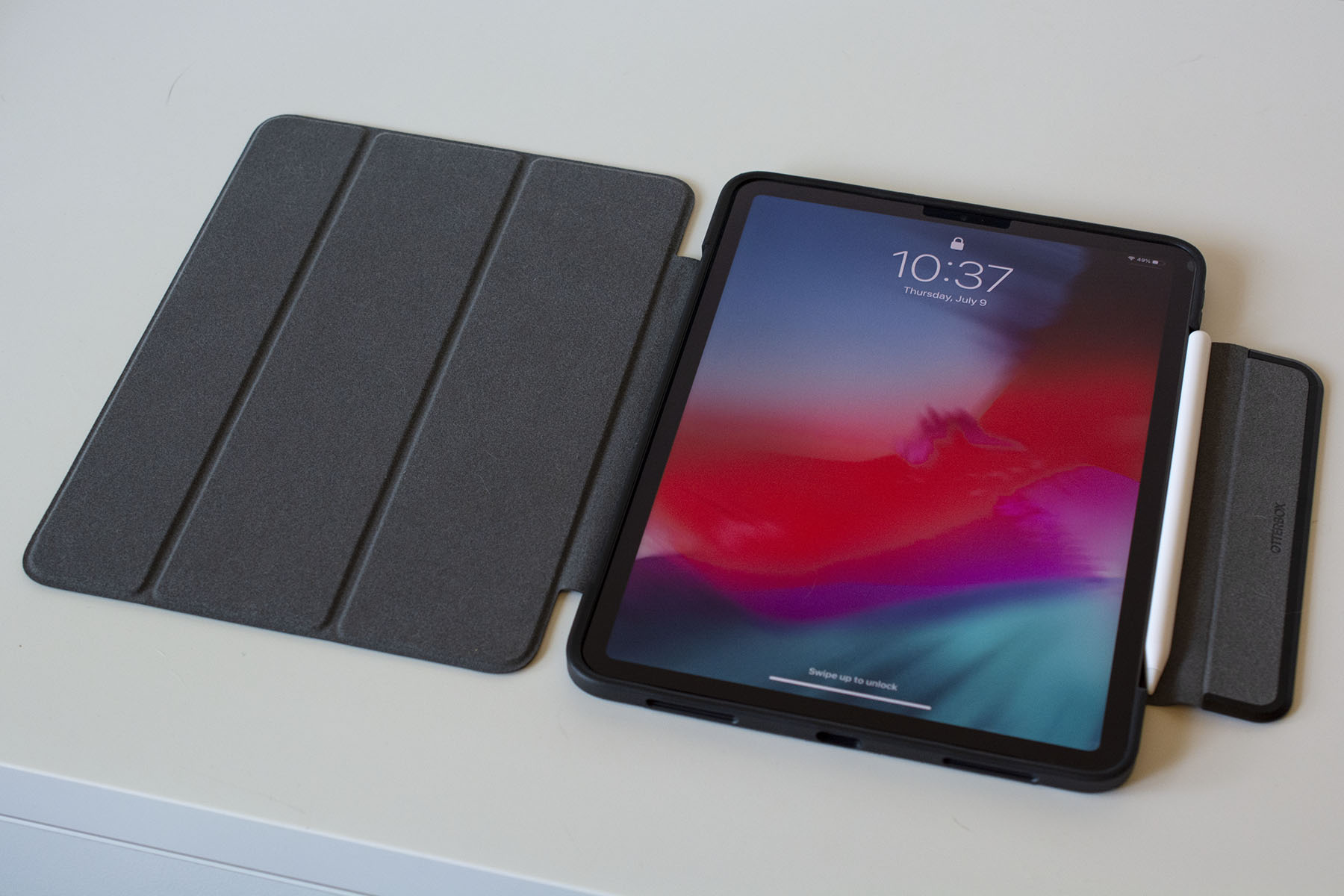
If you’re willing to spend a bit more on a case, get something that combines protection and style. Otterbox is an expert when it comes to protection, but its Symmetry Series 360 series shows that it also has the design chops. Symmetry cases look similar to the Smart Cover, but the clear, scratch-resistant back is sturdy without adding a lot of weight to the iPad and the edge protection is substantial. I also like the extra flap Otterbox added that keeps the screen cover closed and holds the second-generation Apple Pencil to the side of the iPad Pros. Symmetry Series 360 cases are available for most new iPads, and while they’re expensive at $90, they’re worth it if you want a great balance of protection and style.
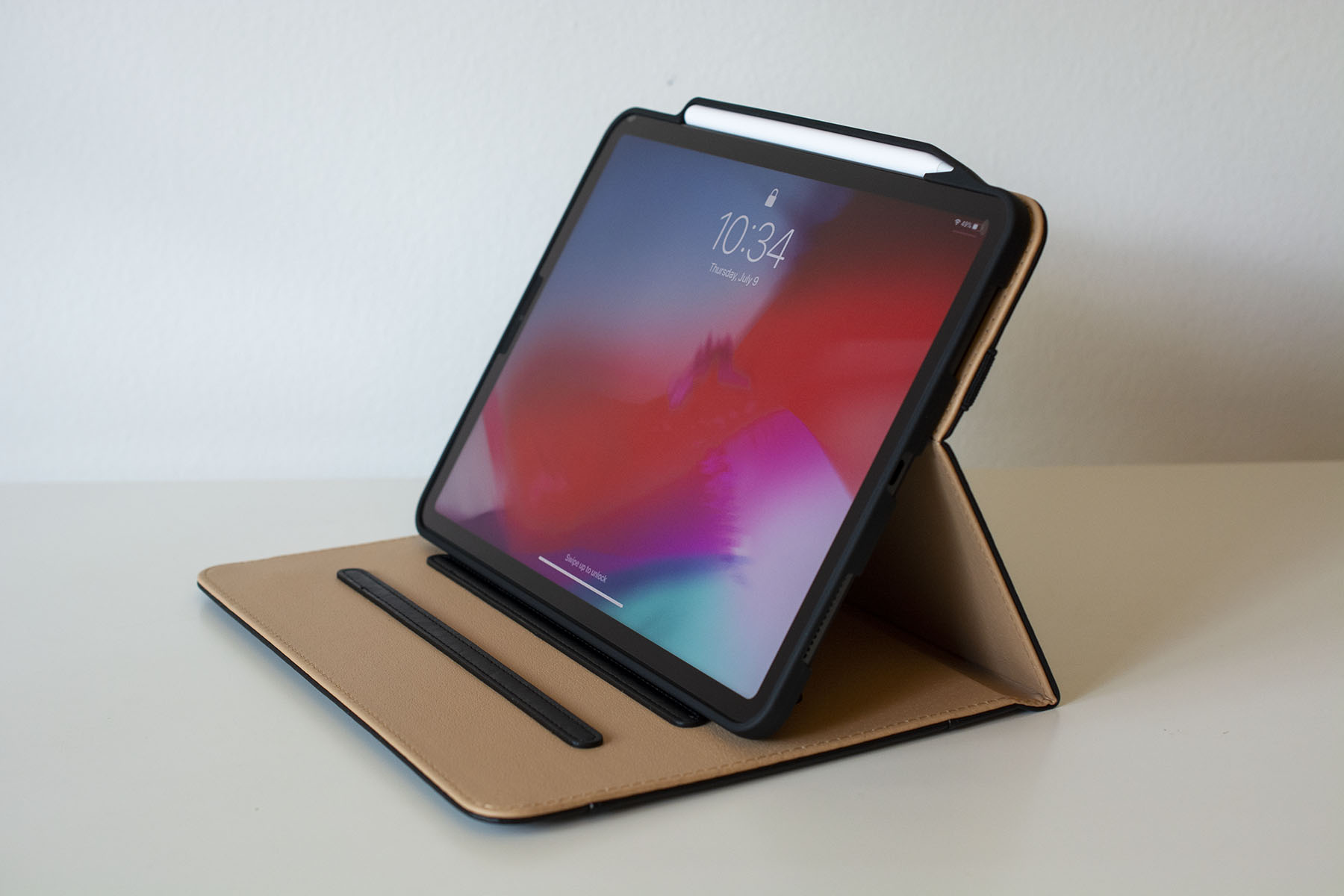
A more affordable alternative is ProCase’s Leather Folio. While ProCase isn’t as well known for protection as Otterbox is, this model has a flexible plastic interior that wraps around most of the iPad’s edges to keep it secure. The lining also surrounds the second-gen Apple Pencil while it magnetically charges against the new iPad Pros, making it one of the more secure cases for those that have the Pencil.
Leather folios will appeal to a certain type of person. I didn’t think I was that person — until I tried this case. Not only is it attractive, but it’s practical. It has a pocket on the front flap, three notches on which to prop up the iPad at different viewing angles and an elastic strap that can either keep the folio closed or hold the front flap against the back of the iPad while you’re using it. It’s definitely worth its $18 list price for those that want a case that’s just as practical as it is professional.
All of the cases we like prop up your iPad in some way, but they aren’t the best if you want the device at a comfortable eye level. You’ll want a dedicated tablet stand for that, and there are several out there that let you adjust height, angle and more. Anozer’s foldable tablet stand is a good option if you’re often on the go. It’s heavier than other stands at one pound and it can be folded (mostly) flat so you can easily throw it in your backpack. While it’s best suited for 7- to 13-inch tablets, it can support certain smartphones, too (or you could get the company’s dedicated smartphone stand instead).
If you’re willing to sacrifice flexibility for something more elegant, Elago’s P2 stand for iPad may be a good fit. It’s made of a single piece of aluminum with a ledge for your iPad and a few well-placed cutouts that you can snake a charging cable through. The ledge is also wide enough to accommodate most iPad cases. It may not be foldable or adjustable, but its minimalist design will make it an attractive addition to your desk.
There are two types of people that seek out keyboards for their iPads: those who want something more comfortable than the on-screen keyboard for banging out the occasional email, and those that plan to use their iPad as a fully-fledged laptop. If you’re part of the first crowd, there are tons of inexpensive Bluetooth keyboards that will do the trick.
I’m partial to Logitech’s Keys to Go, an ultra-slim keyboard that almost disappears in your bag. It’s without a doubt one of the most portable Bluetooth keyboards you’ll find and it’s fairly comfortable to type on. Yes, the keys have little travel and a bubbly feel to them, but they’ll let you compose a quick email or respond to a message on Facebook much more easily than you could with the touchscreen. I also like that its wipeable fabric prevents spills and dirt from getting inside the keyboard. Plus, at around $60-$70, it won’t break the bank.
If you fall into that second category of shopper, there are even more options for you. The most luxurious comes from Apple itself in the Magic Keyboard. The $300 case magnetically attaches to the new iPad Pros and keeps them “floating” above the keyboard and trackpad. We praised the Magic Keyboard for its typing comfort and precise trackpad, but docked it for its limited range of motion. It’s easily the fanciest keyboard available for the iPad Pros and it’s one to consider if money is no object — or if you want the most stylish (and arguably most comfortable) keyboard money can buy.
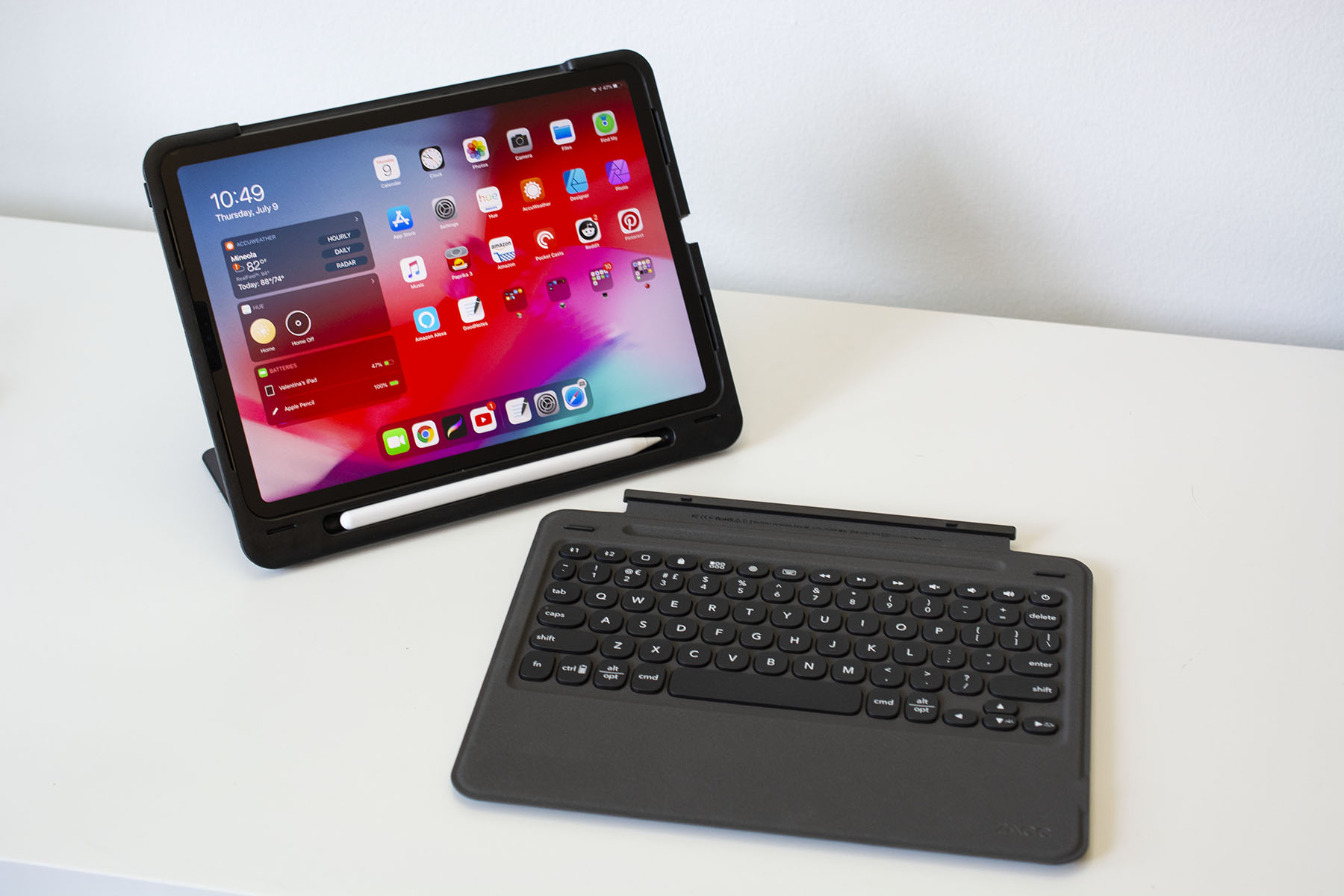
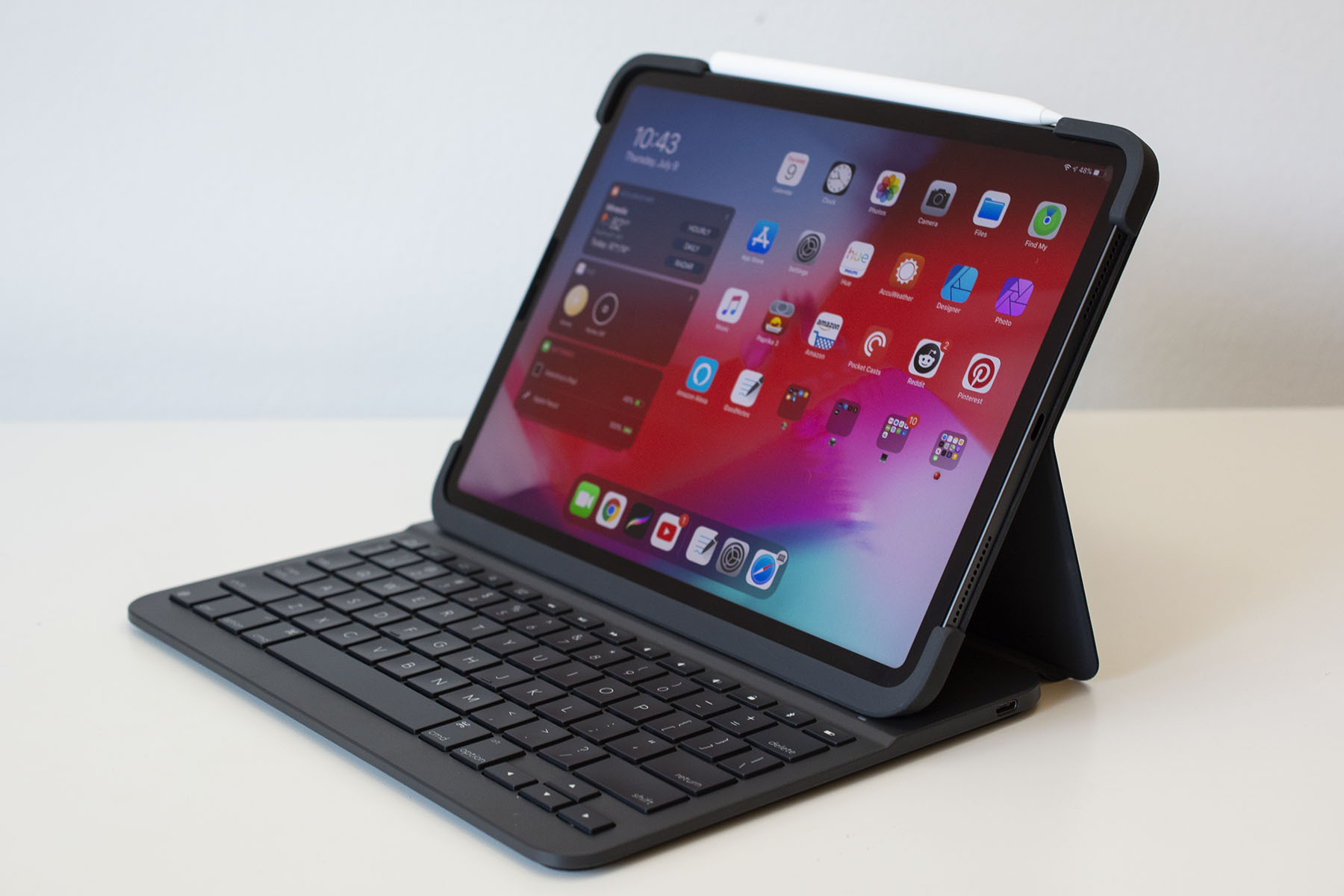
But as far as protection goes, the Magic Keyboard provides basically as much as Apple’s Smart Cover (which isn’t much). If you need something a bit more durable (and don’t want to spend $300), Zagg’s $30 Slim Book Go could do the trick. It’ll keep your entire setup pretty sleek as its name suggests, and it’s even thinner than the $130 Logitech Slim Folio Pro. The latter case may be on the thick side, but it has a well laid-out keyboard and a secure flap that holds the Apple Pencil against your tablet.
If you want something that combines durability with style, we like Logitech’s $160 Folio Touch keyboard case. Its exterior is made of a tweed-like fabric, so it will blend in better with your briefcase or work bag. It’s also fairly slim and has a similar Apple Pencil-friendly flap that closes the whole thing shut. Plus, the keyboard is joined by a small yet useful trackpad, so you can truly use your iPad as if it were a laptop.
This likely won’t come as a surprise, but the Apple Pencil is the best stylus you can get for the iPad. Both the first- and second-generation Pencils are designed to work specifically with iPads and it shows in their seamless writing performance. The second-gen stylus has a double-tap feature that you can customize to a certain degree, and pressure-sensitivity allows you to add as much or as little detail as you want to digital artwork. I highly recommend shelling out $100 or $130 for the Apple Pencil if you’re an artist — you won’t be disappointed.
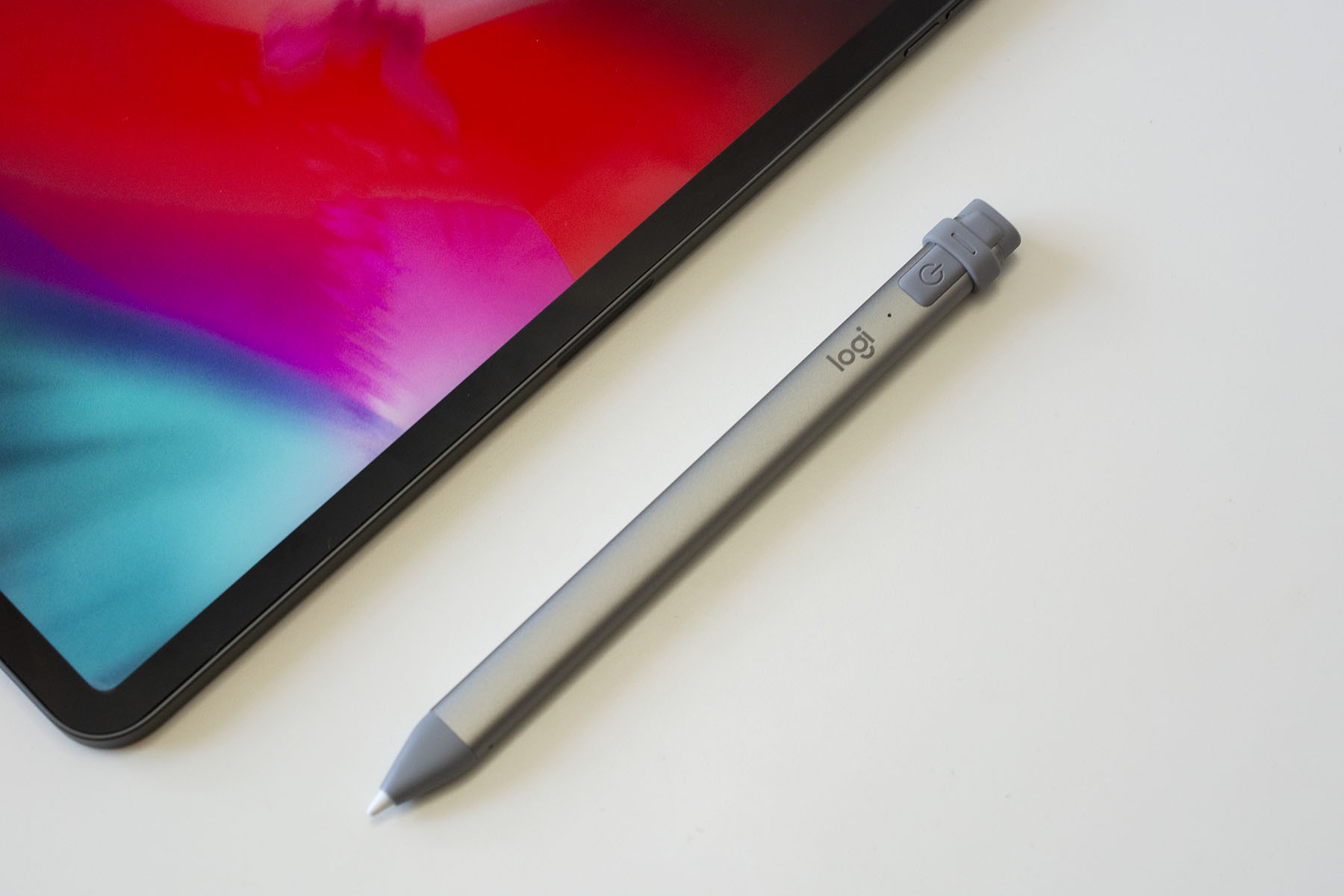
But there are other options, too. Logitech’s Crayon is more affordable at $70 and it has arguably a better grip than either Apple Pencil. It’s just as good in terms of latency and accuracy — drawing in Procreate was a lag-free experience and my strokes always ended up exactly where I wanted them to be.
But as someone who primarily uses an Apple Pencil for digital art, I missed pressure sensitivity when using the Crayon. Aside from that, the other biggest annoyance is that you have to use a Lightning or USB-C cable to charge it (even the newest model for the iPad Pros doesn’t magnetically attach to the tablet for charging). While I wouldn’t recommend the Crayon for serious artists, I would recommend it for anyone who’s on a strict budget, especially digital journal-keepers, hardcore note-takers and the like.
If you’re a heavy user of the Apple Pencil or some other stylus, you should consider getting a screen protector for your iPad. They pull double-duty: not only do they act as a first line of defense if your iPad goes careening onto the concrete, but they can also enhance the digital drawing and writing experience. Using a stylus on an iPad is strange at first because gliding the stylus nib over a glass surface feels nothing like “normal” writing. Matte screen protectors can get closer to replicating the pen-on-paper experience, and they also prevent the stylus nib from wearing down so quickly. Paperlike is the most popular in this space, but Bersem’s screen protectors are a great value at $14 for a pack of two. Not only does the matte finish help when you’re drawing or taking digital notes, but it also reduces screen glare and doesn’t interfere with FaceID on the newest iPads.
If you plan on pushing your iPad Pro to its limits as a daily driver, you’ll probably need more than the tablet’s single USB-C port. Apple has provided little guidance to which USB-C hubs and adapters work best with the iPad Pros — there’s no MFi certification for accessories like this yet. Some hubs specifically advertise that they work with the newest iPad Pros, and if you want to be extra safe, I recommend buying one of those that comes from a reputable brand.
A newcomer in this space is Satechi’s $100 aluminum stand and hub, a foldable rectangle that cradles your iPad and provides a bunch of useful ports and charging capabilities. The holder itself rotates outward, revealing a hidden, attached USB-C cable and a rubber bumper that keeps the stand in place in your desk. On the back edge are a 4K HDMI socket, one USB-A port, a headphone jack, both SD and microSD card slots and a 60W USB-C connection for charging.
I liked the versatility of Satechi’s hub. I could easily use it when I needed to prop my iPad up to watch a YouTube video, and by just plugging in the attached cable, I could switch to using my iPad as more of a work device with all of the necessary connectors in place. It’s also surprisingly light at 10 ounces. Combine that with its foldable design and you have a full-featured hub that can easily be stuffed in a bag.
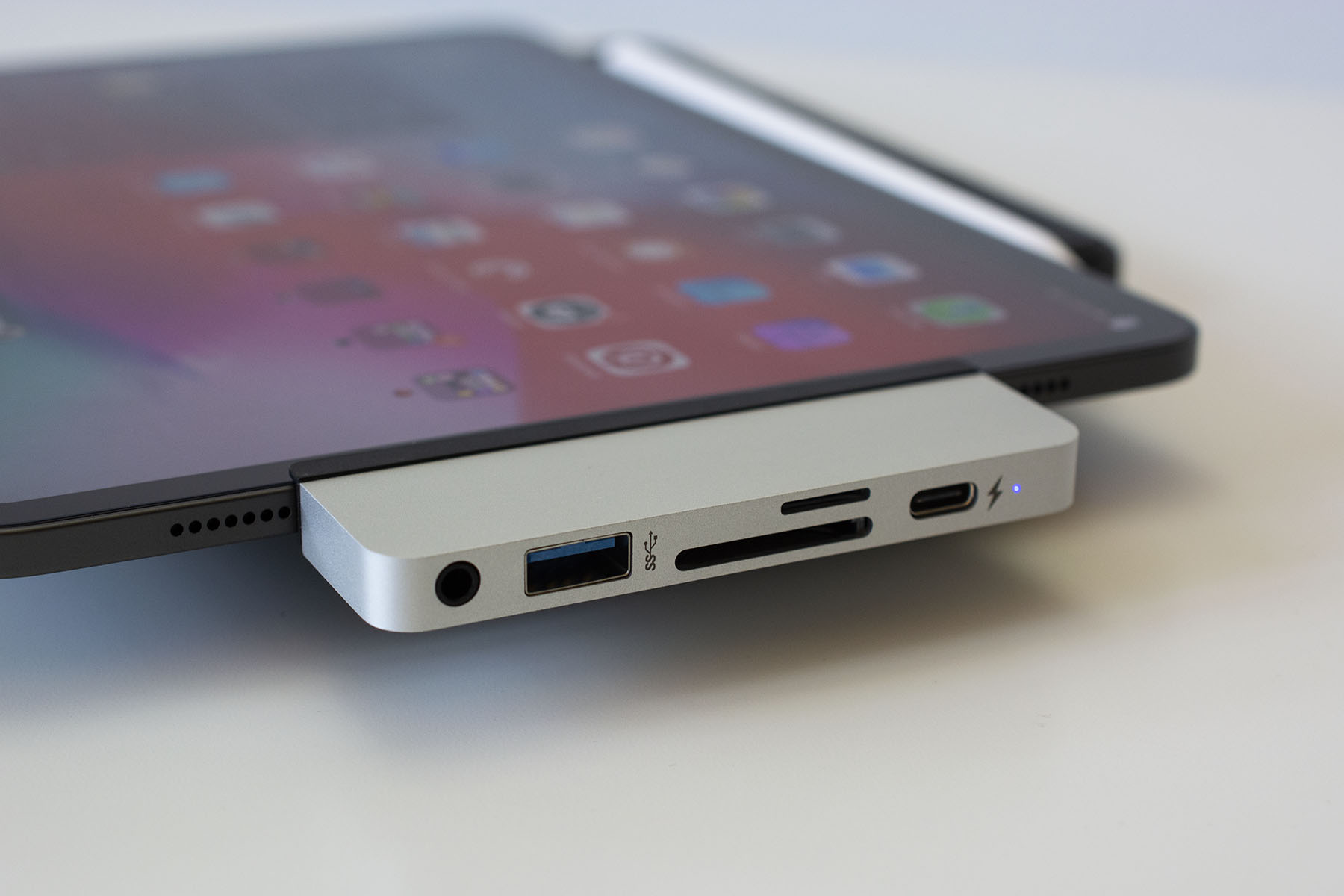
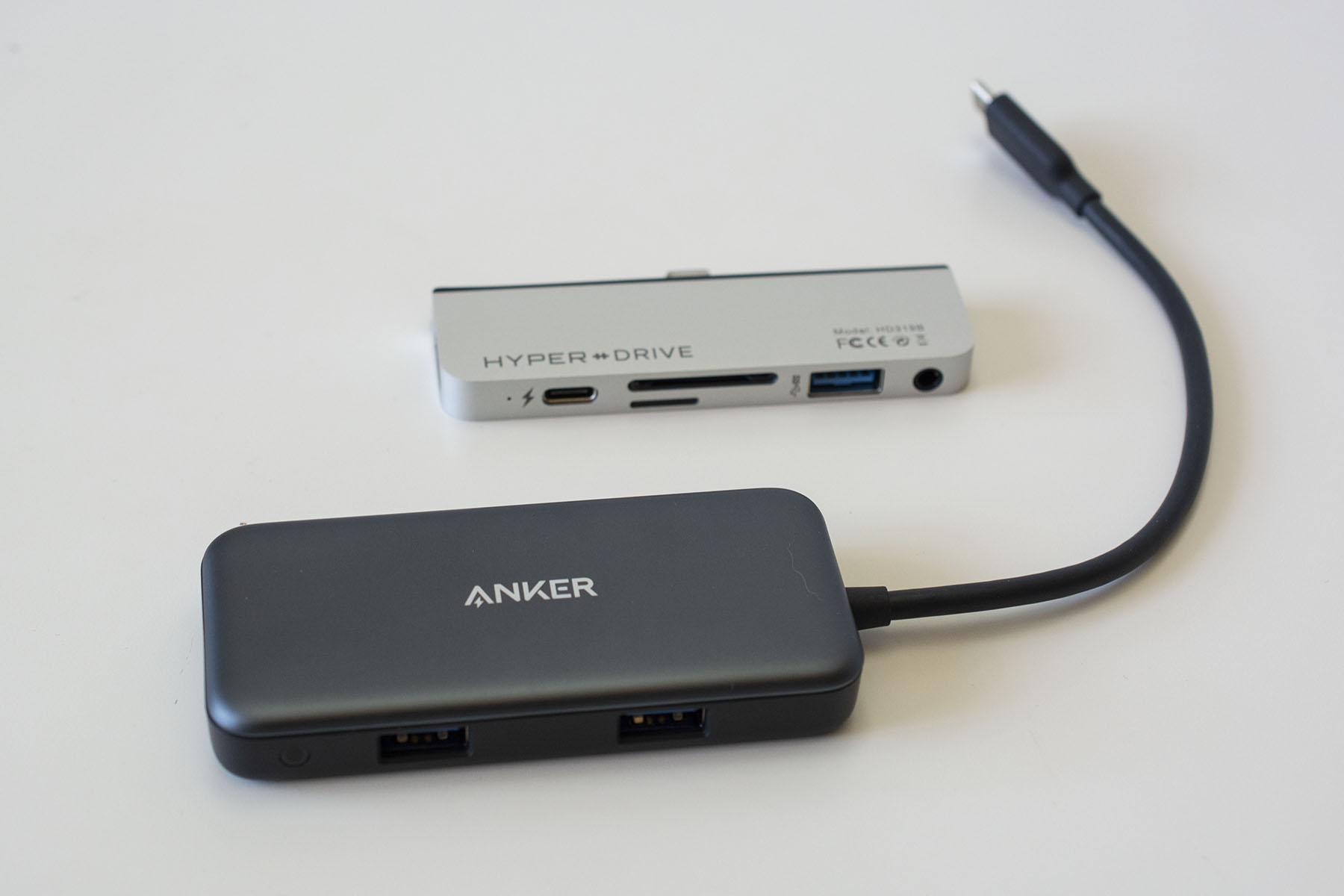
Another popular option is HyperDrive’s USB-C adapter. I’ll admit I was skeptical about this one, mostly because so many Amazon reviewers and YouTube personalities have raved about it (and I have a hard time believing a six-port adapter the size of a lighter should cost $90). However, after testing it out, I can say it delivers on its promises: t’s a neat little adapter that’s just large enough to fit an HDMI socket, a USB-C port, a USB-A connection, micro- and regular SD card slots and a headphone jack on its edges. That should cover most things you’d need an adapter for, save for hardwired internet.
However, what sets the HyperDrive USB-C adapter apart is that it comes with a tool kit that gives you more flexibility in how you use it. The default plate that surrounds the USB-C plug fits iPads without screen protectors, but there’s an included plate that accommodates screen protectors. HyperDrive even included a third plate with a dongle-like attachment so the adapter doesn’t have to sit right up against the iPad. All you need to do is use the tiny screwdriver that’s in the box to switch out the plates.
I think that somewhat justifies its $90 asking price. So many adapters that hug the iPad Pro’s edges are slick but they become basically unusable if you have a case, skin or screen protector.
But $90 for an adapter is still a lot of money and I’d only recommend spending that much if you plan on using the iPad Pro as your daily driver. A cheaper alternative is Anker’s 5-in-1 USB-C adapter: It works just as well as HyperDrive’s; has most of the same ports, with the exception of an extra USB-C port and a headphone jack; and costs only $26.
You could use any of these adapters to connect an external drive to your iPad for more space. We’re fans of Samsung’s T7 series and SanDisk’s Extreme drives for those that want a good amount of extra storage in a fairly durable yet pocketable gadget. If you’d prefer something even more portable, SanDisk’s Dual Drive Luxe flash drive is a good option because it can plug right into your iPad’s USB-C port, it’s available in up to a 1TB capacity and it’s small enough to attach to your keys.
A battery pack or an extra charger is important to have in your bag regardless of where you’re going. RavPower’s 26,800mAh power bank can charge iPad Pros 1.5 times using its 30W USB-C PD port. It also works with the newest MacBook Pros and other USB-C laptops in addition to the Nintendo Switch — so it can be your one-stop-shop for all your charging needs. I also appreciate that it comes with its own USB-C to C cable, so you don’t need to remember to bring one with you, as well as the micro-USB cable used to charge the power bank itself.
RavPower’s PD charger will set you back $60, but you can opt for the $50 Anker Powercore Essential PD charger if you want to spend a bit less. Its 20,000mAh capacity will provide at least 50 percent more juice to most iPads. It’s not ideal for larger devices like laptops, but it works well with smartphones and tablets.
You also don't want to rely solely on the charging adapter that came with your iPad; it's handy to have a backup. Anker's new line of GaN II chargers has a couple of good options, and arguably the best for most people is the 45W Nano II. It's the midrange adapter in the lineup and it can power up a 2020 11-inch iPad Pro up to 30 percent faster than Apple's default adapter. In just a half hour of charging, I got about a 33 percent boost in battery life on my 11-inch iPad Pro. Anker's device is also smaller than Apple's and it has a foldable design, so it'll fit better in cramped spaces and it'll be easier to throw in a travel bag.
The race to develop satellite internet includes some pretty big players like SpaceX, Amazon, Softbank and Facebook. However, Facebook has now essentially thrown in the towel in that business, selling its internet satellite team to Amazon, The Information has reported. For Amazon, it's a significant step in its effort to develop its Project Kuiper satellite network and catch up with SpaceX's Starlink broadband constellation.
Like Starlink, Project Kuiper is designed to provide low-latency, high-speed broadband connectivity to users around the world. Amazon aims to have a 3,236-satellite constellation in orbit by 2029, with half of it launched by 2026. It also plans to build 12 ground stations around the world to transmit data to and from the satellites.
The company has said it will spend more than $10 billion to make all that happen and recently received FAA approval for the project. It also announced last year that it would use United Launch Alliance's ultra-reliable Atlas V rocket for the initial satellite launches.
Amazon has significantly ramped up hiring efforts for Project Kuiper at its Redmond headquarters, with 500 employees currently aboard and 200 open positions. The employees coming from Facebook are reportedly based in the Los Angeles area and include physicists as well as optical, prototyping, mechanical and software engineers. Facebook's former head of Southern California connectivity, Jin Bains, is now listed as a Project Kuiper director in his LinkedIn page.
Meanwhile, it seems Facebook is getting out of the satellite internet business and focusing on terrestrial programs, having invested in subsea and terrestrial fiber as well as wireless services like ExpressWiFi. The company recently launched an "Athena" satellite through its PointView Tech subsidiary, but it was only a test mission rather than the start of a satellite internet constellation. With the sale of its satellite team to Amazon, it appears that any ambitions it may have had in that area are over.