Posts with «provider_name|engadget» label

This week's best deals: $30 off Apple's 10.2-inch iPad and more

A number of new tech deals came up across the web this week, plus there are a few July 4th sales that are still going on. Apple's 10.2-inch iPad is down to $300, and Amazon and Best Buy discounted a bunch of Nintendo Switch games to $45 — including Animal Crossing. If you missed it over the holiday weekend, you can get Solo Stove's Bonfire for $120 less than usual and ThermoWorks' Thermapen Mk4 is down to $69. Here are the best tech deals from this week that you can still get today.

Nintendo Switch games

Both Amazon and Best Buy have a number of Switch games on sale right now, including Animal Crossing: New Horizons for $45. That's the lowest we've seen it, so now's a good time to grab the title if you somehow haven't jumped on the bandwagon yet. Also discounted are Super Smash Bros. Ultimate and a bunch of Mario games like Super Mario 3D All-Stars.

Buy Animal Crossing: New Horizons at Amazon - $45Buy Animal Crossing: New Horizons at Best Buy - $45

Buy Super Mario 3D World at Amazon - $45Buy Super Mario 3D World at Best Buy - $45

Buy Super Smash Bros. Ultimate at Amazon - $45Buy Super Smash Bros. Ultimate at Best Buy - $45

Buy Super Mario 3D All-Stars at Best Buy - $45

10.2-inch iPad
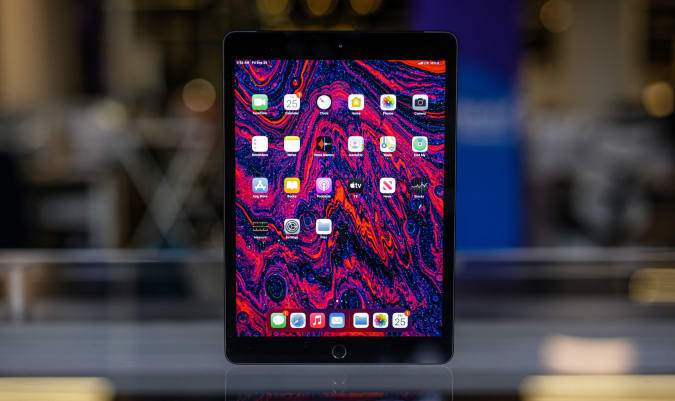
You can still get Apple's 10.2-inch iPad for $299, or $30 off its normal price. It's arguably the best iPad for new tablet owners and we liked its improved performance, familiar design and support for the first-generation Apple Pencil.

Buy 10.2-inch iPad at Amazon - $299

Mac Mini M1

Engadget

Apple's Mac Mini M1 is down to $600 thanks to an automatically applied coupon that knocks $59 off the sale price. In addition to the M1 chipset, you're also getting 8GB of RAM and 256GB of storage in this model. This machine is a good upgrade for those with aging desktops as well as those that want a bit more flexibility than the new, colorful iMacs allow.

Buy Mac Mini M1 at Amazon - $600

MacBook Air M1
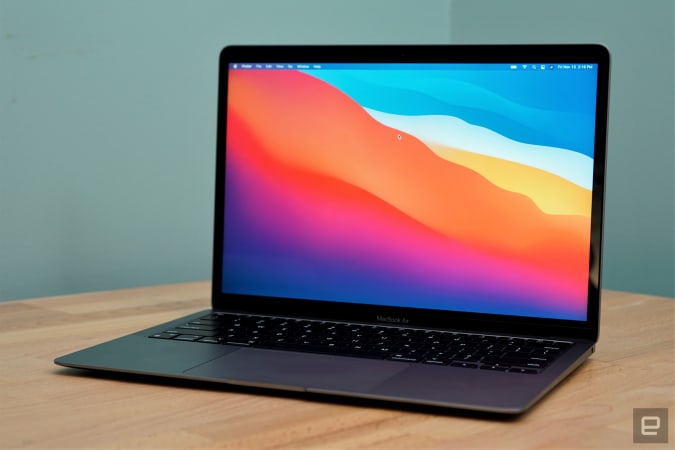
The latest MacBook Air M1 is down to $899 right now, or $100 off its regular price. It's one of the best laptops for most people, and the M1 chipset only makes it a better buy. The Air M1 earned a score of 94 from us for its incredibly fast performance, excellent keyboard and trackpad, good battery life and lack of fan noise.

Buy MacBook Air M1 at Amazon - $899

24-inch iMac M1
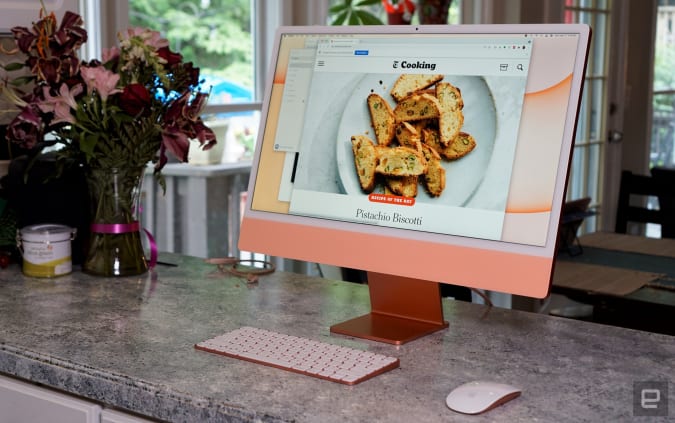
Apple's colorful iMacs with 8-core GPUs are $50 off right now at Amazon, bringing them down to $1,450. We gave this desktop a score of 89 for its remarkable performance thanks to the M1 chip, lovely 24-inch Retina Display and its thin-and-light design.

Buy 24-inch iMac at Amazon - $1,450

Apple Watch Series 6 Product Red Edition

The GPS + Cellular models of the Apple Watch Series 6 Product Red Edition are $100 off at Amazon. The 40mm is down to $399, or close to a record low, while the 44mm version has hit an all-time low of $429. We gave the Series 6 a score of 89 for its speedier performance, quicker charging and slightly improved battery life.

Buy Series 6 (40mm, GPS + Cellular) at Amazon - $399Buy Series 6 (44mm, GPS + Cellular) at Amazon - $429

OnePlus 9 Pro

The OnePlus 9 Pro smartphone is $100 off right now, bringing it down to $970. The regular OnePlus 9 is also on sale, but it's only $80 off. We gave the 9 Pro a score of 88 for its fantastic display, stellar performance and much-improved main camera.

Buy OnePlus 9 Pro at Amazon - $970Buy OnePlus 9 at Amazon - $650

Samsung T7 Touch SSD (500GB)

Samsung

Samsung's T7 Touch portable SSD in 500GB is down to $90, which is close to its all-time-low price. This palm-sized drive has read speeds up to 1,050 MB/s and write speeds up to 1,000 MB/s, and in addition to password protection, it also has a built-in fingerprint reader for extra security.

Buy Samsung T7 Touch (500GB) at Amazon - $90

Solo Stove Bonfire

Solo Stove's Bonfire remains $120 off even after the July 4th holiday has passed. These are smokeless, portable fire pits that we've recommended in the past as an easy way to upgrade your backyard setup.

Buy Bonfire at Solo Stove - $230

ThermoWorks Thermapen Mk4

The Thermapen Mk4 is still on sale for $69 as ThermoWorks makes room for the new Thermapen One thermometer. The Mk4 is the best instant-read thermometer we've used so far —the backlit display makes it easy to read in almost any situation and the display rotates depending on how you're holding the pen. Plus, you never have to remember to turn it off because the pen automatically turns on when you pick it up and will shut off after some time of no use.

Buy Thermapen Mk4 at ThermoWorks - $69

Omaze gaming PC giveaway

Omaze is giving away another $20,000 to build your ultimate gaming PC. This sweepstakes is free to enter, but funds donated with purchased entries will benefit Schools on Wheels, an organization that provides free tutoring and mentoring services to children experiencing homelessness across Southern California.

Enter to win at Omaze

Pricing and availability is subject to change. No donation or payment necessary to enter or win this sweepstakes.See official rules on Omaze.

New tech deals

Philips Hue White and Color Ambience smart lights

A three-pack of the Philips Hue White and Color Ambience smart light bulbs is on sale for $99, or $35 off its normal price. While not a record low, this is a great sale on smart bulbs that don't often see steep discounts. In addition to standard white light, you're getting 16 million colors in these bulbs and they can be controlled with your smartphone.

Buy Philips Hue lights (3-pack) at Amazon - $99

Dyson V10 Allergy

Dyson knocked $80 off its V10 Allergy cordless vacuum, bringing it down to $400. This model includes the V10 motor with 14 cyclones and a filtration system that claims to expel cleaner air as it traps 99 percent of particles as small as 0.3 microns. In addition to the vacuum, you're getting the drop-in dock plus five different cleaning head tools.

Buy V10 Allergy at Dyson - $400

Anker 63W GaN USB-C fast charger

A handy Anker fast charger is back down to its Prime Day price of $39. That's an all-time low and nearly $22 off its normal price. This slim brick has two USB-C ports and two USB-C ports, so it can juice up to four devices at once with a total of 63 watts of power.

Buy 63W GaN USB-C fast charger at Amazon - $39

Microsoft's back to school deals

The Microsoft store just kicked off its back-to-school sale, which includes discounts on Surface devices, gaming gear and more. Of note is a deal that knocks up to $100 off the price of a Surface Go 2 + Type Cover bundle, and you can get up to $500 off gaming laptops from various brands.

Shop Microsoft's back to school deals

NordVPN

One of our recommended VPNs is running a good sale on a two-year subscription. You can sign up for NordVPN for only $89 for the first two years, which comes out to $44.50 per year — and an additional summer promotion adds three free months on top of that. We like NordVPN for its speed, its no-logs policy, the thousands of servers it has to choose from and that one account supports up to six connected devices.

Sign up for NordVPN (two years) - $89

Follow @EngadgetDeals on Twitter for the latest tech deals and buying advice.

'Alto's Odyssey: The Lost City' trailer previews the new urban backdrop

Alto's Odyssey is joining Apple Arcade on July 16th amid an expansion from the game subscription service into classic mobile titles. Developer Snowman recently revealed Apple Arcade members will get access to additional content and it teased some of that in a trailer for Alto's Odyssey: The Lost City.

The latest version of the stylish endless runner adds an urban biome to go along with the desert, canyon and temple areas. In its App Store preview, Snowman said the new area includes "special hidden challenges," but it didn't show any of those in the teaser. It only offered a brief look at the city, which adopts the game's gorgeous art style and features floating lanterns. You'll get to experience The Lost City for yourself next week — assuming you can stay on your snowboard long enough.

Fitbit Luxe review: A tiny tracker that’s both easy and hard on the eyes

If I asked you to envision a fitness tracker on a random person’s wrist, what would your imaginary wearable look like? For years, they’ve largely looked the same — plastic or metal rectangles attached to some generic silicone or nylon strap.

Fitbit likes to say its wearables resemble jewelry. But it’s difficult to make a fitness tracker that actually looks like jewelry and does everything from logging your steps, sleep and workouts to telling you to breathe and relax. The company tried its hand at a stylish fitness band in 2016 with the Alta, but that device was just a slightly narrower Charge with a finicky screen and has since been discontinued. With the Luxe, Fitbit is singing a familiar tune, once again promising a “fashion-forward fitness and wellness tracker... in an effortlessly chic bracelet design."

Design aside, the Luxe packs almost everything you’d want from a fitness band: a heart rate sensor, oxygen saturation (SpO2) monitoring, sleep tracking, water resistance and basic syncing with your phone. At $150, this could be a great option for those looking for a simple no-frills tracker that stands out from the crowd.

Design

Fitbit’s previous claims about how stylish and chic their trackers are have been questionable. They’re all just rectangular blocks with few minor variations. When announcing the Luxe, the company painstakingly detailed how it crafted the Luxe’s case, saying the device’s “breakthrough design has a soft, gentle shape inspired by the human body that sits lightly on your wrist with a jewelry-like look and feel.”

It used techniques like metal injection molding to make the stainless steel case, “providing the warmth expected of handcrafted jewelry, all while delivering a level of precision needed to enable its advanced sensor technology.” After throwing in a few dozen mentions of how elegant the Luxe is, the company ends up calling this “one of Fitbit’s most fashionable and comfortable devices yet.”

Co-founder James Park said “We’ve made major technological advancements with Luxe, creating a smaller, slimmer, beautifully designed tracker packed with advanced features – some that were previously only available with our smartwatches.” Meaning that Fitbit was able to squeeze advanced components into the teeny tiny body of the Luxe, which is about as wide as my index finger and just 1.43 inches long. It’s indeed very small and thin, with a profile of 0.4 inches. That’s about as thick as the Apple Watch SE, but about a third of the width. It’s also about three quarters as wide as a Fitbit Charge 4, and a hair thinner.

So yes, the Luxe is a dainty little thing, which is nice for people like me who have small wrists. The stainless steel case itself is slightly curved along the edges, making it less blockish than the Charge 4 and the Alta. But the strap you pick can make all the difference. When paired with the silicone option you get in the box, the Luxe still looks kinda basic. Swap it out for, say, the Gold Mesh version that Fitbit also sent me, and voila! Instant style elevation.

Cherlynn Low / Engadget

That’s nice, but you could make most other fitness trackers look attractive by swapping in a pretty band. Where the Luxe stands out is in its dainty size and narrow width, and that’s good news for those of us who want something smaller. The added bonus of the Luxe’s footprint is that it never got in the way when I was typing or performing a handstand.

The bad thing about the Luxe’s size is that its screen is correspondingly small. This is a 0.76-inch AMOLED panel running at a 124 x 206 resolution. It’s surrounded by a thick bezel, which is probably hiding all the Luxe’s sensors. But this makes things like your workout stats very hard to read. The screen itself is crisp, bright and colorful. But if you have trouble reading tiny text, you might need a bigger device. Fitbit told Engadget that an update is coming soon that will include larger text, though we still don’t know the specific timeline nor how this will look when it rolls out.

Navigation and in use

Like the Charge 4 and Sense smartwatch, the Luxe has no physical buttons. But unlike the other two, this tracker doesn’t even have an inductive solid state sensor that detects pressure to trigger an action. The only way you’ll be interacting with the Luxe is through its touchscreen. Thankfully, Fitbit uses a standard one here instead of its faux touchscreen that you had to forcefully jab for it to detect a tap. With the Luxe, you can swipe and tap on the screen just like on any smartwatch, albeit with a very rudimentary OS.

Cherlynn Low / Engadget

Swiping up from the main screen shows your daily progress and battery percentage, while dragging down lets you access Settings and enable Do Not Disturb, Sleep or Water Lock modes. Swiping sideways brings you through Notifications, Exercise, Relax (guided breathing), Alarms and Timers. You can scroll vertically on each of these sections to get to more functions. Double tap the top of the screen to go back (or swipe right). That’s it.

For more customization, like rearranging your favorite workouts in Exercise, you’ll need to go to the Fitbit app on your phone. By default, you’ll find Walk, Run, Bike, Swim, Treadmill and Workout (a catch-all for almost everything else) here. When you’re exercising, the Luxe will show your calories burned, time elapsed, heart rate and, where relevant, pace or miles covered. That’s far less information than you’ll see at a glance on a bigger screen, but that’s the sacrifice you make for a smaller tracker. You can swipe up to see more things, like a pause button, but that’s about it.

As you’re working out, too, Fitbit will show your cardio zone below your heart rate, with labels like “fat burn” and “peak.” This is useful information, but again, this is so tiny. I have decent eyesight and even I struggled slightly to read it (and it got harder when I was waving my arms about as I ran).

Cherlynn Low / Engadget

Cramped screen aside, the Luxe behaves like most other basic Fitbit trackers. Though notifications are tedious to read, it’s nice that you can send a quick pre-set reply or emoji from your wrist. The device will also buzz when you’ve been idle too long, or when you’ve achieved your targeted active minutes. When you lift your wrist, the screen wakes up to show you the time (in thankfully large font). If you wear the band to sleep, it’ll use your heart rate to detect what sleep zones you’re in, and after three nights it’ll tell you things like your resting heart rate. If you’ve been running, walking, swimming or biking (or more) for at least 15 minutes, the Luxe will automatically detect and record your activity. You can change that minimum time requirement to something else via the app, too. Unlike the Charge 4, though, the Luxe doesn’t have onboard GPS and will need to connect to your phone to map your outdoor runs.

Something that’s new since Google completed its acquisition of Fitbit is the introduction of Fast Pair, which works with Android devices. This made setting the Luxe up and syncing it to my Pixel 4a a breeze. I charged up the Luxe, and a window popped up on all my Pixel review units asking if I wanted to connect to the tracker. I tapped yes and before I knew it, I was going through the welcome pages since I already had the Fitbit app installed. This is much easier than the old method of first opening the app, hitting the Add New Device button and then waiting endlessly for my phone to find the wearable.

There are some other functions that the Luxe offers, but only if you pay the extra $10 a month for Fitbit Premium. The company is throwing in six months free with every purchase, and that gets you additional insight like your activity, heart rate and sleep trends. It’ll also unlock month-long and year-long reports on your wellness, detailed breakdowns on your sleep and stress, as well as guided workouts, mindfulness and nutrition programs. Without the subscription, most people should find the basic data the Luxe gathers is sufficient. But those who are keen on learning about their long term health trends might benefit from Premium.

Battery life

Cherlynn Low / Engadget

Fitbit promises the Luxe will last up to five days and I actually went a full week of testing the device before it conked out. That’s with tracking multiple workout sessions every other day, though I didn’t wear the band to sleep most nights. If you keep the Luxe on when you go to bed, and also connect it to your phone’s GPS a lot, your runtime will likely be shorter.

Wrap-up

The most impressive thing about the Fitbit Luxe isn’t its style; it’s its size. The fact that this little device can do so much is noteworthy, and those with smaller wrists will like the way it fits. But its size is also one of its drawbacks — its tiny screen makes things hard to read. Still, for $150, the Luxe is a well-made and capable fitness tracker that can track pretty much everything. If you’re looking for a simple activity band that’s smaller than most, this will serve you well. At least, as long as you have near-perfect vision.

'PUBG Mobile' update adds a self-driving Tesla Model Y

PUBG Mobile probably isn't the first game you'd expect to have an electric vehicle tie-in, but it's here all the same. Krafton and Tencent Games have rolled out a 1.5 update for the phone-focused shooter that includes a raft of not-so-subtle plugs for Tesla and its cars. Most notably, you can find a Model Y on Erangel that can drive itself when you activate an autopilot mode on the highway —not that far off from the real Autopilot mode.

You'll also find a Gigafactory on Erangel where you can build the Model Y by activating switches, and self-driving Semi trucks roam around the map dropping supply crates when you damage the vehicles. No, despite the imagery, you can't drive a Cybertruck or Roadster (not yet, at least).

The additions are part of a larger "technological transformation" for Erangel that includes an overhaul of the buildings and new equipment, including an anti-gravity motorcycle.

As is often the case, you shouldn't expect these updates in regular PUBG — the battle royale brawler for consoles and PCs has a more realistic atmosphere. The PUBG Mobile update is really a not-so-subtle way for Tesla to advertise its EVs in countries where it doesn't already have strong word-of-mouth working in its favor.

WhatsApp is adding a 'best quality' setting for sending photos and videos

WhatsApp is working on a setting that will let users more easily bypass its iffy image compression and send photos and videos in the highest available fidelity. The "best quality" option will likely join "auto" and "data saver" choices in a future version of the app.

It appears users will eventually have the choice of whether to compress photos and videos to perhaps save on their data allowance, send them in the best available quality or let WhatsApp automatically select the optimal level of compression for files.

The settings are present in an update WhatsApp submitted to the Google Play Beta Program, as spotted by WABetaInfo. The options will probably arrive in the public Android build of the app, though it's not clear when — they're currently in development. It's likely the additional image quality options will come to iOS as well, since WhatsApp generally maintains the same features across both platforms.

This could come as welcome news for those who don't use the stock messaging apps on iOS or Android and often share photos and videos of their loved ones (Apple Messages retains the original image quality most of the time). Meanwhile, multi-device support is also on the way to WhatsApp.

Arsenal is the latest soccer team to feature in Amazon's 'All or Nothing' docuseries

Amazon is reportedly turning back to the UK's Premier League for the focus of its next All or Nothing sports documentary. Deadline has learned the new series will cover Arsenal as it plays the League's 2021-2022 season. The documentary deal hasn't been finalized, according to the site's sources, but Amazon, Arsenal and production company 72 Films all confirmed the plans.

The Gunners' documentary will debut on Prime sometime after the season in 2022.

 Whether or not it's an exciting series is unclear. Arsenal is a legendary team, but its current roster hasn't produced top-tier results. It finished the 2020-2021 season in eighth place and bowed out of the UEFA Europa League (below the Champions League) in the semis. It does have a rising star in the form of midfielder Bukayo Saka, though, and Deadline pointed out that the team finished the Premier League season on a strong note. Arsenal might make for a good comeback story, then.

Amazon has diversified the scope of All or Nothing over the years to include three soccer teams, New Zealand's All Blacks rugby squad, a range of American football teams and soon a veteran hockey team (the Toronto Maple Leafs). The strategy, however, has remained the same — Amazon is determined to be a go-to source for sports shows and give you a reason to subscribe to Prime Video instead of (or alongside) rivals like Netflix.

Biden's wide-ranging executive order covers Big Tech, net neutrality and more

The movement to get the FCC to restore net neutrality just gained some serious traction. The White House just announced that president Joe Biden will be signing a new executive order today that will establish a "whole-of-government effort to promote competition in the American economy." In other words, it's targeting anticompetitive practices. 

The order includes 72 proposals and actions, among which it specifically says "the President encourages the FCC to restore Net Neutrality rules undone by the prior administration." It also asked the agency to consider limiting early termination fees and prevent internet service providers from making deals with landlords that limit tenant choices. In addition, it urged the FCC to revive the Broadband Nutrition Label that was developed under the Obama administration that would offer greater price transparency.

The order also looked at how "dominant tech firms are undermining competition and reducing innovation," and announced an administration policy of greater scrutiny of mergers. It would give focus on "dominant internet platforms," especially around "the acquisition of nascent competitors, serial mergers, the accumulation of data, competition by “free” products, and the effect on user privacy."

This story is developing, please refresh for updates.

TCL’s Nxtwear G cinema glasses could have been great

Let me ask you a question: Do you really want to buy a pair of Personal Cinema glasses? As cool as they could be, they always feel like an artefact from a dystopia that’s yet to engulf us. When the air burns and the seas boil, you won’t be able to fit a 40-inch HDTV into your existence-support-pod, so these will have to do. It hardly screams “aspirational.”

It doesn’t help that nobody — not Sony,Avegant, Royole nor others — has managed to make this concept work. Personal cinemas, then, have replaced VR as the go-to whenever anyone needs to talk about a product that’s perennially on the edge of breaking through, and never has. But, despite them being a solution in search of a problem, and their historical suckiness, things may be about to change.

You see, TCL has been banging against this particular door for years and now, it’s gearing up to launch its first model. The Nxtwear G Wearable Display Glasses solve many of the problems that dogged those earlier attempts. They’re not perfect, and you’ll probably not want to buy a pair now, but this is the closest anyone has gotten to making this concept work.

TCL’s Nxtwear G puts two tiny displays close to your eyes in order to trick you into thinking you’re looking at a bigger screen. Rather than cram the glasses full of tech, TCL put two displays, a pair of speakers and positioning hardware inside. That keeps the weight down to a very manageable 130 grams (4.5 oz), much kinder to your neck for long-term wear.

Everything else, including power, is handled by the device you plug this into, and the list of compatible hardware is pretty long. You can use major phones from Samsung, LG and OnePlus, as well as over 30 laptops and more than 25 tablets and 2-in-1s. Essentially, TCL made a plug-and-play external display for your head that should play nice with any compatible DisplayPort-equipped USB-C device.

The company decided to swim against much of the received wisdom that we’ve seen with other personal cinemas. Rather than trying to enclose the user in a black void, all the better to replicate that tenth-screen-in-a-mall-multiplex feeling, TCL wants you to see the outside world. Even when I tried the prototype, back in 2019, its representatives said that you should feel comfortable wearing this on public transport, interacting with people as you do.

Daniel Cooper

With every device I’ve tried them with, you simply need to plug the Nxtwear G in and everything starts. If you’re using a compatible TCL phone, you’ll get a pop-up asking if you want to use mirror mode, or PC mode, which sets you up inside Android’s desktop mode. The phone then acts as a touchpad for you to navigate around with your finger, although if you want to do more than hunt-and-peck, buy a Bluetooth keyboard and mouse.

Connecting it to my MacBook Pro, too, and the machine recognized it as an external display and I was able to work and watch TV with my primary displays turned off. In fact, I wrote a chunk of this piece while inside this thing, even if I had to turn the zoom up to mad levels to make sure everything was readable.

The Nxtwear G packs a pair of 16:9, 60Hz micro-OLED 1080p displays that the company says is the equivalent to a 140-inch screen. That requires the usual suspension of ocular disbelief but the effect works here, and the speakers do their job well enough. It’s worth saying that they are essentially blasting audio in every direction, so grab your Bluetooth headphones if, say, your partner gets really annoyed when they can hear you watching Columbo when you’re both in bed.

I don't know if you should expect pixel-perfect video quality from a pair of screens this tiny but be advised that they won't beat your smartphone. Certainly, HD video looks fine, but the smallness of the screens means it's really tough to see good detail. Colors were washed out, certainly compared to the footage that was playing back on the TCL 20 Pro 5G and MacBook Pro I was connected to during testing. 

TCL’s pitch is to say that, as well as passive viewing, you can also use the glasses to work and it’s here that I think TCL may have some success. As I said, it’s possible to work with these on, and it would make sense to use them if you had to view sensitive documents. When you’re working, say, on a train, this is the perfect antidote to shoulder surfers and other drive-by snoopers. Of course, for whoever makes the inevitable joke about watching adult content with nobody noticing, have a cookie.

What TCL has managed to do is, several times over, solve the riddle as to why you could ever want to use a personal cinema. There are times and places where you could do so both for work (more or less) and play (in some circumstances). Unfortunately, while the company was making great strides to solve the technical issues, it didn’t have a huge amount of time to devote to making this experience comfortable.

Your mileage may vary, but I found using these glasses to be a delightful experience right up until the moment it became painful. It is, right now, impossible to use these for a prolonged period of time before something starts hurting, either inside or outside your skull.

Daniel Cooper

One of the more problematic design decisions that TCL took was to include a trio of nose pads that push the screen up and higher. The idea is to keep the screens in line with your eyes, but the unfortunate result is that you need to put the nose pads way down your nose. Like, to the point where you feel like, no matter the size, it feels like you’re wearing those wire grips to close your nostrils that professional swimmers wear during sporting events.

Then there’re the Temple Tips, the part of the glasses arms which bend down to hook over your ears. Whereas with regular glasses those tips are semi-plastic and can be adjusted by an optician (or at home, with a hairdryer and some guile), the Nxtwear G’s arms are rigid. Prolonged periods of wear mean that you’ll get two slices of hard plastic sticking into the soft fleshy bit of your head behind your ears.

The solution I found to alleviate both of those issues, at least for a bit, was to pull out the nose pads entirely and wear them as I would regular glasses. After all, as a seasoned specs wearer, I accepted that the experience might not be as good — but found that this was actually better. I got a full view of the screen and it was significantly more comfortable to wear for longer periods of time. But, unfortunately, the reason the nose pads stand the glasses off your schnozz is to avoid it getting warm, since the Nxtwear G does generate a decent amount of warmth (not heat, warmth, mind you).

And then, finally, there’s the issue of eye strain which, no matter how I wore these things, still meant I had to give up for significant rest periods. Maybe, it’s because I’m short-sighted, and so my eyes are already weak and feeble compared to the average personal cinema enjoyer. But I doubt it, and suspect that lots of people may run the risk of an eye-strain headache if they use this for too long at once.

Now, I bet you’re thinking ‘gee, if these were priced like an accessory, I’d grab a pair just to see what the fuss is about.’ I don’t blame TCL for needing to recoup some of the development costs for these things, but boy. These glasses are going on sale in Oz for $899 AUS, which is the better part of $700 in the US. Heck, you can buy TCL’s new 20 Pro 5G for $500 and just hold it near to your face and pat yourself on the back for your thriftiness.

Facetiousness aside, I think TCL deserves enormous credit for making what can only be described as the best wearable display ever made. And if you’re able, I’d say you should go and try these out, because my comfort-related dealbreakers may not affect you. And TCL deserves a fair crack at making these things cheaper and a little less prone to pinching, because we’re so damn close. Sincerely, if personal cinemas are going to become a success, it’ll be because it follows the template that TCL has laid down. It just needs a few tweaks.

New York City launches a cyberdefense center in Manhattan

Infrastructure cyberattacks are quickly becoming a significant problem in the US, and New York City is opening a facility that could help fend off those potentially dangerous hacks. The Wall Street Journalreports that NYC has launched a long-in-the-making Cyber Critical Services and Infrastructure (CCSI) operations center in Manhattan to defend against major cyberattacks.

The initiative's members are a mix of public and private sector organizations that include Amazon, the Federal Reserve Bank, IBM, the New York Police Department and multiple healthcare providers. If a cyberattack hits, they'll ideally cooperate closely to both overcome the attack and muster a city response if the digital offensive hobbles NYC's infrastructure.

Politicians first floated the idea in 2017, but CCSI has been a strictly virtual initiative until now.

NYC is the first US city to have such a cyberdefense center, but it might not be the last. Cities like Atlanta and Baltimore have reeled from ransomware attacks in recent years, in numerous cases taking a long time (and a lot of money) to recover. A coordinated operations facility could help those cities bounce back quickly from a wide variety of hacks, or at least mitigate the damage.

Engadget Podcast: Who is the OLED Switch for?

This week, Cherlynn and Devindra discuss Nintendo’s surprise OLED Switch announcement along with Time Tech Columnist Patrick Lucas Austin. It definitely isn’t the Switch Pro we’ve been hearing so much, but there are still some nifty upgrades for true Switch diehards. So is it worth $350? Tune in to find out! Also, we chat about the DOD cancelling its $10 billion JEDI contract, and a futuristic new electric scooter from BMW.

Listen below, or subscribe on your podcast app of choice. If you've got suggestions or topics you'd like covered on the show, be sure to email us or drop a note in the comments! And be sure to check out our other podcasts, the Morning After and Engadget News!

Subscribe!


Topics

Video livestream

Credits
Hosts: Devindra Hardawar and Cherlynn Low
Guest: Patrick Lucas Austin
Producer: Ben Ellman
Livestream producers: Julio Barrientos
Graphics artists: Luke Brooks, Brian Oh
Music: Dale North and Terrence O'Brien