Posts with «featured» label

Connected question mark hopes to spark 1 million conversations

Suicide prevention charity R U OK? has partnered with digital innovation agency Fusion to create a fully-connected device in the form of a question mark with hopes of sparking a million conversations throughout Australia. Similar to the Olympic Torch, Quentin will be passed from person to person as it makes its way from town to town starting on Thursday, September 8th.

But unlike the Olympic Torch, the route is not planned. Instead, the journey is determined by the challenge it issues to each new keeper motivating them to reconnect face-to-face with people in their lives.
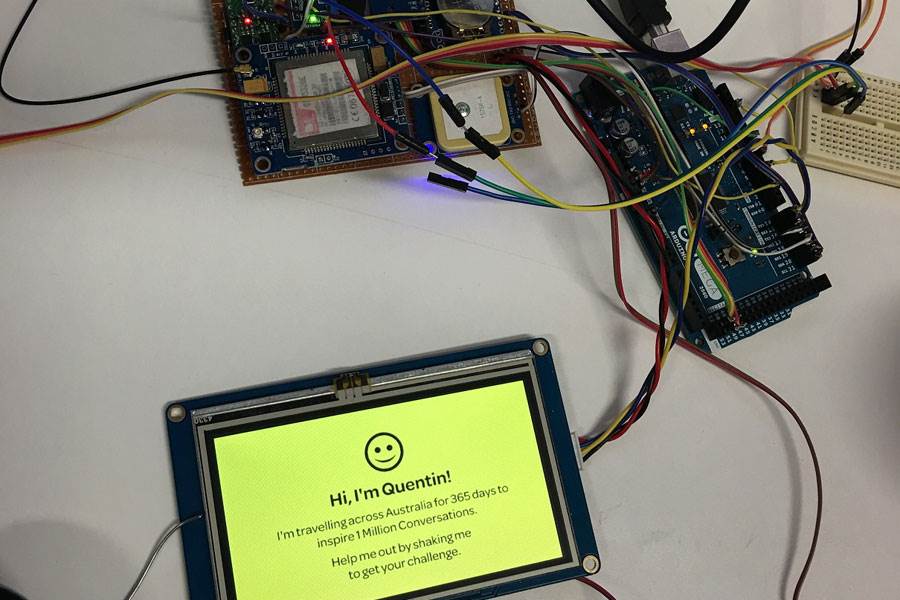
Quentin consists of a translucent 3D-printed shell, and is equipped with an Arduino/Genuino, some sensors, GPS, a display, and an array of LEDs that illuminate, animate and communicate. Users can interact with the device either by SMS or shaking it to receive their R U OK? challenge. Quentin also publishes its activity to the charity’s website, including distance travelled, challenges issued, and the number of keepers.
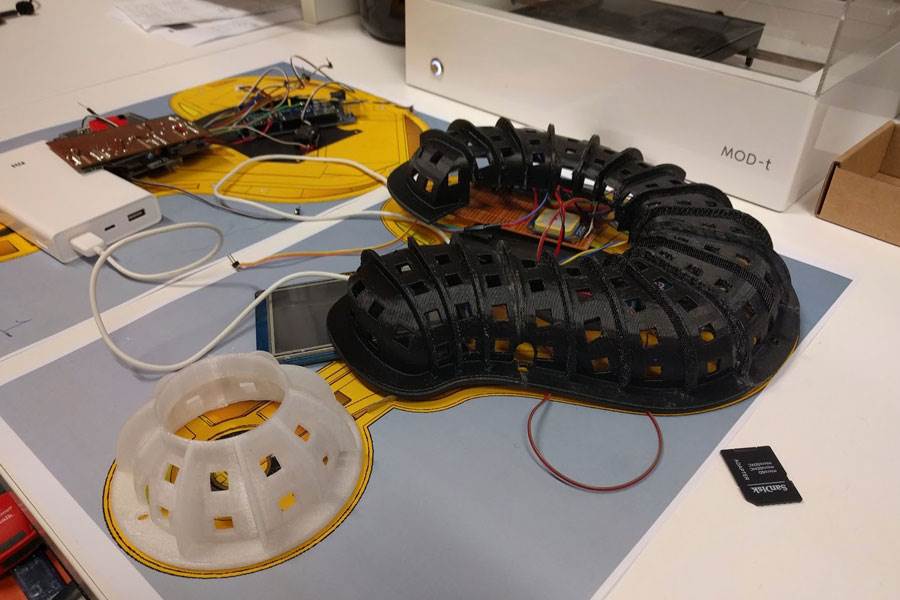
(Photos: Fusion / Campaign Asia)

The Maven Box is an Arduino controller for software developers

Matthias Faust has created an Arduino controller for speeding up software development.

The “Maven Box” is based on an Uno and communicates with a Java program running on a desktop. The device is equipped with customizable buttons, switches and a dial, which act as physical inputs for expediting his daily routine. This enables Faust to select a branch from several GitHub projects, stash changes before pulling, pull the changes, trigger a maven build, as well as display the status of six tests on a set of notification LEDs.

Every job has it’s routine. I am a software developer who works with a Git/Maven based workspace everyday. So when I start working, my daily routine is to update and build my local workspace, pulling changes from GitHub, execute a maven build and execute the updated software. Usually I get my first coffee after that, but because I love coffee so much I thought there must be a faster way to get my system updated and running.

Whether a software developer yourself or simply a fan of awesome Arduino builds, check out the Maven Box’s Instructables page to see more!

Convert a weed wacker toy into a metal detector

Evan Kale is back with another hack. This time, the YouTuber decided to convert a weed wacker-like toy into a metal detector with the help of an Arduino Uno.

As Kale explains, the project is based on a Colpitts Oscillator, which combines an LC circuit with a transistor amplifier for feedback. The frequency of oscillation is somewhere in the 100KHz range, which cannot be heard by humans. Enter the Arduino. When the trigger is pressed, an Arduino program translates the oscillation into an audible tone that is played out of the speaker. When the oscillation exceeds a certain threshold, it also emits a celebratory light show because… why not?

Kale walks through his entire build—along with the science of it all and how it works—in the video below. The schematics can be found on Imgur.

World Maker Faire: Call for volunteers

Calling Makers in New York! Planning on attending World Maker Faire next month? We’re looking for volunteers to join our team during the event, e.g. staffing tables and displays, helping with one-on-one workshops and demos, and providing technical assistance.

If you volunteer with us for one shift, you’ll receive a pass for both days so you can explore and enjoy everything happening around the faire grounds. Water and snacks will be provided, of course, and we’ve prepared a small gift to show our appreciation at the end of the your shift.

Interested? Please fill out this questionnaire, and we’ll get back to you soon!

Unlock your door with a simple hand gesture

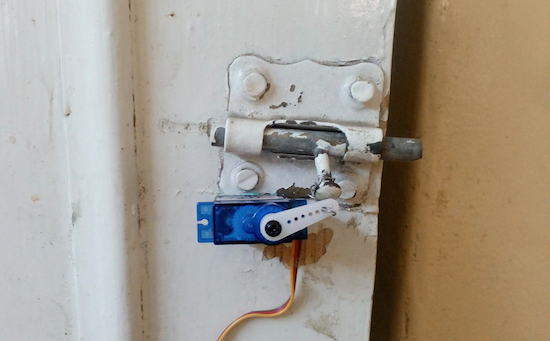
Gone are the days of fumbling with your keys! Adham Negm has come up with a way to open your door with a simple hand gesture while holding your smartphone.

To accomplish this, Negm uses an Arduino Uno, a servo motor to move the bolt, and a 1Sheeld to interface with the smartphone. The 1Sheeld reads the device’s accelerometer data, and then activates the servo when it recognizes a predefined gesture.

Sound like a hack you’d like to try for your room? You can find the entire project on Instructables.

Arduino Blog 05 Sep 21:36

3 simple filtering techniques to eliminate noise

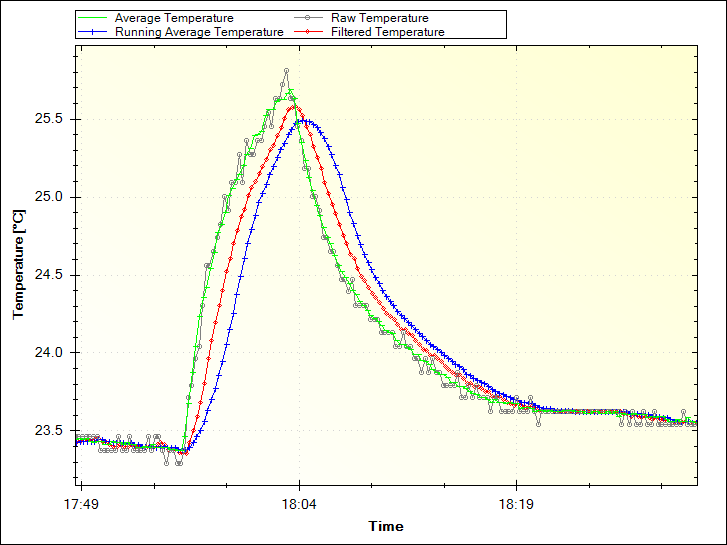
Increasing accuracy in the collection of data coming from sensors is a need that, sooner or later, Makers need to face. Paul Martinsen from MegunoLink created a tutorial to eliminate noise from sensor readings on Arduino with three simple filtering techniques.

The Averaging and Running Average techniques are easy to implement as they work by adding a number of measurements together, then dividing the total by the number of measurements. In both cases, the downside is that it can use a lot of memory.

The Exponential filter is a better solution for several reasons: it doesn’t require much memory, you can control how much filtering is applied with a single parameter, and it saves battery power because you don’t need to make many measurements at once. For this solution, they developed an Arduino filter library so you don’t need to go mad with math!

Interested? You can find the tutorial and explore the code on MegunoLing’s blog post here.

Arduino Blog 05 Sep 13:39

Using Arduino with VVVV now is easier than ever

VVVV is an open-source software toolkit supporting interaction designers and artists handling of large media environments with physical interfaces, real-time motion graphics, audio and video that can interact with many users simultaneously.

The cool thing is that you can control Arduino and Genuino boards with VVVV by uploading a Firmata sketch and then start playing with the input and output pins.

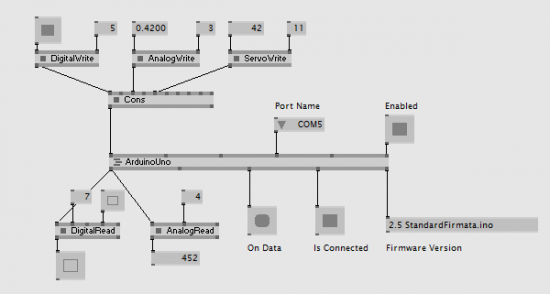
What’s more, the team recently released a brand new set of nodes able to talk to your Arduinos. With this implementation you can:

  • Just plug a DigitalWrite (Firmata), AnalogWrite (Firmata) or ServoWrite (Firmata) node to the Arduino node (or concatenate them together) to set the pins of the Board.
  • Connect DigitalRead (Firmata) and AnalogRead (Firmata) nodes to get the values from the Board’s pins.
  • Use the Sysex Messages output to receive different ‘Sysex Messages’ sent back by the Arduino Board. Some Sysex decoders are already there (see StringDecoder (Firmata), CapabilityDecoder (Firmata)). Sending custom ‘Sysex Messages’ is easy as well.
  • Your board is not listed in the NodeBrowser? The Arduino nodes are easily adaptable for other controllers running Firmata. Hello teensy…

Easier than ever before:

  • no need to supply a spread for all 20 pins and then SetSlice some of them to particular values.
  • no need to define the ‘PinMode’ for each pin.
  • no need to define which pins should report their values back.

Intrigued? Take a look at the details and discussion on VVVV blog!

Sorting cucumbers using AI, Raspberry Pi + Arduino

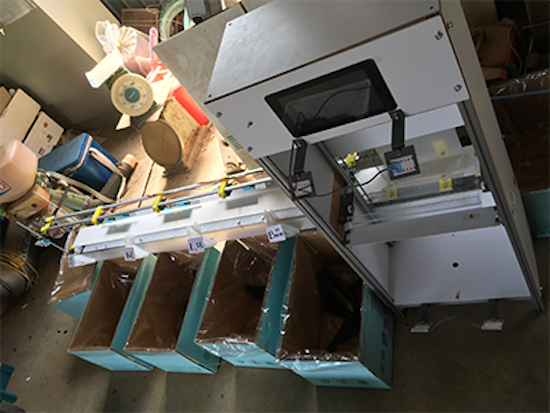
When it comes to farming veggies like cucumbers, the sorting process can often be just as hard and tricky as actually growing them. That’s why Makoto Koike is using Google’s TensorFlow machine learning technology to categorize the cucumbers on his family’s farm by size, shape and color, enabling them to focus on more important and less tedious work.

A camera-equipped Raspberry Pi 3 is used to take images of the cucumbers and send them to a small-scale TensorFlow neural network. The pictures are then forwarded to a larger network running on a Linux server to perform a more detailed classification. From there, the commands are fed to an Arduino Micro that controls a conveyor belt system that handles the actual sorting, dropping them into their respective container.

You can read all about the Google AI project here, as well as see it in action below!

Motion-activated bed lighting system for nighttime wandering

Rather than stumble around in the dark or blind himself with a bedside lamp, Maker Scott Clandinin has come up with an Arduino-powered, motion-activated lighting system for nighttime wandering.

The setup is fairly simple. A PIR sensor detects movement, which automatically triggers a hidden strip of RGB LEDs to illuminate a path as you get out of bed. An RTC module keeps the time and ensures that the lights only turn on between 9pm and 8am. (The good news is that the strip will only stay lit for approximately two minutes, and won’t keep you up for the rest of the night.) A small capacitive touch sensor on the bottom of its case can also be used to test the lighting display outside of operational hours. 

Tired of bumping into things or having to find the switch? Then check out Clandinin’s entire project on Hackaday.io.

Open this Arduino trashcan by waving your hand

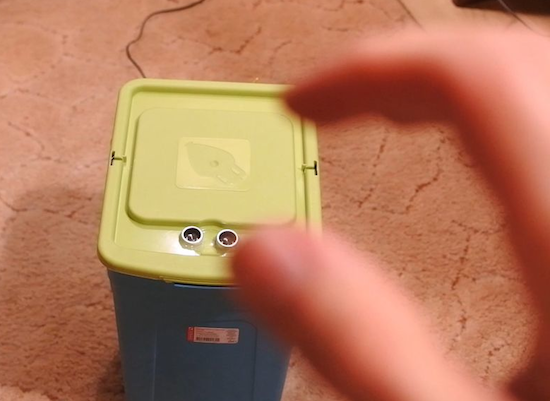
If you’re looking to add some smarts to your kitchen, perhaps a robotic trashcan may be a good start. Take this recent project from Alex Gyver, for example, who built a bin that opens whenever he waves his hand above it.

In Gyver’s case, the can has two modes–one that raises the lid for 10 seconds when a hand is 10 to 30 centimeters away, and another for three seconds when 30 to 70 centimeters away. The latter is clearly for when you have to quickly throwing something out.

The system consists of an Arduino, an inexpensive range ultrasonic sensor, and a servo motor. The distances and times can easily be adjusted by editing the sketch.

Sound like something you’d like in your house, office or dorm? Check out the entire project on Instructables here.