Posts with «featured» label

Cutting electronic parts with Arduino-powered scissors

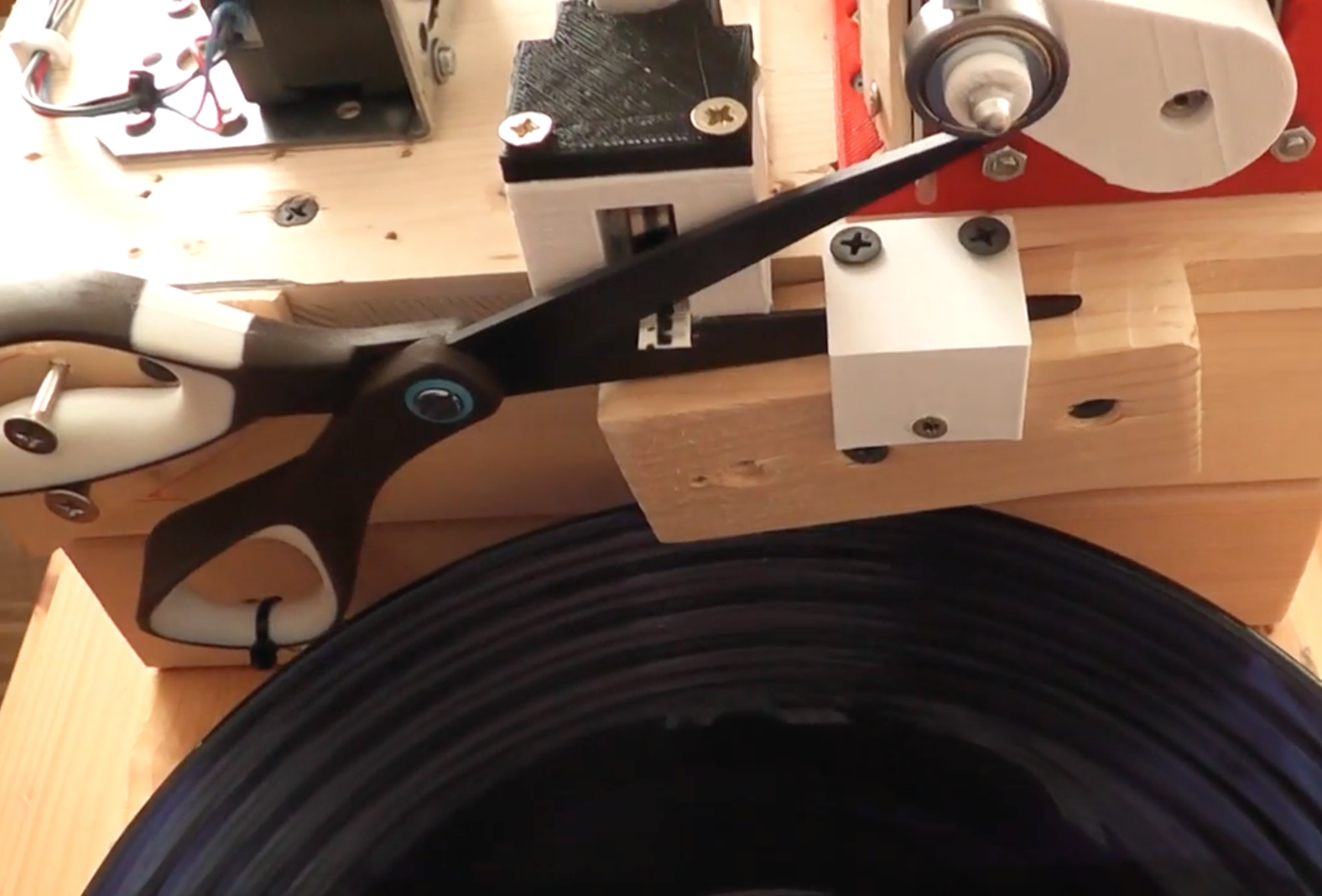
When faced with the need to cut thousands of parts from reels in order to make them into kits, “Der Zerhacker” decided to automate the process.

For his robotic machine, an Arduino Pro Mini pulls strips of tape into position with a stepper motor, coloring them along the way with a marker. An infrared sensor is used to align the correct number of parts with a pair of scissors, which are then cut via a second motor and tumble into a basket.

If you’d like to build your own, 3D print files and Arduino code can be found on Thingiverse. As the author doesn’t have a ton of spare time, wiring and other project details will need to be figured out, but you can get a few clues from the video below…

Meet Moo-Bot, a robotic cow scarecrow

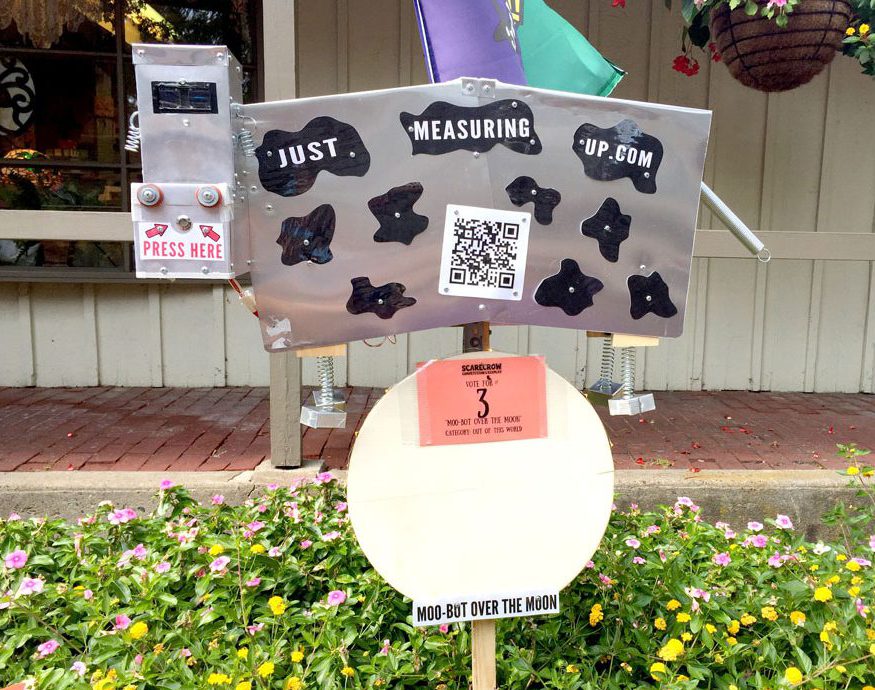
With Halloween around the corner, hackers are gearing up for festivals and trick-or-treaters, hoping to spook visitors or simply impress others with their automation prowess. DIY bloggers Ash and Eileen are no different, and decided to enter a local scarecrow contest in the “Out of this World” category. Their entry? Moo-Bot, an Arduino-powered sheet metal cow that looks like it came straight off the set of a 1950s sci-fi flick.

Not that that is a bad thing; somehow this retro-futuristic bovine looks quite interesting. Making it even better is that the robotic cow’s eyes are made out of two OLED displays, and that it can interact with observers through an internal speaker.

When someone presses a button on its nose, the onboard Uno powers up and tells a pre-recorded series of cow jokes via an MP3 player module. Power is supplied by eight D batteries, which is enough to keep the Moo-Bot going for a few months.

You can read more about the project here, and see it in action below!

The BecDot is an Arduino-based Braille teaching tool for children

While instruments are available for those with visual impairment to read electronic media, they can be quite expensive, costing over $1,000. This is good for adults, but something more kid-friendly (and possibly replaceable) is needed to open up this world to those just learning.

For this purpose, Jacob Lacourse, whose daughter Rebecca was born with Usher Syndrome, developed the BecDot educational toy.

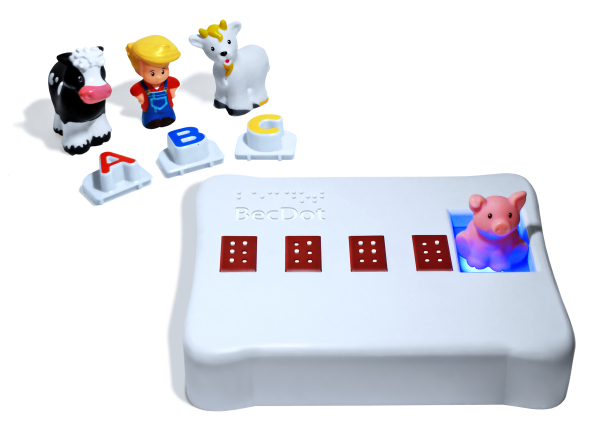
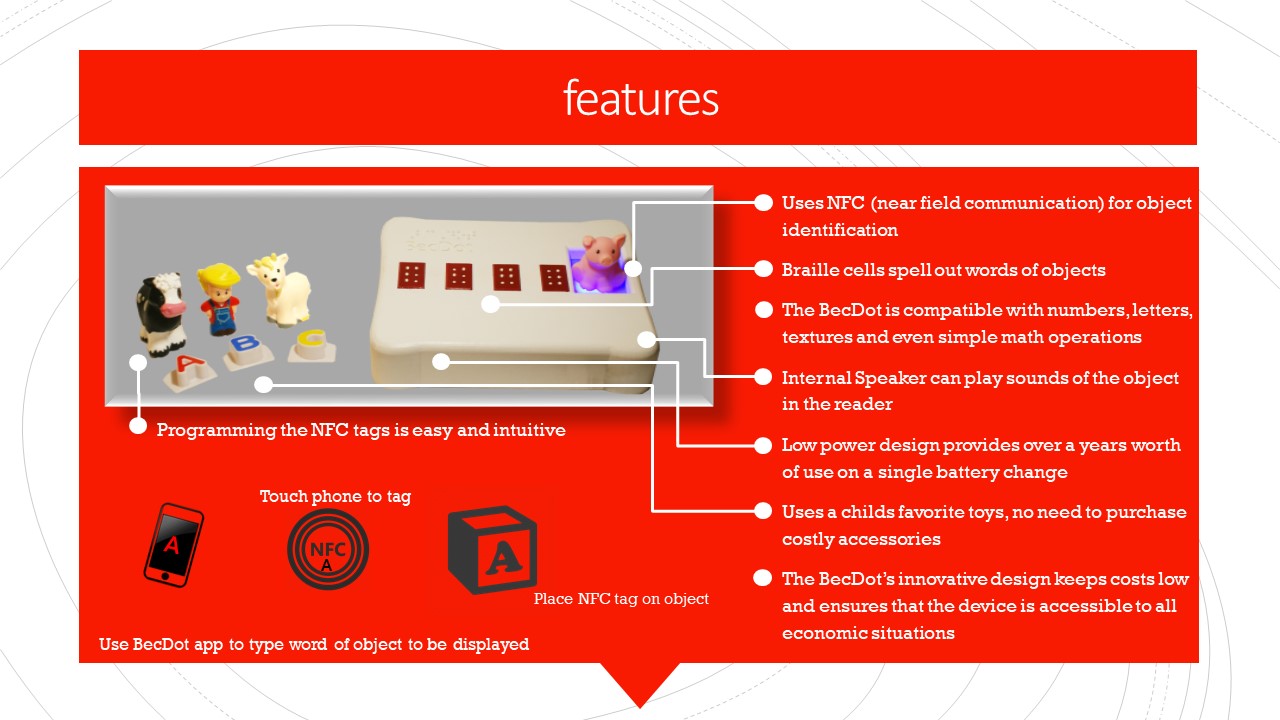
The device–which is now in a prototype form–senses when a plastic object (a letter block, a plastic animal, etc.) is placed in the reader via preprogrammed NFC tags, then raises the corresponding dots on four Braille pads. The prototype uses an Arduino Uno for control, and a system that he developed to raise the Braille dots as needed.

I incorporated an NFC reader (Adafruit PN532) into the device.  The idea was that the reader would read a preprogrammed tag that a parent, caregiver or educator could place on a toy such as a letter block, a plastic dog, cow, goat, etc. When the child places the toy in the reader the device will display the braille equivalent of the object on the four cells.  Of course lights and sounds would also come later in the development of the device.

Lacourse hopes to one day bring the BecDot to market for under $100. Until then, you can check it out in the video below and read more about this amazing project here!

Who Owns Arduino?

Who owns Arduino? We don’t mean metaphorically — we’d say that’s the community of users and developers who’ve all contributed to this amazing hardware/software ecosystem. We mean literally. Whose chips are on the table? Whose money talks? It looks like it could be ARM!

The Arduino vs Arduino saga “ended” just under a year ago with an out-of-court settlement that created a private holding company part-owned by both parties in the prior dispute over the trademark. And then, [Banzi] and the original founders bought out [Musto]’s shares and took over. That much is known fact.

The murky thing about privately held companies and out-of-court settlements is that all of the details remain private, so we can only guess from outside. We can speculate, however, that buying out half of the Arduino AG wasn’t cheap, and that even pooling all of their resources together, the original founders just didn’t have the scratch to buy [Musto] out. Or as the Arduino website puts it, “In order to make [t]his a reality, we needed a partner that would provide us with the resources to regain full ownership of Arduino as a company… and Arm graciously agreed to support us to complete the operation.” That, and the rest of the Arduino blog post, sure looks like ARM provided some funds to buy back Arduino.

We reached out to [Massimo Banzi] for clarification and he replied:

“Hi arm did not buy nor invest in arduino. The founders + Fabio Violante still own the company. As I wrote in the blog post we are still independent, open source and cross platform.”

We frankly can’t make sense of these conflicting statements, at least regarding whether ARM did or didn’t contribute monetary resources to the deal. ARM has no press release on the deal as we write this.

Announcing a partnership without details isn’t a new activity for Arduino. Recently we wrote about open questions on the Arduino Foundation. [Banzi] was willing to speak with Hackaday at length about that topic, suggesting more details were just weeks away but we have yet to see follow-through on that.

What we can tell is that [Banzi] and Arduino want us to know that they’re still independent. The Arduino post mentions independence and autonomy eight times in a 428-word post. (The lady doth protest too much?) They’re very concerned that we don’t think that they’ve been snapped up by ARM.

And there’s also good reason to believe that Arduino will remain autonomous even if ARM owns a big stake. ARM sells its intellectual property to a number of silicon manufacturers, who then compete fiercely by offering different peripheral sets and power budgets, and they’re very serious about providing them all with a level playing field.

Anyway, the various ARM chips are nice to work with from a hacker perspective. If the AVR-based UNO was the last non-ARM Arduino board ever made, we’d only shed a tiny little tear. On the other hand, if you’re an MSP430 or PIC fanboy or fangirl, we wouldn’t be holding your breath for a light-blue board sporting your favorite silicon but that is just conjecture.

So we have seemingly conflicting information on the details of this deal, but also promises of openness and transparency. On one hand we’re pleased that ARM is the apparent silent partner, but on the other hand we’re left confused and wanting more. Who owns Arduino?


Filed under: Arduino Hacks, Business, Current Events, Featured, news

Arduino announces Arm partnership

Dear Arduino Community,

Back in July, we announced that the original Arduino founders regained full control of Arduino as a company. It was the culmination of a project that lasted several months, which required a tremendous amount of effort in finding the right partner that could help us make it happen while keeping the spirit of Arduino true to itself.

Throughout the litigation we dreamed of reclaiming control of the company, bringing it back to its original principles while designing a strategy that would allow us to tackle the challenges of the contemporary IoT world.

In order to make his a reality, we needed a partner that would provide us with the resources to regain full ownership of Arduino as a company while keeping it independent and true to its values of openness.

It wasn’t easy, but more than a year ago, in the middle of the litigation, we started a conversation with an important technology company that is an essential building block of today’s digital world: Arm.

During a very hot day in spring I visited California to meet with Arm. It was a great meeting of minds and we determined that such a partnership was the right fit for us. Arm is an extremely innovative company whose processors can be found inside virtually every mobile device on the planet; but they don’t actually build silicon. Instead, they have created an ecosystem of a thousand-plus partners, some of whom compete with each other, but Arm works in harmony with all of them.

Arm recognized independence as a core value of Arduino. This was very important for us, as it meant full understanding of our need to work with multiple silicon vendors and architectures as long as they make sense for Arduino—without any lock-in with the Arm architecture.

Following the meeting with Arm, I was thrilled. I shared my excitement with our new CEO Fabio Violante and my cofounders: Arduino could again be 100% ours, with the help of a supportive partner that leaves complete autonomy to our team and our community.

We worked very hard for many months to make this happen, and Arm graciously agreed to support us to complete the operation.

What should you expect from us in the future? A stronger Arduino, free to innovate with more firepower, and plenty of enthusiasm for future challenges and opportunities.

We will continue to work with all technology vendors and architectures moving forward. We stay independent; we stay open, and we still provide the most loved microcontroller development platform that has changed the lives of so many people around the world.

12-year-old maker creates his own Flappy Bird console

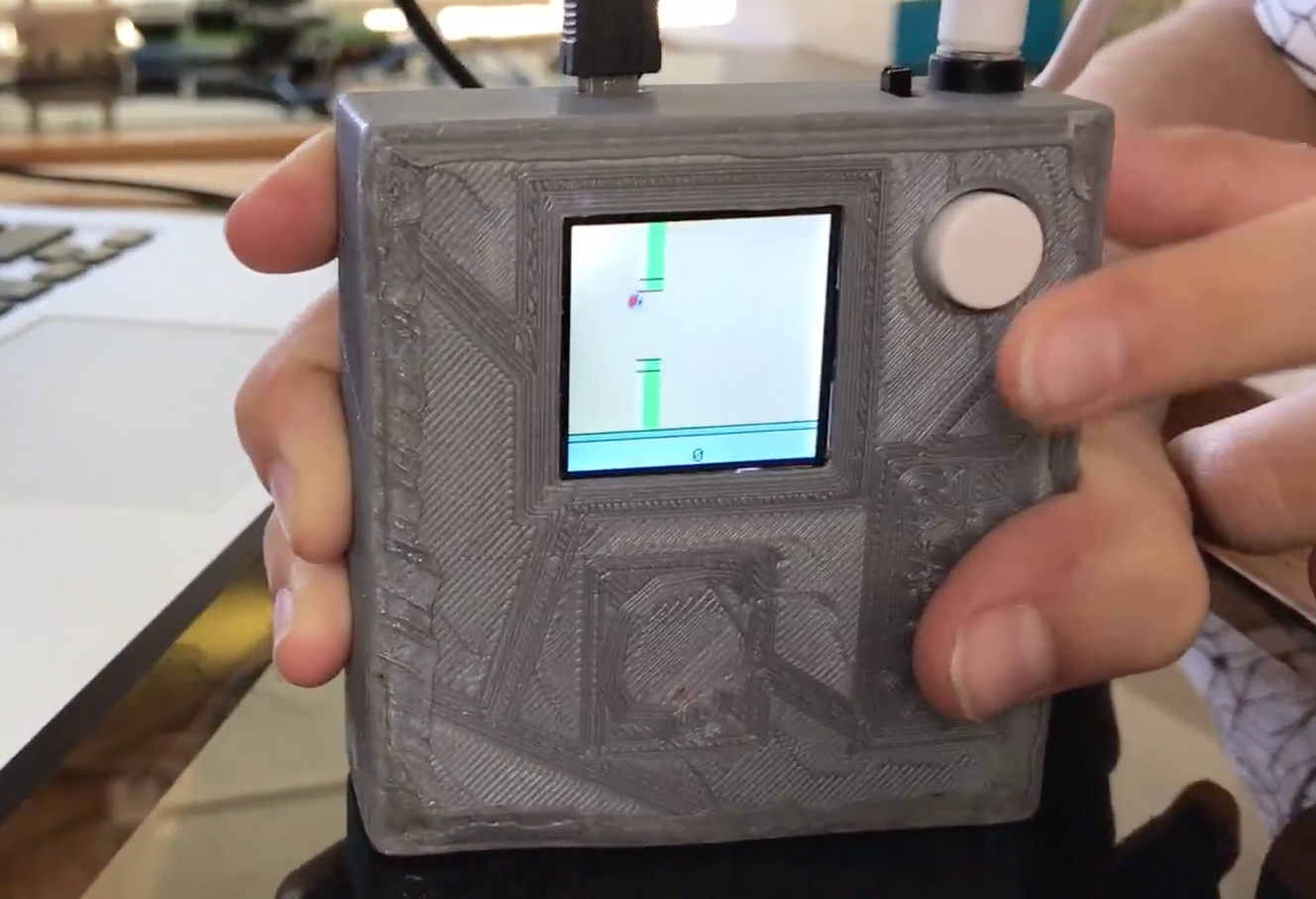
12-year-old Savva Osipov has grown so far up hearing tales of the old Soviet Union from his father, including about the gadgets and technology that was then available. One particular device that caught his attention is the “Nu, pogodi!” portable game that his dad saved from that time. This inspired him to build another simple handheld, a Flappy Bird console, running on an Arduino Nano.

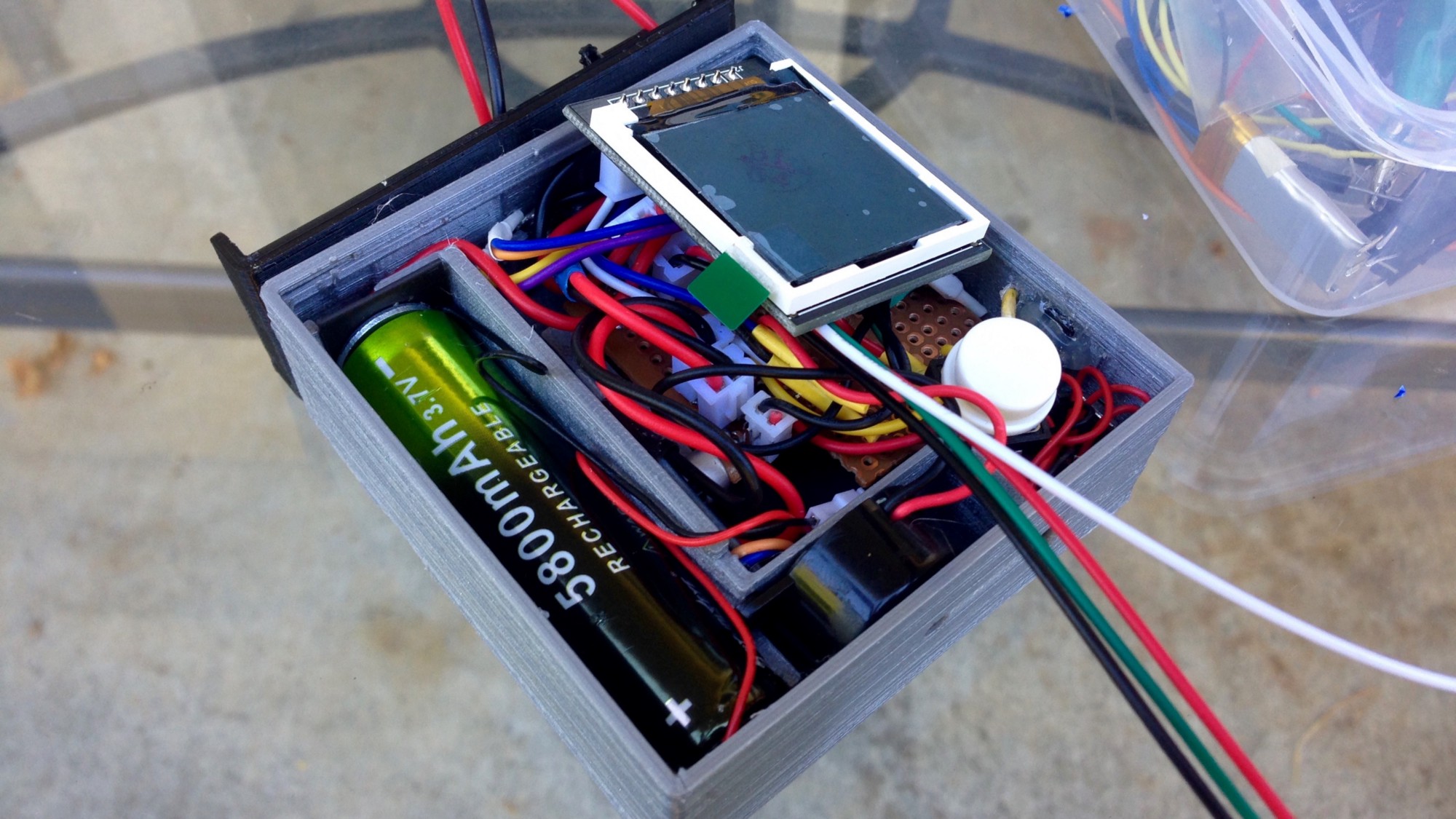
The project’s software is based on code by Themistokle Benetatos, and he designed and 3D-printed a custom case to tie all the necessary game elements (Arduino, screen, battery, speaker, button, etc.) together.

As shown in the video below, it looks like a lot of fun. If you want to create your own, you can find more details in his write-up here!

Creating moving, wirelessly-controlled train LED displays with Arduino

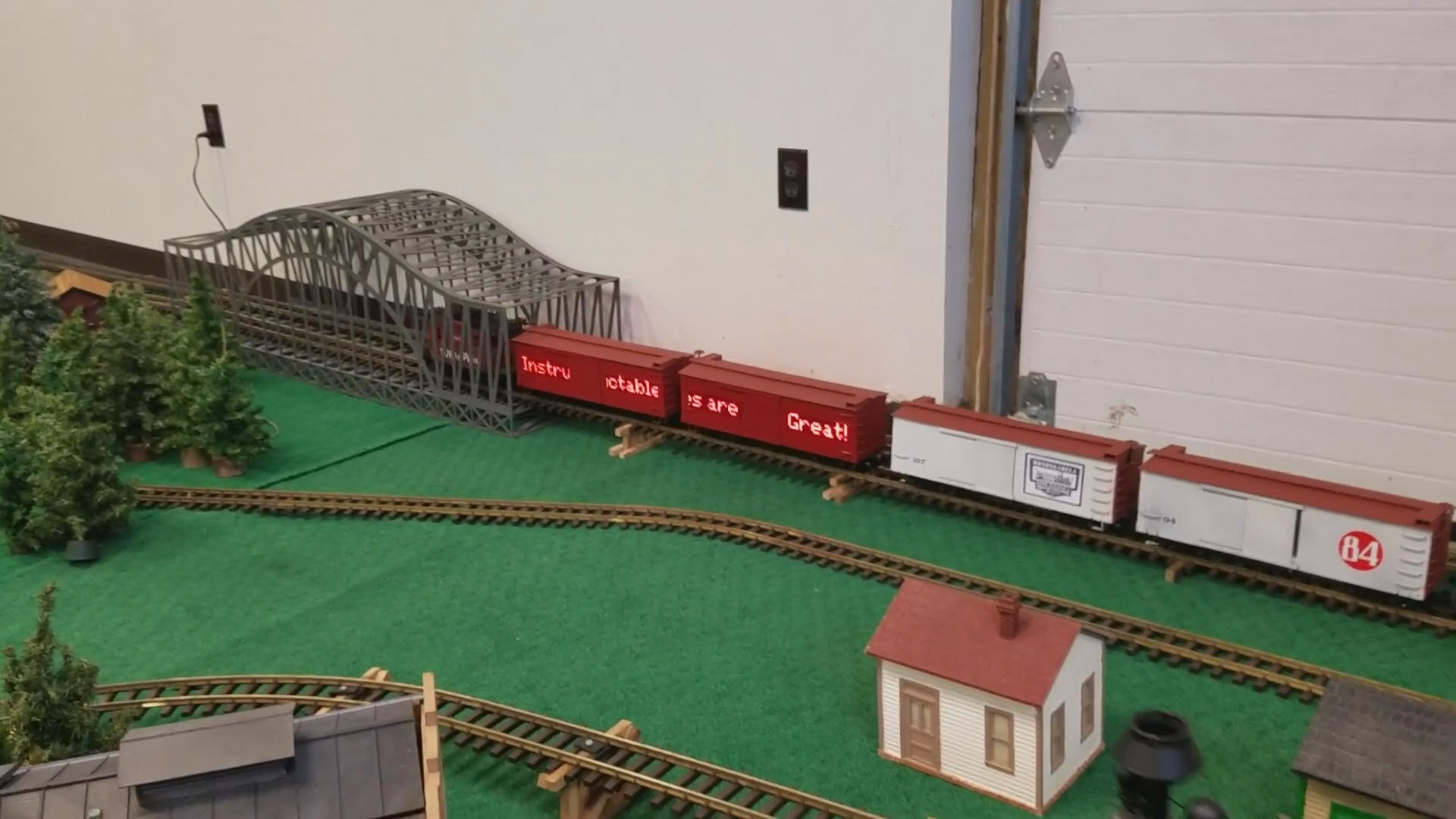
In order to make his model trains stand out, David G. Bodnar has been working on the best way to integrate 8×8 displays into the cars.

Through the process he’s come up with several great techniques, including a red filter to help them “pop,” as well as wiring things in such a way that sets of LEDs can be used on either side to show the same message.

An Arduino Pro Mini and Nano are used for control, while a Bluetooth module with an Android terminal program enables him to change the text remotely.

I have used LED matrix displays for a number of different projects over the last few years.  These 8×8 LED units have a controller that allows an Arduino to talk to them sending text or graphic information that can be displayed.  These small units can be daisy-chained together to create a long, scrolling display.

While the displays are visually appealing and easy to use they might not get the amount of attention that one would hope they would generate at a train show or other public train display. With this in mind I decided to build an on-board train display using three 8×32 LED boards. Each board is mounted on a car with the three connected together to crate one long scrolling message board. To make things even more interesting and compelling to visitors the display’s message can be changed remotely with a cell phone or computer.

Whether you’re interested in enhancing model trains, or simply want to hear more about integrating LED matrix displays into your next project, you can find more details on Instructables and on his website here.

ASK.ME is an interactive Magic 8 Ball that you can walk into

What goes on inside of a Magic 8 Ball when you ask it a question and shake? Sure, as an adult you might guess that it’s some sort of fluid and a geometric shape that floats to the surface; but if you envision it though the mind of a child, there could be an entire colorful word that computes, queries a database, or even magically ascertains the answer.

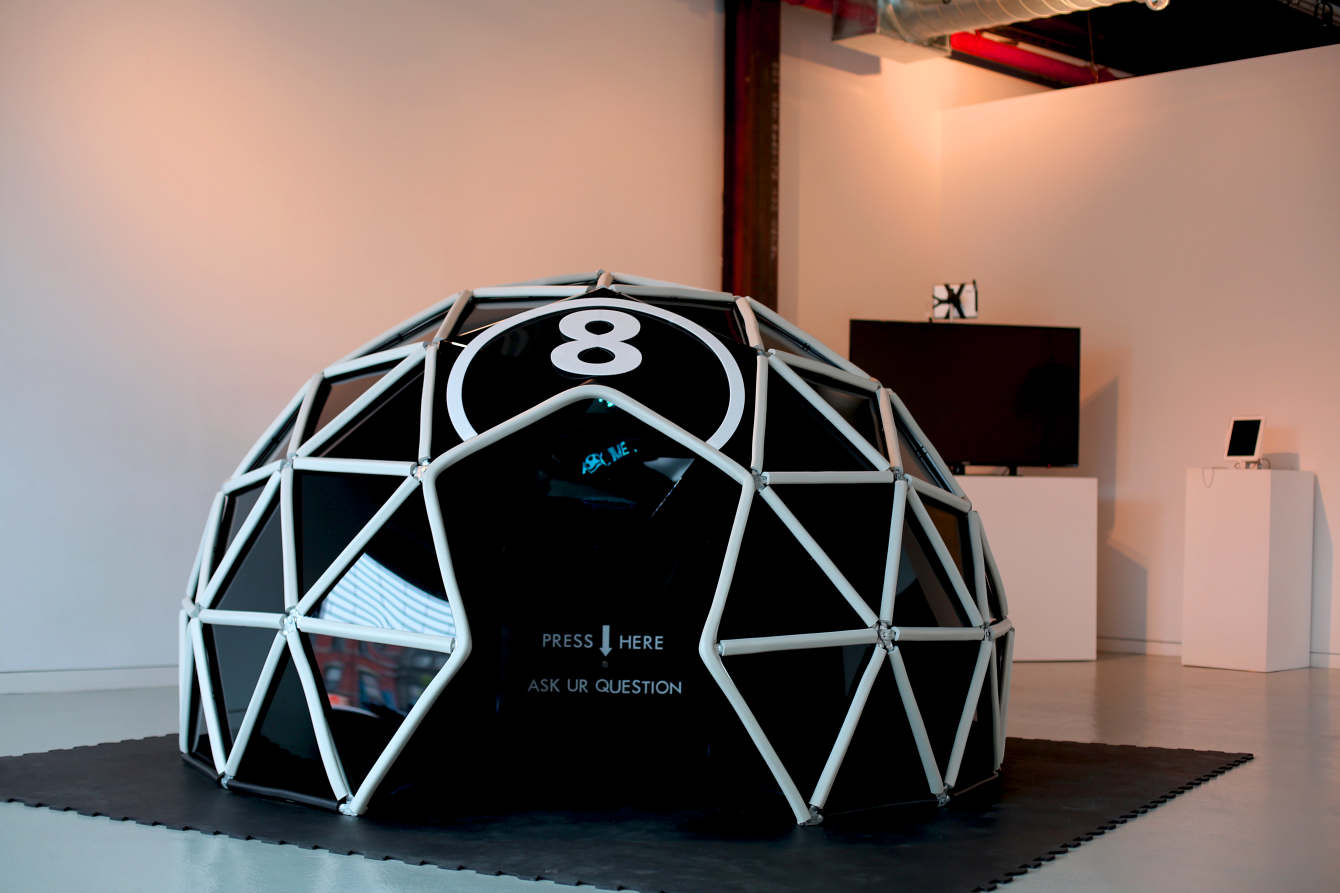
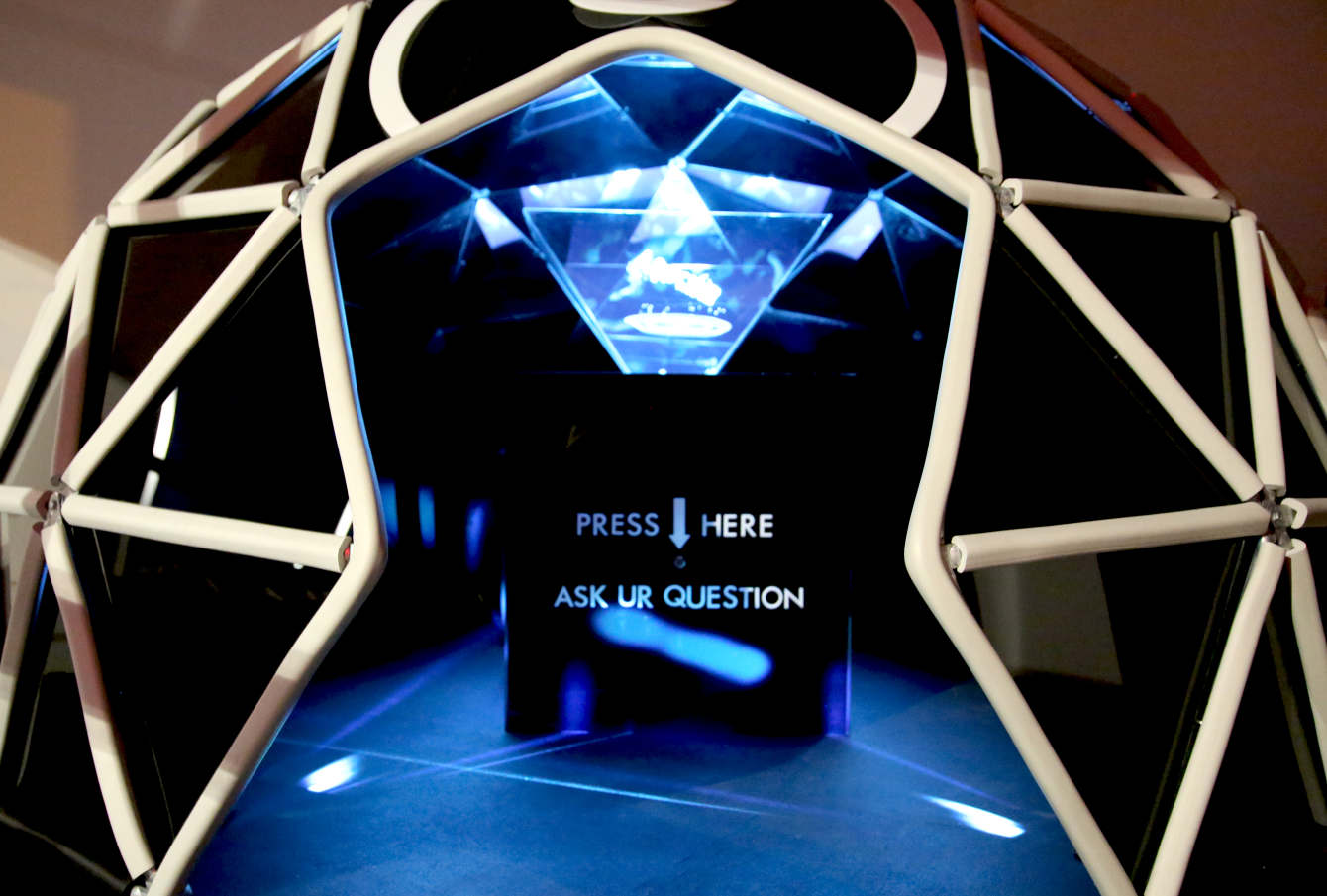
ASK.ME is an Arduino-controlled installation by Joan Raspo that brings this imaginary world to life as a geodesic dome that you can walk into. As a visitor enters inside, their presence is detected and they are greeted with a holographic image that invites them to ask a question.

After pushing a button, ASK.ME allows you time to inquire whatever you have on your mind, then comes back with the response. The dome itself is lined in mirrors, along with a reflective floor and blue fiber optic lighting, creating an immersive interactive experience.

Once activated, the “ASK.ME” hologram changes and presents the visitor with a hologram, linked to audio, asking the visitor “What is Ur question?” Next, a hologram that says “It’s loading” gives the visitor time to ask their question and in ten seconds a holographic answer and audio appears. This gives the visitor the experience of “talking” to a seer—making it seem very human.

You can find more details on the amazing project here, or watch Raspo’s demo below!

Arduino IDE 1.8.5: Hotfix for macOS High Sierra Users

In case you haven’t noticed, our team has just released Arduino IDE 1.8.5! This time the changelog is fairly small, as it mainly solves a (rather important) problem being encountered by macOS users who just updated to High Sierra (10.13).

If you are not using English as system language, any version of Arduino you launch will lack the menu in the system bar. Every Java application is experiencing the same problem, so it will probably be solved by Apple in the near future.

In the meantime, IDE 1.8.5 recognizes when the menu bar is not being displayed and replaces it with a Windows-style one. It may not be the prettiest thing, but at least it works!

If you want to recover the old menu bar while keeping the whole system in your normal language, you can issue a single command on Terminal:

defaults write cc.arduino.Arduino AppleLanguages '(en)'


Thank @AdrianBuza for the workaround. Issuing this command will make Arduino IDE in English, however you can still change the language under “Preferences” without losing the macOS integration.

Maker builds an Arduino-controlled, chess-playing robot

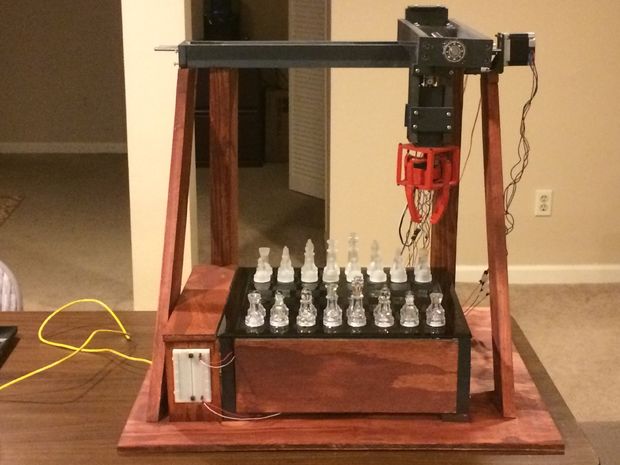
While playing board games on a computer screen can be entertaining, this experience lacks a certain tangible aspect. YouTuber RoboAvatar decided to take things into the third dimension with a chess machine that uses an XYZ gantry system and gripper to move pieces as needed.

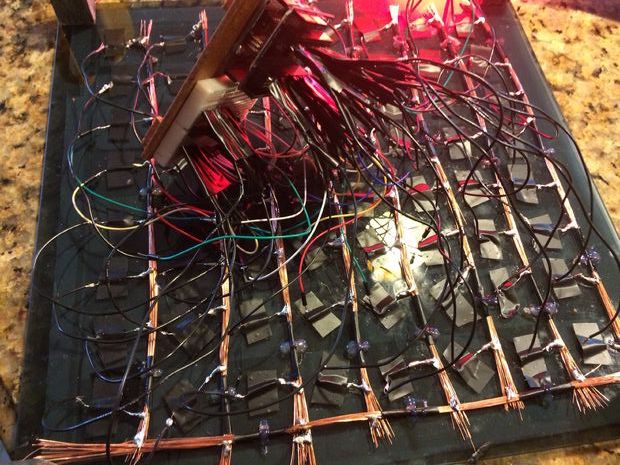
Instead of a vision system, RoboAvatar’s robotic device uses 64 reed switches (one for each square) to tell an Arduino Uno where the magnetized pieces reside. The project also features a Mux Shield and a pair of MCP23017 I/O expander chips, providing a total of 93 available pins.

While the Uno controls the physical motion and sensing of the board, a computer runs a Python program that does the chess game calculations and sends this information to it. You can see the machine demonstrated in the first video below. The second gives an overview of how it was made.

Want to build your own chess-playing robot? More details can be found over on Instructables.