Posts with «arduino» label

Tweephone is a rotary phone Twitter client, even your grandma could love

The collectives behind the Tweephone, UP digital Bureau and Unteleported tech agency, claim that it's the first analog Twitter client. We find that hard to believe but, while we've seen rotary phone-based Twitter tools before and analog meters that measure microblogging activity, we couldn't come up with a single example of a client that lets you punch in messages through non-digital means. Even if it's not the first of its kind, the Tweephone is still a pretty neat hack. Inside the old-school chassis is the ubiquitous Arduino, which interprets your pulls of the dial as letters. Like a phone with only a dial pad, you'll have to ring up numbers multiple times to get the right letter (i.e. dial "2" three times to get a "c"). It definitely not the most efficient method for sending out 140-character missives, but certainly one of the more unique. Check out the video after the break to see it in action.

Continue reading Tweephone is a rotary phone Twitter client, even your grandma could love

Tweephone is a rotary phone Twitter client, even your grandma could love originally appeared on Engadget on Tue, 01 Nov 2011 19:04:00 EST. Please see our terms for use of feeds.

Permalink | Email this | Comments

Lego CD / DVD ripper lets you drop your physical media -- literally (video)

If the only thing standing between you and a full abandonment of physical media is the tedious task of ripping all of your CDs and DVDs, boy have we got the Lego-based gadget for you. Paul Rea whipped up this little beauty -- it's an Arduino-powered Lego arm that swings to pick up a disc, deposit it in the drive and then drop it (perhaps a bit too literally) into a finished pile. It's not quite perfect -- the arm is a bit loud as it moves, and anyone who's ever owned CDs or DVDs may likely grimace as the thing tosses finished discs into a pile, but it's an entertaining break from what can ultimately prove an arduous task.

Continue reading Lego CD / DVD ripper lets you drop your physical media -- literally (video)

Lego CD / DVD ripper lets you drop your physical media -- literally (video) originally appeared on Engadget on Tue, 01 Nov 2011 16:44:00 EST. Please see our terms for use of feeds.

Permalink | Email this | Comments
Engadget 01 Nov 22:44

Insert Coin: BoardX is an open-source, modular motherboard for prolific prototypers

In Insert Coin, we look at an exciting new tech project that requires funding before it can hit production. If you'd like to pitch a project, please send us a tip with "Insert Coin" as the subject line.
We're more than a little enamored with Arduino and its DIY microcontroller ilk. But we'll admit, there are a few limitations that the compulsive prototyper might find bothersome. Chief amongst them is the lack of modularity, Now, sure, you can easily add all sorts of sensors, ports and radios to your Uno (or Duemilanove if you're old school) but that generally requires piling shield, upon shield, upon shield, until you've got a stack of boards three-feet high. And, if you want to use an ARM chip instead of an AVR for a project? Well that's a whole other set of boards. Kevin Greene has decided to address these perceived "weaknesses" with BoardX -- a modular, open-source prototyping platform.

Continue reading Insert Coin: BoardX is an open-source, modular motherboard for prolific prototypers

Insert Coin: BoardX is an open-source, modular motherboard for prolific prototypers originally appeared on Engadget on Tue, 01 Nov 2011 13:15:00 EST. Please see our terms for use of feeds.

Permalink | Email this | Comments

Simple Halloween Skull


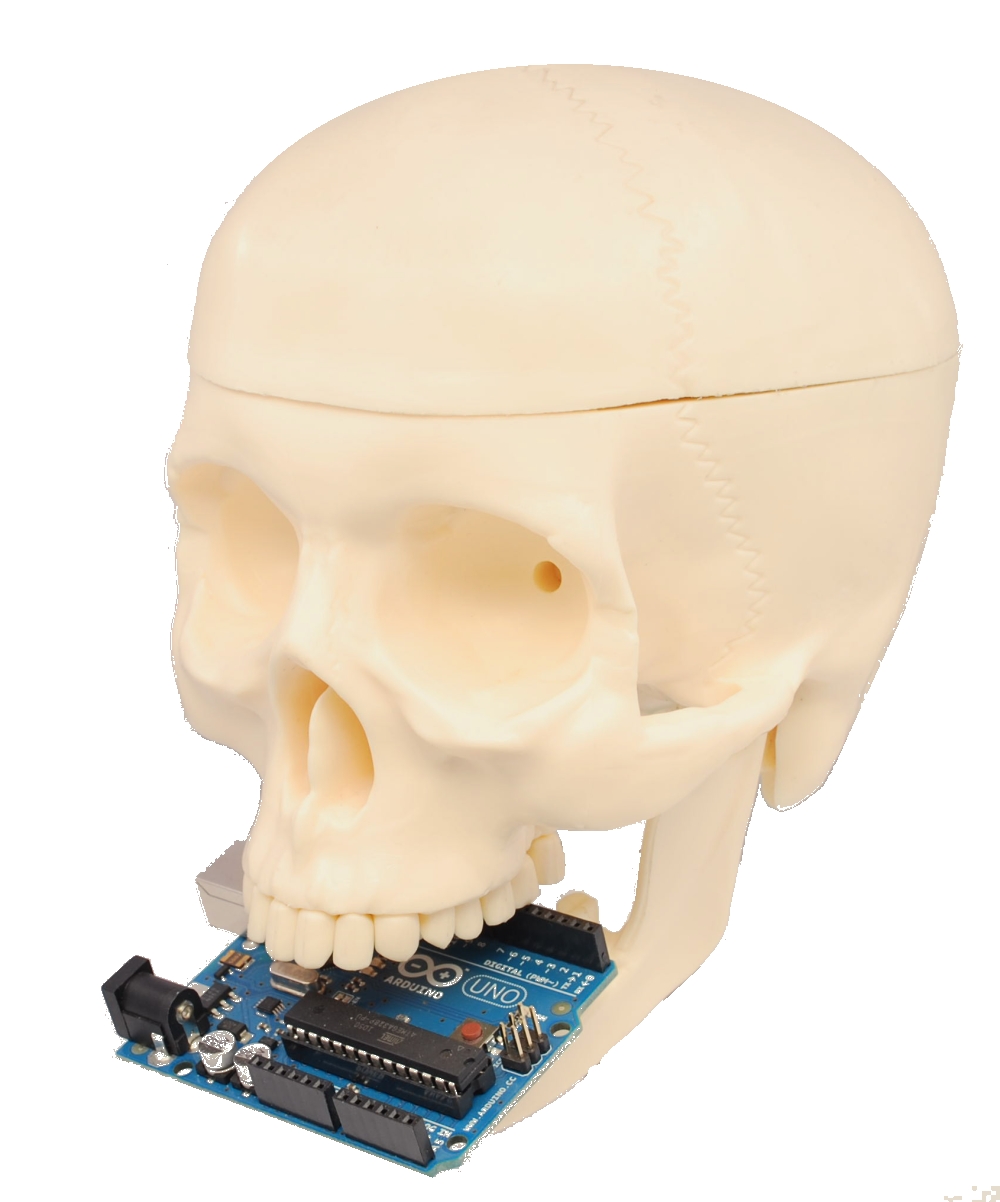
Maybe it’s too late to present an Halloween project with a lot of function, so we decide to develope a simple application to show how controll a mandible of a skull.

In this project the skull speaks and moves the mandible according to the sound level.
An Arduino analyzes the level sound of a audio source and drives a servo motor connected to the mandible.
All very simple.

The video show how it works.

The sketch:


/* Skull
 created 2011
 by Boris Landoni

 This example code is in the public domain.

http://www.open-electronics.org

http://www.futurashop.it

*/

#include <Servo.h> 

Servo myservo;  // create servo object to control a servo 

int potpin = 0;  // analog pin used to connect the potentiometer
int val;    // variable to read the value from the analog pin 

void setup()
{
  myservo.attach(9);  // attaches the servo on pin 9 to the servo object
} 

void loop()
{
  val = (analogRead(potpin)*3);            // reads the value of the potentiometer
  val = map(val, 0, 1023, 50, 0);     // scale it to use it with the servo
  myservo.write(val);                  // sets the servo position according to the scaled value
  delay(15);                           // waits for the servo to get there
}


The schemtaics shows how we connect the servo to Arduino.

     Download the Fritzing file


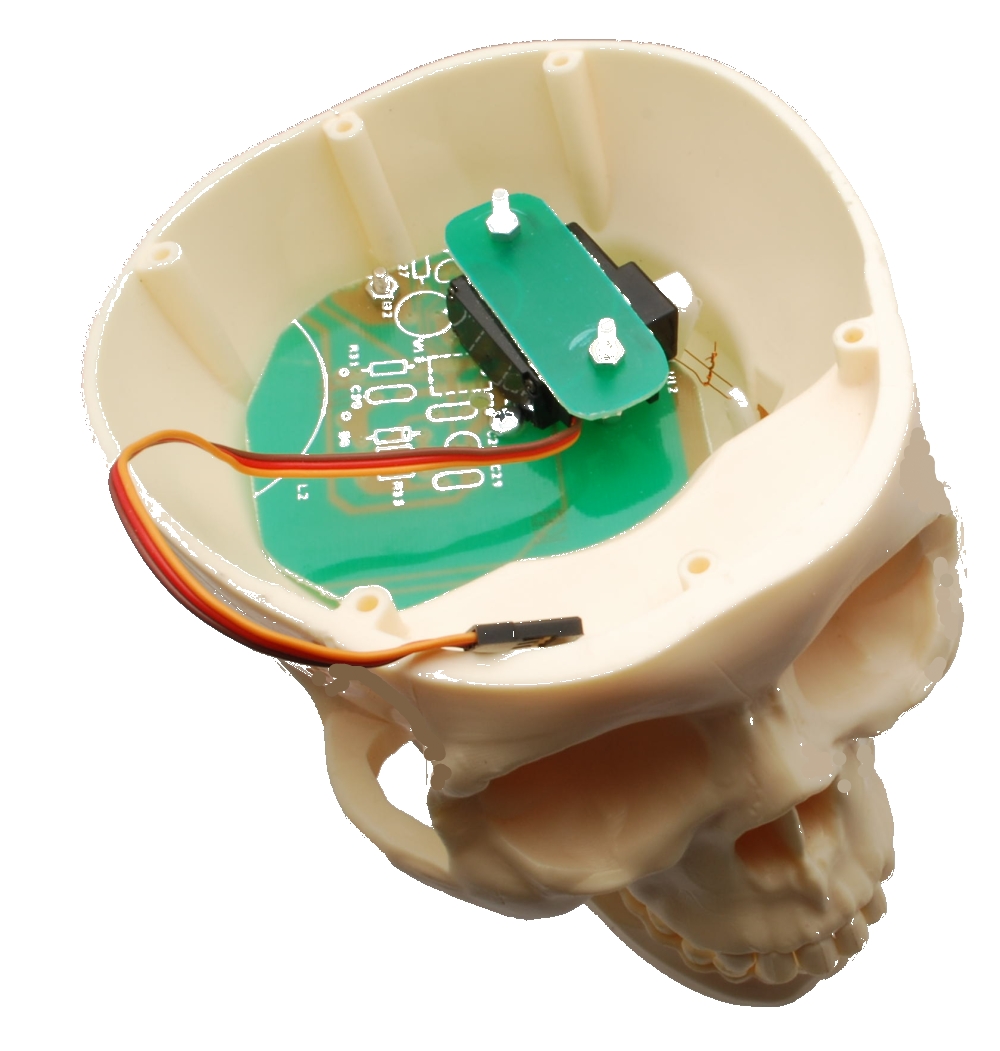
Inside the skull we use an old PCB to fix the servo (you can use what you want).

This project wants to be a start point for yours ideas….
Have a good work

Open Electronics 26 Oct 13:53

HexMotor 2.3 and pressure-sensor boards

Top view of my second PC board. 3 copies of HexMotor 2.3 and 2 copies each of 3 different breakout boards for a pressure sensor.

I got the boards back from 4pcb.com about a week ago.

The HexMotor rev2.3 boards have several new features: LEDs for +5v and +6.25v, a reset button, 16-bit shift register instead of 8-bit, servo outputs connected to pins 13, 7, 2, 9, 10 (rather than to the pins used for PWM).  The new board should be able to do either 6 PWM motors or 4 PWM motors, 5 servos, and 2 non-modulated reversible motors.  I was going to have the robotics club solder the board today, but they did not have time.

[Note: as of 1March 2012, I have put the HexMotor Eagle design files on the web.]

I made some breakout boards for the MPXHZ6250A pressure sensors from Freescale Semiconductor,  which gave me my first taste of SMD soldering.  At least the design uses gull-wing pins, which can be hand soldered.  The breakout board that I think that the robotics club will end up using puts a pressure sensor on one side and headers for a piggyback ADXL335 breakout board on the back.  that way there only need to be one set of wires for connecting the analog inputs and power to the sensors.

That is the board I soldered a sensor to.

Top view of the breakout board with the sensor and headers soldered in place.

The pressure sensors are tiny! I found it fairly difficult to solder the  sensor to the boards, even holding it with clamping tweezers. I did eventually get everything to stick with no shorts between the 3 signal wires, but I did have some trouble with the unused copper pads delaminating from the board.  For future reference: all pads should have wires going to them (even the unused pads) to have enough surface area for good adherence and so that some of the pad is tucked under the solder mask.

Here are the solder connections on the side where none of the pins are used.

Here are the solder connections for the power and signal pins (and an SMD capacitor).

Despite the rather sloppy soldering, the pressure sensor does work.  It turns out that the port size is just the right size for Lego pneumatics components, so testing was pretty easy.

Sensor attached to Lego pump and gauge for testing.

Here are the results of calibration tests with the (probably not very accurate) Lego gauge, done by my son and me.

Pressure (psi) Arduino analogRead
0 367
5 518
6 542
7 576
8 599
9 632
10 657
11 683
12 710
13 734
14 775
15 801
16 832
17 861
18 887
19 915
20 941
21 967
22 1000

The range is about right, since 22 psi plus one atmosphere is about 250kPa, which is supposed to be the high end of the sensor’s range. Also, 600″ (50′) of water is 21.67 psi, so the range from 367 to 1000 corresponds to about 50′, so the sensor should give the robotics team a resolution of about 1″ for measuring depth, as expected from the spec sheet.

The data are well fit by The club members will have to recalibrate the pressure sensor in water, to get calibration as depth in cm. They’ll probably have to re-zero the sensor every day they use it, to compensate for atmospheric pressure, since it is an absolute pressure gauge.


Tagged: Arduino, Lego pneumatics, pressure sensor, Printed circuit board, SMD soldering

Physics Lab 3

The Physics Lab 2 post and Physics class progress described some experiments we were going to do this week with the ultrasonic range finder(s).

What we actually did, after spending a fair amount of time discussing the schedule for the year and expectations (one of the students has not started yet, because of the amount of time he was putting into his Stanford essays—I hope he gets in after all the effort he has expended, was to drop balls and try measuring the drop with both the Maxbotix sensor and a video camera.

We tried both a ping-pong ball and a slightly larger plastic ball.  With both of them the Maxbotix sensor only detected them intermittently, and we go no useful data from the rangefinder.

The HD video from the camera was more usable, but I was not aware that Tracker could use MTS (AVCHD format) files, since it greyed them out. I wasted a lot of time converting the movies to .mov format using iMovie, a piece of software that I have come to hate for its slowness, inefficient use of disk, rigid insistence on a specific directory structure, and generally unfriendly and unintuitive user interface. I’ve gone so far as to buy Premiere Elements, with the hope that it is not so awful (but I’ve not tried to use it yet, so it might be just as bad).

It turned out that my son had not installed the Tracker software on the desktop machine, so we had to get out my laptop and try analyzing the frames there.  I remembered how to calibrate and get the autotracking set up, but I forgot how to specify the beginning and ending frame (I eventually figured it out, but only after some false starts).  The data was pretty clean, though autotracking did lose the ball at one point because of some really stupid projections about where it ought to be.  Redoing the autotracking fixed that problem.  The errors in the tracking due to motion blur were not noticeable in the position plot, made small wiggles in the velocity plot, and made huge wiggles in the acceleration plot.  We did get a chance to talk about how a ±1mm error in position results in a ±3 cm/sec error in velocity and a ±90 cm/sec2 error in acceleration, when using 30 frames per second.

I tried redoing the autotracking using the AVCHD format directly from the camera, but it turns out that AVCHD uses interlaced images, so one gets two pictures of the ball in each frame. When the ball is motionless, this makes a nice circle, but when the ball is moving fast, you get two striped circles that may overlap. Tracker has trouble handling the interlacing, though a really clever algorithm could take advantage of it to get effectively double the frame rate when tracking large objects moving with reasonably constant acceleration.

Bottom line was that neither the ultrasonic rangefinder nor Tracker resulted in fast, painless measurement. We’ll have to try again next week, perhaps with bigger targets for the rangefinder. I initially thought that brighter light for the video would reduce motion blur by reducing shutter time, but it seems that the motion blur is due to interlacing, not to a slow shutter, so changing the lighting won’t help. Algorithmic changes to Tracker would be needed.

What to do in next week’s lab

  1. Analyze the balldrop clips (in .mov format). For calibration, the distance we measured between the top and bottom stile of the file cabinet was 112cm. Since the ball was a few cm in front of the file cabinet, there may be some perspective error in using that measurement to calibrate the drop. Get Tracker to give you position, velocity, and acceleration plots. Use the fluctuation in the acceleration estimates to estimate the errors in the velocity and position measurements.
  2. Write a Vpython program that simulates the motion of the falling ball including the initial pause before dropping, but not including the bounces.

Other homework

  • Read Chapter 3.
  • Work problems 3.P.36, 3.P.40, 3.P.43, 3.P.46, 3.P.52, 3.P.65, 3.P.72.
  • Do computational problem 3.P.76. Note that the computational problems for Chapter 3 are not independent of each other, and you should read all the preceding problems to get hints for this problem.

Tagged: AP physics, Arduino, high school, physics, rangefinder, Tracker, ultrasonic sensor, VPython

Physics class progress

The physics class that I’m doing with my son and another home schooler is going a bit slowly.  The other student couldn’t make it again this week (Stanford early admission deadlines, and he needed the time to polish his application essays).

My son and I compared answers to the Chapter 2 problems I’d assigned (see Physics Lab 2).  We’d each made some careless errors (in one, I’d neglected to take a square root, though I’d written the right formula, in another, I’d forgotten to add the sideways movement during acceleration, in a third, my son had forgotten to divide by 2 at one point).  In short, neither of us were doing “A” work—we knew what we were doing, but were being inexcusably sloppy in the computations (me more so than my son). I’ll have to do better on Chapter 3.

I think that I won’t assign any exercises in Chapter 3 this week, to give the other student a chance to catch up.  Instead, I’ll ask my son to finish the data-acquisition code for the ultrasonic rangefinder.  I wrote some simple code running on the Arduino for gathering the data, and he was going to write a Python program (using PySerial) to record the data and output it in a format suitable for plotting with gnuplot.

Our goal is to finish at least the Newtonian mechanics (Chapters 1–13 of Matter and Interactions) before the AP Physics C exam (afternoon of 14 May 2011), which gives us time for a little over 2 weeks per chapter.  That seems like a fairly leisurely pace right now, but perhaps the chapters get harder.  If we finish earlier, it might be worthwhile to do some timed practice with released tests, which are available at AP Central – The AP Physics C: Mechanics Exam. The Mechanics part of the exam is only 90 minutes (it is followed by the other half of Physics C, which we probably will not get to, unless we double our pace). I think that I’ll take the exam along with the two students, risking the embarrassment of them doing better than me.

Assignment for this week:

  • Finish the assignments from the previous posts (the text about how ultrasonic rangefinders work, the problems and program from Chapter 1, the problems and program from Chapter 2).
  • For my son only: get the data acquisition program working, so that we can do a lab recording something actually moving.  (We might try video recording it at the same time and comparing Tracker with the ultrasonic rangefinder as a data source.)
  • Read Chapter 3.

Arduino code for recording from rangefinders:

// Kevin Karplus
// 30 Sept 2011
//  Using the Ping))) or maxbotix ultrasonic rangefinder
//  to acquire (time_stamp, time_of_flight) pairs and send them over a
//  serial line to a laptop.

// From the documentation:
//   Bidirectional TTL pulse interface on a single I/O pin
//    can communicate with 5 V TTL or 3.3 V CMOS microcontrollers
//   Input trigger: positive TTL pulse, 2 μs min, 5 μs typ.
//   Echo pulse: positive TTL pulse, 115 μs minimum to 18.5 ms maximum.

// As a kluge, the Ping))) is plugged into pins GND,13,12.
// The output pin 13 can provide 40mA of current to the Ping))),
// which only requires about 35mA.

const uint8_t Ping_pin=12;
const uint8_t Vdd_pin=13;

const uint8_t Maxbotix_pin=2;

// speed of sound in air in m/s, as a function of temperature
// in degrees Celsius.
// BUG: currently humidity is ignored, but the speed of sound
//      is higher in more humid air.
inline float speed_sound_t(float temp_C, float relative_humidity=0.0)
{
  // return 331.3 + 0.606 *temp_C; // linear approx
    return 20.0457 * sqrt(temp_C+273.15);
}

float temp=20.0;  // temperature in degrees Celsius
float speed_sound;  // estimated speed of sound in meters/sec
float half_speed_cm_microsec;  // half the speed of sound in cm/microsecond

void setup()
{   pinMode(Vdd_pin, OUTPUT);
    digitalWrite(Vdd_pin, HIGH);
    pinMode(Ping_pin, OUTPUT);
    digitalWrite(Ping_pin, LOW);

    pinMode(Maxbotix_pin, INPUT);
    Serial.begin(115200);

    speed_sound=speed_sound_t(temp);
    half_speed_cm_microsec = speed_sound *0.5 * 100. * 1.e-6;
    Serial.print("Assuming temperature of ");
    Serial.print(temp);
    Serial.print(" gives speed of ");
    Serial.print(speed_sound);
    Serial.println("m/s");

    Serial.println("Arduino Ready");

}

// read_ping returns the time in microseconds for one echo pulse
// There seems to need to be a 1 msec delay needed between read_ping()
// calls (200 microseconds does not seem to be enough).
//
// Reads are very unreliable if the target is close than about 8cm.
unsigned long read_ping(void)
{   // request a reading
    digitalWrite(Ping_pin, HIGH);
    delayMicroseconds(10);
    digitalWrite(Ping_pin, LOW);
    // Now there is a 750 microsecond hold off
    pinMode(Ping_pin, INPUT);

    unsigned long tof= pulseIn(Ping_pin, HIGH);
    pinMode(Ping_pin, OUTPUT);
    digitalWrite(Ping_pin, LOW);
    return tof;
}

// read_maxbotix returns the time in microseconds for one echo pulse
//
// Reads are very unreliable if the target is close than about 16cm,
// but seem more consistent than the Ping))) for longer distances.b

unsigned long read_maxbotix(void)
{
    return pulseIn(Maxbotix_pin, HIGH);
}

bool send_Ping_data=0;
bool send_Maxbotix_data=0;
void loop()
{
     if (Serial.available())
     {  char c=Serial.read();
        switch(c)
        {  case 'b':
            send_Ping_data=1;
            send_Maxbotix_data=0;
            break;
           case 'm':
             send_Ping_data=0;
             send_Maxbotix_data=1;
             break;
           case 'e':
             send_Ping_data=0;
             send_Maxbotix_data=0;
             break;
        }
     }

     // For both sensors, report when the measurement was made,
     // the time of flight for the pulse to go and return,
     // and the computed distance for
     // Both are reported in milliseconds.
     // The time of measurement is corrected by half the time of flight,
     // so that it approximates the time at which the pulse bounced off the object.
     if (send_Ping_data)
     {   unsigned long time_of_flight=read_ping();
         unsigned long when_measured=micros();
         delay(1);   // wait a millisecond to let sensor recover
         Serial.print(when_measured-time_of_flight/2);
         Serial.print("\t");
         Serial.print(time_of_flight);
         Serial.print("\t");
         Serial.println(time_of_flight*half_speed_cm_microsec);
     }
     if (send_Maxbotix_data)
     {   unsigned long time_of_flight=read_maxbotix();
         unsigned long when_measured=micros();
         Serial.print(when_measured-time_of_flight/2);
         Serial.print("\t");
         Serial.print(time_of_flight);
         Serial.print("\t");
         Serial.println(time_of_flight*half_speed_cm_microsec);
     }

}


Tagged: AP physics, Arduino, high school, physics, rangefinder, Tracker, ultrasonic sensor

DIY Sonar for the Blind

This is one of those simple concepts which makes you think “Why didn’t I think of that?”  The entire sonar unit is attached to a wearable glove and as the user sweeps their arm back and forth, the device can detect anything from one inch to 10 feet in size.

Two servomotors apply pressure to the top of the hand when obstructions are detected. The closer the object is, the more pressure is applied. The response time is in milliseconds, allowing a blind person to navigate easily around obstacles or find items on a table, for example.

Top Sonar Projects

Hack n Mod 06 Oct 18:59
arduino  blind  radar  sensor  sonar  

Physics Lab 2

The Physics Lab 1 post described a first experiment using ultrasonic rangefinders.  The students have not really done the Wikipedia-style writeup of how an ultrasonic rangefinder works that I wanted.  I’m not sure whether to push for that or to let it slide—it is important to develop technical reading and writing skills, but they have not yet gotten to the point in the physics course where they could actually derive the speed of sound equation.  The speed of sound in a gas is only vaguely referred to in Chapter 12 of Matter and Interactions, though there is quite a bit on the speed of sound in a solid.

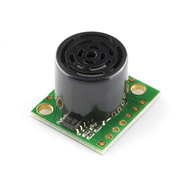
I ended up buying two different ultrasonic rangefinders:

Both of these rangefinders provide a pulse-width output that can be measured with the Arduino pulseIn function call.  The measurement is provided in microseconds, but seems to have a slightly coarser resolution, with measurements spaced about 5 microseconds apart.  To convert round-trip time into round-trip distance, we have to multiply the time in seconds by the speed of sound in meters/second.

There is an online calculator for the speed of sound as a function of temperature, pressure, and humidity, which gives a citation for the calculation (from the Journal of the Acoustical Society of America), but does not give a clear statement of calculation actually used.  The same calculator (at least citing the same source) is also available from UK’s National Physical Lab.  I used a simpler approximation (without humidity or pressure corrections) from Wikipedia’s Speed of Sound article:

On Friday, we did the lab itself:

  1. Hook up the rangefinder to the Arduino and program the Arduino to keep taking measurements and reporting them to the serial line. (I wrote the Arduino program myself, but my son is working on a Python program to record a series of measurements from the Arduino, which will be needed for the next lab.)

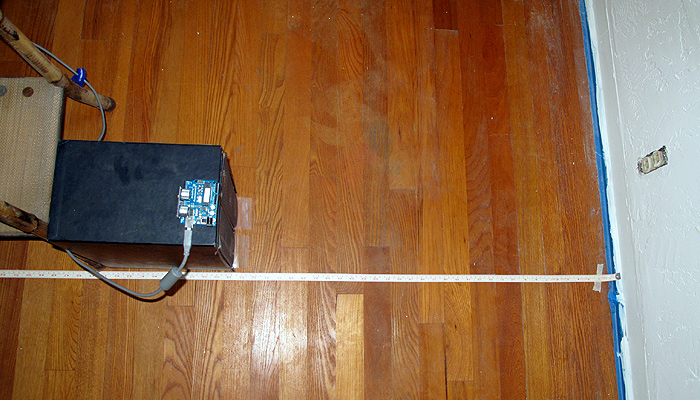
    The setup for Lab 1. The Ping sensor is plugged directly into the Arduino, which sits on top of a copy of the OED, to get it far enough from the floor that we don't detect the floor rather than the wall.

  2. Calibrate the sensor by placing it at carefully measured distances from a hard wall and recording the readings.  Repeat at several different distances.  (Record temperature, humidity, and barometric pressure, if possible.)  Here are the measurements made by the students, taking just the midpoint of the range observed:

# MaxBotix LV-MaxSonar-EZ Calibration
# Distance (centimeters)    Delay Time (microseconds)
10                818
20                1075
30                1515
40                2299
50                2887
60                3470
70                4060
80                4645
90                5231
100               5815

# Parallax Ping))) Sensor Calibration
# Distance (centimeters)    Delay Time (microseconds)
10                735
20                1215
30                1800
40                2405
50                3015

They had a lot of trouble getting consistent readings for the Ping))) sensor.  I think that this may have been due to trying to take the measurements without pausing enough between them, so I added an extra millisecond delay after each Ping))) measurement, and my son and I collected new data today.  We modified the setup slightly, so that instead of using a tape measure on the floor, we measured from the wall to the front of the Ping))) sensor with a steel tape measure.  Here are the measurements we made:

# Ping))) calibration data
# 1 October 2011
# Arduino report several (usually 6) measurements for each distance
# We recorded the actual distance, the minimum and maximum reported time of flight,
# and the minimum and maximum distance reported by the Arduino.
# The reported distance assumed 343.21m/sec speed of sound, and that the time of flight
# was twice the distance.
#distance(cm)  min_tof(usec) max_tof(usec) min_cm max_cm
10    616    624    10.57    10.71
20    1225    1230    21.02    21.11
30    1786    1818    30.65    31.20
40    2385    2391    40.93    41.03
50    2939    2962    50.44    50.83
60    3540    3542    60.75    60.78
70    4065    4089    69.76    70.17
80    4610    4729    79.11    81.15
90    5240    5265    89.92    90.35
100    5833    5858    100.10    100.53
110    6444    6446    110.58    110.62
120    7018    7050    120.43    120.98
130    7575    7582    129.99    130.11

These measurements were fairly consistent (though the variation is larger than I’d like).  I did notice that the Ping))) sensor could get fooled rather badly when an object disappeared from its field of view.  For example, when pointing the sensor at the ceiling from my benchtop, the distance is reported as a fairly consistent 177±0.5cm.  Waving an object in front of the sensor got reasonable readings, but removing the object caused the sensor to get stuck reporting 50.5±1cm, though there was nothing at that distance.  Sometimes the sensor returned to the 177cm reading, sometimes to the 50cm reading, and I’ve not been able to figure out what causes the difference.  The MaxBotix sensor has different dropout problems, sometimes missing the echo and reporting a very long distance, but generally seems to be a little more stable.


What to do before next week’s lab

  1. Plot the sensor readings vs. the actual distance.
  2. Do linear regression to get a predictor of actual distance given sensor reading.  (Caveat: need to plot distance vs. readings rather than readings vs. distance to get best fit for calibration.)  What is the relationship between the speed of sound and the slope of the line?
  3. What is the accuracy and precision of the measurements?  What range of distances can be measured? Is the accuracy better expressed in terms of absolute error (±5mm, for example) or relative error (±1%, for example)?
  4. Fix the Arduino program to get better estimates of the distances from the sensors, if possible.
  5. Get a recording program working to record a series of measurements of a moving object.

What to do in next week’s lab

  1. Redo the Maxbotix calibration the same way we redid the Ping))) calibration, collecting min and max time of flight and using better distance measurements.
  2.  Use either the Ping))) or the Maxbotix sensor to record the movement of a simple object away from the sensor and plot the motion.
  3. Write a Vpython program that simulates the motion, using only a few constants, not a table of positions or velocities (that is, approximate the motion as constant velocity or constant acceleration).  The simple object could be a small vehicle made from Lego (motorized or not), a mousetrap car, a rolling ball, a falling ball, or whatever else is easy to measure.

Other homework

  • Read Chapter 2.
  • Work problems 2P38, 2P40, 2P62, 2P63, 2P66, and 2P69.
  • Do computational problem 2P72.

Tagged: Arduino, engineering education, Matter and Interactions, physics, rangefinder, science education, ultrasonic sensor

Physics Lab 1: ultrasonic rangefinders

We had the first official meeting of the home-school physics class today.  It was just my son and me. Originally we were going to have a second student, but he was busy with college application essays, and asked if he could start next week instead.  My son compared his and my solutions to problems 1P89, 1P97, 1P98, and 1P117 (all the non-computational problems from Chapter 1 of Matter and Interactions).  We got all the same results, but I had left out the units on one of the intermediate steps on one problem—a bad habit that I will try to break, as I agree with John Burk that one should tell the full story of the number, throughout a computation.

In Physics Lab 1, I outlined the first experiment for my home-school physics students and me to do, using an ultrasonic rangefinder.

Here is what I proposed:

  1. Hook up the rangefinder to the Arduino and program the Arduino to keep taking measurements and reporting them to the serial line.
  2. Calibrate the sensor by placing it at carefully measured distances from a hard wall and recording the readings.  Repeat at several different distances.  (Record temperature, humidity, and barometric pressure, if possible.)
  3. Plot the sensor readings vs. the actual distance.
  4. Do linear regression to get predictor of actual distance given sensor reading.  (Caveat: need to plot distance vs. readings rather than readings vs. distance to get best fit for calibration.)
  5. Modify Arduino code to use the calibration parameters to provide better distance measurements.
  6. Re-calibrate using new code.  What is the accuracy and precision of the measurements?  What range of distances can be measured? Is the accuracy better expressed in terms of absolute error (±1cm, for example) or relative error (±5%, for example)?
  7. Open-ended: Experiment with detecting different targets (maybe flat targets from wall size down to the size of a quarter, maybe targets of different materials, maybe spherical targets).  What effect does target size, shape, material,  … have on range and accuracy of the measurement?

What we actually did:

My son and I each picked one of the rangefinders (I bought a Maxbotix LV-MaxSonar-EZ2 and a Ping))) sensor), and separately wrote Arduino code to read them. He chose to use the Maxbotix in the pulse-width mode, which is uncalibrated, but which has the greatest resolution.  I used the Ping))) sensor, which has a similar pulse-width mode.  The biggest difference is that the Ping))) needs to be triggered, while the Maxbotix repeats the measurement several times a second.  He had to solder a header onto the Maxbotix in order to connect it up, while I could cheat a little and plug the Ping directly into the Arduino board.  We could probably arrange to have both sensors on the Arduino at once, but have not tried that.

Both of us failed to get busy-wait loops with digitalRead() to work, but we both managed to get pulseIn() to work.  He just reported time in microseconds (then he had to go off to his improv class).  I spent a little more time adding a computed speed of sound (with temperature correction, but not humidity correction), to report distances in cm.  The repeatability of the Ping))) seems pretty good: about ±1mm, but I’ve not tried to calibrate the accuracy yet.  I don’t know whether the limit on the resolution is the coarseness of the pulseIn() measurement of time or variation in the pulse width output by the sensor.

For next week:

My son still needs to do more work on the prelab writeup about how an ultrasonic rangefinder works, so I hope that both students will have drafts of that for next week.  Also assigned for next week is a Vpython programming assignment (Exercise 1p123).

In lab next week we’ll compare our programs for 1p123, then do some calibration experiments with the rangefinder, or try using it to record a series of time and distance measurements for a moving object, or try learning to use Tracker to do video analysis.


Tagged: Arduino, engineering education, Matter and Interactions, physics, rangefinder, science education, Tracker, ultrasonic sensor