Posts with «arduino» label

Spelling Words with Rising Bubbles

Inspired by a Jeep’s falling water display, Matt Bell created an Arduino-based bubble display, which turns Jeep’s idea on its head. Matt’s latest version makes a few key improvements that help with the bubble size and steadies the speed at which the bubbles rise. For consistent bubble movement, Matt recommends using mineral oil and keeps each “bubble channel” (as I like to call it) in its own vinyl tube. We’re looking forward to seeing the improvements that the next version brings! [via Arduino]

More:


MAKE » Arduino 14 May 12:00

Display alphabets using bubbles

Coder Matt Bell is continuing to improve his exceedingly clever water-based display screen.

Inspired by a Jeep display that spelled out words with falling water, Bell’s design consists of a water tank connected to a grid of clear plastic tubes and an Arduino. Individual solenoid valves at the bottom of each tube can let in air, creating the effect of individual white pixels on a black screen, and preprogrammed sequences can spell out letters or numbers. His newest version adds an air reservoir to control the size of the bubbles, as well as completely separate vinyl tubes rather than one large tank with dividers.

More about the build-instructions and inspiration can be read here and here.

Via:[TheVerge]

Arduino Blog 13 May 22:56

The age of the invisible steering wheel

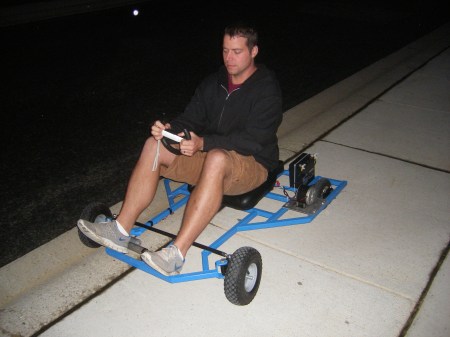
A Nintendo Wii-remote along with bluetooth communication and an arduino gives us this magical cart with a wireless steering wheel.

These cool people are staunch DIY-ers and would love to see the community build more such vehicles.

The cart has two motors which use a chain to drive each of the rear wheels. A pair of H-bridge controllers let the Arduino interface with them. It’s also has a Bluetooth module that makes it a snap to pull accelerometer data from the Wii remote. The front end looks like it uses rack and pinion steering, but you won’t find a pinion or a steering column. Instead, a linear actuator is mounted parallel to the rack, moving it back and forth at the command of the Arduino.

The only downside I spot is the Battery life. I am sure that would be worked out too! Till then – Kudos to the inventors! I smell futuristic looking vehicle controls here.

Via:[Hackaday, NewsFactor]

Arduino Blog 13 May 22:12

Doorbell Alert System That Sends You a Text and a Photo

What do you do when you have an arduino, a camera, an ethernet shield and a doorbell? You make your own intelligent security system.

The system is actually pretty simple. When the doorbell rings an Arduino sends a request to a notification service called PushingBox which then grabs a picture from web camera located outside. Then PushingBox sends a notification to an iPhone (it looks like this can be modded slightly with PushingBox to include Android and Windows Phone as well) and an email with a picture attached.

Via:[Lifehacker]

Arduino Blog 13 May 18:36
arduino  doorbell  ethernet  text  

Arduino mechs learn RobotC, plot assimilation with Lego Mindstorms

Arduino boards have smoothed the creation of lots of eccentric thingamajigs, but robotics and controllers are still not for the faint of heart. Luckily, RoboMatter is coming to the rescue of would-be roboticists with a public beta version of its C-based RobotC language for Arduino. Joining Lego Mindstorm and other bots, Arduino will get RobotC's straightforward sensor and motor controls, along with a debugger and sample program library, while still keeping its native Wiring language. So, if you want to be a Kickstarter magnate , or just out-weird everyone else, rolling your own droid is now a bit easier.

Arduino mechs learn RobotC, plot assimilation with Lego Mindstorms originally appeared on Engadget on Sun, 13 May 2012 04:41:00 EST. Please see our terms for use of feeds.

Permalink | Email this | Comments

Delta Robot

Primary image

What does it do?

Move around in space

Homemade delta robot. It uses an Arduino as a servo/relay controller. Data is transferred over serial port from a homebrewed Qt application to the Arduino.

It was made as a high school project.

Cost to build

$75,00

Embedded video

Finished project

Complete

Number

Time to build

Type

URL to more information

Weight

Mouse Controlling Arduino LEDs


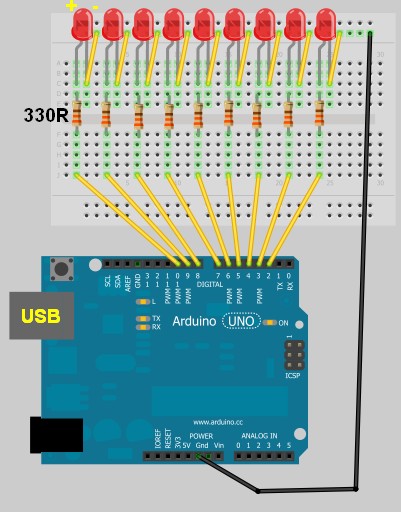
Use a mouse to control LEDs attached to an Arduino. This project uses the processing language to transmit the mouse coordinates to the Arduino, which then uses this information to turn on some LEDs. Please see the video below to see it in action.


Components Required for this project:

  • Arduino UNO
  • Breadboard
  • 9 LEDs
  • 9 x 330 ohm resistors
  • Wires to connect the circuit
  • USB connection cable: to connect the computer to the Arduino
  • A computer: to run the processing sketch, and to compile / upload the Arduino sketch
  • Processing Program installed on computer
  • Arduino Program installed on the computer

Arduino Sketch


This was made using Fritzing.

Arduino Code

You can download the Arduino IDE from this site.

 1
2
3
4
5
6
7
8
9
10
11
12
13
14
15
16
17
18
19
20
21
22
23
24
25
26
27
28
29
30
31
32
33
34
35
36
37
38
39
40
41
42
/* This program was created by ScottC on 9/5/2012 to receive serial 
signals from a computer to turn on/off 1-9 LEDs */

void setup() {
// initialize the digital pins as an output.
pinMode(2, OUTPUT);
pinMode(3, OUTPUT);
pinMode(4, OUTPUT);
pinMode(5, OUTPUT);
pinMode(6, OUTPUT);
pinMode(7, OUTPUT);
pinMode(8, OUTPUT);
pinMode(9, OUTPUT);
pinMode(10, OUTPUT);
// Turn the Serial Protocol ON
Serial.begin(9600);
}

void loop() {
byte byteRead;

/* check if data has been sent from the computer: */
if (Serial.available()) {

/* read the most recent byte */
byteRead = Serial.read();
//You have to subtract '0' from the read Byte to convert from text to a number.
byteRead=byteRead-'0';

//Turn off all LEDS
for(int i=2; i<11; i++){
digitalWrite(i, LOW);
}

if(byteRead>0){
//Turn on the relevant LEDs
for(int i=1; i<(byteRead+1); i++){
digitalWrite(i+1, HIGH);
}
}
}
}

The code above was formatted using this site.


Processing Code

You can download the Processing IDE from this site.

 1
2
3
4
5
6
7
8
9
10
11
12
13
14
15
16
17
18
19
20
21
22
23
24
25
26
27
28
29
30
31
32
33
34
35
36
37
38
39
40
41
42
43
44
45
46
47
48
49
50
51
52
53
54
//Created by ScottC on 12/05/2012 to send mouse coordinates to Arduino

import processing.serial.*;

// Global variables
int new_sX, old_sX;
int nX, nY;
Serial myPort;

// Setup the Processing Canvas
void setup(){
size( 800, 400 );
strokeWeight( 10 );

//Open the serial port for communication with the Arduino
//Make sure the COM port is correct
myPort = new Serial(this, "COM6", 9600);
myPort.bufferUntil('\n');
}

// Draw the Window on the computer screen
void draw(){

// Fill canvas grey
background( 100 );

// Set the stroke colour to white
stroke(255);

// Draw a circle at the mouse location
ellipse( nX, nY, 10, 10 );

//Draw Line from the top of the page to the bottom of the page
//in line with the mouse.
line(nX,0,nX,height);
}


// Get the new mouse location and send it to the arduino
void mouseMoved(){
nX = mouseX;
nY = mouseY;

//map the mouse x coordinates to the LEDs on the Arduino.
new_sX=(int)map(nX,0,800,0,10);

if(new_sX==old_sX){
//do nothing
} else {
//only send values to the Arduino when the new X coordinates are different.
old_sX = new_sX;
myPort.write(""+new_sX);
}
}

The code above was formatted using this site.

Arduino mechs learn RobotC, plot assimilation with Lego Mindstorms

Arduino boards have smoothed the creation of lots of eccentric thingamajigs, but robotics and controllers are still not for the faint of heart. Luckily, RoboMatter is coming to the rescue of would-be roboticists with a public beta version of its C-based RobotC language for Arduino. Joining Lego Mindstorm and other bots, Arduino will get RobotC's straightforward sensor and motor controls, along with a debugger and sample program library, while still keeping its native Wiring language. So, if you want to be a Kickstarter magnate , or just out-weird everyone else, rolling your own droid is now a bit easier.

Arduino mechs learn RobotC, plot assimilation with Lego Mindstorms originally appeared on Engadget on Sat, 12 May 2012 03:05:00 EST. Please see our terms for use of feeds.

Permalink | Email this | Comments

Arduino based four legged DIY Robot

An instructable by Andrew Wright would make this pseudo-pet come alive.

Via:[Treehugger]

Arduino Blog 11 May 23:05
arduino  diy  robot  

Pebble ties itself up in Twine: sounds so rustic, couldn't be any less (video)

Take an e-ink smartwatch that's got plenty of willing customers, throw in a WiFi-connected sensor box and well, imagine the possibilities. The founders behind Pebble and Twine hope you are, because they have announced that the pair will be connectable through the latter's web-based interface. This means you'll be able to setup text notifications to your wrist when your laundry's done, when someone's at your door and plenty more mundane real-world tasks. A brief video explains how it should all go down, but try not to get too excited -- pre-orders are sadly sold out.

Continue reading Pebble ties itself up in Twine: sounds so rustic, couldn't be any less (video)

Pebble ties itself up in Twine: sounds so rustic, couldn't be any less (video) originally appeared on Engadget on Fri, 11 May 2012 16:41:00 EST. Please see our terms for use of feeds.

Permalink | Email this | Comments