Posts with «arduino» label

Club Jameco borrows from Etsy and Kickstarter, lets DIYers design, sell and buy project kits

Though electronics hobbyists may not have the same resources that the Maker Sheds of the world have to design, package and sell do-it-yourself kits, electronics component distributor Jameco plans to change that. With Club Jameco, enthusiasts can pitch their kit ideas to the electronic component wizards in Belmont, CA and if a project is deemed viable for production, they'll be provided with feedback and have their idea posted for public comment. After the creation of step-by-step kit instructions, a list of materials and undergoing final approval, kits will be sold to the adoring masses. Once projects roll off production lines and into garages, creators will be paid royalties anywhere from five to ten percent based on quarterly sales. Aside from giving DIYers another sales avenue, it's also an opportunity for those who've been wary of piecing together projects to finally dive in sans the added fuss. Hankering to propose a bundle of your own? Per usual, all the particulars can be found in the source link below.

Club Jameco borrows from Etsy and Kickstarter, lets DIYers design, sell and buy project kits originally appeared on Engadget on Thu, 17 May 2012 03:41:00 EST. Please see our terms for use of feeds.

Permalink | Email this | Comments

Etch-a-Sketch 3.0 hands-on (video)

The Etch-a-Sketch. A standard bearer for childhood, and one that most of us never really mastered. While Yelizaveta Lokshina can't help you create awe-inspiring portraits from aluminum powder, she has managed to update the toy for the digital age. Using an Arduino, a few buttons and a pressure sensor crammed inside a hollowed-out Etch-a-Sketch, the 3.0 version of the doodler is able to draw in old school gray, as well as vibrant colors created by blending an RGB palette. While holding down the red, green or blue button you squeeze the pressure sensor to add more or less of individual hues. The same sensor is used to change brush width when you hold down the black button. There's even a secret mode that automatically cycles through colors and thicknesses for creating vibrant, almost hallucinatory patterns.

At the moment, the dual doodle knobs need to be physically connected to a computer so that a Processing script can work its magic and render the virtual Etch-a-Sketch. But, future versions may include wireless for sketching out images from the comfort of a couch and an accelerometer for the replicating the satisfying sensation of shaking the red fram to erase your creation. Basically, it's still a work in progress. Drawing with the Etch-a-Sketch 3.0 is just as satisfying, in a tactile sense, as the original, though we struggled slightly to get the hang of the pressure sensitive selector. One thing's for sure, though, the kids love it even more than the 1960 creation. Check out the video after the break to see it in action on the floor of the ITP Spring Show.

Continue reading Etch-a-Sketch 3.0 hands-on (video)

Etch-a-Sketch 3.0 hands-on (video) originally appeared on Engadget on Tue, 15 May 2012 20:21:00 EST. Please see our terms for use of feeds.

Permalink | Email this | Comments

Rocket Brand Studios now carries the Micro Magician


A wonderful package showed up today and inside were the first batch of the new Dagu Micro Magician Arduino board. Put simply, it is awesome.


It is really packed full of goodness, with IR, a sweet motor driver, and even an accelerometer. Just a great board for small bots.

read more

Text-Enabled Espresso Machine Prints Your Number on Foam

Get a personalized messages, order number or sponsor a coffee to the cute guy in the coffee shop with your number. Now the Arduino style!

We made the Textspresso machine to show off our cloud texting technology. It’s a robotic coffee machine. It utilized java script, 3 arduino microcontrollers, a couple servos, an ikea cupboard, and about 100 other pieces. We think it’s great. We’re open sourcing the plans in the coming weeks.

Created by Kelsey Klevenberg of the cloud texting service Zipwhip.

Via:[Make]

Arduino Blog 15 May 21:59

2WD Robot, ArduinoMega 1280, PanPing sensor problem

Hello everybody. 

First sorry for my English but not good. I want to ask the profis about my robotics problems. :) 
I have a 2wd mobile platform. I played with this so many and my old simple codes was working well. 

But I decided, I want to upgrade a little bit my "stupid" code which was very good with the fixed ping sensor and some IR sensor but too simple. Than I rebuilded all IR sensor first, and builded a little servo for the PING sensor. 

read more

Let's Make Robots 15 May 19:37
arduino  avr  ping  servo  

iElektros.de Webstore

Webshop warehouse in Erfurt - Germany.  Boards from SeeedStudio, DFRobot etc. Solar panels, robotics, motor, servo. 

Using Percussa’s AudioCubes with Arduino

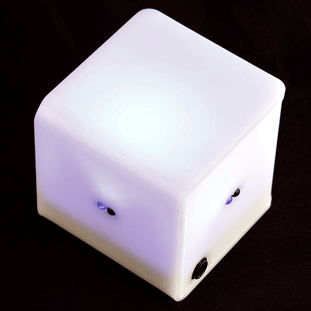
Percussa’s AudioCubes are wireless smart blocks for sound design, composition, live performance, music education and music app development.

They can sense your fingers and hands as well as each other’s location and orientation. They have built in RGB lighting for visual feedback.

Shaping sounds in this fashion is much more intuitive than using knobs:  rather than thinking about the particular setting a sound parameter should have, you can concentrate on the quality and timbre of the sound as you manipulate the sound, via MIDI,  using your hands and fingers.


Using Arduino, you’ll be able to control an analog synthesizer that use CV signals to modulate parameters like oscillator frequency, filter cutoff, or an amplitude envelope.

Details here.

Via [Percussa, Matrixsynth]

Arduino Blog 15 May 18:15

Glitch synthesizer

Glitch is a sound and graphic synthesizer, powered by Arduino, fitted in a Tupperware and using few electronic components.

The sounds are generated by Puredata, then sent via OSC protocol to Processing for the graphic display.

The physical inputs are managed by an Arduino board.


It has been developed by Thomas Meghe, and here you can find the project page.


Arduino Blog 15 May 07:15

New in the Maker Shed: RedPark TTL iOS Cable Breakout Pack

RedPark just announced a new version of their iOS cable and it’s available right now in the Maker Shed! This revised cable allows you to hook your iDevice up to an Arduino with no soldering or jailbreaking required. The new cable works just as the RS-232 terminated version except RedPark has make a few internal changes so that it communicates over TTL serial (the same serial protocol used by an Arduino.) Eliminating the need for a TTL adapter means it’s never been easier to connect your iPhone, iPad, or iPod Touch to an external microcontroller for enhanced sensing and communication!

The new RedPark TTL cable is available by itself or in a handy breakout pack that includes our deluxe jumper wires and Mintronics: Survival Pack Guts (no tin.) This way you have everything you need to hook the cable up to an Arduino and have plenty of components to experiment with. Just add an Arduino, a copy of Alasdair Allen’s “iOS Sensor Apps with Arduino,” and you’ll be up and running in no time! Also, we’ll have them in stock at Maker Faire!

Features:

  • Does not require soldering!
  • Enables development of iOS apps for private use in homes, schools and offices
  • Connects iOS devices to microcontrollers and sensors!
  • Designed for use with iPhone 4S, iPhone 4, iPhone 3GS, iPod touch (fourth generation), iPad 2 and iPad.
  • Used in conjunction with the Redpark Serial Cable SDK and sample code. Together these tools enable you to write iOS apps that communicate with serial devices.
  • Requires iOS 4.3.x or later.
  • Includes Mintronics: Survival Pack Guts
  • Includes Deluxe Jumper Wires

More:


MAKE » Arduino 14 May 16:00

Low Power RGB Night Light


Michael of n0m1 Design built this Arduino-controlled night light as a Mother’s Day gift.

A few years back I made a motion sensitive night light as a Mother’s day gift and while it worked pretty well it really chewed out the batteries. And as with all devices that eat batteries it eventually fell out of use. The standby current was around 4 mA due to the common LM324 opamp that was used to amplify the PIR motion sensor signal. The original enclosure was CNC milled from a bit of re-purposed apple which had a former life as a guitar body I built as a child.

Code and schematics on the project page.


MAKE » Arduino 14 May 15:00