Posts with «arduino» label

Build a Touchless 3D Tracking Interface with Everyday Materials


Combine low-tech materials with some high-tech components and build a completely Touchless 3D Tracking Interface. Explore capacitive sensing by using several panels of cardboard lined with aluminum foil. These panels, when charged, create electric fields that correspond to X, Y, and Z axes to create a 3D cube. With the aid of an Arduino microcontroller and some supplied code, movements inside the cube are tracked as your hand moves around inside the field.

For Weekend Projects makers looking for an introduction to Arduino, this is a great project to learn from. Once you’ve gathered all your parts, this project should only take a couple hours to complete – you’ll be playing 3D Tic Tac Toe before the weekend is over!
Once your touchless 3D tracker is up and running, what you do with it is only limited by your own imagination! The original implementation of this project comes from media artist Kyle McDonald, who has suggested the following uses and applications:

  • Make an RGB or HSB color picker
  • Control video or music parameters; sequence a beat or melody
  • Large, slightly bent surface with multiple plates + a projector = “Minority Report” interface

Sign up below for the Weekend Projects Newsletter to receive the projects before anybody else does, get tips, see other makers’ builds, and more.

Sign Up for the "Weekend Projects" Newsletter
-->-->
-->-->

More:
See all of the Weekend Projects posts


Filed under: Arduino, MAKE Projects, Weekend Projects

Megoperation – Huge Fun at Maker Faire Detroit

This giant-size version of Operation from Brian of the Lansing Makers Network was an enormous hit at Maker Faire Detroit. The game is played just like the original and uses scaled up pieces and kitchen tongs as tweezers. An Arduino detects any false moves and reports them to a computer running a custom Processing sketch. In addition to keeping score, the sketch also keeps track of the the fastest times, peak usage, number of games played and any other information Brian, a self proclaimed data fanatic, could think of. I was a bit disappointed that the ‘scare you to death’ buzzer of the original was left out. Maybe he could work that in on the even larger version he’s building for next year?


Filed under: Arduino, DIY Projects, Projects, Hacks & Mods, Toys and Games

Robot cares for grave stones while honoring the dead

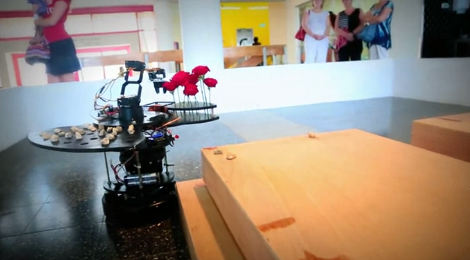
This robot was built to care for the graves and honor the dead in the Jewish tradition. It is called “Stoney” and was developed by [Zvika Markfeld] based on a concept by [Itamar Shimshony] who is working toward an MFA degree. The image above shows it in action as part of an installation; to our knowledge it has not been used for actual grave sites. But the concept is not a joke; it’s something that makes the observers think.

The base of the robot is an iRobot Roomba on top of which is built a platform for a robot arm. The arm has easy access to two palettes, one holds small stones, and the other flowers. There is also a small box which holds a rag. It navigates around the grave, placing stones, flowers, and using the rag and a water dispenser to symbolically clean the headstone. All of this is controlled by an Arduino Mega board which controls another Arduino running the arm, as well as the microcontroller in the Roomba.

The details of the ritual, as well as the components of the robot are well explained in the clip after the break.


Filed under: arduino hacks, robots hacks

Jeffrey The Quadruped

Primary image

What does it do?

It is a pet. It can stay on tables without falling, navigates around via IR sensor, interacts with people

Hey guys,
Just found out about LMR and wanted to share some of the robots we have made in past. (so, I will post 4-5 more projects soon)

Jeffrey The Quadruped is a quite small walker with 4 legs. It has printed circuit board with a custom arduino setup, using an Atmega328.
It has a Sharp IR Rangefinder attached on 2 servos and uses a simple rotational object tracking algorithm to let him create temporary low resolution visual maps. This way it can stay on a table, stay away from objects and even track your hands with a single sensor.

Cost to build

$80,00

Embedded video

Finished project

Complete

Number

Time to build

72 hours

Type

URL to more information

Weight

read more

Raspberry Pi teases finished Gertboard I/O extender, revs creative engines

The Raspberry Pi faithful have been looking forward to the Gertboard almost as much as the main device itself: Gert van Loo's I/O extender promises to flash lights, spin motors and otherwise take on the tasks that the Raspberry Pi doesn't directly manage on its own. While we've seen work on the project since late 2011, the expansion now looks to be closer to reality following a fresh teaser. The refined design's biggest tweak is replacing its original PIC controller with an Arduino-powered chip -- an element no doubt familiar to the crowd that would already be looking at a very hackable, miniature Linux computer. Most everything else is a refinement, although Gert has brought in three physical buttons and two-channel analog-to-digital and digital-to-analog converters. We'll learn the full story later this week, and until then we'll be dreaming of all the off-kilter Arduino projects that might be made better with a little Raspberry Pi companionship.

Filed under: Misc. Gadgets, Peripherals

Raspberry Pi teases finished Gertboard I/O extender, revs creative engines originally appeared on Engadget on Wed, 08 Aug 2012 18:41:00 EST. Please see our terms for use of feeds.

Permalink | Email this | Comments

Making a game with capacitive touch

Hackaday has seen a ton of builds make use of the Arduino CapSense library of late, so it was only a matter of time before we posted a capacitive sensing game controller that is able to move sprites around a screen.

For this build, the controller is made out of small strips of Aluminum foil, wired straight to an Arduino with a few resistors. Once embedded inside a wonderful enclosure that brings about pangs of nostalgia it’s time tow write the game.

For the game portion of the build, Processing was brought into the mix to create a SpongeBob-themed ‘capture all the jellyfish in jellyfish fields’ game. By taping the contacts for the d-pad, the player can move SpongeBob around to catch jellyfish. If you’d like to give the game a go, you can play it in your browser on the project page.

This isn’t the first – or the last – CapSense build we’ll see on Hackaday, but it is the first one dedicated to making a DIY (albeit Nintendo inspired) video game controller. If six buttons aren’t enough, you’ll just have to wait for the PS3 version.


Filed under: arduino hacks
Hack a Day 09 Aug 00:00

Super Angry Birds USB controller puts the sling back in your shot (video)

Yeah. We know. There are pretty much as many ways to play Angry Birds, as there are people who play it. That's a lot. However, the Super Angry Birds controller you see above speaks to us. Why? Because it's not just a sling shot, or a fudged use of existing technology. That wooden "sling" hides one of those motorized faders you see in big music studio desks. Using some coding magic (i.e. a force curve stored in a table), the creators were able to give it a realistic resistance feeling, sans elastic. The rest of the hardware is programmed in Max / MSP and Arduino, with a "Music and Motors" microcontroller. It's not just the sling part, either, with angle and special power triggering available from the same device. A pretty neat solution, we think. Now, we wonder if we could scale this thing up?

Continue reading Super Angry Birds USB controller puts the sling back in your shot (video)

Filed under: Gaming, Peripherals

Super Angry Birds USB controller puts the sling back in your shot (video) originally appeared on Engadget on Wed, 08 Aug 2012 16:34:00 EST. Please see our terms for use of feeds.

Permalink | Email this | Comments

“Hello Garden” – Making Aquaponics Smart


If you’ve ever walked around West Oakland, farming probably doesn’t come to mind. That’s because it’s the fifth busiest shipping port in the United States. But that hasn’t stopped maker Eric Maundu from feeding himself with locally-grown food from his aquaponic gardens, a combination of fish farming and hydroponic planting. Frequently proclaiming, “I am not a farmer,” Eric has applied his robotics and software background to making gardens smart.

“I feel knowledge of electronics and software programming makes me a better farmer than just having a hoe. Gardens that can communicate for themselves using the internet can lead to exchanging of ideas in ways that were not possible before. I can test, for instance, whether the same tomato grows better in Oakland or the Sahara Desert given the same conditions. Then I can share the same information with farmers in Iceland and China.”

His company, Kijani Grows, sells kits, components, installs gardens throughout the Bay Area, and teaches classes on aquaponics. This inspiring video from fair companies gives an epic walkthrough (note the length of the video – how leet!) of his various indoor & outdoor systems and designs:


Filed under: Arduino, Home and Garden

Accelerometer for circuits course?

One of the people that I asked to look over the course notes and give me suggestions suggested another lab that would likely appeal to bioengineers:

another cheap experiment, accelerometers from Sparkfun to measure gait patterns or detect falls.  If really ambitious, you can teach chaos theory here with analyzing chaos levels in gait patterns—they are different for men and women.

I’ve used accelerometers before, both the analog output ADXL335 and the I2C MQA8452Q. The ADXL335 breakout board was from Adafruit Industries, the MQA8452Q from Sparkfun.  Although I personally prefer the I2C interface, since it takes up only 2 Arduino pins, programming is outside the scope of this class.

This lab sounds like fun, and it would be good for the bioengineers to think of accelerometers as cheap sensors that are easily used, rather than as magic that comes in cell phones, I’m not sure how we would get a circuits lab out of this. Even the analog-output accelerometer just needs to have its XYZ pins connected to analog inputs on the Arduino.  Anything interesting you do with the accelerometer is in either the mechanical mounting or in the software analyzing the data, not in electronic circuits.

We have several constraints in selecting labs for this circuits course:

  • Lab must teach something useful to the students.
  • Lab must seem interesting (or at least useful) to bioengineering students.
  • Lab must not be dangerous (either to students or to equipment).
  • Lab must be doable in one 3-hour lab session (we can afford at most 2 labs that are 2-session labs).
  • Lab cannot require students to be able to program computers.
  • Lab cannot require knowledge of electronics beyond what is taught in the course.
  • Lab should support the teaching of traditional linear circuits.
  • Lab should involve student design and not just analysis of existing designs.

The accelerometer lab fails on two points: any design component would have to be software and there is no support for teaching linear circuits in the lab.  That’s too bad, because it is otherwise a cool lab idea.


Filed under: Accelerometer, Circuits course Tagged: accelerometer, Arduino, bioengineering, circuits, course design

Robotic Development Platform

Hello everybody :)

I made this blog to tell you all about my latest project, after my Robotic Arm project has died out a little.

This little thing will be my first actual "robot". The whole idea behind it is that I will have a platform which will be easy to further develop, and thus be awesome to learn new stuff. 

read more

Let's Make Robots 06 Aug 23:27