Posts with «arduino» label

Arduino Percussion Car


The user [selcukartut] sent us a project full integrated with Arduino boards. Filika (Istanbul) designed and produced an Interactive Percussion Playing Car for Volkswagen’s breathtaking pickup Amarok. Several sensors were implemented on the board, so that the participants were able to trigger percussion sounds via tapping their hands on the car.

Technically speaking, there were two types of sensors to gather user interaction data. Force Resistive Sensors were placed on the front panel and piezzo sensors were placed on the sides of the car’s body. Received user interaction was mapped onto a code via customized Arduino Board. Arduino code was commuicating with a sound patch that was built in MaxMSP/Jitter, and finally delivered into Ableton Live as Midi Data. In sum when a person taps onto a sensor that hides under the car’s surface, that interaction was turning into a percussion sound. There were tons of cables, sawing, soldering, coding and etc…

On the [website] there are some videos that show the project in action. Unfortunately all the text are in Turkish, we hope for an English, more international, version.

Arduino Blog 13 Dec 11:40

Mobiton - Robotic Smartphone Shell

Primary image

What does it do?

Uses a smartphone to operate. It can be an assistant, pet, or a telepresence device. Can be anything depends on the mobile app you write.

Hey Guys,

I know, I didn't post for a while. Didn't have time to post some of the projects, sorry about it.

Alright, so here is our new project, we plan to go commercial with it. It is called Mobiton. It is a robotic shell for mobile devices (android currently). You can dock your phone on the device, an application written for the robot pops up and it brings the robot to life.


Cost to build

$150,00

Embedded video

Finished project

Complete

Number

Time to build

Type

URL to more information

Weight

read more

Twitter radio

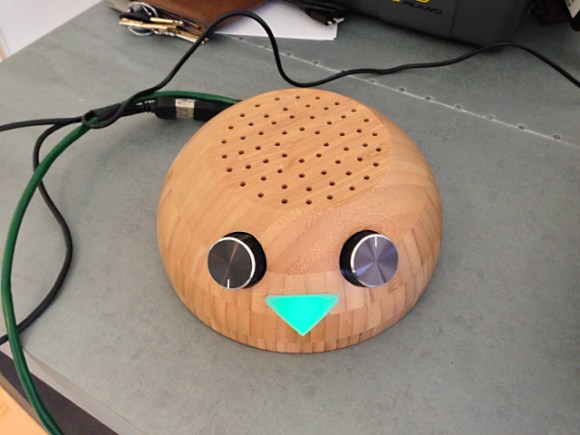
This anthropomorphized wood bowl will read Tweets out loud. It was built by [William Lindmeier] as part of his graduate work in the Interactive Telecommunications Program (ITP) at New York University. View the clip after the break to see and hear a list from his Twitter feed read in rather pleasant text-to-speech voices.

The electronics involved are rather convoluted. Inside the upturned bowl you’ll find both an Arduino and a Raspberry Pi. But that’s not the only thing that goes into this. The best sounding text-to-speech program [William] could find was for OSX, so there is a remote computer involved as well. But we think what makes this special is the concept and execution, not the level of hardware inefficiency.

The knob to the left sets the volume and is also responsible for powering down the device. The knob of the right lets you select from various Twitter lists. Each turn of the knob is responded to with a different LED color in the nose and a spoken menu label. You can get a quick overview of the project from this summary post.


Filed under: arduino hacks, Raspberry Pi
Hack a Day 12 Dec 21:30

New Product: AlaMode Arduino-Compatible Shield for Raspberry Pi

For $35 you can get a lot of processing power with the Raspberry Pi, which for some people begs the question: why use Arduino or another microcontroller? It turns out the two platforms are good for different tasks, and they’re actually quite complementary. Kevin Osborn of the Wyolum open hardware [...]

Read the full article on MAKE

MAKE » Arduino 12 Dec 19:45

Arduion Split Flap Game

When Arduino meets traditions, here the story of [the.anykey] and gift making.

We have a great Dutch tradition called sinterklaas (5th of december). For the older “non-believers” we make surprises. The purpose is to buy a small present but make a really cool “surprise” around it. Here my arduino based Split-flap game I made as surprise.
I made this for my 15-year old niece that was asking for very expensive presents only, so I thought I would make her a bit more price conscious

The arduino (uno) used to run this all was tested to its limit 15 I/O ports
- 5 pins for the score LEDs
- 4 pins for the stepper motor control, via ULN2003a
- 1 PWM pin for Servo to lock or unlock the side door
- 1 PWM pin for piezo speaker so we can make some sounds
- 1 pin for micro switch to align start of cards
- 2 pins for the lower and higher button

Anyway, the project is well structured and there is also a full [instructables] about it, we really enjoyed the submission.

Arduino Blog 12 Dec 17:34
arduino  dutch  flap  gallery  game  

Arduino BlueTooth Controller


Ok this is not a project 100% core Arduino, because it uses custom hardware and only the bootloader of Arduino. But Arduino follows the Open-Hardware philosophy, so we are honoured to share this project that use a bit of Arduino. [chris] , from silverball software, sent us his way to build a game controller , programmed with Arduino software.

Well after a few months of tinkering and several designs I finally have one.
The design is based around the Atmega 328 running the Arduino bootloader. There is a RN42-HID bluetooth module that allows serial communication between it and the microprocessor.

I wanted the device to be fully hackable so I designed it with headers for both the bluetooth module and the Atmega 328 chip. I can reprogram the bluetooth module to run HID keyboard or mouse (or combined), it can iterate as a gamepad, or it can reconfigured to run serial protocol and iterate as a virtual com port.

On the [website] there is full description with lots of pictures, have a look.

Arduino Blog 12 Dec 10:24

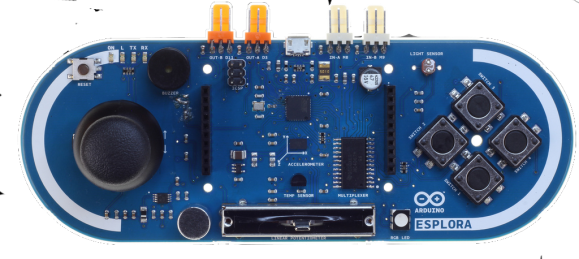
Arduino Esplora makes a great controller

The folks at Arduino seem to be stepping up their game. With the new Arduino Leonardo board able to emulate USB keyboards and mice right out of the box, it seems the perfect time for Arduino designers to come up with a proper video game controller. This new board is called the Arduino Esplora and packs enough buttons and sensors inside to capture just about any user input you can imagine.

On board the Esplora is the same ATMega 32U4 microcontroller found in the newest Arduino boards. For input, the designers included an analog joystick, four tact switches, a linear pot, a microphone, and light sensor. The Esplora also includes a three-axis accelerometer, RGB LED, buzzer, and a breakout for an SPI-controlled TFT LCD display, lest you would want to recreate something like the new Wii U controller on your own.

You can check out everything the Esplora can do over on the official Arduino site for the Esplora library.


Filed under: arduino hacks
Hack a Day 11 Dec 18:01

Avr OS on Arduino

What about an OS to run on your Arduino? Ok not in the way big os, remember Arduino has limited performance, but some of the basics, like spinlocks/multitask can be integrated with the AVR Os. As you know Arduino uses an AVR Compilant Processor, so its easy to port the code. The user [chris] sent us the way to do it, with also a simple sketch to print the classic “Hello World”.

avr-os is a library that provides a very basic rutime that enables your program to multitask.
The library uses pre-emptive multitasking to switch tasks and each task has its own stack that is restored when a task is resumed. An AVR timer is used to provide ticks and this interrupt is used to switch tasks.

All the instructions and the code to do it is stored at the [website]

Arduino Blog 11 Dec 17:04

Arduino-Controlled Drawing Robot

acorv built this sweet drawing arm* with an Arduino Uno and motor shield, two steppers and a servo, Meknex building set parts, and a Nintendo DS touch screen to guide it. Also see the previous version* previous version to see how the project evolved. [via Arduino] *Google translated from Spanish. [...]

Read the full article on MAKE

MAKE » Arduino 11 Dec 15:30
arduino  art  drawbot  

Yellow Plane 2 with Inverted V Tail


[nickatredbox] keeps up to date with the improvements of his project [yellow plane]. As you can find on this blog, the project is evolving week by week. Let’s see what’s today submission

1200 mm Wing space
280 mm cord
14% Clark Y
Target AUW 1300 Grams

Missing battery and camera box have a design which should weigh 140 grams empty.
The assembly shown below weighs 684 Grams no motor or electronics.
Electronics shown weigh 110 grams ESC Arduino board, Xbee, antenna and Gyro board
Motor & prop another 120 Gram

Here you have a [video]  and there you can follow the project on the [website]