Wiicambot
What does it do?
A little robot that just wants to have fun!
The code is choppy but works.
Fun with Wii Camera-


back-

Bottom-

A little robot that just wants to have fun!
The code is choppy but works.
Fun with Wii Camera-


back-

Bottom-


[Dennis Adams'] wreath lights project looks pretty good. But he did some amazing coding to produce a whole set of interesting animated patterns that really seal the deal for the project. Don’t miss the video after the break where he shows off all of his hard work.
He started with a string individually addressable LEDs. These are the 12mm variety like what Adafruit sells (we’ve seen them popping up in a number of projects). To mount each pixel he tried a several different prototypes before settling on a ring that was 14″ in diameter. The design was laser cut from acrylic, with sets of staggered holes to host each ring of LEDs. The final touch was to add ping-pong balls to diffuse the light.
As we mentioned earlier, the light patterns really add the finishing touch to the project, but there is more functionality there too. [Dennis] rolled in the ability to monitor a Twitter feed with the wreath. When he gets a new tweet, a different animation will let him know about it.
[Thanks Chris]
Hi.
Having got the processing/arduino serial sorted, I thought I'd have a go with charliplexing. I downloaded this library, and wrote a bit of code to try it. However, whenever I try to verify a sketch using it (including the demo sketch), I get this error;no matching function to call to 'Charlieplex::Charlieplex(byte [3], int)'. I've tried re-extracting the library, but with no success. Does anyone have any ideas?
If this library is broken, does anyone know of a better one for charlieplexing?
I just got my first Arduino motor shield. However, all the servo ports have 4 pins. The problem is that my servos only have 3 pins. Any help is greatly appreciated! By the way, my shield is an Arduino Motor shield from Seeed.
To put on a live pyrotechnic show at a music festival, [Chris] built the FireHero 3. The result is remotely controlled flames shooting up to 100 feet in the air.
The system is controlled by a Raspberry Pi and an Arduino. A server runs on the Pi and allows a remote computer to control the system. The Pi sends commands over serial to the Arduino, which switches solid state relays that actuate the valves.
There’s also some built in safety features: the system won’t boot unless you have the right key and RFID tag, and there are pressure transducers and temperature sensors to ensure the system is operating safely. A CO2 actuated valve can quickly stop fuel flow in an emergency.
Vaporized propane creates the fireballs. The vapor is created by heating the supply tank in a hot water bath. An accumulation tank stores the vapor and custom built manifolds distribute it to the various flame cannons. At each cannon, a silicon nitride hot surface igniter (HSI) is used to ignite the flames once the valve is opened.
After the break, watch a video the the FireHero making some flames.

Arduino is not only for hobby projects, there are also good way to use it to semplify your work. This is a good example, submitted by [sspence65].
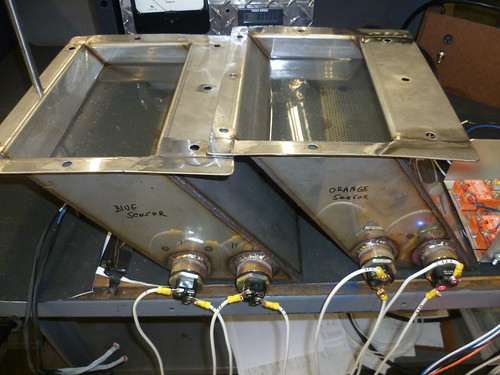
This is a project I did at work to control two water baths for a process control. Two custom tanks have to be kept at 180F, using DS18b20 temp sensors, an Arduino 2560, 4 SSR’s, and $15 1500 watt electric elements.
On the [website] you can find all about the project, included the code for the Arduino Mega.
Sometimes even Santa Claus needs help. Thankfully, the jolly fat guy's got one of our favorite modders on his side. We visited Ben Heck's Madison, Wisconsin workshop a few weeks ago for an Engadget Show segment and got to watch as the master put together a special holiday-themed project, the Naughty or Nice Meter, a big candy cane-accented box that'll help tired parents "keep the kids in line" this holiday season. The box itself is actually a mostly hollow shell, with an Arduino, TI LaunchPad and a few other select select components in the rear that communicate with a specialized app, letting the parent in question adjust the needle based on their kids' behavior. Nothing like a little manipulative fun in the spirit of the holidays! Check out our segment on Mr. Heckendorn just after the jump and click on through the source link to find out how to make a Naughty or Nice meter or your very own.
Filed under: Misc
Source: Element 14
Atom 1.0: http://letsmakerobots.com/node/31322
My previous Arduino project had a controller that was connected to Atom and powered by my laptop.
Parts:
Hi LMRtians,
this is my actual christmas project. A star build out of Plexi and an Adafruit RGB LED strip. Controlled by an Arduino controller. It will be used as christmas decoration behind a window of our house. Looks pretty cool at night.