On Tuesdays, my son and I usually have our weekly physics class, but in deference to the national holiday on Dec 25th we canceled this week’s class. I spent the day preparing drafts of lab handouts for the first three labs in the circuits course. The handouts are taking longer to produce than I expected, and they are coming out longer than expected also. I’ll post links to the lab pages once they are past the draft stage—I’m hoping to get feedback from my co-instructor by next week.
- The draft for the first (thermistor) lab is 10 pages, and still is missing pictures and a couple of paragraphs of text, particularly about using the data logger that my son is still writing for the students in the course to use.
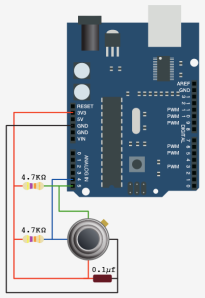
- The draft for the second (microphone) lab is 5 pages, and still doesn’t explain how to use an oscilloscope. We have both analog and digital scopes in the lab, and the analog ones a pretty easy to learn to use, but the Tektronix digital scopes have a very confusing menu interface that takes a long time to become familiar with. I still have to check out whether the function generators in the lab can drive a loudspeaker, as I’m expecting the students to be able to play sine waves into the microphones.
- The draft for the third (electrodes) lab is also 5 pages, but it is looking fairly complete to me.
I’ve posted a tentative schedule for the 10 labs of the quarter, http://courses.soe.ucsc.edu/courses/bme194/Winter13/01/schedule:
- Thermistor lab
- Microphone lab
- Electrodes lab
- Sampling and aliasing lab
- Audio amplifier lab 1 (op amps)
- FET measurement lab, phototransistor measurement lab
- Audio amplifier lab 2 (power amp)
- Hysteresis lab (capacitive touch sensor, 1st soldering project)
- Pressure sensor lab (instrumentation amp, soldering)
- EKG lab
There is a little more measurement and less design content than I had wanted in the first half of the course—I’ve only come up with fairly trivial design exercises until we get to amplifiers, and then the designs get much harder. I’m still trying to come up with a design lab for the phototransistors—right now I’m just looking a characterizing an LED and phototransistor pair for use as an optoisolator, with appropriate biasing for each to transfer analog signals (digital signals are too easy). The students will have 3 LEDs (green, red, and infrared), so we could also look at the signal levels with each, to see whether the infrared emitter provides a better signal.
I don’t really know exactly what is in the sampling and aliasing lab, which my co-instructor created for a different course. I’ll have to get his handouts for it, and type them up in the format I’m using for this course. I’ll probably have to borrow a board from him also, to run through the lab myself. It was probably designed as a 2-hour lab, not a 3-hour one, so I may want to add a bit to it.
The Digikey order for parts shipped today, the last on-line order I made, and it looks like the cost per student will be between $65 and $66 for tools and parts (see Parts orders for Applied Circuits W13 for more details on the pricing). I still have to make a packing list for each kit, and put the kits together. I hope that all the orders arrive by the middle of next week, so that we can distribute the parts kits on Wednesday 2013 Jan 9.
I also hope I’ll be able to package the kits in 1-gallon ZipLock bags—I’m beginning to think I might need to leave the loudspeakers separate, and that it will still be a tight fit. ZipLock does make bigger bags: 3 gallon, 10 gallon, and 20 gallon), but at $1.18 each for the 3-gallon bags, I’d rather not go there—even 40¢ each for the 2-gallon bags is a bit high.
I’ve also been thinking of getting an Arduino Leonardo for testing my son’s DataLogger code, as the Leonardo has a different serial interface and a different number of analog and digital pins available: 20 I/O pins, of which 7 can be configured for PWM and 12 as analog inputs though 3 of those are also PWM pins, as opposed to the 20 I/O pins of the Uno, 6 of which can be configured for PWM and 6 as analog inputs. There are several other incompatibilities (like where the TWI interface and that the Leonardo does not reset when the serial connection is first opened as on all previous Arduino boards). Designing shields for Arduino boards has gotten much more complicated lately, as Arduino has proliferated a number of incompatible interfaces. I think that this might hurt them in their main market. I’m wondering it the Raspberry Pi is cheap enough, available enough, and easy enough to interface and program to edge out Arduino in the next few years. I have some Raspberry Pi boards now, and when I get some time I’ll want to try playing with them.
Filed under:
Circuits course,
Raspberry Pi Tagged:
Arduino,
circuits,
course design,
lab exercises,
Raspberry Pi 


 As 2012 concludes, let’s look back at all the cool Arduino projects that we’ve featured on the site. There were a ton! We’ve been big fans of the Arduino since its release, and there are hundreds of posts on the blog as a testament to this love affair–with more to [...]