Posts with «arduino» label

Arduino Clock Is HAL 1000

In the movie 2001: A Space Odyssey, HAL 9000 — the neurotic computer — had a birthday in 1992 (for some reason, in the book it is 1997). In the late 1960s, that date sounded impossibly far away, but now it seems like a distant memory. The only thing is, we are only now starting to get computers with voice I/O that are practical and even they are a far cry from HAL.

[GeraldF6] built an Arduino-based clock. That’s nothing new but thanks to a MOVI board (ok, shield), this clock has voice input and output as you can see in the video below. Unlike most modern speech-enabled devices, the MOVI board (and, thus, the clock, does not use an external server in the cloud or any remote processing at all. On the other hand, the speech quality isn’t what you might expect from any of the modern smartphone assistants that talk. We estimate it might be about 1/9 the power of the HAL 9000.

You might wonder what you have to say to a clock. You’ll see in the video you can do things like set and query timers. Unlike HAL, the device works like a Star Trek computer. You address it as Arduino. Then it beeps and you can speak a command. There’s also a real-time clock module.

Setting up the MOVI is simple:

 recognizer.init(); // Initialize MOVI (waits for it to boot)
 recognizer.callSign("Arduino"); // Train callsign Arduino (may take 20 seconds)
 recognizer.addSentence(F("What time is it ?")); // Add sentence 1
 recognizer.addSentence(F("What is the time ?")); // Add sentence 2
 recognizer.addSentence(F("What is the date ?")); // Add sentence 3
...

Then a call to recognizer.poll will return a numeric code for anything it hears. Here is a snippet:

// Get result from MOVI, 0 denotes nothing happened, negative values denote events (see docs)

 signed int res = recognizer.poll(); 

// Tell current time
 if (res==1 | res==2) { // Sentence 1 & 2
 if ( now.hour() > 12) 
 recognizer.say("It's " + String(now.hour()-12) + " " + ( now.minute() < 10 ? "O" : "" ) +
     String(now.minute()) + "P M" ); // Speak the time
...

Fairly easy.

HAL being a NASA project (USSC, not NASA, and HAL was a product of a lab at University of Illinois Urbana-Champaign – ed.) probably cost millions, but the MOVI board is $70-$90. It also isn’t likely to go crazy and try to kill you, so that’s another bonus. Maybe we’ll build one in a different casing. We recently talked about neural networks improving speech recognition and synthesis. This is a long way from that.


Filed under: Arduino Hacks, clock hacks

An Arduino laser pinball machine

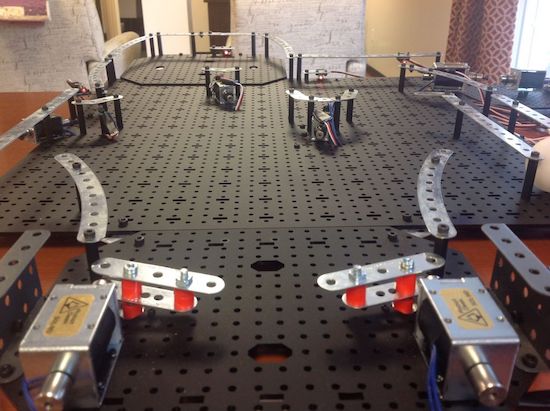
Pinball machines may seem like a good Maker project, but the mechanical components are quite involved. “Joesinstructables,” however, decided to take on this project on using an Erector Set, solenoids, and an Arduino board. In order to get around the challenge of using a heavy steel ball, he instead used a much lighter ping pong ball, sensed in the game by laser tripwires.

A number of solenoids propel the ball around and sound a service desk bell whenever a target is hit–one to three times depending on the difficulty level. Once the ball comes to rest in a target, a laser tripwire automatically triggers a solenoid to eject the ball, putting it back in play.

You can see more info on this build here, or even check out an earlier version for more inspiration!

Serial communication with arduino

In this post, we will learn how to serial communicate other device or arduino suing serial communication.

Introduction:

Serial communication (RS-232) is widely used communication for data transfer. It just uses three wires: Rx, Tx and GND

  In serial communication, 8/9 -bit is transferred through a single wire. The data frame is like this:

Start bit > Data fields (8 or 9 bit data) > Stop bit


Speed of data transfer is measured in terms of baud rate or bps:

Standard is: 9600 baud rate, none parity bit and one stop bit.
The baud rate should be same for both the devices. Any mismatch in the baud rate and the data will not be transmitted properly.
Bluetooth module (HC-05), Zigbee, GMS module, GPS module all these module uses serial communication. In fact, for communication between two microcontroller, we can use serial communication.

Connections:

Arduino                                                      Device
Tx            ===============>               Rx
Rx            ===============>               Tx
GND        ===============>               GND

For interfacing arduino with pc/ laptop, we need terminal software like bray's terminal. 

Just plug in the arduino in your pc/ laptop upload the program below and open terminal software.
Open comport in terminal sofware. The comport should be of arduino.

/* Program starts here */

void setup() {
Serial.begin(9600);   // starts serial communication @9600 bps
}

void loop() {
Serial.print("ARDUINO");   // serially print arduino
//Serial.println("ARDUINO");   // serially print arduino in new line

delay(1000);  // dealy of 1000ms
}

/* Program ends here */

Check this video:


VGA Monitor Becomes Drawing Toy

We hate to break it to [Rob Cai], but he’s built a VGA drawing toy, not an Etch-a-Sketch. How do we know? Simple, Etch-a-Sketch is a registered trademark. Regardless, his project shows how an Arduino can drive a VGA monitor using the VGAx library. Sure, you can only do four colors with a 120×60 resolution, but on the other hand, it requires almost no hardware other than the Arduino (you do need four resistors).

The hardware includes two pots and with the right firmware, it can also play pong, if you don’t want to give bent your artistic side. You can see videos of both the art toy and the pong game, below.

Because the device started as a pong game, [Rob’s] version has two boxes, each with a pot and a button. Of course, if you were really building it just for the drawing toy, you’d probably put it all in a box. Maybe even a red box. If we were building it, we’d be tempted to put a tilt sensor or an accelerometer in the box so you could shake it to erase the picture. Just saying.

If you want 640×480 resolution from an Arduino, it can be done, but it takes more hardware. If you were trying to get a kid interested in Arduino, you could do worse than start with two projects with video that are fun, use a handful of easy-to-source parts, and shares hardware. Then again, if you are in the “go big or go home” camp, we’d redirect to this pong game, instead.


Filed under: Arduino Hacks
Hack a Day 09 Dec 00:00

A DIY Segway-style vehicle

Instructables user “stoppi71” has been building a DIY Segway for a while now, and just posted a bunch of info on the project.

Balancing on two side-by-side wheels is rather difficult, though as the original Segway showed us, it’s quite possible with electronics to help. Naturally, hobbyists have tried to duplicate this effort, including stoppi71, who started his experiments several years ago. He uses both an accelerometer and gyroscope to determine the angle, along with PID control to apply the correct amount of power to each wheel. Buttons on either side handle steering.

Though not the easiest project featured here, if you’re thinking about doing something simlar, his writeup is worth a look! If you enjoy alternative modes of transportation, you may want to check out this electric unicycle as well!

This Stranger (Internet of) Things Wall Receives Messages from Your Phone

Seattle-based Makerologist created this Stranger Things wall with a very keen attention to the details.

Read more on MAKE

The post This Stranger (Internet of) Things Wall Receives Messages from Your Phone appeared first on Make: DIY Projects and Ideas for Makers.

This Old Mouse Keeps Track of Filament Usage

Keeping track of your 3D-printer filament use can be both eye-opening and depressing. Knowing exactly how much material goes into a project can help you make build-versus-buy decisions, but it can also prove gut-wrenching when you see how much you just spent on that failed print. Stock filament counters aren’t always very accurate, but you can roll your own filament counter from an old mouse.

[Bin Sun]’s build is based around an old ball-type PS/2 mouse, the kind with the nice optical encoders. Mice of this vintage are getting harder to come by these days, but chances are you’ve got one lying around in a junk bin or can scrounge one up from a thrift store. Stripped down to its guts and held in place by a 3D-printed bracket, the roller that used to sense ball rotation bears on the filament on its way to the extruder. An Arduino keeps track of the pulses and totalizes the amount of filament used; the counter handily subtracts from the totals when the filament is retracted.

Simple, useful, and cheap — the very definition of a hack. And even if you don’t have a 3D-printer to keep track of, harvesting encoders from old mice is a nice trick to file away for a rainy day. Or you might prefer to just build your own encoders for your next project.


Filed under: 3d Printer hacks, Android Hacks

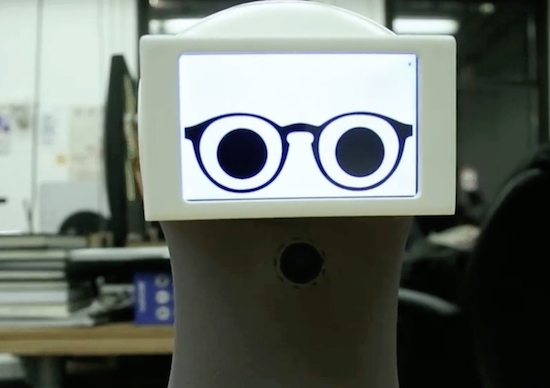
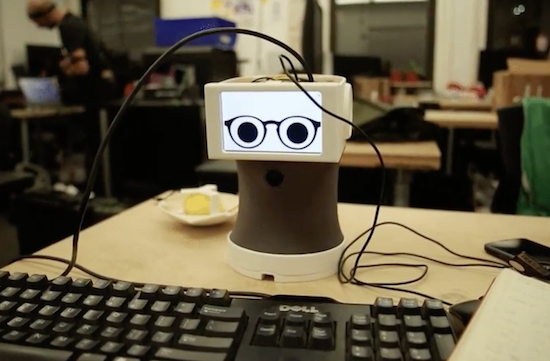
Peeqo is a desktop bot that communicates through GIFs

If you’ve been looking for a robotic assistant with the functionality of an Amazon Echo and the cuteness of a Disney character, you’re in luck. That’s because Abhishek Singh has created Peeqo, an open-source DIY device that responds to human speech through GIFs.

Peeqo has a Raspberry Pi 3 for his brain along with a pair of Arduino Mini boards for controlling movement and LED notifications. The 3D-printed bot is equipped with a half-dozen servos, four custom microphones, a NeoPixel ring on top of his head, a camera at his chest, a USB speaker, and an LCD display.

As for voice recognition, Peeqo uses the Google Speech API for detecting the wake word ‘Peeqo’ and API.AI for responding to the query. The desktop companion can also serve as a full-fledged entertainment system that plays your favorite Spotify tunes. Ask for a song and he’ll sway to the beat.

But that’s not all. Singh even developed a Chrome extension that uses Peeqo to boost his productivity and motivate him to avoid social media while working. Once he tells it to block a certain site, the robot lets his displeasure be known in the form of a GIF.

Intrigued? You can see how Singh brought Peeqo to life on Imgur.

An Arduino round word clock

After considering building a square word clock, Maker Roald Hendriks and his sister came up with something a bit more unique!

Clocks, being decorative, useful and easily hackable, have been targets for creative types, likely from when they were first invented. You’d think maybe all ideas for new clocks have been exhausted. Fortunately, human ingenuity never seems to run dry, and this latest device tells time using Arduino Uno-controlled LEDs.

Outer numbers on the modified IKEA PUGG wall clock illuminate to indicate the hour, while words on the inside represent the minutes. These minutes are literally spelled out in Dutch phrases reveal the particular time, but if you don’t speak the language, the position of the LEDs should give you some clue as to what is going on.

You can read more about the project on its website, and watch a demo below!

Decabit: Or The Conspiracy Theory That Wasn’t

[LDX] first noticed the odd sounds coming out of his ceiling fan, regularly, on the hour and half-hour. Then he noticed that the lights were flickering as well. Figuring something was up, he built a logging power-line monitor to see if he could decode the shadowy signals and figure out what cryptic messages were being transmitted over the power lines. Naturally, he suspected the Illuminati were behind it.

Even if you’re not prone to flights of fancy, you might want to keep track of your power line because it can serve as an accurate long-run timebase for projects, or because it can tell you something about the overall health of the grid.

[LDX]’s circuit is as simple as can be. A 10 V AC transformer reduces the mains power down to something reasonable. A resistive divider chops this down further to the range that an Arduino can handle, and then another voltage divider biases the signal to the Arduino’s ADC midpoint. The plus-minus 10 V signal thus swings between 0 and 5 V, just.

SPOILERS! After confirming that there was a higher-frequency wiggle superimposed on top of the power-line frequency, he contacted the folks at his power company in Denver. The system is called Decabit and it’s used to control street lights, hot water boilers, and other public infrastructure that might want to be coordinated to run when power is cheap or when it gets dark. The PDF that he links to explains it all, so you can take your tinfoil hat right back off.
But we still think it’s a fun project to look into the power lines. Who knows what other people will find? CON-spiracy!


Filed under: Arduino Hacks