Posts with «arduino» label

Log high-altitude balloon data with this Arduino device

Wanting to see data from their high school’s HAB launch, 9th grader “Spaceshark” and a few of his classmates decided to build their own data tracker.

According to the project’s write-up, Spaceshark’s school has an astronomy club which sends HABs to the edge of space. Although the 360-degree video embedded here would be enough to satisfy most people’s curiosity, this team wanted more data!

Spaceshark’s group proceeded to create a data logger using an Arduino Uno, along with sensors to collect data on the satellite’s latitude and longitude coordinates. Altitude, wind speeds, time, and the satellites in view can also be recorded, saving readings on a microSD card for later analysis.

Since these type of balloons can reach heights of 100,000 feet, the fact that the boards used could get quite cold, as well as the question of whether or not the GPS used would work at that altitude, had to be considered. You can find more details of this build on its Instructables page here.

Arduino Day Turin: Call for projects and volunteers!

As recently announced, Arduino Day 2017 will be celebrated on April 1st. (If you want to organize an event of your own, please submit your proposal by March 11th.) Though festivities will be taking place worldwide, the Arduino team will be holding this year’s official event at Toolbox Coworking in Turin–which happens to be in the same building as Arduino’s new Italian headquarters.

The Arduino Day Turin program (11am – 6pm), organized in collaboration with Fablab Torino, will include an exhibition area with boards and projects, a talk area with speeches by Massimo Banzi and other Arduino co-founders, a workshop/demo area with free activities for kids–with the Fablab for Kids team–and adults, as well as an Arduino store with special prices and offers.

We are currently seeking projects for Arduino Day Turin’s exhibition space: if you are an individual or team of Makers and would like to show off  your creations, feel free to fill out this form by March 18th. If you are an Arduino enthusiast and want to help out, we are also looking for volunteers (application here) to welcome guests, document the event, and assist the Arduino crew.

Over the next few weeks, we’ll be sharing more news and updates on Arduino Day Turin’s agenda and activities. In the meantime, don’t forget to post and invite your friends via ia social media using the hashtag #ArduinoD17! 

DIY Syringe Pump Saves Big Bucks for Hacker’s Lab

If you had a choice between going to your boss and asking for funds for a new piece of gear, would you rather ask for $3000 to buy off-the-shelf, or $200 for the parts to build the same thing yourself? Any self-respecting hacker knows the answer, and when presented with an opportunity to equip his lab with a new DIY syringe pump for $200, [Dr. D-Flo] rose to the challenge.

The first stop for [Dr. D-Flo] was, naturally, Hackaday.io, which is where he found [Naroom]’s syringe pump project. It was a good match for his budget and his specs, but he needed to modify some of the 3D printed parts a little to fit the larger syringes he intended to use. The base is aluminum extrusion, the drive train is a stepper motor spinning threaded rod and a captive nut in the plunger holders, and an Arduino and motor shield control everything. The drive train will obviously suffer from a fair amount of backlash, but this pump isn’t meant for precise dispensing so it shouldn’t matter. We’d worry a little more about the robustness of the printed parts over time and their compatibility with common lab solvents, but overall this was a great build that [Dr. D-Flo] intends to use in a 3D food printer. We look forward to seeing that one.

It’s getting so that that you can build almost anything for the lab these days, from peristaltic pumps to centrifuges. It has to be hard to concentrate on your science when there’s so much gear to make.


Filed under: chemistry hacks, tool hacks

Interactive Game Board Helps Toddler Learn Colors and Shapes

Most parents would do anything to enrich their kids’ worlds and teach them what they need to know. Hacker parents often take it one step further by modifying the kid’s world to allow them to work past a disability. To wit we have an interactive game board to help a toddler learn her shapes and colors.

The toddler in question is [Becca], and her needs are special because of the progressive nature of the blindness that will result from her Usher Syndrome. [Becca] will need visual acuity testing much earlier than most toddlers, but a standard eye chart is meaningless to kids before they get their letters. This is where Lea shapes come in – a set of four shapes that are used to make visual testing a game and help practitioners assess what a child can and cannot see.

[Jake] and his wife [Beth] were advised to familiarize [Becca] with the shapes, but all she wanted to do was eat the printed sheet. In order to make the task more entertaining, [Jake] built an interactive board where brightly colored Lea shapes trigger the room lights to change to the same color as the block when it’s inserted into the correct spot on the board, as a visual reward. Reed switches, magnets, and an Arduino comprise the game logic, and the board communicates to the Philips Hue smart bulbs over an NRF24L01. The video below also shows some cool under-bed lights and a very engaged [Becca] learning her shapes and colors.

As we expected when we last covered his efforts to help [Rebecca], [Jake] has leveraged the Raspberry Pi he used as a hub for the stairwell lighting project. We’re looking forward to seeing what else he comes up with, and to see how [Becca] is thriving.


Filed under: Medical hacks, misc hacks

A toast-buttering robot for your breakfast routine

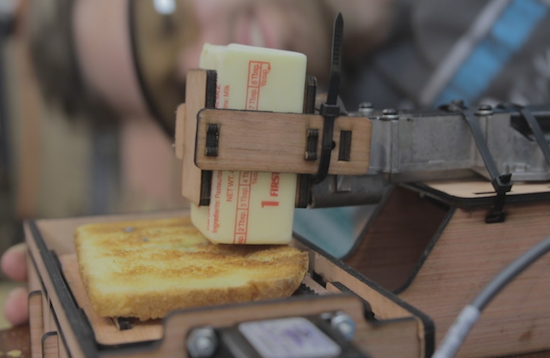
Tired of buttering your toast in the morning? Well, William Osman has just the solution for you, albeit slightly dangerous and excessive for the task at hand.

For his “extremely violent” machine, Osman used a jigsaw motor to hold the butter and an Arduino-driven linear stepper motor to move the slice of toast back and forth. The robot’s frame, spikes, and mounts are all crafted out of laser-cut wood, and everything is held together by a bunch of zip ties.

I was planning on making a more cohesive user experience. But then I didn’t. The jigsaw trigger was wired to a 12v lead acid battery, and the stepper motor was driven by a motion control driver I built several years ago.

Osman documented his entire build process and shared the end result in the video below. Be sure to also check out his other projects here!

Jean-Luc PYcARD is a Pocketable Python Development Platform

It’s a good thing that a ridiculous pun and a screenprint of Jean-Luc Picard on the bottom of the board is enough to qualify for the 2017 Hackaday Sci-Fi Contest, because [bobricius]’s Python-plus-Arduino card and environmental sensor potpourri is very cool.

The PCB design itself is great. It’s got a gigantic LED array, cutout for a wrist strap, and an onboard USB plug so you can program it just by sticking it in your computer; it shows up as a USB mass storage device when you plug it in. The files that show up on the “drive” are Micropython code that you can edit, save, and then run directly on the device. You can hardly beat that for convenience.

And there’s a full complement of sensors: not one but two temperature and humidity sensors, including our recent favorite BME280, which also reads barometric pressure. (We suspect that makes it a tri-corder.) There’s a real-time clock, a buzzer, and some buttons. Want to add more sensors? I2C ports are broken out for your convenience.

Besides having Star Trek flair, this board would give the various educational platforms a run for their money: Micro:bit, we’re looking at you. Very cool indeed!


Filed under: Microcontrollers

Power a 1980s MicroVox with an Arduino Uno

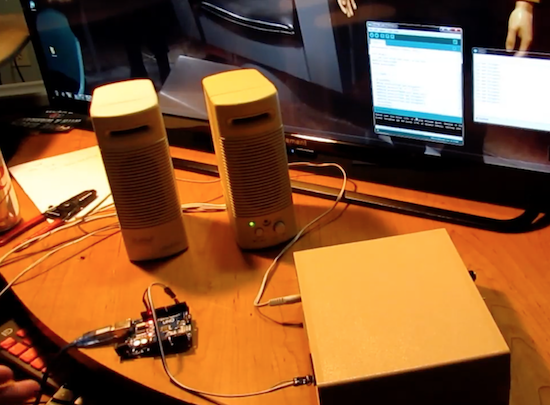
After digging through an extremely complete manual, Monta Elkins used an Arduino Uno to make a MicroVox speech synthesizer do his bidding.

The bad thing about obsolete gear is that it is generally very hard to hook up to modern equipment. The great thing for Makers, though, is that many of the devices from one’s childhood (or before) can now be driven with inexpensive tools such as Arduinos. Some of them, like the 1982-vintage MicroVox model that Elkins got his hands on, even include a manual with schematics and components listed.

After going over his new find and the enclosed manual, the video really hits a highlight around 13:45, when he powers it on to hear it burp out “ready” in a deep monotonous tone that may bring back memories of the robotic future you remember fondly. He finally hooks up the Uno just after that, and gets it to spit out an “interesting” catch phrase just after 16:30.

You can read more about the project on Hackaday and see other projects by Elkins on his YouTube channel here!

Arduino Blog 23 Feb 22:11

Keep the Peace in the Bedroom with a Snore Stopping Sleep Mask

Despite what my wife says, I have absolutely no evidence that I snore. After all, I’ve never actually heard me snoring. But I’ll take her word for it that I do, and that it bothers her, so perhaps I should be a sport and build this snore-detecting vibrating sleep mask so she can get a few winks more.

Part wearable tech and part life hack, [mopluschen]’s project requires a little of the threadworker’s skill. The textile part of the project is actually pretty simple, and although [mopluschen] went with a custom mask made from fabric and foam shoulder pads, it should be possible to round up a ready-made mask that could be easily modified. The electronics are equally simple – an Arduino with a sound sensor module and a couple of Lilypad Vibe boards. The mic rides just above the snore resonating chamber and the vibrators are right over the eyes. When your snore volume exceeds a preset threshold, the motors wake you up.

Whether this fixes the underlying problem or just evens the score with your sleep partner is debatable, but either way there’s some potential here. And not just for snore-correction – a similar system could detect a smoke alarm and help rouse the hearing impaired. But if the sewing part of this project puts you off, you should probably check out [Jenny List]’s persuasive argument that sewing is not just for cosplayers anymore.


Filed under: misc hacks, wearable hacks

MicroVox Puts the 80’s Back into Your Computer’s Voice

[Monta Elkins] got it in his mind that he wanted to try out an old-style speech synthesizer with the SC-01 (or SC-01A) chip, one that uses phonemes to produce speech. After searching online he found a MicroVox text-to-speech synthesizer from the 1980s based around the chip, and after putting together a makeshift serial cable, he connected it up to an Arduino Uno and tried it out. It has that 8-bit artificial voice that many of us remember fondly and is fairly understandable.

The SC-01, and then the SC-01A, were made by Votrax International, Inc. In addition to the MicroVox, the SC-01 and SC-01A were used in the Heath Hero robot, the VS-100 synthesizer add-on for TRS-80s, various arcade games such as Qbert and Krull, and in a variety of other products. Its input determines which phonemes to play and where it shines is in producing good transitions between them to come up with decent speech, much better than you’d get if you just play the phonemes one after the other.

The MicroVox has a 25-pin RS-232 serial port as well as a parallel port and a speaker jack. In addition to the SC-01A, it has a 6502 under the hood. [Monta] was lucky to also receive the manual, and what a manual it is! In addition to a list of the supported phonemes and words, it also contains the schematics, parts list and details for the serial port which alone would make for fun reading. We really liked the taped-in note seen in this screenshot. It has a hand-written noted that says “Factory Corrected 10/18/82”.

Following along with [Monta] in the video below, he finds the serial port’s input buffer chip datasheet online and verifies the voltage levels. Next he opens up the case and uses dips switches to set baud rate, data bits, parity, stop bits and so on. After hooking up the speakers, putting together a makeshift cable for RX, TX and ground, and writing a little Arduino code, he sends it text and out comes the speech.

The SP-01 wasn’t the only speech chip from the 1980s we’ve come across. [Marquis de Geek] used the SP0256 to make what he calls a homemade Stephen Hawking. And Votrax themselves had their own speech box, the Type ‘N Talk which [Jan] used to give voice to old text adventure games with an Android phone and VIC-20. The sound from this one really is remarkable, sounding pretty much the same as modern-day Siri.


Filed under: classic hacks

7 Lessons from Building a GoPro Auto-Panorama Device

Trick your GoPro into taking pictures with a recording

Read more on MAKE

The post 7 Lessons from Building a GoPro Auto-Panorama Device appeared first on Make: DIY Projects and Ideas for Makers.