Posts with «arduino» label

Need desk lighting? How about 1,200+ LEDs?

After he’d just finished a project using RGB LEDs, Imgur user nolobot’s brother mentioned he needed a new computer desk. Most people would probably just let their brother buy one, others would make something out of wood, but nolobot instead decided to create something truly amazing using more than 1,200 WS2812 RGB LED modules, an Arduino Mega, aluminum extrusion, and translucent polycarbonate.

The Mega controls these LEDs with the FastLED library, which are sandwiched between a base piece of plywood and a strip of polycarbonate using custom spacers. This diffuses the light nicely, allowing for beautiful light animations directly on the desk’s surface.

You can find more on this awesome build on the project’s Imgur page!

Raiders of the Lost OS: Reclaiming A Piece of Polish IT History

In today’s digital era, we almost take for granted that all our information is saved and backed up, be it on our local drives or in the cloud — whether automatically, manually, or via some other service.  For information from decades past, that isn’t always the case, and recovery can be a dicey process.  Despite the tricky challenges, the team at [Museo dell’Informatica Funzionante] and [mera400.pl], as well as researchers and scientists from various museums, institutions, and more all came together in the attempt to recover the Polish CROOK operating system believed to be stored on five magnetic tapes.
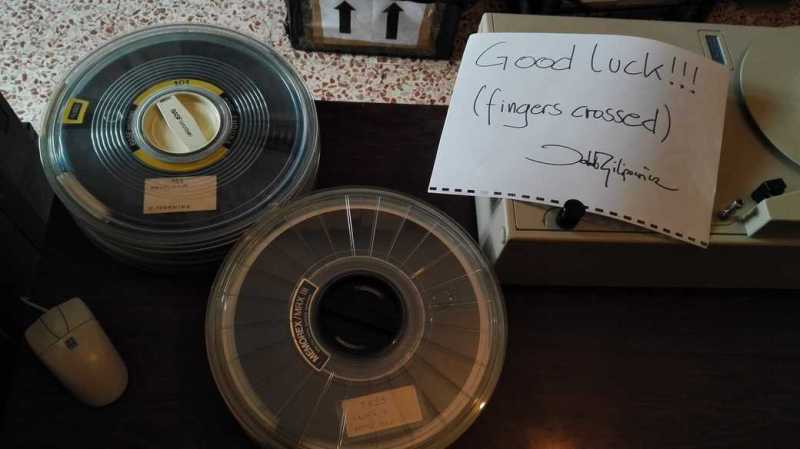
Originally stored at the Warsaw Museum of Technology, the tapes were ideally preserved, but — despite some preliminary test prep — the museum’s tape reader kept hanging at the 800 BPI NRZI encoded header, even though the rest of the tape was 1600 BPI phase encoding. Some head scratching later, the team decided to crack open their Qualstar 1052 tape reader and attempt to read the data directly off the circuits themselves!!

Using an Arduino Mega as a sampling device and the tape in test mode, the team were able to read the tapes, but the header remained inscrutable and accompanied by errors in the rest of the data. Promising nonetheless!

Switching gears, the decision was made to use a logic analyzer to read the tapes and use software to decode the data. While they waited for their new analyzer to ship, one of the team members, [Jacob Filipowicz] harnessed the power of Python to write a program called Nine Track Labs (pictured below) which would allow them to read any kind of magnetic tape, at any speed, BPI, and writing standard. Armed with the software and analyzer, the team was able to successfully recover the data from the tapes in its entirety without errors!

Among the data recovered, there were numerous versions of the CROOK operating system — allowing them to reproduce the OS’s development process, as well as hundreds of other files containing programs and tools hitherto believed to be lost. There was also a backup of a ‘live’ MERA-400 system with a binary CROOK-3 OS, ready to run in emulation. All things considered, the techno-archeological tour-de-force was a smashing success.

If — in your more modern travels — you need to recover an audio recording gone awry, know that you can retrieve that data with a hex editor.


Filed under: classic hacks, computer hacks

The Best of Both Worlds: Arduino + 555 Should Confuse Commenters

Hardly a week goes by that some Hackaday post doesn’t elicit one of the following comments:

That’s stupid! Why use an Arduino when you could do the same thing with a 555?

And:

That’s stupid! Why use a bunch of parts when you can use an Arduino?

However, we rarely see those two comments on the same post. Until now. [ZHut] managed to bring these two worlds together by presenting how to make an Arduino blink an LED in conjunction with a 555 timer. We know, we know. It is hard to decide how to comment about this. You can consider it while you watch the video, below.

On the plus side, there probably is a use case for this. The LED will blink with absolutely no intervention from the Arduino. You could put the Arduino in deep sleep, if you wanted to and that LED will still blink. With a little work, you could probably adapt this idea to any number of circuits out of the 555 playbook, like a PWM generator, for example.

There’s almost nothing a 555 can’t do. If you want to see what’s under its expressionless face, this teardown is an interesting read. We just hope the comment section doesn’t overload like a Star Trek computer being asked by Captain Kirk to compute every digit of pi.


Filed under: Arduino Hacks
Hack a Day 03 Mar 03:00

Making a Mega LED Desk

Few things beat a sturdy, home-built desk — especially when it’s jam-packed with over 1200 WS2812 LEDs.

[nolobot] and his bother struggled with setting up and squaring-off the t-slotted, extruded aluminium frame which makes up the desk. He recommends practicing with a smaller frame for anyone else attempting a similar build. The surface of the desk has a few inches between the polycarbonate top and the 1/4″ plywood painted black serving as the substrate for the LEDs. Those LEDs come in strip form but still required several hundred solders, and wiring headaches in an attempt to make future upgrades manageable. Dozens of support bolts with adjustable feet support the desk surface throughout. These all had to be individually adjusted and can be made out if you look closely at the demo videos.

An Arduino Mega controls the LEDs with the help of the FastLED library. Custom code was necessary because one of the major issues [nolobot] faced was the power draw. 1200 LEDs at 5V draw quite a bit of current, so the LEDs were coded to peak at about 50% brightness. The matrix was split into different banks, while also limiting the 40A PSU to only 15A.

Regarding the final product, all we can say is: woah.

Not a fan of putting this much work into a piece of furniture? There are also ultra-minimalist options at your disposal.

[via /r/arduino]


Filed under: Android Hacks, led hacks
Hack a Day 02 Mar 12:01

Netflix becomes your personal trainer with its new DIY device

Working out can be tough, but inversely, watching Netflix is super easy. The streaming giant doesn't want to distract you from your fitness goals, though. Netflix would much rather be your workout buddy, which is why it posted instructions for making a DIY personal trainer gadget.

Source: Netflix

Netflix becomes your personal trainer with its new DIY device

Working out can be tough, but inversely, watching Netflix is super easy. The streaming giant doesn't want to distract you from your fitness goals, though. Netflix would much rather be your workout buddy, which is why it posted instructions for making a DIY personal trainer gadget.

Laptop control box provides speedy access to apps

If you need to quickly launch certain apps on your MacBook Pro, Carl Gordon has your solution using an Arduino Nano.

Although the TV ads for your notebook computer would perhaps have you believe that everyone who uses it is a DJ, artist, or rock climber, chances are you just use it for a handful of programs and folders over and over. If this sounds like you, you can at least speed up access to them using Gordon’s “Laptop Control Box.”

As seen below, the box acts as a grid of shortcuts to your favorite applications, with a button to select sets of programs and an embedded RGB LED module to show you which set is active without having to look at the screen. Control on the computer side is accomplished with Processing, and though it might look like its window needs to be active in the video, it can work in the background as well.

This version currently gives me to access 24 different functions which are divided into six categories of four functions for ease of use, these categories include: tools, media, browser, utilities, social and lifestyle. Categories can be navigated through using the small button on the side and each category is visualized with a unique color by an RGB LED within the device, illuminating the plastic buttons from underneath.

Check out how to make this handy little gadget in Gordon’s Instructables write-up here.

Reverse Engineering the Smart ForTwo CAN Bus

The CAN bus has become a defacto standard in modern cars. Just about everything electronic in a car these days talks over this bus, which makes it fertile ground for aspiring hackers. [Daniel Velazquez] is striking out in this area, attempting to decode the messages on the CAN bus of his Smart ForTwo.

[Daniel] has had some pitfalls – first attempts with a Beaglebone Black were somewhat successful in reading messages, but led to strange activity of the car and indicators. This is par for the course in any hack that wires into an existing system – there’s a high chance of disrupting what’s going on leading to unintended consequences.

Further work using an Arduino with the MCP_CAN library netted [Daniel] better results, but  it would be great to understand precisely why the BeagleBone was causing a disturbance to the bus. Safety is highly important when you’re hacking on a speeding one-ton metal death cart, so it pays to double and triple check everything you’re doing.

Thus far, [Daniel] is part way through documenting the messages on the bus, finding registers that cover the ignition and turn signals, among others. Share your CAN hacking tips in the comments. For those interested in more on the CAN bus, check out [Eric]’s great primer on CAN hacking – and keep those car hacking projects flowing to the tip line!


Filed under: car hacks

Remotely control a sumo bot with a gaming wheel

Using an Arduino Uno, Nano, and two Bluetooth modules, engineering student “Roboro” can now remotely control his sumo robot.

Like many hackers, Roboro had an old gaming controller that he wasn’t using, in this case an Xbox steering wheel and pedals. Naturally, he converted it into a controller for his sumo robot, which can now be driven manually. This involved wiring the wheel controls into an Uno; the smaller Nano was used onboard the bot.

Rewiring a controller is nothing new, but what is also quite interesting from a hack point of view is that the Arduinos communicate over Bluetooth. When initiated, the controller connects itself to the robot, which can then be driven around (as long as it doesn’t get stuck in the hardwood).

You can see more details of this build on Roboro’s project page.

Heat Pump Gets Brain Transplant; Such is Life in Latvia

If you buy a used heat pump that was made in China and try to use it in Northern Europe, there are bound to be issues. If your heat pump ends up encased in a block of ice that renders it ineffective, you’ve got two choices: give up and pump a proper heater, or hack a new ice-busting brain board into the heat pump and get back to life.

A little too icy.

[Evalds] chose the latter course, obviously, and in the process he gives us a pretty good look at how heat pumps work and how to overcome their deficiencies. In [Evalds]’ Latvia, winters can be both cold and humid, which can worsen an inherent problem with air-coupled heat pumps: they tend to ice up. As the outside coil is cooled to pick up as much heat as possible from the outside air, water vapor condenses out on the coils and freezes. Most heat pumps account for this by occasionally running in reverse, heating the outdoor coils to clear the ice buildup. [Evalds]’  had nothing more than a simple timer to kick off the defrost cycle, and it wasn’t keeping up with the Latvian winter. An Arduino replaced the OEM controller, and wired up to temperature sensors and an IR sensor that watches for ice buildup on the lower part of the coil, the heat pump is now much better behaved.

Of course it wasn’t as smooth as all that — [Evalds] has some hoops to jump through, including EMI problems and a dodgy Arduino clone. But he stuck with it and brought the heat pump back online, likely at far less expense than HVAC techs would charge for a service call.


Filed under: home hacks
Hack a Day 28 Feb 18:00