Posts with «arduino» label

Arduino Saves Gameboy Camera

[Brian Khuu] bought a few Gameboy cameras on the Internet and found that they still had pictures on them from a previous owner. The memory in the camera has a backup battery and if that battery dies, the pictures are history. [Brian] bravely decided to extract the pictures to a PC. He knew the protocol for how the Gameboy talked to the companion pocket printer was available, so he used an Arduino and a Web browser to extract the photos. The resulting code is on GitHub if you want to save your pictures.

Although Brian didn’t have to crack the protocol, he does offer a good explanation of it. There’s even some sniffed displays. The Arduino does all the communications and fools the game into thinking it is the companion printer. However, it simply streams the data out and a Javascript decoder handles the actual decoding. In fact, in the blog post, you can enter data, click a button, and see the resulting Gameboy picture.

It works, but [Brian] did run into a few problems. For one thing, the devices don’t see to use any flow control so he had no choice but to keep up with the Gameboy. Also, there is a CRC he could not correctly decode. However, the pictures look good — well, as good as Gameboy pictures look, at least. So he did get results.

We’ve seen this done with a PC before. If you are more interested in the reverse, by the way, you can use a real Gameboy printer to print from an Arduino.


Filed under: Android Hacks, Nintendo Game Boy Hacks

COME AND VISIT ARDUINO AT MAKER FAIRE ROME THIS WEEKEND!


Starting tomorrow, Friday, Dec. 1st, the Arduino team will be exhibiting at 5th annual Maker Faire Rome – The European Edition. Those heading to Rome over this weekend (December 1st -3rd) are invited to swing by our booth at Pavilion 7 (Interaction) and join us for some inspiring talks. This year Arduino is also operating the official Maker Shop with lots of products and ideas that can help you find original gifts for Christmas.

The booth

We’ve been preparing a series of demos for adults and kids at the booth to showcase the new Arduino Education products and programs and the latest developments of the MKR family boards and IoT solutions. Moreover, you’ll have the opportunity to learn more about the AUG (Arduino User Group) Program, to meet the winner of the Arduino MKR FOX 1200 Contest, and to play with an interactive installation by Supsi university!

The store

At Pavillon 7, close to Arduino Booth there will be a Maker Shop by Arduino selling most of the Arduino products (including the latest Arduino MKR WAN 1300 (Lora) and Arduino MKR GSM 1400 recently announced!). You’ll find also some other interesting kits and Christmas gift ideas for kids, makers and developers, plus a selection of Arduino goodies.

Talks

The Arduino team will join the Maker Faire Rome’s program with some unmissable talks and presentations about Arduino innovations, new products and partnership programs with the following schedule:

We look forward to seeing you all at Pavilion 7 (check out the Makerfaire MAP in PDF

Zigbee-Based Wireless Arduinos, Demystified

Hackday regular [Akiba] is working on a series of video tutorials guiding newbies into the world of the 802.15.4 wireless protocol stack — also known as ZigBee. So far, his tutorials include a “getting started with chibiArduino”, his own Arduino-based wireless library, as well as a more basic tutorial on how radio works.

[Akiba] already made a name for himself though a large number of wireless projects, including his Saboten sensor boards, which are ruggedized for long-term environmental monitoring. The Saboten boards use the same wireless stack as his Arduino-compatible wireless development boards, his Freakduino products. The latest version features an ATmega 1284P with 8x the RAM and 4x the flash of the older, 328P-based Freakduinos. It comes in both 900 MHz and 2.4 GHz and there’s also a special 900 Mhz “Long Range” variant. The boards include some great power-saving features, including switchable status LEDs and on-board battery regulation circuity allowing one to run a full year on two AA cells while in sleep mode. They also have a USB stick configuration that is great for Raspberry Pi projects and for running straight from the PC.

For more [Akiba] goodness, check out our colleague [Sophi]’s SuperCon interview with him as well as our coverage of his Puerto Rico lantern project.


Filed under: Wireless Hacks

Gamify Your Workout with the Wearable Console Controller

‘Tis soon to be the season when resolutions falter and exercise equipment purchased with the best of intentions is cast aside in frustration. But with a little motivation, like making your exercise machine a game console controller, you can maximize your exercise gear investment and get in some guilt-free gaming to boot.

Honestly, there is no better motivation for keeping up with exercise than taking classes, but not many people have the discipline — or the pocketbook — to keep going to the gym for the long haul. With this in mind, [Jason] looked for a way to control PS4  games like Mario Karts or TrackMania with his recumbent bike. In an attempt to avoid modifying the bike, [Jason] decided on a wearable motion sensor for his ankle. Consisting of an Uno, an MPU9250 accelerometer, and a transmitter for the 433-MHz ISM band, the wearable sends signals to a receiver whenever the feet are moving. This simulates pressing the up arrow controller key to set the game into action. Steering and other game actions are handled by a regular controller; we’d love to see this expanded to include strain gauges on the recumbent bike’s handles to allow left-right control by shifting weight in the seat. Talk about immersive gameplay!

While we like the simplicity of [Jason]’s build and the positive reinforcement it provides, it’s far from the first exercise machine hack we’ve seen. From making Google Street View bike-controlled to automatically logging workouts, exercise machines are ripe for the hacking.


Filed under: Misc Hacks, Wearable Hacks
Hack a Day 29 Nov 06:00

E-Paper Hacking with Ben Krasnow

Exploring the latest generation of e-paper, how it works, and how you can program and hack the display.

Read more on MAKE

The post E-Paper Hacking with Ben Krasnow appeared first on Make: DIY Projects and Ideas for Makers.

Create the smart home gadget of the future with Alexa and Arduino

We’re excited to announce a new challenge with Amazon Alexa and Hackster.io, which invites the Arduino community to design the smart home gadgets of the future.

Makers have already come up with exciting ways to integrate Alexa and Arduino into their projects, from talking teddy bears and singing animatronic fish, to voice-controlled blinds and holiday decorations, to robotic coffee machines and drink mixers. And now, we want to see what next-generation devices you can come up with next. Personalized lighting? Room temperature automation? Security and doorbell systems? Pet toys and feeders?

Contest winners will be awarded with prizes that can help take their ideas from prototype to product through Dragon Innovation’s certification process, Kickstarter coaching sessions, cash, and more.

The Best Overall Alexa Smart Home Skill & Gadget winner will receive a prize package valued at $29,000:

  • $14,000 cash
  • Kickstarter Package: Promotional video and marketing fund
  • Dragon Innovation Certification
  • A 60-minute Kickstarter coaching session (to take your project to product)

Want to learn more about the Alexa and Arduino Smart Home Challenge? You can find a full list of rules and prizes here.

The King of All Game Genies In An Arduino

While Nintendo is making a killing on nostalgic old consoles, there is a small but dedicated group of hackers still working with the original equipment. Since the original NES was rolled out in the 80s, though, there are a few shortcomings with the technology. Now, though, we have Arduinos, cheap memory, and interesting toolchains. What can we do with this? Absolutely anything we want, like playing modern video games on this antiquated system. [uXe] added dual-port memory to his ancient NES console, opening up the door to using the NES as a sort of video terminal for an Arduino. Of course, this is now also the King of All Game Genies and an interesting weekend project to boot.

Most NES cartridges have two bits of memory, the PRG and CHR ROMs. [uXe] is breaking out the cartridge connector onto an exceptionally wide rainbow ribbon cable, and bringing it into a custom Arduino Mega shield loaded up with two 16K dual-port RAM chips. These RAM chips effectively replace the PRG and CHR ROMs Since these are dual-port RAM chips, they can be written to by the Arduino and read by the NES simultaneously.

The NES sees one port of the RAM and can read and write from it while the Arduino still has access to make changes to the other post while that’s happening. A trick like this opens up a whole world of possibilities, most obviously with tiling and other graphics tricks that can push beyond the console’s original capabilities. [uXe] is currently playing Arduboy games on the NES — a really neat trick to pull off. Well done [uXe]!

Be sure to check out the video below of the NES running some games from the Arduboy system. It seems to integrate seamlessly into the hardware, so if you’ve always had a burning desire to fix crappy graphics on some of your favorite games, or run some special piece of software on an NES, now might just be your time to shine.


Filed under: nintendo hacks
Hack a Day 20 Nov 16:31

Antique grandfather clock retrofitted with Arduino control

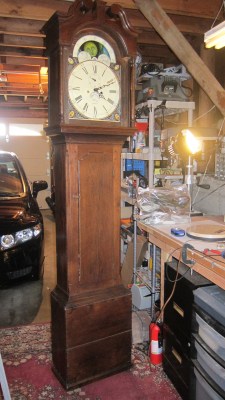
When you see a mechanical clock, you know on some level that it took a vast amount of expertise and craftsmanship to get working, but you might also assume that this could all be swapped out very easily with modern electronics. While this might be the case with a clock that only tells time, as David Henshaw shows with his project, once you add in extra features like a moon phase, date indicator, and chimes, things get complicated quickly.

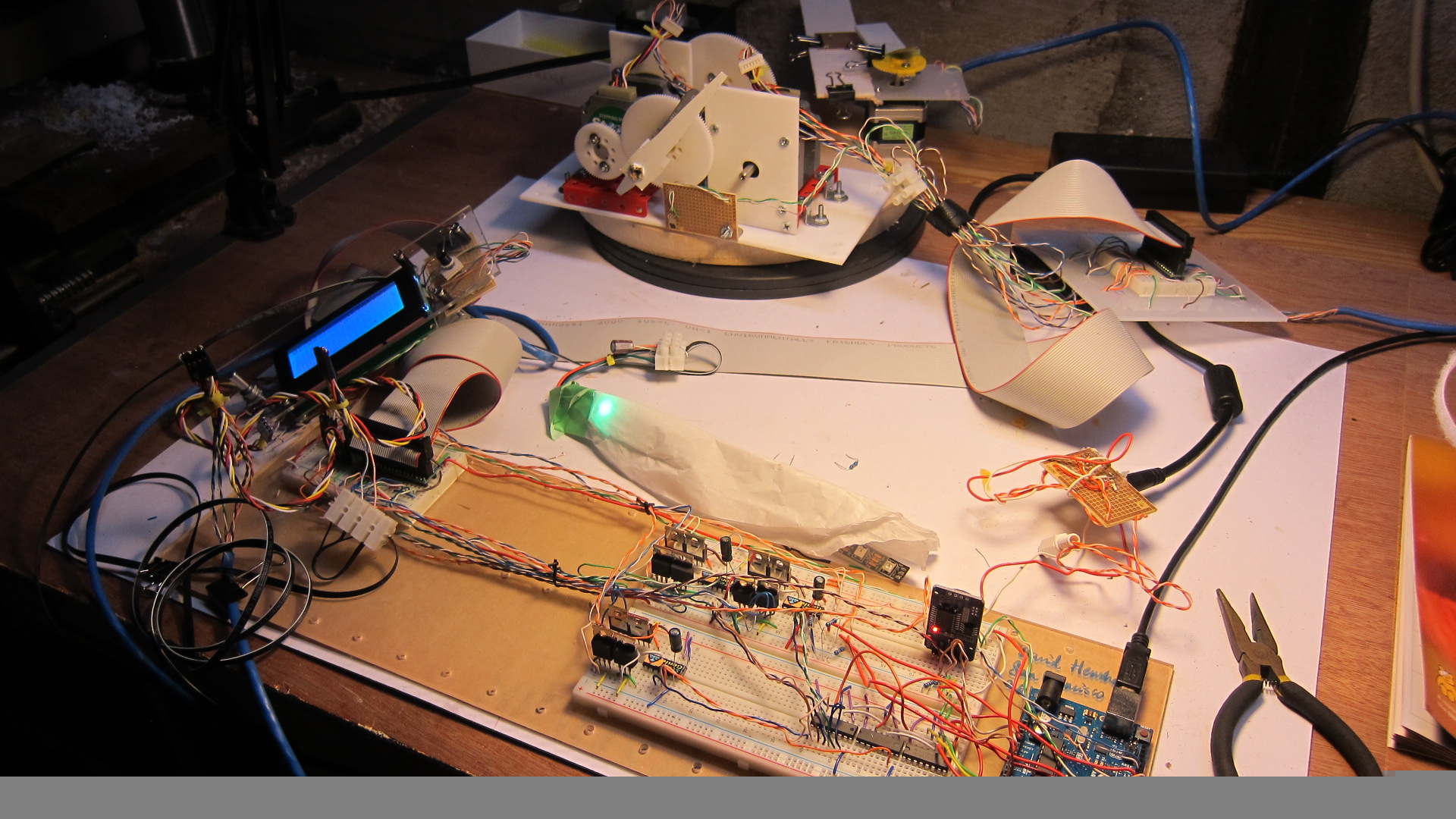
Henshaw began by purchasing an 1847 vintage clock from England without the movement—the parts that actually it tell time. He then replaced the mechanical assembly normally found inside with stepper motors, sensors, an Arduino Uno, and a variety of other wires and bits.

You can see the retrofitted grandfather clock in action below, while the build process (which took the better part of a year) and Arduino code he used are outlined on his website.

Building an 8-step keyboard sequencer with Arduino

Sequencers, as YouTuber “LOOK MUM NO COMPUTER” explains, are musical devices that go through a sequence of tones one by one. While this can be done quite simply with a 4017 counter chip, if you instead substitute in an Arduino board for the counter, you can make your gadget behave normally, go backwards, or even act as a sort of keyboard using input buttons.

This particular project employs a Nano for control, giving it a conveniently small form factor to fit inside your equipment.

Since the start of building modular synths, ive always been looking for an arduino powered sequencer. but never really happy with the projects that were about. because it was still menu dives and button combinations. which is not what you wanna be messing about with! you may aswell use a computer and a mouse ha.

Be sure to check out LOOK MUM NO COMPUTER’s entire build process and a demo of the keyboard sequencer in the video below. You can also find circuit diagrams and Arduino code in the project’s write-up here.

Modernizing a 170 year old Antique Grandfather Clock

Frankly, we let out a yelp of despair when we read this in the tip line “Antique Grandfather clock with Arduino insides“! But before you too roll your eyes, groan, or post snark, do check out [David Henshaw]’s amazing blog post on how he spent almost eight months working on the conversion.

Before you jump to any conclusions about his credentials, we must point out that [David] is an ace hacker who has been building electronic clocks for a long time. In this project, he takes the antique grandfather clock from 1847, and puts inside it a new movement built from Meccano pieces, stepper motors, hall sensors, LEDs, an Arduino and lots of breadboard and jumper wires while making sure that it still looks and sounds as close to the original as possible.

He starts off by building a custom electro-mechanical clock movement, and since he’s planning as he progresses, meccano, breadboard and jumper wires were the way to go. Hot glue helps preserve sanity by keeping all the jumper wires in place. To interface with all of the peripherals in the clock, he decided to use a bank of shift registers driven from a regular Arduino Uno. The more expensive DS3231 RTC module ensures better accuracy compared to the cheaper DS1307 or similar clones. A bank of RGB LEDs acts as an annunciator panel inside the clock to help provide various status indications. The mechanical movement itself went through several iterations to get the time display working with a smooth movement of the hands. Besides displaying time, [David] also added a moon phase indicator dial. A five-rod chime is struck using a stepper motor driven cam and a separate solenoid is used to pull and release three chime hammers simultaneously to generate the loud gong sounds.

And here’s the amazing part – he did all of this before laying his hands on the actual grandfather clock – which was shipped to him in California from an antique clock specialist in England and took two months to arrive. [David] ordered just the clock housing, dial/face and external parts, with none of the original inner mechanism. Once he received it, his custom clock-work assembly needed some more tweaking to get all the positions right for the various hands and dials. A clock like this without its typical “ticktock” sound would be pretty lame, so [David] used a pair of solenoids to provide the sound effect, with each one being turned on for a different duration to produce the characteristic ticktock.

At the end of eight months, the result – christened Judge – was pretty satisfying. Check the video below to judge the Judge for yourself. If you would like to see some more of [David]’s clockwork, check out Dottie the Flip Dot Clock and A Reel to Reel Clock.


Filed under: Arduino Hacks, clock hacks