Owners of Western Digital network attached storage (NAS) devices may have yet another security headache on the horizon. Following the two flaws hackers exploited to wipe My Book Live devices remotely, security journalist Brian Krebs has published a report on another zero-day vulnerability that affects Western Digital products running the company’s My Cloud OS3 software. What’s more, it doesn’t appear there will be an official fix for those who don’t upgrade to a newer storage solution.
Earlier in the year, security researchers Radek Domanski and Pedro Ribeiro discovered a series of weaknesses that allow a malicious actor to remotely update a My Cloud OS3 device to add a backdoor. The two say they never heard back from the company when they tried to contact it about the vulnerability. Western Digital attributes its response (or lack thereof) to one of its previous policies.
“The communication that came our way confirmed the research team involved planned to release details of the vulnerability and asked us to contact them with any questions,” a spokesperson for the company told Krebs. “We didn’t have any questions so we didn’t respond. Since then, we have updated our process and respond to every report in order to avoid any miscommunication like this again.”
While the flaw isn’t present in Western Digital's new My Cloud OS 5, it’s unclear if the company ever went back to address it in My Cloud OS3. What’s more, it no longer plans to support the older software. “We will not provide any further security updates to the My Cloud OS3 firmware,” Western Digital says in a support page dated to March 12th, 2021. “We strongly encourage moving to the My Cloud OS 5 firmware. If your device is not eligible for upgrade to My Cloud OS 5, we recommend that you upgrade to one of our other My Cloud offerings that support My Cloud OS 5.”
We’ve reached out to the company for more information. In the meantime, you can protect your My Cloud device by downloading a patch Domanski and Ribiro developed. One thing to note is you’ll need to reapply it each time you reboot your device. You can also protect your My Cloud NAS drive by limiting its access to the internet.
iPadOS 15 is arriving at a crucial time for the iPad. Ever since the well-designed and overly powerful 2018 iPad Pro arrived, people have increasingly asked Apple to make its tablet software as flexible and impressive as its hardware. This year’s iPadOS update isn’t going to satisfy those who want the iPad to work more like a Mac — it still feels like an iPad, for better or worse.
That said, Apple has made a handful of significant changes and a host of smaller ones, all of which add up to an experience that makes the iPad more customizable and flexible than before while still retaining (and improving upon) the basic iPad experience. There are a lot of new features to unpack, and the just-released iPadOS 15 public beta is still a work in progress, but here are some of the most significant changes to look forward to when the final software arrives this fall.
Should you install iPadOS 15?
But first, a note about that beta status. Apple’s public betas are generally pretty reliable, and that’s true here, too. I’ve generally been able to use my 11-inch iPad Pro without any issues, but apps occasionally crash and throw me to the Home Screen; interacting with notifications doesn’t always work; and there are various other hiccups here and there. (Examples: my cursor doesn’t always move to the search field when I summon it, and the last few letters of my messages are sometimes cut off when using the app in Slide Over.) It’s nothing deal-breaking, but it’s noticeable, particularly when I use my iPad for multiple hours at a time. Unless you're extremely curious, I'd wait for a few more beta versions to be released before giving it a shot, unless you can put it on a back-up iPad.
Widgets and Home Screen updates
With that out of the way, let’s dig into the new features. The most obvious change in iPadOS 15 is that widgets have come to the Home Screen. As with last year’s iOS 14, iPad users can now pin widgets anywhere they want. You can also select which apps you want to show on the Home Screen and stash the rest in the App Library, an auto-organized place to find everything you’ve installed on your iPad. Both widgets and the App Library came to the iPhone last year, and it was surprising that they didn’t arrive on the iPad until now.
My "work" home screen.
I’m glad Apple did this, because it makes your iPad’s home screens far more customizable than before, something sorely needed on a big-screen device. It took a little work, but I’ve now hidden the apps I don’t use as much in the App Library and now have five home screens curated for work, entertainment, games and so forth. For example, my work screen only has six app shortcuts (Drive, Docs, Sheet, Trello, Slack and LastPass), but the variety of widgets I have installed provides glanceable info and easy access to a lot of tools. I have a widget showing recent notes in the “work” folder, another with Reminders (also specifically from my work group), an Apple News widget showing the latest tech news, and widgets for Google Calendar and Gmail. All that, plus the apps in my dock, make this the prime place to go when I need to get things done.
Quick Notes
The other new feature that could fundamentally change the iPad experience is Quick Notes. As Apple’s Craig Federighi said during last month's WWDC keynote, Notes are now a “system-wide” feature. Swiping in from the lower right corner summons a new note that floats above whatever apps you’re using. You can quickly type or write down (with the Apple Pencil) whatever comes to mind and then swipe the note away when you’re done. Depending on your settings, you can start a new note every time you access Quick Notes, or just keep adding to the same one. Finally, you can swipe between Quick Notes you’ve started if you want to get to a specific document.
At the top of this Quick Note is a button that automatically appears to let you save a link to the page you're visiting.
The iPad’s Slide Over multitasking feature offered an approximation of this experience, but Quick Notes is far more flexible. For starters, you can move a Quick Note anywhere on the screen you want, making it feel like a true “window” reminiscent of something you would use on Windows or macOS. If you’re going to jump in and out of the same note frequently, you can dismiss it to the side of the iPad screen where a little arrow shows that you can summon it back quickly.
Apple’s Quick Note demos mostly focused on using the Apple Pencil to quickly jot things down, but it works just as well with a keyboard. When I’m doing work, it’s almost always with the Magic Keyboard attached, and being able to quickly summon a persistent document to take notes in, regardless of what else I was doing, makes the iPad feel significantly more versatile. It’s a great tool when doing research, especially since you can add links to web pages in Safari or destinations in Maps with one tap. My only real complaint is that the “swipe in from the bottom right” gesture is a little awkward, especially when using the iPad docked to a keyboard. It’s much with the Apple Pencil.
Multitasking
Multitasking was a major focus at WWDC, as well. While Apple did make some useful changes here, the fundamental iPad multitasking experience is still the same. Apps can take up the whole screen, or share the display with a second app in Split View. There’s also the Slide Over area, which lets you quickly summon a floating window containing another app. Apple has made major improvements to these features over the years, but they’re the same fundamental multitasking options we’ve had since iOS 9 back in 2015.
The tiny multitasking menu can be handy, once you know how to use it.
If you’ve been hoping for a true windowed multitasking experience, this isn’t it. But Apple has made it easier to work with the multitasking features it does offer. Now, there’s a tiny three-dot menu at the top of every app you use that lets you move the app between full screen, slide over and split view. As I compose this sentence, I’m typing in the Notes app, full screen. If I want to take Notes into Split View and share the screen with Safari, I just tap the multitasking menu and hit the Split View icon. This gives me a full view of my Home Screen, which then lets me pick anything I want to go alongside Notes.
Being able to quickly choose from any app on your Home Screen when setting up a multitasking view is a big improvement; before, you primarily had to use search to find the app you want, or drag one of the apps available in your dock. The menu also makes it a lot easier to move apps between Split View, Slide Over and full-screen views. Previously, you had to be aware of a variety of gestures, but a few minutes of playing with the multitasking menu makes the behavior pretty clear.
Safari
The last major change I’ll cover at this early stage is Safari. It’s one of the most important apps on the iPad, and it’s gotten a lot better in the last few years. But for iPadOS 15, Apple has made what I predict will be a polarizing design decision. In an effort to slim down the top menu bar, Apple crammed the URL bar and open tabs into one row. Essentially, a tab and its URL bar are now represented by a single visual cue.
This means that the location of the URL bar moves. If you’re looking at the right-most tab you have open, for instance, the URL bar is all the way to the right. It definitely takes some time to get used to, since most of us are used to it always being right in the center of whatever browser we’re using. This also makes it harder to see all your tabs; besides the “active” tab, I can currently see eight others. The rest are hidden off to the left and right of my active tab. To see them, you’ll have to scroll either direction to find what you’re looking for.
Because my active tab is the one furthest to the right, the URL bar in my window is also far to the right.In this case, my active tab is to the far left, and so is the URL bar.
Apple’s menu bar cleanup also means it removed the button that zooms out to show you a preview of every tab you have open. I used that constantly, so I hate this change. And unlike on the Mac, you can’t customize the Safari menu on the iPad at all. Now, you either have to use a keyboard shortcut or pull up the new sidebar, which contains all the open tabs in a window along with your bookmarks, reading list, history and links shared in Messages.
Safari on the iPad already did a great job of hiding the menu bar once you started scrolling through a site, so this change feels unnecessary to me. I’ll be curious to see what kind of feedback Apple gets during the beta, because I wager plenty of other people will prefer the old layout.
Safari's new sidebar holds your tab groups as well as usual items like bookmarks and your reading list.
There is at least one good thing about the new Safari: tab groups. They’re handled elegantly, with a button in the sidebar letting you open either a new “blank” group for you to populate or taking all your current tabs and saving them as a group. You can swap between groups in the sidebar, and access any groups you’ve created in any open Safari window you have. Groups will also sync across your other devices, assuming you’ve upgraded to iOS 15 or macOS Monterey. Having different tab groups for different tasks has already proven useful to me, and I’ll probably use them even more as I get used to incorporating them into my workflow.
More to come
There are plenty of other significant changes to iPadOS 15, things like the new Focus system and notifications revamp, improvements to FaceTime and Messages, the new Universal Control system that works between a Mac, iPhone andiPad, and plenty more. (You can read about some of these changes in our previews of iOS 15 and macOS Monterey.) We’ll be doing a proper review of all the new software in its final form this fall, but in the meantime I’m going to keep digging into the future beta releases to see how iPadOS 15 changes between now and its wider release.
As the holiday weekend approaches, deals on the latest gadgets have been popping up across the web. Apple's 10.2-inch iPad is $30 off right now and Solo Stove, the maker of compact, stainless steel fire pits, has knocked $120 off most of its devices. We even have a few holdouts from Amazon Prime Day still available, like deals on Anker's Eufy RoboVac 11S and a two-pack Nest WiFi system. Here are the best July 4th tech deals we could find.
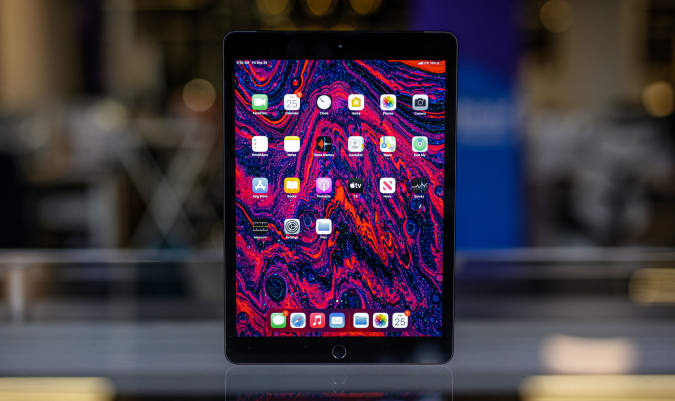
10.2-inch iPad
The 10.2-inch iPad remains on sale for $299, or $30 off its normal price. It's arguably the best tablet for new tablet owners and we liked its improved performance, familiar design and support for the first-generation Apple Pencil.
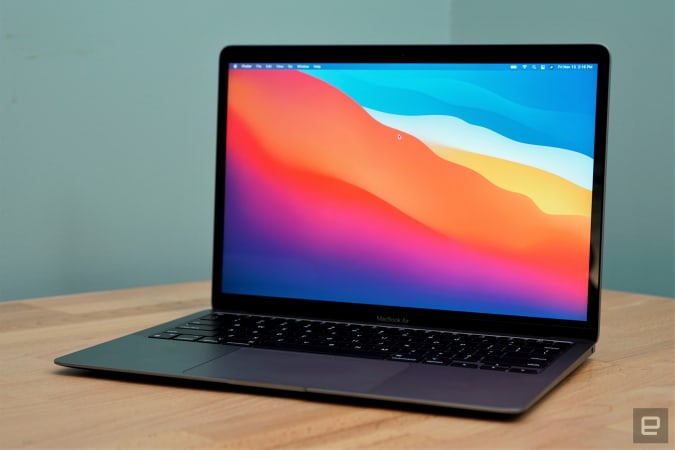
Apple's MacBook Air M1 has dropped to $899, which is the best price we've seen it. If you're looking to upgrade your notebook, this is one of the best options for most people right now. The Air M1 earned a score of 94 from us for its incredibly fast performance, excellent keyboard and trackpad, good battery life and lack of fan noise.
Apple's colorful iMacs with 8-core GPUs are $50 off right now at Amazon, bringing them down to $1,450. We gave this desktop a score of 89 for its remarkable performance thanks to the M1 chip, lovely 24-inch Retina Display and its thin-and-light design.
Solo Stove's Bonfire is $120 off for the company's July 4th sale, bringing it down to $230. That's the best price we've seen, and the other models are also $120 off for a limited time, too. These are smokeless, portable fire pits that we've recommended in the past as an easy way to upgrade your backyard setup.
On the heels of the new Thermapen One announcement, the Thermapen Mk4 has been discounted to $69. It's the best instant-read thermometer we've used so far —the backlit display makes it easy to read in almost any situation and the display rotates depending on how you're holding the pen. Plus, you never have to remember to turn it off because the pen automatically turns on when you pick it up and will shut off after some time of no use.
ThermoWorks is also running an Independence Day sale that knocks up to 20 percent off remote BBQ alarm thermometers.
The GPS + Cellular models of the Apple Watch Series 6 Product Red Edition are $100 off at Amazon. The 40mm is down to $399, or close to a record low, while the 44mm version has hit an all-time low of $429. We gave the Series 6 a score of 89 for its speedier performance, quicker charging and slightly improved battery life.
Through Sunday, July 4, GameStop is running a holiday sale that includes a "buy two, get one free" promo on a number of titles including Marios + Rabbids Kingdom Battle and Spider-Man: Miles Morales. The sale also includes discounts on pre-owned games as well as $30 in extra credit when you trade in a PS4, XB1, Nintendo Switch or another console.
Both Amazon and Microsoft have the Galaxy Buds+ for $100, or $50 off their normal price. We gave them a score of 83 for their improved audio quality, longer battery life, deeper iOS integration and better call quality.
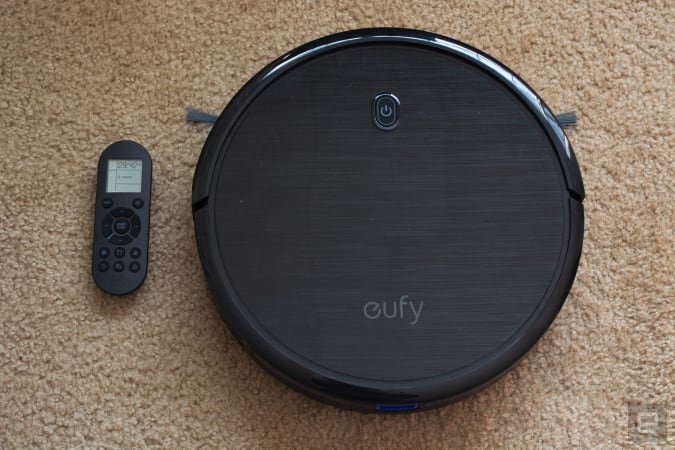
One of our favorite budget robot vacuums, the Anker Eufy RoboVac 11S, has dropped to $140. That's $90 off its normal price and close to its record-low. Not only is this one of the slimmest robo-vacs we've tried, but it cleans hard floors and carpets thoroughly and it comes with a remote that you can use to manually direct the vacuum, set schedules and more.
The Nest WiFi pack with one router and one extension point is down to $189, or $80 off. We gave this mesh system a score of 84 for its unobtrusive design, simple installation process and built-in smart speaker capabilities.
LG's 2021 C1 OLED 4K TVs have dropped in price, so you can grab the 55-inch for $1,497, or about $300 off its normal price. The C1 is the mid-tier lineup that includes the company's latest processor, HDMI 2.1 support and NVIDIA G-SYNC and FreeSync compatibility.
My Best Buy members can get the 48-inch LG CX OLED 4K smart TV for $1,250, or $250 off its normal price. It's free to sign up for My Best Buy and it's worth it to get a bit of extra money off all of the retailer's current sales. This OLED set has LG's a9 Gen 3 processor, support for Dolby Vision, Atmos, HDR10 and HLG plus Google Assistant and Amazon Alexa integration.
The Beats Solo Pro are still discounted to a record-low of $149. We liked these on-ear cans for their excellent sound quality, good ANC and hands-free Siri capabilities.
Omaze is giving away another $20,000 to build your ultimate gaming PC. This sweepstakes is free to enter, but funds donated with purchased entries will benefit Schools on Wheels, an organization that provides free tutoring and mentoring services to children experiencing homelessness across Southern California. Through July 2, you can use the code RADNESS150 at checkout to get an additional 150 bonus entries.
Pricing and availability is subject to change. No donation or payment necessary to enter or win this sweepstakes.See official rules on Omaze.
New tech deals
55-inch Sony A8H Bravia OLED smart TV
Amazon knocked about $600 off Sony's 55-inch A8H Bravia OLED smart TV. It includes the company's X1 Ultimate processor, Game Mode for a smoother, more responsive experience, the Android TV operating system and support for the Google Assistant, Amazon's Alexa and even Apple's AirPlay 2.
Apple's MagSafe charger is down to $34 at Amazon, or $6 off its normal price. While not a huge discount, it's a good opportunity to get a first-party accessory for less. This thin disk magnetically attaches to the back of the latest iPhones to power them up.
The accessory maker Twelve South is running a 4th of July sale through July 5th that knocks up to 60 percent off of many products. Of note are the AirFly Bluetooth transmitter for as low as $25, the Compass Pro adjustable iPad stand for $50 and the HiRise Lightning Stand for $25.
Casetify's holiday sale gets you 15 percent off most items through July 5th when you use the code 4JULY21 at checkout. The company makes colorful cases and protective gear for numerous mobile devices including iPhones, Galaxy handsets, AirPods and more. They also make great gifts thanks to Casetify's extensive library of customizable accessories.
Through July 4th, you can get 30 percent off sitewide at Speck. In addition to iPhones and Android device cases, Speck has gear for AirPods, MacBooks, Kindles, Chromebooks and others. If you want a case for your smartphone that will both look good and keep your gadget safe, Speck accessories are good options.
Aukey's PowerZeus 500 portable power station is on sale for $367 when you use the code AUKEYPLUS at checkout. This 518Wh station can easily come with you on a camping trip to provide juice to all your devices, or act as a backup battery during power outages.
One of our recommended VPNs is running a good sale on a two-year subscription. You can sign up for NordVPN for only $89 for the first two years, which comes out to $44.50 per year. We like NordVPN for its speed, its no-logs policy, the thousands of servers it has to choose from and that one account supports up to six connected devices.
Vinyl has been on a resurgence, and it seems like the pandemic has accelerated that. When Amazon launches a record of the month club to capitalize on it, you know it’s reached a tipping point. All this means many of us are looking to upgrade from a cheap turntable and build our first HiFi system. While there are many parts to that, perhaps most important are the speakers. If your speakers don’t sound good, what’s the point?
In a bid to help, we’ve assessed some of the best passive speakers under $600. These will need an amplifier, yes, but offer greater flexibility to your HiFi setup. And if you’ve been living with built-in speakers or all-in-one setups, we explain exactly what you might need. I promise you — it’s a beginner-friendly guide for recent vinyl addicts.
Instead, it's a platform where people go 'to be entertained.'
Instagram doesn't see itself as a platform where people go to share photos anymore. That's the main takeaway from a series of comments made by the head of the company, Adam Mosseri. "Let's be honest, there's some really serious competition right now," Mosseri said. "TikTok is huge, YouTube is even bigger and there are a lot of other upstarts as well." To stay competitive, Mosseri said Instagram has to embrace that aspect of itself, and that will mean changes. One way the app will change is with Instagram handing out more recommendations. He also said Instagram plans to embrace video more broadly, focusing on full-screen and immersive content. Continue reading.
Google has updated its Pay app's Passes API to simplify storing and displaying a digital card on Android to show a users' COVID-19 test and vaccination details. The tech giant has given access to the API to healthcare organizations, government agencies and organizations authorized to distribute COVID vaccines. That means their developers can easily create digital COVID vaccine and test cards that users can store on their device. Continue reading.
Porsche is planning a worldwide recall of its Taycan EV over a software issue that can cause sudden power loss. The action follows an investigation by the National Highway Traffic Safety Administration (NHTSA), which started in May following reports of cars switching to emergency mode. There have been no reports of accidents or injuries, according to sources familiar with the situation, but the NHTSA has also reached out to Volkswagen (Porshe’s parent company) regarding the Audi e-tron GT and RS e-tron GT, both of which use a similar powertrain to the Taycan. Continue reading.
With all of the changes that came to macOS Big Sur last year, we didn't expect Apple to deliver much with this year's update. It seems like iOS 15 and iPadOS 15 got the bulk of the upgrades this time around. But with major changes to Safari, FaceTime and new SharePlay features, the update is worth your attention. Devindra Hardwar gives it a test drive. Continue reading.
Nixxes is Sony's second studio purchase in a week.
Sony has just bought another studio, and, no, it’s not Bluepoint Games. On Thursday, the company announced the acquisition of Nixxes Software, a Dutch developer best known for supporting Crystal Dynamics, IO Interactive and Eidos Montreal in porting some of their games over to PC. The deal suggests Sony may step up its efforts to bring more of its exclusives to Windows. The company released Horizon Zero Dawn and Days Gone to Steam and the Epic Games Store, and Sony president Jim Ryan has said that more of the company’s first-party games would make their way to the PC. Continue reading.
We had a feeling Sony's tricked-out Xperia 1 III smartphone would be expensive. Turns out, we were right. Sony has revealed that the new handset (pcitured above), which packs a pro-grade camera, is available to pre-order for a cool $1,300 ahead of its August 19th release date. That means the new flagship is $100 more expensive than its predecessor, the Sony Xperia 1 ii, and fellow high-enders like the $1,200 Samsung Galaxy S21 Ultra, the $1,099 Apple iPhone 12 Pro Max and the $969 OnePlus 9 Pro.
As you'd expect at that price, the Xperia 1 III has some killer specs that should appeal to photography buffs. The 12-megapixel, 24mm equivalent Exmor RS sensor is accompanied by a 12-megapixel ultra-wide camera and a time-of-flight sensor that gathers depth data. Sony says the flagship is the first phone in the world with “true” optical zoom, which is achieved by actually moving the telephoto lens elements inside the phone. While the burst mode captures photos as fast as 20 times per second.
Sony also claims that the phone's 6.5-inch OLED display is the world’s first mobile 4K screen with a 120Hz refresh rate. Inside, there's Qualcomm’s powerful Snapdragon 888 chipset combined with 12GB of RAM and 256GB of internal storage, along with a 4,500mAh battery that supports wireless charging.
Sony Xperia 5 III
If you find paying upwards of $1,000 is too steep, Sony is also releasing the cheaper Xperia 5 III (pictured above) a month later in September for £899 in the UK — we've reached out for US pricing. Here, you'll get a 6.1-inch Full HD OLED screen, slightly less RAM at 8GB and either 128GB or 256GB of internal storage. Sony also cut back on some of the camera software tricks available on its big brother like real-time object tracking and the time-of-flight sensor. Plus, you don't get support for wireless charging. Otherwise, it packs the same chipset, pro-grade camera setup, 3D Reality audio support and battery, making it more of a crowdpleaser compared to its pricey sibling.
To sweeten the deal, both phones will ship with Sony wireless headphones: the Xperia 1 III comes with the WF-1000XM3 earbuds and the Xperia 5 III with the WH-H910N over-ear headphones. Purchasing the flagship also gets you 43,200 Call of Duty: Mobile CP Points worth $540.
Apple and Intel are reportedly testing chip designs with TSMC's 3-nanometer process and could be first to market with the technology, according to Nikkei. Intel may be planning to use the chips in next-gen notebooks and data centers, while Apple could be first to market with a 3-nanometer processor in future iPad models. Taiwan-based TSMC will reportedly start manufacturing processors for both companies as early as next year.
TSMC is currently manufacturing 5-nanometer chips for Apple's iPhone 12, and in 2022 will build next-gen AMD Zen 4 chips. It has targeted 3-nanometer volume production for the second half of 2022 with products likely coming along in 2023.
TSMC expects the new tech to deliver 10-15 percent greater performance at the same power levels, or reduce power 25 to 30 percent at the same transistor speeds over 5-nanometer tech. The company also has a 4-nanometer N4 process set to arrive in 2022, offering an evolution over 5-nanometer with minimal changes required by chip designers.
Apple's iPad will reportedly be the first devices powered by 3-nanometer chips, according to Nikkei's sources. The next generation of iPhones rolling out next year will supposedly use 4-nanometer tech for scheduling reasons.
Currently the chip volume planned for Intel is more than that for Apple's iPad using the 3-nanometer process.
The situation with Intel is perhaps more interesting. Intel confirmed to Nikkei that it would work with TSMC for its 2023 product lineup and has previously said that it would subcontract some chip manufacturing out to the Taiwan-based company, though it didn't say which technology it would use.
As it stands now, Intel has only just started rolling out its 10-nanometer chips (which are broadly equivalent to chips made with TSMC's 7-nanometer process), and has delayed 7-nanometer production until 2023.
According to Nikkei, TSMC will produce more chips for Intel than Apple. "Currently the chip volume planned for Intel is more than that for Apple's iPad using the 3-nanometer process," a source said. Intel plans to use TSMC to build processors for notebook and data servers "in an attempt to regain market share it has lost to Advanced Micro Devices and NVIDIA over the past few years," the story reads.
If the rumors prove accurate, Intel could possibly beat AMD to 3-nanometer tech, as AMD plans to use 5-nanometer chips for its next-gen Zen 4 processors. AMD now relies on TSMC for its processor and GPU chips, as its previous supplier GlobalFoundries decided not to manufacture 7-nanometer or smaller chips back in 2018.
TSMC is building a $12 billion chip fab plant in Arizona and plans to use its current 5-nanometer manufacturing technology. Intel, meanwhile, plans to invest $20 billion in two Arizona factories.
You're not losing access to digital games for the PSP just yet. When Sony reversed its decision to close the PS3 and the PS Vita storefronts back in April, it also said that the "PSP commerce functionality will retire on July 2nd, 2021 as planned." While that could be interpreted as Sony pulling the plug on all PSP downloads, new language that has popped up on both the US and the UK PlayStation websites (as spotted by Kotaku) shows that's not the case.
The PSP game store shut down way back in 2016, but you can still get games for the console through the PS3 and the PS Vita stores. Now that those storefronts aren't shutting down, you'll still be able to download PSP games through them, though there will be some limitations going forward. Starting on July 6th, you will no longer be able to search for games on the PSP itself or make any in-game purchases. Kotaku says the information first appeared on the UK website on June 28th, and it makes no mention of the previous July 2nd timeline.
When Sony backtracked on its plans to shutdown the PS3 and Vita stores, Sony Interactive Entertainment's CEO Jim Ryan said that it was clear the company "made the wrong decision." It's unclear if limiting PSP users' capability to search for titles or make in-game purchases is what Sony had in mind when it said that it will retire the console's "commerce functionality," or if it also changed its decision like it did with the PS3 and PS Vita stores' closure. Either way, what matters is that the PSP's digital library will continue being available for now.
Twitter is thinking about new ways to share tweets with specific groups of people. The company showed off two concepts for new features that would allow users to target tweets toward specific audiences without having to switch accounts or change privacy settings.
The first would enable people to designate “trusted friends” so some tweets would only be visible to that group. The idea is similar to Instagram’s “close friends” feature for Stories. According to an image shared by Twitter designer Andrew Courter, Twitter’s version would allow users to toggle the audience much like the way you can choose who is able to reply to you.
He added that “perhaps you could also see trusted friends' Tweets first” in your timeline, which would offer another alternative to the chronological or algorithmic “home” timelines Twitter currently offers.
Twitter
Another feature would allow people to take on different personas or “facets” from the same account. For example, a user could have a professional identity, where they tweet about work-related topics, and a personal one that’s meant more for friends and family. According to the images, users could have the option of making any one persona public or private, and new followers would be able to choose which “facet” they want to see tweets from.
Finally, Courter showed off a new concept for filtering replies that would allow users to choose specific words or phrases “they prefer not to see.” Then, if a user who is replying or mentioning the user tries to use one of those words or phrases, Twitter will let them know the words go against that person’s preference.
Twitter
According to the images shared by Courter, the feature wouldn’t prevent anyone from sending a tweet using the offending words, but it would make it less visible to the person on the receiving end. The idea is similar to other kinds of anti-bullying nudges Twitter has employed in the past, but would go a step further as each user could set their own conversational “boundaries.”
All these features are still just ideas — Courter noted that “we’re not building these yet” — so they may never actually launch. But the company is looking for feedback on the designs, so they could inform future tools Twitter does decide to build. At the very least, it sheds some light on how Twitter is thinking about issues like identity.
Ratchet & Clank Rift Apart should now look smoother and feel more responsive if you play Sony's latest PS5 exclusive in fidelity mode on a 120Hz display. The latest patch bumps up the framerate from 30 fps to 40 fps in that mode.
The update slightly makes up for the lack of variable refresh rate (VRR) support on PS5 as things stand, though Sony plans to enable that through an update in the future. The fidelity mode prioritizes visuals over performance, offering ray tracing and up to 4K resolution, but the framerate was capped at 30 fps. The performance and performance RT modes have lower resolution, but run the game at 60 fps.
Aiming for 40 fps might seem like an odd number when we're so used to having 60Hz and 120 Hz displays. Because 40 divides neatly into 120, a 120Hz screen will show a new frame on every three refreshes. As The Verge notes, that will help ensure Ratchet & Clank Rift Apart looks smooth if you have a compatible display. It'll certainly seem slicker than a framerate that doesn't match up with how often a screen refreshes, which could cause screen tearing.
The framerate issue should become less complicated for PS5 developers once the VRR update arrives. Xbox Series X/S and many PC GPUs currently have VRR support, and more 120Hz+ monitors and TVs are hitting the market.
With all of the changes that came to macOS Big Sur last year, we didn't expect Apple to deliver much with this year's update, Monterey. And for the most part, that prediction held true. iOS 15 and iPadOS 15 got the bulk of the upgrades this time around. But that doesn't mean Apple has forgotten about its computers. After testing out the first macOS Monterey public beta, I'd wager Mac fans will be pleased to see just how much it pushes Apple's desktop vision forward. It's not a dramatic leap like Windows 11, but, well, it doesn't really have to be.
What's in the public beta?
This Monterey public beta includes the FaceTime and SharePlay updates, which will also show up in Apple's mobile operating systems. There's also the dramatically redesigned Safari browser, and improved Focus options for managing notifications and other distractions.
Unfortunately, you won't see our most anticipated new feature, Universal Control. That'll let you use a single keyboard and mouse to control multiple Macs and iPads simultaneously. Given just how complex the feature appears to be, it makes sense for Apple to take time and make sure it's fully baked. It'll likely pop up in a future beta as we get closer to a final release in the fall.
Safari
After loading up the Monterey public beta for the first time, I had a hard time telling if I actually upgraded from Big Sur. But then I launched the new Safari browser, which sent my head spinning. Say goodbye to the tabs bar — get used to juggling your tabs, address bar and navigation buttons all in a thin menu at the top.
Clearly, the goal is to devote as much screen space to web pages as possible. That makes for a better browsing experience on smaller devices, like the 13-inch MacBook Air I’ve been testing on. But it also means a lot more clutter when trying to sort through your tabs. It's not bad when dealing with just a few tabs, but once I racked up 10 or more, they all got reduced to their site icons. It used to take a lot more tabs to make Safari that unusable.
Devindra Hardawar/Engadget
While you can always hover your cursor over the icons to see a small preview of the page, that can be a slow process if you're trying to fish through tons of tabs from one site. You can also bundle tabs together in groups now, which could be useful if you're on a serious research binge. You can name tab groups and swap between different sets in an instant. It's a more elegant solution than opening more Safari windows, and best of all it's also synced across the browser on iOS and iPadOS.
Beyond the new interface, Safari is still the zippiest browser on macOS by far. I typically juggle Chrome and Safari at the same time — it's helpful for keeping work and personal logins separate — and Apple's browser always loads pages just a bit faster.
Apple
FaceTime and SharePlay
In macOS Monterey, FaceTime is starting to look a lot more like Zoom. And I suppose that makes sense, given just how essential group video chats have been over the past year. Now you can start a FaceTime call without ringing anyone directly. Once you're in, you can either invite your friends or create a link for anyone to join, even if they're on an Android device. Your calls are more like events anticipating a group of people, instead of individual chats where you may rope in a friend or two.
During my testing, a friend was able to join my FaceTime weblink via his iPhone running iOS 14, but he couldn't hear anything. When he moved over to his Mac, everything worked fine. Since he was running macOS Catalina, though, it still showed up as a web FaceTime call, instead of automatically opening the app.
If you've got AirPods or other headphones that support Spatial Audio, you'll also be able to hear people’s voices coming from different directions based on their screen position in FaceTime. They'll need to be running the Monterey or iOS/iPadOS 15 beta for the feature to work, but it'll certainly be more useful once those updates finally drop. During my testing, I heard two friends coming from the left and right channels of my AirPod Pros. It's like you're sitting at a small table together. I'd imagine it would also be useful for users who are visually impaired and hard of hearing, as the separation makes it easier to keep track of multiple people.
I’d imagine many more people will be FaceTiming their friends to take advantage of SharePlay, which allows you to watch shows and listen to music with others. Using it could be more intuitive, though. When trying out the feature with other Monterey and iOS 15 beta testers, it took us a while to figure out there wasn’t a SharePlay button anywhere within FaceTime. Instead, you have to start playing a piece of media, which triggers a pop-up notification that asks if you want to share it with friends, or view it on your own.
Once I figured that out, it was nice to be able to sit back and watch a few minutes of Mythic Quest with my friends. Unfortunately, even though FaceTime is opening up to Android and Windows users with web video chats, those folks won’t be able to enjoy SharePlay content. And it remains to be seen if and how media providers adopt the service. With Apple TV+ content, you and your friends need to have subscriptions to watch anything. I can’t imagine Netflix or Disney+ being more lax and allowing a single subscriber to share something with friends.
Other notable additions:
The new Focus Modes are a nice way to reduce distractions from notifications. You can also customize your Focus options to allow messages from specific users.
Quick Notes is a simple way to grab quotes and other snippets of information from websites and documents. They appear inside of the Notes app and are synchronized across all of your Apple devices with iCloud.
I didn’t have much time to dive into Shortcuts, but at first glance they appear to be a more user-friendly stab at macOS Automations. One of the built-in Shortcuts is supposed to make a GIF from video files, but it kept throwing an error whenever I tried to trigger it with Siri.
Live Text is a nifty feature that lets you select text embedded in photos. It’s useful for grabbing information from receipts, and I’d wager it’d be helpful for handwritten notes as well.