AT&T and Facebook Reality Labs are joining forces to work on "collaborative video calling" as well as augmented reality experiences in Facebook’s apps. They're using Spark AR, a platform from Facebook that powers AR experiences across devices and the company's apps.
Their first AR collaboration is a promo for Space Jam: A New Legacy. Using your phone, you can bring Lola Bunny, Daffy Duck and Tweety into your space via a website, AT&T's Instagram profile or Facebook. You can use the front or rear camera to take a picture with them or create a video with a custom intro from Bugs Bunny. AT&T says its 5G network can boost the "performance and reliability for each AR experience," with the help of more vivid graphics and shorter load times.
The Facebook partnership is one of a slew of 5G collaborations that AT&T will discuss at an event on Wednesday. The provider has partnered with Boingo to bring 5G+ (aka millimeter wave 5G) to airports across the US, including John F. Kennedy, LaGuardia, Chicago O’Hare, Los Angeles Airport and Denver International Airport. They plan to roll out 5G+ in seven airports this year and 25 by the end of 2022 with the aim of reducing network congestion. AT&T, which suggests you might use the network to quickly download a bunch of TV show episodes right before a flight, has already switched on 5G at Tampa International Airport.
AT&T has also teamed up with an app called Bookful for 5G-powered AR reading experiences with characters from kids' books leaping out of the screen. In addition, it's working with Warner Bros., Ericsson, Qualcomm, Dreamscape and Wevr on a proof-of-concept Harry Potter virtual reality experience called Chaos at Hogwarts.
Razer has unveiled its latest Blade 17 with the latest NVIDIA and Intel parts targeted at both gamers and content creators. It also launched the more mild-mannered, but much cheaper and still pretty well-equipped Blade 15 Base, also equipped with Intel's latest 11th-generation CPUs.
The Blade 17 is certainly the star of this show, as it comes with Intel's 8-core 11th-generation Core i9-11900H, the same we saw in its Blade 15 laptop earlier this year. As Intel's first 10-nanometer gaming PC chips, it delivers a 19 percent speed bump over equivalent last-gen CPUs, Intel claims. You can also clock the chip up to 4.9 GHz while seeing a stock PL1 power draw of 65 watts. All of that means you should see more performance and power efficiency at the same time, according to Razer and Intel.
Razer
To compliment that CPU, you can get the Blade 17 with up to an RTX 3080 GPU in either 8GB or 16GB configurations, depending on the display. And there are three display choices: you can get it with a 120Hz 4K HDR 400 nit touch display for content creation (with the 16GB VRAM RTX 3080 configuration), a 360Hz 1080p display for the fastest gaming possible, or a 240Hz 2,560 x 1,440 display for a blend of the two.
Other specs include 32GB of 3,200 MHz Dual-Channel DDR4 RAM (upgradeable to 64GB), up to a 4TB NVMe SSD (with an open M.2 slot) and numerous ports: Two Thunderbolt 4 ports (USB-C 3.2 Gen2), three USB 3.2 Gen 2 Type A ports, HDMI 2.1 and a UHS-III SD card reader. It also comes with WiFi6, a 1080p webcam with Windows Hello IR, THX spatial audio support, a 4-mic array and a 70.5 WHr battery.
Razer
All of that fits in a 6.06 pound squarish body with typical Razer styling that's relatively slim at 19.9 mm. The Blade 17 is now available for pre-order at $2,400, but you'll pay up to $3,700 for the 4K display-equipped model with 32GB of RAM and an RTX 3080 with 16GB of DDR6 VRAM.
The Blade 15 Base (below) is more modestly equipped than either that model or the Blade 15 we saw in May. However, it still has respectable components including Intel's 8-core i7-11800H processor and up to RTX 3070 8GB graphics. It also comes with either a 144Hz 1080p IPS, THX certified display or a 165Hz QHD display with up to 100 percent DCI-P3 coverage.
Razer
Other features on the Blade 15 Base include a single Thunderbolt 4 port (USB-C), three USB 3.2 Gen 2 ports, a USB-C 3.2 Gen 2 port, HDMI 2.1 and Gigabit ethernet. That's a bit of a letdown from the Blade 15 advanced, which has an extra Thunderbolt port and an SD UHS III card reader. However, you'll also pay considerably less, as the Blade 15 Base starts at $1,800, compared to the $2,300 starting price of the Blade Advanced.
Windows 365, a new service announced today at the Microsoft Inspire conference, is basically an unintentional riff on the Yo Dawg meme: Microsoft put Windows in the cloud so you can run a Windows computer while you're running your computer. You can just call it a Cloud PC, as Microsoft does. It's basically an easy-to-use virtual machine that lets you hop into your own Windows 10 (and eventually Windows 11) installation on any device, be it a Mac, iPad, Linux device or Android tablet. Xzibit would be proud.
Microsoft
While Windows 365 doesn't come completely out of nowhere — rumors about some kind of Microsoft cloud PC effort have been swirling for months — its full scope is still surprising. It builds on Microsoft's Azure Virtual Desktop service, which lets tech-savvy folks also spin up their own virtual PCs, but it makes the entire process of managing a Windows installation in a far-off server far simpler. You just need to head to Windows365.com when it launches on August 2nd, choose a virtual machine configuration, and you'll be up and running. (Unfortunately, we don't yet know how much the service is going to cost, but Microsoft says it will reveal final pricing on August 1st.)
Windows 365 likely isn't going to mean much for most consumers, but it could be life-changing for IT departments and small businesses. Now, instead of managing local Windows installations on pricey notebooks, IT folks can get by with simpler hardware that taps into a scalable cloud. Windows 365 installations will be configurable with up to eight virtual CPUs, 16GB of RAM and 512GB of storage at the time of launch. Microsoft is also exploring ways to bring in dedicated GPU power for more demanding users, Scott Manchester, the director of Program Management for Windows 365, tells us.
Smaller businesses, meanwhile, could set up Windows 365 instances for their handful of employees to use on shared devices. And instead of lugging a work device home, every Windows 365 user can securely hop back into their virtual desktops from their home PCs or tablets via the web or Microsoft's Remote Desktop app. During a brief demo of Windows 365, running apps and browsing the web didn't seem that different than a local PC. It's also fast enough to stream video without any noticeable artifacts, Manchester says. (Microsoft is also using technology that can render streaming video on a local machine, which it eventually passes over to your Cloud PC.) You'll also be able to roll back your Cloud PC to previous states, which should be helpful if you ever accidentally delete important files.
Microsoft
While the idea for Windows 365 came long before the pandemic, Microsoft workers spent the last year learning first-hand how useful a Cloud PC could be. They used a tool meant for hybrid work — where you can easily switch between working in an office or remotely — while stuck at home during the pandemic.
But why develop Windows 365 when Azure Virtual Desktop already exists? Manchester tells us that Microsoft noticed a whopping 80 percent of AVD customers were relying on third-party vendors to help manage their installations. "Ultimately, they were looking for Microsoft to be a one-stop-shop for them to get all the services they need to," he said said.
That statistic isn't very surprising. Virtualizing operating systems has been a useful local tool for developers over the last few decades, but it's typically been a bit too difficult for mainstream users to manage on their own. And even though a tool like Azure Virtual Desktop brought it to the cloud (Manchester assures us that's not going anywhere either), it's even more difficult to manage.
One thing Windows 365 doesn't mean, at least at this point, is the end of traditional computers. "I think we'll still continue to have great client PC experiences," said Melissa Grant, director of Product Marketing for Windows 365, in an interview. "You know we have a relationship with our laptops. It is our sort of home and hub for our computing experience. What we want to offer with Windows 365 is the ability to have that same familiar and consistent Windows experience across other devices."
Accessories will be key whether you’re turning your new iPad into a laptop replacement or just trying to protect it against daily-life hazards. It’s tempting to turn to Apple’s own accessories — and in some cases, you should — but there’s a slew of alternatives that work just as well and are often more affordable. We tested out a bunch of cases, keyboards, styli and other miscellany to see which iPad accessories are worth buying.
Cases and stands
Valentina Palladino / Engadget
I’ve always been that person who takes her new smartphone or tablet out of the box and immediately puts it in a case. While some detest hiding the true form of their new gear, it’s undeniable that cases provide protection for probably the most expensive tech you own. Apple’s Smart Covers for its various iPads are fine, but they’re overpriced and most of them don’t give your iPad any edge protection. Similar alternatives abound, some of which do surround the edges of an iPad. I’ve found ProCase and MoKo make some of the best — even better, they cost a fraction of what Apple’s Smart Cover costs.
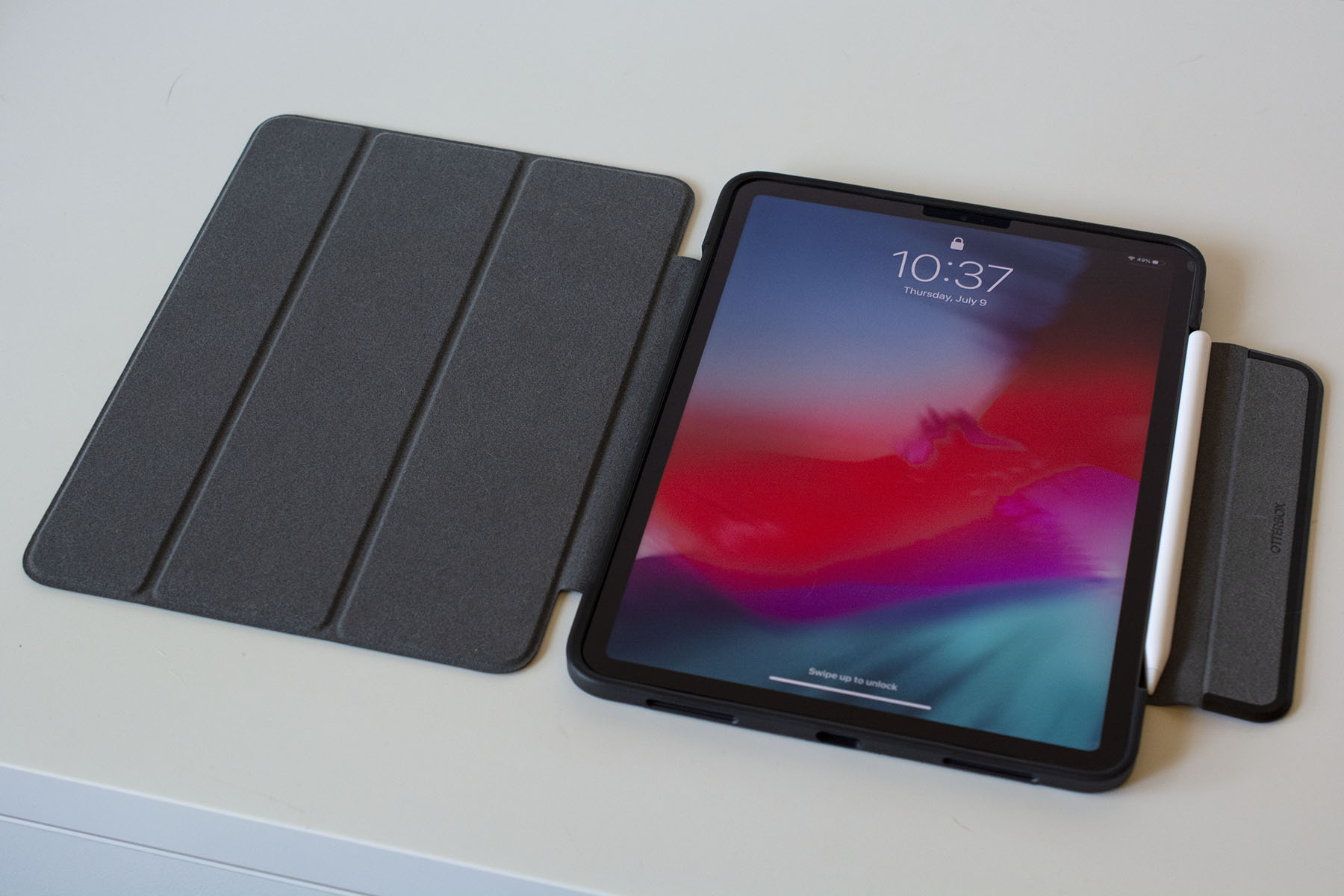
If you’re willing to spend a bit more on a case, get something that combines protection and style. Otterbox is an expert when it comes to protection, but its Symmetry Series 360 series shows that it also has the design chops. Symmetry cases look similar to the Smart Cover, but the clear, scratch-resistant back is sturdy without adding a lot of weight to the iPad and the edge protection is substantial. I also like the extra flap Otterbox added that keeps the screen cover closed and holds the second-generation Apple Pencil to the side of the iPad Pros. Symmetry Series 360 cases are available for most new iPads, and while they’re expensive at $90, they’re worth it if you want a great balance of protection and style.
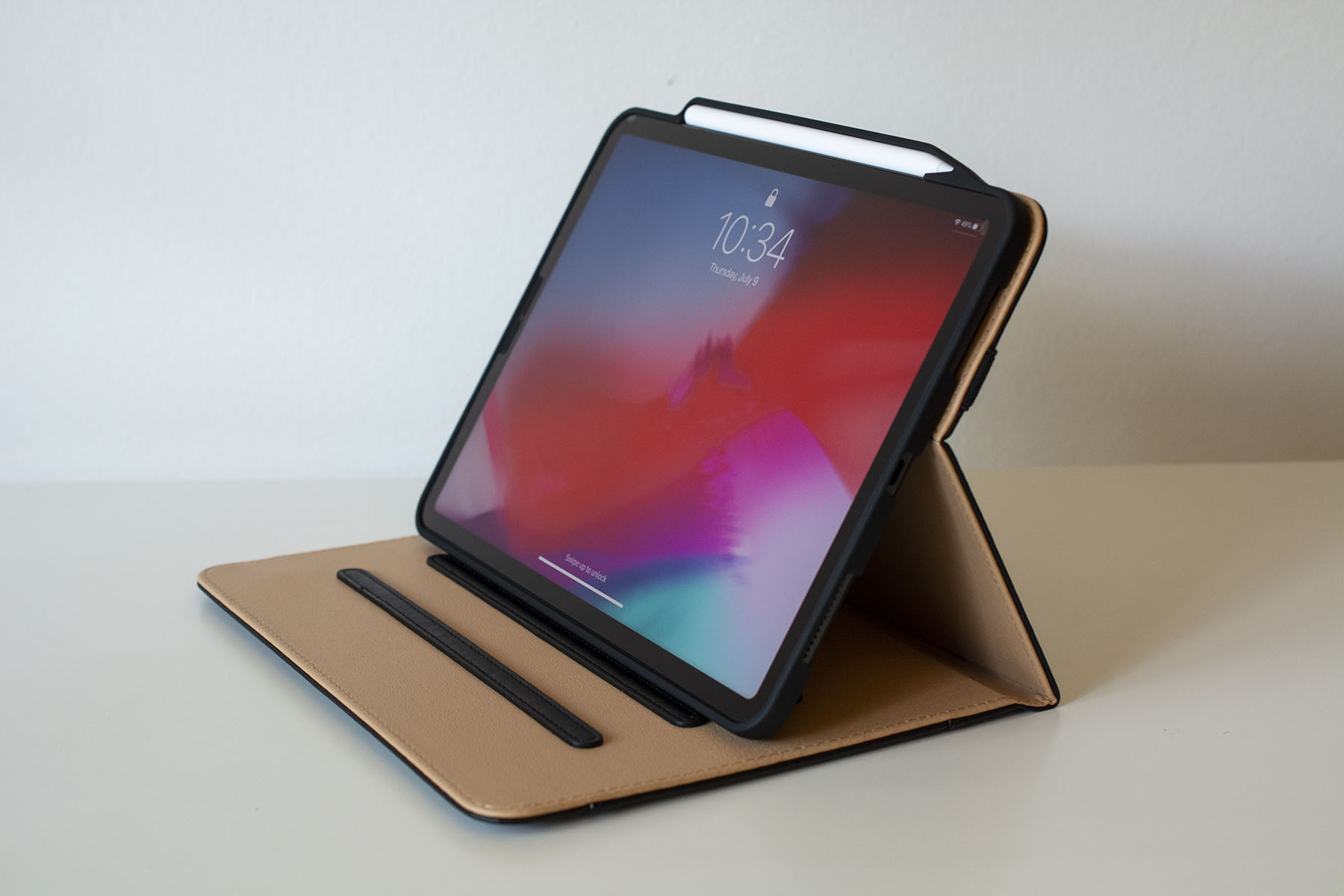
A more affordable alternative is ProCase’s Leather Folio. While ProCase isn’t as well known for protection as Otterbox is, this model has a flexible plastic interior that wraps around most of the iPad’s edges to keep it secure. The lining also surrounds the second-gen Apple Pencil while it magnetically charges against the new iPad Pros, making it one of the more secure cases for those that have the Pencil.
Leather folios will appeal to a certain type of person. I didn’t think I was that person — until I tried this case. Not only is it attractive, but it’s practical. It has a pocket on the front flap, three notches on which to prop up the iPad at different viewing angles and an elastic strap that can either keep the folio closed or hold the front flap against the back of the iPad while you’re using it. It’s definitely worth its $18 list price for those that want a case that’s just as practical as it is professional.
All of the cases we like prop up your iPad in some way, but they aren’t the best if you want the device at a comfortable eye level. You’ll want a dedicated tablet stand for that, and there are several out there that let you adjust height, angle and more. Anozer’s foldable tablet stand is a good option if you’re often on the go. It’s heavier than other stands at one pound and it can be folded (mostly) flat so you can easily throw it in your backpack. While it’s best suited for 7- to 13-inch tablets, it can support certain smartphones, too (or you could get the company’s dedicated smartphone stand instead).
If you’re willing to sacrifice flexibility for something more elegant, Elago’s P2 stand for iPad may be a good fit. It’s made of a single piece of aluminum with a ledge for your iPad and a few well-placed cutouts that you can snake a charging cable through. The ledge is also wide enough to accommodate most iPad cases. It may not be foldable or adjustable, but its minimalist design will make it an attractive addition to your desk.
There are two types of people that seek out keyboards for their iPads: those who want something more comfortable than the on-screen keyboard for banging out the occasional email, and those that plan to use their iPad as a fully-fledged laptop. If you’re part of the first crowd, there are tons of inexpensive Bluetooth keyboards that will do the trick.
I’m partial to Logitech’s Keys to Go, an ultra-slim keyboard that almost disappears in your bag. It’s without a doubt one of the most portable Bluetooth keyboards you’ll find and it’s fairly comfortable to type on. Yes, the keys have little travel and a bubbly feel to them, but they’ll let you compose a quick email or respond to a message on Facebook much more easily than you could with the touchscreen. I also like that its wipeable fabric prevents spills and dirt from getting inside the keyboard. Plus, at around $60-$70, it won’t break the bank.
If you fall into that second category of shopper, there are even more options for you. The most luxurious comes from Apple itself in the Magic Keyboard. The $300 case magnetically attaches to the new iPad Pros and keeps them “floating” above the keyboard and trackpad. We praised the Magic Keyboard for its typing comfort and precise trackpad, but docked it for its limited range of motion. It’s easily the fanciest keyboard available for the iPad Pros and it’s one to consider if money is no object — or if you want the most stylish (and arguably most comfortable) keyboard money can buy.
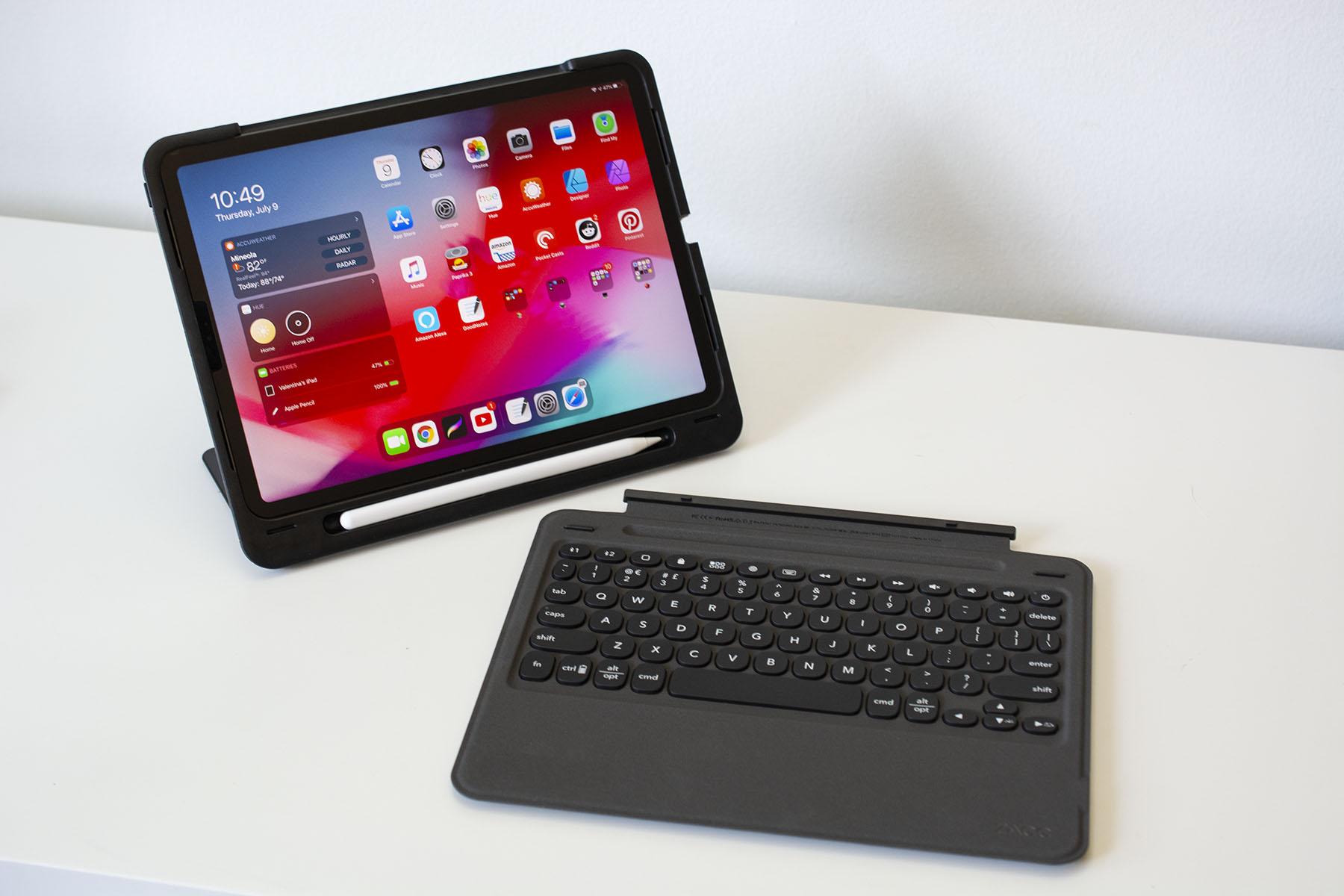
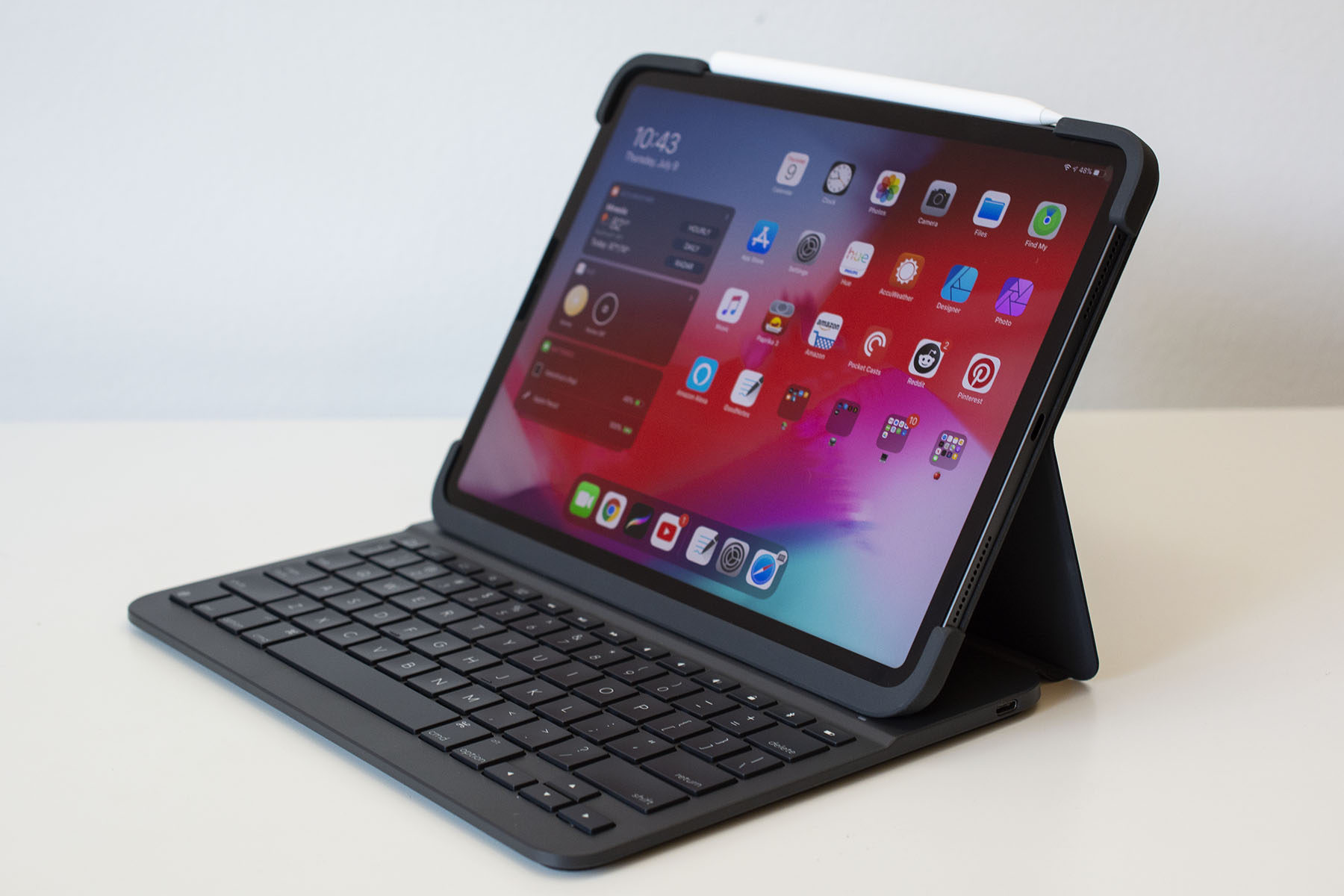
But as far as protection goes, the Magic Keyboard provides basically as much as Apple’s Smart Cover (which isn’t much). If you need something a bit more durable (and don’t want to spend $300), Zagg’s $30 Slim Book Go could do the trick. It’ll keep your entire setup pretty sleek as its name suggests, and it’s even thinner than the $130 Logitech Slim Folio Pro. The latter case may be on the thick side, but it has a well laid-out keyboard and a secure flap that holds the Apple Pencil against your tablet.
If you want something that combines durability with style, we like Logitech’s $160 Folio Touch keyboard case. Its exterior is made of a tweed-like fabric, so it will blend in better with your briefcase or work bag. It’s also fairly slim and has a similar Apple Pencil-friendly flap that closes the whole thing shut. Plus, the keyboard is joined by a small yet useful trackpad, so you can truly use your iPad as if it were a laptop.
This likely won’t come as a surprise, but the Apple Pencil is the best stylus you can get for the iPad. Both the first- and second-generation Pencils are designed to work specifically with iPads and it shows in their seamless writing performance. The second-gen stylus has a double-tap feature that you can customize to a certain degree, and pressure-sensitivity allows you to add as much or as little detail as you want to digital artwork. I highly recommend shelling out $100 or $130 for the Apple Pencil if you’re an artist — you won’t be disappointed.
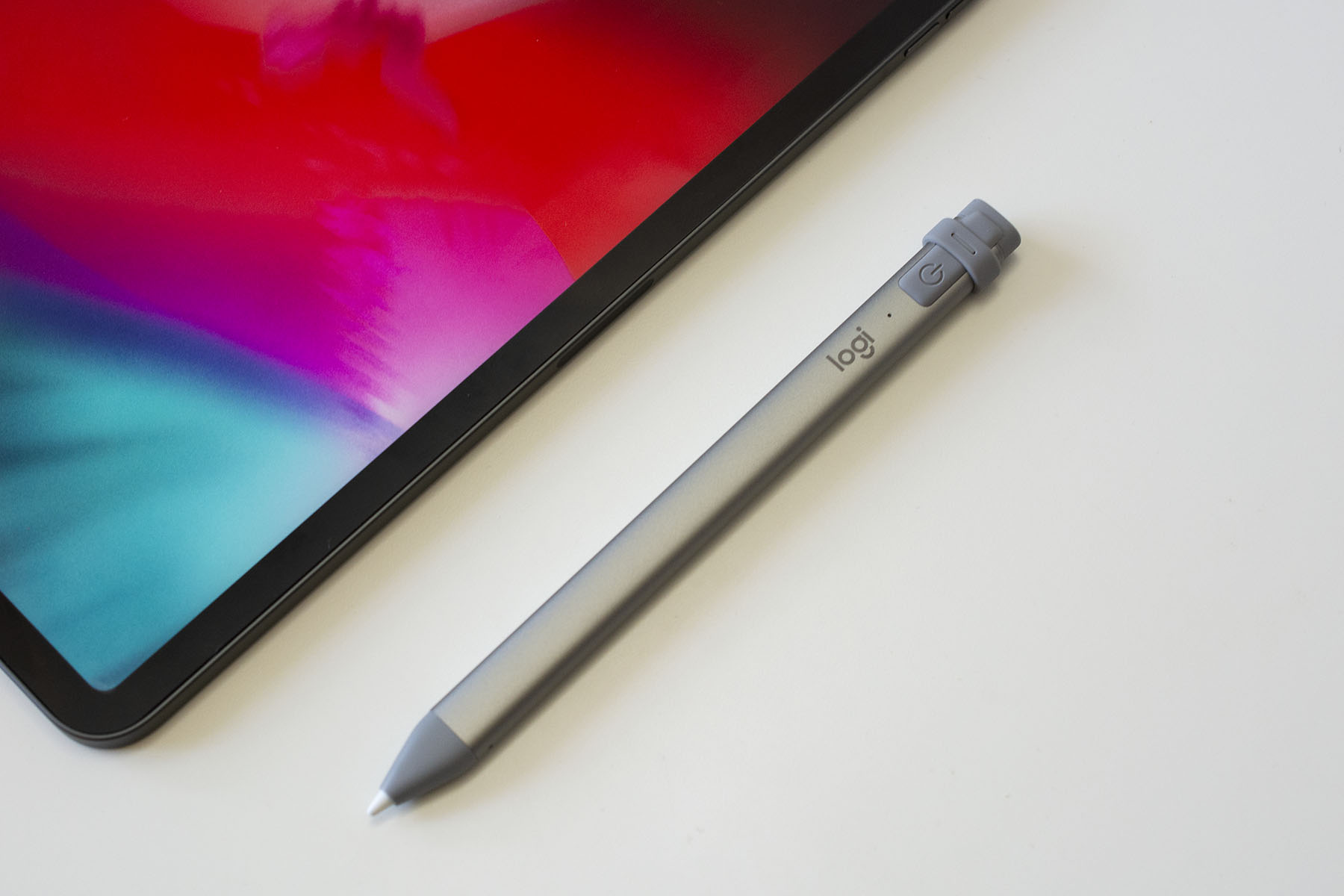
But there are other options, too. Logitech’s Crayon is more affordable at $70 and it has arguably a better grip than either Apple Pencil. It’s just as good in terms of latency and accuracy — drawing in Procreate was a lag-free experience and my strokes always ended up exactly where I wanted them to be.
But as someone who primarily uses an Apple Pencil for digital art, I missed pressure sensitivity when using the Crayon. Aside from that, the other biggest annoyance is that you have to use a Lightning or USB-C cable to charge it (even the newest model for the iPad Pros doesn’t magnetically attach to the tablet for charging). While I wouldn’t recommend the Crayon for serious artists, I would recommend it for anyone who’s on a strict budget, especially digital journal-keepers, hardcore note-takers and the like.
If you’re a heavy user of the Apple Pencil or some other stylus, you should consider getting a screen protector for your iPad. They pull double-duty: not only do they act as a first line of defense if your iPad goes careening onto the concrete, but they can also enhance the digital drawing and writing experience. Using a stylus on an iPad is strange at first because gliding the stylus nib over a glass surface feels nothing like “normal” writing. Matte screen protectors can get closer to replicating the pen-on-paper experience, and they also prevent the stylus nib from wearing down so quickly. Paperlike is the most popular in this space, but Bersem’s screen protectors are a great value at $14 for a pack of two. Not only does the matte finish help when you’re drawing or taking digital notes, but it also reduces screen glare and doesn’t interfere with FaceID on the newest iPads.
If you plan on pushing your iPad Pro to its limits as a daily driver, you’ll probably need more than the tablet’s single USB-C port. Apple has provided little guidance to which USB-C hubs and adapters work best with the iPad Pros — there’s no MFi certification for accessories like this yet. Some hubs specifically advertise that they work with the newest iPad Pros, and if you want to be extra safe, I recommend buying one of those that comes from a reputable brand.
A newcomer in this space is Satechi’s $100 aluminum stand and hub, a foldable rectangle that cradles your iPad and provides a bunch of useful ports and charging capabilities. The holder itself rotates outward, revealing a hidden, attached USB-C cable and a rubber bumper that keeps the stand in place in your desk. On the back edge are a 4K HDMI socket, one USB-A port, a headphone jack, both SD and microSD card slots and a 60W USB-C connection for charging.
I liked the versatility of Satechi’s hub. I could easily use it when I needed to prop my iPad up to watch a YouTube video, and by just plugging in the attached cable, I could switch to using my iPad as more of a work device with all of the necessary connectors in place. It’s also surprisingly light at 10 ounces. Combine that with its foldable design and you have a full-featured hub that can easily be stuffed in a bag.
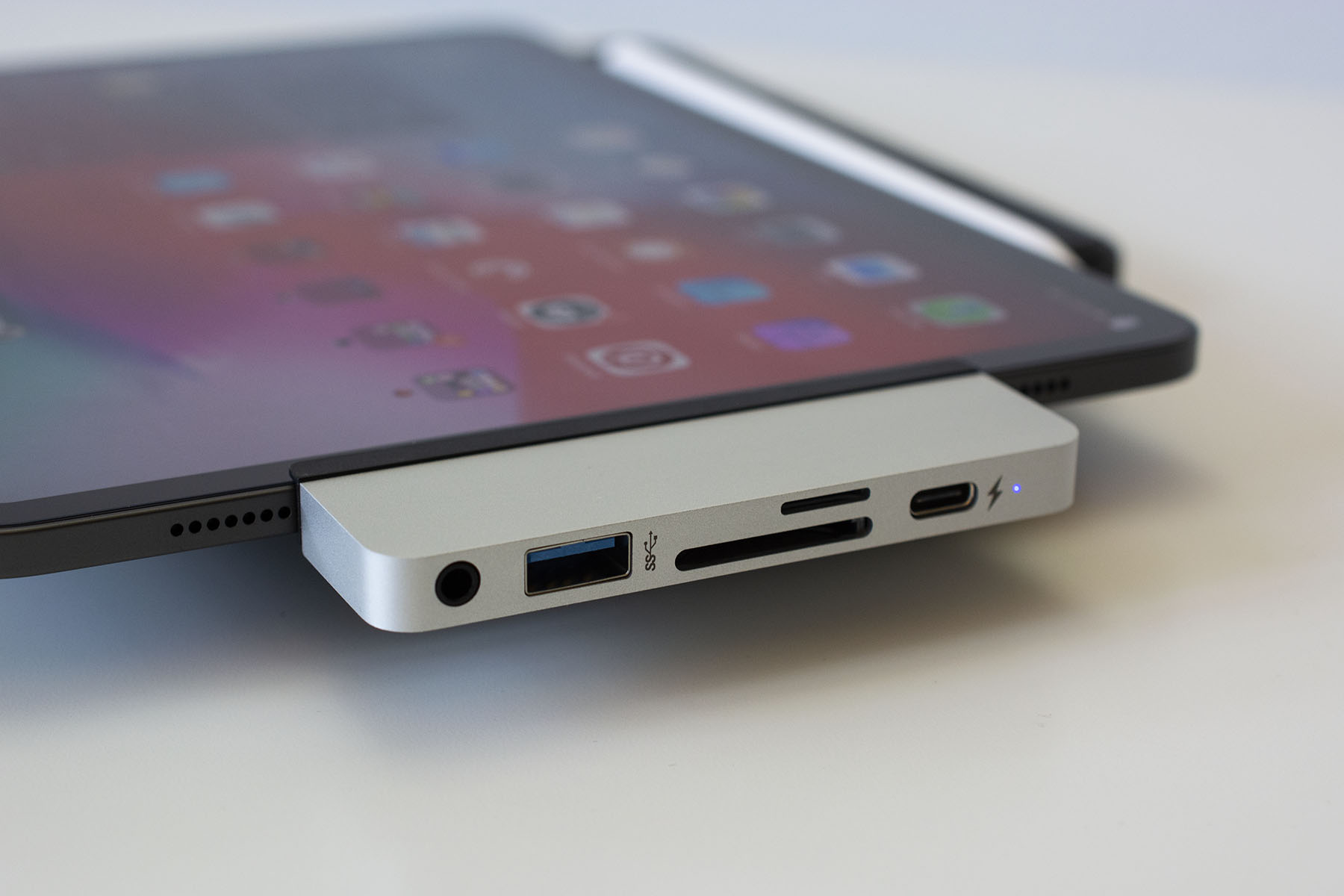
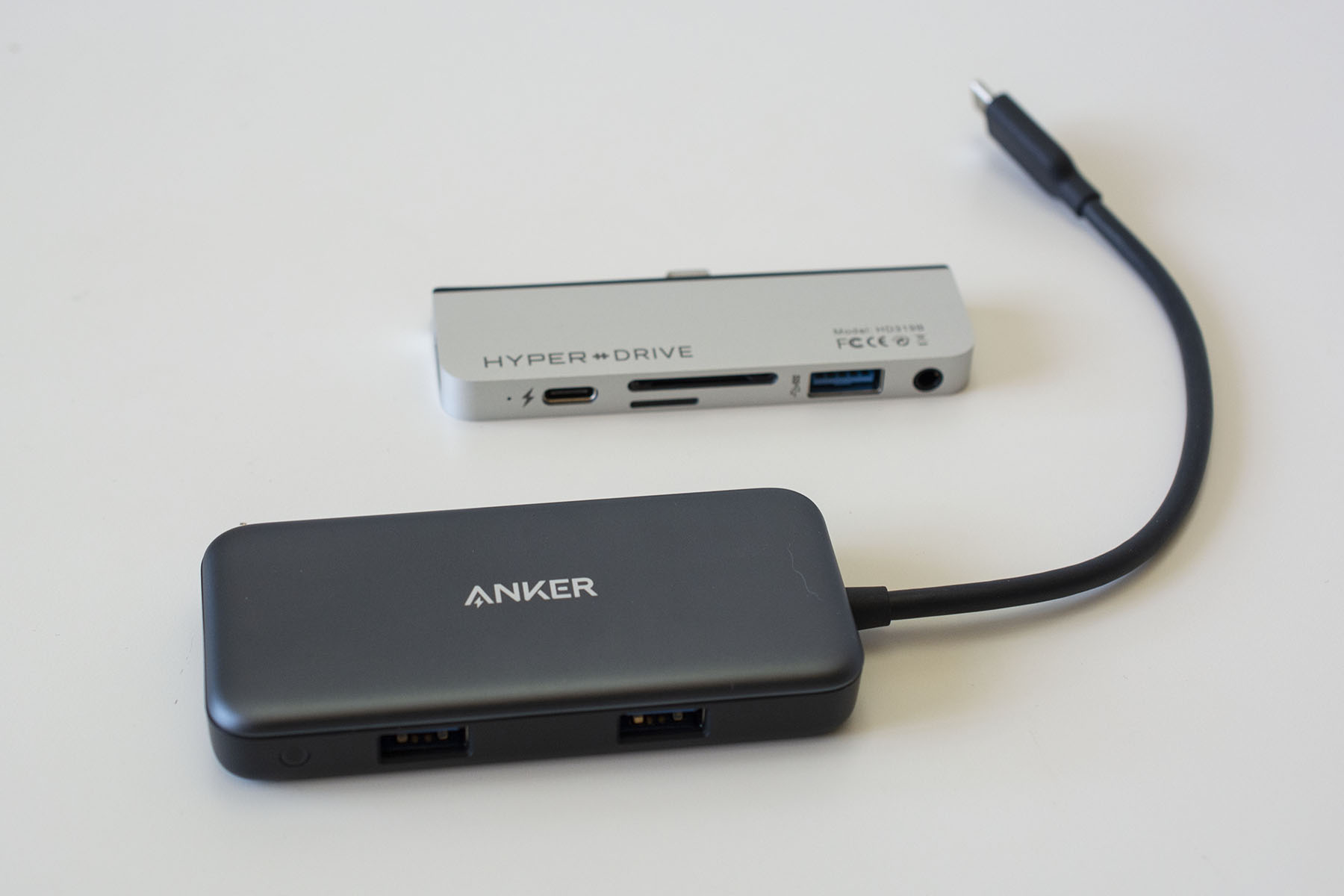
Another popular option is HyperDrive’s USB-C adapter. I’ll admit I was skeptical about this one, mostly because so many Amazon reviewers and YouTube personalities have raved about it (and I have a hard time believing a six-port adapter the size of a lighter should cost $90). However, after testing it out, I can say it delivers on its promises: t’s a neat little adapter that’s just large enough to fit an HDMI socket, a USB-C port, a USB-A connection, micro- and regular SD card slots and a headphone jack on its edges. That should cover most things you’d need an adapter for, save for hardwired internet.
However, what sets the HyperDrive USB-C adapter apart is that it comes with a tool kit that gives you more flexibility in how you use it. The default plate that surrounds the USB-C plug fits iPads without screen protectors, but there’s an included plate that accommodates screen protectors. HyperDrive even included a third plate with a dongle-like attachment so the adapter doesn’t have to sit right up against the iPad. All you need to do is use the tiny screwdriver that’s in the box to switch out the plates.
I think that somewhat justifies its $90 asking price. So many adapters that hug the iPad Pro’s edges are slick but they become basically unusable if you have a case, skin or screen protector.
But $90 for an adapter is still a lot of money and I’d only recommend spending that much if you plan on using the iPad Pro as your daily driver. A cheaper alternative is Anker’s 5-in-1 USB-C adapter: It works just as well as HyperDrive’s; has most of the same ports, with the exception of an extra USB-C port and a headphone jack; and costs only $26.
You could use any of these adapters to connect an external drive to your iPad for more space. We’re fans of Samsung’s T7 series and SanDisk’s Extreme drives for those that want a good amount of extra storage in a fairly durable yet pocketable gadget. If you’d prefer something even more portable, SanDisk’s Dual Drive Luxe flash drive is a good option because it can plug right into your iPad’s USB-C port, it’s available in up to a 1TB capacity and it’s small enough to attach to your keys.
A battery pack or an extra charger is important to have in your bag regardless of where you’re going. RavPower’s 26,800mAh power bank can charge iPad Pros 1.5 times using its 30W USB-C PD port. It also works with the newest MacBook Pros and other USB-C laptops in addition to the Nintendo Switch — so it can be your one-stop-shop for all your charging needs. I also appreciate that it comes with its own USB-C to C cable, so you don’t need to remember to bring one with you, as well as the micro-USB cable used to charge the power bank itself.
RavPower’s PD charger will set you back $60, but you can opt for the $50 Anker Powercore Essential PD charger if you want to spend a bit less. Its 20,000mAh capacity will provide at least 50 percent more juice to most iPads. It’s not ideal for larger devices like laptops, but it works well with smartphones and tablets.
You also don't want to rely solely on the charging adapter that came with your iPad; it's handy to have a backup. Anker's new line of GaN II chargers has a couple of good options, and arguably the best for most people is the 45W Nano II. It's the midrange adapter in the lineup and it can power up a 2020 11-inch iPad Pro up to 30 percent faster than Apple's default adapter. In just a half hour of charging, I got about a 33 percent boost in battery life on my 11-inch iPad Pro. Anker's device is also smaller than Apple's and it has a foldable design, so it'll fit better in cramped spaces and it'll be easier to throw in a travel bag.
The race to develop satellite internet includes some pretty big players like SpaceX, Amazon, Softbank and Facebook. However, Facebook has now essentially thrown in the towel in that business, selling its internet satellite team to Amazon, The Information has reported. For Amazon, it's a significant step in its effort to develop its Project Kuiper satellite network and catch up with SpaceX's Starlink broadband constellation.
Like Starlink, Project Kuiper is designed to provide low-latency, high-speed broadband connectivity to users around the world. Amazon aims to have a 3,236-satellite constellation in orbit by 2029, with half of it launched by 2026. It also plans to build 12 ground stations around the world to transmit data to and from the satellites.
The company has said it will spend more than $10 billion to make all that happen and recently received FAA approval for the project. It also announced last year that it would use United Launch Alliance's ultra-reliable Atlas V rocket for the initial satellite launches.
Amazon has significantly ramped up hiring efforts for Project Kuiper at its Redmond headquarters, with 500 employees currently aboard and 200 open positions. The employees coming from Facebook are reportedly based in the Los Angeles area and include physicists as well as optical, prototyping, mechanical and software engineers. Facebook's former head of Southern California connectivity, Jin Bains, is now listed as a Project Kuiper director in his LinkedIn page.
Meanwhile, it seems Facebook is getting out of the satellite internet business and focusing on terrestrial programs, having invested in subsea and terrestrial fiber as well as wireless services like ExpressWiFi. The company recently launched an "Athena" satellite through its PointView Tech subsidiary, but it was only a test mission rather than the start of a satellite internet constellation. With the sale of its satellite team to Amazon, it appears that any ambitions it may have had in that area are over.
SolarWinds vulnerabilities continue to be targeted by overseas hackers months after the US information technology company suffered a widespread cyberattack. On Tuesday, Microsoft said that a group operating out of China was using a zero-day remote code execution to attack SolarWinds software. If successfully exploited, the flaw in the IT company's Serv-U software allows hackers to perform actions like install and run malicious payloads or view and change data, Microsoft noted in a blog post.
As part of its investigation, Microsoft said it had observed the hacking group targeting organizations in the US military research and development and software sectors. The company has designated the actor as DEV-0322 in reference to its status as an unidentified "development group." Microsoft explained that it uses the label prior to reaching high confidence about the origin or identity of a hacker. The group operating out of China is using commercial VPN solutions and compromised consumer routers to carry out their attacks, Microsoft said. Those affected have been notified and assisted in their response, the company noted.
SolarWinds confirmed on the weekend that it was notified by Microsoft of a security vulnerability in its Serv-U software. The flaw was related to the product's managed file transfer and secured FTP, which it has since patched.
SolarWinds gained overnight notoriety in December after it became the subject of a supply chain cyberattack that impacted 18,000 of its customers, including nine US government agencies. US intelligence released a joint statement in January naming Russia as the most likely source of the hack. The following month, Reuters reported that suspected Chinese hackers had exploited a separate flaw in SolarWinds' software to to help breach US government computers last year. The latest vulnerability is not related to the so-called Sunburst supply chain attack, SolarWinds said.
As it promised last month, Amazon has launched its serialized fiction Kindle Vella store that lets you unlock episodic, self-published stories via in-app purchases. The new platform is a way for readers to discover new fiction and a new way for authors to generate revenue from the Kindle Direct Publishing service.
While the name might suggest otherwise, Kindle Vella isn't available on Amazon's Kindle e-readers. Rather, you'll only find it on Amazon.com or the Kindle iOS app (no Android for now). To start with, the service will be limited to US-based authors who publish stories in English.
The serialized stories will run from 600 to 5,000 words per episode, with the first three offered for free. To see subsequent episodes, you'll need to pay for "tokens," with prices ranging from $2 for 200 tokens up to $15 for 1,700 tokens. The latter will give you about 34 episodes, though prices per episode depend on the word count — the more words, the more you'll have to spend.
Authors, meanwhile, will receive 50 percent of the revenue along with bonuses based on engagement with the app's social media-style features. To that end, readers can follow stories to be notified of new episodes, leave a thumbs up for episodes they like, apply a "Fave" for their favorite story of the week (provided they purchase tokens), and share on Twitter, Facebook and other social media. To boost engagement, authors can speak directly to readers at the end of episodes to "share story insights and behind-the-scenes content," Amazon wrote.
Since Amazon opened Vella to authors three months ago, "thousands of authors" have published "tens of thousands of Kindle Vella episodes across dozens of genres and microgenre," Amazon said. Authors appear to be interested as well. "I’ve published close to 30 novels, and I’m enjoying the adventure of writing The Marriage Auction in this new format,” said bestselling author Audrey Carlan in a statement. Whether or not the format takes off now depends on readers — to try it out, you can access Vella here.
Apple has quietly started selling a MagSafe Battery Pack for its iPhone 12 lineup. Spotted by 9to5Mac, the new accessory costs $99, with deliveries beginning early next week. Instead of a case you put on your iPhone, this latest battery pack attaches to the back of your device.
The accessory is available in a single size that features a 1,460mAh battery, meaning it can’t change any model in the iPhone 12 family to full. When using the battery pack on the go, it will charge your phone at about 5 watts. Plugging it into a power adapter while it’s still attached to your iPhone will increase that speed to about 15 watts. Either way, it’s not the fastest way to top up an iPhone 12, but it should still help in a pinch.
Apple
According to an official support document, you need iOS 14.7 to use the battery pack. Apple has yet to release that update. The company also recommends using a 20 watt or higher USB-C power adapter and USB-C to Lightning cable for charging the device.
When it’s attached to your iPhone, you’ll see how much power it has left to give on the battery widget you can add to your Home Screen and Today View. Interestingly, Apple also notes you may get a notification from your device that the accessory won’t charge it past 90 percent. You can bypass that limit enabling by low power mode through the Control Center.
Apple isn’t the first company to offer a battery pack that attaches magnetically to the iPhone 12 and its siblings. However, after Amazon removed many of the most popular brands on its marketplace earlier in the year, those have been harder to find. And if you visit the website now, you’ll find that many of the battery packs listed don’t have an estimated availability.
Ghostwire: Tokyo, the upcoming PlayStation 5 and PC game from Bethesda studio Tango Gameworks, has been delayed to early 2022. It was expected to arrive in the coming months.
The studio says it's "focused on protecting the health of everyone at Tango." It's based in Tokyo, where a fourth state of emergency just came into effect amid a sharp increase in COVID-19 cases.
“We want to get the game in your hands as soon as possible so you can experience the unforgettable version of a haunted Tokyo that we’ve been hard at work building,” Tango, which also made The Evil Within, wrote in a tweet. “Our new release window will give us time to bring the world of Ghostwire to life as we’ve always envisioned it.”
Although a specific release date hadn't been set, Sony suggested in a CES 2021 presentation that the spooky Ghostwire: Tokyo would arrive in October. The company later took down the video and replaced it with a version that dropped release windows for several third-party games.
Bethesda announced Ghostwire: Tokyo in 2019 and Tango plans to show off more of the paranormal adventure in the coming months. Ghostwire will be a timed console exclusive on PS5. It’s highly likely Ghostwire will eventually come to Xbox, though — Microsoft owns Bethesda, after all.
While the Ghostwire delay may have been unavoidable, pushing back the release date to early next year may give Deathloop, another PS5 console exclusive from fellow Bethesda studio Arkane, more room to breathe. Following delays of its own, Deathloop is scheduled to arrive on September 14th.
Between the enduring popularity of the Nintendo Switch, the increasing power of flagship phones and new services like Apple Arcade, portable gaming has finally moved to the forefront. However, the disappearance of 3.5mm ports on mobile devices has left many players bereft of premium audio — Bluetooth earbuds don’t quite cut it when you need your audio synced perfectly. If you want a rock-solid connection your best bet is an RF dongle, which usually uses USB-A in a world steadily being overtaken by USB-C ports. Razer has finally stepped up with a mobile-first headset that can connect to your Switch, Android phone or thin-and-light laptop, the $100 Barracuda X.
The Barracuda X is far from the first headset geared toward Nintendo Switch players; we’re big fans of SteelSeries’ Arctis 1 Wireless thanks to its comfort and superb audio quality, and have even included it in a few of our gift guides. It’s fair to say that this headset is the Barracuda’s primary competitor. Even the RF adapters look the same.
Kris Naudus / Engadget
However, while the Arctis 1 Wireless maintains the standard look of the line (as it should — it’s a great design), the Barracuda is a change of pace for Razer. Instead of the Kraken brand’s circular, grated look, the new headset resembles last year’s Opus headphones, which got a refresh last month. It’s not totally identical, with different joints on the cups, and cloth ear padding instead of fake leather. Here in New York, it’s 90 degrees as of this writing, and I can report that I haven’t felt the need to take off the Barracuda even after wearing it for a few hours. It’s still a bit warm, and I definitely feel cooler when I take the headset off, but it’s bearable.
The Barracuda X also weighs a very scant 250 grams, one of the lightest headsets I’ve tested. (I think it might be lighter than its own packaging.) In direct comparison it feels about the same in hand as similar models from Turtle Beach and Logitech, but there’s a balance in the Barracuda’s plastic build that makes it feel more ethereal. It’s not something I would mind keeping on my head for several hours or throwing it in my backpack so I can game on the train. Which is precisely the point: You shouldn’t feel that carrying this thing around is a burden.
Kris Naudus / Engadget
While I wouldn’t go tossing this thing around casually in a rage, it does feel solidly built, capable of taking a few dings in your bag. I have mixed feelings about the detachable mic; being able to take it off means a more compact headset design, but it’s also another fiddly bit that I might lose. Then again, it’s unlikely you need voice functions while out and about. (Heck, the Switch console doesn’t even have real voice chat; it asks you to connect via the app on your phone.)
The Barracuda X excites me, mostly because of its USB-C compatibility. But that’s also where it falls short for me. The adapter is small, for sure, but it’s very wide. That means that if you happen to have a laptop with two USB-C ports next to each other like my 2017 MacBook, the Barracuda dongle will block the other completely. This is a hassle in my office setup, where I have an external monitor and USB hub connected on the other side. So while working I get to choose between the power cord and the headset. I’ve opted out of using the Barracuda with my laptop at all, preferring instead to listen to podcasts on my phone. However, that’s my unique situation, and on the go you might only need two ports: one for the headset and the other for power.
Kris Naudus / Engadget
It’s exciting to see companies finally start to take mobile gaming seriously, and address the specific needs those gamers have. Mobile-friendly controllers are great, but many popular mobile games don’t really need them. Better audio, though? Almost everyone can appreciate that. The $100 price tag might seem a bit steep for some, but the Barracuda X seems versatile enough that you’ll more than get your money’s worth.