Following the death of a sight-impaired relative, Wataru Chino had no choice but to take action. In response to the tragedy, the Honda EV engineer developed an in-shoe navigation system, dubbed Ashirase (both the name of the product and the name of the company) that allows low-sighted people to use their feet to navigate, rather than cell phones or other visual aids. The tactile navigation system has earned the financial backing of Honda’s Ignition startup incubator program and continues to gain traction.
The Ashirase system is two-part, consisting of the dedicated Ashirase navigation app running on the user’s smartphone and a silicone shoe insert cradling a combination motion sensor-electronic compass. Once the user programs their walking destination into the app, the shoe inserts will vibrate in various patterns and tempos — “walk forward” causes vibrations under the balls of the feet, “turn left” rubs the appropriate side of both feet and the speed at which the inserts vibrate indicate proximity to the turn or obstacle.
The idea behind the system is to allow users to remain more aware of their surroundings while they walk, using their feet to navigate rather than repeatedly stopping to consult their smartphones or passersby for directions.
Ashirase
Currently the insert prototypes can only be used in low top sneakers and dress shoes but Chino already has plans to expand the footwear selection. “We are thinking about [new footwear styles], and the idea is twofold at this moment,” Chino told Engadget through an interpreter. “One is to try to change, modifying the [electronic] device so that the shape can be fitted to other types of shoes.”
“Otherwise,” he continued, “what we can do is to change the yellow parts of this device so that it fits other types of shoes” noting that the white “puck”part can be disconnected from the flexible yellow insert that sits around the wearer’s foot and houses the various vibrating navigation gyroscopes. The system has a reported week-long battery life when using the system to navigate an average of three hours a day. Initially, the insert will be offered in generic small, medium and large sizes in Japan but he plans to offer more personalized fittings once the product hits market.
The navigation system is currently a bit limited, based on the Google Maps API rather than an HD map source, in that it will work so long as a navigation data signal is available. That means that the system may not initially work in indoor areas like malls or hotels — though hiking trails, parks and other public lands should be no problem.
Chino and his team are reportedly looking into incorporating either a Personal Dead-reckoning (PDR) system, Wi-Fi-based positioning or IoT navigation capability to help users make their ways through indoor public spaces at a later date. The team also reportedly plans to add public transportation options to the program in the future.
The company plans to release a beta version of the Ashirase system in Japan in October or November of this year. Users will be given free use of the insert and app for one week before being asked for feedback. Following the public beta, Ashirase executives expect the commercialized product to be ready by October 2022 and include a 2,000 - 3,000 yen ($18 - $27) monthly subscription.
Before that can happen, however, the startup is seeking some 200 million yen in additional funding — not including the 70 million yen in equity the Ignition program already provided — in order to scale up to full production.
As July comes to a close, a number of laptops, earbuds, games and more have gone on sale across the web. Students planning their back-to-school shopping list have a few ways to save on Apple products — the latest MacBook Air M1 is $150 off at Amazon (that's better than Apple's own education discount) and the iPad Air remains $100 off as well. All capacities of Samsung's T7 portable SSD have been discounted, so you can grab one for as low as $70, while Microsoft's Xbox Ultimate Game Sale knocks up to 80 percent off console and PC titles. Here are the best tech deals from this week that you can still get today.
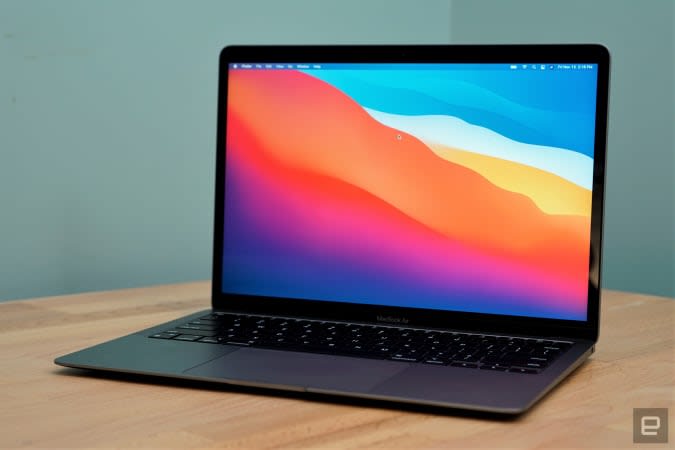
MacBook Air M1
The latest MacBook Air M1 is down to $850 at Amazon, or $150 off its regular price. The 512GB model has the same discount, so you can grab it for $1,099. It's one of the best laptops for most people, and it's a great option for students going back to school. The Air M1 earned a score of 94 from us for its incredibly fast performance, excellent keyboard and trackpad, good battery life and lack of fan noise.
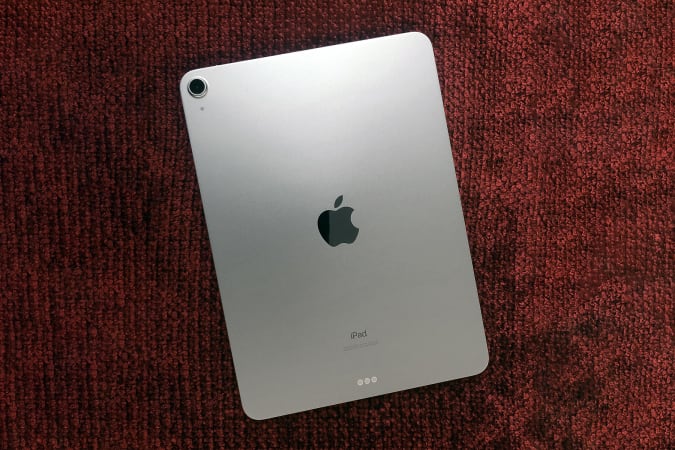
The latest iPad Air is down to the best price we've seen it, just $500 for the base model. That's $100 off its normal price and a great deal on what we think is the best iPad for most people. We gave the slab a score of 90 for its fast performance, speedy WiFi, healthy battery life and support for the second-generation Apple Pencil.
The AirPods Pro are back on sale for $190, or $60 off their normal price. While not a record low, it's still one of the best prices we've seen all year. The AirPods Pro earned a score of 87 for their improved audio quality, comfortable fit, solid ANC and IPX4 water resistance.
Apple's 10.2-inch iPad is still on sale for $299, or $30 off its normal price. It's arguably the best iPad for new tablet owners and we liked its improved performance, familiar design and support for the first-generation Apple Pencil.
Nintendo's Mario Kart Live: Home Circuit game for the Switch is down to $75, or $25 off its normal price. This add-on set lets you bring the action of Mario Kart into your real-life living room, creating your own racetracks and zooming around them using a tiny kart driven by either Mario or Luigi.
Samsung's T7 portable SSD in 500GB is down to a record-low of $70, or $30 off its normal price. Other capacities are on sale, too — you can get a 1TB model for $150 and a 2TB model will set you back $300. We like these drives for their portability, durable design and speedy performance.
Amazon's latest Echo Buds are on sale for $80, which is a discount we saw last during Prime Day. You can also get the buds with their wireless charging case for only $100. We gave these a score of 80 for their improved sound quality, good ANC and smaller, comfortable design.
Amazon's first-generation Echo Show 5 returned to its all-time-low price of $45 at Best Buy. If you're looking for a smart alarm clock of sorts, this is the best option if you already use Alexa as your primary voice assistant. The second-generation Echo Show 5, which came out recently, has a few minor differences, but we think the first-generation remains a solid buy — especially at half off its original price.
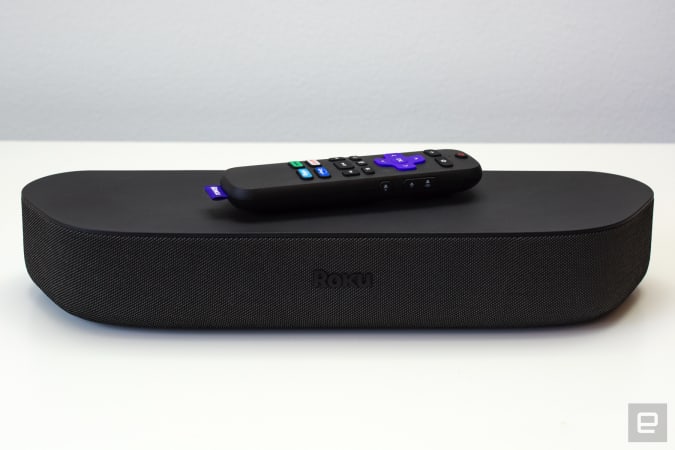
A bunch of Roku devices are on sale at Amazon, including the Roku Streambar, which is down to a record low of $99. This compact soundbar is a convenient gadget to get if you want to upgrade your home theater system without spending a ton of money. We gave it a score of 86 for its space-saving design, Dolby Audio support and built-in 4K streaming technology. If you want to spend even less, a handful of Roku streamers have been discounted, including the Express ($25) and the Streaming Stick+ ($39).
The Thermapen Mk4 has been discounts to $69 as ThermoWorks makes room for the new Thermapen One thermometer. The Mk4 is the best instant-read thermometer we've used so far —the backlit display makes it easy to read in almost any situation and the display rotates depending on how you're holding the pen. Plus, you never have to remember to turn it off because the pen automatically turns on when you pick it up and will shut off after some time of no use.
Through December 8, you can enter to win four-day passes to San Diego Comic-Con 2022. Along with the passes, you'll get access to a special preview night, reserved seating in Hall H, a personal concierge, a private tour of the Comic-Con Museum, dinner in Balboa Park and tickets to the "Night at the Comic-Con Museum" event. It's free to enter, but funds from this sweepstakes will go to the San Diego Comic Convention.
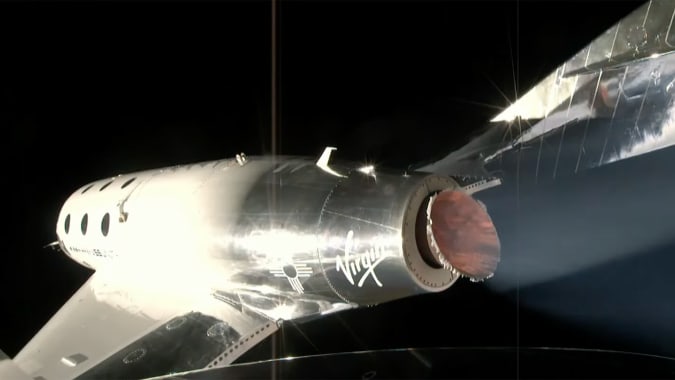
In this Omaze giveaway you can win two seats on one of the first Virgin Galactic flights to space. In addition, you'll go on a tour of Spaceport America in New Mexico with Richard Branson. You don't have to pay to enter, but funds from all paid entries will support Space for Humanity, an organization that hopes to make space more accessible for all.
Omaze is giving away another $20,000 to build your ultimate gaming PC. This sweepstakes is free to enter, but funds donated with purchased entries will benefit Schools on Wheels, an organization that provides free tutoring and mentoring services to children experiencing homelessness across Southern California.
Pricing and availability is subject to change. No donation or payment necessary to enter or win this sweepstakes.See official rules on Omaze.
New tech deals
DJI OM4
DJI's OM4 smartphone gimbal is $20 off right now, bringing it down to $129. It uses 3-axis stabilization to let you shoot smooth video with your smartphone, and it's new, magnetic quick-release makes it easy to snap your phone in and out of it. It also supports gesture control and Active Track 3.0, which lets you lock on to the subject you're filming with better accuracy.
Mirror's summer sale knocks $400 off its high-tech fitness system when using the code JULY400 at checkout. The discount breaks down to $150 off the mirror device itself, plus free delivery and installation. Just know that the sale is only on the product itself, not on the subscription needed to take the Mirror's fitness classes.
Arturia has knocks 50 percent off all of its individual software titles through August 8. That means you can get some of our favorite music software, including Pigments and Analog Labs, for $99 each. This is a good opportunity to add new synths and other software instruments to your collection for less.
One of our recommended VPNs is running a good sale on a two-year subscription. You can sign up for NordVPN for only $89 for the first two years, which comes out to $44.50 per year — and an additional summer promotion adds three free months on top of that. We like NordVPN for its speed, its no-logs policy, the thousands of servers it has to choose from and that one account supports up to six connected devices.
Yes, you can finally upgrade your SSD storage on the PS5 — a console that already demands pretty huge game file sizes. It’s a whole lot more complicated than plugging in a USB drive, however. First up, you have to be a PS5 beta user in the US, Canada and parts of Europe. Then, you need a PCIe Gen4 SSD for read speeds of 5,500MB/s or higher — there are options from Samsung, Western Digital and Seagate.
But that’s not the end of things. Sony notes in its guide to SSD upgrades that you also need to factor in the PS5's cooling mechanism. This means you might have to add a heatsink to your SSD or choose a compatible SSD with the cooling structure built-in.
Oh, it has to be the right-sized heatsink, too. And Sony suggests doing the whole installation in a well lit room, flashlight “optional.” It literally says that.
Did you buy a next-gen console so you didn’t have to think too much about these kinds of things? Well, sorry. It’s time to measure a heatsink. The feature will roll out to non-beta PS5 users later this year.
(TLDR: The Western Digital Black SN850 heatsink model should work if you want to upgrade your PS5 storage.)
Intel’s very own desktop PC series gets a little more compelling. The new NUC 11 Extreme, AKA Beast Canyon, is a lot like last year’s NUC 9 Extreme. But it's a bit cheaper and more flexible, thanks to its faster 11th-gen Intel CPU and support for full-sized GPUs. It’s bigger, yes, but that ability to work around full-sized GPUs makes it a genuine, if expensive, gaming PC desktop option. Devindra Hardawar puts it through its paces. Continue reading.
Finally, a game you play as a cat. After being teased in 2020, we finally get to see the game in action — and news it will arrive next year. Gameplay involves using physical abilities as a cat to navigate the environment and solve puzzles. You can also scratch furniture. Continue reading.
Nothing’s long-teased launch product is almost here. Its transparent-cased wireless earbuds look cool, ring in at $100 and, perhaps a little surprisingly, sound pretty good. The Ear 1s are a little temperamental with connectivity — and pricier headphones sound better — but Nothing has delivered some stylish buds that will come to the US next month. Mat Smith tests them out. Continue reading.
Black Widow star Scarlett Johansson is suing Disney over the company's decision to release the movie in theaters and on Disney+ simultaneously. Johansson claims this was a breach of contract. In the suit, Johansson says Black Widow was supposed to be released exclusively in theaters, per her deal with Marvel. A large portion of Johansson's salary was tied to its box office success.
The move to launch the film on Disney+ may have impacted Black Widow's performance in theaters. According to Variety, it’s on track to become one of the lowest-grossing Marvel movies to date, based on box office sales. Continue reading.
Starting today, you can use a second-generation Fire TV Cube to take part in two-way Zoom calls. For the best experience, Amazon recommends a webcam with a 60- to 90-degree field of view that can capture video at 1080p. The company also suggests mounting the device on the top of your TV set, and that you sit about six to 10 feet away. At the very least, you’ll want a 720p camera that supports USB Video Class (UVC). You’ll also need a Micro USB-to-USB adapter since the second-generation Fire TV Cube doesn’t have a full-sized USB-A port. One thing to note is Amazon recommends against using a 4K-capable camera. Outside of those requirements, you’ll need to download the latest Fire TV Cube update and the Zoom app from the Fire TV Appstore.
Once you have everything ready to go, you can tell Alexa to join a video call for you, at which point the voice assistant will ask you to provide a meeting ID and passcode. It’s also possible to link your calendar to Alexa, which will allow you to more seamlessly join any Zoom meetings you have on your schedule.
Amazon isn’t the first company to allow you to use your TV for video calls. Since last August, you’ve been able to stream Google Meet calls to Chromecast and other Cast-enabled devices. Over that same time frame, Amazon has offered two-way video calling between Fire TV Cube and camera-enabled Alexa devices. It might seem like a late offering, but with the return-to-office plans of most companies constantly shifting due to new developments in the pandemic, it’s a feature that’s likely to get plenty of use.
While Airbnb has for a long time allowed hosts to list how fast the WiFi connection is at their rentals, it’s not something you see detailed with every home, condo and apartment on the service. As the company continues to try to attract remote workers, it’s introducing a speed test tool hosts can access within the Airbnb app.
The tool itself is fairly simple. Provided you’ve switched to a host account, you’ll find it under the “Amenities” section of a listing, and it will only estimate your download speeds. When you complete a speed test, the app will share that information with Airbnb and M-Lab, the organization that provided Airbnb the open-source software the company used to build the tool.
According to a support document from the company, M-Lab will include your test results in a publicly available database it provides for internet researchers. More importantly, those who want to stay at your home or accommodation will see if your WiFi connection is suited to their needs. It should also help ensure listings have accurate estimates.
Airbnb considers anything above a consistent 7 Mbps as a “snappy” connection. “Guests can hang with family and friends on a video call or gather together to stream a rom-com,” the company says on its website. Airbnb has started rolling out the WiFi tool to hosts in the US, with global availability to follow in the coming weeks.
Huawei has revealed the P50 and P50 Pro, its first flagship phones that use HarmonyOS 2 from the outset. The company started rolling out the operating system to its existing devices in early June.
The switch to HarmonyOS was made in part due to US sanctions that have hit Huawei. Along with slowing down manufacturing and hobbling the company’s ability to source components with American technology, the restrictions led to Google shutting off Huawei from official Android updates. Huawei switched to an open-source version. It was also prevented from using Google apps and services on its most recent phones. There have been suggestions that HarmonyOS is actually a fork of open-source Android.
The sanctions also seem to have impacted Huawei's choice of processor in the latest handsets, too. The P50 and one of the P50 Pro variants boast Qualcomm's Snapdragon 888 4G chipset with Adreno 660 graphics. Qualcomm received permission in November to sell some chips to Huawei. The other models use Huawei's own Kirin 9000 processor, but there's no mention of 5G support for any of the devices.
Pick from the Cocoa Gold, Charm Pink, Golden Black, and Pearl White colourways & see your vision brought to life with the #HUAWEIP50Series.
The P50 and P50 Pro, which are aimed at the Chinese market, boast 6.5-inch and 6.6-inch displays, with 90Hz and 120Hz refresh rates respectively. Both devices use the same hole-punch front-facing 13MP camera.
The P50 Pro's rear camera array includes 50MP color and 40MP mono True-Chroma lenses, a 13MP ultra-wide and a 64MP telephoto camera. The P50 has a 50MP True-Chroma camera, a 13MP ultra-wide and a 12MP telephoto lens. The devices are IP68-rated for their splash, water and dust resistance.
The phones both support 66W super-fast wired charging, and the P50 Pro offers 50W wireless charging. The P50 has a 4100mAh battery, while the P50 Pro has a 4360mAh capacity.
The P50 starts at 4,488 yuan (approximately $695) for a model with 8GB of RAM and 128GB of storage. It'll be available in September. The P50 Pro, meanwhile, will be available broadly on August 12th, starting at 5,988 yuan (about $927) for the same memory and storage capacity as the base P50. Huawei hasn't clarified if or when it'll sell the devices outside of China.
Those looking for a new daily-driver should seriously consider the MacBook Air M1. Thanks to Apple's new processor, it's powerful enough to serve most people well and its new fanless design is a big improvement. The laptop normally starts at $1,000, but now you can get it for $850 on Amazon. That's a new all-time low and it's $50 cheaper than the price the laptop has been hovering at for the past few weeks.
The base model comes with 8GB of RAM and 256GB of storage, but you can also grab the 512GB model for less now, too — $1,099 to be exact, or $150 off its normal price. The extra-storage models ship relatively quickly, but you'll have to wait until the end of August to get the base laptop in your hands. If you're willing to wait, this is the best sale we've seen on the MacBook Air M1 in months.
We consider the MacBook Air M1 to be the best Apple laptop for most people right now. The performance boost that the M1 chipset provides is impressive — sites load almost instantly, scrolling feels effortless and native apps run like clockwork. There's no fan inside the Air M1, so you'll get a quieter experience overall — no annoying whirring when you're pushing the machine to its limits. And the Air M1 should last all day (about 16.5-hours in our testing) so you can use it for work and play.
The Air M1's design is quite familiar, but that's not a bad thing. It's that familiar thin-and-light clamshell with a lovely 13.3-inch Retina display, a big and accurate trackpad and a comfortable keyboard. Yes, you'll have to deal with a 720p webcam and just two USB-C ports, but those are small prices to pay for an otherwise stellar machine.
Follow @EngadgetDeals on Twitter for the latest tech deals and buying advice.
Samsung's T-series of portable SSDs has been a favorite of ours for a while thanks to its compact design, speedy performance and general versatility. Not only are they good options for photographers and content creators who work with large files regularly, but they're also good for students who want a reliable drive that can serve them for the entirety of their time at school. Now you can get the latest Samsung T7 drive in 500GB for $30 less than usual as Amazon has it for only $70. Other capacities are on sale, too: the 1TB model is down to $150, while the 2TB version will set you back $300.
The T7 is the latest in this lineup, along with the T7 Touch, which is essentially the same drive but with a built-in fingerprint sensor for an extra layer of security. Both drives have sleek aluminum unibodies that are roughly the size of a credit card, and they're protected against drops and shocks. The T7 also uses ePCM technology and Dynamic Thermal Guard to control heat levels, so it should never get too hot even when you push it to the limit. As far as speed goes, the T7 supports reads speeds up to 1,050 MB/s and write speeds up to 1,000 MB/s.
The T7 may not have a fingerprint sensor, but it does have optional password protection — that way you can prevent unauthorized persons from accessing your documents. It has just one USB-C port on it, but it comes with both USB-C and USB-A cables, so you can use it with nearly any device you have, including some game consoles. Overall, it's a solid drive to grab if you're looking for a no-fuss portable storage option for photos, important files and more.
As expected, Sony is gradually opening up access to the PS5's empty M.2 expansion slot. Starting today, a new system software update gives beta users in the US, Canada and parts of Europe the ability to boost local storage with select SSD drives. But, the process isn't as straightforward as previous reports suggested.
We already knew the required read speeds would be 5,500MB/s or higher, which limits you to PCIe Gen4 SSDs. Of course, there are plenty of drives that can manage that: The Samsung 980 Pro, Western Digital SN850, Corsair Force MP600, Seagate Firecuda 530, Sabrent Rocket 4 Plus, to name a few.
To make things more complicated, Sony says that you'll also need to take into account the PS5's cooling mechanism. That means you can either attach a heatsink to your SSD, either in a single- or double-sided format, or purchase a compatible SSD with the cooling structure built-in. But, even then, it needs to be the right-sized heatsink that matches the required dimensions. The total size including the cooling structure needs to be smaller than 110mm (L) x 25mm (W) x 11.25mm (H) or, in inches, smaller than 4.33in (L) x 0.984 in (W) x 0.442in (H).
Basically, you can forget just popping the cover and slotting in just any Gen 4 SSD. For instance, the Corsair Force MP600 has a heatsink which is too high to fit (though you can purchase it without one and use your own thermal solution). Whereas the WD Black SN850 heatsink should be fine.
Beyond the M.2 SSD support, the PS5 beta software also includes additional software and improvements. Among them is 3D audio support for built-in TV speakers that can boost sound by measuring the acoustics of a room using the DualSense controller. You can switch it on or off from the sound menu in the console's system settings. What's more there are a bunch of control customization options in the Control Centre. Here, the Game Base will also let you message friends and parties and see how many friends are online.
While PS4 and PS5 games will also be labeled accordingly and appear separately in the home screen and game library. The update also packs a trophy tracker for quick access to up to five trophies per game via the Control Center, the option to pick between 720p and 1080p on PlayStation Now and the ability to enable automatic video clips in challenges for high scores. The software update is also rolling out in Japan, UK, Germany, and France.
Who is a powerful miniature desktop for? That was the question running through my mind when I reviewed Intel's NUC 9 Extreme last year. It was the company's most powerful compact PC kit (NUC stands for "next unit of computing") at the time. But it was so wildly expensive — especially since you need to add your own RAM, storage, GPU and OS — it didn't make sense for anyone but mini-PC obsessives. The new NUC 11 Extreme, AKA "Beast Canyon," is pretty much the same story. But it's at least a bit cheaper and more flexible, thanks to its faster 11th-gen Intel CPU and support for full-sized GPUs.
I'll get this out of the way up front: Yes, this NUC is dramatically larger than any previous units we've seen. The 5-liter NUC 9 Extreme already seemed to be pushing the limits of a compact PC, but at 8 liters, the NUC 11 Extreme is what you'd call a Big Boy. Sure, it beats making space for a mid-tower PC on your desk, but it's still pretty substantial. You can't blame Intel too much: Gamers wanted full-sized GPUs in a NUC, this is just the most efficient way to make that happen.
The NUC 11 Extreme screams "gamer" before you even turn it on. Its black metal case sports mesh air vents along the sides, giving you a peek at the GPU within and three large case fans up top. For a small box, it's clearly meant to push a lot of air. Hit the power button and it springs to life with an LED skull along the front panel, as well as underside LED lighting. I'm not one for too much gamer bling, but Intel's lighting comes is relatively subtle compared to many other PC makers.
Devindra Hardawar/Engadget
Our review unit featured Intel's 11th-gen i9 Compute Element, a modular card with an eight-core 11900KB CPU. It can also be purchased separately as an upgrade for NUC 9 Extreme customers. That was always the dream for Intel's NUC Extreme platform, which also includes Razer's Tomahawk mini-PC. Wouldn't it be nice if you could just yank a card out in a few years to get a new CPU? There are some compromises, though. According to Intel, there's no front panel audio support when using the new Compute Card on the NUC 9 Extreme, and there's no guaranteed PCIe 4.0 either. The company also says compatibility with other boxes depends on how the their NUC base board was designed. (We've reached out to Razer to see if the Tomahawk can be upgraded.)
To help speed up our review process, Intel sent along a unit pre-configured with Windows 10 Pro, 16GB of RAM, a speedy 512GB NVMe SSD, and an ASUS RTX 3060 GPU. Remember, you'll need to gather all of that gear too if you you a NUC kit for yourself (or just buy one pre-built from resellers like SimplyNUC).
While I've appreciated all of Intel's previous performance-oriented NUCs, including 2018's "Hades Canyon" model and 2016's "Skull Canyon," they've always been held back by their notebook processors. The NUC 11 Extreme, though, runs more powerful CPUs with a 65-watt TDP. That means it can tap into more power like a traditional desktop gaming chip. And based on our benchmarks, you can definitely see the benefits of that boost.
In PCMark 10, the NUC easily outpaced every Windows PC we've seen this year. It was slightly faster than ASUS's ROG Strix G15, which was running AMD's powerful Ryzen 9 5900HX. Admittedly, we haven't looked at any gaming notebooks with 11th-gen Intel chips, but based on that AMD comparison I'd still expect the NUC 11 to come out ahead of those. We also haven't tested comparable 11th-gen desktop CPUs yet, but I'd wager they'll perform better since they can draw more power.
Apple's M1 iMac was the only computer we've reviewed that beat the NUC when it came to single-core performance in Geekbench 5, but Intel's machine still came out ahead in multithreading. The NUC 11 Extreme also impressed me when it came to transcoding a 4K video clip into 1080p. It managed to do that in 41 seconds, beating the speedy ROG Strix G15 by 6 seconds.
Devindra Hardawar/Engadget
I'm mainly focusing on CPU-bound benchmarks, because the NUC 11's graphics scores will ultimately depend on the GPU you plug into it. But I couldn't review a gaming PC without actually playing some games, could I? I'm happy to report that it reached 150 fps to 160 fps in Overwatch with epic graphics settings at my ultrawide monitor's native resolution (3,440 by 1,440 pixels). I was even able to get Control running in 1440p between 60 and 70 fps with medium ray tracing settings and graphics set to high. (Thanks to a healthy DLSS assist, of course.)
Basically, the NUC 11 Extreme does everything I expect it an RTX 3060-equipped gaming desktop to do. And despite the tight quarters, temperatures didn't suffer much either. The GPU never went above 75 celsius while gaming, and the CPU stayed under 80 celsius as well. The fans were noticeable under load, but they were never as whiny as the ones you'd find on some gaming laptops. (Larger fans can push more air without making as much noise, naturally.)
This being the ultimate DIY PC kit, I also had to tear it open to see just how modular it actually was. The side panels came off easily enough, but I had to spend a few minutes prodding the NUC to make its top panel flip over. That revealed its innards, but I still had to lift up the rear panel to remove the screws securing the Compute Element, its plastic blower, and the GPU. It took around 10 more minutes to fully disassemble the system.
The entire process felt easier than on the NUC 9 Extreme, simply because there was more room to work with. But it's still not completely intuitive. I also accidentally tore apart the fan temperature sensors attached to the Compute Element, because a mere tug split them in half. If you've built PCs before, you should be able to intuit all of the cables and PCIe release levers you need to find. But I'd recommend taking some photos of all of the tiny wires connected to the Compute Element, because it's easy to mistake where they go and genuinely tough to plug them back in.
Devindra Hardawar/Engadget
The Compute Element card was similar to the one I held last year, except now there's a bigger fan and a beefier heatsink. Given the small workable space, I was also interested in seeing how more powerful GPUs would fit into the NUC 11. NVIDIA's massive RTX 3070 Ti and 3080 had no trouble fitting, and the Radeon RX 6800 dropped in just fine too. The bulkier RX 6800 XT was a no-go, unfortunately. Its heat sink was just a bit too large to fit in properly. Intel says the NUC 11 Extreme should fit GPUs up to 12 inches long, but be wary if you're planning to use anything with a bulky heatsink.
I'll admit, I was surprised that this NUC could actually fit some of the fastest graphics cards on the market. That makes it far more useful than the last model, which was limited to shorter 8-inch long GPUs. Now, you can have a NUC that could genuinely offer most of the speed you'd get with a full-sized desktop. Or maybe you just want a secondary computer to power your game streaming. Based on what I've seen, the NUC 11 Extreme can handle most anything.
But, it's still very expensive. Intel expects the Core i7 and i9 models to be priced between $1,150 and $1,350. (It's nixed plans for an i5 model.) You can also get the Compute Elements separately between $780 and $980 — a lot to pay for a card that's essential a cradle for CPUs that cost half the price. And, once again, you'll also have to shell out for all of the additional hardware and software you need for a Windows PC. All told, you can expect to pay at least another $1,000 if you want 16GB of RAM, 1TB of NVMe SSD storage and a decent GPU.
Devindra Hardawar/Engadget
That may sound ridiculous, but keep in mind the Core i9 NUC 9 Extreme kit started at $1,639 last year. I couldn't fathom why anyone would pay out the nose for a compromised desktop that couldn't fit a full-sized GPU. But the NUC 11 Extreme fixes those issues, and it includes a far faster CPU.
Intel's vision for a world where desktop computers can be both powerful and tiny is slowly coming into focus. Now, with the NUC 11 Extreme, Intel finally has a beefy miniature PC that I could actually recommend (assuming you've got deep pockets).