Google has revealed a slew of features and updates for Android 12. Starting today, the digital car key function that was announced at Google I/O in May is available on Pixel 6, Pixel 6 Pro and Samsung Galaxy S21 for compatible BMW vehicles in select countries. You can use your phone to lock and unlock the doors, and start the engine. The feature is likely coming to other vehicles later — Google has been working with other, unnamed automakers on support for digital car keys.
There's now an option to open Android Auto automatically when you connect your device to a compatible car. In addition, the home screen will have an always-on play button, so you can fire up your favorite music with a single tap.
Smart reply options (which will arrive in the coming months) will offer more ways to respond to text messages while you're driving. You can tap to reply or create a custom message with the help of Google Assistant. Also coming soon, there'll be a faster way to search for music in your media apps. Just tap the search button and say the name of your favorite artist or song.
Other media-centric options are coming to the home screen of Android 12 proper. A YouTube Music widget, for instance, includes playback controls and recently played songs. Two other widgets are rolling out next week. One for Google Play Books offers access to your library of books and could help you keep track of where you are in audiobooks.
A Google Photos People & Pets widget, meanwhile, provides an easy way to bring your loved ones to the home screen. Select a few faces and a frame, and your family, friends and pets can take pride of place on the home screen.
Elsewhere in Google Photos, you'll start to see Memories in the photo grid. It's a curated selection of photos and videos from holidays and events like birthdays and graduations, which are displayed in a stories format. Along with renaming, personalizing and correcting them, you'll have the option to remove Memories from the grid.
Google is bringing Family Bell from smart home products to mobile devices. You can set up the feature to alert you and your family with bells and notifications when it's time to do certain things, such as picking up kids from school or getting to bed at a decent hour. Family members can set or customize as many bells as they like on their own devices to keep stay on schedule. Google will offer suggested bells too, including holiday-themed ones like volunteering for a local cause or watering the tree.
In Gboard's Emoji Kitchen, you'll see thousands more emoji mashups. They'll be available for Gboard Beta users starting today and for everyone in the coming weeks.
Last, but not least, Google announced another Android security measure. To help protect your privacy, your device will automatically turn off runtime permissions (which allow apps to access data or carry out actions for you) in apps you haven't used in a while. You can turn these permissions back on in the app or the device settings. The feature will be available on Android 12 at first. Starting next month, Google plans to roll it out to devices with Google Play services running Android 6.0 or later.
Verizon (Engadget's former parent company) isn't just relying on no-frills media players to push its Stream TV platform. The carrier has unveiled the Stream TV Soundbar (shown below) and Stream TV Soundbar Pro (at top), both of which mate Android TV with Bang & Olufsen's audio know-how and some high-end features to match. All of them include Dolby Atmos surround sound and content-sensitive sound field selection — it's just a question of how much B&O influence you want.
The base Stream TV Soundbar costs $400 with five speakers "tuned" by B&O as well as two HDMI ports. Step up to the $1,000 Soundbar Pro and you'll get nine B&O speakers, a third HDMI port and a B&O-designed profile. Both run the same Stream TV interface with similar software features (including Chromecast streaming and the Google Play Store), so it really comes down to your budget and desire for Danish audio.
Both soundbars are available solely through Verizon as of today (December 1st). They face stiff competition. On top of direct rivals like JBL's Link Bar, you can find plenty of not-quite-so-connected soundbars like the Sonos Arc and Beam or Sony's HT-A5000. Verizon's bars make the most sense if you're already shopping the company's store, unimpressed with your immediately available alternatives or just want a (relatively) inexpensive way to get B&O sound into your living room.
The perfect hybrid machine that’s just as good a tablet as it is a laptop still doesn’t exist. But, in 2021, companies like Microsoft, Apple and Google continued to improve their operating systems for machines that do double duty. Windows 11 has features that make it friendlier for multi-screen devices, while Android 12L is on the horizon and promises an optimized experience for larger displays. Plus, with the rise of ARM-based chips for laptops, especially Apple’s impressive M1 series, prospects for a powerful 2-in-1 with a vast touch-friendly app ecosystem is at an all-time high.
These machines still have their limits, of course. Since they’re smaller than proper laptops, they tend to have less-powerful processors. Keyboards also tend to be less sturdy, with condensed layouts and shallower key travel. Plus, they’re almost always tablets first, leaving you to buy a keyboard case separately. (And those ain’t cheap.) So, you can’t always assume the advertised price is what you’ll actually spend on the 2-in-1 you want.
Sometimes, getting a third-party keyboard might be just as good, and they’re often cheaper than first-party offerings. If you’re looking to save some money, Logitech’s Slim Folio is a cheaper option, and if you don’t need your keyboard to attach to your tablet, Logitech’s K780 Multi-Device wireless keyboard is also a good pick.
While we’ve typically made sure to include a budget 2-in-1 in previous years, this time there isn’t a great choice. We would usually go with a Surface Go, but the 2021 model is too expensive. Other alternatives, like cheaper Android tablets, are underpowered and don’t offer a great multitasking interface. If you want something around $500 that’s thin, lightweight and long-lasting, you’re better off this year looking at a conventional laptop (like those on our best budget PCs list).
Chris Velazco / Engadget
When you’re shopping for a 2-in-1, there are some basic criteria to keep in mind. First, look at the spec sheet to see how heavy the tablet is (alone, and with the keyboard). Most modern hybrids weigh less than 2 pounds, with the 1.96-pound Surface Pro 8 being one of the heaviest around. The iPad Pro 12.9 (2021) and Samsung’s Galaxy Tab S7+ are both slightly lighter. If the overall weight of the tablet and its keyboard come close to 3 pounds, you’ll be better off just getting an ultraportable laptop.
You’ll also want to opt for an 11-inch or 12-inch screen instead of a smaller 10-inch model. The bigger displays will make multitasking easier, plus their companion keyboards will be much better spaced. Also, try to get 6GB of RAM if you can for better performance — you’ll find this in the base model of the Galaxy Tab S7+, while this year’s iPad Pro and the Surface Pro 8 start with 8GB of RAM.
Finally, while some 2-in-1s offer built-in LTE or 5G connectivity, not everyone will want to pay the premium for it. An integrated cellular radio makes checking emails or replying to messages on the go far more convenient. But it also often costs more, and that’s not counting what you’ll pay for data. And, as for 5G — you can hold off on it unless you live within range of a mmWave beacon. Coverage is still spotty and existing nationwide networks use the slower sub-6 technology that’s barely faster than LTE.
Engadget Picks
Best overall: Surface Pro 8
Dana Wollman/Engadget
There’s no beating the Surface series when it comes to 2-in-1s. They’re powerful, sleek tablets running an OS that’s actually designed for productivity. The Surface Pro 8 is Microsoft’s latest and it addresses most of the issues we had with its predecessor. It’s thinner and looks more modern, borrowing the design of last year’s Pro X. Plus, it has a 120Hz display that makes scrolling endless spreadsheets or emails feel much faster. Just remember to drop the refresh rate to 60Hz if you want to get respectable battery life out of this thing. Windows 11 also offers a better split-screen experience for on-the-go multitasking.
Like most of the other 2-in-1s on this list, the Pro 8 doesn’t come with a keyboard cover — you’ll have to pay extra for that. That’s a shame, considering it starts at $1,099. Microsoft offers a variety of Type Covers for its Surface Pros ranging from $100 to $180, depending on whether you want a slot for a stylus on it. But at least they’re comfortable and well-spaced. You can also get the Surface Slim Pen 2 ($130) for sketching out your diagrams or artwork, and it also features haptic feedback for a more responsive experience.
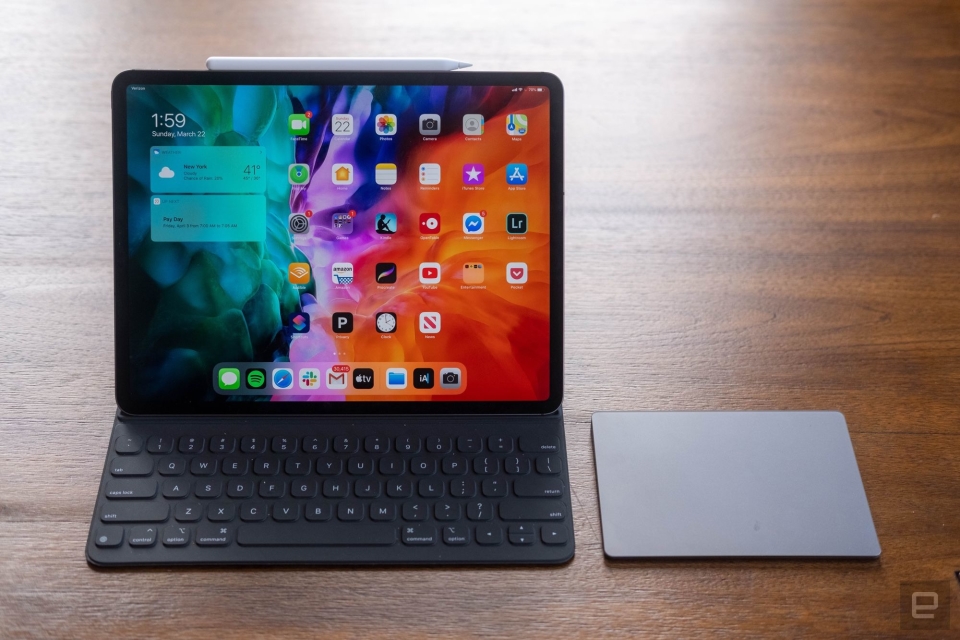
If you’re already in the Apple ecosystem, the best option for you is obviously an iPad. The 12-inch Pro is our pick. Like older models, this iPad Pro has a stunning 12.9-inch screen with a speedy 120Hz refresh rate, but this year it uses mini-LED backlighting to deliver greater dynamic range. Apple’s M1 chipset is impressively fast too, and more than good enough for most tasks. Plus, the latest iPadOS is superior to older versions thanks to widgets and quick notes support.
Apple’s new Magic Keyboard provides a satisfying typing experience, and its trackpad means you won’t have to reach for the screen to launch apps. But it’ll also cost you an extra $300, making it the most expensive case on this list by a lot. The iPad also lacks a headphone jack and its webcam is awkwardly positioned along the left bezel when you prop it up horizontally, so be aware that it’s still far from a perfect laptop replacement. Still, with its sleek design and respectable battery life, the iPad Pro 12.9 is a good 2-in-1 for Apple users.
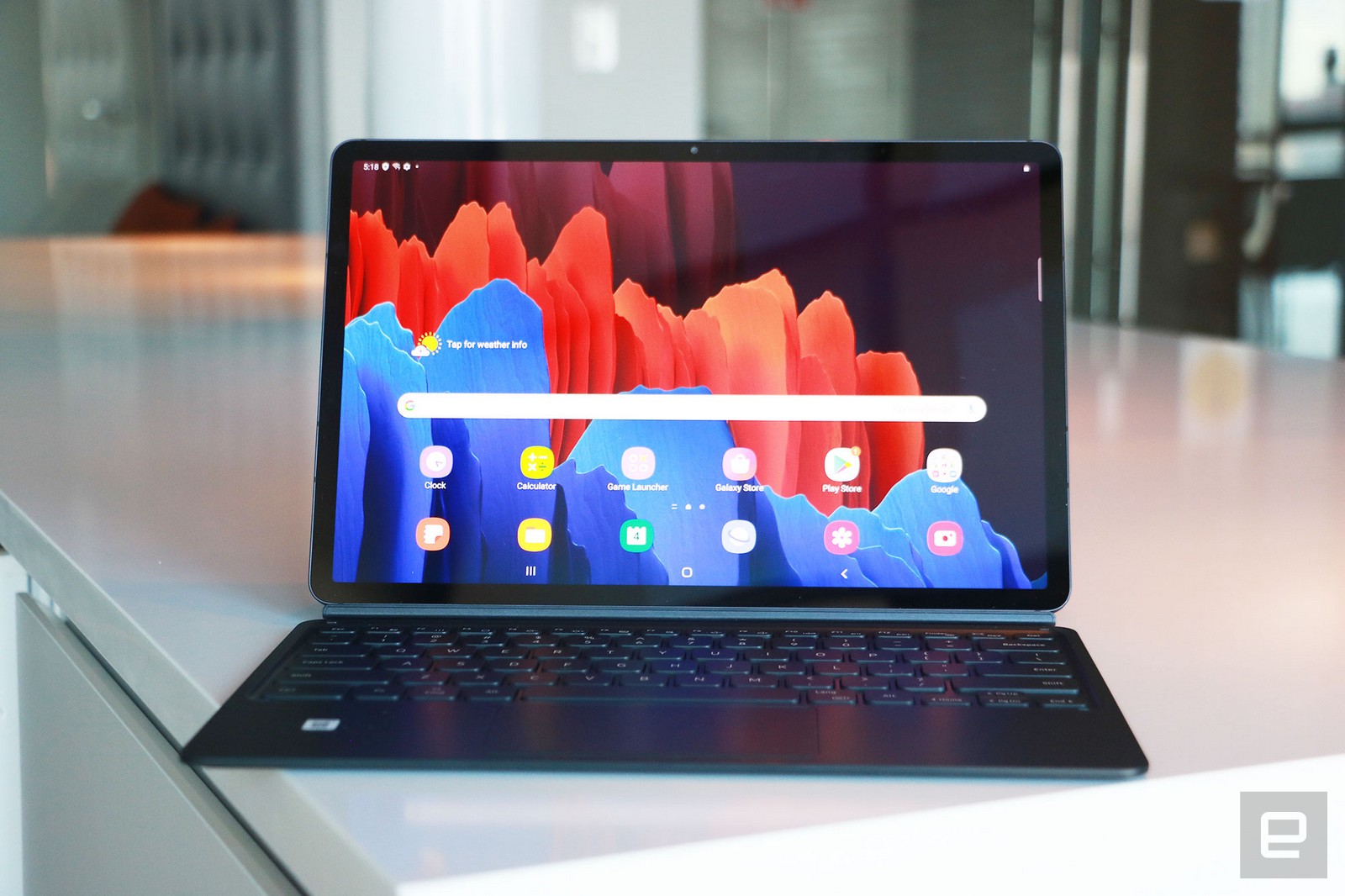
While Windows is better than iPadOS and Android for productivity, it lags the other two when it comes to apps specifically designed for touchscreens. If you want a tablet that has all the apps you want, and only need it to occasionally double as a laptop, the Galaxy Tab S7+ is a solid option. Though it was released last year, it’s still the best Android-powered 2-in-1 around. You’ll enjoy watching movies and playing games on its gorgeous 12.4-inch 120Hz AMOLED screen, and Samsung includes the S Pen, which is great for sketching and taking notes. The Snapdragon 865+ processor and 6GB of RAM keep things running smoothly, too.
Thankfully the company significantly improved its keyboard case over previous models, with more comfortable and responsive keys. You could type for hours on this thing and not hate yourself (or Samsung). The battery life is also excellent, so you won’t need to worry about staying close to an outlet. The main caveat is that Android isn’t great as a desktop OS and, while Samsung’s DeX mode offers a somewhat workable solution, it has plenty of quirks. Still, with Android 12L on the horizon, a simple software update could ease some pain.
Android might suck as a desktop operating system, but Chrome OS doesn’t. If most of your tasks take place inside a browser, the HP Chromebook x2 will serve you well. It has great battery life, an excellent 11-inch screen and looks nice, to boot. HP even includes the keyboard and stylus with the tablet, which almost none of the competition does.
Chrome still isn’t a great OS in tablet mode, and the Chromebook x2’s Snapdragon 7c processor sometimes struggles if you rack up too many tabs. It’s also a little pricey at $600, but you can often find it for $400 when it goes on sale at sites like Best Buy. That makes it a solid choice considering everything HP includes for the money.
Niantic has acquired another company to help build out its augmented reality platforms. The company has announced that it's acquiring the team behind Lowkey, an app you can use to easily capture and share gameplay moments. While you can use any screen capture application — or even your phone's built-in feature — to record your games, Lowkey was designed with casual gamers or those who don't want to spend time editing their videos in mind.
The app can capture videos on your computer, for instance, and sync them with your phone where you can use its simple editing tools to create short clips optimized for mobile viewing. You're also able to share those clips with friends within the app Snapchat-style or publish it for public viewing like TikTok. Niantic didn't reveal what the Lowkey team will be doing for its AR games and experiences exactly, but it said the team's "leadership in this space will accelerate the social experiences [it's] building in [its] products." The company added: "We share a common vision for building community around shared experiences, and enabling new ways to connect and play for our explorers."
The Pokémon Go creator purchased other companies in the past in its quest to build more tools and features for its augmented reality products. In 2017, it purchased social animation startup Evertoon to build a social network for its games. Last year, it bought 3D mapping startup 6D.ai to develop "planet-scale" augmented reality, and just this August, it acquired LiDAR scanning app Scaniverse to create a 3D map of the world.
Xbox video game clips are about to become much more easily shareable via unique public URLs on the Xbox mobile app, according to a tweet from Microsoft's Larry Hryb (@majornelson). Those links will also be collected into a new "trending content" area so you can see what others are doing. The features are now being tested in the app and will "soon' roll out to all users, Hryb said.
Link sharing and trending content are coming soon to the Xbox mobile app, letting you share links to your game clips and see the top trending content from other Xbox gamers.
This is currently being tested in the app and will soon be rolling out to all users! pic.twitter.com/5ZzhmvEFvg
"With Link sharing, just go to the capture you want to share in the Xbox mobile app to get a link, then paste it anywhere to share with your friends, who don't need to be signed-in to view your capture. We are now testing this long requested feature," Hryb said in the thread.
According to images shared by Hryb, the trending content section is a new social media-type site on iOS and Android kinds of resembles (wait for it) TikTok's feed — somewhat of a trend lately. Clicking on it opens up highlights that you can scroll through and then like, comment and share (top).
Microsoft already offers the ability to share game clips and screenshots via your profile's activity feed, clubs, messages and social media, on consoles as well as the mobile app. Sony also recently unveiled a similar feature on the PlayStation 5. However, letting you generate public links should make it more seamless, and Microsoft is making it more accessible with the social media aspect. The company has been testing the feature with developers, but you should see the feature in the near future.
HTC has rolled out a firmware update for the latest standalone Vive Focus that greatly improves its hand-tracking capabilities. The company says firmware version 3.0.999.284 significantly improves the feature's performance, stability and accuracy. HTC's Vive Focus 3 launched with hand tracking back in July, allowing users to use their hands as controllers. With this software engine upgrade, HTC says the headset will be able to track fast hand movements more easily and recognize pinch-to-zoom gestures more accurately.
Since the company opened the feature to developers, these improvements would translate to better hand tracking within applications. Developers can integrate the headset's six current predefined hand gestures into their VR apps, and HTC previously said that additional gestures will be added in the future.
HTC said in its announcement:
"Being able to navigate virtual environments naturally and intuitively will go a long way towards making VR more accessible to everyone, no matter their familiarity with technology. As we step into the metaverse era, we couldn’t be more excited to bring these quality-of-life improvements to all VIVE Focus 3 customers around the world."
When the manufacturer launched the Vive Focus 3 back in July, we found it to be the best standalone VR headset yet. It's not a direct competitor to the Quest 2, however, seeing as it costs $1,300. Unlike the Oculus (now Meta) headset, it targets business users and not ordinary consumers who want to enjoy VR experiences in their own home.
VCV Rack 2 has arrived, and it could help you figure out if modular synthesis is something you can get into before blowing a fortune on it. The original app dropped in 2017, giving you access to thousands of virtual modules that let you try Eurorack for free. This upgraded app comes with a completely redesigned user interface with a dark room mode and a much better module browser than its predecessor. VCV has a library of almost 2,700 modules, and the new browser will make them easier to sort with its category filters and the capability to highlight the modules you use the most.
While the app itself is still free to download and use, there's now a Pro version that includes a VST plugin for full integration into the digital audio workstation of your choice. That means you'll be able to use VCV Rack within Ableton, Logic or even GarageBand. The Pro tier also comes with professional support — and the promise of more plugin formats in the future. Rack 2's paid version will set you back $99 until 2022, though you can also get it bundled with VCV Drums and VCV Sound Stage for $209. You can get both paid and free VCV Rack 2 versions right now from its official page.
Every December for the last few years, Qualcomm has held an annual event in Hawaii to announce its latest flagship mobile chipset. This year was no different with the company taking the opportunity to unveil the Snapdragon 8 Gen 1. That’s right, for the second year in a row, Qualcomm is moving away from the sequential numbering scheme that has defined its processors for years. Just as the Snapdragon 865 gave way to the 888, the company will now replace the 888 with the Gen 1.
The system-on-a-chip includes Qualcomm’s own X65 5G modem. The company says it’s capable of theoretical download speeds of 10Gbps. That’s one of those specs that’s impressive on paper, but won’t mean much out in the real world since some of the fastest 5G networks can’t deliver speeds greater than 4Gbps in ideal conditions. If you have access to a WiFi 6 or 6E router, the Gen 1 can sustain download speeds of 3.6 Gbps over WiFi.
As with its past flagship chipsets, Qualcomm has put significant effort into improving the camera experience. The Gen 1 features an 18-bit image signal processor. That’s a first for the company, and something it says allows the component to process 4,000 times more data than the 14-bit Spectra ISP found on the Snapdragon 888. Additionally, phones with the Gen 1 will have the ability to capture photos at 3.2 gigapixels per second. In practice, that means the Gen 1 can process data from three 36-megapixel cameras simultaneously without any shutter lag, according to Qualcomm.
In another first for a mobile device, the company says the chipset can record 8K HDR footage at 30 frames per second. Again, that’s not the most practical feature for a phone in 2021 since 4K is the top end for most content. On that note, the Gen 1 supports UHD capture at 120 frames per second and can record slow motion footage at 960 frames per second at 720p. Separate from its Spectra ISP, the Gen 1 includes a always-on image signal processor that can power a camera while consuming very little battery power. It’s a feature that will allow Gen 1-equipped devices to offer always-on face detection for biometric authentication.
The Gen 1 won’t offer greatly improved CPU performance over what was already possible with the Snapdragon 888 Plus. What it does promise is faster performance when it comes to AI-related tasks. That’s thanks to Qualcomm’s new seventh-generation AI engine, which the company says is up to four times faster than its predecessor thanks to more shared memory and a faster tensor accelerator. Gaming performance is another highlight of the Gen 1. According to Qualcomm, its latest Adreno GPU offers 30 percent faster rendering performance while consuming 25 percent less power. Over on the audio front, the Gen 1 includes support for Qualcomm’s recently announced aptX Lossless Bluetooth codec. It can deliver up to CD-quality 16-bit 44.1kHz audio streaming over a wireless connection.
Rounding out the Gen 1’s feature list is a dedicated Trust Management Engine. The Gen 1 is the first mobile chipset to support Google’s Android Ready SE standard out of the box, which means it has the capability to store things like digital car keys and IDs.
With its mix of performance improvements and new features, the Snapdragon 8 Gen 1 offers an intriguing look at the next generation of Android flagships. Now we have to wait to see what capabilities manufacturers decide to enable in their latest devices. The first Gen 1-equipped phones will arrive later this year, with more expected to come in the first half of 2022.
Separately, Qualcomm announced it’s partnering with Google to bring the company’s Neural Architecture Search platform to its product portfolio. The technology, which will be available first on the Snapdragon 8 Gen 1, allows companies to create and optimize AI models automatically instead of manually. According to Google, NAS optimize AI models in weeks rather than months.
Meta’s Reality Labs unit is rolling out one last major software update for the Quest and Quest 2 before the end of the year. And it’s one you’ll want to download as soon as you can because it adds some handy features.
One of them allows you to record yourself while inside a game or app. If you own a VR headset, you’ve probably seen videos like the one above where you can see how a game physically plays. Before today, you needed special equipment to capture footage from that mixed reality perspective. With the new update, you can use your phone instead.
Reality Labs
Naturally, the final result isn’t as polished as the above video, but you can still get an idea of how games like Beat Saber play out in the real world. You’ll need an iPhone XS or above with iOS 11 or higher to use the new mobile mixed reality camera. With today’s release, about a dozen games support the feature, including Superhot VR, Pistol Whip and Synth Riders.
The update also includes a number of features Meta said were coming “soon” at its Connect conference in late October. To start, you can now make voice calls through the Messenger app on Quest and Quest 2 headsets. The feature allows you to not only call other Quest users, but you can also dial up your Facebook friends.
Reality Labs
Starting today, some games will also allow you to back up your save data to the cloud. The feature may not be immediately available on your headset after downloading the update. That’s because Reality Labs says it’s rolling it out at a slower pace to make sure it works correctly. Additionally, it’s an opt-in feature for developers, so not every game may support it even after it’s broadly available. While not new to the Quest platform, today’s update also removes the experimental tag that had been applied to the multi-user and app sharing features that were introduced at the start of the year.
Lastly, while not directly related to today’s update, in the “coming weeks” Reality Labs plans to introduce new customization options to Horizon Workrooms. To start, you’ll have the option to choose from multiple virtual office environments and the ability to decorate the space with custom posters and your company's logo.
It might soon be easy to build living robots — because they'll build themselves. New Scientistreports Harvard University, Tufts University and University of Vermont researchers have learned that their frog cell-based Xenobots can self-reproduce. The custom organisms can collect "hundreds" of individual cells in their dishes to spontaneously assemble baby bots that grow up within a few days. As this happens over and over, you could use the reproduction to amass however robots you need to deliver drugs, remove microplastics from rivers or otherwise complete small-scale tasks.
The replication method is as notable as the bots themselves. The cells would normally develop into tadpole skin, but the computer-designed cell mix instead uses the "kinematic" (motion-based) replication normally seen only with molecules. No known animal or plant reproduces this way, according to study lead Sam Kriegman — the robots effectively broke the 'rules' of biology.
Yes, the researchers are aware of the technical and ethical problems with robots that copy themselves without prompting. The team's goal is to understand the self-reproduction and learn how to "control it, direct it, douse it, exaggerate it," according to project co-leader Joshua Bongard. Honing this development in a tightly-controlled lab could lead to carefully managed growth. That, in turn, could lead to regenerative medicine and anti-pollution tools that simply weren't possible before.