Posts with «technology & electronics» label

The best smartwatches

Just a few years ago, the case for smartwatches wasn’t clear. Today, the wearable world is filled with various high-quality options, and a few key players have muscled their way to the front of the pack. Chances are, if you’re reading this guide, you’ve probably already decided that it’s time to upgrade from a standard timepiece to a smartwatch. Maybe you want to reach for your phone less throughout the day, or maybe you want to stay connected in a more discrete way. The list of reasons why you may want a smartwatch is long, as is the list of factors you’ll want to consider before deciding which to buy.

What to look for in a smartwatch
Cherlynn Low

Compatibility

Apple Watches only work with iPhones, while Wear OS devices play nice with both iOS and Android. Smartwatches made by Samsung, Garmin, Fitbit and others are also compatible with Android and iOS, but you’ll need to install a companion app.

The smartwatch OS will also dictate the type and number of on-watch apps you’ll have access to. Many of these aren’t useful, though, making this factor a fairy minor one in the grand scheme of things.

Price

The best smartwatches generally cost between $300 and $400. Compared to budget smartwatches, which cost between $100 and $250, these pricier devices have advanced fitness, music and communications features. They also often include perks like onboard GPS, music storage and NFC, which budget devices generally don’t.

Some companies make specialized fitness watches: Those can easily run north of $500, and we’d only recommend them to serious athletes. Luxury smartwatches from brands like TAG Heuer and Hublot can also reach sky-high prices, but we wouldn’t endorse any of them. These devices can cost more than $1,000, and you’re usually paying for little more than a brand name and some needlessly exotic selection of build materials.

Battery life

Battery life remains one of our biggest complaints about smartwatches, but there’s hope as of late. You can expect two full days from Apple Watches and most Wear OS devices. Watches using the Snapdragon Wear 3100 processor support extended battery modes that promise up to five days on a charge — if you’re willing to shut off most features aside from, you know, displaying the time. Snapdragon’s next-gen Wear 4100 and 4100+ processors were announced in 2020, but only a handful of devices – some of which aren’t even available yet – are using them so far. Other models can last five to seven days, but they usually have fewer features and lower-quality displays. Meanwhile, some fitness watches can last weeks on a single charge.

A few smartwatches now support faster charging, too. For example, Apple promises the Series 7 can go from zero to 80 percent power in only 45 minutes, and get to full charge in 75 minutes. The OnePlus Watch is even speedier, powering up from zero to 43 percent in just 10 minutes. (Mind you that turned out to be one of the only good things about that device.)

Communication

Any smartwatch worth considering delivers call, text and app alerts to your wrist. Call and text alerts are self explanatory, but if those mean a lot to you, consider a watch with LTE. They’re more expensive than their WiFi-only counterparts, but data connectivity allows the smartwatch to take and receive calls, and do the same with text messages, without your phone nearby. As far as app alerts go, getting them delivered to your wrist will let you glance down and see if you absolutely need to check your phone right now.

Fitness tracking

Activity tracking is a big reason why people turn to smartwatches. An all-purpose timepiece should log your steps, calories and workouts, and most of today’s wearables have a heart rate monitor as well.

Many smartwatches also have onboard GPS, which is useful for tracking distance for runs and bike rides. Swimmers will want something water resistant, and thankfully most all-purpose devices now can withstand at least a dunk in the pool. Some smartwatches from companies like Garmin are more fitness focused than others and tend to offer more advanced features like heart-rate-variance tracking, recovery time estimation, onboard maps and more.

Health tracking on smartwatches has also seen advances over the years. Both Apple and Fitbit devices can estimate blood oxygen levels and measure ECGs. But the more affordable the smartwatch, the less likely it is that it has these kinds of health tracking features; if collecting that type of data is important to you, you’ll have to pay for the privilege.

Engadget

Music

Your watch can not only track your morning runs but also play music while you’re exercising. Many smartwatches let you save your music locally, so you can connect wireless earbuds and listen to tunes without bringing your phone. Those that don’t have onboard storage for music usually have on-watch music controls, so you can control playback without whipping out your phone. And if your watch has LTE, local saving isn’t required — you’ll be able to stream music directly from the watch to your paired earbuds.

Always-on displays

Most flagship smartwatches today have some sort of always-on display, be it a default feature or a setting you can enable. It allows you to glance down at your watch to check the time and any other information you’ve set it to show on its watchface without lifting your wrist. This will no doubt affect your device’s battery life, but thankfully most always-on modes dim the display’s brightness so it’s not running at its peak unnecessarily. Cheaper devices won’t have this feature; instead, their screens will automatically turn off to conserve battery and you’ll have to intentionally check your watch to turn on the display again.

NFC

Many smartwatches have NFC, letting you pay for things without your wallet. After saving your credit or debit card information, you can hold your smartwatch up to an NFC reader to pay for a cup of coffee on your way home from a run. Keep in mind that different watches use different payment systems: Apple Watches use Apple Pay, Wear OS devices use Google Pay, Samsung devices use Samsung Pay and so forth.

Apple Pay is one of the most popular NFC payment systems, with support for multiple banks and credit cards in 72 different countries, while Samsung and Google Pay work in fewer regions. It’s also important to note that both NFC payment support varies by device as well for both Samsung and Google’s systems.

Engadget Picks

Best overall: Apple Watch

Cherlynn Low / Engadget

The Apple Watch has evolved into the most robust smartwatch since its debut in 2015. It’s the no-brainer pick for iPhone users, and we wouldn’t judge you for switching to an iPhone just to be able to use an Apple Watch. The latest model, the Apple Watch Series 7, has solid fitness-tracking features that will satisfy the needs of beginners and serious athletes alike. It also detects if you’ve fallen, can carry out ECG tests and measures blood oxygen levels. Plus, it offers NFC, onboard music storage and many useful apps as well as a variety of ways to respond to messages.

The main differences between the Series 7 and the Series 6 that preceded it are the 7’s larger display, its overnight respiratory tracking and faster charging. The slight increase in screen real estate allows you to see things even more clearly on the small device, and Apple managed to fit a full QWERTY keyboard on it to give users another way to respond to messages. The faster charging capabilities are also notable – we got 10 percent power in just 10 minutes of the Watch sitting on its charging disk, and it was fully recharged in less than one hour.

While the $399 Series 7 is the most feature-rich Apple Watch to date, it’s also the most expensive model in the Watch lineup, and for some shoppers there might not be clear benefits over older editions. Those who don’t need an always-on display, ECG or blood oxygen readings might instead consider the Apple Watch SE, which starts at $279.

We actually regard the Watch SE as the best option for first-time smartwatch buyers, or people on stricter budgets. You’ll get all the core Apple Watch features as well as things like fall detection, noise monitoring and emergency SOS, but you’ll have to do without more advanced hardware perks like a blood oxygen sensor and ECG monitor.

Buy Apple Watch Series 7 at Amazon - $399Buy Apple Watch SE at Amazon - $279

Best budget: Fitbit Versa 2

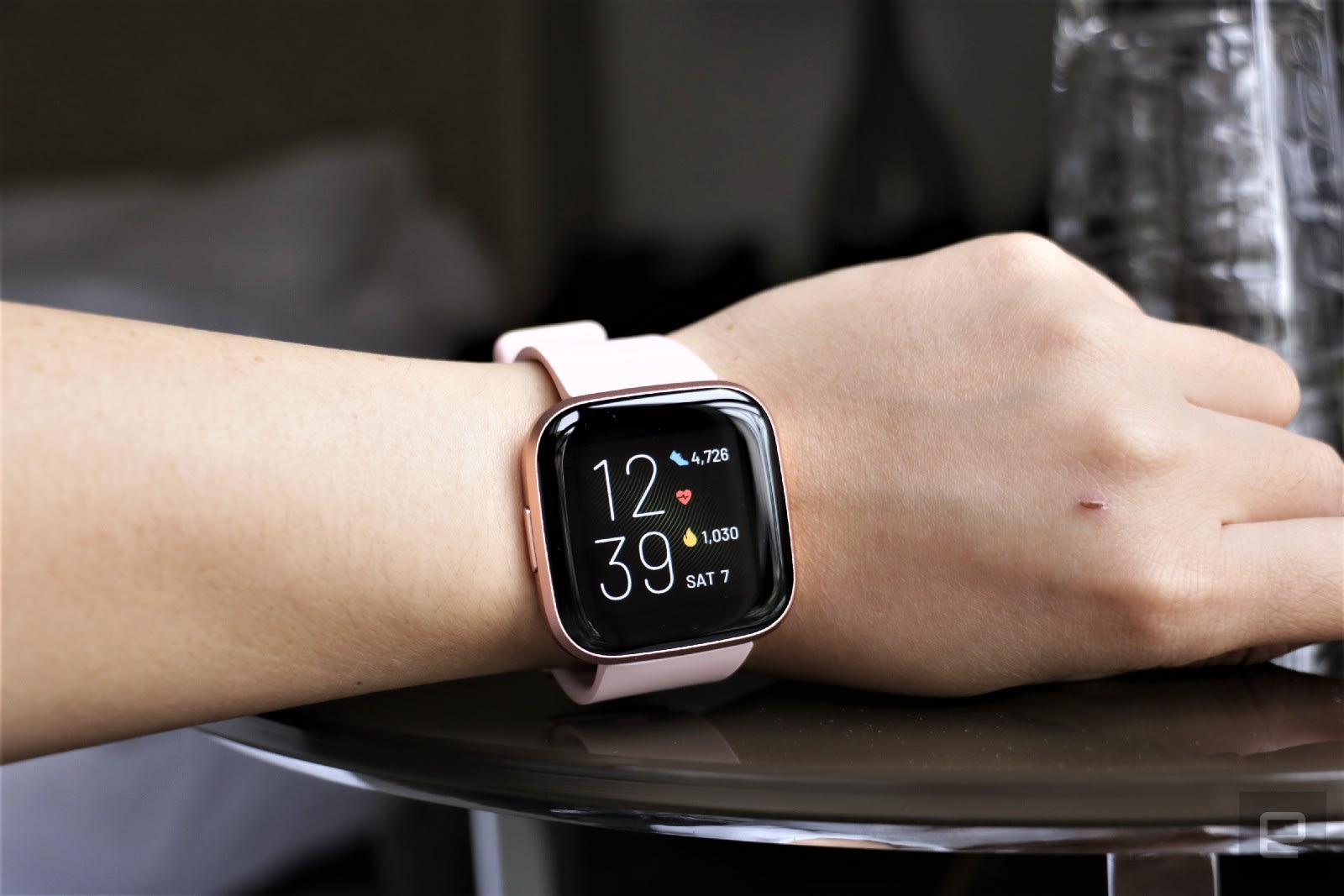
Dropping $400 on a smartwatch isn’t feasible for everyone, which is why we recommend the Fitbit Versa 2 as the best sub-$200 option. It’s our favorite budget watch because it offers a bunch of features at a great price. You get all of these essentials: Fitbit’s solid exercise-tracking abilities (including auto-workout detection), sleep tracking, water resistance, connected GPS, blood oxygen tracking and a six-day battery life. It also supports Fitbit Pay using NFC and it has built-in Amazon Alexa for voice commands. While the Versa 2 typically costs $150, we’ve seen it for as low as $100.

Buy Fitbit Versa 2 at Amazon - $150

Best for Android users: Samsung Galaxy Watch 4

David Imel for Engadget

Samsung teamed up with Google recently to revamp its smartwatch OS, but that doesn’t mean Tizen fans should fret. The Galaxy Watch 4 is the latest flagship wearable from Samsung and it runs on WearOS with the new One UI, which will feel familiar if you’ve used Tizen before. Also, the watch now comes with improved third-party app support and access to the Google Play Store, so you can download apps directly from the watch.

We like the Galaxy Watch 4 for its premium design as well as its comprehensive feature set. It has a 3-in-1 biometric sensor that enables features like body mass scanning, bloody oxygen tracking and more, plus it has a plethora of trackable workout profiles. Both the Galaxy Watch 4 and the Watch 4 Classic run on new 5nm processors and have more storage than before, as well as sharper, brighter displays. They both run smoothly and rarely lag, but that performance boost does come with a small sacrifice to battery life: the Galaxy Watch 4 typically lasted about one day in our testing, which while not the best, may not be a dealbreaker for you if you plan on recharging it every night.

Buy Galaxy Watch 4 at Amazon - $250

Fashion-forward options

Fossil

Yes, there are still companies out there trying to make “fashionable” smartwatches. Back when wearables were novel and generally ugly, brands like Fossil, Michael Kors and Skagen found their niche in stylish smartwatches that took cues from analog timepieces. You also have the option to pick up a “hybrid” smartwatch from companies like Withings and Garmin – these devices look like standard wrist watches but incorporate some limited functionality like activity tracking and heart rate monitoring. They remain good options if you prefer that look, but thankfully, wearables made by Apple, Samsung, Fitbit and others have gotten much more attractive over the past few years.

Ultimately, the only thing you can’t change after you buy a smartwatch is its case design. If you’re not into the Apple Watch’s squared-off corners, all of Samsung’s smartwatches have round cases that look a little more like a traditional watch. Most wearables are offered in a choice of colors and you can pay extra for premium materials like stainless steel. Once you decide on a case, your band options are endless – there are dozens of first- and third-party watch straps available for most major smartwatches, allowing you to change up your look whenever you please.

Cherlynn Low contributed to this guide.

Shark's WiFi robot vacuum with clean base is half off today only

One of Amazon's latest daily deals knocks half off a powerful Shark robot vacuum. The Shark AV1010AE robot vacuum with clean base is down to $300 today only, which is 50 percent less than its usual rate and the best price we've seen it. It shares many features with the Shark machine that made it onto our list of best robot vacuums, including home mapping, Alexa and Google voice control and the convenience of a clean base.

Buy Shark WiFi robot vacuum at Amazon - $300

We've been generally impressed with Shark's robot vacuums, with both high-end and affordable models earning spots in our guides. The AV1010AE is a mid-tier machine featuring improved carpet cleaning with multi-surface brush rolls, suction that's powerful enough to capture pet hair along with dirt and debris and row-by-row cleaning. It'll also map out your home as it cleans so you can then send the machine to specific rooms for more targeted cleaning.

Shark's robot vacuum connects to WiFi so you can control it via its companion mobile app. Not only can you start and stop cleaning jobs from there, but you can also set schedules so the machine cleans routinely on certain days and times. If the robo-vac starts to run out of juice before it's done cleaning, its Recharge and Resume feature will force the machine back to its base to power up, and once it has a sufficient amount of battery power, it'll automatically pick up where it left off.

And you won't have to tend to the vacuum every job thanks to the included clean base — it'll empty its dustbin into the clean base after its done cleaning, so you'll only have to empty the base once every 45 days or so. We also appreciate that Shark's base is bagless, so you're not forced to buy proprietary garbage bags for it. The clean base is a big perk of this sale as it's pretty rare to find a robot vacuum that comes with one for only $300.

As a mid-tier device, the AV1010AE doesn't have all of the features we tested out on the model that made it into our best robot vacuums guide (RV2502AE). The AV1010AE doesn't have AI laser vision, so it won't be as good at avoiding obstacles as other models, and lacks self-cleaning brush rolls as well as PowerFin Technology. The latter refers to flexible silicon fins found on some Shark machines that help get deeper into carpets and pick up more hair. If you're willing to skip those advanced features, you'll still get a solid robot vacuum in the Shark AV1010AE without spending too much money.

Follow @EngadgetDeals on Twitter for the latest tech deals and buying advice.

WhatsApp finally makes moving from Android to iOS less painful

If the thought of losing your tremendous trove of WhatsApp chat histories, files and other data has been keeping you from making the jump to iOS, you'll no longer have to worry. Today, the app is adding a feature to help you move your content over, and it'll be part of Apple's existing "Move to iOS" tool. To be clear, WhatsApp's feature is available as a beta for now, so you may encounter bugs during the transfer process.

To port your files over, you'll want to pay attention to the Apps and Data transfer page while setting up your iPhone. After you select the "Move data from Android" option, your new iPhone will look for the Move to iOS app on your older device and create a peer-to-peer connection. Here, you can choose what apps, files, contacts and more to bring over to your iPhone, and starting today the option for WhatsApp will join that list. 

When you select WhatsApp, it will open automatically and prompt you to give permission to move your data over. Depending on the amount of content you have, it'll take awhile to package everything up to transfer to your iPhone. Apple will also pre-load the WhatsApp icon on your home page so you can just tap it to finish installing it on your new iPhone, instead of having to go through the App Store. 

You'll need to authenticate in WhatsApp when you first open it in iOS before the data is decrypted, but once that's done you should see all your chats safely transferred to their new home. Once the migration is completed, you can also choose to back your WhatsApp chats to iCloud Drive to make upgrading to new iPhones easier.

The Move to iOS process will also look at the apps on your Android phone and see if they exist on Apple's App Store. If they do, the icons will appear on your new iPhone's home screen and you can tap them to finish downloading . This feature works for those using Android 5 and later, as well as iOS 15.5 onwards. 

Prior to this, WhatsApp users making the move from Android to iOS had to give up their chat histories (or find extremely convoluted ways to port their data over). Though this process still requires numerous steps, it at least offers those switching platforms a built-in method of transfer. Those who already made the move before today will unfortunately not be able to make use of this tool.

Amazon's Kindle is 33 percent off right now

You might have found the right Father's Day gift if there's a literary dad in your life. Amazon is selling the basic Kindle e-reader with lock screen ads for $60, or a hefty 33 percent off. You can also buy the Kindle Kids variant for $65 (41 percent off) if the upgraded warranty, child-friendly cover and year of Kids+ service will provide some piece of mind. You can buy the regular version without ads for $75.

Buy Kindle at Amazon - $60

The standard Kindle has been around for quite some time, but for a good reason: it handles the essentials very well. The front light and contrast will help you read in bed, and the touchscreen design is both easy to use and easy to carry around. Simply speaking, you might not need much more than this to read a favorite novel.

There are limitations. The base Kindle isn't waterproof, so you won't want to bring it to the beach. And while the six-inch screen and 8GB of storage should be enough for typical reading, you might like the larger, better-lit screen of the Kindle Paperwhite or the 32GB capacity of the Paperwhite Signature Edition. If you're new to e-readers or just aren't fussy, though, Amazon's everyday model is more than enough.

Follow @EngadgetDeals on Twitter for the latest tech deals and buying advice.

HyperX’s Cloud Mix Buds makes managing multi-device audio a breeze

Wireless headphones have gotten better at connecting to multiple devices in recent years. But pairing can still be kind of a hassle, especially if you’re gaming on a range of devices including consoles, phones and PCs. But after testing out its new Cloud Mix Buds, it feels like HyperX has come up with a simple and elegant way of supporting wireless audio on a bunch of different gadgets, regardless of if you’re gaming or just relaxing to music.

The main thing that separates the Cloud Mix Buds from similar headphones is that in addition to Bluetooth 5.2, the earbuds also come with their own dongle that sends audio over a dedicated 2.4Ghz channel. So not only do you get lower latency compared to Bluetooth – which is extremely useful when you’re playing fast-paced games – you also get a stronger signal that’s less likely to cut out.

Sam Rutherford/Engadget

The thing I like the most about the Cloud Mix Buds’ kit is that because the dongle has a USB-C connector, it worked seamlessly with every gaming system I tested including more oddball ones like the Steam Deck. And I didn’t even need to install HyperX’s free Ngenuity app either. The one exception is that, while the Cloud Mix Buds are compatible with both Android and iOS devices, PCs and consoles at large, because Microsoft uses a proprietary wireless audio protocol, the earbuds don’t work with Xboxes.

That makes switching wireless audio as easy as moving the dongle from one device to another. In my experience, the best way to take advantage of buds’ dual-mode wireless connectivity was by keeping them paired with my phone over Bluetooth (where latency isn’t as big a concern) and attaching the dongle to whatever I’m gaming on at the time. The USB-C adapter even has a handy button that you can press to mute its mics.

For gadgets that don't have a USB-C port or have ports that are hard to reach, the Cloud Mix Buds come with a handy extension adapter and a USB-C to USB-A cable. 
Sam Rutherford/Engadget

As an added bonus, HyperX includes a small extension adapter and a USB-C to USB-A cable with the earbuds. This allows the buds to work with an even wider range of devices like the Nintendo Switch, whose lone USB-C port is occupied when docked. So instead of plugging the dongle into the console itself, you can connect the extension adapter to the USB-A port on the Switch’s dock, and then plug the dongle into that. This also worked really well for my desktop PC, which doesn’t support Bluetooth (it has an older mobo without built-in WiFi or BT) and lacks easily accessible front-side USB-C ports.

As far as audio quality goes, the Cloud Mix Buds 12mm drivers deliver crisp sound including a bit deeper bass than what I get from Samsung’s Galaxy Buds Pro. And while it’s subtle, the reduced latency you get with the 2.4GHz connectivity is noticeable in shooters where reaction times really matter. Unfortunately, because I’ve been using the buds prior to their official release, I didn’t have the chance to dive deeper into the Ngenuity app’s more advanced features, which include support for virtual 7.1 surround sound, customizable EQs and adjustable touch controls.

For devices like a PS5, the size of the Cloud Mix Buds' dongle may block other nearby ports. 
Sam Rutherford/Engadget

The Cloud Mix Buds feature above-average battery life with around 10 hours of runtime using Bluetooth (or closer to 8 hours when using the 2.4GHz dongle), with another 20 to 22 hours in the case. HyperX also includes a protective silicone sleeve for the charging case and a choice of three different ear tips (small, medium and large). For me, the default medium tips offered a snug fit that blocked a lot of ambient noise without being too tight.

Finally, while you don’t get support for wireless charging, my favorite little design element is being able to plug the 2.4GHz dongle into the bottom of the case when traveling so you don’t lose it. For a device that’s meant to be used both at home and on-the-go, that’s a really thoughtful touch. The downside is that the dongle is so wide, it can block nearby ports like the front USB-A jack on a PS5.

When you're traveling, you can stash the Cloud Mix Buds' dongle on the bottom of its case so you don't lose it. 
Sam Rutherford/Engadget

Now I admit getting earbuds to play nice with a lot of different gaming devices is sort of a first-world problem. But for those who have the luxury of jumping between multiple consoles or systems (sorry Xbox), HyperX’s Cloud Mix Buds makes all that a breeze, while still offering good battery life, a simple design, and solid audio quality. And with a price of $150, that’s an appealing combo for big-time gamers that appreciate the freedom of wireless sound.

Michigan approves digital license plates by startup Reviver

Michigan drivers now have the option of adorning their cars with digital license plates, which can locate lost vehicles and receive public safety alerts — for a fee. Reviver, the maker of the connected plates, announced that Michigan residents and businesses can now purchase the device (known as the RPlate) online. Consumers can choose between two models: a battery-powered plate and a hard-wired plate that includes GPS. The plates have been available for sale in California and Arizona, and the company is aiming to make them available nationwide.

But what exactly is a digital license plate? The RPlate is essentially a license plate with an HD display and LTE connectivity (as well as GPS for the hard-wired model) that includes a number of security and personalization features. Drivers can switch between dark and light modes and select personalized messages to appear at the bottom. The GPS-enabled plate also includes telematic transponders, so it can locate a lost or stolen vehicle and send alerts to your smartphone if it detects suspicious movement. There’s a companion mobile app that allows drivers to track mileage and renew their vehicle registration online. 

Reviver's digital plate also includes a couple of security features that could be overkill for some. For example, there’s a “Valet Parking” mode that lets you monitor your car remotely while it is being parked by a valet attendant and a geofencing option for family members or employees who drive the car that sends alerts if they violate the travel boundaries.

The digital license plates don’t come cheap. Both models require a subscription ($19.95 per month for battery-powered and $24.95 per month for hard-wired) and cost an additional $150 if you elect to have a professional install the plate. The company is also working on a number of new features, including integration with toll roads, parking meters and additional DMV services.

Sony would love if you bought its $3,700 Walkman for over-the-top audiophiles

Are you the sort of music listener who'll happily pay more for a set of earphones than you would on a nice computer? If so, Sony has the MP3 players for you. The company has released two ultra-high-end Walkman MP3 players aimed squarely at audiophiles. The headliner, the $3,700 NW-WM1ZM2 (pictured at left), mates an S-Master HX digital amp with "fine-tuned" capacitors, thick Kimber Kable (to link the amp to the headphone jack) and a 99.99 percent pure gold-plated, oxygen-free copper chassis — all of which supposedly contribute to "clear, expansive" output. Even the reflow soldering includes gold that purportedly boosts sound localization and widens the sound stage.

You can also expect more practical improvements from the Android-based player, including a larger five-inch (and finally 720p) display, a larger power supply and an improved upscaling algorithm for CD-quality (16-bit, 44/48kHz) audio. You'll get 256GB of expandable storage for your tunes, WiFi streaming, a USB-C port and 40 hours of battery life when playing 96kHz FLAC audio. The ZM2 supports up to 32-bit, 384kHz audio in formats like MQA and WAV, so you're more likely to be limited by your source material than your hardware.

Don't worry if that feels excessive, as there's also a lower-cost model... relatively speaking. The $1,400 NW-WM1AM2 (shown at right) offers much of the core functionality of the ZM2, but in an aluminum alloy body with 'just' a low-resistance oxygen-free copper cable. You'll also have to make do with 128GB of expandable space.

Both Walkman models are available now. As with many devices aimed at audiophiles, there's a question of whether or not the exotic components and materials will be noticeable in your listening experience. Moreover, you're limited by the lowest common denominator in your setup. Even if you listen to songs that can take advantage of the design (Apple Music's 24-bit, 192kHz hi-res lossless suddenly seems modest), you'll have to find headphones or speakers that are up to the job. Both players are mainly aimed at wealthy music fans determined to maximize audio fidelity, even if they might not hear the difference.

FDA clears Rune Labs to use the Apple Watch to monitor Parkinson's

Turns out the Apple Watch’s motion sensors can be a useful tool for Parkinson’s patients and their physicians. The FDA has granted approval to Rune Labs to use their software paired with the Apple Watch to track symptoms of Parkinson’s disease, Reutersreported today. The San Francisco-based digital health startup has created software for watchOS that can detect common Parkinson’s symptoms such as tremors, involuntary or slow movement, rigidity and poor balance. Smartphone and other remote forms of monitoring Parkinson’s have been around for a while, but this is the first software designed for the Apple Watch that the FDA has cleared for motion disorders.

Since the Apple Watch Series 4 was first released in 2018, the wearable has been able to detect hard falls and offer advanced activity metrics. The company that same year added a Movement Disorder API to its open-source ResearchKit, opening the door for developers to create watchOS apps to track Parkinson’s and other diseases. As Rune Lab notes, the company is the first to make use of the API for commercial purposes.

The watchOS app by Rune Labs will give physicians access to patient movement data over time, which can further supplement the information they get from an in-person physical exam. Rune Labs also notes the Apple Watch’s tools aren’t capable of giving patients a complete picture of their disorder. “Of course, there are limitations to Apple's Movement Disorder kit: tremor and dyskinesia are only two symptoms in Parkinson’s Disease, and the classifiers themselves are not yet perfect,” wrote Rune Labs founder Brian Pepin last year in a blog post.

Apple has focused a lot of time and money on expanding and updating the Watch's health and fitness tracking capabilities, with many more to come in future updates. Earlier this month the FDA also cleared watchOS's AFib History feature — which monitors irregular and extremely rapid heartbeat — and will be released in the upcoming watchOS 9 update. 

Webex's seamless CarPlay support means you can never escape your meetings

Have you ever wished you could keep a work meeting going as you leave for home? No? Too bad, you're getting that option regardless. Cisco has introduced seamless transition features that 'help' you continue Webex meetings on your iPhone and through CarPlay. Move to Mobile lets you move a call from the desktop to your iPhone by scanning a QR code, while CarPlay can now continue a meeting the moment you plug your iPhone into your ride.

An update due in August will give you the option to listen to historical Webex recordings. You can catch up on a meeting you missed while you're stuck in traffic, in other words. No matter what meeting you're listening to, you'll see your schedule after the call is over. You can join a meeting directly from CarPlay if you're running late.

There are practical advantages to these updates. If you're a remote worker, you can run errands instead of being locked to your computer. And if you're back to working in the office, you can still leave early when the team holds a last-minute chat. Still, it's difficult to imagine many people getting excited about seamless Webex calls. After all, there's a good chance you consider your car a refuge — you probably don't want work following you on the road.

Microsoft Teams is using AI to prevent awkward interruptions in video calls

Microsoft might soon mitigate some of the worst nuisances in video chats. The Vergenotes Microsoft is rolling out AI-based voice quality upgrades that should help every call participant hear each other clearly. New machine learning models can not only cancel echoes, but even reduce the chances of awkward interruptions by eliminating echo-related overlaps. This won't stop rude people from hijacking the conversation, but it might help you raise an important point without completely disrupting someone else's train of thought.

The machine learning technology counters echoes by using a combination of roughly 100,000 simulated rooms and training from 30,000 hours of speech. Microsoft also paid regular Teams users to record their voices to help recognize thousands of different devices. And crucially, the processing happens on your device. This helps Microsoft cut costs, of course, but also makes sure the echo reduction happens quickly and across a wider range of users.

The feature is live now following months of testing. It comes in tandem with a few other upgrades, including AI improvements for bandwidth-limited video calls and optimizations for displaying text. This by itself probably won't make you choose Teams over rivals like Zoom or Google Meet, but it might tip the balance if virtual meetings are commonplace at your workplace.