Posts with «robotics» label

Robot Van Gogh will paint your portrait
Maker Faire Rome, where everything started

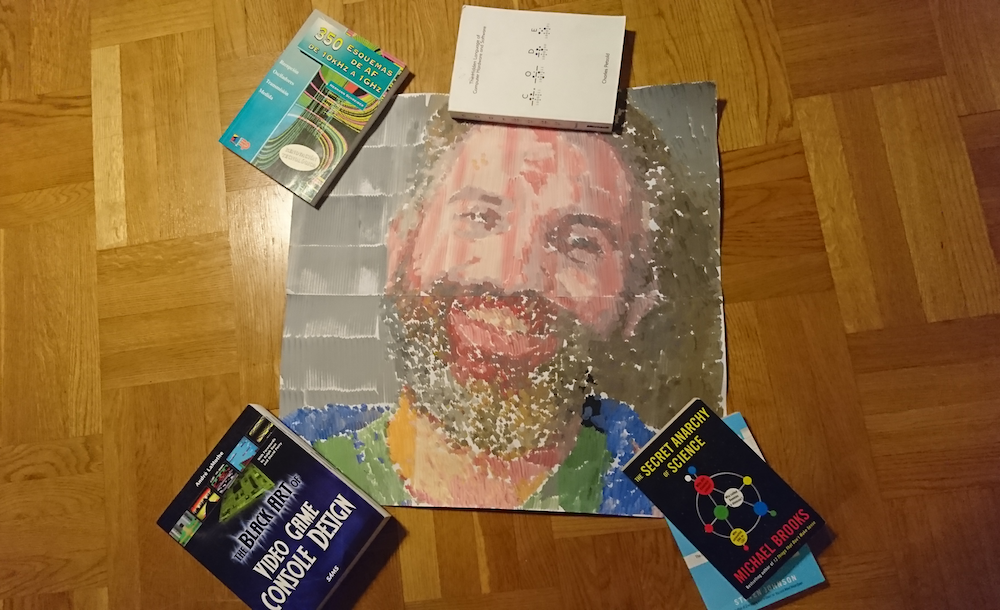
I participated in Maker Faire Rome back in December 2017. I came with the rest of the Arduino crew to spend two days talking to other makers in the show, check out the projects made in the field of education and to…  get a portrait painted. Now seriously, I hadn’t planned to get a painting of my beard made at Maker Faire, it just happened. I was walking around together with Marcus, one of the guys running the Arduino Education web infrastructure, when I saw my own picture on a computer screen at a not-so-distant booth. We came closer just to satisfy my curiosity, and then the surprise… there was a robot making my portrait!

The process of making this portrait was not exactly short, the robot moves back and forth every couple of brush strokes to get some more paint. The colors are created by dipping into small containers. Imagine a CNC of sorts moving on the X-Y plane and making a small movement with the brush in order to make a mark on the canvas. My portrait is made of several A4 pages glued together, as you can see in the picture. In total it takes several hours to produce a portrait like this one.

You can see the first traces made by the machine while painting my portrait in the following video.

The painting robot was built by Jose Salatino, a painter gone roboticist that used to go around making portraits to famous musicians and giving the paintings away to them. He told me that this is how he started in the art world. At some point he wanted to bring together his life passion with his hobby (electronics) and got interested into painting robots (seems like there is a whole niche there I haven’t explored yet) and realized that very few people were really using a painter’s technique to mix the colors. That triggered him into learning more about machines in general, and machines that could paint in particular.

[Jose’s self portrait process, image courtesy of Jose Salatino]

The machine itself

The painter robot, which I came to call Van Gogh because of its painting style, is a two-axis machine that can be programmed to move all over the canvas. The machine uses the technique of creating a color by mixing first basic pigments (blue, yellow, red) and then dipping the brush again into one of a series of containers grading from white to black. This is, Jose told me, how he would mix the paint: first dip into the different containers of basic color (e.g. to make a bright green, need to dip once in blue and maybe three times in yellow), second assign the luminosity by dipping into a certain gray color. When asked about whether the paint containers would not get dirty by doing so, Jose replied that so it goes when painting for him. The colors get dirty on the palette and you need to keep on adding new color. And this is when I realized that I was totally over engineering the project in my head when I tried to imagine how I would do it. Check the robot in action in the following video.

Note the sponge used to clean the brush before reloading it with paint, yet another master move, in my opinion. You can read more about the machine by visiting the project’s write-up here. 

The contest Jose is participating in

Jose has entered a robotics painting contest with the works made by his robot. One of the proposed pieces is actually my portrait.  

The 2018 “3rd Annual” International Robotic Art Competition’s goal is to challenge teams to produce something visually beautiful with robotics – that is, to have a robot use physical brushes and paint to create an artwork.

Jose’s robot is all about brushes, as I already told you. And he is all for the competition, for which he teamed up with his kids who learned everything that was needed to make the robot paint as it does. The idea is that, in case he won this contest, 90% off the $100.000 USD prize would be donated to an NGO in the US. Are you interested in art? More specifically, are you into robotic art? Then visit the contest’s site, register, and vote for your favorite pieces. If you voted for Jose’s work, you could also help him choose an NGO where to give the money away: Red Cross, Black Girls Code, Learn2Teach-Teach2Learn… as he lives in Barcelona, he doesn’t really know who he would give the price to in the US. Jose is open to suggestions, but remember he needs your vote first!

Check the whole contest here and Jose’s entry here.

Read more about Jose

If you are interested in reading more about Jose’s project, his daughter, Flor, made a very nice interview and reflection about the role of the artist when there is a machine making the work. This is something I bet many readers were wondering by now: “if the machine paints it, who is the one to be credited, the machine or the person making the machine?” In my opinion, and since I am one of the models, I think we–the models giving away our image–should be also getting some credit, or? (Note: this last sentence was a joke!)

This 3D-Printed Robotic Vacuum Sucks

After you’ve taken a moment to ponder the turn of phrase used in the title, take a look at this scratch-built robotic vacuum created by [theking3737]. The entire body of the vacuum was 3D printed, and all of the internal electronics are off-the-shelf modular components. We can’t say how well it stacks up against the commercial equivalents from iRobot and the like, but it doesn’t look like it would be too hard to build one yourself to find out.

The body of this rather concerned-looking robot was printed on a DMS DP5 printer, which is a neat trick as it only has a build platform of 200 mm x 200 mm. Once all the pieces were printed, a 3D pen was used to “weld” the sections together. The final result looks a bit rough, but should give a bond that’s just as strong as the printed parts themselves.

The robot has four sets of ultrasonic range finders to detect walls and obstacles, though probably not in the positions you would expect. The right side of the robot has two sets of sensors, while the left side only gets one. We aren’t sure the reasoning behind the asymmetrical layout, but presumably the machine prefers making right turns.

Control is provided by an Arduino Mega and the ever-reliable HC-05 Bluetooth module. A companion Android application was written which allows configuring the robot without having to plug into the Arduino every time you want to tweak a setting.

We can’t say we’ve seen that many DIY robotic vacuums here at Hackaday, but we’ve certainly featured our fair share of hacks for the commercially available models.

Learning Microcontrollers and Robotics in the DroneBot Workshop

Discover an excellent YouTube channel for learning hobby electronics, microcontrollers, robotics, and drones.

Read more on MAKE

The post Learning Microcontrollers and Robotics in the DroneBot Workshop appeared first on Make: DIY Projects and Ideas for Makers.

10 Arduino-Based Robo-Critters

Hot on the heels of yesterday’s delightful discovery of Vorpal, a lovable scamp of a hexapod, I decided to poke around to see what other Arduino-based robot projects there are out there these days. I found this YouTube video rounding up ten robo-critters. These include a robo-dog, a robotic cat, […]

Read more on MAKE

The post 10 Arduino-Based Robo-Critters appeared first on Make: DIY Projects and Ideas for Makers.

This 3D Printed Arduino-Based Hexapod Robot Can Bust a Move!

Check out the sick moves on this open-source, 3D-printable hexapod robot.

Read more on MAKE

The post This 3D Printed Arduino-Based Hexapod Robot Can Bust a Move! appeared first on Make: DIY Projects and Ideas for Makers.

Build a Thermoelectric-Cooled Drinkibot

John Park uses a Peltier cooler, a Trinket M0, and CircuitPython to build a drink-dispensing and cooling robot.

Read more on MAKE

The post Build a Thermoelectric-Cooled Drinkibot appeared first on Make: DIY Projects and Ideas for Makers.

Desktop Robot Head and Arm

Primary image

What does it do?

Desktop Robot

Hi Everyone. Its been a long time since I last posted a robot project on here but I wanted to share my latest project with you all. I have always enjoyed making various types of robot but I have a particular soft spot for desktop robots. I like the idea of a little robot pal sat next to me on the desk that I can develop when I get the spare time.

Cost to build

Embedded video

Finished project

Number

Time to build

Type

URL to more information

Weight

read more

Desktop Robot Head and Arm

Primary image

What does it do?

Desktop Robot

Hi Everyone. Its been a long time since I last posted a robot project on here but I wanted to share my latest project with you all. I have always enjoyed making various types of robot but I have a particular soft spot for desktop robots. I like the idea of a little robot pal sat next to me on the desk that I can develop when I get the spare time.

Cost to build

Embedded video

Finished project

Number

Time to build

Type

URL to more information

Weight

read more

SKELLY the Skeleton Robot

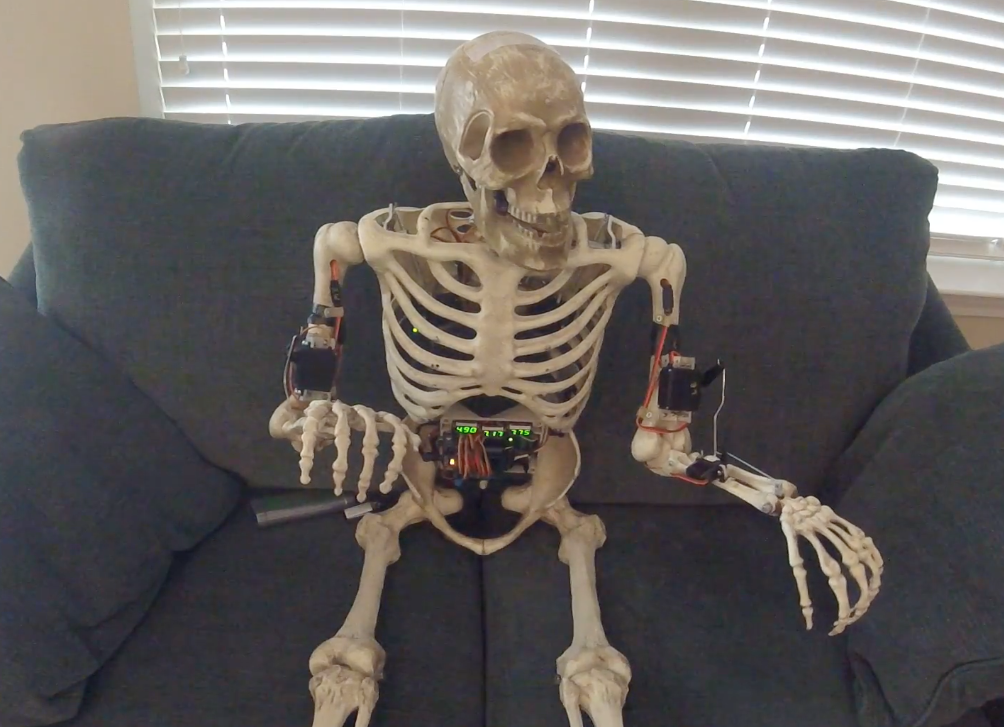
While it might seem like a long time away to most people, if you’re looking to make an amazing automated display for Halloween, it’s time to start planning! One idea would be an automated skeleton robot like SKELLY.

This particular robot was built using an Arduino Mega, a Cytron PS2 Shield, a modified sensor shield, and a wireless PS2 controller. SKELLY is equipped with a total of eight servos: six for bending his shoulders, elbows and wrists, one for running his mouth, and another for turning his head. There is also a pair of LEDs for eyes, and a small motor in his head with a counterweight that allows him to shake.

SKELLY is programmed using the Visuino visual programming environment. As seen in the videos below, the robot–which is the author’s first–is quite nimble, waving and moving along with an automatic piano!

Design and 3D Print Robots with Interactive Robogami

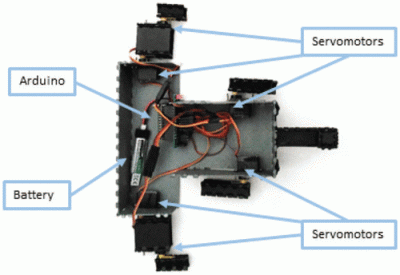
Internals of 3D printed “print and fold” robot. [Image source: MIT CSAIL]
Robot design traditionally separates the body geometry from the mechanics of the gait, but they both have a profound effect upon one another. What if you could play with both at once, and crank out useful prototypes cheaply using just about any old 3D printer? That’s where Interactive Robogami comes in. It’s a tool from MIT’s Computer Science and Artificial Intelligence Laboratory (CSAIL) that aims to let people design, simulate, and then build simple robots with a “3D print, then fold” approach. The idea behind the system is partly to take advantage of the rapid prototyping afforded by 3D printers, but mainly it’s to change how the design work is done.

To make a robot, the body geometry and limb design are all done and simulated in the Robogami tool, where different combinations can have a wild effect on locomotion. Once a design is chosen, the end result is a 3D printable flat pack which is then assembled into the final form with a power supply, Arduino, and servo motors.

A white paper is available online and a demonstration video is embedded below. It’s debatable whether these devices on their own qualify as “robots” since they have no sensors, but as a tool to quickly prototype robot body geometries and gaits it’s an excitingly clever idea.

Perhaps there’s an opportunity to enhance the “3D print, then fold” approach Robogami uses with this concept for making flexible prints out of non-flexible material, or incorporating simple 3D printed circuitry.

Thanks to [Adam] for the tip!


Filed under: robots hacks