Posts with «featured» label

The Floppotron is back with the Pokémon theme song
A few weeks ago, we heard Pawel Zadrozniak’s computer hardware orchestra perform a cover of Nirvana’s “Smells Like Teen Spirit.” Now, the Floppotron is back–this time with its own geeky rendition of the Pokémon theme song.

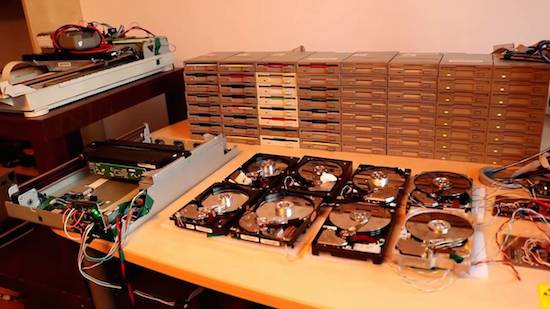
The Floppotron is comprised of 64 repurposed floppy disk drives, eight hard disks, and two scanners. Every column of floppy drives is connected to an 8-channel controller based on ATmega16 MCU. The higher the volume, the more drives are playing.

Meanwhile, the eight hard disks with a pair of 4-channel controllers act as percussion. The sound generated depends on the driving speed–the higher the frequency, the greater the pitch. Hard disks use a magnet and a coil to tilt the head. When voltage is supplied for long enough, the head speeds up and hits the bound making the “drum” sound.

To drive the coils, Zadrozniak says he employed a pair of push-pull outputs built using discrete SMD MOSFETs. Most of the tunes are made by the two scanners, both of which are connected to Arduino devices. Data is received over UART (USB-UART) and buffers messages to keep the music in time.

The host application is written in Python 2.7 and parses the language that is used to write note sequences and arrange tracks that go to a specific controller. You can read more about the Floppotron here, or just listen to the Pokémon anthem below!

VW builds an incredible Internet-connected RC track

When the Golf GTI and the Jetta GLI were born, Volkswagen packed both with turbocharged engines, precision performance, and a whole lot of vroom. But aside from their stylish exteriors, a rivalry between the vehicles was forged. And, what better way to settle this rivalry than with a massive RC car race on a custom, Tron-like track?

As part of their “Rival Road: GTI vs. GLI” virtual experience, Volkswagen built a giant 1,800 square-foot track equipped with illuminated walls, low-polygon-looking mountains, and nine Arduino-powered obstacles (connected to a laser-etched control panel) that are activated by viewers on Twitch. These barriers include everything from a turntable that spins the cars around, to whack-a-mole-style pillars that pop up randomly, to rumble strips.

From July 26-27th, fans can tune in to the live stream to support their favorite team and vote on the obstacles that’ll be raised from the track to thwart opponents. The RC Golf GTI and Jetta GLI vehicles will be operated by professional RC drivers Tanner Foust and Scott Speed.

Pretty sweet, right? Jalopnik had the chance to get a firsthand look at the project, where Volkswagen showed off everything from how it was made to how it works.

Arduino Blog 26 Jul 14:57

Spinphony turns cycling into music

Spinphony is a bike installation that was built in collaboration with 72andSunny‘s Google team and their Made with Code initiative, with hopes of inspiring teenage girls to take an interest in coding.

As its name would suggest, the project combines spinning (indoor cycling) and music with each bike representing a different instrument stem of a song.

For instance, bike one controls drums, bike two might control bass and so on. The way we made it all come together was to have the volume of each stem depend on the speed at which the bike was being pedaled (i.e. the slower the RPM the quieter the stem of the song and vice versa). This is where Arduino came into play.

The prototype is based on an Arduino Uno and uses two magnets, a reed switch, RPM values, and MIDI to produce some spincredible sounds. You can see it in action below!


This DIY stepper motor clock is weird yet wonderful

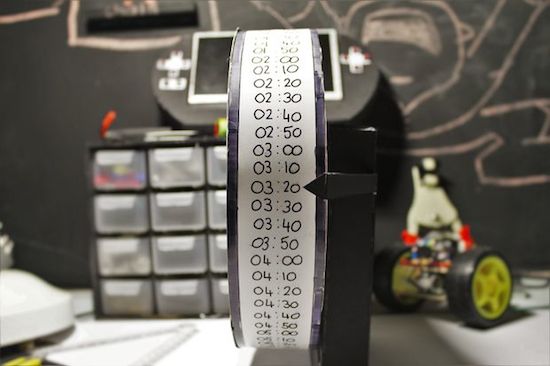
Just when you thought you’ve seen every possible kind of Arduino-driven clock, another one emerges. This “DIY strange-looking” device takes the form of a wheel with times written on it, which is rotated using an Arduino Micro and a 5V stepper motor. And while it may not be the most accurate timekeeper out there, it’s an excellent way for Makers to explore electronics, programming, and even geometry.

Unlike most clocks that have either two or three hands going around a 12-hour face, 17-year-old Instructables user “Electronics for Everyone” chose a fixed pointer to denote the time in 10-minute intervals instead.

The idea behind the clock is a circle with a circumfrence of 72cm that ticks at 1cm every 10 minutes, which means every 72 ticks will equal 12 hours…

You can find an entire breakdown of the build, along with its measurements and code, on its project page here.

Prototyping a smart bulb with JavaScript, Arduino + PubNub

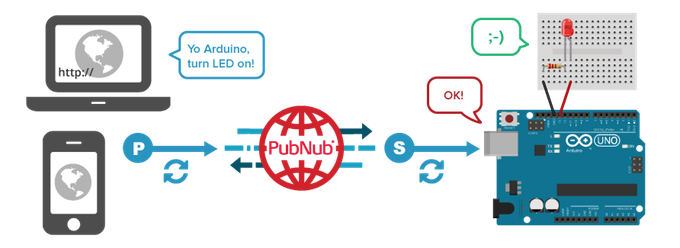
In this video, our friends at PubNub are going to create a smart home network that builds upon their previous Johnny Five tutorial. They again hack an Arduino Uno using JavaScript, but this time to create the simplest smart bulb. Because by “smart bulb,” we really just mean an LED.

The tutorial was developed by Tomomi Imura from PubNub and also uses Johnny-Five. No, not the robot from the movie Short Circuit. It is an open-source JavaScript robotics framework that lets you program an Arduino with Node.js. The bulb itself is remotely controlled via a web portal.

To establish the realtime communication between the Arduino and a web browser, the PubNub Data Stream Network (DSN) is used. PubNub provides global infrastructure and allows you to build and scale real-time apps and IoT devices quite easily.

The remote controller (web app) is written in JavaScript. This is a simple user interface that includes only one button. While a completed code sample is available on CodePen, this tutorial employs a simplified version so that it’s easier to follow along.


This Arduino machine will sort your Skittles by color

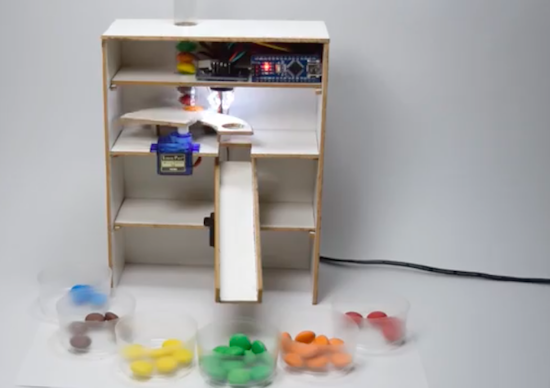
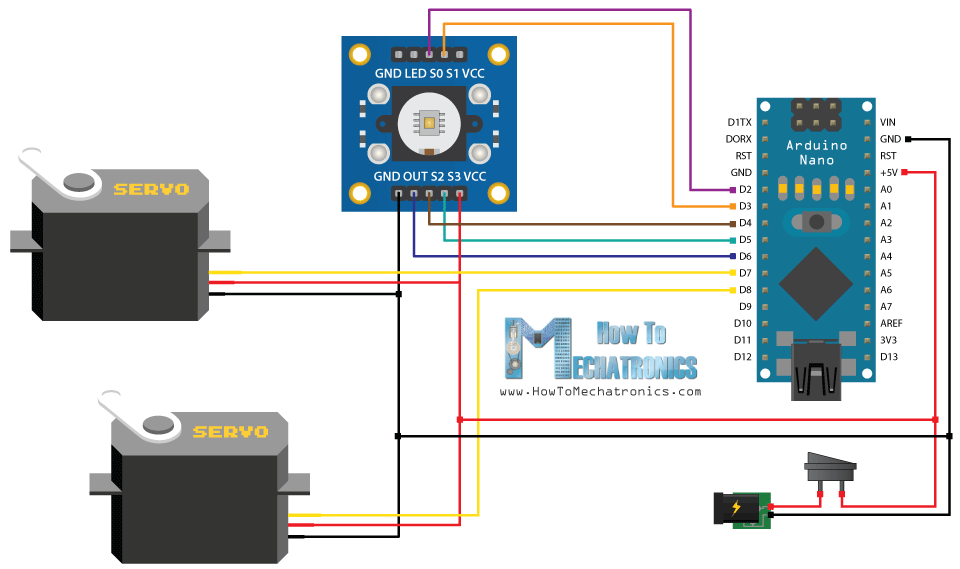
Do you just really hate yellow Skittles? Only love the red ones? Well, why waste your time sorting them out yourself when an automated machine can do it for you? As part of a recent tutorial, Dejan Nedelkovski has built what we calls the “Arduino Color Sorter” using a TCS3200 color sensor, two hobbyist servo motors, and an Arduino Nano.

How it works is fairly straightforward: The candies are stored within a plastic tube on top of the contraption and dropped onto a platform attached to the first servo. The motor then rotates the platform, bringing the Skittle to the color sensor. From there, the bottom servo moves into position while the top servo rotates again until the candy falls into the guide rail and into its respective bin.

So whether you’re tired of grouping your Skittles or need to meet the request of rockstars like Van Halen (no brown M&Ms!), you can find the Arduino Color Sorter’s 3D model, code and instructions here.


Turn your old cellphone into a smartwatch

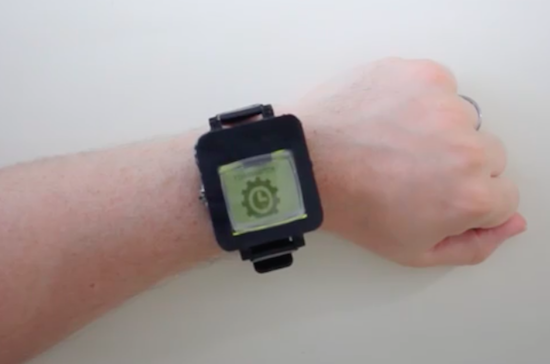
Do you have an old cellphone lying around somewhere? Don’t know what to do with it? Time to blow off that dust and convert the ‘dumb’ device into a smartwatch? This is exactly what Tinkernut has done. His DIY wearable not only tells time, but connects wirelessly to his smartphone over Bluetooth and notifies him of incoming calls and text messages via light and vibration.

The build itself uses an LCD screen and vibrating motor from a Nokia 1100 along with an Arduino Pro Mini to drive the system. A 3.7V 1100mAh rechargeable battery powers the gadget. All the electronics are soldered together to a perfboard, and housed inside a 3D-printed case.

Have an obsolete phone you’d love to repurpose into modern-day tech? Tinkernut has put together a detailed three-video series that explains everything from extracting the display, to connecting it to the Arduino, to creating an app in the MIT App Inventor. Admittedly, this project kept things simple; however, there are plenty of other features you can add, including a pedometer to count steps or a real-time clock module so you can keep time without having the watch tethered to your mobile device.

Getting Started with Johnny-Five for IoT (Part 1)

Interested in the world of hardware hacking, but feeling left out because you just don’t have the time to learn another language? Or maybe you aren’t comfortable using Sketch to program? Have no fear, you can easily use JavaScript to program boards like Arduino and Genuino. Yes, just JavaScript!

In this series of video, PubNub’s Tomomi Imura shows you how to start hacking an Arduino with Node.js using Johnny-Five, a JavaScript Robotics Framework.

Part one of this tutorial covers:

  1. Setting up a board.
  2. Building the Hello World of hardware, a LED blink.
  3. Writing your Johnny-Five code to make it blink programmatically.

Enjoy the tutorial!


Lawn Da Vinci is an open-source, remote-controlled lawn mower

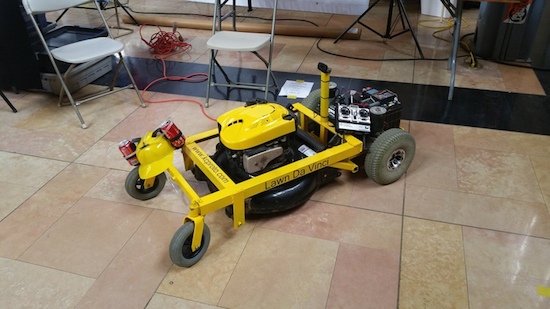
Inspired by the one seen in Honey, I Shrunk The Kids, Blake Hodgson has built a remote-controlled lawn mower of his own dubbed ”Lawn Da Vinci.”

The robotic machine’s frame is made from angle iron and steel, while its wheels and motors were taken from a mobility scooter. Power is supplied by a pair of 12V car batteries wired in series, and it’s driven across the yard with an RC airplane remote.

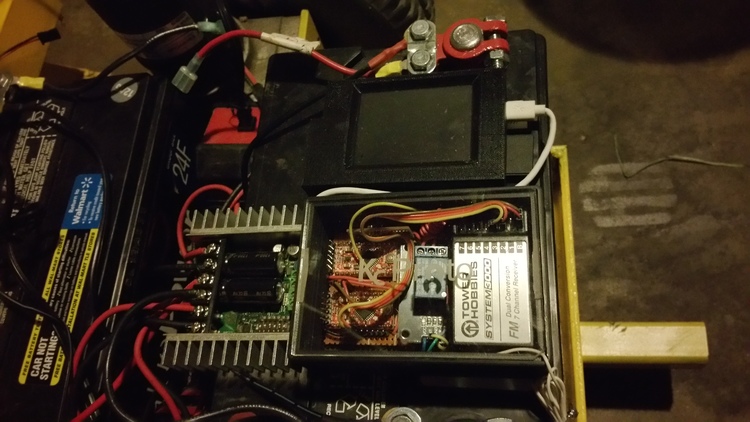
The Lawn Da Vinci has two Arduino Pro Minis and a Raspberry Pi for a brain–one Arduino is used for the motors and RC signal, the other for the kill switches. Meanwhile, the Raspberry Pi is tasked with streaming video from an attached webcam to his phone.

To improve reliability and reduce complexity, the motor driver now gets its signal directly from the RC receiver once it goes through the two relays controlled by the Arduino, which is always looking for a good signal. The Arduino and Raspberry Pi are powered off of a disassembled car cigarette lighter USB charger which takes the 12v of the batteries down to a clean 5v. I originally had it powered off of the Sabertooth but have better reliability this way. There are many ways to kill the motors.  You can turn the remote off, push the trainer button, left with the right joystick, or push a button separate key fob and all of these will kill it.

Rather not to push a mower around all summer long? Check out Hodgson’s entire project–complete with its code–on his blog here, or read more on Hackaday.

OMG, this DIY split flap display is awesome

Let’s face it, there’s something magical about split flap displays. Common throughout older airports and train stations, the electromechanical devices are used to show changeable alphanumeric text (e.g. arrival and departures), fixed graphics, or in Jonathan Odom’s case, Internet slang.

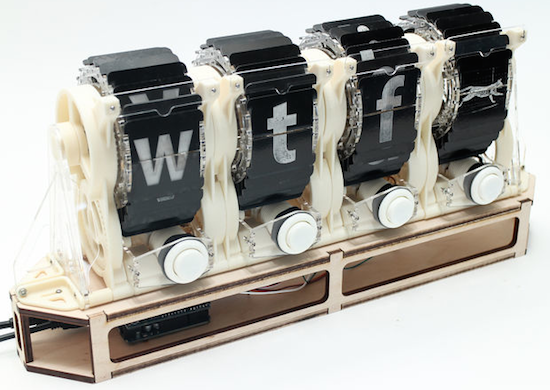
With three-letter abbreviations like BRB, LOL, OMG and SMH commonplace in today’s smartphone and online conversations, the Maker decided to bring text and animation back to its mechanical roots with his own split flap display. As you can see in the video below, an arcade button under each frame enables him to cycle through all 26 letters to spell out his thoughts in acronym form, while a fourth frame reveals an animation of the very first cat video (by Eadweard Muybridge).

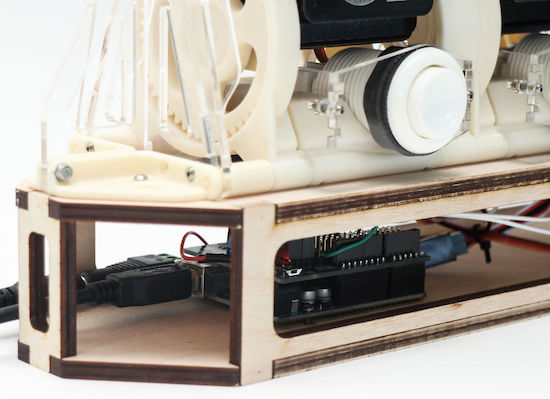
Structurally, the DIY gadget consists of 3D-printed parts, laser-cut acrylic for the tongue, flaps, brackets, wheels and spars, and plywood for the base. Everything is assembled by hand using screws and nuts. In terms of electronics, an Arduino Uno and Adafruit Motor Shield control a set of servo motors.

The configuration I built has four modules, but you could build as many as you want and connect them. The Arduino motor shield has 16 channels, so if you want more than than that you’ll have to find another means of controlling the rotation.

Want one for your desk? You can find all the necessary files and code on its project page, and see the final product in action below!