MyRobots.com: for all of your robot's social needs

MyRobots.com: for all of your robot's social needs originally appeared on Engadget on Wed, 21 Dec 2011 00:12:00 EST. Please see our terms for use of feeds.
Permalink | Email this | Comments


MyRobots.com: for all of your robot's social needs originally appeared on Engadget on Wed, 21 Dec 2011 00:12:00 EST. Please see our terms for use of feeds.
Permalink | Email this | Comments
Continue reading Arduino hack lights up the tree with every email, spammers get in spirit
Arduino hack lights up the tree with every email, spammers get in spirit originally appeared on Engadget on Mon, 19 Dec 2011 01:09:00 EST. Please see our terms for use of feeds.
Permalink | Email this | Comments
Continue reading USB Biofeedback Game Controller lets you play Mario with your guns (video)
USB Biofeedback Game Controller lets you play Mario with your guns (video) originally appeared on Engadget on Fri, 16 Dec 2011 11:07:00 EST. Please see our terms for use of feeds.
Permalink | Email this | Comments
In the previous post we showed you how to make small Christmas shapes using an RGB LED and a small circuit based on PIC.
The designs were obtained working with the CNC some acrylic sheets.
But our CNC can do much more … Therefore we decided to make the greatest figure and design a new driver that mounts more LEDs.

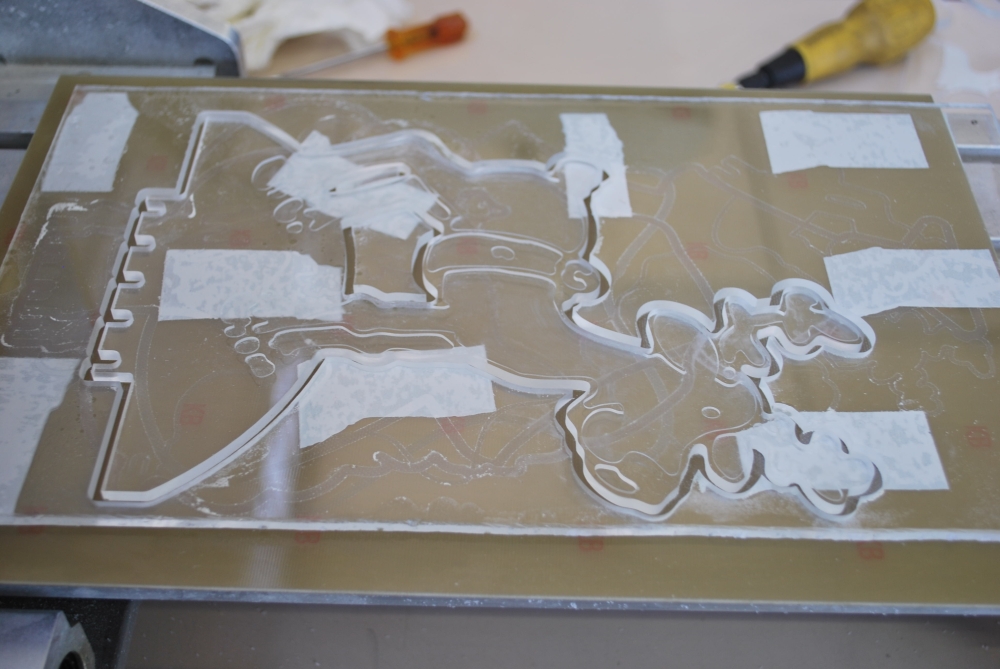
Just because we do not like things simple we recreated all using a system based on Arduino.
This allows you to create an open source system easy to modify.
The microcontroller is an Atmega328 preprogrammed with the bootloader of Arduino UNO. The programming can be done via a USB / TTL (eg FTDI5V of SparkFun).
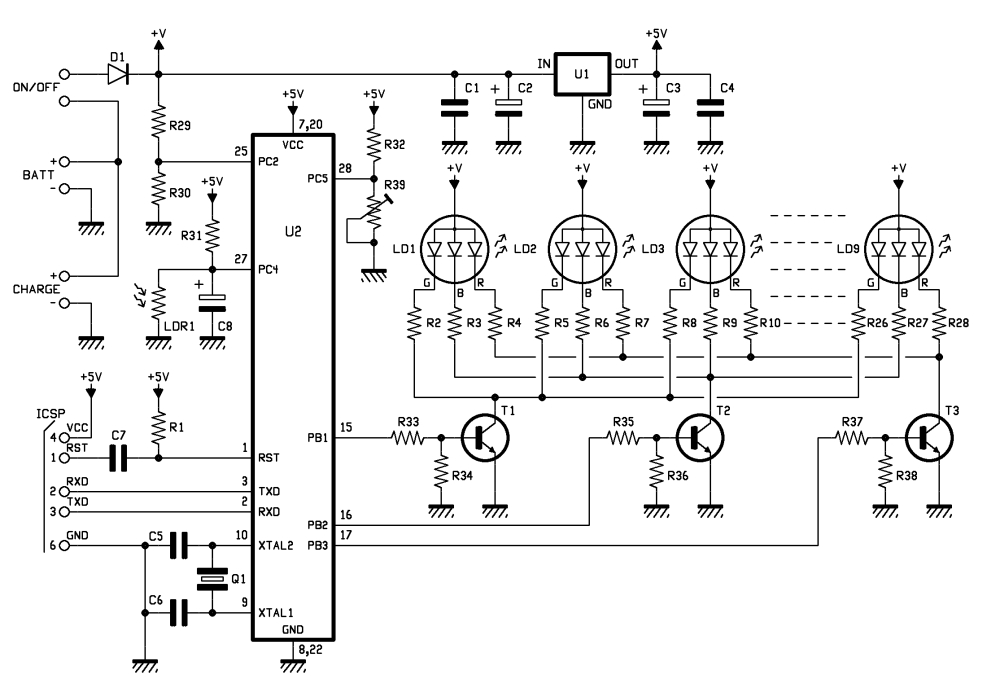
The circuit operation is very similar to that of the smallest model: here we find the photocell that allows to verify the amount of light present in the environment, but in this case, you can adjust the sensitivity of the circuit by a trimmer.
BOM
R1: 10 kohm
R2: 820 ohm
R3: 820 ohm
R4: 1 kohm
R5: 820 ohm
R6: 820 ohm
R7: 1 kohm
R8: 820 ohm
R9: 820 ohm
R10: 1 kohm
R11: 820 ohm
R12: 820 ohm
R13: 1 kohm
R14: 820 ohm
R15: 820 ohm
R16: 1 kohm
R17: 820 ohm
R18: 820 ohm
R19: 1 kohm
R20: 820 ohm
R21: 820 ohm
R22: 1 kohm
R23: 820 ohm
R24: 820 ohm
R25: 1 kohm
R26: 820 ohm
R27: 820 ohm
R28: 1 kohm
R29: 10 kohm
R30: 4,7 kohm
R31: 10 kohm
R32: 4,7 kohm
R33: 4,7 kohm
R34: 10 kohm
R35: 4,7 kohm
R36: 10 kohm
R37: 4,7 kohm
R38: 10 kohm
R39: Trimmer 4,7 kohm MV
C1: 100 nF
C2: 470 µF 25 VL
C3: 470 µF 25 VL
C4: 100 nF
C5: 15 pF
C6: 15 pF
C7: 100 nF
C8: 100 µF 25 VL
T1: BC547
T2: BC547
T3: BC547
LD1: LED 5 mm RGB c.a.
LD2: LED 5 mm RGB c.a.
LD3: LED 5 mm RGB c.a.
LD4: LED 5 mm RGB c.a.
LD5: LED 5 mm RGB c.a.
LD6: LED 5 mm RGB c.a.
LD7: LED 5 mm RGB c.a.
LD8: LED 5 mm RGB c.a.
LD9: LED 5 mm RGB c.a.
U1: 7805
U2: ATMEGA328P-PU (with bootloader)
Q1: 16 MHz
LDR1: photoresistor 2÷20 kohm
- Terminal 2 via (3 pz.)
- Socket 14+14
- Battery 12V/2A
- Strip male 6 via
- Plug
- Switch
 |
 |
Comparing the value read from the A/D converter connected to the photoresistor with that connected to trimmer R39, the micro decides whether to start the sequence of fading, or whether turn off the LEDs. RGB LEDs are driven by the transistor; this choice permit to control with a single line of microcontroller, more LEDs in order to create large luminous figures.
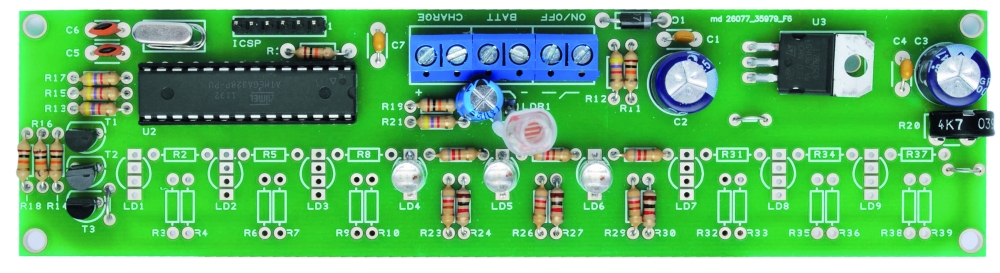
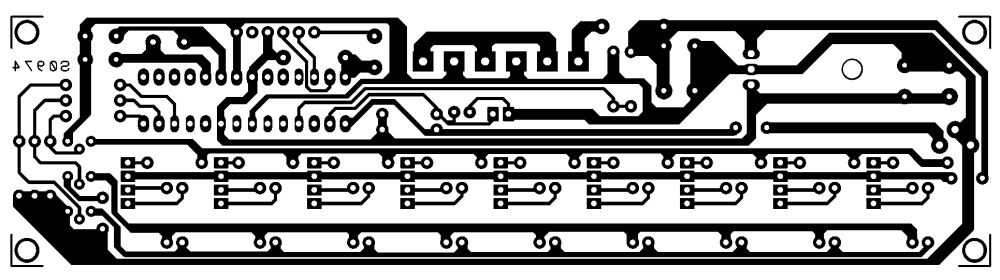
As you can see, we use a line dell’ATmega for each of the primary colors of red, green and blue, so it is clear that all the diodes will do the same play of light. Of course isn’t required to mount all the LEDs provided in the circuit: you mount those who need to obtain a good visual effect on the size of the pattern in the Plexiglass. Note that there are three terminals on the PCB: one to connect the power switch (ON / OFF) a second (BATT) to apply to the circuit power supply and a third (CHARGE) for a possible battery charger lead or a small 12-volt solar panel, which already incorporates the charging circuit. These solutions allow you to use the figures lack the power grid. In this regard, an analog input of the microcontroller is dedicated to control the battery voltage: when it drops below 10 V, the circuit will emit flashes to warn that the energy is about to end.

This circuit is evidently intended to be used externally (provided it is properly isolated) and will turn on and off independently, thanks to the ambient light sensor, which will illuminate the figures in the evening to let off in the morning. In short, is a solution to decorate the garden or backyard.
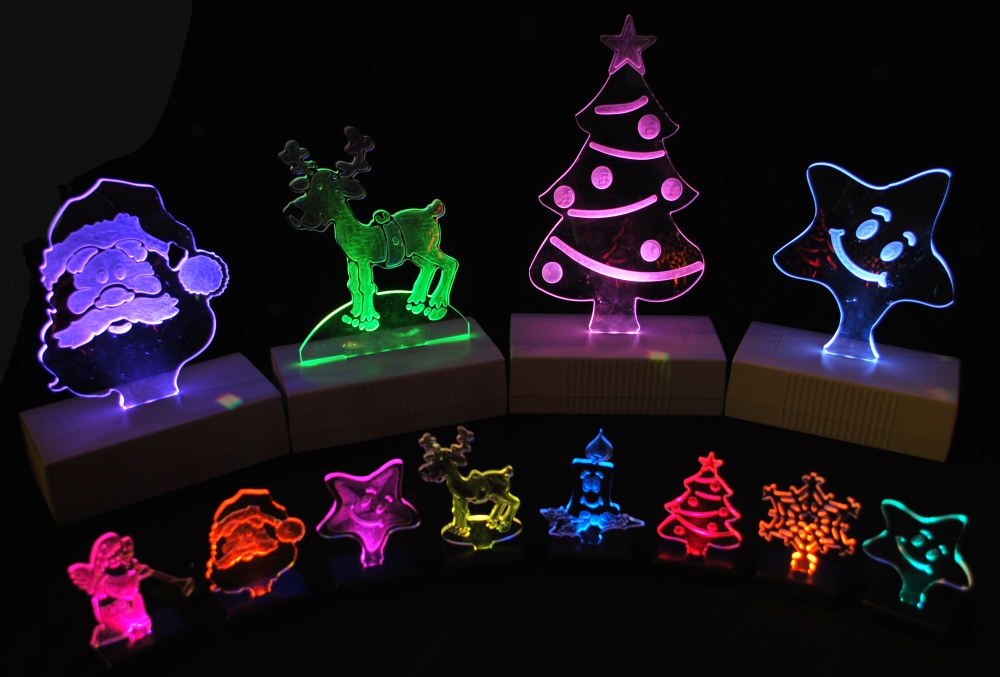
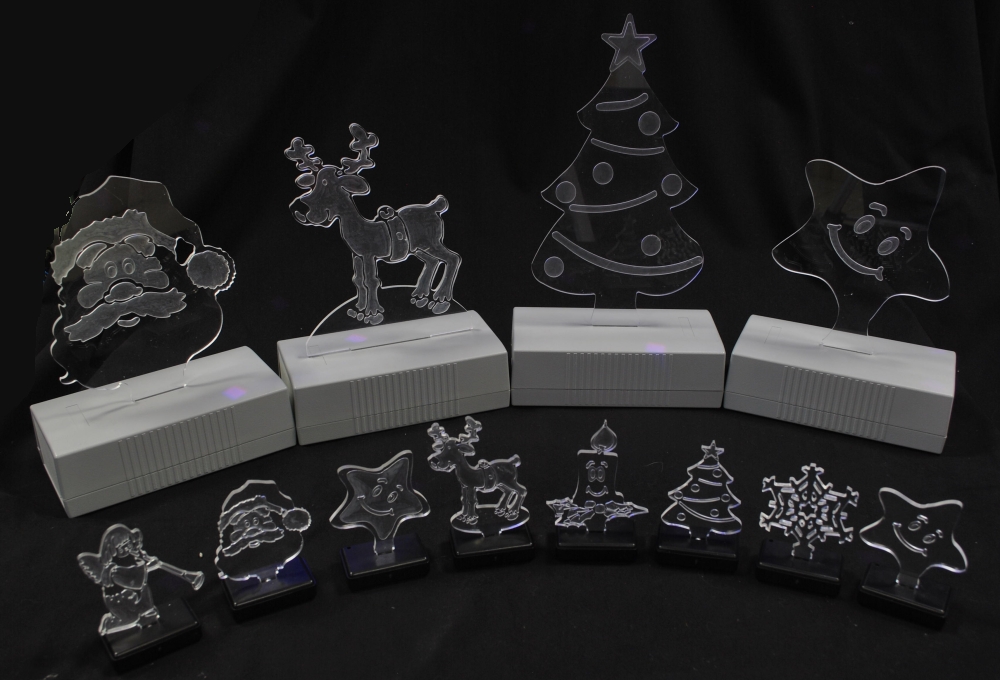
Building shapes
The materials chosen for this application are clear polycarbonate (or methacrylate) or Plexiglas, which can give the shape you want. Then we need to affect, deep enough (half or two thirds the thickness of the plate) the drawing or writing that you want to appear bright.
The Sketch
//****************************************************************
//*  Name    : RGB controller for common anode led               *
//*  Author  : Landoni Boris                                     *
//*  www.open-electronics.org                                    *
//*  blog.elettronicain.it                                       *
//*  www.futurashop.it                                           *
//****************************************************************

int red = 9;    // RED LED connected to PWM pin 3
int green = 10;    // GREEN LED connected to PWM pin 5
int blue = 11;    // BLUE LED connected to PWM pin 6
int photo = A4;    // BLUE LED connected to PWM pin 6
int trim = A5;    // BLUE LED connected to PWM pin 6
int volt = A2;    // BLUE LED connected to PWM pin 6
int r=50; int g=100; int b=150;
int rup; int gup; int bup;
int fader=1;
int inc=10;
void setup()
{
      Serial.begin(9600);
      Serial.println("Serial READY");
      rgb(r, g, b);
      r = random(0,255);
      g = random(0,255);
      b = random(0,255);

}

void loop()  {

  Serial.print("trim  ");
  Serial.println(analogRead(trim)*2);

  Serial.print("photo ");
  Serial.println(analogRead(photo));

  Serial.print("volt ");
  Serial.println(analogRead(volt));
  if (analogRead(volt)<600){
      Serial.println("low battery");
      rgb(0, 0, 0);
      delay(500);
      rgb(255, 255, 255);
  }

  if ((analogRead(trim)*2)>analogRead(photo)){
      Serial.println("trim > photo  -  off");
      rgb(0, 0, 0);
      fader=0;
  }
  else
  {
    if (fader==0){
      r = random(0,255);
      g = random(0,255);
      b = random(0,255);
    }
    fader=1;

  }
  //delay(2000);

  if (fader==1){
    funcfader();
  }
}

void funcfader(){
    Serial.println("fader");
    if (rup==1){r+=1;}
    else{r-=1;}
    if (r>=255){rup=0;}
    if (r<=0){rup=1;}

    if (gup==1){g+=1;}
    else{g-=1;}
    if (g>=255){gup=0;}
    if (g<=0){gup=1;}

    if (bup==1){b+=1;}
    else{b-=1;}
    if (b>=255){bup=0;}
    if (b<=0){bup=1;}

    delay(inc*2);
    rgb(r, g, b);
}

void rgb(int r, int g, int b)
{
  Serial.print("RGB: ");
  Serial.print(r);
  Serial.print(" ");
  Serial.print(g);
  Serial.print(" ");
  Serial.println(b);
  if (r>255) r=255;
  if (g>255) g=255;
  if (b>255) b=255;
  if (r<0) r=0;
  if (g<0) g=0;
  if (b<0) b=0;
  analogWrite(red, r);
  analogWrite(green, g);
  analogWrite(blue, b);
}
 |
Star |
|
Reindeer |
|
Santa Claus |
|
Tree |

Continue reading Beat Box table turns RFID tagging into beautiful music
Beat Box table turns RFID tagging into beautiful music originally appeared on Engadget on Wed, 14 Dec 2011 21:26:00 EST. Please see our terms for use of feeds.
Permalink | Email this | Comments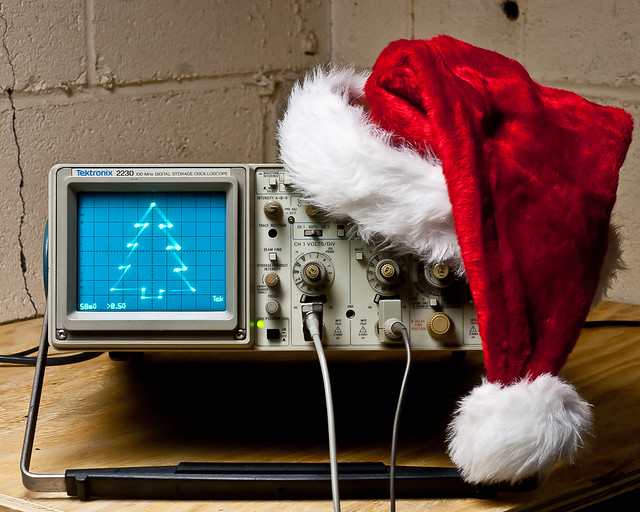

When I was a little kid, my dad worked at Bell Labs. Every year around Christmas, we’d go visit him at work. One memory which has always stuck with me from my holiday visits was seeing a Christmas tree on an oscilloscope. I was pretty amazed by it. Engineers are a funny bunch — they tend to celebrate holidays in the most uniquely nerdy and wonderful ways, just like kids. When I recently acquired a new ‘scope and wanted to familiarize myself with it, I knew exactly what my test circuit was going to be.
In honor of the nameless BTL engineer whose scope scribbling captivated me as a child, here we are. Maybe the same thing will happen for some other kid. There are a lot of holiday parties coming up. You could put this on one of your scopes at work or at your hackerspace, and some other kid will see it, and it’ll fire their imagination too. It looks pretty neat at any rate, and it’s downright fascinating after a few fortified egg nogs.
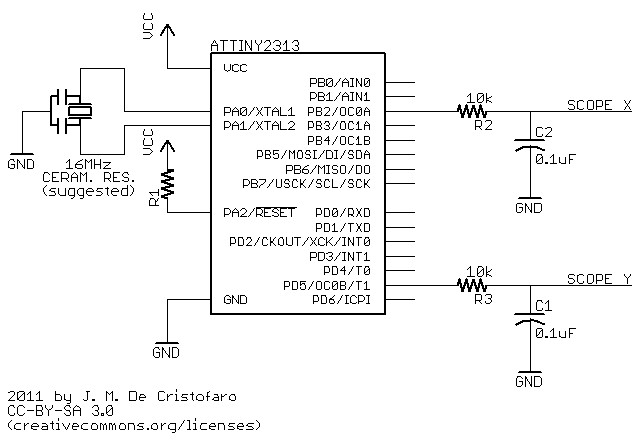
While I suspect the original was built with 74xx logic circuits, or maybe a couple 555′s (you could easily make a Christmas tree shape by combining triangle (x) and sawtooth (y) waveforms), this one uses an AVR ATTiny2313. (I used my handy BB313 board). You could do this with an Arduino too (that is covered below) — pretty much anything that has an 8-bit timer with dual PWM outputs will do the job. The discussion will apply regardless of the implementation (though the numbers might change).
Before you continue, bear in mind that I assume you already know how to use an oscilloscope: how to attach the probes, adjust the voltage ranges, put it in XY mode, etc.
The ATTiny code is here, and this is the schematic for the circuit:
How it works:
The PWM outputs feed two RC low-pass filter circuits, with a time constant chosen to effectively suppress the jitter from the rectangular waveforms. The PWM outputs (and hence the DC components of the signals) jump from one point in the drawing to the next; in order to actually draw lines to make the tree shape, you have to interpolate between those points. The delay between one ‘drawing’ point and the next has to be chosen to allow the charge/discharge curve of the RC circuit to do the interpolation. You’ll notice in the photo above that the ‘straight’ lines are slightly curved. This is the because the jumps in x don’t quite equal the jumps in y. You’ll also notice that the tree appears a bit crooked. This is the result of the RC curve not settling out completely before the next transition — the voltages never quite get to where they’re supposed to go before they switch to a new value. Personally, I rather like these imperfections — the tree has a hand-drawn quality to it, like a homemade ornament. You could make the lines straighter and the drawing more uniform by using a longer delay, but it will lower the overall refresh rate, resulting in noticeable flicker. How you draw your oscilloscope Christmas tree says a lot about your personality.
The ATTiny’s clock is running off of a ceramic resonator at 16MHz. The PWM frequency is 16MHz/256 or 62.5kHz. The corner frequency of the filter is 160Hz, which is about 8.5 octaves (2.5 decades) below that. I used 10k resistors and 0.1uF caps here — you could also use any other “equivalent” RC combo (100k/0.01uF or 1k/1uF, etc.) If you choose to use a chip with a different clock frequency, then you’ll have to adjust the RC circuit accordingly.
Reducing the capacitor values (or increasing the resistor values) will shift the corner frequency of the filter up, and you’ll start to see the lines get crooked, like resistors in a schematic. These are triangle waves resulting from filtering the rectangular PWM signal. This can look pretty cool too, actually, as below where I switched to 0.022uF capacitors.
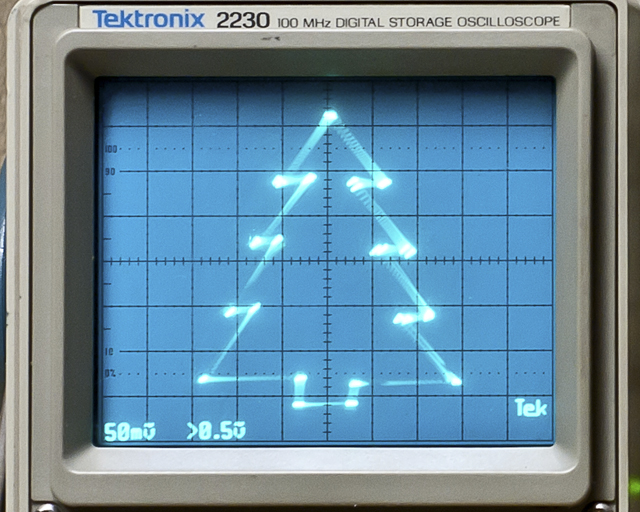
Now the tree has needles, and all it took was changing the coefficients of a partial differential equation — easy! (this might be a great way to introduce a kid to the concept of filtering — just sayin’).
Arduino Implementation:
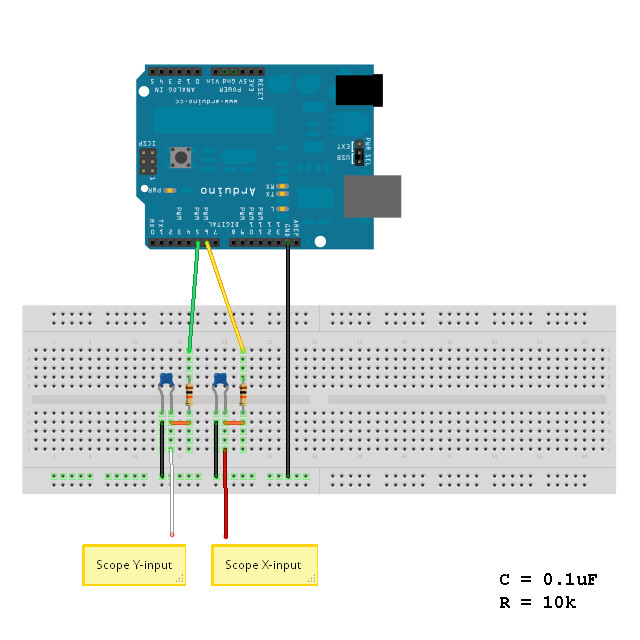
Doing this on an Arduino isn’t much different than using the ATTiny, except that it’s more expensive and instead of a real schematic, you have to read this ridiculous handy cartoon (above).*
The Arduino code is here. It uses no libraries, so all you have to do is extract the folder into your Arduino directory, set up your oscilloscope and load the sketch.
Possible alternative methods:
Be as creative as you like with it — I hope you enjoy making it work for you.
Merry Christmas!
*just kidding — I love Arduino! Buon Natale!
UPDATE – Several folks have done this themselves and written in:
EmbeddedEric did an awesome Frosty the Snowman with his daughters.
aussie_nick did one using a DSO.
Goran did one for the Calgary On-Air Engineers.
Gordon Pearce took it to the next level with animation using sine functions:
Nice!

Continue reading Step aside Arduino, TinkerForge is the new sheriff in mod-town (video)
Step aside Arduino, TinkerForge is the new sheriff in mod-town (video) originally appeared on Engadget on Fri, 09 Dec 2011 19:35:00 EST. Please see our terms for use of feeds.
Permalink | Email this | Comments

 The idea of using triangulation for distance measurements is well known since Pythagorean time, when his brilliant formula become available for mathematicians.

 What is new in this design, is lasers power control via “blooming” effect of CMOS camera. Here this “negative” effect was put to work instead of ADC. No need high price “no-blooming” camera! (More information on this link: http://dpanswers.com/content/tech_defects.php ) There are few others design approach, that I was trying to make in hardware/software, and some of them not fully implemented yet ( project just started ).
Power Control Loop (PCL) allows to get stable readings of the reflected back light beams, doesn’t matter what is reflectivity of the object’s surface, how well illuminated background and what distance range !!! edited: / (Regarding stability measurements in varying illumination conditions, right now there is a resistor for manual adjustment comparator trigger level, depends on average “black-fixed” video. Gonna get rid off it shortly)./
Probably, someone could “hack” a camera, and redesign build-in AGC to provide stable, “fixed-white” level of video signal. But it would be extremely difficult to do with this SMD components, lack of documentation and too complicated for average hobbyist. Plus after that camera is not “in use” anymore for it’s main purpose.
Arduino has low size of RAM memory and 8-bit low power microprocessor, so full image processing could not be done. Instead, “build-in” 1-bit comparator forms visual map, where each cell stores time stamp, when events was captured. As video frame created from top to bottom line by line, line number corresponds to Y coordinate, and time of events on this line – X consequently. At this stage project is more like test bench, than final solution -);.
Right now I’m looking for optical zooming devices, to cover long / short distances automatically. Green lasers, I’m sure ‘d bring better resolution, just have to find couple of them for affordable price.
Approximate range with low cost CMOS camera and w/o optical zoom: 0.2 – 10 meters. Accuracy would greatly depends on lasers base/spacing. Lasers base also defines minimum size of the tracking object in Z coordinate. NTSC camera:
Velleman CAMCOLMBLAHU MINI COLOR CMOS CAMERA WITH AUDIO + POWER ADAPTER
has viewing angle 52 degrees. Forget about pixels resolution for a moment, we are in analog television world -); Math to calculate the distance (I call it Z coordinate) is pretty simple: D = B / tan ( phi ), where D is distance, B is lasers base, and phi is an angle what camera reports. Phi = 52 degree / 832 = 0.0625 degree per coordinate difference.(See below where 832 comes from). D = B / tan (( X1 – X2 ) * 0.0625). For example, B = 6 cm, X1 = 500, X2 = 512, than: D = 0.06 / tan ( ( 512 – 500) * 0.0625) = 4.58 meters.
( http://en.wikipedia.org/wiki/Tangent_(trigonometric_function)

Basically, one laser would be sufficient to measure distance. I installed two of them, because it looks cool! If seriously, there are a few advantages:
- redundancy;
- better accuracy;
- no interruption in distance measurements, even when object is in “vision field” area. I defined this area, for PCL operation. Width of vision field area is adaptive, it’s narrowing to a few lines! after start-up system.
 This version of software capable to follow 1 object in X axes. edited: see below Version 2 release notes. Object has to be visible by itself (rocket, vehicle, any source of light in general) OR highlighted by external light source – not focused to cover bigger space area. Reflectivity of object would define necessary power of the light source in this case, for specific distance range. Optical zoom would significantly improve systems performance.
Tracking in Vertical (Y axes) is not implemented yet, but coordinate reported on serial monitor. Math calculus of Z dimension is not included, simple trigonometry formula could be used. Calibration of mechanical setup would be necessary in order to get meaningful measurements results.

52 microsecond is essential characteristic of the NTSC standard, which represents active line duration. I used NTSC cam, and for PAL/SECAM it’s the same. 16 MHz oscillators frequency Arduino Uno board. I’m saying edge detection instead of spacial resolution as in current setup left edge is only detected with highest possible time accuracy 16 MHz. Technically it easy to modify settings to detect right side edge as well, and measure size of object, shape, and track few of them the same time. It wouldn’t be 832 pixels, as interrupt routine timing overhead will slow down time response, and there is not much memory in Arduino to do a complex analysis of the picture anyway. This is why decision was made not to bother with right side. In current design, capture timing of event completely done by hardware. There is a link with details on video format: http://en.wikipedia.org/wiki/Analog_television#Synchronization
If you can imagine a balloon brightly highlighted from left side, with right edge invisible in shadow, it’d be close approximation. For time sync extraction: LM1881. Two sync signal vertical/horizontal are attached on pins 2 and 3. Hardware interrupt feature of AtMega 328 continuously updates synchronization information – current line number. Time capture done by analog comparator and timer 1. DC voltage has to be adjusted in order to trigger comparator reliable at specific level of the video signal.
And one more things to mention, servo motor driving. In order to avoid interrupt routines racing , between lines/frame syncs and servo motor software library, which generate a jitter in position of the servo, plus timing noise on video raster, I didn’t use a standard Arduino Servo library, and generate servo-sync synchronously with frame sync. Frequency is up to 60 Hz instead of regular 50 Hz, but there is no complain from my Parallax servo, and I think it would the same with any other motors as well.
Link to download sketch: Arduino_Laser_TRF
12 December 2011 ***** VERSION 2 *****


* There are 4 main features in the project:
*
* 1. LOCALIZATION XY. CMOS Camera, LM1881.
* 2. RANGE FINDER Z. Two Lasers plus Camera.
* 3. TRACKING 3D. 2 Servo Motors, plus all of the above.
* 4. TRACE TOOL. Doesn’t require hardware, software only.
*
Feature considered to be independent, so you can star to build from first one, than move on next stage, and so on depends on a budget, parts availability or your interest! This version of software capable to track object in 3D space, X, Y and Z coordinates. Tracking feature requires
object to be visible in normal “visible” spectrum or near IR. Spectral range could be extended to thermal vision with different Image sensors. Emitting light by itself Object (rocket, star, any source of light in general) OR highlighted by external light source – not focused to cover bigger space area. For distance measurements Reflectivity of object and distance would define necessary power of the external light source in this case.
Z coordinate / distance is calculated in real time, based on simple trigonometry formula D = B * tan (phi).
Calibration of mechanical setup would be necessary in order to get accurate measurements results, especially
on long distances, when angle phi becomes really small.
Link to download sketch: Arduino_Laser_TRF_V2
* I’m not removing first version from download section, as it’s smaller and easier to understand logic
behind some software sub-module. Please, be advised that V1 has bugs in servo motor position calculation. V1 is preferable to hobbyist, who want only localization and distance measurements features.
NEXT LEVEL DEGREES OF FREEDOM : 6 D++
http://optical-magnet-laser-6d-tracking.blogspot.com/


Triggertrap automatic shutter release hits production, links your camera to most things originally appeared on Engadget on Tue, 06 Dec 2011 11:10:00 EST. Please see our terms for use of feeds.
Permalink | Email this | Comments
Continue reading eSleeper combines cats, Arduino and Twitter in an eMac shell (video)
eSleeper combines cats, Arduino and Twitter in an eMac shell (video) originally appeared on Engadget on Thu, 01 Dec 2011 06:34:00 EST. Please see our terms for use of feeds.
Permalink | Email this | Comments