Posts with «arduino» label

More on electronics course design

I wrote earlier this week about an applied electronic circuits course for our bioengineering majors that Steve P. and I will be designing over the summer, and how it will be designed backwards from the labs we plan to have them do.  That wasn’t quite an accurate description of our design process though, as the selection of the labs is based on more fundamental curricular goals.  I think that Steve and I have similar goals for the course, based on our discussions of it, but we’ve not tried to write them down formally yet.  I believe that we’ll need to do this for ABET, if the bioengineering program goes for full engineering accreditation.

I know that the EE Department wants the course to have a wider appeal than just to bioengineering majors taking it because it is (well, will be) required, as fluctuations in the cohort size for engineering majors has been large (biggest in computer science, which has been on a roller-coaster ride nationwide for the past couple of decades). The BME department chair, who is also the bioengineering undergrad director and main adviser, estimates a class size of 30–50 students if the course is offered this coming winter, and expects growth to 50–60 over the next few years.  The labs have room for about 20 students at a time, so this means 2 lab sections this year, growing to 3.  If we had a wider appeal, we might be able to pick up some computer science students, some game design students, or some Digital Arts and New Media (DANM) students, who are currently avoiding EE courses despite some interest in electronics because of the highly theoretical EE 101 course that is prereq to everything.  One problem with this broadening is that most of the potentially larger audience will not have been required to take the physics electricity and magnetism class, which I think is going to be an essential prereq.

Trying to put these two ideas, the need for more explicit goals for choosing labs and a wider potential market for the course, together, I came up with a possible theme for the class to guide lab selection and topics for the course:

Students completing this course will be able to design and build simple biosensors  for measuring chemical, electrical, or physical properties of biological systems (especially humans) and recording the measurements for computer analysis or interaction.

I still have to run this idea by Steve, and we’ll almost certainly need to tweak it a bit before we’re happy with it.  I’m particularly interested in two words in the goal (which I think Steve will agree with): design and build.  I don’t want this class to be a theoretical circuits course, in which students learn to formulate and solve large systems of linear equations, with no connection in their minds to any design problems.  I also want the students to learn to make things that they can take home, not just breadboard prototypes, though I may have to compromise a bit on this one, with most labs being breadboard only, and only one or two getting them to the next stage: a soldered prototype. Designing PC boards is probably beyond the scope of the class.

The labs I talked about in the previous post all fit within this theme:

  • Skin conductance meter.
  • Electrical field measurements in an electrophoresis gel.  This one is a bit of a stretch for the new theme, as electrophoresis gels are a standard lab tool, but not a biological system.
  • Conductivity of saline solutions. Used for measuring ecosystems (like rivers).
  • Do-it-yourself EKG
  • Optical pulse detector
  • Breathalyzer
  • Thermistor-based temperature measurement.

Since that post I’ve come up with a couple of other ideas:

  • Capacitance touch sensor (nice intro in Microchip application note AN1101).  This one is more ambitious than the EKG even, in that it involves a capacitance-sensitive oscillator design, but the oscillator is low frequency and the frequency sensing can be done by a microprocessor. They could use the same Arduino that they use for recording voltage data in other labs, but we’d have to provide them with a different program, since we are planning on having no programming required in the class or as prereqs to the class.  If the oscillator is a low enough frequency (say around 1kHz), then the program could be almost identical to the interrupt-driven data logger that my son wrote for the homemade super pulley, but interpreting the interrupt times differently.
  • Potentiometer-based goniometer for measuring joint angles.  Like the thermistor lab, this one is mainly a voltage-divider lab. The design problems are more mechanical than electrical, but it would be useful for students in understanding noise problems in sensors, since potentiometers are notorious for the noise in the signals.  It would also prepare students well for later work (outside this class) using servos, since most servo motors use a potentiometer-based angle measurements in their feedback loop.  I wonder whether the guts of a servo circuit are within the scope of this class—probably not, as much of it is concerned with handling the power demands and voltage spikes of the inductive load of the motor.

There have been a few ideas that I’ve had to reject as being overly ambitious for a first circuits course or too expensive to implement:  anything involving a microscope or micromanipulator setup is too expensive (eliminating most of the nanopipette work done in Pourmand’s lab), anything requiring weeks of practice to set up is also out (eliminating much of the nanopore work in Akeson’s lab, since forming the bilayers is still an art that few master quickly, also eliminating most work that would require growing neural cell cultures).  The nanopipettes and nanopores also require measuring currents in the picoamp range, which requires very sensitive electronics and extreme attention to noise control (including doing everything in a Faraday cage), which is probably beyond the scope of a first circuits class.  A subsequent bioelectronics class could cover patch-clamp amplifiers and other specialized measuring circuitry.

We probably do want some lab that measures ionic current, though, as that is fundamental to both the nanopipette and nanopore work.  I wonder whether we can do a scale model of the nanopore (with pin-prick size holes in plastic or Teflon), so that the students can measure the currents without the picoamp scale problems.

I suspect that when we try out the labs, we’ll find that only about half of them work well for us, and that several of them rely on the same basic circuit ideas (like voltage dividers to convert resistance into voltage).  In the latter case, we may give students the choice of several different labs to do.  I’ve always liked the approach of giving students a number of different design problems (of roughly comparable difficulty and covering the same fundamental concepts) and letting them choose which ones to work on.  I’ve never implemented this approach in any of my classes, though, as I’ve either been faced with a pre-designed set of lab exercises that I didn’t have the authority or time to redesign or I’ve gone for quarter-long independent projects which are not even attempting equivalence between projects.

Whether we end up rejecting some of these labs or merging some into alternative choices for a single lab, we’re obviously going to need more lab ideas.  Does anyone have any?


Filed under: Uncategorized Tagged: Arduino, bioengineering, circuits, course design, teaching

ArduSat puts Arduino experiments in space

CubeSats are nothing new – hundreds have been launched into Earth orbit by schools and universities over the past decade. Like anything cool, an Arduino eventually gets thrown into the mix. That’s what the folks behind ArduSat are doing: they’re launching an Arduino-laden satellite into orbit with a bunch of sensors to enable anyone to become a citizen space scientist.

On board the ArduSat is a suite of sensors including a spectrometer, Geiger counter, IR light sensor, electromagnetic wave sensor, a temperature sensor, gyroscope, accelerometer, magnetometer, GPS unit, CO2 sensor, and of course a few cameras. The rewards for this Kickstarter are fairly interesting: backers who pledge $500 are able to buy a week’s worth of time using the ArduSat sensors for your own personal experiment.

As for how this Arduino-powered satellite is getting a ride up to Low Earth Orbit, the team plans to send an application into NASA for the CubeSat Launch Initiative ride-along program. If NASA selects the ArduSat, it’ll get a ride into space along with other CubeSats on a larger commercial launch. If the ArduSat isn’t selected by NASA, the team behind this satellite has secured funding to piggyback on a commercial launch.

Tip ‘o the hat to [HackTheGibson] for sending this in.


Filed under: arduino hacks, hardware, kickstarter

Live Controlled Floppy Drives

We’ve seen many examples of floppy and hard disk drives being sequenced to make music, but the Moppy can be controlled by an external keyboard. Sammy1am created the Moppy using and Arduino UNO and some stepper motors to set the frequencing of the spinning disk drives.

[via Arduino Blog]


MAKE » Arduino 15 Jun 20:00

XOrduino: an Arduino-compatible board for the OLPC XO laptop

Dr. Scott Ananian, from the One Laptop Per Child (OLPC) project, conceived an Arduino Leonardo-compatible board especially designed for the OLPC XO laptop, with the goal to cut down its price as much as possible, to foster its adoption even in developing countries. From Scott’s blog:

The board uses mostly through-hole parts, with one exception, and there are only 20 required components for the basic Arduino functionality, costing about $5 (from digikey, quantity 100). It is reasonable for local labor or even older kids to assemble by hand.

The board, named XOrduino, is open hardware (schematics and pcb files can be found on github), and can be directly plugged into the XO’s USB ports, which allowed Scott to save the money required for the USB connector. Moreover, its design has been inspired by other open hardware projects, such as SparkFun’s ATmega32U4 breakout board and SparkFun’s Scratch Sensor Board-compatible PicoBoard.

Scott designed also a second board, which is even cheaper than the first one, called XO Stick:

It’s based on the AVR Stick using the ATtiny85 processor and costs only $1/student. It’s not quite as user-friendly as the Arduino-compatible board, but it can also be used to teach simple lessons in embedded electronics.

A longer description can be found here, while detailed release notes can be found on github.

It’s very exciting to see how open technologies, such as open hardware and open source software, contribute to the way education and creativity can take place around the world, especially regarding their promotion in developing countries.

[Via: Ossblog, OLPC blog, Scott Ananian's blog]

Arduino Barcamp Zaragoza 2012


Arduteka en colaboración con Cooking Hacks y Milla Digital del ayuntamiento de Zaragoza han preparado un evento con capacidad para más de 400 personas en uno de los edificios más emblemáticos de la ciudad, el Antiguo Seminario Metropolitano de Zaragoza transformando en una moderna Ciudad Administrativa Municipal y que amablemente han cedido para organizar el evento.


Desde charlas sobre arte interactivo con Arduino como interface, pasando por talleres sobre impresión 3D hasta demostración de integración de Arduino con Asterisk será solo una parte de lo que vamos a poder disfrutar, ya que estarán habilitados diferentes Stands como el de Parrot, en que podremos probar el nuevo Ar-Drone 2.0, el de Cooking Hacks que nos amenizarán con micro talleres Arduino e incluso el de nuestros amigos de Ultra-Lab que seguro hará las delicias de los asistentes.


Por si esto fuera poco.. Contaremos con la presencia y colaboración de David Cuartielles, el cual nos ofrecerá una charla sobre los últimos productos Arduino que se está aconteciendo…


Accede ahora a toda la información en la nueva web de Arduteka AQUÍ e inscríbete!!

Te lo vas a perder??


Via | Arduteka


DeskLights Ambient Notification System

San Diego-based software engineer Michael LaGrasta brought his DeskLights ambient notification system to Maker Faire Bay Area this year, where I had the chance to meet him. In a nutshell, using an Arduino Uno Ethernet and 160 RGB LEDs (in the form of Adafruit’s Pixels, “the desk receives event notifications over the network and alters its color and pattern to provide those notifications to the user. The combination of color and location can be used to communicate a wide variety of information.” You can customize the color of the lights, flashing patterns, and where they light up on the desk to denote an endless number of different notifications, like incoming email, calendar alerts, basically whatever would be most useful to you. Also, “a light can change from green to red to indicate server health and process load or increase its intensity the longer you ignore your email.” Michael used an Ikea Galant desk, which has a frosted surface, but he’s currently working on a tabletop version that won’t require a translucent desktop, and will be posting updates on Twitter. Michael shared his step-by-step for the build with us in Make: Projects and is offering his code on GitHub. Useful project, and yet another reason to incorporate pretty lights.


Hexy: hands-on with the adorable, affordable hexapod (video)

The Artisan's Asylum has a few guiding principles, one of which is anyone can "make." We assume one of the others is "you can never have too many hexapods." If Stompy, the giant rideable bot, is a bit much for you to handle (or store), then maybe Hexy is more your speed. He's got six legs and 20 servos, but at only $200, he's much cheaper than similar hexapod kits and, most importantly, more adorable. The bot is the brain child of Joseph Schlesinger, a resident at the Somerville hacker space who saw a need for a low-cost but serious robotics kit. Since hitting Kickstarter in May, his creation has raked in roughly $86,000 in pledges, far surpassing his original goal of thirteen grand. We swung by Joe's booth to get a taste of what exactly his hundreds of backers have bought into and to find out what's next for the budding bot entrepreneur.

Continue reading Hexy: hands-on with the adorable, affordable hexapod (video)

Hexy: hands-on with the adorable, affordable hexapod (video) originally appeared on Engadget on Thu, 14 Jun 2012 18:41:00 EST. Please see our terms for use of feeds.

Permalink | Email this | Comments

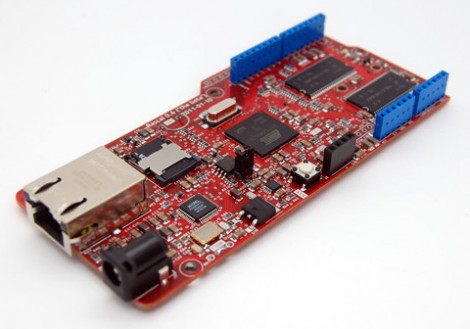
Embedded Linux meets Arduino with the Rascal Micro

Behold the Rascal Micro. It’s running embedded Linux and has a dual-row of pin headers which probably seem pretty familiar. The idea here is to bring Arduino hardware (ie: shields) to a party with a powerful web server.

The image above is the beta version of the hardware. What’s being shown off in a recent Engadget demo is a version that slides two USB ports in between the barrel jack and the NIC. This makes it easy to jump over to wireless with the use of a USB dongle, or you can figure out what other peripherals you want to include in your project.

The novelty here is that the web server included a built-in editor. So not only can it serve you a webpage to control hardware or display sensor status, but it will let you edit the interface without needing to reflash anything.

The price rings in somewhere around $100-150, and like the popular Raspberry Pi board, you can’t get your hands on it right now.


Filed under: linux hacks, Microcontrollers

Glowback: Arduino-Powered Clay Sculpture


Ben Hollis and Eva Funderburgh chose an unusual material to house their Arduino in: clay. Glowback, the little creature they’ve created, has nodules on its back made of transluscent porcelain. The porcelain gives off a soft glow in staggered rhythms provided by the super bright LEDs underneath the nodules.

With physical computing being used more and more in fine arts, it’s exciting to see a project such as this one. See Ben Hollis’ site for full documentation.


MAKE » Arduino 14 Jun 20:00

SMS Text Scroller Powered by Android and Arduino

follower posted a new project up on Labradoc: an <a href="“>LED matrix display connected to an Arduino Mega ADK and an Android phone:

I was working to get things working for the evening of Sat 19th (NZ time) but noticed an issue during the afternoon that stopped much in the way of new feature development.

Once I had the the display working okay I added a couple of features:

  • One permanent message (hardcoded into the sketch) to display.
  • Four “slots” used to store the last four SMS messages received. When a new message is received the oldest message is overwritten. (The display order doesn’t change however–i.e. the message in slot 1 is always displayed after the permanent message, even if it’s not the most recent/oldest.)

Project: SMS Text Scroller by follower


MAKE » Arduino 14 Jun 16:30
adk  android  arduino  sms