Posts with «arduino» label

Standuino Sports Sketch Style Circuit Board


If you’re looking for an Arduino clone with a little bit of style, look no further than the Standuino. Its sketch style silk screen and goofy-sized vias give it a charming and playful aesthetic. While it’s named after artist Standa Filip, the creators say it also communicates what it’s best at: standalone applications. [via nerdstink]


MAKE » Arduino 24 Jun 03:30
arduino  

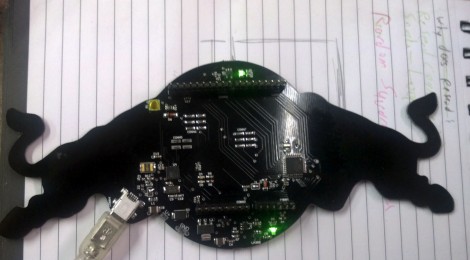
Red Bull Creation hardware (Bullduino) arrives

The Bullduino’s are starting to arrive. When [Arclight] received his in the mail the first thing he did was to share the hardware details. Of course this is the hardware that participants in the Red Bull Creation contest will be receiving ahead of this year’s contest.

The board is an ATmega328 Arduino clone. Instead of an FTDI chip for USB this one is sporting an ATmega8u2. That’s not too much of a surprise as it should translate to a cost savings. [Arclight] reports that the stock firmware flashes a message in Morse code. It seems the Hartford HackerSpace got their Bullduino several days ago and already decoded the message. It reads:

“Wouldn’t lou prefer a good game of chess?”

The guys that did the decoding speculate that this could be a type as ‘l’ and ‘y’ are inversions of each other in Morse code; or it could be some kind of clue. At any rate, if you want to do some disassembly and see if there’s anything lurking in the firmware, [Arclight] posted FLASH and EEPROM dumps from both ATmega chips along with his article.


Filed under: arduino hacks

Fijibot

Primary image

What does it do?

Seeks light to charge batteries (photovore) and avoids obstacles

Fijibot is an autonomous, self-charging photovore. I built him using a 1.5 liter Fiji Water bottle, an Arduino Uno, 6v solar panel (plus various other parts) from Radio Shack, an Arduino Proto Shield (plus various other parts) from Adafruit, and the wheels and steering arrangement from an RC car.

Cost to build

$150,00

Embedded video

Finished project

Complete

Number

Time to build

20 hours

Type

wheels

URL to more information

Weight

800 grams

read more

Audio Input to Arduino

The easiest way to connect audio signal to your arduino, is build a simple 3 components (2 resistors plus cap) circuitry shown on the first drawings on right side. Disadvantage: as there is no amplifier, sensitivity would be low, hardly enough to work with headphones jack output.  For low level signals, like electret microphone, amplifier is necessary. Here is the kit, which included board, electronic components and NE5532 Operational Amplifier IC:

  Super Ear Amplifier Kit

Other option, from SparkFun Electronics:

  Breakout Board for Electret Microphone

Note: I don’t recommend to replace NE5532 OPA with popular  LM358 or LM324 due their pure frequency response above > 10 kHz.

Configuring AtMega328 ADC to take input samples faster:

void setup() {

   ADCSRA = 0×87; // freq = 1/128, 125 kHz. 13 cycles x 8     usec =  104 usec.
// ADCSRA = 0×86; // freq = 1/64,   250 kHz. 13 cycles x 4     usec =   52 usec.
// ADCSRA = 0×85; // freq = 1/32,   500 kHz. 13 cycles x 2     usec =   26 usec.
// ADCSRA = 0×84; // freq = 1/16 ,    1 MHz. 13 cycles x 1      usec =   13 usec.
// ADCSRA = 0×83; // freq = 1/8,       2 MHz. 13 cycles x 0.5   usec =  6.5 usec.
// ADCSRA = 0×82; // freq = 1/4,       4 MHz. 13 cycles x 0.25 usec = 3.25 usec.

ADMUX    = 0×40;                          // Select  Analog Input 0

ADCSRA |= (1<<ADSC);                 // Start Conversion

Timer1.initialize(T_PERIOD);           // Sampling with TimerOne library
Timer1.attachInterrupt(iProcess);

}

Reading and storing samples to array via ISR ( Timer Interrupt Subroutine ), Timer1 in this example:

void iProcess()
{
static uint8_t n_sampl;
if (ADCSRA & 0×10)
{
int16_t temp = ADCL;
         temp += (ADCH << 8);
          temp -= sdvigDC;    
    ADCSRA |= (1<<ADSC);
xin[n_sampl] = temp;
}

if (++n_sampl >= FFT_SIZE )
{
n_sampl = 0;
process = 1;
}

}

Don’t like to solder all this components from the drawings above? Here is easy way around, if you, by chance, have a spare USB speakers around. Something like this:

Note: Speakers should use USB port as a power source, not AC power outlet!

1.  Open box up, and look  what kind of chip (IC) Power Amplifier inside, on the PCB board:

2.  TEA2025 in this example, but could be different in yours. Not big deal, just write down the name, than go on-line and try to find a data sheet for your particular chip. My favorite links:  1   and   2.  From the data sheet you will find pin numbers of two outputs, for left and right channels. Just solder couple of wires to ground and to one of the output and that’s it!

3. If printing on the IC body is unreadable, or couldn’t find a data sheet, it is possible to trace two wires from the speaker to IC. Most likely, there would be an electrolytic cap installed in series, between chip output and speaker. Solder a signal wire on the chip’s side of the cap, or near IC. There is a slim chance, of course, that IC configured in bridge configuration, and wouldn’t be any caps. It’s even better, just use ether of two speaker’s wires as a signal line, and ground as ??? a ground.

Be careful, use different color of wires for ground line and signal line. There would be no protection, and wrong polarity could damage an analog input of the arduino board, and in some occasions Power Amplifier IC. To prevent this, I’d strongly advise to install 10 kOHm resistor in series with signal wire.


New in the Maker Shed: Arduino Robot Shield Kit

My first hands-on experience with robotics and microcontrollers came from using a Parallax Boe-Bot kit with a Basic Stamp. I had no programming experience but using the included documentation and my PC, I was able to figure out how to build a robot that would react to obstacles and navigate its environment. Since then I’ve switched over to the Arduino but I still miss the experience I received from the Boe-Bot. Parallax must have read my mind because they released the Robotics Shield Kit for Arduino which is now available in the Maker Shed. They’ve taken their excellent Board of Education and transformed it into a shield (also available separately) which fits on top of an Arduino. The rest of the kit remains largely unchanged from the original Boe-Bot, which I consider a good thing.  Full documentation with over 40 activities is available online so you’ll be learning in no time. Simply add your own Arduino and a USB cable and enter into the fascinating world of robotics and Arduino!

Features

  • Board of Education Shield PCB
  • High-quality aluminum robot chassis, continuous rotation servos, and wheels
  • Boe-Boost Module
  • All the assembly hardware needed (nuts, screws standoffs)
  • Parallax screwdriver
  • Detailed online documentation and tutorials
  • All the electronic components and sensors needed for the tutorials
  • Note: Requires Arduino and USB cable

Homemade Satellites are Just Around the Corner


As a child, I always looked up at the stars and wondered how I could make it into space. Hopefully, I will live to see that day, but for now, a homemade satellite will have to do. The Nanosatisfi team has made it their mission “to provide affordable space exploration for everyone!,” and with ArduSat, they move one step closer to reality. ArduSat is a Arduino-controlled miniature 10cm cubic satellite, weighing 1 kg, which is roughly equivalent to half a store bought loaf of bread. Its size might not be impressive, but it packs over 25 sensors including: Myspectral’s open source spectrometer, inertial measurement unit, magnetometer, along the standard set, and many others. This impressive little machine boasts a camera to take photographs, it could send messages back to earth, or it can run your space experiments. With the ability to upload code directly to the ArduSat while in space, the possibilities are virtually limitless.

Be sure to check out their YouTube Channel for more technical details. You can also support their efforts via their Kickstarter page .


DIWire Build Plans Available for Download

We’ve previously posted about DIWire, an Arduino based machine that bends metal wire into 2D or 3D shapes. Now the folks at Pensa have uploaded the bill of materials, code, and models of the custom parts for 3D printing so that you can get started building your own CNC wire bending machine… in case one of these is out of your price range.


MAKE » Arduino 21 Jun 17:30
arduino  cnc  wire  wire bending  

Buying parts for circuits course

I’m going to need some parts to play with for the circuits course.  While I probably could get the parts I need at work from the Baskin Engineering Lab Support (BELS) staff, it would probably involve a bit of hassle, as there isn’t even a course number for the course yet, and so they’d have a difficult time figuring out which department to charge for the 30¢ and 60¢ parts—the cost in staff time (and my time) would be ridiculous.  So I decided to buy my own parts with my own money from Digikey.  My experience with them in the past is that in-stock parts generally get delivered by US mail within 2 days of ordering (it helps that they are not far away).

One experience we don’t give the students (at least, not until the senior design project) is trying to figure out what parts to buy.  It can be an overwhelming task—DigiKey has in stock 10,917 chips that come up in response to a search for op amps. We can reduce that to 1,249 if we restrict ourselves to through-hole rather than surface-mount parts. Adding a request for rail-to-rail outputs reduces that number to 314.  Sorting by price and looking through those under $1 shows many from Microchip Technology, each with slightly different specs.  I don’t see any way that a student in a beginning circuits class could make sense of most of the specs.

Thermistors are almost as bad, as there are a lot of specs for them also, and the price range is huge.  You have to know that you want NTC (negative thermal coefficient) devices, which gets you down to 1,369 thermistor types.  Eliminating surface mount parts reduces the number to 479, ranging in price from 23.5¢ each to $20 each.

I’ve decided to play with three different thermistors:

  • Vishay BC Components NTCLE100E3103JB0 a very cheap (23.5¢ each in quantities of 10) 10kΩ thermistor with B-value 3977K).  There is high variation in the resistance (±5%), but low variation in the B-value (±0.75%).  These are glass-bead thermistors with short leads and will need some sort of waterproofing for the labs.
  • The epoxy-coated Vishay BC Components NTCLE413E2103F520L has 50mm leads and is epoxy coated, but with the warning “Not intended for fluid immersed applications or continuous contact with water.”  It is a 10kΩ thermistor with B-value 3435K, both ±1%, and costs 34.9¢ each in quantities of 10. It may be waterproof enough for the relatively short duration of the labs, and the 2″ leads may make it easier to use with disposable thermometer covers from the drugstore.
  • Murata Electronics North America NXFT15XH103FA2B100 a 10kΩ thermistor with B-value 3431K, with low resistance variation (±1%) and moderate B-value variation (±1%).  Note: the specs give different B-values depending which pair of temperatures used—I’ll have to look to see if they have specs for higher-order models of the resistance as a function of temperature. Although these thermistors cost more (66¢ each in quantities of 10), they have 100mm insulated, flexible leads, which should be long enough that we use these in a coffee-cup water bath, though they come with the warning not to use them in wet or humid locations, nor “Places with salt water, oils, chemical liquids or organic solvents”.  The long flexible leads may make this one the easiest to use with disposable thermometer covers.

It looks like I’d have to go to $2–$4 per part for thermistor probes with a brass, copper, or plastic sheath, and even then the manufacturers don’t say that they are waterproof.

I also decided to get myself some op-amp chips to play with, since we will certainly be assigning some op-amp labs. Because I don’t have a bench power supply, I want to use a single power supply, like a 5v wall wart (or the 5v supply for the Arduino).  I also want a DIP package, so that I can use the op amp on a breadboard.  I looked for cheap op amps on Digikey, and the best choice I found was a Microchip Technology MCP6002-I/P (33¢ each in quantities of 10) for a dual op amp with rail-to-rail output.  It is a bit slow (1MHz gain-bandwidth product, 0.6V/µsec slew rate), but has a low input bias current (1pA) and will run on a single power supply anywhere from 1.8V to 6V, so should be easy to use with batteries or the Arduino power supply.

I will have to be careful not to blow up the chips with my function generator, though, as I believe it has a 10V peak-to-peak output.  Maybe I won’t have to worry about it—I just tried to turn on my function generator to check the output voltage, and it won’t turn on.  The fuse looks ok, but I don’t even get a power-on light, much less any signal at the output.  I don’t know whether I want to try debugging it or not, given that I don’t even have a manual for it, much less a schematic.  It worked fine the last time I turned it on, so I’ve no idea what the problem is.  I suppose I should have expected it, buying cheap, old equipment on e-bay, but I didn’t expect the function generator to fail after I had checked that it was working.  It will be harder for me to develop a lab that uses a function generator, though, if I don’t have a functional one to test the lab with.  I wonder whether it is better to try to fix the one I have or get another one.

The students will have Agilent 33120A Function/Arbitrary Waveform Generators to work with, which are very nice instruments, but out of my price range ($1300 refurbished on e-bay, $2200 MSRP).  I could get a cheap Victor VC2002 for about $130, which is about as good a price as the used stuff on e-bay.


Filed under: Circuits course Tagged: Arduino, bioengineering, circuits, course design, function generator, op amp, teaching, temperature measurement, thermistor

A closer looks helps you build your own DiWire Bender

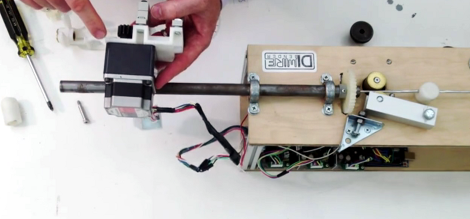
Whether or not you’re actually going to build this CNC wire bender, we think you’ll love getting a closer look at how it’s put together. The team over at PENSA got such a strong response from a look at the original machine that they decided to film a video (embedded after the break) showing how the thing was put together. They’ve also posted a repository with code, bom, etc.

In the image above [Marco] shows off the portion that actually does the bending. It’s designed to mount on the pipe through which the straightened wire is fed. The 3d printed mounting bracket really makes this a lot easier. The assembly provides a place to attach the solenoid which moves a bearing in and out of position. That bearing presses against the wire to do the bending, but must be moved from one side of the wire to the other depending on the direction of the next bend. This is a lot easier to understand after watching the demo video which is also embedded after the break.


Filed under: cnc hacks
Hack a Day 21 Jun 12:01

Tears of Rainbow.

Video clips on youtube, arduino is running simple demo application.

Tears of Rainbow                             BarGraph HD movie                                    " href="//www.youtube.com/watch?v=30ELYwyy4JQ&feature=youtu.be]" target="_blank">BarGraph movie.


It’s time to release new updates for my first (ever) project with Arduino, “Color Light Music”.  From artistic perspective, VU BarGraph style (IMHO) is the best one for spectral dynamic representation, and not much could be improved on this side. But this time, it cross my mind an another idea “Tears of Rainbow”. This blog about how successively (or awfully) the idea was brought to life. And of course, VU visual effects still there, updated with nice peak indicators, color adjustment flexibility (this time triple color LEDs), and PWM-ed brightness settings luxury.  So, this is design requirements, I was following:

  •   make it as big as possible, GIGANTIC size !;
  •   Lego style, or many blocks / modules, which could be re-arranged in different pattern;
  •   extend-able,  easy to add up more blocks later on;
  •   low price on hardware, no special display driver IC.
To simplify assembly work, I decided to buy RGB Led Strip. I had known, from my first project, that design would be composed with straight lines, and the longer lines means the more LED’s ( and consequently, soldering work). For comparison, one line on this display consist of 6 RGB leds, or 24 soldering connections. Using RGB strip, I reduce a workload 24 to 4, or 6 times. I envy to people,  who have a patience to build  8x8x8 RGB led cube (or even 10^3 !).   Addressable RGB strip would make life even easier,   but  I couldn’t find local re-seller,  and was not going to wait shipment / customs. It’s summer time!
 In order to easy reconfigure a style, for example, from  3 BarGraphs, needed in Color Music exposition, to just  1 GIGANTIC VU meter (*),  RGB led strip is chopped-up and attached to 3 rectangular shape plates. I find out, that for some reason strip isn’t “sticky” enough, and to keep its perfectly align on a plate, I used a tire-ups at both ends. Luckily, it was quite easy to punch a holes in the plates for tire-ups just using kitchen knife.
 It wouldn’t be so, if I use a glass as a back-plate
(I had such idea initially). Something to think, if you plan to work with a strip in your design. The same also true for wiring (32 wires per plate). Tin “cookie” plates just was made to be part of this project!  And I even did not mention the heat dissipation,  1/3 of 5 meters strip consume around 12 W of power,  it’s almost like my soldering iron!
 One more things before I forget, I installed 1 cm paper pads to insulate contacts from the metal plate in the middle and on one side. Heat shrink tube takes care of the other end.
 LED’s use 12V as power source, and as I need a lot of  PWM channels to control their brightness , here comes 74HC595 buffered by ULN2803 at the outputs. Nothing special, 9 shift registers daisy chained to produce 72 PWM outputs. Two IC in a pair installed in reverse on a prototype board, to minimize a number of interconnections. As you can see from the  picture, there is only 1! yellow jumper brought from pin 15 of the shift register to pin 8 of the Darlington array. Why they don’t make a shift register in DIP-16 package? There wouldn’t be any jumpers at all!  Other alternative is using TPIC6B595.
        * For clarity, schematic diagram shows only two pairs of chip, and half length of the strip lines.

Now software part.

There are on-line libraries available, to drive 74HC595 by arduino. Only some of them not using hardware “build-in”  SPI interface , and really slow in communication with peripheral IC’s (don’t forget, that LED display only second part of the project, the first one, FFT, is very time consuming). The others libraries, nicely written and perfectly optimized for speed, have too much functionality, that I don’t need in my project, plus they are memory demanding. On the other hand, I need low resolution animation function – sliding down colorful tears, that I have to create on my own.  Now I ‘d like to represent a code, very fast SPI subroutines, completely written in C !  Function shift out 9 bytes ( for 9 shift registers in this project ) approximately in less than 36 usec, or 0.5 usec per one PWM channel. One bit-set in the unrolled loop is about 4.5 cycles.

static uint8_t brightn;

brightn++;
 if(( brightn % QUANTUMS ) == 0)
{
bitClear(PORTB,LATCH_PB);
SPDR = 0;

uint8_t * srP = &brightns[PIN_NBRS];
uint8_t cmp_level = brightn;

for (int8_t iSR = 0, curBt = 0; iSR < IC_COUNT ; iSR++, curBt = 0){

if ((* –srP) > cmp_level)
curBt |= 0b00000001;
if ((* –srP) > cmp_level)
curBt |= 0b00000010;
if ((* –srP) > cmp_level)
curBt |= 0b00000100;
if ((* –srP) > cmp_level)
curBt |= 0b00001000;
if ((* –srP) > cmp_level)
curBt |= 0b00010000;
if ((* –srP) > cmp_level)
curBt |= 0b00100000;
if ((* –srP) > cmp_level)
curBt |= 0b01000000;
if ((* –srP) > cmp_level)
curBt |= 0b10000000;

loop_until_bit_is_set(SPSR, SPIF);
SPDR = curBt; // Start the transmission
}
loop_until_bit_is_set(SPSR, SPIF);
bitSet(PORTB,LATCH_PB);
}

FFT part of the code completely “copy / pasted” form my “Radix-4″ blog. Here an advise, if you wish to explore the code, look there for “pure” form of function. What is new in this publication, is magnitude calculation subroutine, without slow SQRT.

Bar Graphs “set position” sub-function, or mapping height of lighted area of a plate to integral sum of the bins, brought into this project with mild modification from first project.

Continue moving from LED’s display to audio input, I should say couple words on a sampling. There are two functions in the project, that have to be triggered periodically with a timer, “display refresh” posted above and “take ADC sample”. It looks logically, instead of having two timers and have a lot of troubles with collision / racing between them, to scale both function to the same time frame, and execute them at once. “Display refresh” rate equals to minimum rate just to avoid flickering (60/70 Hz) multiplied by the numbers of brightness level. For example, setting brightness step number to 256 ( which provides excellent 256 x 256 x 256 = 16 M colors ) would require periodicity 60 x 256 = 15360 Hz.  See, where I’m driving at? Exactly, 15 kHz is nice frequency to sample audio input!. Well, it’s not 44.1 kHz as default settings Hi-Fi audio standard would recommend, but I ‘m not using all sound data in this project, as I only interested in lower 2 kHz part of the spectrum. And BTW, it’s almost 4x times higher than bear minimum prescribed by sampling theorem (Whittaker–Shannon–Kotelnikov).  I’ve made my choice at 15.625 kHz, to simplify math of binary compare to 64. ( 1/64 usec = 15.6 kHz) If there is no big difference, why not pick up “lucky” binary number, and help a Timer to do his job?

Initially, I thought that I would just re-use sampling sub-function  from “Pitch Shifting” project, slightly adjusting it from 8.0  to 15.6 kHz. I was surprised to discover, that TIMER2 and SPI don’t want to work together! Have I missed something in a data sheet? Could be, sometimes it’s so hard to comprehend, that I’d be still experimenting with “Blinking Led”, if not help from this (must to have) masterpiece:

AVR Microcontroller and Embedded Systems: Using Assembly and C (Pearson Custom Electronics Technology)

O’K, there is TIMER1 available. As project already have been heavily “over-loaded” on software side, I decided to take TimerOne library and not bother myself this time with a bunch of registers, interruptions, masks, etc, leaving this out of the scope, as not related to subject.

FFT size =128 provides extra fine resolution for Color Music performance. BTW, may be it not obvious, but bigger size of FFT has LOWER CPU workload per sample. And last, after everything was melted in one  (BIG) sketch nothing happened. No, my arduino can’t catch up at 15.6 kHz. Shifting 9 bytes via SPI, as I mention earlier, takes 36 microseconds. It’s leaving 64 – 36 = 28 microseconds per sample for everything else, or 28 x 128 = 3 584 per frame.  Radix-4 (size = 128) takes 4.2 milliseconds, as I posted here.  Alright, hell with it, who need 16 M colors  on 8 x 3 led display, by the way?  So, I bring quantity of brightness steps down to:             256 / 4 = 64, which is more than enough -> 262 144 color combinations!  QUANTUMS definition sets coefficient 4 in SPI sub-function.  The same time frame rate equals to  122 Hz, which is 2x times higher, than 60 Hz I started my calculation with.

Default color map, or bin’s assignment to a specific plate, is shown above. This time I implemented a command in CLI to make adjustment in this map on the fly, according to music style, equalizing all three bars more or less proportionally. Automatic Gain Control loop implemented in first project, doesn’t work so great with bigger display size ( first project uses 4  lines per color ). Plus, AGC bringing noise in the visual performance in  pauses between  two songs and in quite fragments of the music.  Starting bin position for each RGB plate could not be changed using CLI  ( you still can do this modifying the scetch), but quantity of bins accumulated per plate could be adjusted simply sending “dr” for red, “dg” – for green, and “db” - for blue, where  d is a digit 0..9.  Bands could over-lap, which is not desirable, in this case red is limited too 0..3, green 0..6, and blue 0..9.

More on the audio input hardware and sampling software subroutine, I post in separate blog, as this part follows w/o much modification thorough a few previous blogs, and doesn’t need to be re-stated here.

*Note: in software G.VU is not implemented yet.

Link to download a sketch:  Tears_of_Rainbow.