My virtual robot project
Concept:


Concept:

End-of-year engineering school projects often pique our interest for their creativity. It's not every day that they can carry a bassline, however. James McVay's robot project for his honors year at the Victoria University of Wellington, the supremely well-named MechBass, wouldn't have much trouble keeping up with a favorite band. It centers on a custom, Arduino-compatible board that controls the plucking, fretting and damping of four strings to faithfully recreate bass guitar sounds from MIDI input. The design even accounts for the unwanted noises of actuators and motors, while virtually everything was either 3D-printed or laser-cut just for the task at hand. Sounds good? There's more in the pipeline: an upcoming Swivel robot will experiment with different playing techniques, and McVay ultimately sees his work teaching us about robotic music's interaction with human performers. For now, we'll be happy with the video after the break and hope that MechBass takes requests.
Source: Hack A Day
Now that we’re using a 74HC14 Schmitt trigger in the capacitive touch sensor for the hysteresis oscillator, that lab can be the first soldering project, in addition to learning about hysteresis.
I tried laying out a very compact PC board for the students to solder (still requiring them to do some design—they’ll have to breadboard their design first to get appropriate R and C values). I came up with one very compact design that could get 4 copies into the 50mm×50mm limit of the $1 boards from ITEAD, making the boards only 25¢ each.

Compact layout to get 4 hysteresis oscillator boards out of one 50mm×50mm board. The gutters are pretty narrow, though, and I’m not sure I’m skillful enough with the board shears to cut that accurately. The yellow “airwires” are Eagle telling me that the Gnd and +5V wires are not connected between the different copies.
It seemed a little silly to try to squeeze the price down to 25¢, when the other parts cost 90¢: 59¢ for the screw terminals, 28¢ for the Schmitt trigger chip, 1¢ for the resistor, and 2¢ for the capacitor. With this layout it is also a little tricky for the students to properly wire the unused inputs high.
Given the high risk of ruining the boards trying to cute them with the board shears, I decided to redesign for a 50¢ board.

Much looser layout, having only two copies on the 50mm x 50mm board. This version makes it easier for the students to see how things are connected, and has lots of room for the board shears to make the cut.
The lab would now require that the students measure the thresholds of the Schmitt trigger, breadboard the hysteresis oscillator, make a touch pad out of foil and packing tape, measure the frequency of the oscillation to estimate the touch pad capacitance, adjust the parameters of the Arduino program to match the frequencies of their oscillator, solder up the board, and demonstrate it working to control an LED. I think that is plenty for a 3-hour lab.
When I set up the web pages for the course, I’ll try to make sure I put the Eagle design files (.brd and .sch) for each board the students use on the web, so that future instructors can easily order more copies of the board, even if my laptop gets run over by a beer truck. That will also make it easier for instructors at other schools to try to duplicate the course.


So, I was starting on building my second robot, and I didn't really find enough materials around. I found straws and chopsticks, so I cut them up, glue them, and made them into a cheap base for my robot.

For more info, visit http://danrobotics.weebly.com/very-very-cheap-arduino-platform.html
Hello all
I have renbotics ServoShield and I have made a code on arduino where from serialport I can send commads to servos and it happens with that way... S01P1200,S14P2300etc..I mean that Servo 1 to 1200 posion and servo 14 to 2300 posion
Hello all
I have renbotics ServoShield and I have made a code on arduino where from serialport I can send commads to servos and it happens with that way... S01P1200,S14P2300etc..I mean that Servo 1 to 1200 posion and servo 14 to 2300 posion
 What happens when you want to play two instruments at the same time, but only have two hands? You let electronics do the work for you, of course.

[Akira] looks to increase his urban canvas by tagging poles which some custom hardware. If you’re looking to add some art to a lamp post, height becomes a problem. That’s where this little guy comes in. The remote-controlled pole climber includes a marker that leaves a trail as the device climbs and descends.
The rig clamps around a pole, with omnidirectional bearings on three sides of the four-sided frame. That last side is occupied by a rubber wheel mounted at a bit of an angle. When the motor turns the angle of the wheel causes the jig to rotate around the pole and climb at the same time. To come back down the motor is simply reversed. Xbee modules are used to make a rudimentary wireless control with a button for up and another for down. It looks like the marker is also mounted on a servo but we didn’t see a way to control when it is actually touching the pole. Perhaps you can figure it out by studying the clip after the jump.
We’ve seen projects that climb poles before. Among our favorites is the one that takes your bicycle with it.


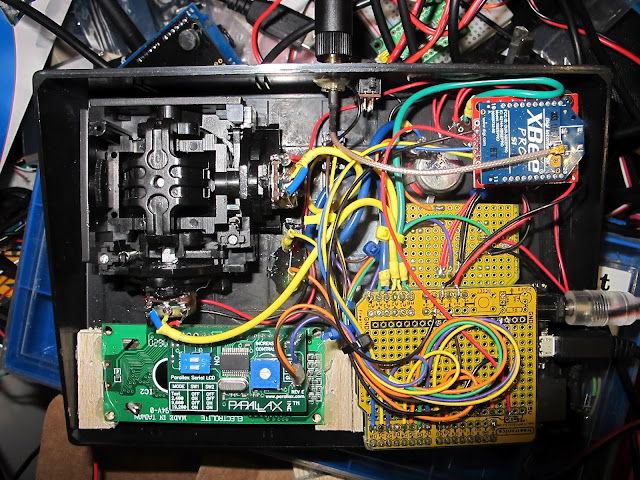
[nickatredbox] has sent this interesting project with Arduino involving wireless comunication. The fun comes when you have to decide to buy something already done or DIY.
I wanted a remote control system of my own design for may various RC model projects planes and boats. I set about researching the options and and Xbee with / Arduino solution poped out as a viable option, having failed performance testing using both WiFi and TinyCLR. The other feature I get as the Xbee is a transceiver is real-time telemetery. I’m sure I could buy this functionality from HobbyKing but where is the fun in that.
More project on the [website]