Posts with «arduino» label

Lego plant watering robot

Primary image

What does it do?

Watering the plants while you're on holiday

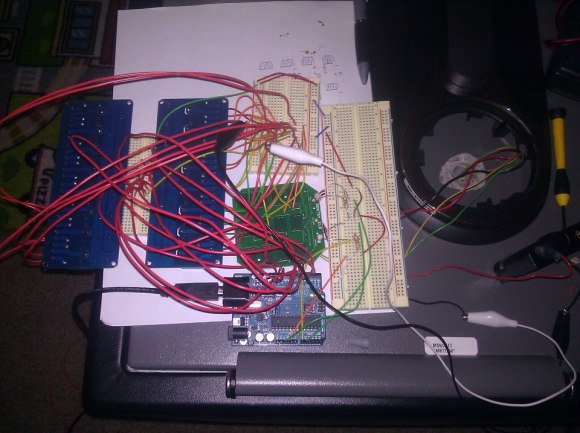
This robot waters the plants while you're on holiday! You have to line up the plants and through a GUI in Microsoft Access you can input the water demands per plant (how many times per week the plant needs water and how much). The water reservoir contains a mixer and an aeration unit (through lego compressors) to avoid dead water. The only thing not lego about it is the water pump and the robot is controlled by an Arduino Duemilanove. I've used a selfmade multipurpose motor driver pcb so all the electronics visisble aren't used ;)

Cost to build

$100,00

Embedded video

Finished project

Complete

Number

Time to build

60 hours

Type

URL to more information

Weight

4000 grams

Vintage Kegerator

[Kerber] got his hands on a classic 1950′s General Electric fridge, and converted it into this classy vintage kegerator.

As his build log shows, it took an intensive restoration process to get this fridge back in shape. He completely stripped it down, scraping off the sixty year old insulation, fibreglass, and glue. Then the chassis was sanded down to a smooth finish and painted black. R-19 insulation was added to replace the old stuff.

Next up was electronics. An Arduino, DS18B20 temperature sensor, and a solid state relay were used to regulate the temperature and prevent frozen beer. There’s also a Guruplug server that reads data from the Arduino every minute. It makes this data accessible through a web page, so the temperature of the kegs can be monitored from anywhere. [Kerber] admits that this is overkill, but leaves room for future expansion.

The kegerator draws about 180 Watts, and runs for about 6 minutes per hour to keep the temperature regulated. This is pretty impressive considering the age of the fridge. The final restoration looks great, and serves up data along with the beer.


Filed under: beer hacks

Replacement controllers for slot car racing

That blur on the right is a car racing into the frame. But look around the rest of the image and you’ll see the area is littered with extra hardware. [Matthew], [Doug], and [Barry] have been hard at work adding extra functionality and replacing the original controllers on this Scalextric slot car setup. So far it looks like their build log has not caught up with all the work they’ve done. We’re hoping to learn more details as they have time to write about them (this is coursework at University so we’re sure there’s a lot on their plates). But for now there are several videos and a gallery of images to drool over.

The cars are controlled by the voltage level in the track. The team replaced the stock controllers with a Raspberry Pi. It manages that voltage using Pulse-Width Modulation via MOSFETs. This allows the races to be automated but also makes it simple for a human operator to use just about any input device imaginable to control the cars. For good measure they also added a lap counter that uses an IR LED and detector to sense when a car passes the finish line.

After viewing several of their videos we think the goal of the project is to log the fasts times without sending the cars flying off the tracks during the turns.


Filed under: Raspberry Pi, toy hacks
Hack a Day 23 Jan 19:01

Adafruit Gemma stuffs a wearable Arduino platform into a one-inch disc

Adafruit's Flora wearable platform is barely a year old, yet it already has a little sibling on the way -- and we do mean little. The newer Gemma is Arduino-programmable over USB like its relative, but measures just over half the size of the Flora at an inch in diameter. It's even bordering on cute, as far as circuit boards go. Before developing any grand visions of wearable computers, though, be aware that Gemma's features scale down with its size: there's only three input/output pins, and a limited amount of memory won't let it handle more than about a dozen of Adafruit's NeoPixel lights. All the same, any aspiring tailor willing to trade flexibility for subtlety in a costume will likely want to sign up for notification of the Gemma's in-stock date at the source link.

Filed under: Wearables

Comments

Source: Adafruit

Engadget 22 Jan 14:32

TRUE ANALOG AUDIO VOLUME CONTROL (T.A.A.V.C.).


More:   Video1   and   Video2

Now my Arduino can precisely measure audio input (VU meter),   and obviously, next thing that comes to mind right after measurements, is regulation or control. There are many different ways how to electronically adjust audio volume or level of AC signal.  I’ll name a few:

  • Specifically design IC, Digital potentiometers.
  • Mechanical potentiometers, driven by servo / motors.
  • Vacuum tubes amplifiers in “variable-mu” configuration.
  • Resistive opto-isolators.

First category (#1) fits nicely for arduino project. But it’s not interesting to me. My apologies to someone, who was searching an example of interface between arduino and digital pot. Other people don’t tolerate semiconductors in audio path ( tube sound lovers ). Third option would make them happy, only (#3) requires high voltage and difficult to accomplish on low hobbyist budget, so I left it out of the scope. Mechanical pot (#2) would be good solution to satisfy Hi-Fi perfectionists and arduino fans. The same time response time of mechanical parts is too slow, verdict – discarded.  (#4) have been in use since 1960s, but would you like your lovely music to be adjusted by highly toxic CdSe / CdS ?  I don’t think so. Wiki says opto-isolators have low THD distortion level, less than 0.1%. Probably true, but apart from technical aspect, there is always psychological, poisonous CdSe affects my perception.

How about variable resistor in it’s simplest form – tungsten wire? Where you can get one? In the electrical bulb. Perfect material for audiophiles – where distortion could get into ? – It’s pure metal ! And here is my design of the “basic cell” – True Analog Audio Volume Control (T.A.A.V.C.)

As you can see, cell consists of 5 bulbs plus 1 resistor. All elements form 2 attenuation stages, basically – voltage dividers with variable resistors. Resistive values of bulbs proportional to temperature, which is easy to control passing DC current through. To make it work with the biggest possible dynamic range, middle bulb is also heated up by current flow from two differential control lines / phases.

 Hardware prototype / Proof of Concept.

Differential Power Amplifier (PA) IC LM4863  is used as DC current source for control lines. Circuitry powered from 5V regulated switching power supply (4A).  Bulbs – clear mini lights, 2.5V, approximately 200 mA. Cold state resistance about 1.2 – 1.5 Ohm, hot state resistance is rising up to 15 Ohm.  Volume regulator could be connected to any audio source with output impedance no more than 32 Ohm, for example, headphones output. For test I used second channel of the PA, that shown in “optional” box on the left side. Second channel is a “nice to have” feature  in stereo version of the project, when both channels would drive two separate TAAVC cells, so using it as a “buffer” amplifier may be not an option.

Results.

  Measured attenuation  range of the “basic cell” is  20 dB, or 10 x times.

 to be continue…

 Chart, PWM (Voltage) to Attenuation:

 Quite interesting, isn’t it? I was not expecting it’s to be linear, but changing direction surprised me. There is one things, which could explain such abnormality, is that when voltage on the control lines 1 and 2 ( LM4863 outputs ) is approaching power rails, output impedance of the power amplifier is increasing, and consequently, attenuation characteristics of the basic cell deteriorate. It means, that in order to keep attenuation curve gradually declining, more powerful PA necessary. For now, I limited PWM to 0 – 200 range.

I’m thinking, STA540  powered from +12V, and 5 V bulbs would make sense to try next time.  Probably, replacing middle bulb for less current hungry, will increase max attenuation per cell up to 30-35 dB.

 O’K, after I get this data, how could I “straighten it up” for practical use ?  Volume control device, could be linear or logarithmic, but chart doesn’t resemble nether of this. And this is exactly what I need Arduino for.

Linearization.

 If you, by chance, have read this page, than you know how to do this part. Polynomial approximation. Unfortunately,  2-nd degree polynomial I used last time is not enough for VERY non-linear curve like I have. So, I “upgraded” my calibration subroutine (method: LEAST SQUARES) up to 3-rd degree:

void calibrate()
{
 //Least squares 3-rd degree polynomial coefficient calculation
 float arr[10][5] ={{0},{0}}, err[10] = {0}, coeff[10] = {0};

 err[0] = 10;
 for(uint8_t i = 1; i < 7; i++)
 {
  err[i] = 0;
  for(uint8_t j = 0; j < 10; j++)
  {
   err[i] += pow(level_table[j], i);
  }
 }

 for(uint8_t i = 0; i < 4; i++)
 {
  for(uint8_t j = 0; j < 4; j++)
  {
   arr[i][j] = err[i+j];
  }
 }

 for(uint8_t i = 0; i < 4; i++)
 {
  arr[i][4] = 0;
  for(uint8_t j = 0; j < 10; j++)
  {
   if (i==0) arr[i][4] += calibration[j];
   else arr[i][4] += calibration[j] * pow(level_table[j], i);
  }
 }

 for(uint8_t k = 0; k < 4; k++)
 {
  for(uint8_t i = 0; i < 4; i++)
  {
   if ( i != k )
   {
    for(uint8_t j = (k + 1); j < 5; j++)
    {
     arr[i][j] -= ((arr[i][k] * arr[k][j]) / arr[k][k]);
    }
   }
  }
 }

 union split_float {
 uint16_t tegri[2];
 float loatf;
 } sf; 

 for(uint8_t i = 0; i < 4; i++)
 {
  coeff[i] = ( arr[i][4] / arr[i][i]);
  sf.loatf = coeff[i];
  store_entry(( 2 * i ), sf.tegri[0] );
  store_entry(( 1 + (2 * i)), sf.tegri[1] );
 }
}

Procedure takes 10 data samples as input, calculates 4 coefficients and stores them in EEPROM memory.

VU meter based on Arduino UNO ( in minimum configuration Arduino and DC offsetting circuit ) should be connected right to T.A.A.V.C. output. Everything works in automatic mode, with results printed on serial monitor for review. Stable AC input is necessary, which easy to get from any PC sound card based signal generator, recorded media file or lab sine-wave generator. Arduino also provides PWM for T.A.A.V.C       via pin D3 (TIMER2 OCR2B).

Link to download Arduino UNO sketch: T.A.A.V.C.

to be continue…audio compressor, .

Last part,

Dynamic Range Compressor.

There are two important parameters defined in the beginning of the sketch:

#define          CMP_THRE                     -10             // Compression Threshold 
#define          CMP_RATE                        4             // Compression Ratio 4 : 1

Threshold and Ratio. I’m not into explaining all bunch of the details about compressors or what for do you need one, rather forward you to this link.  I only want to say, that I didn’t find any evidence that someone ever used electrical bulbs as compressors “engine”. So, this is my idea, and my implementation.

Technical specification of this design is quite modest, having close to 20 dB maximum attenuation and setting ratio to 2:1, threshold couldn’t be set lower than -40 dB. Good news, that for practical use in home environment it’s  really unlikely, that you ‘d need more. It’s also should be enough to solve a problem with annoying TV or Radio commercial / advertisement.

Compare to VU Meter project, I’ve made a few “relaxing” changes to the code, as it appears there are no strict industry standard on Dynamic Range Regulation. I reduce sampling rate down to 10 kHz,  and  split Low Pass Filtering in two sections. One is the same, as in VU Meter, inside sampling interruption subroutine, only with lower time constants. First LPF section is responsible for “shaping” attack and decay timing. Using quite inertial electrical bulbs in the project, reduce importance of this timing. Here attack and release mostly defined  by thermal responsiveness of the bulbs, which isn’t very high. Decreasing software LPF time constants helps to improve sensitivity. Other LPF section included inside LCD drawing function, works to overcome display slowness, suppressing LCD flickering. Other changes from simple VU Meter, is that finally I “scaled” everything correctly,  and “0″ db corresponds exactly to 1.228 V RMS at the input. Threshold level -10 expressed in dB as well. You may see threshold “mark” above the log scale. Indicator “needle” just below it, small 5×2 pixels only, but you can make it bigger if you wish.

I already described calibration procedure, to do it right, you need to connect arduino to output of the TAAVC cell.  Polynomial coefficients and minimum / maximum constants stored in EEPROM, so you don’t have to do this procedure each time after power cycling.  In normal mode arduino getting input measurements from the cell input:

Finished.  I’ll do a video “on demand” -);  If I had time…

Arduino UNO sketch:  Audio Dynamic Range Compressor. (TAAVC part 3).


MakerLab reviews the Arduino Starter Kit

When we released the Arduino Kit, we knew that we are equiping the closet-wannabe-makers to start planning for world domination. Now it has the stamp of approval from MakerLab too!

Make Noise With The New Arduino Kit is a project by Alessandro Contini (@CNTLSN) and Alberto Massa (@nkint)

The above video explores the basic components of the kit and things that a new-maker would want to start with, including a light controlled theramin, and by theramin, I really mean exploring every possibe way to make impressive noises from one simple experiment.

Sounds fun? Do write to us, what you made out of your starter kit. We may feature you next

Via:[MakerLab]

Arduino Blog 22 Jan 11:45

Object Avoidance Robot MK1

Primary image

What does it do?

Navigate around via ultrasound

Hello everyone. My ultrasonic sensors arrived (4 in total) but instead of using them on my scrapbot, i found some 360 degree servos that i had gathering dust from a previous project.so i decided to make use if them. The scrapbot was too loud because of the build materials so i settled with this. 

In the video it has the distance set to 30cm. 

Materials:

Body: Tamiya universal board (leftover from an onld tank project)

Cost to build

$35,00

Embedded video

Finished project

Complete

Number

Time to build

5 hours

Type

wheels

URL to more information

Weight

1000 grams

read more

Brute force finds the lost password for an electronic safe

[Teatree] tells a sad, sad story about the lost password for his fire safe. The electronic keypad comes with a manufacturer’s code as well as a user selected combination. Somehow he managed to lose both of them, despite storing the user manual safely and sending the passwords to himself via email. He didn’t want to destroy the safe to get it open, and turning to the manufacturer for help seemed like a cop-out. But he did manage to recover the password by brute forcing the electronic keypad.

There is built-in brute force protection, but it has one major flaw. The system works by enforcing a two-minute lockout if a password is entered incorrectly three times in a row. But you can get around this by cutting the power. [Teatree] soldered a relay to each set of keypad contacts, and another to the power line and got to work writing some code so that his Arduino could start trying every possible combination. He even coded a system to send him email updates. Just six days of constant attacking netted him the proper password.


Filed under: security hacks

Insert Coin: Arduino-compatible Pinoccio microcontroller sports battery, WiFi

In Insert Coin, we look at an exciting new tech project that requires funding before it can hit production. If you'd like to pitch a project, please send us a tip with "Insert Coin" as the subject line.

It's been said that imitation is the sincerest form of flattery. Improving on a good idea, however, is truly the ultimate homage, according to the makers of the new Pinoccio microcontroller. Inspired by the Arduino, the brain trust behind the Pinoccio decided to take the stuff they liked about the popular platform -- ease of programming and low cost -- and add some features to make it even better. These include a rechargeable battery, a temperature sensor and a built-in radio that allows one Pinoccio with a WiFi shield to communicate wirelessly with other Pinoccios. The microcontroller also delivers performance that stacks up well with an Arduino Mega but at a smaller size -- the Pinoccio only measures a couple of inches long and an inch wide. The project is currently trying to raise $60,000 at Indiegogo, with supporters netting the standard Pinoccio by pledging $49 and a microcontroller with a WiFi shield for $99. For more details, feel free to check out the video after the break or peruse the project's Indiegogo page by clicking at the source link.

Previous project update: The Lomography Smartphone Film Scanner was apparently ready for its closeup. The Kickstarter project more than tripled its $50,000 goal with two more weeks to go.

Filed under: Misc

Comments

Source: Indiegogo

Permaduino makes your Arduino projects permanent (video)

Arduinos are fun to tinker with, but there's one problem. Once you've built something cool, you pretty much have to tear it down to use your board for another project. Sure, you can always buy multiple Arduino boards or proto shields, but what if you want to turn your creation into something a bit more permanent and a lot more compact? Say hello to Permaduino, a small battery-powered Arduino prototype board that just launched on Indiegogo. It features an Atmega328P (natch), two AAA battery holders with a 3 to 5V DC-DC converter (up to 180mA), a 25-column breadboard with VCC and ground, plus FTDI, AVR-ISP and USB interfaces. Best of all, Permanuino conveniently fits inside a standard 8mm videotape case (as long as you don't mount large components on that breadboard). Interested? Hit the break for the Indigogo link and campaign video.

Filed under: Misc

Comments

Source: Permaduino (Indiegogo)

Engadget 20 Jan 17:09