LCD
Hi.
Has anyone tried using These LCDs with an arduino? I'm not sure whether they're HDD44780 compatible or not, and I can't seem to find much of a datasheet.
Thanks in advance.


Hi.
Has anyone tried using These LCDs with an arduino? I'm not sure whether they're HDD44780 compatible or not, and I can't seem to find much of a datasheet.
Thanks in advance.
 Using an Arduino Uno equipped with an Ethernet Shield and an LCD Keypad shield, MAKE reader Kedume demonstrates how to create a simple text display for the number of likes on any Facebook page. I think that this is a great project for an Arduino beginner because all you need [...]
 Still haven't picked up an Ultimate Arduino Microcontroller Pack? Sunday at Midnight PST is your last chance to save $30 on this kit, the equivalent for getting an Arduino FREE!
 Circuit bender Dr. Bleep built this sweet Arduino-compatible drum machine, the Bleep Drum, with four sounds, four selectable sequences, tap tempo, record and playback, and more. Of course it’s open source and eminently hackable.Filed under: Arduino, Electronics, Music

[Chipsy] found himself with an interesting problem. The room that serves his home theater has a wall mirror which reflects part of the screen during viewing. In an otherwise dark room this was very distracting. His solution was to add a blind that covers the mirror during viewing, but who wants to constantly pull that down and back up again? Since the motorized projection screen he is using has a remote control he figured out a way to motorize the blind and synchronize it with the screen’s remote.
The screen uses mechanical relays to switch the motor. He patched into these with an Arduino to detect whether the screen was going up or down. It was easy enough to use his own relay and motor with the blind, but he needed a way to stop the blind once it was in position. For covering up the mirror he simply sets an 18 second timer, but for retracting the blind he wanted precise alignment so he added a magnet and sense its position with a reed switch. See the synchronized screen and blind in the clip after the break.


Looking back on how I entered the world of robotics, I wished that I had a sturdy, easy to program Arduino shield and platform. Well, I made what I wished I had. It turned out to be my best looking robot ever! I made the shield in Fritzing (to attach to the Arduino Uno and the robot). The PCB image is attached (it is double sided, the darker wires are on the bottom). I know I have some empty space and rough edges on the pcb, but it still works flawlessly. I will create a library for the functions of the shield, greatly simplifying the programming aspect.

Over at the LVL1 hackerspace in Lousiville, [Brad] is putting together a workshop on etching PCBs at home. [Brad] wanted all the participants to take home something cool, so he settled on an Arduino clone as the workshop’s project.
The clone [Brad] used is the Nanino, a single-sided board we’ve seen before. Unfortunately, there aren’t any CAD files for the Nanino and doing a toner transfer with the existing PDFs was a pain. This led [Brad] to redraw the Nanino in Diptrace and put the files up for everyone to grab.
In his workshop, [Brad] is going to be using a laser printer, hydrogen peroxide, and HCl. one of the most common setups for home etching. If you’re in the Louisville area, you can make your own Nanino with a home etching workshop on March 16th. Be careful, though: those LVL1 guys are pretty weird; they have a moat and are building a homicidal AI.


I am working on a biped robot that I am running using Processing and servo firmata on an arduino uno. This works fine and I have a decent walking gait. I would like to include an accelerometer into the robot to give the robot more stability. So I decided to switch over to standard firmata on the arduino so I can use the i/o. The problem is that with the standard firmata none of the servos work eventhough the servo library is still included in the standard firmata.
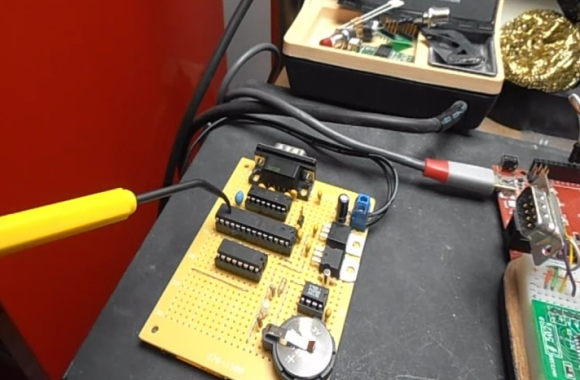
[Osgeld] is showing off what he calls a sanity check. It’s the first non-breadboard version of his Pocket Serial Host. He’s been working on the project as a way to simplify getting programs onto the Apple II he has on his “retro bench”. When plugged in, the computer sees it as a disk drive.
The storage is provided by an SD card which is hidden on the underside of that protoboard. This makes it dead simple to hack away at your programs using a modern computer, then transfer them over to the retro hardware. The components used (starting at the far side of the board) are a DB9 serial connector next to a level converter to make it talk to the ATmega328 chip being pointed at with a tool. The chip below that is a level converter to get the microcontroller talking to the RTC chip seen to the right. The battery keeps that clock running when there’s no power from the 5V and 3.3V regulators mounted in the upper right.
The video after the break shows off this prototype, the breadboard circuit, and a demonstration with the Apple II.
[Thanks Brendan]

