Posts with «arduino» label

Tutorial – Arduino and PCF8591 ADC DAC IC

Learn how to use the NXP PCF 8591 8-bit A/D and D/A IC with Arduino in chapter fifty-two of my Arduino Tutorials. The first chapter is here, the complete series is detailed here.

Updated 17/06/2013

Introduction

Have you ever wanted more analogue input pins on your Arduino project, but not wanted to fork out for a Mega? Or would you like to generate analogue signals? Then check out the subject of our tutorial – the NXP PCF8591 IC. It solves both these problems as it has a single DAC (digital to analogue) converter as well as four ADCs (analogue to digital converters) – all accessible via the I2C bus. If the I2C bus is new to you, please familiarise yourself with the readings here before moving forward.

The PCF8591 is available in DIP form, which makes it easy to experiment with:
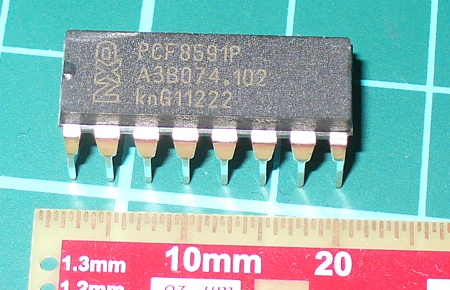
You can get them from the usual retailers. Before moving on, download the data sheet. The PCF8591 can operate on both 5V and 3.3V so if you’re using an Arduino Due, Raspberry Pi or other 3.3 V development board you’re fine. Now we’ll first explain the DAC, then the ADCs.

Using the DAC (digital-to-analogue converter)

The DAC on the PCF8591 has a resolution of 8-bits – so it can generate a theoretical signal of between zero volts and the reference voltage (Vref) in 255 steps. For demonstration purposes we’ll use a Vref of 5V, and you can use a lower Vref such as 3.3V or whatever you wish the maximum value to be … however it must be less than the supply voltage. Note that when there is a load on the analogue output (a real-world situation), the maximum output voltage will drop – the data sheet (which you downloaded) shows a 10% drop for a 10kΩ load. Now for our demonstration circuit:
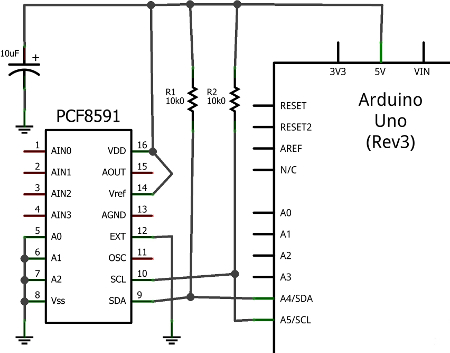
Note the use of 10kΩ pull-up resistors on the I2C bus, and the 10μF capacitor between 5V and GND. The I2C bus address is set by a combination of pins A0~A2, and with them all to GND the address is 0x90. The analogue output can be taken from pin 15 (and there’s a seperate analogue GND on pin 13. Also, connect pin 13 to GND, and circuit GND to Arduino GND.

To control the DAC we need to send two bytes of data. The first is the control byte, which simply activates the DAC and is 1000000 (or 0x40) and the next byte is the value between 0 and 255 (the output level). This is demonstrated in the following sketch:

// Example 52.1 PCF8591 DAC demo
// http://tronixstuff.com/tutorials Chapter 52
// John Boxall June 2013
#include "Wire.h"
#define PCF8591 (0x90 >> 1) // I2C bus address
void setup()
{
 Wire.begin();
}
void loop()
{
 for (int i=0; i<256; i++)
 {
 Wire.beginTransmission(PCF8591); // wake up PCF8591
 Wire.write(0x40); // control byte - turn on DAC (binary 1000000)
 Wire.write(i); // value to send to DAC
 Wire.endTransmission(); // end tranmission
 }

 for (int i=255; i>=0; --i)
 {
 Wire.beginTransmission(PCF8591); // wake up PCF8591
 Wire.write(0x40); // control byte - turn on DAC (binary 1000000)
 Wire.write(i); // value to send to DAC
 Wire.endTransmission(); // end tranmission
 }
}

Did you notice the bit shift of the bus address in the #define statement? Arduino sends 7-bit addresses but the PCF8591 wants an 8-bit, so we shift the byte over by one bit. 

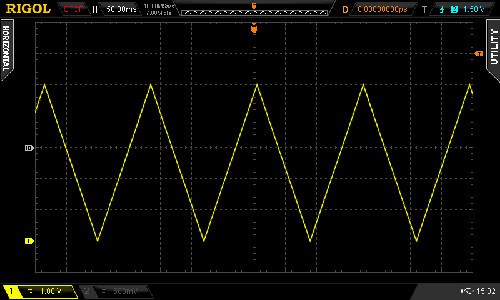
The results of the sketch are shown below, we’ve connected the Vref to 5V and the oscilloscope probe and GND to the analogue output and GND respectively:
If you like curves you can generate sine waves with the sketch below. It uses a lookup table in an array which contains the necessary pre-calculated data points:

// Example 52.2 PCF8591 DAC demo - sine wave
// http://tronixstuff.com/tutorials Chapter 52
// John Boxall June 2013

#include "Wire.h"
#define PCF8591 (0x90 >> 1) // I2C bus address

uint8_t sine_wave[256] = {
 0x80, 0x83, 0x86, 0x89, 0x8C, 0x90, 0x93, 0x96,
 0x99, 0x9C, 0x9F, 0xA2, 0xA5, 0xA8, 0xAB, 0xAE,
 0xB1, 0xB3, 0xB6, 0xB9, 0xBC, 0xBF, 0xC1, 0xC4,
 0xC7, 0xC9, 0xCC, 0xCE, 0xD1, 0xD3, 0xD5, 0xD8,
 0xDA, 0xDC, 0xDE, 0xE0, 0xE2, 0xE4, 0xE6, 0xE8,
 0xEA, 0xEB, 0xED, 0xEF, 0xF0, 0xF1, 0xF3, 0xF4,
 0xF5, 0xF6, 0xF8, 0xF9, 0xFA, 0xFA, 0xFB, 0xFC,
 0xFD, 0xFD, 0xFE, 0xFE, 0xFE, 0xFF, 0xFF, 0xFF,
 0xFF, 0xFF, 0xFF, 0xFF, 0xFE, 0xFE, 0xFE, 0xFD,
 0xFD, 0xFC, 0xFB, 0xFA, 0xFA, 0xF9, 0xF8, 0xF6,
 0xF5, 0xF4, 0xF3, 0xF1, 0xF0, 0xEF, 0xED, 0xEB,
 0xEA, 0xE8, 0xE6, 0xE4, 0xE2, 0xE0, 0xDE, 0xDC,
 0xDA, 0xD8, 0xD5, 0xD3, 0xD1, 0xCE, 0xCC, 0xC9,
 0xC7, 0xC4, 0xC1, 0xBF, 0xBC, 0xB9, 0xB6, 0xB3,
 0xB1, 0xAE, 0xAB, 0xA8, 0xA5, 0xA2, 0x9F, 0x9C,
 0x99, 0x96, 0x93, 0x90, 0x8C, 0x89, 0x86, 0x83,
 0x80, 0x7D, 0x7A, 0x77, 0x74, 0x70, 0x6D, 0x6A,
 0x67, 0x64, 0x61, 0x5E, 0x5B, 0x58, 0x55, 0x52,
 0x4F, 0x4D, 0x4A, 0x47, 0x44, 0x41, 0x3F, 0x3C,
 0x39, 0x37, 0x34, 0x32, 0x2F, 0x2D, 0x2B, 0x28,
 0x26, 0x24, 0x22, 0x20, 0x1E, 0x1C, 0x1A, 0x18,
 0x16, 0x15, 0x13, 0x11, 0x10, 0x0F, 0x0D, 0x0C,
 0x0B, 0x0A, 0x08, 0x07, 0x06, 0x06, 0x05, 0x04,
 0x03, 0x03, 0x02, 0x02, 0x02, 0x01, 0x01, 0x01,
 0x01, 0x01, 0x01, 0x01, 0x02, 0x02, 0x02, 0x03,
 0x03, 0x04, 0x05, 0x06, 0x06, 0x07, 0x08, 0x0A,
 0x0B, 0x0C, 0x0D, 0x0F, 0x10, 0x11, 0x13, 0x15,
 0x16, 0x18, 0x1A, 0x1C, 0x1E, 0x20, 0x22, 0x24,
 0x26, 0x28, 0x2B, 0x2D, 0x2F, 0x32, 0x34, 0x37,
 0x39, 0x3C, 0x3F, 0x41, 0x44, 0x47, 0x4A, 0x4D,
 0x4F, 0x52, 0x55, 0x58, 0x5B, 0x5E, 0x61, 0x64,
 0x67, 0x6A, 0x6D, 0x70, 0x74, 0x77, 0x7A, 0x7D
};
void setup()
{
 Wire.begin();
}
void loop()
{
 for (int i=0; i<256; i++)
 {
 Wire.beginTransmission(PCF8591); // wake up PCF8591
 Wire.write(0x40); // control byte - turn on DAC (binary 1000000)
 Wire.write(sine_wave[i]); // value to send to DAC
 Wire.endTransmission(); // end tranmission
 }
}

And the results:
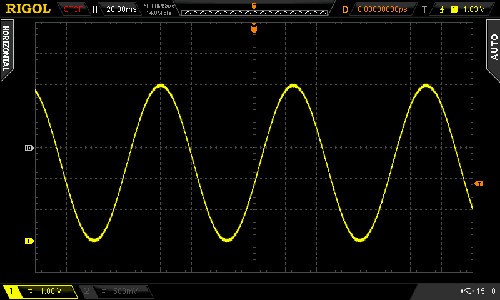
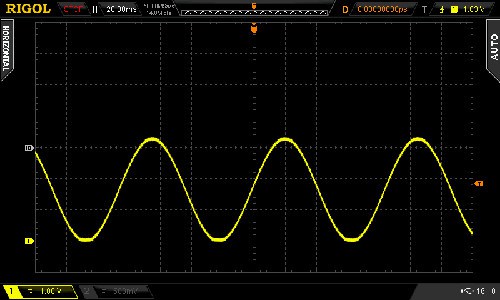
For the following DSO image dump, we changed the Vref to 3.3V – note the change in the maxima on the sine wave:
Now you can experiment with the DAC to make sound effects, signals or control other analogue circuits.

Using the ADCs (analogue-to-digital converters)

If you’ve used the analogRead() function on your Arduino (way back in Chapter One) then you’re already familiar with an ADC. With out PCF8591 we can read a voltage between zero and the Vref and it will return a value of between zero and 255 which is directly proportional to zero and the Vref. For example, measuring 3.3V should return 168. The resolution (8-bit) of the ADC is lower than the onboard Arduino (10-bit) however the PCF8591 can do something the Arduino’s ADC cannot. But we’ll get to that in a moment.

First, to simply read the values of each ADC pin we send a control byte to tell the PCF8591 which ADC we want to read. For ADCs zero to three the control byte is 0x00, 0x01, ox02 and 0x03 respectively. Then we ask for two bytes of data back from the ADC, and store the second byte for use. Why two bytes? The PCF8591 returns the previously measured value first – then the current byte. (See Figure 8 in the data sheet). Finally, if you’re not using all the ADC pins, connect the unused ones to GND.

The following example sketch simply retrieves values from each ADC pin one at a time, then displays them in the serial monitor:

// Example 52.3 PCF8591 ADC demo
// http://tronixstuff.com/tutorials Chapter 52
// John Boxall June 2013
#include "Wire.h"
#define PCF8591 (0x90 >> 1) // I2C bus address
#define ADC0 0x00 // control bytes for reading individual ADCs
#define ADC1 0x01
#define ADC2 0x02
#define ADC3 0x03
byte value0, value1, value2, value3;
void setup()
{
 Wire.begin();
 Serial.begin(9600);
}
void loop()
{
 Wire.beginTransmission(PCF8591); // wake up PCF8591
 Wire.write(ADC0); // control byte - read ADC0
 Wire.endTransmission(); // end tranmission
 Wire.requestFrom(PCF8591, 2);
 value0=Wire.read();
 value0=Wire.read();
 Wire.beginTransmission(PCF8591); // wake up PCF8591
 Wire.write(ADC1); // control byte - read ADC1
 Wire.endTransmission(); // end tranmission
 Wire.requestFrom(PCF8591, 2);
 value1=Wire.read();
 value1=Wire.read();
 Wire.beginTransmission(PCF8591); // wake up PCF8591
 Wire.write(ADC2); // control byte - read ADC2
 Wire.endTransmission(); // end tranmission
 Wire.requestFrom(PCF8591, 2);
 value2=Wire.read();
 value2=Wire.read();
 Wire.beginTransmission(PCF8591); // wake up PCF8591
 Wire.write(ADC3); // control byte - read ADC3
 Wire.endTransmission(); // end tranmission
 Wire.requestFrom(PCF8591, 2);
 value3=Wire.read();
 value3=Wire.read();
 Serial.print(value0); Serial.print(" ");
 Serial.print(value1); Serial.print(" ");
 Serial.print(value2); Serial.print(" ");
 Serial.print(value3); Serial.print(" ");
 Serial.println();
}

Upon running the sketch you’ll be presented with the values of each ADC in the serial monitor. Although it was a simple demonstration to show you how to individually read each ADC, it is a cumbersome method of getting more than one byte at a time from a particular ADC.

To do this, change the control byte to request auto-increment, which is done by setting bit 2 of the control byte to 1. So to start from ADC0 we use a new control byte of binary 00000100 or hexadecimal 0x04. Then request five bytes of data (once again we ignore the first byte) which will cause the PCF8591 to return all values in one chain of bytes. This process is demonstrated in the following sketch:

// Example 52.4 PCF8591 ADC demo
// http://tronixstuff.com/tutorials Chapter 52
// John Boxall June 2013
#include "Wire.h"
#define PCF8591 (0x90 >> 1) // I2C bus address
byte value0, value1, value2, value3;
void setup()
{
 Wire.begin();
 Serial.begin(9600);
}
void loop()
{
 Wire.beginTransmission(PCF8591); // wake up PCF8591
 Wire.write(0x04); // control byte - read ADC0 then auto-increment
 Wire.endTransmission(); // end tranmission
 Wire.requestFrom(PCF8591, 5);
 value0=Wire.read();
 value0=Wire.read();
 value1=Wire.read();
 value2=Wire.read();
 value3=Wire.read();
 Serial.print(value0); Serial.print(" ");
 Serial.print(value1); Serial.print(" ");
 Serial.print(value2); Serial.print(" ");
 Serial.print(value3); Serial.print(" ");
 Serial.println();
}

Previously we mentioned that the PCF8591 can do something that the Arduino’s ADC cannot, and this is offer a differential ADC. As opposed to the Arduino’s single-ended (i.e. it returns the difference between the positive signal voltage and GND, the differential ADC accepts two signals (that don’t necessarily have to be referenced to ground), and returns the difference between the two signals. This can be convenient for measuring small changes in voltages for load cells and so on.

Setting up the PCF8591 for differential ADC is a simple matter of changing the control byte. If you turn to page seven of the data sheet, then consider the different types of analogue input programming. Previously we used mode ’00’ for four inputs, however you can select the others which are clearly illustrated, for example:
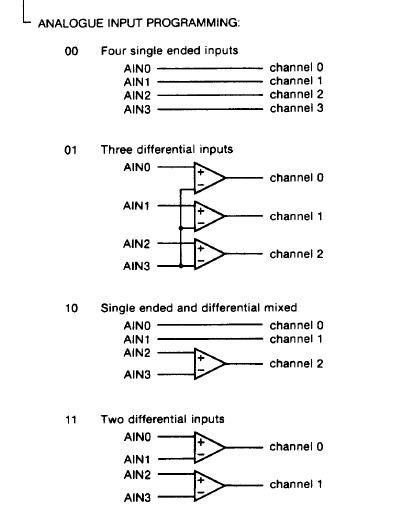
So to set the control byte for two differential inputs, use binary 00110000 or 0x30. Then it’s a simple matter of requesting the bytes of data and working with them. As you can see there’s also combination single/differential and a complex three-differential input. However we’ll leave them for the time being.

Conclusion

Hopefully you found this of interest, whether adding a DAC to your experiments or learning a bit more about ADCs. We’ll have some more analogue to digital articles coming up soon, so stay tuned. And if you enjoy my tutorials, or want to introduce someone else to the interesting world of Arduino – check out my new book “Arduino Workshop” from No Starch Press.

In the meanwhile have fun and keep checking into tronixstuff.com. Why not follow things on twitter, Google+, subscribe  for email updates or RSS using the links on the right-hand column? And join our friendly Google Group – dedicated to the projects and related items on this website. Sign up – it’s free, helpful to each other –  and we can all learn something.

The post Tutorial – Arduino and PCF8591 ADC DAC IC appeared first on tronixstuff.

New freshman design seminar

This week I filed paperwork for yet another new course for bioengineering majors: a freshman design seminar.  The course idea was started by the Biomedical Engineering Society (BMES), a student club at UCSC.  They were seeing a lack of engineering in the first couple of years of the bioengineering major.  The first two years at UCSC usually have 12 technical courses and 6 general-education courses, but the bioengineering major has 16 required lower-division courses, mostly science and math.  That means that most students don’t get any engineering design courses in their first two years.

The BMES officers brought the idea of a lower-division project first to the dean of the School of Engineering, who encouraged them to get it created as a permanent course in the department.  They then brought the idea to David Bernick and me, and we brainstormed how to convert the project idea into a workable course that has no prerequisites.  We decided to go with a 2-unit course (about 60 hours total work) rather than a standard 5-unit course (about 150 hours) or a 7-unit lecture plus lab (about 210 hours), because bioengineering students can’t really afford to delay any of their technical coursework, so the design seminar has to be handled as overload.

We decided on winter quarter to offer the seminar.  Fall quarter was rejected, since students will need to be advised to take it and summer advising sessions do not really provide much opportunity for peer advising by fellow engineering students. Spring quarter was rejected, because I’ll have the circuits course (with 12 hours a week in lab, plus 3.5 hours a week in lecture, plus grading), so won’t have the time to do the freshman seminar as well.  David could probably do it in Spring, but it would be best if there were more than one possible instructor available.  It’s not clear who would teach the course the first year—I would have to take it on as overload if I did it, and money would have to be found to hire David to do it, as the course wasn’t even thought of when the curriculum leave plan was written for the next fiscal year.

The class is limited to freshmen and sophomore bioengineering majors (or premajors), but upper-division bioengineers will be encouraged to volunteer as mentors (and some may be paid as group tutors).

Here is the catalog copy I submitted (limited to 40 words):

A first course in engineering design for bioengineers. In co-operation with the Biomedical Engineering Society (BMES).  Students choose a design project and work on it in competitive and cooperative teams. Covers team building, design, prototyping, and report writing.

And here is the more detailed “supplemental sheet” that has the actual course description:

Undergraduate Supplemental Sheet

Information to accompany Request for Course Approval


Sponsoring Agency: Biomolecular Engineering
Course #: 88A
Catalog Title: BMES freshman design seminar
Please answer all of the following questions using a separate sheet for your response.


1. Are you proposing a revision to an existing course? If so give the name, number, and GE designations (if applicable) currently held.
This is not a revision to any existing course.

2. In concrete, substantive terms explain how the course will proceed. List the major topics to be covered, preferably by week.
This course is a project course for freshmen, done in conjunction with the Biomedical Engineering Society (BMES), a student organization on campus.

  1. The class will choose a project for the quarter, with advice from BMES and the instructor.  Lab and fabrication facilities will be toured.
  2. Instructor and reference librarians will introduce students to finding detailed information in the library and on the web relevant to the course (finding data sheets for parts, finding tutorials on relevant theory, searching for survey articles and application notes, using EndNote or BibTeX to maintain a bibliography, …).  Students will choose topics relevant to the project to research.
  3. Students will present the results of background research and brainstorm approaches to the design problem.  Students will be assigned the task of finding and reading data sheets for components they might need.  Students will write a clear set of design goals for the project.
  4. Teams will be formed to prototype different approaches. Dynamics of team formation and functioning will be discussed.  Procedures will be determined for abandoning unpromising approaches, merging teams, and starting new ones.
  5. Weeks 5–8 will involve prototyping projects, with instruction in prototyping technologies and tools (laser cutter, soldering, drill press, glass bending, … ) as needed.  Written drafts of design reports will be required every 2 weeks—these are cumulative reports, not just what has been done since last time.
  6. Weeks 9 and 10 will involve testing and comparison of the different design approaches and a collaborative final design report from the entire class that includes an analysis of all the different designs—their strengths and their weaknesses.  The final design report will be given as a public oral presentation, as well as in a written report.

3. Systemwide Senate Regulation 760 specifies that 1 academic credit corresponds to 3 hours of work per week for the student in a 10-week quarter. Please briefly explain how the course will lead to sufficient work with reference to e.g., lectures, sections, amount of homework, field trips, etc. [Please note that if significant changes are proposed to the format of the course after its initial approval, you will need to submit new course approval paperwork to answer this question in light of the new course format.]
Students will spend 3.5 hours a week in lab/lecture and about 3–6 hours a week in reading, writing, and group design meetings, depending on level of commitment to the course, making this course 2–3 units of effort.

4. Include a complete reading list or its equivalent in other media.
The students will be reading primarily about the background and components for the particular project they are doing, which will most likely be different each year.  For example, if students do a project on building a device to continuously monitor optical density in a liquid culture, they will be reading about the theory of optical density measurements, how liquid cultures are grown, light sources (LEDs, laser diodes, and incandescent lights), photo detectors (photodiodes, phototransistors, and photoresistors), and whatever other knowledge they need to design and build their prototypes.  Most of this reading will be from the internet and books or journal articles from the library.
Discussions on team formation may be based on a book like Teamwork and Project Management, 3rd edition by Karl A. Smith and P.K. Imbrie, but a shorter, more readable presentation is probably needed.  Short articles like http://www.mindtools.com/pages/article/newLDR_86.htm (“Forming, Storming, Norming, and Performing”) or http://www.clemson.edu/OTEI/documents/teamwork-handbook.pdf‎ (“Successful Strategies for Teams”) may be more appropriate.

5. State the basis on which evaluation of individual students’ achievements in this course will be made by the instructor (e.g., class participation, examinations, papers, projects).
Students will be evaluated primarily on design reports and participation in project design.

6. List other UCSC courses covering similar material, if known.
This course is similar to capstone design courses and senior theses, but on a much smaller scale.  It is intended to be a first introduction to engineering design for bioengineering majors.

7. List expected resource requirements including course support and specialized facilities or equipment for divisional review. (This information must also be reported to the scheduling office each quarter the course is offered.)
Students will need access to a lab where they can use both electronic equipment and standard molecular biology equipment.  Baskin 287 has all the molecular biology equipment, but lacks a multimeter, bench power supply, oscilloscope, function generator, and soldering station.  Several of the electronics labs have the electronics equipment, but lack water, sinks, and biomolecular lab equipment.  A Bunsen burner for shaping glass tubes would be useful for some projects.
Students may also need access to the laser cutter and other fabrication tools in Baskin Engineering 138.

8. If applicable, justify any pre-requisites or enrollment restrictions proposed for this course. For pre-requisites sponsored by other departments/programs, please provide evidence of consultation.
There are no prerequisites for the course, as it is intended as a freshman seminar.  Enrollment is limited to bioengineering majors and pre-majors who are freshman or sophomores, to keep the freshmen from being overwhelmed by upper-division students.  A small number of upper-division students are expected to participate as group tutors.

9. Proposals for new or revised Disciplinary Communication courses will be considered within the context of the approved DC plan for the relevant major(s). If applicable, please complete and submit the new proposal form (http://reg.ucsc.edu/forms/DC_statement_form.doc or http://reg.ucsc.edu/forms/DC_statement_form.pdf) or the revisions to approved plans form (http://reg.ucsc.edu/forms/DC_approval_revision.doc or http://reg.ucsc.edu/forms/DC_approval_revision.pdf).
This course is not expected to contribute to any major’s disciplinary communication requirement, though it will include feedback on writing design reports so that students are better prepared for writing in upper-division technical courses.

10. If you are requesting a GE designation for the proposed course, please justify your request making reference to the attached guidelines.
This course is a group design effort, in which students agree on an overall design project, split into teams to prototype different approaches to the design, and work cooperatively both within the teams and in the class as a whole.  The course matches the Practice: Collaborative Endeavor (PR-E code): “Students learn and practice strategies and techniques for working effectively in pairs or larger groups to produce a finished product. For example, students might learn specialized practical information such as how to use change-management software to monitor and manage changes initiated by multiple group members. Alternatively, they might learn basic information about leadership, teamwork, and group functioning, which they can incorporate into their own group process. What is common to all courses is that some instruction regarding the process of collaboration is provided, in addition to instruction specific to the academic discipline and the products being produced.”

11. If this is a new course and you requesting a new GE, do you think an old GE designation(s) is also appropriate? (CEP would like to maintain as many old GE offerings as is possible for the time being.)
As this is a 2-unit course, the old GE designations, which were reserved for 5-unit courses, are not applicable.

Yesterday (Friday), BMES met with me to discuss whether the course description met their goals and how to get sufficient enrollment in the course. (I’d had to file the paperwork in a hurry, hoping to catch the last Committee on Educational Policy meeting of the year—we may still have missed it, in which case the course won’t be approved until the fall.)  The students who read the course description seemed to think that the course was what they were looking for.  I’m a bit worried about whether it can be kept to the workload of a 2-unit course.

We also talked a bit about possible projects for the first offering.  Two have been discussed so far:

  • A low-cost optical density meter for continuous monitoring of OD 600 (with an LED light source) or OD 650 (with a narrower-spectrum laser-diode light source) of cultures on a shaker table.
  • A pulse oximeter for measuring blood oxygenation.

Both of these projects have minimal analog electronics (basically just an LED or two and a phototransistor, with associated resistors).  The challenging parts are the mechanical design for the density meter (how do the sensor and shaker flask interact?  submersible sensor? culture pumped through a tube? waterproofing? autoclavable?) and the programming for the pulse oximeter (I think that most of the usual analog electronics can and should be replaced by programming, but is the Arduino powerful enough?  do we need a Raspberry Pi instead?).

We’ll be encouraging the members of BMES to come up with other project ideas, so that there can be a different project every year.  Another possibility that was mentioned is to build a thermal cycler for PCR, like the OpenPCR project, but the design work there has already been done, and the parts are more expensive.

The two projects we’ve been thinking of so far use only a few dollars worth of parts and a re-usable $22 Arduino board, so I don’t see any problem in just having students buy the components themselves.  It would be good for them to learn how to find and order parts from companies like DigiKey (though they are an expensive source for 650nm laser diodes: $9 vs. 5 for $10 at other suppliers).

Unless we get some corporate sponsorship, we’ll have to run this design seminar on a shoestring, as the School of Engineering relies on student lab fees for consumable parts, and those fees have to be approved about a year in advance. Anyone know a company interested in making a small donation to support such a freshman design seminar?  (It is not worth my time to go looking for a sponsor, but I’d be glad to put anyone who wants to make a donation in touch with the University Development people working with the School of Engineering.)


Filed under: freshman design seminar Tagged: Arduino, Biomedical Engineering Society (BMES), curriculum design, design project course, engineering education, prototype

New freshman design seminar

This week I filed paperwork for yet another new course for bioengineering majors: a freshman design seminar.  The course idea was started by the Biomedical Engineering Society (BMES), a student club at UCSC.  They were seeing a lack of engineering in the first couple of years of the bioengineering major.  The first two years at UCSC usually have 12 technical courses and 6 general-education courses, but the bioengineering major has 16 required lower-division courses, mostly science and math.  That means that most students don’t get any engineering design courses in their first two years.

The BMES officers brought the idea of a lower-division project first to the dean of the School of Engineering, who encouraged them to get it created as a permanent course in the department.  They then brought the idea to David Bernick and me, and we brainstormed how to convert the project idea into a workable course that has no prerequisites.  We decided to go with a 2-unit course (about 60 hours total work) rather than a standard 5-unit course (about 150 hours) or a 7-unit lecture plus lab (about 210 hours), because bioengineering students can’t really afford to delay any of their technical coursework, so the design seminar has to be handled as overload.

We decided on winter quarter to offer the seminar.  Fall quarter was rejected, since students will need to be advised to take it and summer advising sessions do not really provide much opportunity for peer advising by fellow engineering students. Spring quarter was rejected, because I’ll have the circuits course (with 12 hours a week in lab, plus 3.5 hours a week in lecture, plus grading), so won’t have the time to do the freshman seminar as well.  David could probably do it in Spring, but it would be best if there were more than one possible instructor available.  It’s not clear who would teach the course the first year—I would have to take it on as overload if I did it, and money would have to be found to hire David to do it, as the course wasn’t even thought of when the curriculum leave plan was written for the next fiscal year.

The class is limited to freshmen and sophomore bioengineering majors (or premajors), but upper-division bioengineers will be encouraged to volunteer as mentors (and some may be paid as group tutors).

Here is the catalog copy I submitted (limited to 40 words):

A first course in engineering design for bioengineers. In co-operation with the Biomedical Engineering Society (BMES).  Students choose a design project and work on it in competitive and cooperative teams. Covers team building, design, prototyping, and report writing.

And here is the more detailed “supplemental sheet” that has the actual course description:

Undergraduate Supplemental Sheet

Information to accompany Request for Course Approval


Sponsoring Agency: Biomolecular Engineering
Course #: 88A
Catalog Title: BMES freshman design seminar
Please answer all of the following questions using a separate sheet for your response.


1. Are you proposing a revision to an existing course? If so give the name, number, and GE designations (if applicable) currently held.
This is not a revision to any existing course.

2. In concrete, substantive terms explain how the course will proceed. List the major topics to be covered, preferably by week.
This course is a project course for freshmen, done in conjunction with the Biomedical Engineering Society (BMES), a student organization on campus.

  1. The class will choose a project for the quarter, with advice from BMES and the instructor.  Lab and fabrication facilities will be toured.
  2. Instructor and reference librarians will introduce students to finding detailed information in the library and on the web relevant to the course (finding data sheets for parts, finding tutorials on relevant theory, searching for survey articles and application notes, using EndNote or BibTeX to maintain a bibliography, …).  Students will choose topics relevant to the project to research.
  3. Students will present the results of background research and brainstorm approaches to the design problem.  Students will be assigned the task of finding and reading data sheets for components they might need.  Students will write a clear set of design goals for the project.
  4. Teams will be formed to prototype different approaches. Dynamics of team formation and functioning will be discussed.  Procedures will be determined for abandoning unpromising approaches, merging teams, and starting new ones.
  5. Weeks 5–8 will involve prototyping projects, with instruction in prototyping technologies and tools (laser cutter, soldering, drill press, glass bending, … ) as needed.  Written drafts of design reports will be required every 2 weeks—these are cumulative reports, not just what has been done since last time.
  6. Weeks 9 and 10 will involve testing and comparison of the different design approaches and a collaborative final design report from the entire class that includes an analysis of all the different designs—their strengths and their weaknesses.  The final design report will be given as a public oral presentation, as well as in a written report.

3. Systemwide Senate Regulation 760 specifies that 1 academic credit corresponds to 3 hours of work per week for the student in a 10-week quarter. Please briefly explain how the course will lead to sufficient work with reference to e.g., lectures, sections, amount of homework, field trips, etc. [Please note that if significant changes are proposed to the format of the course after its initial approval, you will need to submit new course approval paperwork to answer this question in light of the new course format.]
Students will spend 3.5 hours a week in lab/lecture and about 3–6 hours a week in reading, writing, and group design meetings, depending on level of commitment to the course, making this course 2–3 units of effort.

4. Include a complete reading list or its equivalent in other media.
The students will be reading primarily about the background and components for the particular project they are doing, which will most likely be different each year.  For example, if students do a project on building a device to continuously monitor optical density in a liquid culture, they will be reading about the theory of optical density measurements, how liquid cultures are grown, light sources (LEDs, laser diodes, and incandescent lights), photo detectors (photodiodes, phototransistors, and photoresistors), and whatever other knowledge they need to design and build their prototypes.  Most of this reading will be from the internet and books or journal articles from the library.
Discussions on team formation may be based on a book like Teamwork and Project Management, 3rd edition by Karl A. Smith and P.K. Imbrie, but a shorter, more readable presentation is probably needed.  Short articles like http://www.mindtools.com/pages/article/newLDR_86.htm (“Forming, Storming, Norming, and Performing”) or http://www.clemson.edu/OTEI/documents/teamwork-handbook.pdf‎ (“Successful Strategies for Teams”) may be more appropriate.

5. State the basis on which evaluation of individual students’ achievements in this course will be made by the instructor (e.g., class participation, examinations, papers, projects).
Students will be evaluated primarily on design reports and participation in project design.

6. List other UCSC courses covering similar material, if known.
This course is similar to capstone design courses and senior theses, but on a much smaller scale.  It is intended to be a first introduction to engineering design for bioengineering majors.

7. List expected resource requirements including course support and specialized facilities or equipment for divisional review. (This information must also be reported to the scheduling office each quarter the course is offered.)
Students will need access to a lab where they can use both electronic equipment and standard molecular biology equipment.  Baskin 287 has all the molecular biology equipment, but lacks a multimeter, bench power supply, oscilloscope, function generator, and soldering station.  Several of the electronics labs have the electronics equipment, but lack water, sinks, and biomolecular lab equipment.  A Bunsen burner for shaping glass tubes would be useful for some projects.
Students may also need access to the laser cutter and other fabrication tools in Baskin Engineering 138.

8. If applicable, justify any pre-requisites or enrollment restrictions proposed for this course. For pre-requisites sponsored by other departments/programs, please provide evidence of consultation.
There are no prerequisites for the course, as it is intended as a freshman seminar.  Enrollment is limited to bioengineering majors and pre-majors who are freshman or sophomores, to keep the freshmen from being overwhelmed by upper-division students.  A small number of upper-division students are expected to participate as group tutors.

9. Proposals for new or revised Disciplinary Communication courses will be considered within the context of the approved DC plan for the relevant major(s). If applicable, please complete and submit the new proposal form (http://reg.ucsc.edu/forms/DC_statement_form.doc or http://reg.ucsc.edu/forms/DC_statement_form.pdf) or the revisions to approved plans form (http://reg.ucsc.edu/forms/DC_approval_revision.doc or http://reg.ucsc.edu/forms/DC_approval_revision.pdf).
This course is not expected to contribute to any major’s disciplinary communication requirement, though it will include feedback on writing design reports so that students are better prepared for writing in upper-division technical courses.

10. If you are requesting a GE designation for the proposed course, please justify your request making reference to the attached guidelines.
This course is a group design effort, in which students agree on an overall design project, split into teams to prototype different approaches to the design, and work cooperatively both within the teams and in the class as a whole.  The course matches the Practice: Collaborative Endeavor (PR-E code): “Students learn and practice strategies and techniques for working effectively in pairs or larger groups to produce a finished product. For example, students might learn specialized practical information such as how to use change-management software to monitor and manage changes initiated by multiple group members. Alternatively, they might learn basic information about leadership, teamwork, and group functioning, which they can incorporate into their own group process. What is common to all courses is that some instruction regarding the process of collaboration is provided, in addition to instruction specific to the academic discipline and the products being produced.”

11. If this is a new course and you requesting a new GE, do you think an old GE designation(s) is also appropriate? (CEP would like to maintain as many old GE offerings as is possible for the time being.)
As this is a 2-unit course, the old GE designations, which were reserved for 5-unit courses, are not applicable.

Yesterday (Friday), BMES met with me to discuss whether the course description met their goals and how to get sufficient enrollment in the course. (I’d had to file the paperwork in a hurry, hoping to catch the last Committee on Educational Policy meeting of the year—we may still have missed it, in which case the course won’t be approved until the fall.)  The students who read the course description seemed to think that the course was what they were looking for.  I’m a bit worried about whether it can be kept to the workload of a 2-unit course.

We also talked a bit about possible projects for the first offering.  Two have been discussed so far:

  • A low-cost optical density meter for continuous monitoring of OD 600 (with an LED light source) or OD 650 (with a narrower-spectrum laser-diode light source) of cultures on a shaker table.
  • A pulse oximeter for measuring blood oxygenation.

Both of these projects have minimal analog electronics (basically just an LED or two and a phototransistor, with associated resistors).  The challenging parts are the mechanical design for the density meter (how do the sensor and shaker flask interact?  submersible sensor? culture pumped through a tube? waterproofing? autoclavable?) and the programming for the pulse oximeter (I think that most of the usual analog electronics can and should be replaced by programming, but is the Arduino powerful enough?  do we need a Raspberry Pi instead?).

We’ll be encouraging the members of BMES to come up with other project ideas, so that there can be a different project every year.  Another possibility that was mentioned is to build a thermal cycler for PCR, like the OpenPCR project, but the design work there has already been done, and the parts are more expensive.

The two projects we’ve been thinking of so far use only a few dollars worth of parts and a re-usable $22 Arduino board, so I don’t see any problem in just having students buy the components themselves.  It would be good for them to learn how to find and order parts from companies like DigiKey (though they are an expensive source for 650nm laser diodes: $9 vs. 5 for $10 at other suppliers).

Unless we get some corporate sponsorship, we’ll have to run this design seminar on a shoestring, as the School of Engineering relies on student lab fees for consumable parts, and those fees have to be approved about a year in advance. Anyone know a company interested in making a small donation to support such a freshman design seminar?  (It is not worth my time to go looking for a sponsor, but I’d be glad to put anyone who wants to make a donation in touch with the University Development people working with the School of Engineering.)


Filed under: freshman design seminar Tagged: Arduino, Biomedical Engineering Society (BMES), curriculum design, design project course, engineering education

Arduino data logger at Global Physics Department

My son presented the Arduino Data Logger he wrote for my circuits class to the Global Physics Department on 2013 May 15.  The sessions are recorded, and the recording is available on the web (though you have to run Blackboard Collaborate through Java Web Start to play the recording).

I thought he did a pretty good job of presenting the features of the data logger.

Now that school is beginning to wind down, he’s started looking at making modifications to the data logger code again, and has updated it at https://bitbucket.org/abe_k/arduino-data-logger/

He’s down to only three classes now (US History, Physics, and Dinosaur Prom Improv), though he still has homework to catch up on in Dramatic Literature and his English class.  He’s still TAing for the Python class also.

On Thursday and Friday this week, he’ll be taking the AP Computer Science test and the AP Physics C: Electricity and Magnetism test.  He’s having to take both tests in the “make-up” time slot, because we couldn’t get any local high school to agree to proctor the tests for him during the regular testing time.  Eventually his consultant teacher convinced the AP coordinator to let her proctor the tests, but by then it was too late to register for anything but the makeup tests. We’re way behind schedule on the physics class, so he’s just going to read the rest of the physics book without working any problems before Friday’s exam—we’ll finish the book in a more leisurely fashion after the exam. He won’t be as prepared for the physics exam as I had hoped, but at least the CS exam looks pretty easy to him.

One thing I didn’t realize is that schools can charge homeschoolers whatever the market will bear for proctoring the tests:

  • Depending on the reasons for late testing, schools may be charged an additional fee ($40 per exam), part or all of which the school may ask students to pay. Students eligible for the College Board fee reduction will not be charged the $40-per-exam late-testing fee, regardless of their reason for testing late.
  • Schools administering exams to homeschooled students or students from other schools may negotiate a higher fee to recover the additional proctoring and administration costs.

[ http://professionals.collegeboard.com/testing/ap/about/fees ]

We’re paying $145 per exam (not just the $89 standard fee and the $40 late fee), but I’m glad he gets to take the exams at all this year.

Tomorrow he and I are doing another campus tour—this time at Stanford. He managed to get an appointment with a faculty member, but we noticed that the faculty member is scheduled to be teaching a class at the time of the appointment—I wonder what is going to happen with that. I’ll report on the visit later this week.


Filed under: Data acquisition Tagged: Advanced Placement exams, Arduino, data logger, Global Physics Department, physics

Arduino data logger at Global Physics Department

My son presented the Arduino Data Logger he wrote for my circuits class to the Global Physics Department on 2013 May 15.  The sessions are recorded, and the recording is available on the web (though you have to run Blackboard Collaborate through Java Web Start to play the recording).

I thought he did a pretty good job of presenting the features of the data logger.

Now that school is beginning to wind down, he’s started looking at making modifications to the data logger code again, and has updated it at https://bitbucket.org/abe_k/arduino-data-logger/

He’s down to only three classes now (US History, Physics, and Dinosaur Prom Improv), though he still has homework to catch up on in Dramatic Literature and his English class.  He’s still TAing for the Python class also.

On Thursday and Friday this week, he’ll be taking the AP Computer Science test and the AP Physics C: Electricity and Magnetism test.  He’s having to take both tests in the “make-up” time slot, because we couldn’t get any local high school to agree to proctor the tests for him during the regular testing time.  Eventually his consultant teacher convinced the AP coordinator to let her proctor the tests, but by then it was too late to register for anything but the makeup tests. We’re way behind schedule on the physics class, so he’s just going to read the rest of the physics book without working any problems before Friday’s exam—we’ll finish the book in a more leisurely fashion after the exam. He won’t be as prepared for the physics exam as I had hoped, but at least the CS exam looks pretty easy to him.

One thing I didn’t realize is that schools can charge homeschoolers whatever the market will bear for proctoring the tests:

  • Depending on the reasons for late testing, schools may be charged an additional fee ($40 per exam), part or all of which the school may ask students to pay. Students eligible for the College Board fee reduction will not be charged the $40-per-exam late-testing fee, regardless of their reason for testing late.
  • Schools administering exams to homeschooled students or students from other schools may negotiate a higher fee to recover the additional proctoring and administration costs.

[ http://professionals.collegeboard.com/testing/ap/about/fees ]

We’re paying $145 per exam (not just the $89 standard fee and the $40 late fee), but I’m glad he gets to take the exams at all this year.

Tomorrow he and I are doing another campus tour—this time at Stanford. He managed to get an appointment with a faculty member, but we noticed that the faculty member is scheduled to be teaching a class at the time of the appointment—I wonder what is going to happen with that. I’ll report on the visit later this week.


Filed under: Data acquisition Tagged: Advanced Placement exams, Arduino, data logger, Global Physics Department, physics

Olympia Circuits shows Arduino datalogger and Arno Add-Ons at Maker Faire 2013

Olympia Circuits is best known for its Arno board and Arno Shield, which are designed to ease the Arduino learning curve by providing a bevy of pre-wired sensors and controls along with detailed instructions for several DIY projects. The company announced a couple of new products at Maker Faire this past weekend: the Arno Digital RGB Add-On and the SODA HE-1.0 Arduino datalogger. With the former, your Arno simply gains three RGB LEDs, while the latter stands for "Simple, Open Data Acquisition, High Efficiency." It's an Arduino board with screw terminals designed around Atmel's ATmega32u4 that features a real-time clock (RTC) with battery backup, a high-precision ADC and a microSD card slot. The RTC can either wake the entire board or trigger an interrupt at set intervals, which makes the board very power efficient when used in the field. Olympia Circuits will be updating its website with more info shortly (including availability and pricing). Until then, don't miss our hands-on gallery below.

Filed under: Misc

Comments

Source: Olympia Circuts

Arduino Yun weds Arduino, WiFi and Linux at Maker Faire 2013

The Arduino Robot wasn't the only interesting product the Italian company launched at Maker Faire this past weekend. Arduino Yún combines a Leonardo board (featuring Atmel's ATmega32u4) with a MIPS-based WiFi SoC (Atheros AR9331) running Limino (an OpenWRT / Linux derivative). It includes everything you'd expect from a Leonardo board plus WiFi, wired Ethernet, a USB host port and a microSD card slot. The Arduino side can be programmed wirelessly and communicates with the WiFi SoC via SPI and UART interfaces using the new Bridge Library, which delegates networking to the Linux side. Out of the box, the board behaves just like any standard WiFi access point with a full web interface -- it even allows SSH access. Arduino Yún is the first of a family of WiFI-enabled products and will be available late June for $69. Check out the gallery below for some closeup shots, and follow the source for more details.

Filed under: Misc, Wireless

Comments

Source: Arduino blog

Insert Coin: Linkbot modular robotic platform lets you quickly build a bot, skills

In Insert Coin, we look at an exciting new tech project that requires funding before it can hit production. If you'd like to pitch a project, please send us a tip with "Insert Coin" as the subject line.

Everybody loves robots, but the initial ardor for building one can quickly be snuffed out by the complex reality of actually programming it to do anything. That's where Linkbot comes in, a new project from the Barobo team that brought us the Mobot. It's designed as a modular system that can be expanded infinitely with accessories like a camera mount, gripper, and wheels, thanks to three separate mounting surfaces -- which also have standard #6-32 screw attachment holes on the mounting plate to attach personality-enhancing cutouts. Despite the expansion potential, though, it can still be used right out of the box to do robotics without touching a lick of code. That's thanks to several built-in modes like BumpConnect, which permits wireless connections between the modules by touching them together; and PoseTeach, to program complex motions by hand in a similar (but less time-consuming) manner to stop-motion animation techniques.

For those who want to step it up a notch, the system lets you go far past basic mech fun. The Linkbot itself has two rotating hubs with absolute encoding, along with an accelerometer, buzzer, multicolored LCD and ZigBee wireless system with a 100m line-of-sight range. There are also optional breakout and Bluetooth boards to connect sensors like range finders, IR proximity sensors, photo detectors and thermostats. The outfit's BaroboLink software for Mac, PC or Linux is included to program the Arduino-compatible bot in several languages as well, and can even translate previously created PoseTeach motions into computer routines. So far, the company has created working prototypes and even shipped them to local schools, so if you're interested, you can pledge a minimum $129 toward the company's $40,000 target to grab one. That'll net you a Linkbot, two wheels, the BaroboLink software, access to the MyBarobo community -- and hopefully a jolt to your robotics confidence.

Filed under: Robots

Comments

Source: Kickstarter

Arduino Robot launches at Maker Faire, we go hands-on (video)

There's a new kid on the Arduino block, and it's called the Arduino Robot. Launched yesterday at Maker Faire Bay Area, it's the company's first product that extends beyond single microcontroller boards. The Roomba-like design, which we first saw in November 2011, is the result of a collaboration with Complubot. It consists of two circular boards, each equipped with Atmel's ubiquitous ATmega32u4 and connected via ribbon cable.

The bottom board is home to four AA batteries (NiMH), a pair of motors and wheels, a power connector and switch plus some infrared sensors. By default it's programmed to drive the motors and manage power. The top board features a color LCD, a microSD card slot, an EEPROM, a speaker, a compass, a knob plus some buttons and LEDs. It's programmed to control the display and handle I/O. Everything fits inside a space that's about 10cm high and 19cm in diameter.

Pre-soldered connectors and prototyping areas on each board make it easier to customize the robot platform with additional sensors and electronics. It even comes with eleven step-by-step projects and a helpful GUI right out of the box. The Arduino Robot is now on sale at the Maker Faire for $275 and will be available online in July. Take a look at our gallery below and watch our video interview with Arduino founder Massimo Banzi after the break.

Filed under: Misc, Robots

Comments

Via: Make

Source: Arduino

Google I/O attendees will see their every move recorded in real time

During Google I/O this week, visitors to the Moscone Center will have their every movement tracked, but it's not as creepy as it sounds. Google's Cloud Platform Developer Relations team is spearheading a project called the Data Sensing Lab, which utilizes a network of Arduino sensors to collect ambient data and translate it into easily understood visualizations. Fluctuations in temperature, air quality and humidity will be recorded along with noise levels and foot traffic to provide a real-time breakdown of activity within the Moscone Center. The information from the Data Sensing Lab will then be displayed on a number of screens scattered around the conference floor.

The Data Sensing Lab is the next step in Google's quest to master environmental data collection after absorbing the team behind Behavio last month. Developer Programs Engineer Michael Manoochehri admits that the plan is "kind of futuristic, and maybe a little crazy," but emphasizes the practical uses for real-time environmental analytics. For example, information about air quality fluctuations can be monitored to adjust a room's temperature and footstep counters can provide valuable insight into which areas are most popular. In the spirit of open innovation, Google promises to make the Cloud Platform code, the Arduino sensor designs and the collected data available online after the conference. Big Brother might be watching, but at least we'll be able to watch right along with him.

Filed under: Misc, Google

Comments

Via: TechCrunch

Source: Google