Posts with «arduino» label

Teach kids how colors are made with the color machine
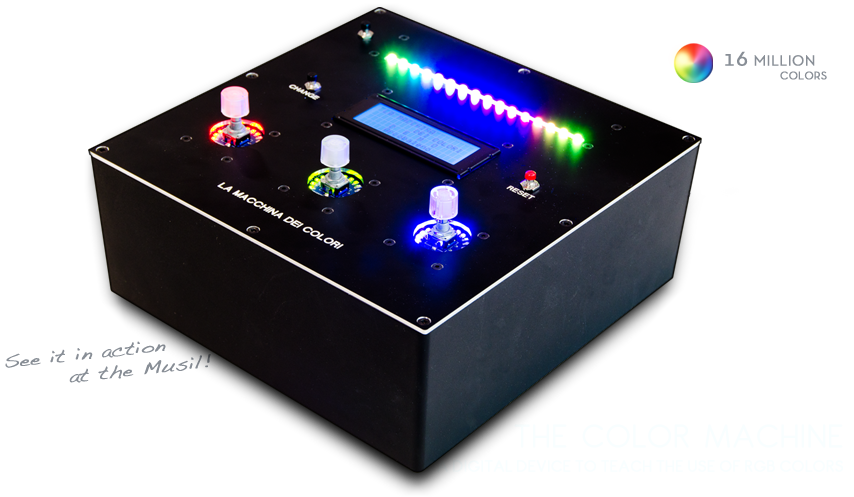
The Color Machine (La macchina dei colori, in Italian language) is a tool to teach children about the use and the operation of RGB color coding, which is used in all digital devices (TVs, smartphones, computers, etc.). It was created with Arduino Mega by an italian duo composed by Fabio Ghidini and Stefano Guerrini:

Using 3 knobs you can increase the percentages of red, green and blue separately, and the LED strip at the top of the machine lights up consistently with the color mix choosen.

The Color Machine has 4 different operating modes: “let’s create colors”, “guess the color”, “the names of the colors” and “demo”. Under the guidance of a teacher, children can play and learn at the same time to recreate colors with additive synthesis. This device is currently used in the educational workshops of Musil – Museum of Industry and Labour of Rodengo Saiano (Italy).


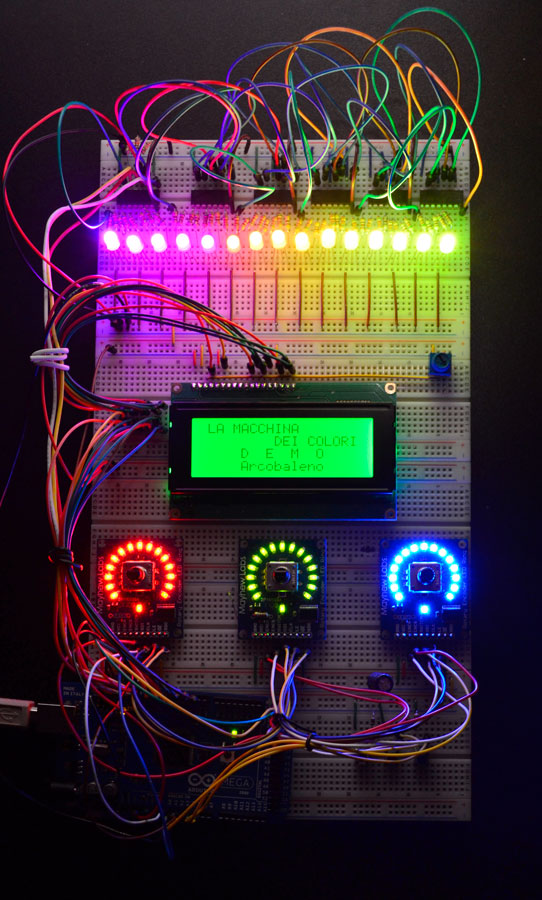
This is the first propotype:
Arduino Blog 09 Apr 11:05

How to monitor a domestic photovoltaic plant with Arduino


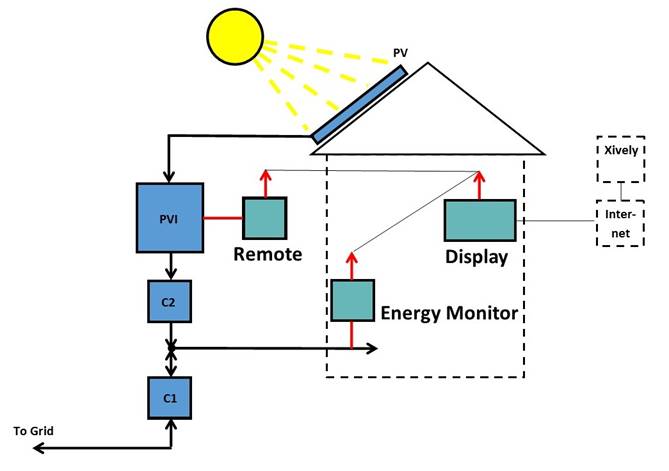
ArdaSol is the name of a project for a solar energy monitoring system based on Arduino Mega and UNO, made by Heinz Pieren. It’s a system built to monitor energy production and consumption of a domestic photovoltaic plant:

The ArdaSol Energy Monitoring System has 3 devices:

- ArdaSol Display based on a Arduino Mega Board
The master of the system, it collects the data from the two other ArdaSol devices, shows the data on the display, stores it on a SD card and sends it to a server in the internet.

- ArdaSol Energy Monitor based on a Arduino Uno
Measures the consumption of the energy, shows energy values on local display and delivers it on request to the ArdaSol Display.

- ArdaSol Remote PVI Interface based on a Arduino Uno
The photovoltaic inverter (PVI) has a RS485 interface, this is connected to ArdaSol Remote, which interacts as a gateway to ArdaSol Display. It converts the requests, coming with a radio signal to the PVI and vice versa.


Swimming Mermaid LED Tail #arduinomicromonday

Glimmer the Mermaid is an incredible project by Erin St. Blaine:  it uses about 180 Adafruit Neopixels, an Arduino Micro to control them and silicone. To change  animations and brightness she added a bluetooth module to connect it to an Android tablet:

If you want to discover the details of the project or watch it in a live show, check her website!


Arduino Blog 07 Apr 22:02

Makers in Space: What Was Old Is New Again

Setting the record straight on the history of Do-It-Yourself satellites.

Read more on MAKE

Building an Arduino out of Paper

Following in the footsteps of the original Paperduino—and the Paperduino Leonardo—comes the Paperduino Tiny.

Read more on MAKE

Arduino Uno Controlling a Lego Mindstorms Elevator

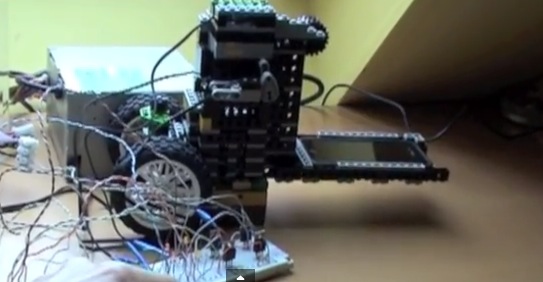
NooTrix submitted us a 4-part tutorial to build a Lego Mindstorm Elevator controlled by an Arduino Uno:

 The elevator is built using components from an old Lego Mindstorms RCX 1.5. For the control part, we use an Arduino Uno board instead of the obsolete Lego RCX brick. The motor and sensors are from Lego. The connection to motor is done using a set of transistors organized in a H-Bridge.

The goal of the project is to show how to control Lego parts (motor, sensors, …) using an Arduino:

the elevator carries a smartphone and keep it level which is useful for taking snapshots of documents instead of scanning them. Full description, a step by step tutorial, as well as pictures, videos are available online.

All circuit schematics and source code are released under a free open source license (creative commons).

Arduino Blog 03 Apr 16:39
arduino  diy  elevator  lego  mindstorm  

Intel Galileo Live Show-and-Tell Tonight!

Tonight at at 9pm ET / 6pm PT, we’re wrapping up Getting Started with Intel Galileo Maker Sessions with a “show-and-tell” Hangout On Air.

Read more on MAKE

Smart Smoker, the Better Barbecue

Simple modifications that make a better barbeque

Read more on MAKE

Controlling a Raspberry Pi / Arduino Bot from the Internet Part 2 of 3

This is part two of a three part Series to explain how I control my BotTwo semi-Autonomous Robot from a webpage on the Internet. 

read more

Controlling a Raspberry Pi / Arduino Bot from the Internet Part 2 of 3

This is part two of a three part Series to explain how I control my BotTwo semi-Autonomous Robot from a webpage on the Internet. 

read more