With parts from a bathroom organizer and arcade buttons, Alex “GlacialGeyser” made his own MIDI machine.
MIDI controllers can be great instruments to supplement your musical skills. As seen in the video below, Alex’s project is no exception, and he’s able to produce some really beautiful music using it and a keyboard. Physically, he created this out of plastic parts from a bathroom organizer and a cutting board that he cut using mostly handheld power tools. An Arduino Mega serves as the brains of the operation along with two 75mm 10k faders, two 10k knobs, pitch bend and modulation wheels, and a couple of LEDs.
The build is finished off with a splattered paint effect and nearly a whole can of clear coat. Programming the device was a challenge, but it seems Alex gained some useful knowledge for next time!
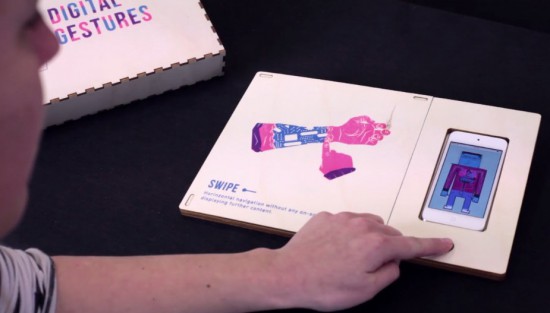
Digital and craft maker lab Tazas recently worked with a group of master students on an interactive book/prototype to reflect on how gestures like swiping have become as natural as shaking hands. Digital Gestures is a metaphor of the human body’s physiological senses, which identifies 10 actions inherent to our daily interactions with technology: drag and drop, spread and squeeze, swipe, double tap, scroll, zoom, rotate, draw, press, press and hold.
The project was brought to life using four basic electronic components and some digital fabrication: a web server (VPS), an AtHeart Blend Micro Bluetooth module linking objects to the elements contained on the server, an iPod Touch connected viewing medium and conductive ink. All the elements are arranged on a laser cut wooden base, while an iPod digitally decrypts the printed* pages filed on its left.
To play, the viewer places an illustrated page on the support and touches a specific key point beforehand determined as conductive. When touching, the viewer has the ability to interact on the screen in order to understand the illustrated use. This experimental reflection raises many questions about the conditioning that man receives from the machine by accepting these precepts without altering their function. What will become of our so-called ‘daily’ gestures? Will our close to real behavioral experiment be upset? Answers that require that ‘use must be done.’
[Jason] learned a lot by successfully automating this meat smoker. This is just the first step in [Jason’s] smoker project. He decided to begin by hacking a cheaper charcoal-fed unit first, before setting his sights on building his own automatic pellet-fed smoker. With a charcoal smoker it’s all about managing the airflow to that hot bed of coals.
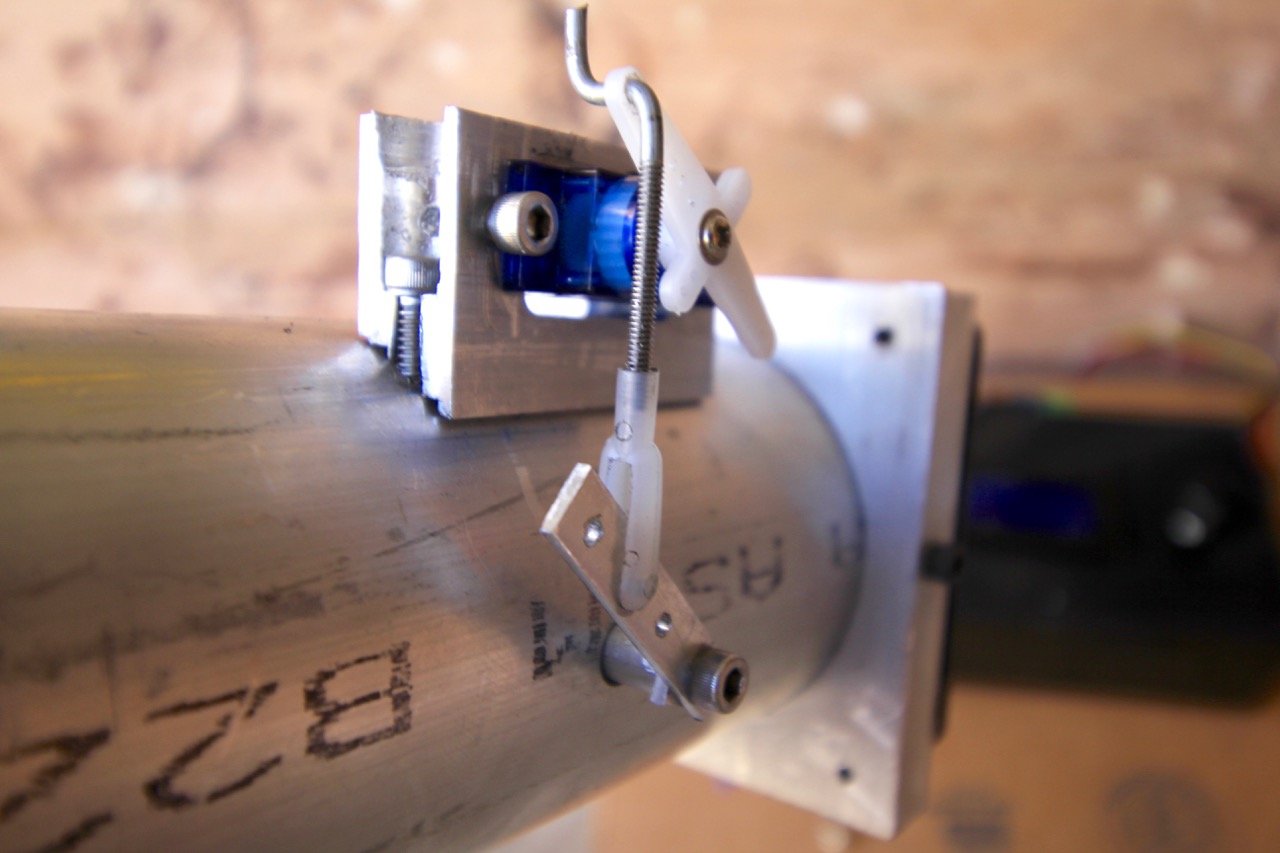
Custom mount for servo was actually one of the more challenging things to get just right.
[Jason] started by making sure the bottom was sealed off from stray airflow, then he cut a hole into the charcoal pan and attached a length of steel pipe. The opposite end of the pipe has a fan. Inside the pipe there is a baffle separating the fan from the charcoal pan. The servo motor shown here controls that valve.
The pipe is how air is introduced into the smoker, with the fan and valve to control the flow rate. The more air, the higher the temperature. The hunk of pipe was left uncut and works fine but is much longer than needed; [Jason says] the pipe is perfectly cool to the touch only a foot and a half away from the smoker.
With the actuators in place he needed a feedback loop. A thermocouple installed into the lid of the smoker is monitored by an Arduino running a PID control loop. This predicts the temperature change and adjusts the baffle and fan to avoid overshooting the target temp. The last piece of hardware is a temperature probe inside the meat itself. With the regulation of the smoker’s temperature taken care of and the meat’s internal temperature being monitored, the learning (and cooking) process is well underway.
There are many, many smoker automation projects out there. Some smokers are home-made electric ones using flower pots, and some focus more on modifying off the shelf units. In a way, every PID controlled smoker is the same, yet they end up with different problems to solve during their creation. There is no better way to learn PID than putting it into practice, and this way to you get a tasty treat for your efforts.
GeekCon participants add a switch and actuator to a HAL 9000 model for the world’s largest “leave-me-alone box.”
You’ve probably seen the silly boxes that when you flip a switch to turn it “on,” an arm comes out to turn itself “off” again. At this year’s GeekCon Makers conference, participants decided to make a useless machine, but in place of a simple box, they made a model of the HAL 9000 computer from 2001: A Space Odyssey.
Rather than the normal “useless” configuration, it turns itself “on” instead of “off” in an apparent nod to the fact that the computer didn’t want to be disconnected in the movie. One Arduino controls a projector for the “eye” assembly, while another takes care of the servos and audio. HAL’s sounds are stored on an SD card inside an Adafruit Music Shield.
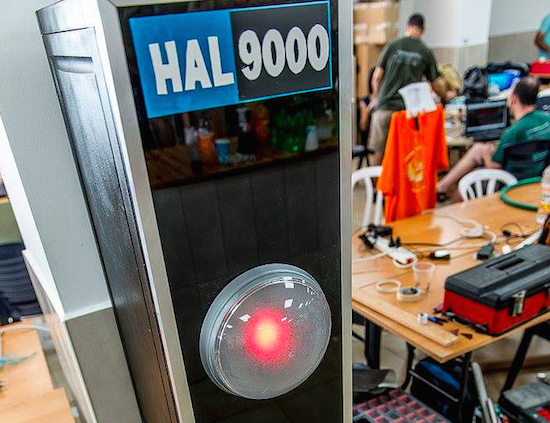
Behind the eye, made out of round lamp and a red plastic diffuser, there is a projector. The projector is connected to Arduino TVout which only outputs a white filled circle that also changes its diameter based on microphone input. Having the circle moving according to the sounds gives HAL’s eye more realistic look.
The second Arduino was in charge of servos and audio. We divided the tasks to two Arduino Uno to avoid collisions in PINs requirements.
[Eric Dirgahayu] wanted to explore underwater with some sensors and cameras. First, he needed a platform to carry them. That led to his Arduino-controlled swimming fish. The fish is made from PVC and some waterproof servos. From the video (see below) it isn’t clear how much control the fish has, but it does swim with an undulating motion like a real fish.
The included software allows for infrared control (so clean water is a must) and there is a ballast tank for buoyancy. The site has several videos and tabs that show different aspects of the project. We found the site a little difficult to navigate, so to help you out, you can go straight to the interesting bits of the construction. Here’s the electronics, too.
If you need a home for your robot fish, we’ve seen plenty of high-tech tanks. If you prefer your submersibles a little more futuristic, you can always try Star Trek.
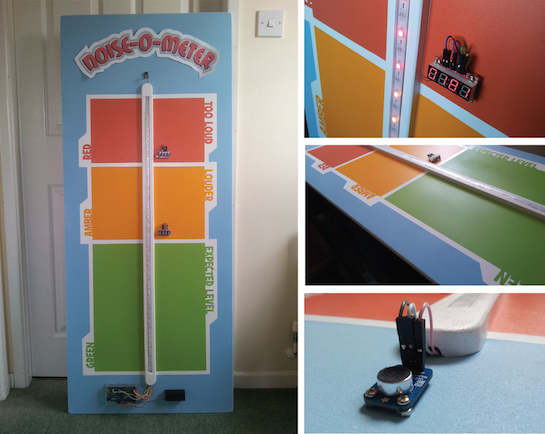
With his beautifully-colored classroom “noise-o-meter,” Mr. Jones knows when things are getting out of hand.
When you were in school (or if you are in school) the teacher likely told the class to be quiet, perhaps repeating him or herself over an over during the day. The teacher, however, likely never really defined what is good and bad. Mr. Jones has finally solved this issue by creating a classroom “noise-o-meter” using an Arduino, an electret microphone, and a programmable LED strip. In order (apparently) too keep the class in line, noise is simply marked as green for “expected,” amber for “louder,” and “red” for too loud which corresponds nicely with more “traditional” VU meters.
I built this a short while ago as an idea to use in a primary classroom setting. Poster displays are often used by primary teachers wanting to control the noise levels in their classrooms but I wanted to add technology to make it dynamic and responsive. The motivation for this came after seeing the Adafruit Digital NeoPixel LED Strip online and realizing its potential as part of a VU meter.
In a time when we’re inundated with talk of an impending AI apocalypse it’s nice to see an AI that’s intentionally useless. That AI is HAL 9000. No, not the conflicted HAL from the movie 2001: A Space Odyssey but the World’s Biggest AI Useless Machine HAL built by [Rafael], [Mickey] and [Eyal] for GeekCon 2016 in Israel.
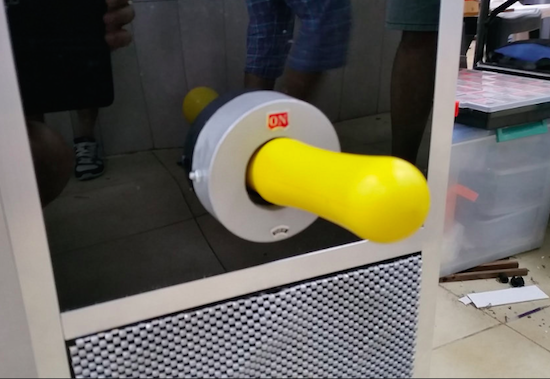
Standing tall, shiny and black, the box it’s housed in reminds us a bit of the monolith from the movie. But, in a watchful position near the top is HAL’s red eye. As we approach, HAL’s voice from the movie speaks to us asking “Just what do you think you’re doing, Dave?” as the eye changes diameter in keeping with the speech’s amplitude. And at the bottom is a bright, yellow lever marked ON, which of course we just have to turn off. When we do, a panel opens up below it and a rod extends upward to turn the lever back to the ON position.
Behind the scenes are two Arduinos. One Arduino manages servos for the panel and rod as well as playing random clips of HAL from the movie. The other Arduino uses the Arduino TVout library to output to a projector that sits behind the red diffuser that is the eye. That Arduino also takes input from a microphone and based on the amplitude, has the projector project a white circle of corresponding diameter, making the eye’s appearance change. You can see all this in action in the video after the break.
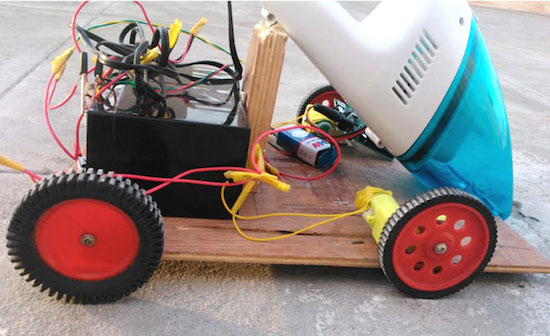
This dust buster-based robotic vacuum may or may not work as well as a Roomba.
If you’re fascinated by the idea of a robotic vaccum cleaner to keep you from having to do certain chores, you could buy an iRobot, or you could make your own instead. This particular DIY model uses four motors for locomotion, an Arduino Uno, an IR and ultrasonic sensors to avoid obstacles, as well as a (formerly) handheld vacuum cleaner to suck up debris.
The assembly sits on a wooden chassis, and as author B. Aswinth Raj is quick to point out, many variations on this robot could be made. Code is included and fairly short, so whether you’d like to copy this design or improve upon it, the bot should certainly give you some build ideas!
In this project we will use the power of embedded systems and electronics to make our own robot which could help us in keeping our home or work place neat and tidy. This robot is simple four wheeled vacuum cleaner which could smartly avoid obstacles and vacuum the floor at the same time. The idea is inspired by the famous vacuum cleaner iRobot Roomba…
You can find more detailed instructions, along with its code and a circuit diagram, on this CircuitDigest page.
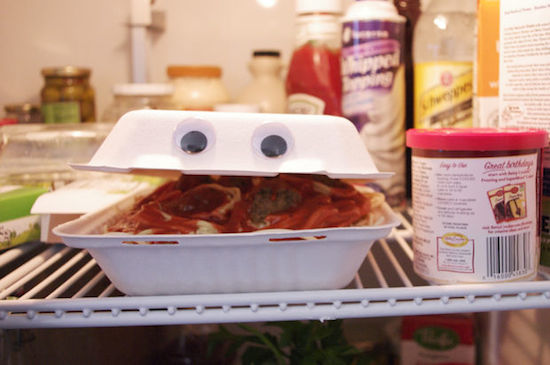
An Arduino plus fake food and audio capabilities equals something truly unique!
Randy “randofo” Sarafan had an idea when he was in college: a takeout container that talked. To the world’s great benefit, now that he knows about electronics, he finally made this dream a reality. Using an Arduino Mega with a Seed Studio Music Shield, he was able to coordinate the movements of a servo and thus the lid of a box with the audio coming out of a speaker. After attaching googly, or “googily” eyes, and modifying a fake serving of spaghetti, he had something that should be quite entertaining!
This idea came about after having taken a special effects film class when I was in college. While in the class, I made a short film of myself talking to a takout container with a face drawn on it. However, not having the know-how to do anything with electronics, the initial version was being controlled by a friend pulling upon and releasing a thin fishing line. While I do not doubt that my friend was skilled at controlling the lid in this manner, I couldn’t help but thinking that it would be great if I could automate the whole thing — at the very least — less embarrasing.


 Paint a fun and funky MIDI input device for making music on a pizza box.